Home Blog Page 4

ChatGPT How-To Guide 2026: Practical Workflows for Research, Writing, and Automation

ChatGPT how to questions have changed. In 2026, the most useful answer is not a list of clever prompts. Professionals want repeatable workflows that help them research faster, write clearly, analyze information, and automate routine work without losing accuracy or judgment.

The guide also works for managers who are standardizing AI use across a team. Use the sections below to turn individual experimentation into shared habits, repeatable reviews, and safer handoffs between people and tools.

Use one workflow at a time, save what works, and refine it with real examples from your own documents, meetings, and customer questions. Small improvements compound quickly when the whole team follows the same pattern.

Start With the Workflow, Not the Prompt

Many users open ChatGPT and ask one broad question. That can work for brainstorming, but it often produces generic output. A better method is to define the workflow first: input, role, constraints, output format, review step, and next action. This turns a vague request into a repeatable process.

For example, instead of asking “write a report,” give ChatGPT the audience, source notes, decision to support, length, tone, required sections, and quality checks. The same structure works for marketing drafts, meeting summaries, spreadsheet formulas, and research briefs.

The Five-Part Prompt Framework

1. Context

Tell ChatGPT what situation it is helping with. Include the audience, goal, source material, and business constraint. Context prevents the model from guessing the wrong purpose.

2. Task

State the exact action: summarize, compare, draft, rewrite, classify, extract, generate options, or build a checklist. One clear task is better than five mixed tasks.

3. Rules

Add boundaries such as “do not invent sources,” “ask if information is missing,” “use plain English,” or “preserve technical terms.” Rules improve reliability when they are specific.

4. Format

Specify whether you want bullets, a table, JSON, an email, a step-by-step plan, or a short executive summary. Format instructions save editing time.

5. Review

Ask ChatGPT to list assumptions, weak points, missing data, or verification steps. This is the difference between passive output and useful collaboration.

ChatGPT workflow checklist for prompt inputs review steps and automation handoff
A reliable ChatGPT workflow includes inputs, constraints, output format, review, and handoff.

Workflow 1: Research Briefs

Use ChatGPT to organize research, not to replace verification. Start by collecting trusted notes, links, transcripts, or excerpts. Then ask ChatGPT to group themes, identify contradictions, create a comparison table, and list claims that need confirmation.

A strong research prompt might say: “Using only the notes below, create a one-page research brief for a product manager. Include key findings, open questions, risks, and a source-to-claim table. Do not add facts that are not in the notes.” This keeps the model grounded.

If you are comparing AI products, pair this workflow with a tool-selection process like Five Best AI Tools You Might Not Have Heard Of: Practical Alternatives Beyond ChatGPT. ChatGPT can summarize options, but your team should still verify pricing, privacy terms, integrations, and support quality.

Workflow 2: Better Business Writing

ChatGPT is excellent for moving from rough notes to a first draft. The best results come when you provide the message goal, target reader, tone, must-include points, and what to avoid. Ask for two versions: a concise version and a warmer version. Then edit the best parts yourself.

For important writing, add a review prompt: “Check this draft for unsupported claims, vague wording, hidden assumptions, and sentences that may confuse a non-technical reader.” This turns ChatGPT into an editor rather than just a writer.

Workflow 3: Spreadsheets and Data Cleanup

ChatGPT can explain formulas, generate spreadsheet functions, clean messy text, and suggest pivot-table structures. Provide column names, sample rows, the tool you use, and the expected output. Never paste sensitive customer data into an unapproved AI tool.

For spreadsheet-heavy teams, our article on Best AI Tools Guide 2026: How to Choose the Right AI Apps Beyond ChatGPT shows why AI is becoming part of daily analysis. The safest pattern is to use sample data for formula design, then apply the formula inside your protected spreadsheet.

Workflow 4: Meeting Notes and Action Items

After a meeting, paste approved notes or a transcript and ask ChatGPT to produce decisions, action items, owners, deadlines, unresolved questions, and follow-up messages. Ask it to separate facts from inferred tasks. This helps teams avoid vague summaries that sound useful but do not drive action.

A good review step is: “Highlight any action item that does not have an owner or deadline.” That small instruction improves accountability immediately.

Workflow 5: Customer Support Drafts

Support teams can use ChatGPT to draft responses, rewrite technical explanations, and create troubleshooting steps. The workflow must include guardrails: use only approved knowledge-base content, avoid promises, respect refund and privacy policies, and require human review before sending sensitive replies.

Ask ChatGPT to produce both the customer-facing answer and an internal note explaining which policy or help article it used. That makes the draft easier for an agent to verify.

Workflow 6: Light Automation

ChatGPT can help design automations before you build them. Describe the trigger, inputs, conditions, tools, failure cases, and desired output. Ask for a step-by-step workflow and a test checklist. This is useful for email routing, content calendars, reporting, ticket triage, and repetitive admin tasks.

Do not let automation skip approval for high-impact actions. If an automation sends customer messages, changes records, publishes content, or touches money, add a human checkpoint.

Quality Checks Before You Trust the Output

  • Verify factual claims with primary sources.
  • Check dates, prices, product names, and links.
  • Remove confidential information from prompts unless the tool is approved for it.
  • Review tone and brand fit before publishing.
  • Ask ChatGPT to list assumptions and missing information.
  • Use human approval for legal, medical, financial, security, or employment content.

Team Prompt Library

Teams get better results when they share proven prompts. Create a small prompt library with templates for research briefs, email rewrites, meeting summaries, support drafts, spreadsheet formulas, and project plans. Each template should include instructions, sample inputs, expected output, and review steps.

Keep the library short. Ten reliable prompts that employees actually use are better than one hundred clever prompts nobody trusts. Update templates when tools change or when reviewers notice recurring mistakes.

A useful library also records when a prompt should not be used. Mark templates that are only for public information, templates that require approved internal tools, and templates that need manager review before output is shared. This helps new employees understand the boundary between productive AI assistance and risky copy-and-paste behavior.

Advanced Tips for Reliable Results

Ask ChatGPT to work in stages when the task is important. First, request a plan. Second, approve or correct the plan. Third, ask for the draft. Fourth, ask for a critique. This staged method reduces surprises because you can catch misunderstandings before the model writes a long response.

Use examples whenever quality matters. One sample email, report section, support answer, or spreadsheet row can guide style better than a paragraph of abstract instructions. If the output must follow a standard, paste the standard and ask ChatGPT to check against it.

Finally, keep humans responsible for judgment. ChatGPT can accelerate research, writing, and automation design, but it should not become the final authority for facts, policies, or customer-impacting decisions. Treat it as a fast assistant whose work becomes valuable after review.

Common Mistakes

The first mistake is asking ChatGPT to do too much at once. Split complex work into steps. The second mistake is accepting polished output without checking it. The third is using personal accounts for company data. The fourth is failing to save good workflows so every employee starts from scratch.

Another mistake is treating ChatGPT as separate from existing tools. The best workflows connect it to documents, spreadsheets, calendars, project boards, and review processes. For broader tool comparisons, see ChatGPT for Excel and Google Sheets: How Spreadsheets Became Everyday AI Workspaces.

FAQ

What is the best way to learn ChatGPT?

Learn by building workflows around real tasks: summarize notes, draft emails, compare options, explain formulas, and create checklists. Review every output and improve the prompt.

Can ChatGPT automate my work?

It can help design and draft automations, but high-impact actions should include human approval. Use it first for planning, documentation, and low-risk handoffs.

How do I make ChatGPT more accurate?

Provide better context, source material, constraints, and review instructions. Ask it to identify assumptions and verify important claims externally.

Should businesses create prompt rules?

Yes. Simple rules around data privacy, approved tools, review steps, and output quality make ChatGPT safer and more useful for teams.

Conclusion

A practical ChatGPT how to strategy is about repeatable workflows. Start with context, define the task, set rules, choose the format, and add a review step. Use ChatGPT for research organization, writing, spreadsheets, meeting notes, support drafts, and automation planning. Then verify important output before it reaches customers or business systems.

When teams treat ChatGPT as a structured assistant instead of a shortcut, they get faster work, clearer thinking, and fewer mistakes. That is the real productivity advantage in 2026.

Related update: How to Get ChatGPT to Write in Your Preferred Style.

Practical Chatgpt How-To Practical Workflows Workflow for Readers

This update expands the article with a practical, reader-first workflow designed for people who use ChatGPT and AI tools in real projects rather than only reading a high-level overview. Before you copy a prompt or install another extension, define the task, the expected output, the audience, the data you can safely provide, and the human review step that will catch mistakes. That simple preparation makes chatgpt how-to guide 2026: practical workflows for research, writing, and automation more useful because it turns AI from a random answer generator into a repeatable assistant that supports writing, research, planning, coding, support, and productivity work.

Start with a short project brief. Write one sentence for the goal, one sentence for the context, three bullet points for constraints, and one example of the format you want. Then ask ChatGPT to produce a first draft, critique the draft, and revise it against your constraints. This three-step loop is more reliable than a single long prompt because it separates generation from quality control. If the output will be published, sent to a customer, or used for business decisions, add a final manual verification step for facts, dates, names, prices, and claims.

Step-by-step implementation checklist

  • Clarify the use case: decide whether the AI should summarize, compare, draft, brainstorm, analyze, rewrite, classify, or create a plan.
  • Provide trusted context: paste only the minimum safe information needed. Remove private data, credentials, unpublished customer details, and confidential business records.
  • Ask for structure: request headings, tables, examples, assumptions, risks, and next actions so the answer is easier to audit.
  • Force verification: ask the model to mark uncertain claims, list missing information, and separate facts from recommendations.
  • Review like an editor: check accuracy, originality, tone, formatting, and whether the answer actually solves the reader’s problem.
  • Save reusable prompts: when a prompt works, store it with notes about the task, input format, output format, and review criteria.

Example prompt you can adapt

Use this structure as a safe starting point: “Act as an AI productivity editor. My goal is [describe goal]. The audience is [describe audience]. Use the following context: [paste non-sensitive context]. Create a practical answer with steps, examples, common mistakes, and a short FAQ. If any claim is uncertain, label it as uncertain and tell me how to verify it.” This prompt works well because it tells the model what role to play, what outcome matters, what context to use, and how to handle uncertainty.

Common mistakes to avoid

The most common mistake is treating every AI answer as final. ChatGPT can be persuasive even when it is incomplete, outdated, or too generic. Another mistake is using one prompt for every task. A prompt for a product comparison should not look like a prompt for a legal-style policy summary or a coding bug report. Finally, avoid publishing AI text without adding your own judgment, examples, screenshots, workflow notes, or local context. Readers and search engines both reward pages that demonstrate experience and usefulness.

Internal resources for deeper learning

FAQ: ChatGPT How-To Guide 2026: Practical Workflows for Research, Writing, and Automation

Is this workflow suitable for beginners?

Yes. Beginners should start with a narrow task, provide clear context, and review the result carefully. The goal is not to automate judgment, but to make the first draft, comparison, or checklist faster and easier to improve.

Can I use the same process for business content?

You can, but business content needs stricter review. Verify facts, remove confidential information, adapt the tone to your brand, and make sure the final version includes examples or insights that come from real experience.

How do I know if the AI answer is good enough?

A good answer is specific, structured, accurate, and actionable. It should explain assumptions, mention risks, include concrete steps, and help the reader make a decision or complete a task without needing to search again immediately.

Should I trust sources generated by ChatGPT?

No source should be trusted blindly. If the answer includes citations, open the sources yourself, confirm they exist, check the publication date, and compare important claims with official documentation or reputable expert references.

Related update: How to Use ChatGPT for Email Writing and Replies.

Related update: ChatGPT for Work: Simple Ways to Save Time Every Week.

Related update: How to Turn ChatGPT Into a Personal Writing Assistant.

Related update: A Practical Guide to Using ChatGPT for Research.

Related update: How to Ask ChatGPT Better Questions.

Generative AI Governance in 2026: Practical Rules for Safer Business AI Use

Generative AI governance is no longer a policy document that sits in a shared folder. In 2026, it is an operating system for how teams use ChatGPT, copilots, image models, meeting assistants, AI search, coding agents, and workflow automation without creating avoidable legal, privacy, security, or quality risks.

The business case is clear: generative AI can speed up research, drafting, analysis, customer support, marketing, development, and internal operations. The governance case is just as clear: every useful AI workflow touches data, decisions, brand voice, users, employees, vendors, or regulated processes. A company that adopts AI without rules may move fast for a few weeks, then lose time repairing leaks, errors, duplicated tools, and unclear accountability.

This guide gives practical rules for safer business AI use. It is written for founders, managers, marketers, operations teams, IT leaders, and anyone responsible for making AI useful without letting it become chaotic.

What Generative AI Governance Means

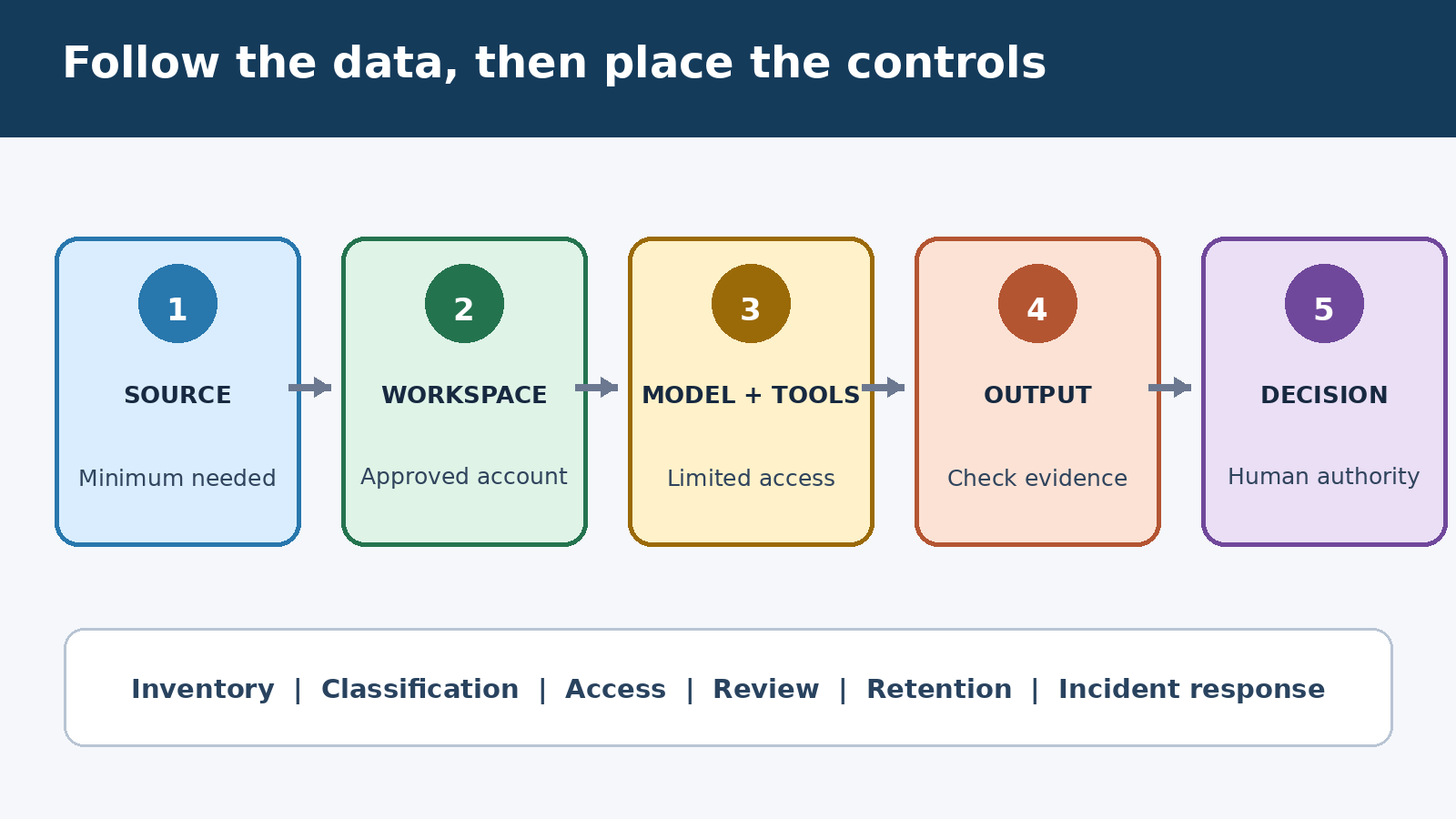
Generative AI governance is the set of policies, roles, controls, reviews, and measurements that guide how an organization uses AI systems. It answers simple questions: which tools are approved, what data can be used, who checks important outputs, when human approval is required, how incidents are reported, and how results are measured.

Good governance should not feel like a ban. The goal is to make responsible AI adoption easier. When employees know which tools are allowed and which workflows are safe, they spend less time guessing and more time building useful habits. The best governance programs are short, practical, and connected to daily work.

Rule 1: Create an Approved AI Tool List

Start with visibility. Many companies discover that employees are already using several AI apps: general chatbots, browser extensions, meeting note takers, slide generators, coding assistants, and research tools. Some are harmless experiments. Others may process customer data, internal documents, source code, contracts, or financial details.

Create an approved tool list with three categories: approved for general use, approved with restrictions, and not approved for company data. Include the tool name, owner, business purpose, allowed data types, login method, payment owner, and review date. This simple inventory reduces shadow AI and gives teams a safe default.

Rule 2: Classify Data Before It Enters AI

Most AI risk begins with data. A prompt can include customer names, employee records, private strategy, unreleased product plans, API keys, confidential contracts, or regulated information. Employees may not think of a prompt as a data transfer, but in practice it often is.

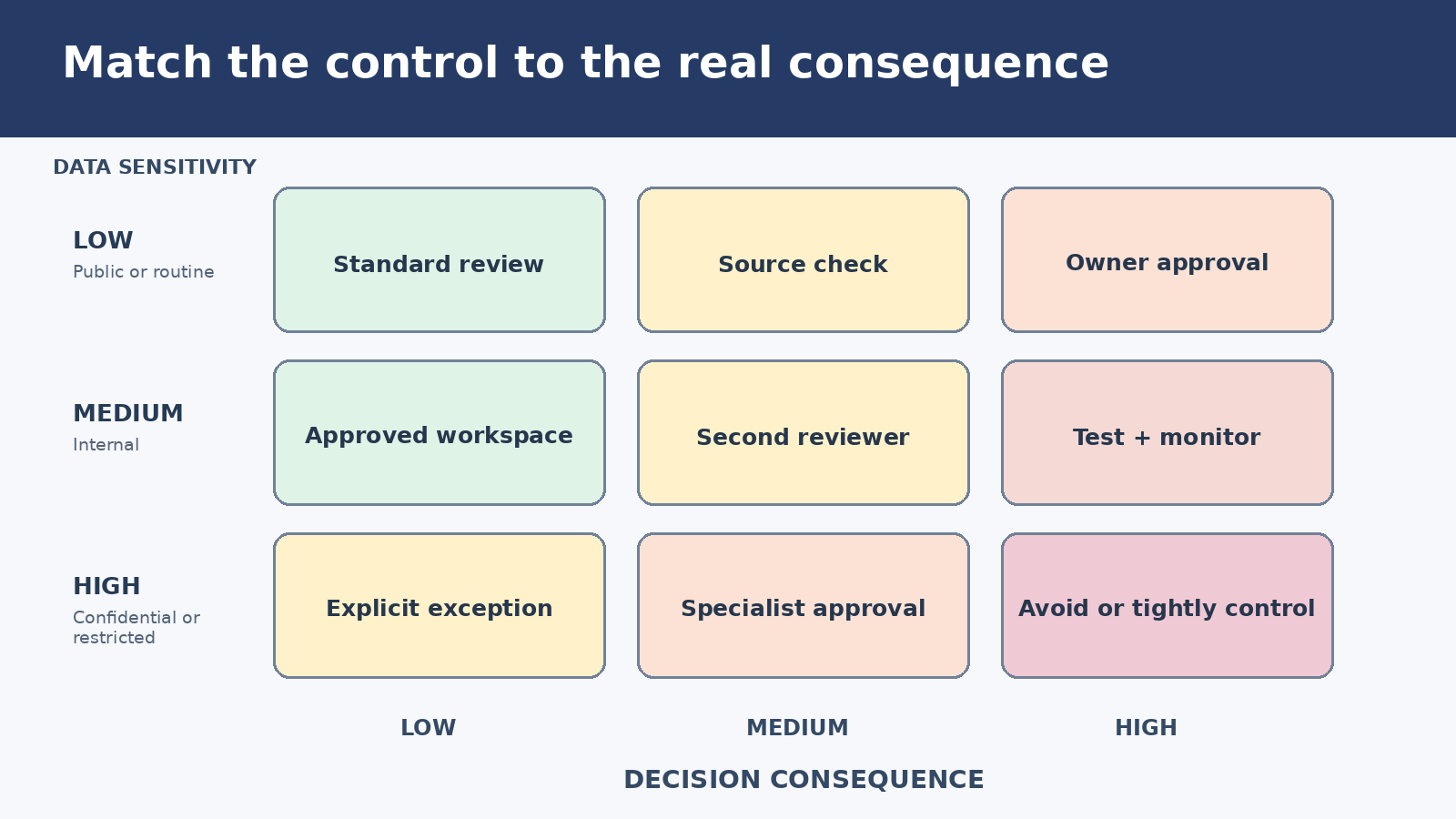
Use four clear data levels: public, internal, confidential, and restricted. Public content can usually be used in approved tools. Internal content may be allowed when business terms and privacy settings are acceptable. Confidential and restricted data should require stronger controls, such as enterprise accounts, contractual protections, access limits, or human approval. Never rely on employees to interpret a long legal policy in the middle of a deadline.

Rule 3: Define Human Review Requirements

Generative AI can draft, summarize, translate, code, classify, and recommend, but it should not silently own high-impact decisions. Define when human review is mandatory. Examples include legal language, financial advice, hiring decisions, healthcare content, customer-impacting messages, security changes, public announcements, code merges, and anything that affects rights, pricing, access, or safety.

The practical test is simple: if a wrong output could harm a customer, employee, user, partner, or business relationship, a qualified human must review it before action. For lower-risk work, such as brainstorming blog angles or rewriting a non-sensitive paragraph, lighter review is enough.

Rule 4: Separate Drafting From Decision-Making

A useful governance pattern is to let AI assist with preparation while keeping final decisions with people. AI can draft a support response, summarize a contract, compare vendor options, or propose a project plan. A person should decide what is sent, signed, purchased, changed, or published.

This separation keeps AI useful without pretending it has accountability. It also gives teams a healthy workflow: ask AI for options, ask it to list assumptions, ask it to identify risks, then make the decision with context and judgment.

Rule 5: Keep Prompts and Outputs Auditable

If AI becomes part of business operations, organizations need a record of important usage. That does not mean saving every casual brainstorm forever. It means logging enough context for higher-risk workflows: the tool used, user, date, source data, prompt summary, output, reviewer, and final action.

Auditability helps when something goes wrong. If a customer receives inaccurate information or a generated report includes unsupported claims, the team can trace the workflow and improve it. It also helps managers identify which AI use cases deliver value and which only create noise.

Generative AI governance framework for safer business AI use
A practical governance framework links approved tools, data rules, review gates, logging, and training.

Rule 6: Train Employees With Real Scenarios

Training should be practical, not abstract. Instead of a long slide deck about responsible AI, give employees examples from their own work. Show a safe prompt and an unsafe prompt. Show how to remove personal data. Show how to verify sources. Show where to report a risky output. Show which tool to use for each task.

Teams should learn prompt hygiene, data handling, hallucination checks, copyright awareness, bias review, and privacy basics. For managers, training should also cover how to evaluate AI-assisted work without assuming every polished answer is correct. For more context on adoption patterns, see Five Best AI Tools You Might Not Have Heard Of: Practical Alternatives Beyond ChatGPT.

Rule 7: Require Source Checks for Factual Claims

AI-generated text can sound confident even when it is wrong. Governance must require source checks for factual claims, statistics, product comparisons, legal summaries, medical information, financial guidance, and technical instructions. A useful rule is: no source, no claim.

For public content, ask the reviewer to open the source, confirm the date, check the original context, and remove claims that cannot be verified. For internal analysis, separate facts from assumptions. AI can accelerate research, but it should not replace evidence.

Rule 8: Control AI Use in Customer-Facing Workflows

Customer support, sales, onboarding, and marketing are popular AI use cases because they involve repeatable communication. They also carry brand and trust risks. A chatbot that invents a refund policy, a sales email that overpromises, or a generated knowledge-base article with outdated steps can create real damage.

Customer-facing AI should use approved content sources, clear escalation rules, tone guidelines, and human review for sensitive topics. If customers interact directly with an AI system, disclose it where appropriate and provide a path to a human. A safer customer workflow starts narrow, measures errors, and expands only after the team understands the failure modes.

Rule 9: Protect Code, Credentials, and Internal Systems

Developers and technical teams should treat AI tools as part of the software supply chain. Do not paste secrets, private keys, production logs with tokens, or proprietary code into unapproved tools. Coding assistants should be reviewed through normal security practices: branch protection, code review, dependency scanning, secret scanning, tests, and least-privilege access.

AI agents that can call tools or APIs need extra care. Give them scoped permissions, monitor their actions, and require approval before they change production systems. If your team is comparing broader AI tools, our guide on Best AI Tools Guide 2026: How to Choose the Right AI Apps Beyond ChatGPT explains why workflow fit matters as much as model capability.

Rule 10: Measure Value, Not Just Usage

Governance should support business value. Track which AI workflows save time, improve quality, reduce backlog, or create measurable outcomes. Do not celebrate usage alone. A team can generate thousands of words and still create more review work than value.

Useful metrics include hours saved, error rates, review time, customer satisfaction, content performance, cycle time, tool cost, incident count, and employee adoption. Review tools quarterly. Remove apps that duplicate features, violate policy, or fail to produce value.

A Simple 30-Day Governance Plan

  • Week 1: inventory current AI tools, owners, payment accounts, and common use cases.
  • Week 2: define approved tools, data rules, and workflows that require human review.
  • Week 3: train employees with real examples and publish a short internal AI policy.
  • Week 4: add audit logs for higher-risk workflows, measure usage, and create an incident process.

This plan is intentionally simple. A small business does not need a heavy committee to begin. It needs visible tools, clear data boundaries, review gates, and a way to learn from mistakes.

Common Mistakes to Avoid

The first mistake is writing a policy that nobody reads. Keep the rules short and searchable. The second mistake is approving tools without checking privacy, retention, training, and admin settings. The third mistake is treating AI outputs as final work because they look polished. The fourth mistake is letting every department buy separate tools without coordination.

The fifth mistake is ignoring change management. People need examples, templates, and permission to ask questions. If governance feels like surveillance or punishment, employees may hide AI use. If it feels like a practical safety system, adoption becomes easier.

FAQ

What is generative AI governance?

Generative AI governance is the practical system of rules, roles, approvals, data controls, training, and audits that guide how a business uses AI tools safely and effectively.

Does every business need an AI policy?

Yes. Even a small business should have a short AI policy that explains approved tools, prohibited data, review requirements, and who to contact when a risky AI use case appears.

What data should not be entered into public AI tools?

Avoid entering passwords, API keys, private customer data, employee records, unreleased strategy, confidential contracts, source code, regulated information, and anything the company is not allowed to share externally.

How can teams use ChatGPT safely at work?

Use approved accounts, remove sensitive data from prompts, verify factual claims, review important outputs, document high-risk workflows, and keep humans responsible for final decisions.

Conclusion

Generative AI governance in 2026 is about making AI useful, trusted, and repeatable. The safest companies will not be the ones that ban every new tool. They will be the ones that know which tools are used, what data is allowed, who reviews important outputs, how incidents are handled, and which workflows create measurable value. Start with simple rules, teach them through real examples, and improve them as AI becomes part of everyday business work.

Practical Generative Governance Practical Rules Workflow for Readers

This update expands the article with a practical, reader-first workflow designed for people who use ChatGPT and AI tools in real projects rather than only reading a high-level overview. Before you copy a prompt or install another extension, define the task, the expected output, the audience, the data you can safely provide, and the human review step that will catch mistakes. That simple preparation makes generative ai governance in 2026: practical rules for safer business ai use more useful because it turns AI from a random answer generator into a repeatable assistant that supports writing, research, planning, coding, support, and productivity work.

Start with a short project brief. Write one sentence for the goal, one sentence for the context, three bullet points for constraints, and one example of the format you want. Then ask ChatGPT to produce a first draft, critique the draft, and revise it against your constraints. This three-step loop is more reliable than a single long prompt because it separates generation from quality control. If the output will be published, sent to a customer, or used for business decisions, add a final manual verification step for facts, dates, names, prices, and claims.

Step-by-step implementation checklist

  • Clarify the use case: decide whether the AI should summarize, compare, draft, brainstorm, analyze, rewrite, classify, or create a plan.
  • Provide trusted context: paste only the minimum safe information needed. Remove private data, credentials, unpublished customer details, and confidential business records.
  • Ask for structure: request headings, tables, examples, assumptions, risks, and next actions so the answer is easier to audit.
  • Force verification: ask the model to mark uncertain claims, list missing information, and separate facts from recommendations.
  • Review like an editor: check accuracy, originality, tone, formatting, and whether the answer actually solves the reader’s problem.
  • Save reusable prompts: when a prompt works, store it with notes about the task, input format, output format, and review criteria.

Example prompt you can adapt

Use this structure as a safe starting point: “Act as an AI productivity editor. My goal is [describe goal]. The audience is [describe audience]. Use the following context: [paste non-sensitive context]. Create a practical answer with steps, examples, common mistakes, and a short FAQ. If any claim is uncertain, label it as uncertain and tell me how to verify it.” This prompt works well because it tells the model what role to play, what outcome matters, what context to use, and how to handle uncertainty.

Common mistakes to avoid

The most common mistake is treating every AI answer as final. ChatGPT can be persuasive even when it is incomplete, outdated, or too generic. Another mistake is using one prompt for every task. A prompt for a product comparison should not look like a prompt for a legal-style policy summary or a coding bug report. Finally, avoid publishing AI text without adding your own judgment, examples, screenshots, workflow notes, or local context. Readers and search engines both reward pages that demonstrate experience and usefulness.

Internal resources for deeper learning

FAQ: Generative AI Governance in 2026: Practical Rules for Safer Business AI Use

Is this workflow suitable for beginners?

Yes. Beginners should start with a narrow task, provide clear context, and review the result carefully. The goal is not to automate judgment, but to make the first draft, comparison, or checklist faster and easier to improve.

Can I use the same process for business content?

You can, but business content needs stricter review. Verify facts, remove confidential information, adapt the tone to your brand, and make sure the final version includes examples or insights that come from real experience.

How do I know if the AI answer is good enough?

A good answer is specific, structured, accurate, and actionable. It should explain assumptions, mention risks, include concrete steps, and help the reader make a decision or complete a task without needing to search again immediately.

Should I trust sources generated by ChatGPT?

No source should be trusted blindly. If the answer includes citations, open the sources yourself, confirm they exist, check the publication date, and compare important claims with official documentation or reputable expert references.

Five Best AI Tools You Might Not Have Heard Of: Practical Alternatives Beyond ChatGPT

0

Five Best AI Tools You Might Not Have Heard Of: Practical Alternatives Beyond ChatGPT

Five best AI tools you might not have heard of is a more useful search than another list of the obvious names. ChatGPT, Gemini, Claude, and Copilot are powerful general assistants, but many daily problems are solved better by focused tools that live closer to the work: concentration, presentations, research capture, family planning, and personal knowledge management.

This guide looks at five practical alternatives beyond ChatGPT: Brain.FM, Beautiful.ai, Recall, Maple, and Mem. The goal is not to replace ChatGPT. The goal is to know when a specialist AI app can remove steps, reduce friction, and make a narrow workflow easier than a blank chat box.

Why Look Beyond ChatGPT?

General AI assistants are excellent for drafting, brainstorming, explaining, translating, coding help, summarizing, and turning rough notes into structure. But a general assistant still requires you to bring the task, context, files, and destination. If the work happens in slides, meetings, web research, household calendars, or long-term notes, a purpose-built AI tool can feel faster because the workflow is already built in.

A useful way to choose is to ask: does this app remove a repeated step that ChatGPT does not remove by itself? If yes, it may deserve a trial. If no, it is probably just another subscription with a different interface. For a broader comparison, see our recent guide: Best AI Tools Guide 2026: How to Choose the Right AI Apps Beyond ChatGPT.

1. Brain.FM for Focus and Deep Work

Brain.FM is an AI-assisted focus music platform designed for work, relaxation, meditation, and sleep. Instead of asking a chatbot to write something, you use Brain.FM to shape the environment around the work. That makes it different from most AI productivity apps: it is not creating text or images, but helping you stay in the state where high-quality work is possible.

The best use case is deep work. Writers, students, programmers, analysts, and anyone who struggles with noisy environments can test it during a real work block. Start a 25- or 50-minute session, choose a focus mode, and measure whether you stayed on task longer than usual. The output is not a document; the output is fewer distractions.

Brain.FM is worth trying if your main productivity problem is attention, not ideas. ChatGPT can help you plan the work, but it cannot make your room quieter or keep you in a rhythm. A focused audio tool may be more valuable than another writing assistant if distraction is the bottleneck.

2. Beautiful.ai for Presentations

Beautiful.ai focuses on slide creation. This matters because slide decks are not only writing tasks; they are layout, hierarchy, charts, icons, spacing, and visual consistency. ChatGPT can draft the outline and speaker notes, but a presentation tool can help turn those ideas into polished slides faster.

The strongest use case is a recurring business deck: weekly updates, sales presentations, investor summaries, training material, or educational explainers. If you already know your message but lose time formatting slides, Beautiful.ai can reduce design friction. Templates and automated layout decisions help users avoid messy spacing and inconsistent visual structure.

The right workflow is simple: use ChatGPT to clarify the story, then use Beautiful.ai to build the deck. Do not expect the tool to replace strategic thinking. It is best when you already know the audience, the main claim, and the evidence. It is weaker if you need deep research or original analysis before building slides.

3. Recall for Capturing and Summarizing Research

Recall is built for saving and summarizing online material such as articles, videos, PDFs, and other web content. This is useful because research overload is a real problem. People save tabs, bookmark links, copy quotes into documents, and still forget why each source mattered. A capture-first AI tool can organize the research trail before it becomes chaos.

Use Recall when you repeatedly collect information from the web. For example, a marketer tracking competitor posts, a student reviewing sources, a founder researching vendors, or a creator gathering examples can benefit from one-click capture and summaries. The advantage is not only summarization; it is having saved research that remains searchable later.

One caution: summaries are starting points, not final evidence. Always open the original source before quoting statistics, prices, legal claims, medical information, or product promises. AI summaries are helpful for triage, but important claims still need human verification. That rule applies to every AI research workflow.

Decision matrix for five lesser-known AI tools beyond ChatGPT
A practical decision matrix for choosing specialized AI tools beyond a general chatbot.

4. Maple for Family Planning and Household Workflows

Maple is a family-oriented assistant for meal planning, chores, calendars, lists, and household coordination. That makes it a useful reminder that AI productivity is not only for office work. Families also manage recurring logistics: groceries, appointments, school tasks, travel, meals, budgets, and shared responsibilities.

ChatGPT can generate a meal plan or chore chart, but a household assistant can keep the workflow closer to the people who need it. The benefit comes from shared planning, mobile access, lists, routines, and calendar context. If your family already uses a shared calendar and notes app, Maple is worth testing only if it makes coordination easier than your current setup.

The best trial is one real week. Use it for dinners, grocery planning, chores, and one family event. At the end of the week, ask whether it reduced reminders, duplicate messages, and last-minute decisions. If not, keep your existing tools and use ChatGPT only for occasional planning prompts.

5. Mem for Personal Knowledge Management

Mem is a note-taking and personal knowledge tool with AI features for searching, connecting, and drafting from stored notes. This category is important because many people do not need more generated content; they need better access to what they already know. Notes, meeting takeaways, ideas, documents, and email fragments become valuable only when they can be retrieved at the right moment.

A personal knowledge tool is most useful for people who write, research, manage projects, or work across many topics. Instead of asking ChatGPT a generic question, you can ask your own knowledge base about your saved context. That can produce more relevant answers, especially when your notes include decisions, preferences, project history, or source material.

The risk is capture without review. If you save everything but never clean, tag, or revisit anything, the system becomes another archive. Test Mem with a narrow use case first: client notes, article ideas, learning notes, or project decisions. If AI search helps you find useful context faster, it may earn a place in your stack.

How These Tools Compare

  • Brain.FM: best for attention, focus sessions, relaxation, and sleep routines.
  • Beautiful.ai: best for polished decks, visual reports, and recurring presentation workflows.
  • Recall: best for saving, summarizing, and organizing web research.
  • Maple: best for household planning, meals, chores, calendars, and family coordination.
  • Mem: best for searchable personal notes, knowledge recall, and idea management.

The common theme is specialization. These are not universal chatbots. They are focused tools that try to solve one category of work with fewer manual steps. That is the real reason to test them.

How to Test an AI Tool Without Wasting Money

Use a real task, not a demo prompt. For Brain.FM, test a work session you normally find difficult. For Beautiful.ai, rebuild an actual deck. For Recall, save sources for a real article or purchase decision. For Maple, plan a real household week. For Mem, search notes from a live project. A real test shows whether the tool fits your behavior.

Measure three things: time saved, quality improved, and friction removed. If an app saves ten minutes but creates a new place to manage, the value may be weak. If it removes an entire repeated step, the value is stronger. This is the same principle we use when evaluating broader AI adoption trends, including ChatGPT for Excel and Google Sheets: How Spreadsheets Became Everyday AI Workspaces.

Privacy and Data Questions

Before uploading documents, notes, calendars, family data, or private research, check the privacy policy and settings. Ask whether data can be used for training, whether files can be deleted, what sharing controls exist, and whether paid plans offer stronger protection. Household and personal knowledge tools can contain sensitive details, so they deserve the same caution as workplace AI.

For teams, look for admin controls, permissions, export options, and audit history. For individuals, keep sensitive financial, medical, legal, and identity information out of tools unless you understand the safeguards. Productivity should not require giving every app unlimited context.

A Simple Stack Beyond ChatGPT

Most people do not need all five tools. A practical stack starts with one general assistant such as ChatGPT, then adds one specialist tool for the biggest bottleneck. If you struggle with distraction, test Brain.FM. If slides slow you down, try Beautiful.ai. If research tabs are everywhere, test Recall. If home logistics are painful, try Maple. If your notes are impossible to search, try Mem.

This approach prevents subscription sprawl. The best AI stack is not the longest list; it is the smallest set of tools you actually use every week. For more ChatGPT workflows and comparisons, browse our AI guides such as ChatGPT Futures Class of 2026: What Student Builders Reveal About the Future of AI.

FAQ

What are the five best AI tools you might not have heard of?

Five useful lesser-known AI tools to test are Brain.FM for focus, Beautiful.ai for presentations, Recall for research capture, Maple for family planning, and Mem for personal knowledge management.

Are these tools better than ChatGPT?

They are not universally better than ChatGPT. They are better for specific workflows where built-in structure, integrations, or context make the task easier than using a general chatbot.

Should I pay for multiple AI tools?

Only pay when a tool saves measurable time or improves work you repeat often. Start with free trials or free tiers, then keep only the tools that remove real friction.

What is the safest way to try new AI apps?

Test with non-sensitive tasks first, read data policies, avoid uploading private information unnecessarily, and confirm that you can delete or export your data.

Conclusion

The best reason to explore five best AI tools you might not have heard of is not novelty. It is workflow fit. ChatGPT remains a strong general assistant, but focused tools such as Brain.FM, Beautiful.ai, Recall, Maple, and Mem can be more practical when they solve a narrow problem directly. Choose the tool that removes the most friction from work you already do, test it with a real task, and keep your AI stack simple.

Related update: The Best Ways to Use ChatGPT for Brainstorming.

Practical Five Tools You Might Workflow for Readers

This update expands the article with a practical, reader-first workflow designed for people who use ChatGPT and AI tools in real projects rather than only reading a high-level overview. Before you copy a prompt or install another extension, define the task, the expected output, the audience, the data you can safely provide, and the human review step that will catch mistakes. That simple preparation makes five best ai tools you might not have heard of: practical alternatives beyond chatgpt more useful because it turns AI from a random answer generator into a repeatable assistant that supports writing, research, planning, coding, support, and productivity work.

Start with a short project brief. Write one sentence for the goal, one sentence for the context, three bullet points for constraints, and one example of the format you want. Then ask ChatGPT to produce a first draft, critique the draft, and revise it against your constraints. This three-step loop is more reliable than a single long prompt because it separates generation from quality control. If the output will be published, sent to a customer, or used for business decisions, add a final manual verification step for facts, dates, names, prices, and claims.

Step-by-step implementation checklist

  • Clarify the use case: decide whether the AI should summarize, compare, draft, brainstorm, analyze, rewrite, classify, or create a plan.
  • Provide trusted context: paste only the minimum safe information needed. Remove private data, credentials, unpublished customer details, and confidential business records.
  • Ask for structure: request headings, tables, examples, assumptions, risks, and next actions so the answer is easier to audit.
  • Force verification: ask the model to mark uncertain claims, list missing information, and separate facts from recommendations.
  • Review like an editor: check accuracy, originality, tone, formatting, and whether the answer actually solves the reader’s problem.
  • Save reusable prompts: when a prompt works, store it with notes about the task, input format, output format, and review criteria.

Example prompt you can adapt

Use this structure as a safe starting point: “Act as an AI productivity editor. My goal is [describe goal]. The audience is [describe audience]. Use the following context: [paste non-sensitive context]. Create a practical answer with steps, examples, common mistakes, and a short FAQ. If any claim is uncertain, label it as uncertain and tell me how to verify it.” This prompt works well because it tells the model what role to play, what outcome matters, what context to use, and how to handle uncertainty.

Common mistakes to avoid

The most common mistake is treating every AI answer as final. ChatGPT can be persuasive even when it is incomplete, outdated, or too generic. Another mistake is using one prompt for every task. A prompt for a product comparison should not look like a prompt for a legal-style policy summary or a coding bug report. Finally, avoid publishing AI text without adding your own judgment, examples, screenshots, workflow notes, or local context. Readers and search engines both reward pages that demonstrate experience and usefulness.

Internal resources for deeper learning

FAQ: Five Best AI Tools You Might Not Have Heard Of: Practical Alternatives Beyond ChatGPT

Is this workflow suitable for beginners?

Yes. Beginners should start with a narrow task, provide clear context, and review the result carefully. The goal is not to automate judgment, but to make the first draft, comparison, or checklist faster and easier to improve.

Can I use the same process for business content?

You can, but business content needs stricter review. Verify facts, remove confidential information, adapt the tone to your brand, and make sure the final version includes examples or insights that come from real experience.

How do I know if the AI answer is good enough?

A good answer is specific, structured, accurate, and actionable. It should explain assumptions, mention risks, include concrete steps, and help the reader make a decision or complete a task without needing to search again immediately.

Should I trust sources generated by ChatGPT?

No source should be trusted blindly. If the answer includes citations, open the sources yourself, confirm they exist, check the publication date, and compare important claims with official documentation or reputable expert references.

Related update: How to Use ChatGPT to Summarize Long Articles and Notes.

Related update: A Practical Guide to Using ChatGPT for Research.

Best AI Tools Guide 2026: How to Choose the Right AI Apps Beyond ChatGPT

0

Best AI Tools Guide 2026: How to Choose the Right AI Apps Beyond ChatGPT

Best AI tools guide searches are no longer about finding one magic app. In 2026, most people already know ChatGPT can write, summarize, brainstorm, code, and explain. The harder question is when ChatGPT is enough and when a specialist AI app is the smarter choice.

This guide is built for mainstream users, students, creators, founders, marketers, and small teams that want practical productivity without paying for ten overlapping subscriptions. We will compare AI productivity tools by use case: writing, research, coding, spreadsheets, image and video, meetings, automation, privacy, pricing, and workflow fit.

Start With the Job, Not the Hype

The most common mistake is choosing an AI tool because it appears in a viral list. A better approach is to define the job. Do you need faster first drafts, trustworthy citations, cleaner code, better meeting notes, spreadsheet formulas, image concepts, video clips, or automated workflows? The best AI tools are the tools that remove friction from work you already do often.

For many users, ChatGPT remains the flexible starting point. It is excellent for general writing, brainstorming, tutoring, data cleanup, spreadsheet help, code explanation, and turning rough notes into structured output. But specialist tools can win when they are deeply integrated into a narrow workflow.

When ChatGPT Is Enough

Use ChatGPT first when the task is broad, exploratory, or conversational. If you are planning an article, rewriting an email, explaining a concept, creating a study plan, drafting spreadsheet formulas, or reviewing a document, a general AI assistant is usually the fastest option. It is also useful when you need one place to combine text, files, images, and reasoning.

Recent AI product updates show why general assistants are becoming everyday workspaces. For example, pChatGPT recently covered how ChatGPT for Excel and Google Sheets: How Spreadsheets Became Everyday AI Workspaces, which shows how ChatGPT is moving from a chat box into common productivity tools.

When a Specialist AI Tool Is Better

A specialist app is worth considering when it saves steps that ChatGPT cannot remove by itself. Meeting assistants can join calls, transcribe speakers, summarize decisions, and push tasks into project tools. Coding assistants can understand an entire repository inside the editor. Design tools can generate brand-safe layouts. Automation tools can connect AI to email, calendars, CRMs, and spreadsheets.

The key is integration. A specialist AI app should reduce copying and pasting. If you still move information manually between the AI tool and your real workspace, the benefit may not justify another subscription.

Best AI Tools by Use Case

Writing and editing

For writing, compare ChatGPT, Claude-style long-form assistants, Grammarly-style editing tools, Notion-style workspace AI, and marketing copy platforms. ChatGPT is strong for outlines, drafts, rewrites, and idea generation. Dedicated editing tools are better for grammar, tone consistency, and real-time writing inside email or documents.

Research and learning

Research tools should be judged by source visibility. Look for citations, links, document upload support, search freshness, and the ability to separate evidence from opinion. A good research workflow uses AI to find patterns and summarize sources, but the user still checks important claims before publishing or making decisions.

Coding and development

Developers should look at editor integration, repository awareness, test execution, security controls, and review workflows. Coding assistants are most useful when they can explain unfamiliar code, generate small functions, write tests, refactor safely, and help debug without bypassing human review. If your team is exploring developer AI, our earlier guide on ChatGPT Futures Class of 2026: What Student Builders Reveal About the Future of AI is a useful companion.

Spreadsheets and data work

Spreadsheet AI is valuable when it helps users create formulas, clean messy columns, classify rows, summarize tables, and turn business questions into repeatable analysis. The best spreadsheet assistant is not only a chatbot; it works where the data already lives and makes the formula or reasoning visible.

Meetings and notes

Meeting tools should capture accurate transcripts, speaker labels, summaries, decisions, and action items. They should also respect privacy. Teams need consent rules, retention settings, and controls for sensitive calls. If a meeting assistant saves one hour per week but creates compliance risk, it is not really productive.

Image, video, and design

Image and video tools are improving quickly, but the right choice depends on the output. Social images, ads, product mockups, thumbnails, explainers, and short videos each require different controls. Compare style consistency, editing precision, commercial-use terms, export quality, and whether the tool supports your brand assets.

Automation and agents

Automation platforms connect AI to real actions: sending emails, updating records, creating tickets, moving files, or triggering workflows. This is powerful, but it requires guardrails. Before connecting AI to important systems, define approval steps, logs, permissions, and rollback plans.

AI tools decision matrix for writing research coding meetings design and automation
Choose AI tools by workflow fit: writing, research, coding, meetings, design, automation, privacy, and price.

The 2026 AI Tool Comparison Checklist

  • Use case fit: Does the app solve one frequent problem better than ChatGPT alone?
  • Workflow integration: Does it work inside your browser, documents, IDE, calendar, email, design app, or project system?
  • Output quality: Are results reliable enough after a normal review?
  • Source transparency: Can you inspect citations, data inputs, edits, or reasoning steps?
  • Privacy controls: Can you manage data retention, training settings, sharing, and admin policies?
  • Security: Does the tool support SSO, permissions, audit logs, and safe team management?
  • Pricing: Is the paid plan clearly better than a general assistant you already use?
  • Portability: Can you export your work if you stop using the service?

Pricing: Avoid Subscription Sprawl

AI subscriptions add up quickly. A simple rule works well: start with one general assistant, then add a specialist tool only when it saves measurable time every week. If a tool is fun but not part of a repeated workflow, use the free tier or test it for one project before paying annually.

Teams should also check whether a business plan is necessary. Admin controls, data protection, shared workspaces, and support may matter more than a slightly cheaper individual plan. For freelancers and students, the best plan is often the one that covers the most daily tasks with the fewest separate apps.

Privacy and Security Questions to Ask

Before uploading sensitive information, read the data policy. Ask whether prompts and files are used for training, how long data is retained, where it is processed, and whether admins can control sharing. For work accounts, confirm that the tool supports secure login, role-based permissions, and audit history.

AI tools connected to email, cloud drives, source code, calendars, or customer records deserve extra caution. Productivity should not come at the cost of exposing private data. This is especially important as more apps add agent features that can take actions, not only generate text. For a broader adoption view, see our analysis of ChatGPT Mac App Security Update: What OpenAI’s Certificate Rotation Means for Users.

A Simple Stack for Most Users

If you are overwhelmed, start with a small stack. Use ChatGPT or another general assistant for thinking, writing, learning, and everyday problem solving. Add a meeting assistant only if you spend several hours per week in calls. Add a coding assistant if you work in software. Add a design or video tool if visual content is part of your work. Add automation only after you understand the repeated process you want to improve.

This stack keeps AI useful without turning your workflow into a collection of disconnected tools. The goal is not to own every impressive app. The goal is to create a reliable system that helps you move from idea to finished work faster.

How to Test an AI Tool in 30 Minutes

Pick one real task you completed recently. Give the tool the same goal, context, constraints, and source material. Measure how much time it saves, how many corrections you make, and whether the final output is usable. Then test the same task with ChatGPT. If the specialist tool is only slightly better, it may not be worth paying for. If it removes several steps or produces a clearly better result, it belongs on your shortlist.

Do not judge only by a demo prompt. AI tools often look amazing in examples prepared by the vendor. A fair test uses your files, your style, your data, and your deadline.

FAQ

What is the best AI tool in 2026?

There is no single best AI tool for everyone. ChatGPT is a strong general assistant, while specialist tools may be better for meetings, coding, design, research, automation, or spreadsheet workflows.

Are paid AI tools worth it?

Paid AI tools are worth it when they save time every week, improve output quality, or integrate into work you already do. If you use a tool only occasionally, a free plan or general assistant may be enough.

Should beginners start with ChatGPT or another app?

Most beginners should start with ChatGPT or a similar general assistant because it handles many tasks in one place. After that, add specialist apps for repeated workflows.

How many AI tools should I use?

Use as few as possible. One general assistant plus one or two specialist tools is enough for many people. Too many subscriptions create cost, confusion, and privacy risk.

Conclusion

The smartest way to use this best AI tools guide is to choose by workflow, not hype. ChatGPT is often the best starting point, but specialist AI apps can be excellent when they integrate deeply with meetings, code, spreadsheets, design, research, or automation. In 2026, the winning AI stack is simple, secure, affordable, and used consistently.

Related update: Viral ChatGPT Trend Has Users Clamoring For ‘Ridiculously Bad’ AI Images: Complete Guide for ChatGPT Users.

Related update: How to Get ChatGPT to Write in Your Preferred Style.

Practical Tools Choose Right Apps Workflow for Readers

This update expands the article with a practical, reader-first workflow designed for people who use ChatGPT and AI tools in real projects rather than only reading a high-level overview. Before you copy a prompt or install another extension, define the task, the expected output, the audience, the data you can safely provide, and the human review step that will catch mistakes. That simple preparation makes best ai tools guide 2026: how to choose the right ai apps beyond chatgpt more useful because it turns AI from a random answer generator into a repeatable assistant that supports writing, research, planning, coding, support, and productivity work.

Start with a short project brief. Write one sentence for the goal, one sentence for the context, three bullet points for constraints, and one example of the format you want. Then ask ChatGPT to produce a first draft, critique the draft, and revise it against your constraints. This three-step loop is more reliable than a single long prompt because it separates generation from quality control. If the output will be published, sent to a customer, or used for business decisions, add a final manual verification step for facts, dates, names, prices, and claims.

Step-by-step implementation checklist

  • Clarify the use case: decide whether the AI should summarize, compare, draft, brainstorm, analyze, rewrite, classify, or create a plan.
  • Provide trusted context: paste only the minimum safe information needed. Remove private data, credentials, unpublished customer details, and confidential business records.
  • Ask for structure: request headings, tables, examples, assumptions, risks, and next actions so the answer is easier to audit.
  • Force verification: ask the model to mark uncertain claims, list missing information, and separate facts from recommendations.
  • Review like an editor: check accuracy, originality, tone, formatting, and whether the answer actually solves the reader’s problem.
  • Save reusable prompts: when a prompt works, store it with notes about the task, input format, output format, and review criteria.

Example prompt you can adapt

Use this structure as a safe starting point: “Act as an AI productivity editor. My goal is [describe goal]. The audience is [describe audience]. Use the following context: [paste non-sensitive context]. Create a practical answer with steps, examples, common mistakes, and a short FAQ. If any claim is uncertain, label it as uncertain and tell me how to verify it.” This prompt works well because it tells the model what role to play, what outcome matters, what context to use, and how to handle uncertainty.

Common mistakes to avoid

The most common mistake is treating every AI answer as final. ChatGPT can be persuasive even when it is incomplete, outdated, or too generic. Another mistake is using one prompt for every task. A prompt for a product comparison should not look like a prompt for a legal-style policy summary or a coding bug report. Finally, avoid publishing AI text without adding your own judgment, examples, screenshots, workflow notes, or local context. Readers and search engines both reward pages that demonstrate experience and usefulness.

Internal resources for deeper learning

FAQ: Best AI Tools Guide 2026: How to Choose the Right AI Apps Beyond ChatGPT

Is this workflow suitable for beginners?

Yes. Beginners should start with a narrow task, provide clear context, and review the result carefully. The goal is not to automate judgment, but to make the first draft, comparison, or checklist faster and easier to improve.

Can I use the same process for business content?

You can, but business content needs stricter review. Verify facts, remove confidential information, adapt the tone to your brand, and make sure the final version includes examples or insights that come from real experience.

How do I know if the AI answer is good enough?

A good answer is specific, structured, accurate, and actionable. It should explain assumptions, mention risks, include concrete steps, and help the reader make a decision or complete a task without needing to search again immediately.

Should I trust sources generated by ChatGPT?

No source should be trusted blindly. If the answer includes citations, open the sources yourself, confirm they exist, check the publication date, and compare important claims with official documentation or reputable expert references.

Related update: How to Use ChatGPT to Summarize Long Articles and Notes.

Related update: How to Use ChatGPT for Email Writing and Replies.

Related update: How to Compare ChatGPT Responses and Improve Weak Outputs.

Related update: A Practical Guide to Using ChatGPT for Research.

ChatGPT for Excel and Google Sheets: How Spreadsheets Became Everyday AI Workspaces

0

ChatGPT for Excel is a practical signal that generative AI is moving into the tools people already use every day. OpenAI’s spreadsheet update says ChatGPT for Excel and ChatGPT for Google Sheets are now generally available across plans and powered by GPT-5.5. That matters because spreadsheets are still where teams plan budgets, reconcile data, build reports, test scenarios, and explain decisions.

The story is not only that ChatGPT can answer questions about a workbook. The bigger shift is that the spreadsheet itself is becoming an AI workspace. Instead of copying data into a separate chatbot, users can ask for help inside the model, sheet, table, or report they are already using. For finance teams, analysts, operators, students, founders, and small businesses, this could make AI feel less like a separate destination and more like a normal part of work.

What Is ChatGPT for Excel and Google Sheets?

ChatGPT for Excel is an add-in that brings ChatGPT directly into Microsoft Excel. OpenAI’s announcement describes workflows such as building models, updating existing workbooks, analyzing formulas, running scenarios, auditing assumptions, and generating outputs from cells. The Google Sheets version extends the same idea to teams that live in browser-based spreadsheets.

OpenAI originally positioned the Excel product around finance-heavy work, including financial modeling, research, due diligence, underwriting, valuation, budgeting, and reporting. With general availability across plans, the concept is broader: ChatGPT can support any spreadsheet user who needs to understand messy data, explain calculations, prepare summaries, or convert raw information into a usable structure.

Why Spreadsheets Are the Right Place for Everyday AI

Spreadsheets are universal because they sit between data and decisions. They are flexible enough for a household budget and powerful enough for a complex forecast. They are also full of repetitive tasks: cleaning rows, checking formulas, explaining changes, building charts, comparing scenarios, and turning numbers into narratives.

That makes spreadsheets a natural home for AI. A chatbot can be useful in a separate window, but the user still has to paste context, describe the structure, and manually transfer results. When AI is inside Excel or Google Sheets, it can work closer to the source. It can reference cells, understand sheet relationships, and help the user inspect the logic behind a result.

From Formula Helper to Workflow Partner

The first wave of spreadsheet AI often focused on formula generation: “Write an XLOOKUP,” “fix this nested IF,” or “summarize this column.” Those tasks are still useful, but ChatGPT for Excel points to a larger role. ChatGPT can help users reason about the workbook as a system.

For example, a manager can ask why revenue changes under a new assumption. An analyst can ask which formulas feed a forecast line. A founder can request a cash-flow model from plain-language business assumptions. A student can ask for an explanation of a pivot table. A sales team can ask for account segments and suggested next actions. The value comes from combining spreadsheet structure with natural language guidance.

ChatGPT for Excel and Google Sheets workflow showing spreadsheet analysis and AI assistance
ChatGPT inside spreadsheets can help users move from raw rows and formulas to analysis, scenarios, and explanations.

Finance Teams Will Feel the Impact First

OpenAI’s announcement highlights finance because spreadsheets remain central to finance work. Analysts spend hours building models, updating assumptions, pulling research, checking formulas, and preparing slides or memos. If ChatGPT can reduce the manual friction around these tasks while preserving workbook structure, it can change how finance teams allocate time.

The immediate benefit is speed. A model refresh that used to require many small manual edits could become a guided workflow. Scenario analysis can become more conversational. Error checking can become easier for inherited workbooks. Research notes can be connected to assumptions more clearly.

The deeper benefit is accessibility. Junior analysts, operators, and non-finance managers can ask better questions about a model without needing to memorize every formula pattern. That does not replace professional judgment. It gives more people a way to understand the logic and limitations of the spreadsheet before making a decision.

What This Means for Google Sheets Users

Google Sheets is common in startups, schools, marketing teams, operations groups, and collaborative planning. Bringing ChatGPT into Sheets could make AI assistance more available in shared, fast-moving workflows. Teams can use it to clean campaign data, summarize survey responses, prepare content calendars, categorize support tickets, or draft simple dashboards.

The key advantage is collaboration. Many Sheets workflows are living documents, not static files. People update them from different locations, comment on rows, and use them as lightweight databases. AI can help if it respects that workflow: suggesting changes, explaining logic, and helping users review the result rather than silently overwriting important context.

Trust, Auditability, and Human Review Still Matter

Spreadsheets are powerful because they are transparent. Users can inspect cells, formulas, assumptions, and outputs. AI should strengthen that transparency, not hide it. OpenAI says the product is designed to preserve formulas, structure, assumptions, and formatting, while also asking for permission before editing and letting users review steps.

That is important because spreadsheet errors can have real consequences. A wrong assumption can distort a budget. A broken formula can change a forecast. A mislabeled column can produce a misleading report. ChatGPT can help find and explain problems, but users should still verify important outputs, especially in finance, legal, health, hiring, compliance, or customer-impacting decisions.

The right mental model is “AI-assisted spreadsheet work,” not “automatic truth.” ChatGPT can accelerate drafting, analysis, and explanation, but the human owner remains responsible for checking the workbook and understanding the decision.

How Everyday Professionals Can Use ChatGPT in Spreadsheets

For many users, the best starting point is not a complicated financial model. Start with a repetitive task that already happens every week. Ask ChatGPT to explain a formula, classify rows, identify outliers, summarize changes, or create a cleaner structure for a report.

  • Turn messy exports into clean tables with consistent labels.
  • Explain what a complicated formula is doing in plain English.
  • Build a simple budget, forecast, or inventory tracker from requirements.
  • Compare two scenarios and summarize the biggest drivers of change.
  • Draft a short narrative summary from a table of results.
  • Find missing values, unusual spikes, duplicates, or inconsistent categories.
  • Prepare charts or pivot-table ideas for a presentation.

These use cases matter because they save attention, not just time. The user can spend less energy formatting and more energy deciding what the numbers mean.

How Businesses Should Roll It Out

Organizations should treat spreadsheet AI as a productivity upgrade and a governance question. Teams need clear rules about what data can be used, which workbooks are appropriate, and when human approval is required. Sensitive customer data, unreleased financials, regulated information, and confidential strategy documents may need stricter controls.

A practical rollout can begin with low-risk workbooks, internal training, and documented review habits. Encourage employees to ask ChatGPT for explanations and drafts, but require verification for final numbers. Create examples of approved prompts. Teach teams how to check formulas, inspect assumptions, and document AI-assisted changes.

This connects with broader mainstream AI adoption. As covered in ChatGPT Advertising in 2026: What OpenAI Ads Mean for Search, Privacy, and Brands, ChatGPT is becoming part of ordinary workflows rather than a niche experiment. Spreadsheet integration is one of the clearest examples because it places AI inside a familiar business interface.

Risks to Watch

The biggest risk is overconfidence. If a user accepts an AI-generated formula or summary without checking it, a small mistake can spread through a workbook. Another risk is data exposure. Teams should understand what information is being sent to AI systems and whether enterprise controls apply.

There is also a skills risk. If people rely on AI without learning spreadsheet fundamentals, they may struggle to catch errors. The better approach is to use ChatGPT as a tutor as well as an assistant. Ask it to explain why a formula works, what assumptions matter, and how to verify the output.

Finally, businesses should watch for process drift. If every team creates its own AI-assisted spreadsheet workflow without standards, reports may become inconsistent. Shared templates, review checklists, and ownership rules will help keep the benefits without creating confusion.

What This Signals for the Future of Office Software

ChatGPT for Excel and Google Sheets shows where productivity software is heading. AI will not live only in a chat window. It will appear inside documents, spreadsheets, inboxes, calendars, design tools, code editors, and customer systems. The best integrations will understand context, preserve user control, and make work easier to audit.

This shift also changes what “AI skills” mean. Prompting is useful, but the more important skill is workflow design. Users need to know what task they are improving, what data is reliable, which outputs require review, and how to measure whether AI actually helped. The same lesson appears in articles about ChatGPT Memory and Gmail Context: What GPT-5.5 Instant Changes for Personalization and Privacy: value comes when AI is embedded in real workflows with clear guardrails.

FAQ

Is ChatGPT for Excel available to everyone?

OpenAI’s May 2026 update says ChatGPT for Excel and Google Sheets are generally available across plans and powered by GPT-5.5. Availability can still depend on region, account settings, admin controls, and product rollout details.

Can ChatGPT edit my spreadsheet?

OpenAI describes spreadsheet workflows where ChatGPT can help build, update, analyze, and audit workbooks. Important edits should be reviewed by the user, and teams should follow their organization’s data and approval policies.

Will AI replace spreadsheet skills?

No. It can reduce repetitive work and explain formulas, but users still need to understand assumptions, verify calculations, and judge whether outputs make business sense.

What is the best first use case?

Start with a low-risk, repetitive task: cleaning exported data, explaining formulas, summarizing a report, finding anomalies, or drafting a simple scenario model.

Conclusion

ChatGPT for Excel is important because it brings AI into one of the most common work surfaces in the world. Spreadsheets are where people turn data into decisions. By placing ChatGPT inside Excel and Google Sheets, OpenAI is making AI less separate, more contextual, and more useful for everyday work. The opportunity is real, but so is the responsibility: verify outputs, protect sensitive data, and use AI to improve judgment rather than replace it.

Source: OpenAI announcement on ChatGPT for Excel and Google Sheets.

Practical Chatgpt Excel Google Sheets Workflow for Readers

This update expands the article with a practical, reader-first workflow designed for people who use ChatGPT and AI tools in real projects rather than only reading a high-level overview. Before you copy a prompt or install another extension, define the task, the expected output, the audience, the data you can safely provide, and the human review step that will catch mistakes. That simple preparation makes chatgpt for excel and google sheets: how spreadsheets became everyday ai workspaces more useful because it turns AI from a random answer generator into a repeatable assistant that supports writing, research, planning, coding, support, and productivity work.

Start with a short project brief. Write one sentence for the goal, one sentence for the context, three bullet points for constraints, and one example of the format you want. Then ask ChatGPT to produce a first draft, critique the draft, and revise it against your constraints. This three-step loop is more reliable than a single long prompt because it separates generation from quality control. If the output will be published, sent to a customer, or used for business decisions, add a final manual verification step for facts, dates, names, prices, and claims.

Step-by-step implementation checklist

  • Clarify the use case: decide whether the AI should summarize, compare, draft, brainstorm, analyze, rewrite, classify, or create a plan.
  • Provide trusted context: paste only the minimum safe information needed. Remove private data, credentials, unpublished customer details, and confidential business records.
  • Ask for structure: request headings, tables, examples, assumptions, risks, and next actions so the answer is easier to audit.
  • Force verification: ask the model to mark uncertain claims, list missing information, and separate facts from recommendations.
  • Review like an editor: check accuracy, originality, tone, formatting, and whether the answer actually solves the reader’s problem.
  • Save reusable prompts: when a prompt works, store it with notes about the task, input format, output format, and review criteria.

Example prompt you can adapt

Use this structure as a safe starting point: “Act as an AI productivity editor. My goal is [describe goal]. The audience is [describe audience]. Use the following context: [paste non-sensitive context]. Create a practical answer with steps, examples, common mistakes, and a short FAQ. If any claim is uncertain, label it as uncertain and tell me how to verify it.” This prompt works well because it tells the model what role to play, what outcome matters, what context to use, and how to handle uncertainty.

Common mistakes to avoid

The most common mistake is treating every AI answer as final. ChatGPT can be persuasive even when it is incomplete, outdated, or too generic. Another mistake is using one prompt for every task. A prompt for a product comparison should not look like a prompt for a legal-style policy summary or a coding bug report. Finally, avoid publishing AI text without adding your own judgment, examples, screenshots, workflow notes, or local context. Readers and search engines both reward pages that demonstrate experience and usefulness.

Internal resources for deeper learning

FAQ: ChatGPT for Excel and Google Sheets: How Spreadsheets Became Everyday AI Workspaces

Is this workflow suitable for beginners?

Yes. Beginners should start with a narrow task, provide clear context, and review the result carefully. The goal is not to automate judgment, but to make the first draft, comparison, or checklist faster and easier to improve.

Can I use the same process for business content?

You can, but business content needs stricter review. Verify facts, remove confidential information, adapt the tone to your brand, and make sure the final version includes examples or insights that come from real experience.

How do I know if the AI answer is good enough?

A good answer is specific, structured, accurate, and actionable. It should explain assumptions, mention risks, include concrete steps, and help the reader make a decision or complete a task without needing to search again immediately.

Should I trust sources generated by ChatGPT?

No source should be trusted blindly. If the answer includes citations, open the sources yourself, confirm they exist, check the publication date, and compare important claims with official documentation or reputable expert references.

ChatGPT Futures Class of 2026: What Student Builders Reveal About the Future of AI

0

ChatGPT Futures Class of 2026 is more than an awards announcement. OpenAI’s inaugural ChatGPT Futures program highlights 26 students and young builders who are using AI to turn classroom questions, side projects, research ideas, and community problems into working products. The bigger story is what this group says about the next phase of AI: students are no longer only learning about technology; they are building with it while they learn.

OpenAI described the Class of 2026 as the first generation to start and finish college with ChatGPT. That timing matters. These students entered higher education as generative AI moved from novelty to everyday tool. By graduation, many had learned to use AI for prototyping, writing, coding, research, design, accessibility, and entrepreneurship. The result is a useful preview of how work, education, and innovation may look when AI is treated as a launchpad rather than a shortcut.

What Is the ChatGPT Futures Class of 2026?

ChatGPT Futures is an OpenAI program recognizing 26 students and young builders from more than 20 universities and institutions. According to OpenAI, each honoree receives a $10,000 grant and access to frontier models. The public announcement emphasizes students using AI in ambitious and human-centered ways, including study tools, mental health resources, accessibility work, scientific research, and early-stage organizations.

The program is important because it reframes the student-AI conversation. Much of the debate around AI in education has focused on cheating, plagiarism, and detection. Those issues are real, but they are not the whole picture. ChatGPT Futures points to another reality: when students use AI responsibly, they can move from idea to prototype faster, learn outside their original discipline, and contribute before they have a perfect resume or a large budget.

Why Student Builders Matter for the Future of AI

Students are often early indicators of how technology will be used in the wider economy. Social media, mobile apps, creator platforms, open-source tools, and cloud software all spread through student communities before reshaping mainstream work. ChatGPT is following a similar pattern, but with a deeper effect because it touches language, code, analysis, creativity, and decision support at the same time.

For the Class of 2026, AI is not just a productivity app. It is a collaborator for brainstorming, a tutor for unfamiliar subjects, a coding partner for first prototypes, and a translation layer between disciplines.

From AI Literacy to AI Agency

The key lesson from ChatGPT Futures Class of 2026 is the shift from AI literacy to AI agency. AI literacy means understanding what the tool can and cannot do. AI agency means using that understanding to act: to build, test, publish, organize, measure, and improve.

OpenAI’s announcement says students do not have to wait to become experts before getting started. That does not mean expertise no longer matters. It means the path to expertise is changing. Students can now learn by building earlier. They can ask better questions because they can quickly see what breaks, what users misunderstand, and what evidence is missing.

This connects with broader AI adoption trends. As we discussed in ChatGPT Advertising in 2026: What OpenAI Ads Mean for Search, Privacy, and Brands, mainstream AI use is moving from occasional experimentation to daily workflows. Students who combine curiosity, skepticism, and execution will have an advantage in that environment.

What the Class of 2026 Reveals About Project-Based Learning

Traditional education often separates learning from doing. Students take classes, complete assignments, and eventually apply knowledge later. AI compresses that timeline. A student can use ChatGPT to outline a research plan, generate starter code, compare methods, draft interview questions, summarize literature, and prepare a pitch. The human still has to judge quality, verify facts, talk to users, and make decisions, but the empty-page problem becomes smaller.

This makes project-based learning more practical. Instead of waiting until senior year or graduate school to build something meaningful, students can start with a small prototype and improve it over time. The prototype becomes a learning engine. Every bug, user complaint, failed experiment, or confusing result teaches the student what to study next.

Student builders using ChatGPT to turn ideas into real-world AI projects
Student builders are using ChatGPT to move from idea, research, and prototype to real-world impact faster.

Why This Does Not Mean “AI Does the Work”

A common misunderstanding is that AI-powered student projects are less impressive because the tool helped. That misses the point. Good AI use still requires problem selection, taste, persistence, ethics, communication, and domain judgment. ChatGPT can suggest options, but it cannot decide what matters to a community. It can generate code, but it cannot replace user research, accountability, or long-term maintenance.

The strongest student builders will be the ones who combine AI fluency with human responsibility. They will know when to ask for help, when to verify an answer, when to slow down, and when a technical solution is not enough. In other words, AI raises the ceiling for what students can attempt, but it also raises the importance of judgment.

Skills Students Need in the ChatGPT Era

The ChatGPT Futures Class of 2026 suggests a practical skills map for students and educators. The first skill is asking precise questions. Prompting is not magic; it is structured thinking. Students who can define a goal, constraints, audience, evidence, and evaluation criteria will get better results from AI systems.

The second skill is verification. AI can be confidently wrong, outdated, or incomplete. Students need habits for checking sources, testing outputs, comparing alternatives, and documenting assumptions. This is especially important in health, finance, law, science, and public policy projects.

The third skill is iteration. AI makes it easy to create a first draft, but real value comes from revision. Builders must test with users, measure outcomes, refine interfaces, improve data quality, and remove unnecessary complexity. A fast prototype is only the beginning.

The fourth skill is ethical design. Students building with AI need to think about privacy, consent, bias, accessibility, safety, and transparency. They should be able to explain when AI is being used, what data is involved, and what human review exists.

What Educators Can Learn From ChatGPT Futures

For schools and universities, the lesson is not simply to allow or ban ChatGPT. The better question is how to design learning environments where AI use is visible, responsible, and connected to deeper outcomes. Assignments can ask students to document their AI process, critique AI-generated suggestions, compare human and machine approaches, and defend final decisions.

Educators can also create more authentic assessments. If AI can produce a generic essay, the assignment should move toward research logs, oral defenses, live demos, reflective analysis, data collection, peer feedback, and applied projects. These formats make it harder to outsource thinking and easier to reward genuine learning.

What Businesses Can Learn From Student Builders

Companies should watch student builders because they often reveal future workplace habits. The next generation of employees may expect AI support for research, coding, documentation, planning, customer communication, and data analysis.

That can be a major advantage if businesses create guardrails. Teams should provide approved AI tools, data-use policies, review processes, and security standards. Without that structure, employees may create shadow workflows. With it, they can safely improve operations from the bottom up.

This is related to the rise of AI coding and automation covered in ChatGPT Memory and Gmail Context: What GPT-5.5 Instant Changes for Personalization and Privacy. The same principle applies: AI works best when it is paired with good environments, clear constraints, and human review.

Responsible AI Is Part of the Opportunity

OpenAI’s description of the program repeatedly emphasizes human-centered use. That is important. The future of AI will not be judged only by model capability. It will be judged by whether people use these systems to solve meaningful problems without creating avoidable harm.

Student builders should treat responsibility as a product feature. If a tool helps classmates study, it should avoid misleading explanations. If it supports mental health navigation, it should be careful about crisis situations and professional boundaries. If it translates resources for underserved communities, it should respect cultural context and verify accuracy. If it analyzes research, it should cite sources and preserve uncertainty.

How Students Can Start Building With ChatGPT

Students who are inspired by ChatGPT Futures Class of 2026 do not need to begin with a large startup idea. A better starting point is a specific problem they understand personally. Choose a repeated frustration in school, work, community service, accessibility, research, or creative production. Then build the smallest useful version.

  • Write a one-sentence problem statement and identify who experiences the problem.
  • Use ChatGPT to brainstorm possible solutions, but choose one narrow prototype.
  • Ask real users what they currently do and where they struggle.
  • Build a basic demo, checklist, workflow, chatbot, dashboard, or resource library.
  • Test it with a small group and document what works and what fails.
  • Review privacy, safety, and accuracy risks before expanding.
  • Share what you learned, not just what you built.

The Bigger Signal for 2026

The ChatGPT Futures Class of 2026 is a signal that AI-native learning is becoming normal. The most important change is not that students can finish tasks faster. It is that more students can attempt ambitious projects earlier. They can cross disciplinary boundaries, create working prototypes, and learn from real feedback while they are still developing their expertise.

That shift will affect universities, employers, startups, nonprofits, and public institutions. The winners will be the organizations that teach people how to use AI with curiosity and discipline. The losers will be those that treat AI as either a forbidden shortcut or an automatic solution. It is neither. It is a powerful tool that rewards clear thinking.

FAQ

What is the ChatGPT Futures Class of 2026?

It is OpenAI’s inaugural group of 26 students and young builders recognized for using AI in thoughtful, ambitious, and human-centered ways. The program includes grants and access to frontier models.

Why is ChatGPT Futures important?

It shows how students are using AI to build real projects, not only to complete assignments. The program highlights AI as a tool for agency, experimentation, and responsible innovation.

Does AI replace student effort?

No. AI can accelerate research, drafting, coding, and prototyping, but successful projects still require judgment, verification, user understanding, ethics, and persistence.

How should schools respond to ChatGPT?

Schools should move beyond simple bans or detection-only policies. Better approaches include transparent AI-use guidelines, project-based assessment, source verification, process documentation, and responsible-use training.

Conclusion

ChatGPT Futures Class of 2026 gives us a preview of the next AI generation: students who learn by building, verify as they go, and use tools like ChatGPT to contribute sooner. The lesson for everyone else is clear. AI literacy is only the starting point. The real opportunity is AI agency: the ability to turn learning into action with responsibility, creativity, and purpose.

Source: OpenAI announcement on ChatGPT Futures.

Related update: How to Use ChatGPT for Content Ideas When You Feel Stuck.

Practical Chatgpt Futures Class Student Workflow for Readers

This update expands the article with a practical, reader-first workflow designed for people who use ChatGPT and AI tools in real projects rather than only reading a high-level overview. Before you copy a prompt or install another extension, define the task, the expected output, the audience, the data you can safely provide, and the human review step that will catch mistakes. That simple preparation makes chatgpt futures class of 2026: what student builders reveal about the future of ai more useful because it turns AI from a random answer generator into a repeatable assistant that supports writing, research, planning, coding, support, and productivity work.

Start with a short project brief. Write one sentence for the goal, one sentence for the context, three bullet points for constraints, and one example of the format you want. Then ask ChatGPT to produce a first draft, critique the draft, and revise it against your constraints. This three-step loop is more reliable than a single long prompt because it separates generation from quality control. If the output will be published, sent to a customer, or used for business decisions, add a final manual verification step for facts, dates, names, prices, and claims.

Step-by-step implementation checklist

  • Clarify the use case: decide whether the AI should summarize, compare, draft, brainstorm, analyze, rewrite, classify, or create a plan.
  • Provide trusted context: paste only the minimum safe information needed. Remove private data, credentials, unpublished customer details, and confidential business records.
  • Ask for structure: request headings, tables, examples, assumptions, risks, and next actions so the answer is easier to audit.
  • Force verification: ask the model to mark uncertain claims, list missing information, and separate facts from recommendations.
  • Review like an editor: check accuracy, originality, tone, formatting, and whether the answer actually solves the reader’s problem.
  • Save reusable prompts: when a prompt works, store it with notes about the task, input format, output format, and review criteria.

Example prompt you can adapt

Use this structure as a safe starting point: “Act as an AI productivity editor. My goal is [describe goal]. The audience is [describe audience]. Use the following context: [paste non-sensitive context]. Create a practical answer with steps, examples, common mistakes, and a short FAQ. If any claim is uncertain, label it as uncertain and tell me how to verify it.” This prompt works well because it tells the model what role to play, what outcome matters, what context to use, and how to handle uncertainty.

Common mistakes to avoid

The most common mistake is treating every AI answer as final. ChatGPT can be persuasive even when it is incomplete, outdated, or too generic. Another mistake is using one prompt for every task. A prompt for a product comparison should not look like a prompt for a legal-style policy summary or a coding bug report. Finally, avoid publishing AI text without adding your own judgment, examples, screenshots, workflow notes, or local context. Readers and search engines both reward pages that demonstrate experience and usefulness.

Internal resources for deeper learning

FAQ: ChatGPT Futures Class of 2026: What Student Builders Reveal About the Future of AI

Is this workflow suitable for beginners?

Yes. Beginners should start with a narrow task, provide clear context, and review the result carefully. The goal is not to automate judgment, but to make the first draft, comparison, or checklist faster and easier to improve.

Can I use the same process for business content?

You can, but business content needs stricter review. Verify facts, remove confidential information, adapt the tone to your brand, and make sure the final version includes examples or insights that come from real experience.

How do I know if the AI answer is good enough?

A good answer is specific, structured, accurate, and actionable. It should explain assumptions, mention risks, include concrete steps, and help the reader make a decision or complete a task without needing to search again immediately.

Should I trust sources generated by ChatGPT?

No source should be trusted blindly. If the answer includes citations, open the sources yourself, confirm they exist, check the publication date, and compare important claims with official documentation or reputable expert references.

Related update: How to Use ChatGPT for Social Media Captions and Post Ideas.

ChatGPT Mac App Security Update: What OpenAI’s Certificate Rotation Means for Users

0

ChatGPT Mac app security update is now an urgent practical topic for anyone who uses ChatGPT, Codex, or other OpenAI desktop tools on macOS. OpenAI disclosed that a software supply chain attack tied to compromised TanStack npm packages affected two employee devices and exposed limited credential material from a subset of internal repositories. The company says it found no evidence that user data, production systems, intellectual property, or OpenAI software were compromised. Even so, the incident triggered a precaution that matters to everyday Mac users: OpenAI is rotating signing certificates and requiring updated macOS apps before the old trust path is revoked.

The key date is June 12, 2026. After that date, macOS security protections may block new downloads or first-time launches of OpenAI apps signed with older certificates. For most users, the fix is simple: update from inside the app or download only from OpenAI’s official pages. The larger lesson is also important. AI apps are now normal productivity tools, but they are built through complex software supply chains. When a dependency or developer machine is targeted, the safest response is fast transparency, certificate rotation, and clear user guidance.

What happened?

According to OpenAI’s public response, the incident began with the broader Mini Shai-Hulud software supply chain campaign involving TanStack npm packages. Npm packages are reusable JavaScript components that developers install to build applications. If a malicious package version is published and installed, it can run during the install process and attempt to steal credentials or inspect the developer environment.

OpenAI reported that two employee devices in its corporate environment were affected. The company investigated with outside incident-response support and said it observed behavior consistent with credential-focused exfiltration in a limited subset of internal source code repositories accessible to those employees. Some impacted repositories included code-signing certificates for OpenAI products, including macOS apps.

That sounds serious, but OpenAI’s stated findings are narrower than the worst-case scenario. The company says it found no evidence that customer data was accessed, no evidence that production systems were compromised, no evidence that OpenAI software was altered, and no evidence that malicious software was signed with OpenAI certificates. Certificate rotation is therefore a defensive step, not proof that users downloaded a compromised ChatGPT app.

Why code-signing certificates matter on Mac

Code-signing certificates help macOS decide whether software comes from a trusted developer and whether it has been tampered with. Apple’s Gatekeeper and notarization systems use these signals when users download, launch, or update apps. When a company believes signing material may have been exposed, rotating certificates reduces the chance that an attacker can misuse old credentials or create confusion around trusted software.

For Mac users, that means older versions of ChatGPT desktop, Codex, or related OpenAI apps may need to be replaced with versions signed using new certificates. OpenAI has said macOS users should update before June 12. Windows and iOS users were not asked to take the same action, because OpenAI’s guidance focuses the required user step on macOS apps.

Who needs to update?

If you use the ChatGPT desktop app on a Mac, you should update. If you use OpenAI’s Codex app or Codex CLI on macOS, you should also check OpenAI’s guidance and install the newest version. If you only use ChatGPT in a web browser, this certificate-rotation deadline does not affect the browser session in the same way. Browser users should still remain alert for phishing pages and fake downloads, but the June 12 deadline is specifically about OpenAI macOS application trust.

The safest approach is to update even if your app still works today. Certificate changes can create a confusing user experience after a deadline: an app may fail to launch, an updater may stop working, or macOS may display a warning that looks alarming. Updating early avoids that problem and reduces the chance that a user will search the web in a hurry and click a fake installer.

How to update safely

OpenAI’s advice is straightforward: use the in-app updater or OpenAI’s official download pages. Do not install “ChatGPT,” “OpenAI,” or “Codex” apps from links in unexpected emails, text messages, ads, chat messages, file-sharing links, or third-party download sites. This is especially important after a high-profile security notice, because attackers often use real news as a lure.

  • Open the ChatGPT Mac app and check for an update from the app’s own menu or update prompt.
  • If you download a fresh installer, start from OpenAI’s official website rather than a search ad or third-party mirror.
  • Be suspicious of urgent messages claiming your account will be deleted unless you install an attached file.
  • Do not enter your OpenAI password into a page reached from an unsolicited installer warning.
  • If your company manages devices, ask IT whether updates are being deployed through managed software tools.
Checklist for safely updating the ChatGPT Mac app after OpenAI certificate rotation
Mac users should update from official OpenAI channels, avoid surprise installers, and verify managed-device guidance.

What this means for ordinary ChatGPT users

For ordinary users, the message is not “panic.” It is “update and be careful where you download.” OpenAI’s disclosure says there is no evidence that ChatGPT user data was accessed or that OpenAI products were modified. That distinction matters because a certificate rotation can sound like a full product compromise when it may actually be a precaution after limited exposure.

The update is still important because trust infrastructure is how operating systems separate legitimate applications from suspicious ones. If old certificates are retired, apps signed with them can become unreliable or blocked. Updating gives your Mac a newer, trusted build and helps OpenAI close off any potential misuse of the older signing chain.

What businesses should do

Businesses should treat this as a small but useful security drill. First, identify which employees have installed ChatGPT, Codex, or other OpenAI desktop tools on managed Macs. Second, confirm whether the installed versions are current. Third, push updates through device management where possible. Fourth, send a short internal note telling employees not to use third-party installers.

This is also a good moment to revisit AI tool governance. Many teams now use ChatGPT for writing, research, coding, support, and analysis. A desktop app may have access to files, clipboard content, browser context, or developer workflows depending on how people use it. Companies should know which AI tools are approved, which data can be used with them, and how employees should verify updates.

We covered a related governance theme in ChatGPT Advertising in 2026: What OpenAI Ads Mean for Search, Privacy, and Brands, where the core lesson was that AI systems should be managed like real production tools. The same principle applies here: AI apps need normal software inventory, patching, identity controls, and user education.

Why supply chain attacks keep targeting developer tools

Attackers increasingly target developer ecosystems because one compromised package, token, build script, or workstation can open doors into many organizations. Modern software depends on open-source packages, package managers, CI/CD workflows, code-signing systems, cloud credentials, and developer laptops. That creates speed and innovation, but it also creates paths attackers can abuse.

The TanStack incident is part of that larger pattern. The public reporting around the campaign described malicious package versions, install-time behavior, and credential theft attempts. Even when a company contains the direct impact, the response can still affect users because certificates, updates, and trust decisions must be cleaned up carefully.

For developers, the lesson is to monitor package installations, pin critical dependencies, protect tokens, separate personal and production credentials, and treat unexpected package behavior as a serious event. For users, the lesson is simpler: when a trusted vendor tells you to update through official channels, do it before the deadline.

How to spot fake ChatGPT Mac installers

Security news creates phishing opportunities. Fake installers may claim to be urgent certificate updates, “security patches,” beta versions, cracked premium apps, or enterprise tools. Some may copy OpenAI branding and use realistic file names. Others may appear in sponsored search results or social media replies.

Warning signs include a download hosted on an unfamiliar domain, a password-protected archive, a request to disable macOS security settings, a demand to run Terminal commands you do not understand, or a message that asks for your OpenAI login before installing. If something feels off, close the page and navigate manually to OpenAI’s official site.

Privacy-conscious users may also want to review ChatGPT Memory and Gmail Context: What GPT-5.5 Instant Changes for Personalization and Privacy, because safe AI adoption is not only about app updates. It is also about understanding what context, memory, and connected services can expose when AI tools become part of daily work.

Recommended checklist

  • Update ChatGPT for Mac before June 12, 2026.
  • Update Codex or related OpenAI macOS tools if you use them.
  • Use only in-app updates or official OpenAI download pages.
  • Ignore unexpected installer links in email, messages, ads, or social posts.
  • Tell family members or employees about the deadline if they use ChatGPT on Mac.
  • For managed Macs, verify deployment through your IT or MDM platform.
  • Keep macOS itself updated so Gatekeeper and notarization protections work properly.
  • Remove old installers from Downloads folders to avoid reinstalling outdated builds later.

FAQ

Was ChatGPT hacked?

OpenAI says it found no evidence that ChatGPT user data, production systems, intellectual property, or OpenAI software were compromised. The disclosed issue involved two employee devices affected through a software supply chain attack and limited credential material in internal repositories.

Why do Mac users have to update?

OpenAI is rotating code-signing certificates as a precaution. Older macOS apps signed with previous certificates may stop being trusted after June 12, 2026, so users should install updated versions signed with the new certificates.

Do Windows or iPhone users need to do anything?

OpenAI’s required update guidance is focused on macOS users. The company said Windows and iOS users do not need to take action for this certificate-rotation issue, though keeping apps updated is always a good habit.

Where should I download the update?

Use the in-app updater or OpenAI’s official download pages. Avoid links from emails, ads, messages, file-sharing sites, or third-party download pages, especially if they pressure you to act immediately.

Bottom line

The ChatGPT Mac app security update is a reminder that AI tools are now part of the mainstream software supply chain. OpenAI’s public statement says users’ data and OpenAI’s products were not found to be compromised, but macOS users still need to update before June 12 to stay on a trusted certificate path. The best response is calm and practical: update early, use official sources, warn less-technical users, and treat unexpected ChatGPT installers as suspicious.

For more coverage of AI risk, user privacy, and practical adoption, see our continuing ChatGPT Adoption 2026: What OpenAI Signals Reveals About Mainstream AI Use.

Practical verification checklist for AI model updates

When an AI model or OpenAI feature changes, do not rely on a headline alone. Open the official release notes, test the feature on a low-risk task, compare the output with a previous workflow, and write down any limits you discover. This gives readers a practical way to decide whether the update is useful for writing, coding, research, or business productivity.

  • Check whether the feature is available in your account and region.
  • Test one real prompt with clear inputs, constraints, and expected output.
  • Compare accuracy, speed, formatting, and citations before changing your workflow.
  • Keep human review for sensitive, legal, medical, financial, or security-related output.

FAQ: How should readers use this information?

Use the advice for education and productivity planning, not as a substitute for professional judgment. For more background about our editorial standards, read About PChatGPT, check the FAQ, or browse recent AI tool guides from the homepage.

ChatGPT Advertising in 2026: What OpenAI Ads Mean for Search, Privacy, and Brands

0

ChatGPT advertising is becoming one of the most important AI business stories of 2026. OpenAI has been testing ads in ChatGPT and has signaled wider access for advertisers through new buying options and expanded markets. That matters because ChatGPT is not a normal search engine, social feed, or display network. It is a conversational interface where people ask for help, compare choices, plan purchases, write documents, and solve problems in the same session.

For users, the key question is whether ads can appear without weakening trust. For brands, the question is how to show up in AI-assisted discovery without interrupting the answer. For publishers and marketers, the question is even broader: if conversational AI becomes a major layer between people and the open web, how should content, measurement, privacy, and search strategy change?

Why ChatGPT Ads Are Different From Search Ads

Search advertising is built around keywords, auctions, landing pages, and short user queries. Social advertising is built around audiences, creative, and feeds. ChatGPT advertising sits in a different context. A person may be comparing software, planning a trip, researching a health topic, drafting a business proposal, or asking for product recommendations inside a conversation that has many turns.

That creates an opportunity and a constraint. The opportunity is intent: users often tell the assistant exactly what they need. The constraint is trust: if ads appear to shape the assistant’s answer, people may lose confidence in the product. OpenAI’s public messaging has emphasized that answers should remain independent, conversations should stay private from advertisers, and users should keep control. Those principles will determine whether ChatGPT ads become useful or annoying.

The Business Reason OpenAI Is Testing Ads

Running large AI systems is expensive. Subscriptions, API usage, enterprise contracts, and app-store distribution all help, but advertising is a natural business model for free or lower-cost consumer access. If ads subsidize broader availability, they could make powerful AI tools accessible to more people without forcing every user onto a premium plan.

The challenge is that advertising in an assistant has a smaller margin for error than advertising on a results page. A sponsored result can be labeled and placed beside organic results. A conversational recommendation feels more personal. That means ad labels, placement, user controls, and separation between paid messages and model-generated answers must be obvious.

What Users Should Watch For

Users should not assume every AI ad is harmful. A clearly labeled sponsored offer can be useful when someone is actively shopping or comparing options. The problem comes when the line between helpful suggestion and paid influence becomes blurry. Users should look for three things: clear labeling, easy dismissal, and transparent privacy rules.

If an ad appears inside ChatGPT, it should be visibly marked as sponsored. Users should know why it is appearing at a high level, such as the topic of the current conversation, without advertisers receiving private conversation details. Users should also be able to control whether certain ad categories, personalization features, or sensitive-topic ads are allowed.

Privacy Will Define the Market

Privacy is the central issue for ChatGPT advertising. Conversations can include sensitive information: work plans, financial concerns, legal questions, personal goals, medical symptoms, product frustrations, and private documents. Even if advertisers never see raw chats, people will want strong guarantees about how ad matching works.

A privacy-safe model would avoid sharing conversation content with advertisers, limit sensitive-category targeting, use aggregated measurement where possible, and provide simple controls. It would also explain data retention and personalization in language normal users can understand. If the system requires a legal expert to interpret, trust will suffer.

How Brands Should Prepare

Brands should not treat ChatGPT ads as another place to paste search campaigns. Conversational discovery rewards clarity, usefulness, and credibility. A user asking an assistant for help is usually trying to make a decision, not passively scroll. That means brands need landing pages, product data, comparison content, pricing transparency, reviews, support documentation, and structured information that can support an informed answer.

Marketers should prepare by auditing how their products are described across the web. Are features current? Is pricing clear? Are policies easy to find? Are help pages accurate? Are product pages fast, accessible, and written for real questions? AI advertising may bring the click, but weak content will lose the user quickly.

SEO Does Not Disappear; It Evolves

Some people will frame ChatGPT ads as the end of SEO. That is too simple. Search behavior is changing, but discoverability still depends on accurate, useful, crawlable, and trusted information. The difference is that content may be used by AI systems, cited by assistants, summarized in answers, compared against competitors, or discovered through a sponsored conversational path.

For a broader view of mainstream AI behavior, see our recent analysis of ChatGPT Memory and Gmail Context: What GPT-5.5 Instant Changes for Personalization and Privacy. The same adoption trend that brings more people into ChatGPT also increases the importance of being understandable to AI systems and humans at the same time.

Impact on Publishers and the Open Web

Publishers have a complicated stake in conversational advertising. If users get answers inside ChatGPT without visiting original sources, referral traffic can decline. If ads become a major revenue engine inside AI assistants, publishers will ask how their content, reporting, and expertise are valued. This is not only a marketing question; it is a web ecosystem question.

Healthy AI discovery should preserve incentives for original content. That may involve citations, licensing, referral opportunities, publisher tools, and ad formats that do not simply replace the open web with a closed answer box. The long-term success of AI assistants depends on a reliable information supply, and reliable information requires sustainable creators and publishers.

What Makes a Good ChatGPT Ad?

A good ChatGPT ad should be relevant, labeled, useful, and easy to ignore. It should not pretend to be the assistant’s neutral recommendation. It should not interrupt sensitive conversations. It should not use manipulative urgency. It should help the user complete a task by offering a clear next step, such as comparing plans, downloading a guide, starting a trial, booking a demo, or viewing a product page.

The best early advertisers will likely be brands with strong educational content, transparent offers, and clear product-market fit. Thin landing pages and vague claims will perform poorly because users are already in an information-rich environment. The ad has to add value, not just occupy space.

ChatGPT advertising strategy map showing privacy, trust, search, and brand discovery
ChatGPT advertising strategy should balance brand discovery, user trust, privacy controls, and useful content.

Risks for Marketers

The first risk is over-measurement. Marketers may want the same user-level tracking they expect from older ad platforms, but conversational AI requires stricter boundaries. The second risk is creative mismatch. A display-style slogan may feel out of place in an assistant. The third risk is compliance. Regulated industries such as finance, health, education, and employment will need careful rules for claims, targeting, and disclaimers.

Another risk is overdependence. Brands that rely only on paid placement inside AI tools could lose resilience. A stronger strategy combines organic authority, useful owned content, email relationships, community, product quality, and selective paid AI discovery.

How Small Businesses Can Use the Trend

Small businesses do not need to wait for every ad product to mature. They can prepare now by improving the information AI systems and customers need. Build pages that answer buyer questions. Publish comparisons, tutorials, FAQs, pricing explanations, and implementation guides. Keep business profiles and product data consistent. Track which questions customers ask before purchasing.

If ChatGPT ad buying becomes broadly accessible, small businesses should start with narrow use cases. Promote a guide, consultation, trial, or specific product category rather than a generic homepage. Measure lead quality, not only clicks. Conversational intent may be strong, but the landing experience still decides whether the visit becomes revenue.

Connection to Personalization and Memory

Advertising becomes more sensitive as assistants become more personalized. If users allow memory, connected apps, or richer context, the assistant can be more helpful. But ad systems must be careful not to make personalization feel like surveillance. Our recent article on ChatGPT Adoption 2026: What OpenAI Signals Reveals About Mainstream AI Use explains why context and privacy are now inseparable parts of the ChatGPT product conversation.

The safest path is user-controlled personalization. People should be able to understand what context is used, change settings, delete memory, and distinguish between assistant personalization and ad personalization.

Checklist for AI Marketing Teams

  • Audit landing pages for clear answers, current pricing, and fast mobile performance.
  • Create comparison content that helps users make decisions honestly.
  • Prepare short, transparent sponsored messages rather than generic display copy.
  • Define sensitive categories where your brand should avoid conversational targeting.
  • Use first-party conversion measurement where appropriate and privacy-safe.
  • Monitor brand mentions in AI answers and improve inaccurate public information.
  • Keep SEO, content, and paid media teams aligned around real user questions.
  • Test small budgets first and evaluate lead quality, not just traffic volume.

FAQ

What is ChatGPT advertising?

ChatGPT advertising refers to sponsored placements or messages shown inside ChatGPT experiences. The emerging model is designed around conversational context rather than traditional search-result pages.

Will ads change ChatGPT answers?

OpenAI has stated that ads should not influence ChatGPT’s answers. The practical test will be whether users can clearly distinguish independent answers from sponsored placements.

Can advertisers see my ChatGPT conversations?

OpenAI’s public advertising principles emphasize keeping conversations private from advertisers. Users should still review privacy settings and watch for clear explanations of how ad matching and measurement work.

Should businesses start preparing for ChatGPT ads?

Yes. Even before every ad tool is widely available, businesses can improve product information, FAQs, comparison pages, landing pages, and measurement so they are ready for AI-assisted discovery.

Conclusion

ChatGPT advertising could reshape digital marketing, but only if it protects the trust that makes conversational AI valuable. The winning formula is not simply more ads in more places. It is useful sponsored information, clear labels, strong privacy boundaries, and content that genuinely helps users make decisions. For brands, the message is straightforward: prepare for AI discovery now, but build the strategy around trust rather than interruption.

Related update: How to Get ChatGPT to Write in Your Preferred Style.

Practical verification checklist for AI model updates

When an AI model or OpenAI feature changes, do not rely on a headline alone. Open the official release notes, test the feature on a low-risk task, compare the output with a previous workflow, and write down any limits you discover. This gives readers a practical way to decide whether the update is useful for writing, coding, research, or business productivity.

  • Check whether the feature is available in your account and region.
  • Test one real prompt with clear inputs, constraints, and expected output.
  • Compare accuracy, speed, formatting, and citations before changing your workflow.
  • Keep human review for sensitive, legal, medical, financial, or security-related output.

FAQ: How should readers use this information?

Use the advice for education and productivity planning, not as a substitute for professional judgment. For more background about our editorial standards, read About PChatGPT, check the FAQ, or browse recent AI tool guides from the homepage.

Related update: How to Compare ChatGPT Responses and Improve Weak Outputs.

Related update: How to Use ChatGPT for Social Media Captions and Post Ideas.

ChatGPT Memory and Gmail Context: What GPT-5.5 Instant Changes for Personalization and Privacy

0

ChatGPT Memory and Gmail Context: What GPT-5.5 Instant Changes for Personalization and Privacy

ChatGPT memory and Gmail context is becoming one of the most important practical AI topics for everyday users. OpenAI’s recent ChatGPT release notes describe memory improvements, memory sources, and GPT-5.5 Instant as the new default model. For Plus and Pro users on the web, the model can more effectively use context from past chats, saved memories, files, and connected Gmail when those features are available and enabled.

This is useful because ChatGPT can stop treating every conversation like a blank page. It can remember preferences, connect related projects, and offer more relevant next steps. It is also sensitive because the same context that makes answers smarter may include personal plans, work documents, email threads, account details, private contacts, or historical conversations that users did not expect to influence a new answer.

The main question is not whether personalization is good or bad. The real question is how to use it deliberately. GPT-5.5 Instant makes the tradeoff clearer: better context can improve productivity, but users and teams need stronger habits around memory review, connected-app permissions, and privacy boundaries.

What Changed with GPT-5.5 Instant?

GPT-5.5 Instant is described by OpenAI as the new default ChatGPT model. The release matters because the default model shapes the experience for a large share of users. When the default model becomes better at using long-term context, more people will encounter personalized responses even if they are not actively testing advanced AI settings.

According to OpenAI’s release notes, memory improvements are rolling out to ChatGPT Plus and Pro users to make responses more personalized, useful, and continuous over time. GPT-5.5 Instant can use relevant context from past chats, files, and Gmail when connected. OpenAI also describes memory sources, which help users see information that contributed to personalization and edit what is no longer useful.

That combination points to a broader product direction. ChatGPT is moving from a simple prompt-and-response tool toward a persistent assistant that can understand user preferences, recurring projects, documents, and communication patterns.

Why Gmail Context Matters

Gmail context is especially important because email is where much of modern life and work happens. It can contain meeting plans, invoices, customer messages, travel details, product feedback, job applications, support requests, private notes, and long-running project threads. If ChatGPT can draw on connected Gmail where available, it can produce more helpful answers such as meeting briefs, draft replies, task lists, or summaries of recent conversations.

But email is also one of the highest-sensitivity data sources a person can connect to an AI assistant. A useful assistant may need to know what someone asked last week. A privacy-conscious user may not want every old thread to shape new recommendations. This is why connection settings, memory controls, and source visibility matter.

Personalization Benefits Users Will Notice

More relevant answers

Instead of asking users to restate every detail, ChatGPT can adapt to known preferences, active projects, and prior context. A user who often writes technical explainers may receive more structured drafts. A small business owner may receive suggestions that match previous campaigns, tone, and constraints.

Better continuity across projects

Many tasks do not fit neatly inside one chat. Planning a launch, comparing tools, writing a report, preparing a trip, or managing a customer issue may involve many conversations. Memory and connected context can help ChatGPT connect those pieces instead of forcing the user to rebuild the background each time.

Faster first drafts

Gmail and file context can help the assistant understand who is involved, what was promised, and what deadline matters. That can make first drafts, summaries, and next-step lists more practical.

Better recommendations

When ChatGPT understands past decisions and current constraints, it can recommend options that fit the user instead of offering generic advice. This is where personalization creates real value, especially for recurring workflows.

Illustration of ChatGPT memory, Gmail context, and privacy controls feeding a personalized AI assistant
GPT-5.5 Instant makes ChatGPT more context-aware, which increases both usefulness and the need for careful privacy controls.

Privacy Risks to Understand

Personalized AI is not only a convenience layer. It changes the data surface around the assistant. Users should understand the following risks before connecting sensitive accounts or relying on memory-driven answers.

  • Unexpected context: an answer may be influenced by older chats, saved memories, files, or connected-app data that the user forgot about.
  • Over-personalization: ChatGPT may make assumptions based on stale preferences, old projects, or outdated information.
  • Sensitive email exposure: Gmail may contain information about other people, customers, employers, or accounts that should not be reused casually.
  • Workplace policy conflicts: employees may connect personal AI accounts to work email or files without realizing compliance implications.
  • Source ambiguity: memory sources can improve transparency, but users still need to review what is stored and what connected apps can provide.

These risks are manageable, but they require active settings review. The more useful an assistant becomes, the more important it is to understand what it can access.

How Memory Sources Help

Memory sources are an important step because they move personalization from a hidden feeling to something users can inspect. If ChatGPT shows which memories or context contributed to a response, users can correct stale information, remove irrelevant assumptions, and decide whether a connected source should remain available.

This is similar to checking browser extensions, OAuth app permissions, or cloud storage sharing settings. The safest approach is not to panic and disconnect everything. The safer habit is to periodically review what has access, why it has access, and whether that access still matches the purpose.

Recommended Settings Checklist for Users

1. Review saved memories

Open ChatGPT settings and inspect saved memories. Remove anything outdated, too sensitive, or no longer helpful. Memories should describe durable preferences, not secrets or temporary details.

2. Check connected apps

If Gmail, Google Drive, or other apps are connected, review whether the connection still serves a real purpose. Disconnect apps that are not needed for current workflows.

3. Use temporary chats for sensitive questions

When asking about sensitive topics, private decisions, confidential business information, or one-off research, use a mode that avoids adding long-term context where available.

4. Separate personal and work use

Do not mix a personal ChatGPT account with company email, customer records, or regulated work data unless your organization explicitly allows it. Use approved business accounts and policies for work tasks.

5. Treat Gmail as high-trust data

Email can include passwords, invoices, medical messages, client conversations, legal details, and private relationships. Only connect it if the productivity benefit is worth the data exposure and you understand the controls.

What This Means for Businesses

For companies, GPT-5.5 Instant and Gmail-aware personalization are another sign that consumer AI behavior is becoming workplace behavior. Employees may use ChatGPT to summarize emails, draft responses, prepare meetings, analyze files, or plan projects. Some of those tasks are valuable. Some may violate policy if they involve confidential data.

Businesses should respond with practical governance. A simple AI policy should define approved tools, allowed data types, prohibited data types, human-review requirements, and connection rules for email and cloud storage. Teams should also receive training on when memory helps and when it should be disabled.

This connects directly to broader AI adoption trends. In our recent article on ChatGPT Adoption 2026: What OpenAI Signals Reveals About Mainstream AI Use, we explained why mainstream ChatGPT use requires clearer workflows and guardrails. The same idea applies here: context-aware AI is powerful when it is intentionally managed.

Practical Use Cases for GPT-5.5 Instant with Context

  • Meeting preparation: summarize recent email threads, identify open decisions, and suggest agenda items.
  • Follow-up drafts: turn a long conversation into a concise reply with next steps.
  • Project continuity: remember goals, tone, constraints, and prior decisions across multiple chats.
  • Personal planning: organize travel, learning plans, budgets, or recurring tasks with less repeated explanation.
  • Content production: keep a consistent voice and structure across outlines, drafts, and revisions.

Users following ChatGPT product changes may also find our coverage of Non-Human Identity Security in 2026: How to Protect AI Agents, Secrets, and Cloud Workloads useful, because assistant integrations increasingly shape how people interact with AI across devices and services.

Safe Prompting with Memory and Gmail Context

When using a context-aware assistant, prompts should include boundaries. For example: “Use only the attached file, not my email history,” or “Summarize this thread without including personal details,” or “Draft a reply but do not mention pricing until I confirm.” Clear boundaries help the model focus and reduce unwanted context mixing.

Users should also ask ChatGPT to explain what assumptions it used. If a response seems too personalized, ask which memory or source influenced it. Then review settings if the answer reveals stale or unwanted context.

Sources and Further Reading

OpenAI’s ChatGPT release notes describe GPT-5.5 Instant, memory improvements, and the rollout of memory sources. OpenAI’s Google app data controls FAQ explains how connected Google apps may interact with memory and personalization when enabled.

FAQ

What is GPT-5.5 Instant?

GPT-5.5 Instant is OpenAI’s newer default ChatGPT model, described in release notes as better at using relevant context from past chats, files, and connected Gmail where available.

What is ChatGPT memory Gmail context?

It refers to ChatGPT using saved memories, previous conversations, files, and connected Gmail information to make answers more personalized and relevant.

Can ChatGPT read all of my Gmail automatically?

Users should check their own connected-app settings. OpenAI documentation indicates connected Google apps may be used when connected and when relevant settings such as memory are enabled.

Are memory sources available only in GPT-5.5 Instant?

OpenAI describes memory sources as a broader ChatGPT feature for consumer plans, while GPT-5.5 Instant is the default model that can use context more effectively for certain users.

Should businesses allow Gmail-connected ChatGPT?

Only with clear policy, approved accounts, data-classification rules, and user training. Business email can contain confidential, regulated, or customer-sensitive information.

How can I use personalized ChatGPT safely?

Review saved memories, audit connected apps, use temporary chats for sensitive topics, separate work and personal accounts, and avoid sharing secrets or regulated data unless your organization permits it.

Conclusion

ChatGPT memory and Gmail context is the next major step in making AI assistants feel less generic and more useful. GPT-5.5 Instant can improve continuity, reduce repeated explanations, and make everyday workflows faster. But personalization is only trustworthy when users understand the sources behind it and control what the assistant can remember or access.

The best approach is balanced: use memory for durable preferences and low-risk productivity, connect Gmail only when the benefit is clear, review sources regularly, and keep sensitive personal or business data behind explicit boundaries. For more AI product coverage, visit the AI Trends archive.

Practical verification checklist for AI model updates

When an AI model or OpenAI feature changes, do not rely on a headline alone. Open the official release notes, test the feature on a low-risk task, compare the output with a previous workflow, and write down any limits you discover. This gives readers a practical way to decide whether the update is useful for writing, coding, research, or business productivity.

  • Check whether the feature is available in your account and region.
  • Test one real prompt with clear inputs, constraints, and expected output.
  • Compare accuracy, speed, formatting, and citations before changing your workflow.
  • Keep human review for sensitive, legal, medical, financial, or security-related output.

FAQ: How should readers use this information?

Use the advice for education and productivity planning, not as a substitute for professional judgment. For more background about our editorial standards, read About PChatGPT, check the FAQ, or browse recent AI tool guides from the homepage.

ChatGPT Adoption 2026: What OpenAI Signals Reveals About Mainstream AI Use

0

ChatGPT Adoption 2026: What OpenAI Signals Reveals About Mainstream AI Use

ChatGPT adoption 2026 is no longer a niche trend limited to early adopters, technical teams, or people experimenting with prompts for fun. OpenAI Signals data for Q1 2026 suggests ChatGPT is becoming a mainstream digital habit: used by a broader mix of people, in more countries, and for increasingly repeatable work and personal tasks.

The important lesson is not simply that ChatGPT is growing. Growth has been visible for years. The more useful signal is that adoption is broadening. When a tool spreads across age groups, geographies, and everyday workflows, businesses need to stop treating it as a side experiment and start planning for enablement, governance, training, and measurable productivity.

What OpenAI Signals Measures

OpenAI Signals is an economic research initiative that publishes privacy-preserving usage patterns from ChatGPT. The Q1 2026 update focuses on consumer ChatGPT plans such as Free, Go, Plus, and Pro. That means it excludes ChatGPT Enterprise, education-specific products, Codex, and other business-only usage. In practice, the public consumer dataset likely understates total workplace and technical adoption.

The dataset looks at patterns such as message activity, country-level usage per capita, inferred age distribution, name-based gender estimates, and whether messages appear work-related. These are not perfect measures of economic impact, but they are valuable directional indicators of how generative AI is moving into everyday life.

Why ChatGPT Adoption in 2026 Looks Different

Earlier AI adoption was often concentrated among software developers, startup workers, marketers, students, and technology enthusiasts. The 2026 pattern is broader. OpenAI’s update says ChatGPT use expanded beyond early adopters, with usage rising across age groups and becoming more balanced among users whose names can be mapped to gender categories.

That matters because a mainstream tool changes expectations. Customers expect faster answers. Employees expect help drafting, summarizing, searching, and analyzing. Small businesses expect automation without building custom software. Schools, agencies, clinics, and professional-service firms all face the same question: how should people use AI safely and productively?

Key Takeaways from OpenAI Signals Q1 2026

1. Usage is spreading across age groups

Users under 35 still account for a large share of ChatGPT messages, but the Q1 update points to increased participation from older users as well. This is a classic mainstream-adoption signal. A technology becomes more durable when it solves practical problems for people outside the original enthusiast group.

2. Global adoption is deepening

OpenAI ranks countries by messages per capita to track relative movement. The fastest-rising countries in the Q1 update included markets across Latin America, the Caribbean, Asia-Pacific, Africa, and Europe. That global spread suggests ChatGPT is not only a U.S. technology trend; it is becoming part of a wider digital-work pattern.

3. Workplace use is becoming more repeatable

The data shows that work-related usage on consumer accounts remained consistent with previous quarters, while task categories continued to evolve. Content creation remains important, but specialized tasks such as information retrieval and documentation are growing. The result is a shift from “try this chatbot” to “use this tool as part of a recurring workflow.”

4. Consumer data undercounts business usage

Because the consumer Signals data excludes enterprise and Codex usage, it does not fully capture what is happening inside companies, developer teams, and education deployments. Separate B2B Signals data points to a growing gap between frontier organizations and typical firms, especially around deeper, more complex AI use.

Dashboard illustration showing ChatGPT adoption trends across countries, age groups, and workplace tasks
ChatGPT adoption in 2026 is increasingly defined by broader demographics, global usage, and repeatable workplace tasks.

What Mainstream AI Adoption Means for Businesses

For business leaders, the broadening of ChatGPT usage changes the planning horizon. AI is not just a future transformation project. Employees are already using it through personal accounts, paid plans, integrations, and mobile apps. Customers are also using AI to compare products, draft support requests, summarize policies, and evaluate options.

Companies should respond with a practical operating model. That includes approved tools, clear data rules, training by job function, guidance for prompt quality, and a way to measure outcomes. A good policy should not simply say “yes” or “no” to AI. It should explain which tasks are allowed, which data is restricted, when human review is required, and how teams should document AI-assisted work.

Practical Use Cases Behind the Adoption Curve

The most durable AI use cases are often simple. People use ChatGPT to summarize long documents, rewrite emails, create outlines, brainstorm options, translate ideas into clearer language, compare alternatives, debug small technical issues, and retrieve information. These tasks save minutes many times per day, which is why adoption becomes habitual.

For teams that want a deeper view of automation risk, our recent article on Non-Human Identity Security in 2026: How to Protect AI Agents, Secrets, and Cloud Workloads explains why governance matters as AI tools gain more access and autonomy. Adoption without guardrails can create data leakage, quality, compliance, and accountability problems.

How Leaders Should Prepare for the Next Phase

Create role-based AI playbooks

Different teams need different guidance. Sales teams may need help with account research and outreach drafts. Finance teams may need analysis controls. HR teams may need privacy rules. Developers may need secure coding workflows and code-review policies. A generic AI memo is less useful than a practical playbook for each function.

Train people on verification, not just prompting

Prompt writing is useful, but verification is more important. Employees should know how to check facts, cite sources, protect sensitive data, and recognize when an AI answer is incomplete or overconfident. In mainstream adoption, the biggest productivity gains come from combining AI speed with human judgment.

Measure workflow impact

Track where ChatGPT reduces cycle time, improves quality, or increases throughput. Useful metrics include time saved per task, number of drafts reviewed, customer response time, documentation completeness, code-review speed, and employee satisfaction. Measurement prevents AI from becoming a vague innovation label.

Build data boundaries early

Mainstream usage increases the chance that sensitive data will be pasted into the wrong place. Establish clear categories: public information, internal information, confidential information, regulated data, source code, customer records, and secrets. Then define which categories can be used with approved AI tools.

Implications for Search, Content, and Digital Business

Broader ChatGPT usage also affects how people discover information. Users increasingly ask AI systems for summaries, comparisons, and recommendations before visiting websites. That means digital businesses need content that is structured, authoritative, and easy to interpret. Clear headings, original explanations, FAQs, schema-friendly formatting, and reliable sourcing all become more valuable.

For readers following AI product changes, our coverage of ChatGPT Personal Finance: What OpenAI’s New Money Dashboard Means for Users shows how ChatGPT-related integrations can reshape assistant behavior and user expectations. The adoption story is not only about the ChatGPT website; it is about AI becoming part of many digital interfaces.

Risks to Watch as Adoption Broadens

  • Shadow AI use: employees may use personal accounts for work tasks without approval.
  • Data exposure: sensitive files, customer details, or source code may be shared with the wrong tool.
  • Overreliance: users may accept outputs without checking facts, calculations, or policy implications.
  • Uneven productivity: teams with training and clear workflows may pull ahead of teams that rely on ad hoc experimentation.
  • Compliance gaps: regulated industries need stronger audit trails and human review.

These risks do not mean organizations should avoid ChatGPT. They mean adoption should be managed intentionally. The same tool that improves productivity can also amplify mistakes if teams skip governance.

A Simple 30-Day Adoption Plan

Week 1: Inventory current use

Survey teams to learn where ChatGPT is already used, what plans or integrations are active, and which workflows rely on AI-generated drafts or analysis.

Week 2: Define approved use cases

Select five to ten low-risk, high-value use cases such as summarization, first-draft writing, meeting preparation, customer-support drafts, or internal knowledge retrieval.

Week 3: Add safeguards

Create rules for sensitive data, source verification, human approval, and storage of AI-assisted outputs. Include a simple escalation path for uncertain cases.

Week 4: Measure and improve

Collect examples of time saved, quality improvements, common mistakes, and training needs. Use those findings to expand the program gradually.

FAQ

What is OpenAI Signals?

OpenAI Signals is a research and data initiative that shares privacy-preserving patterns about how people and organizations use ChatGPT and related AI tools.

What does ChatGPT adoption in 2026 show?

It shows that ChatGPT usage is broadening beyond early adopters across age groups, countries, and recurring workplace tasks, according to OpenAI’s Q1 2026 Signals update.

Does OpenAI Signals include enterprise usage?

The consumer Signals dataset focuses on Free, Go, Plus, and Pro plans. It excludes ChatGPT Enterprise, education products, Codex, and business-only usage, so it likely undercounts organizational adoption.

Why should businesses care about mainstream AI adoption?

Mainstream adoption means employees and customers increasingly expect AI-assisted speed and convenience. Businesses need training, policies, data boundaries, and measurement to use AI safely.

What is the best first step for companies?

Start by inventorying current AI use, approving a small set of safe workflows, training employees on verification, and creating clear rules for sensitive data.

Conclusion

ChatGPT adoption 2026 is best understood as a shift from experimentation to routine use. OpenAI Signals suggests ChatGPT is becoming more global, more demographically broad, and more embedded in everyday work. The opportunity for organizations is clear: help people use AI well, protect sensitive data, measure real productivity, and build habits that scale safely.

For more coverage of AI adoption and practical implementation, explore the AI Trends archive.

Practical verification checklist for AI model updates

When an AI model or OpenAI feature changes, do not rely on a headline alone. Open the official release notes, test the feature on a low-risk task, compare the output with a previous workflow, and write down any limits you discover. This gives readers a practical way to decide whether the update is useful for writing, coding, research, or business productivity.

  • Check whether the feature is available in your account and region.
  • Test one real prompt with clear inputs, constraints, and expected output.
  • Compare accuracy, speed, formatting, and citations before changing your workflow.
  • Keep human review for sensitive, legal, medical, financial, or security-related output.

FAQ: How should readers use this information?

Use the advice for education and productivity planning, not as a substitute for professional judgment. For more background about our editorial standards, read About PChatGPT, check the FAQ, or browse recent AI tool guides from the homepage.