
Using ChatGPT for email writing works best when you treat it as a drafting partner, not an automatic sender. It can turn rough notes into a clear message, suggest a more tactful reply, shorten a long update, or show you where a request sounds vague. You remain responsible for the recipient, facts, promises, attachments, privacy, and final tone.
The difference between a useful draft and bland AI prose usually comes down to context. “Write an email” gives ChatGPT almost nothing to work with. A compact brief that names the relationship, desired outcome, essential facts, tone, and length produces a much better starting point. This guide shows a repeatable process for new messages and replies, including practical prompts, privacy checks, and ways to preserve your own voice.
What ChatGPT can and cannot do for email
OpenAI’s current ChatGPT Capabilities Overview lists drafting, rewriting, and summarizing among ChatGPT’s core uses. Those three actions cover most email work. You can ask for a first draft from notes, request a rewrite of your own text, or reduce a long thread to decisions and unanswered questions before composing a response.
ChatGPT does not know the hidden history of a relationship unless you provide it in the conversation or an appropriate workspace. It may infer the wrong level of formality, invent a missing detail, soften a firm boundary too much, or write a confident sentence that commits you to something you never approved. It also cannot reliably know whether the address in your mail client is correct or whether you remembered the attachment.
That division of labor is healthy. Let the model help with structure, wording, alternatives, and compression. Keep judgment, authorization, and sending with a person. For a high-stakes message involving money, employment, health, legal rights, security, or a public statement, use the organization’s required review process as well.
Start with an email brief, not a vague command
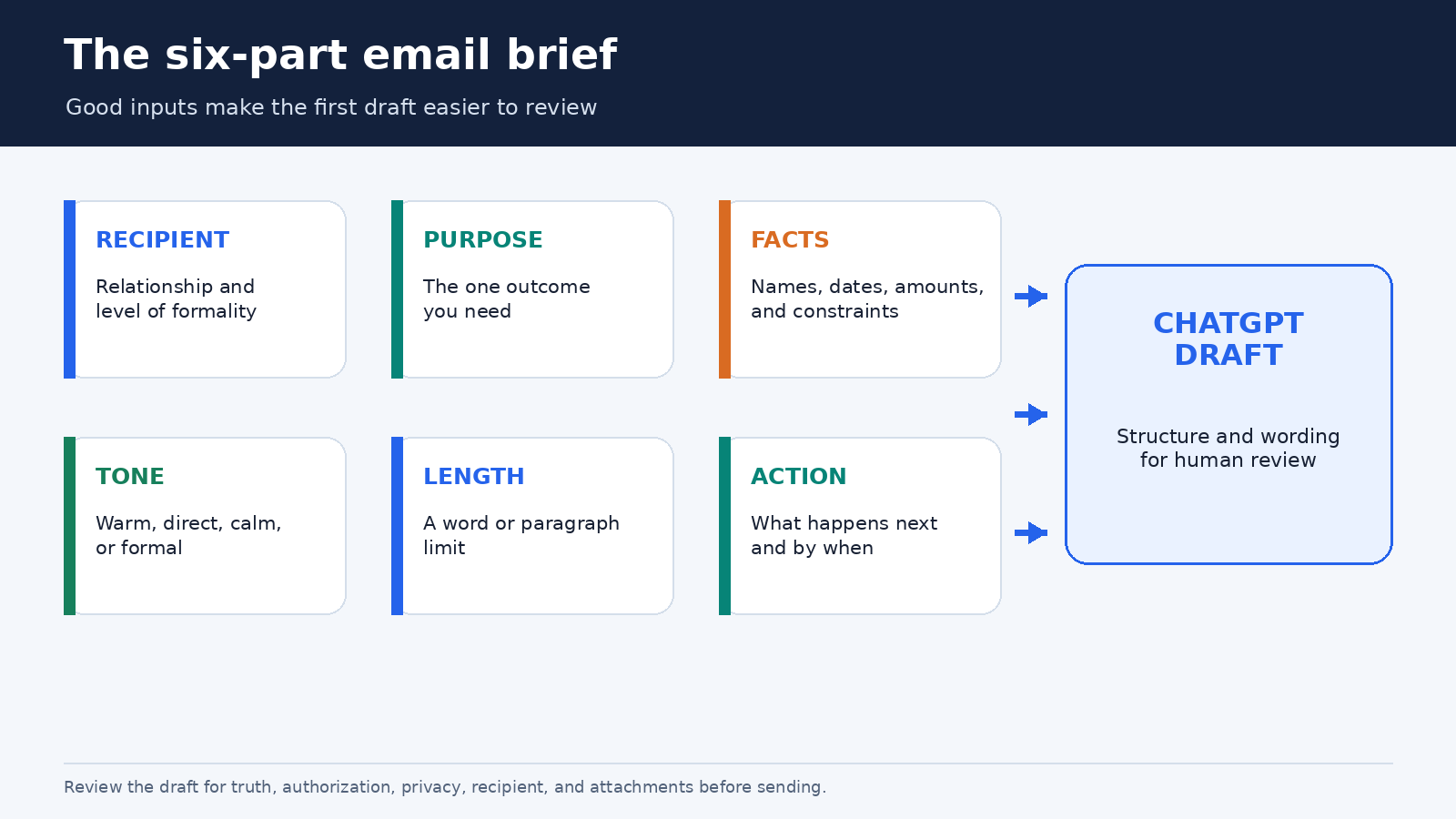
A strong email brief can fit in six lines. Give ChatGPT only the information it needs, in a form that is easy to inspect:
- Recipient and relationship: a longtime client, a new manager, a colleague, or a vendor you have not met.
- Purpose: request approval, decline an invitation, correct a misunderstanding, or confirm next steps.
- Required facts: dates, amounts, names, links, decisions, and constraints that must appear.
- Tone: warm and direct, calm but firm, formal, or conversational.
- Length: for example, under 140 words or three short paragraphs.
- Call to action: the exact response or action you need, plus a deadline if one is real.
Here is a reusable prompt:
Draft an email to [recipient and relationship]. My goal is [outcome]. Include only these facts: [facts]. Use a [tone] tone and keep it under [length]. End with a clear request for [action]. Do not invent names, dates, policies, or commitments. Put any missing information in square brackets.
The instruction about square brackets is especially useful. Instead of quietly filling a gap, ChatGPT has a visible place to mark it. You can also ask it to list assumptions before drafting. Neither method guarantees that every unsupported statement will be caught, so review the result against your notes.
A reliable workflow for a new email
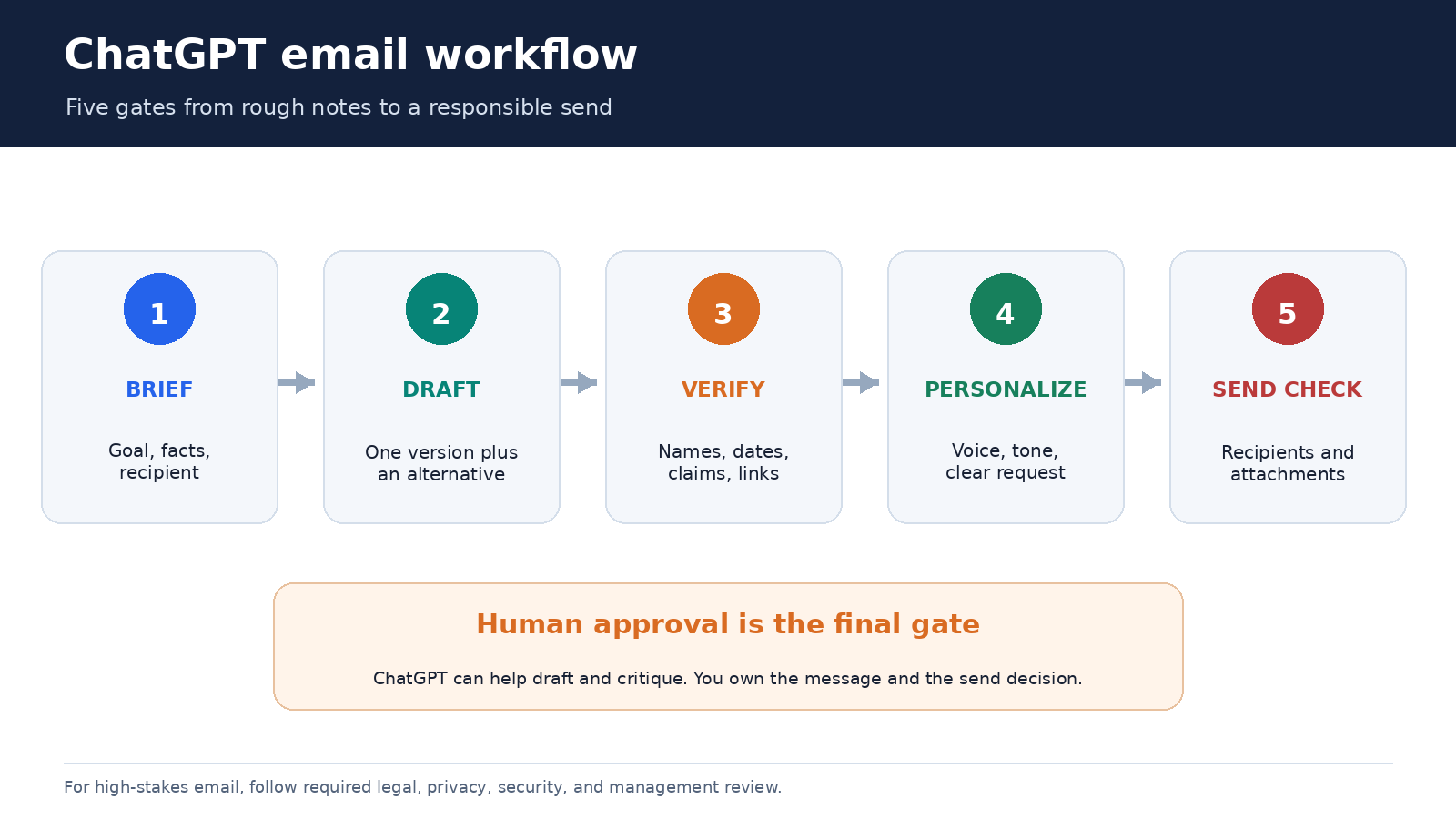
First, write the facts in plain language. Do not polish them yet. A note such as “delivery moved from Tuesday to Thursday because the warehouse closes Wednesday; ask whether Thursday morning works” is easier to verify than a finished paragraph. Remove unrelated personal or confidential details before placing the note in ChatGPT.
Second, request one draft and one alternative. Ask the alternatives to differ in a meaningful way, such as “one concise and one warmer,” rather than requesting five nearly identical versions. Compare the opening, level of detail, and request. Often the best email combines the direct opening from one version with the considerate closing from the other.
Third, edit in your own words. Replace generic phrases such as “I hope this message finds you well” if you would never write them. Add the small signals that make the message sound like you: a familiar greeting, a precise reference to the previous conversation, or a natural sign-off. The aim is not to hide AI involvement. It is to make the email accurate and appropriate for a real relationship.
Fourth, run a constraint check. You can paste your revised draft and ask: “Check this email against the following facts and requirements. Do not rewrite it. List any mismatch, unsupported claim, unclear pronoun, missing request, or ambiguous date.” A critique-only pass is useful because it separates checking from another wholesale rewrite.
Finally, verify outside ChatGPT. Confirm names, numbers, time zones, links, quoted language, and deadlines against the authoritative source. In your email client, check the To, CC, and BCC fields, then check the subject and attachment. Read the message once from the recipient’s point of view before sending.
How to reply to a long or emotional thread
A reply needs more context than a new email because it must answer what was actually said. Before sharing a thread, remove signatures, phone numbers, addresses, tracking codes, and unrelated quoted history where practical. For sensitive work, follow your employer’s approved tools and policies. If the original message can be summarized safely, use your own summary instead of pasting it verbatim.
Ask ChatGPT to separate the thread into four buckets: decisions already made, questions you must answer, actions assigned to you, and points that remain unclear. Then verify that summary yourself. This reduces the chance that a polished reply skips the one question that mattered to the sender.
A useful reply prompt is:
Help me draft a reply based only on the summary below. Acknowledge the concern without admitting facts I have not confirmed. Answer questions 1 and 2, say that question 3 is still being checked, and propose the next step. Keep the tone calm and specific. Do not add policy language or a deadline unless it appears in my notes.
When the exchange is tense, ask for a neutral reading before asking for a reply: “Identify phrases in my draft that could sound blaming, evasive, or dismissive. Explain why, then offer a plainer alternative for each phrase.” That keeps you in control of the substance while using ChatGPT as a tone reviewer. Avoid asking it to diagnose the sender’s motives. The words in the thread may support several interpretations.
Prompt patterns for common email jobs
Make a request easier to answer: “Rewrite my draft so the request, owner, and deadline are explicit. Preserve every factual detail. If the deadline is missing, insert [confirm deadline] rather than inventing one.”
Decline without overexplaining: “Draft a respectful decline in 80 to 100 words. Thank the sender, give only this reason, avoid false future promises, and close warmly.”
Follow up after silence: “Write a short follow-up that references the original request and makes replying easy. Do not imply blame or urgency. Offer two next steps: approve, or suggest a change.”
Turn notes into a meeting recap: “Organize these verified notes into decisions, action items with owners, and open questions. Then draft a concise email. Keep unknown owners marked [owner needed].”
Adjust formality without changing meaning: “Provide a more conversational version and a more formal version. Preserve dates, amounts, names, conditions, and the requested action exactly. After each version, list any phrase where meaning might have shifted.”
Shorten a draft: “Reduce this email by 30 percent. Keep the decision, reason, deadline, and call to action. Remove repetition and throat-clearing, but do not make the tone abrupt.”
Good prompts describe the job and the boundary. “Make it better” invites broad changes. “Cut repetition while preserving these four facts” gives you an output that is easier to audit.
Keep your voice consistent without creating a robot template
You can give ChatGPT a small style card instead of an archive of personal correspondence. For example: “Use short paragraphs, contractions where natural, plain English, no exclamation marks in business mail, and a direct request near the end.” Add two brief samples that you have permission to use, ideally with names and sensitive details removed.
For recurring work, OpenAI’s Projects documentation says a Project can keep related chats, files, and instructions together. Project instructions apply inside that Project and override global custom instructions there. A Project for approved customer support language or a weekly internal update can be useful, but keep its scope narrow and review old source material. Our guide to project-only memory explains how to separate a Project’s conversational context from unrelated work.
Do not freeze every message into one formula. A payment reminder, a condolence note, and a quick teammate update should not share the same rhythm. Treat your style card as a default, then tell ChatGPT what is different about this recipient and moment.
For a longer or delicate draft, Canvas may be easier than repeated full-message rewrites. OpenAI describes Canvas as a workspace for iterative writing, and its current capabilities page says you can work with inline suggestions and focused edits. Highlight only the paragraph you want changed and state what must remain untouched. This reduces collateral changes elsewhere in the email.
Privacy and data controls deserve a separate check
Email often contains information about people who never chose to place their data in an AI tool. Minimize what you share. Replace real names with roles, remove contact details and account numbers, and summarize the relevant passage when exact wording is unnecessary. Never paste passwords, authentication codes, private keys, or confidential material that your policy forbids.
OpenAI’s current Data Controls FAQ says signed-in users can turn off “Improve the model for everyone” under Settings and Data Controls. Their chats can remain in history even when that training control is off. OpenAI also says Temporary Chats do not appear in history, do not create memories, are not used to train models, and are deleted from its systems after 30 days, although they may be reviewed for abuse monitoring.
Those controls are useful, but they do not replace your workplace rules or a confidentiality assessment. Business and institutional plans may have additional controls. If you are unsure whether a message can be processed in ChatGPT, ask the relevant privacy, security, legal, or IT owner before sharing it. Our practical guide to ChatGPT memory controls covers memory and Temporary Chat as separate context choices.
The final send checklist
- Does the subject accurately describe the message?
- Are the recipient names, addresses, and CC or BCC choices correct?
- Can every date, amount, quote, link, and factual claim be verified?
- Does the message make only commitments you are authorized to make?
- Is the requested action obvious, realistic, and assigned to the right person?
- Could any sentence sound harsher, more evasive, or more certain than intended?
- Is every promised attachment actually attached?
- Did you remove comments, placeholders, private notes, and AI instructions?
For important mail, pause before sending. Reading it aloud catches missing words and unnatural phrasing. If the message could materially affect another person, a second human reviewer is often more valuable than another AI rewrite.
Frequently asked questions
Can ChatGPT write a complete email from a few bullet points?
Yes, it can produce a draft from bullet points. Include the recipient relationship, goal, required facts, tone, length, and call to action. Tell it to mark missing information instead of inventing it, then verify the result before sending.
Should I paste an entire email thread into ChatGPT?
Not by default. Remove irrelevant quoted history and sensitive identifiers, or provide a verified summary if exact wording is unnecessary. Follow your organization’s approved-tool and data-handling rules, especially for confidential, regulated, legal, health, employment, or security-related email.
How do I make a ChatGPT email sound like me?
Provide a short style card and one or two permitted, de-identified examples. Ask for targeted edits rather than endless full rewrites. Then replace generic phrases with language you naturally use and check that the tone suits this particular relationship.
Can ChatGPT send the email for me?
Features and connected apps vary by plan, workspace, and current product settings. Even where an action is available, keep a human approval step. Confirm recipients, facts, authorization, attachments, and the exact final text in the sending interface.
Use AI to reduce friction, not responsibility
ChatGPT is most useful for email when it removes the blank page, not the human judgment. A clear brief leads to a better draft. A separate fact check catches unsupported details. A tone pass can expose wording that feels sharper or vaguer than intended. The last review protects the relationship and the record.
Build the habit around a simple sequence: brief, draft, verify, personalize, and send. That workflow is quick enough for everyday messages and disciplined enough to scale to recurring work. The result should not merely sound polished. It should be true, purposeful, appropriately private, and recognizably yours.