A bad ChatGPT image can be funny for a second and still be useless for the job. A poster may have garbled lettering, a product may change shape, a hand may look odd, or a carefully described room may arrive with the wrong layout. The useful response is not to keep pressing regenerate and hoping. Treat the image as a draft, identify the most important failure, and make one controlled correction at a time.
This guide gives you a repeatable way to fix bad ChatGPT images, including prompts for composition, text, continuity, local edits, and intentional comedy. It does not rely on claims about viral trends or undocumented product behavior. The workflow is based on OpenAI’s official guidance for creating images in ChatGPT, editing generated images, and its published usage policies.
First decide whether the image is wrong or merely surprising
Before changing the prompt, write down what success means. A surprising image is not automatically a failed image. An unexpected color or unusual camera angle might improve a playful concept. It becomes a problem when it breaks the intended use, such as an unreadable event date, an inaccurate product detail, or a visual hierarchy that hides the main subject.
Use three short labels. Must keep covers the parts already working. Must fix names the one defect that blocks use. May vary gives the model room to solve the problem. For example: “Keep the blue ceramic mug, warm window light, and square framing. Fix only the handle so it connects naturally to the mug. The background objects may vary.” This is far more actionable than “make it better.”
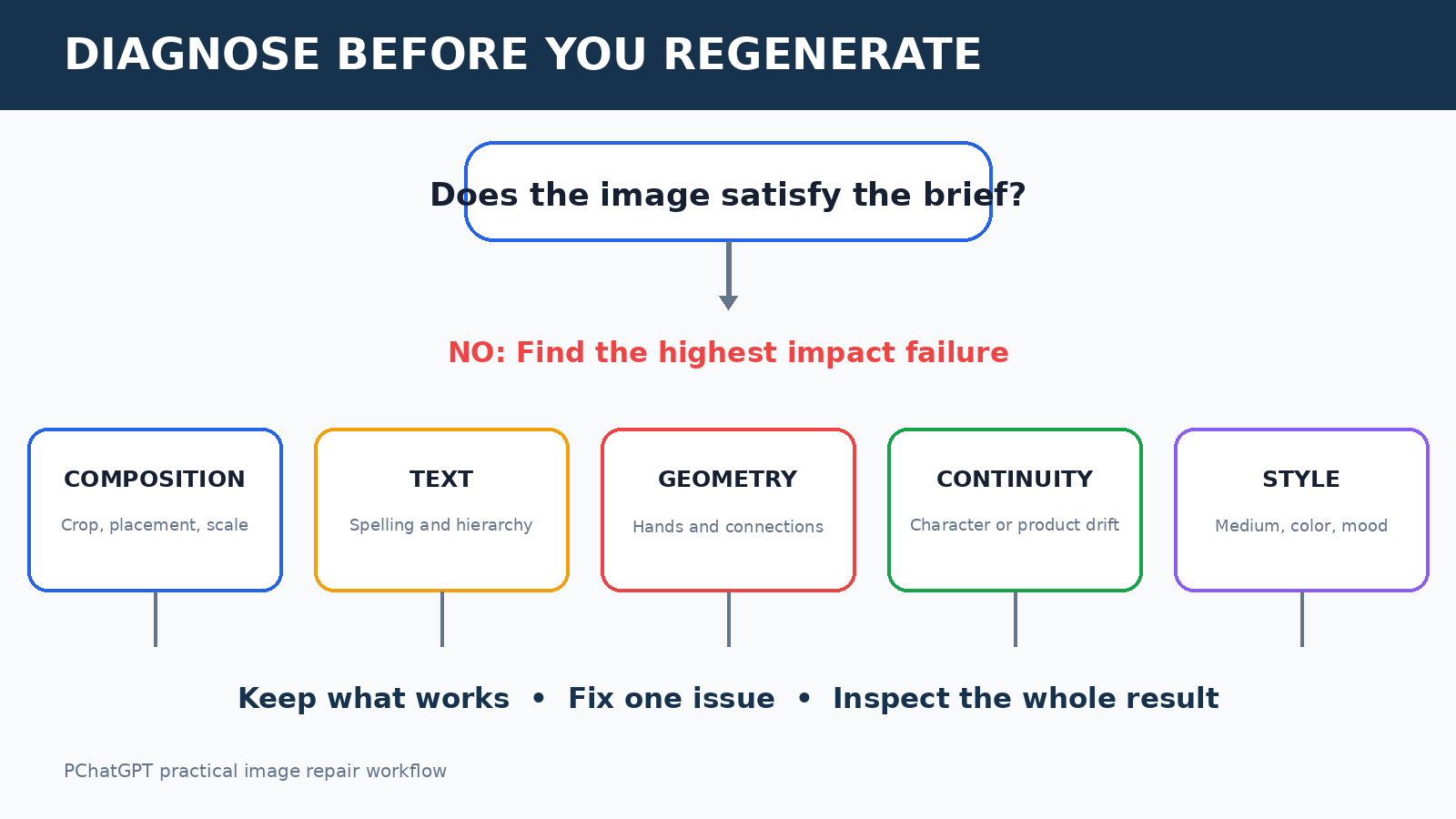
Diagnose the failure before you prompt again
- Composition failure: the subject is too small, cropped, hidden, or placed in the wrong part of the frame.
- Identity or continuity failure: a character, object, palette, or setting changes between versions.
- Geometry failure: hands, furniture, packaging, reflections, or connected parts do not make physical sense.
- Text failure: words are misspelled, duplicated, tiny, distorted, or arranged incorrectly.
- Style failure: the result is too photographic, too flat, too busy, or otherwise unlike the requested visual language.
- Brief failure: the image may be attractive, but it does not communicate the intended message to the intended audience.
- Safety or rights concern: the concept involves deceptive use, harmful content, a real person’s likeness, or material you do not have a right to use.
Choose the highest impact category, not every visible flaw. If the focal subject is hidden, perfect lettering will not rescue the design. If a real date must be legible, text accuracy comes before decorative detail. This priority keeps each editing turn understandable and makes it easier to tell whether the correction worked.
Build a prompt that behaves like a visual brief
A useful image prompt is a compact visual brief, not a pile of adjectives. State the purpose, subject, action, setting, composition, visual treatment, required text, and constraints. Put the nonnegotiable details near the beginning. If the image is for a specific placement, include the orientation and where empty space is needed for a headline or interface element.
Create a [format and purpose] for [audience].
Main subject: [who or what, including defining details].
Action and setting: [what is happening and where].
Composition: [shot, angle, placement, and negative space].
Visual treatment: [medium, lighting, palette, and mood].
Exact visible text: “[short text]”.
Must keep: [critical details].
Avoid: [two or three concrete problems].
Here is a practical example: “Create a landscape website hero for a neighborhood bakery. Show one round sourdough loaf on a pale wooden counter, photographed at eye level in soft morning window light. Place the loaf in the right third and leave a clean, low-detail area on the left for a website heading. Use warm cream and muted brown tones. No labels, no extra loaves, no people, and no text inside the image.” The directions can be checked visually, which is what makes them useful.
Negative instructions help when they are limited and specific. A long catalog of forbidden details can compete with the actual goal. Replace “do not make it weird, fake, messy, or bad” with visible constraints such as “one cup, two handles on the tray, no lettering, uncluttered background.” Describe what should occupy the frame rather than relying only on what should not appear.
Use a controlled repair loop
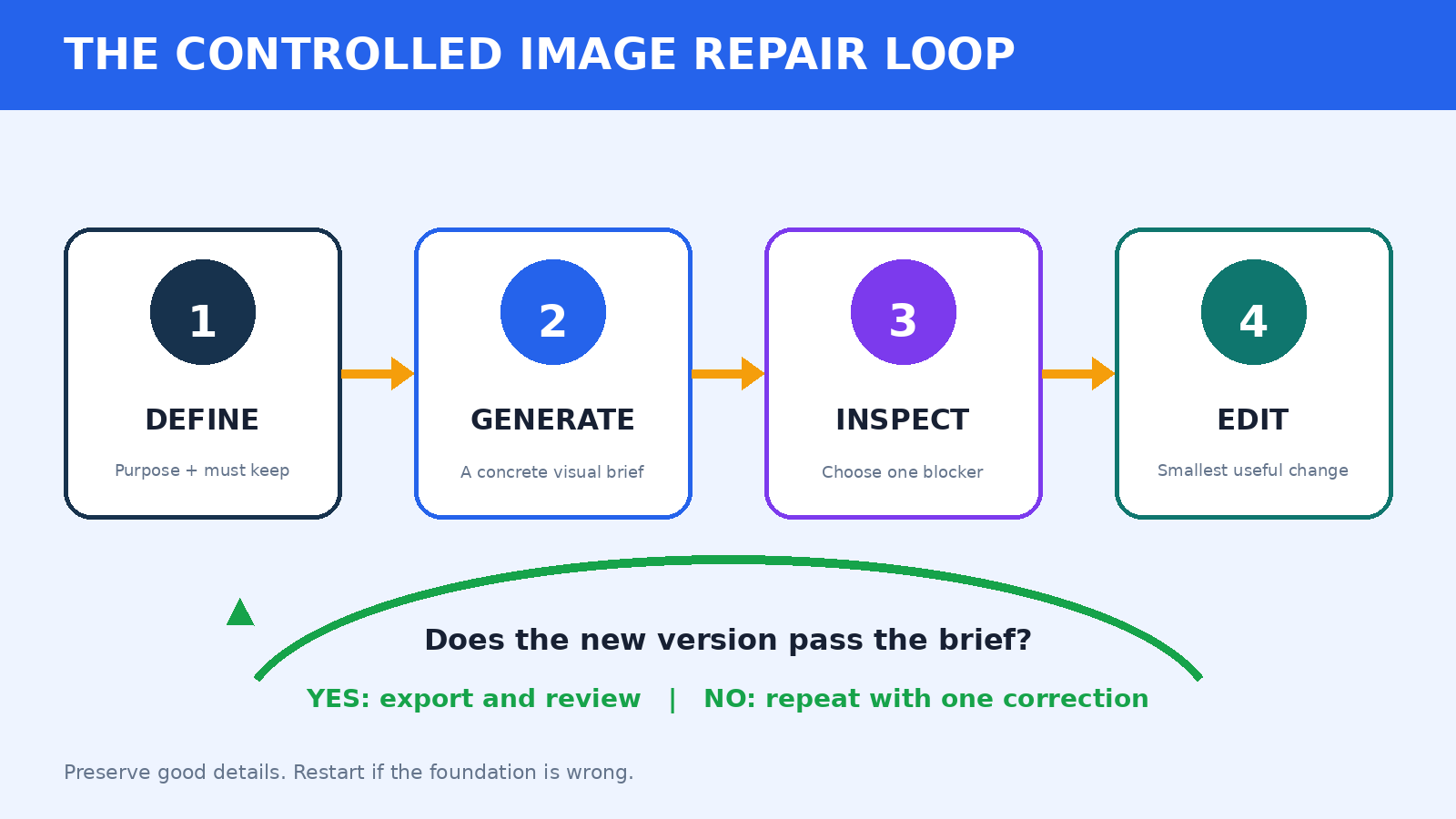
OpenAI’s ChatGPT image instructions explain that you can create an image by describing it or use the image creation option in ChatGPT. The official editing guide describes selecting an area of a generated image and describing the change. It also warns that a selection may not be perfectly precise and that edits can extend beyond the highlighted area. That is a good reason to inspect the entire result after every local edit, not just the selected patch.
1. Preserve the working parts
Begin the next instruction with continuity: “Keep the camera angle, character clothing, background, lighting, and color palette unchanged.” Then request one correction. If the result drifts anyway, refer back to the defining details instead of using vague phrases such as “same as before.” A model can act on “the yellow raincoat with three black buttons” more reliably than on your unstated memory of the previous frame.
2. Make the smallest useful change
If one region is wrong, use the available selection or editing control and describe the replacement in relation to nearby objects. Try: “Replace only the sign inside the selected area. It should be a plain white rectangular card attached flat to the brick wall, viewed at the same angle, with matching afternoon shadows. Leave the person and doorway unchanged.” Local context matters because perspective, light, and material need to fit the surrounding image.
3. Compare against the brief
After each version, check the original purpose and your must-keep list. Do not let a polished new detail distract you from a broken requirement. For a product image, inspect shape, quantity, logos, labels, and attachments. For a character, compare face, hair, clothing, age cues, and scale. For an instructional graphic, verify every label and relationship manually.
4. Know when to restart
Editing is not always the cheapest path. Restart when the composition is fundamentally wrong, several essential objects conflict, or repeated repairs have made continuity worse. Keep the lessons from the failed attempt, then write a fresh prompt with fewer moving parts. A clean restart is especially sensible when you are trying to repair both layout and detailed lettering at the same time.
How to handle garbled text
Keep visible wording short. Put the exact copy in quotation marks, state its location, and ask for a simple typographic hierarchy. For example: “At the top, set the exact words ‘OPEN STUDIO’ in large black uppercase sans serif letters on one line. Below it, set ‘Saturday 10 AM’ in smaller black letters. No other words or symbols.” Then zoom in and proofread every character.
If exact typography is business critical, use ChatGPT for the illustration and add the final words in a layout tool you control. This is not a defeat. It separates two jobs: generating the visual and typesetting verified copy. Reserve clean space in the image prompt, export the chosen artwork, and add names, prices, dates, legal text, and calls to action manually. Never publish important AI-rendered text without checking it.
Repair composition, anatomy, and object geometry
For composition, use spatial language that can be seen: left third, centered at eye level, full object visible, wide shot, overhead view, foreground, background, or empty upper-right corner. Include quantity and relationships: “Exactly three jars in one straight row, all fully visible, with equal spacing.” If cropping is the problem, ask for more room around the subject and name the body parts or object edges that must remain inside the frame.
For hands and connected objects, reduce unnecessary complexity. Specify the action and contact points: “Her right hand holds the mug by its handle; all fingers remain behind the handle except the thumb, which rests on top.” For furniture or packaging, explain which part connects to which surface. When a reflection matters, describe the reflecting surface, the reflected subject, and the camera angle. If the scene still fails, simplify the pose or crop so the difficult relationship is no longer central.
Keep characters and products consistent
Create a small continuity sheet in your notes. Record five or six stable traits for a character, such as approximate age, hairstyle, clothing, signature accessory, palette, and art treatment. For a product, record silhouette, material, color, dimensions, number and position of components, and any marks that truly matter. Repeat this compact anchor in later prompts, and vary only the scene or action.
Change one axis per turn. First establish the character. Next change the location while keeping the pose simple. Then change the action. Asking for a new pose, outfit, location, camera lens, time of day, and style in one step makes it difficult to identify the source of drift. If you are developing a broader creative workflow, the site’s guide to using ChatGPT for brainstorming can help you separate concept selection from execution, while the preferred style guide shows the same value of concrete examples and repeatable constraints.
Make a funny bad image on purpose
Intentional comedy works best when the mistake is designed rather than random. Choose one comic rule: absurd scale, a literal interpretation of an idiom, an overly formal setting for a trivial object, or one harmless physical impossibility. Keep the rest of the image coherent so the joke is readable. “A tiny office stapler receiving a grand museum unveiling, with serious curators and dramatic spotlights” has a clear contrast. “Make everything chaotic and terrible” does not.
Do not frame a real person as doing something they did not do, and do not use embarrassment as a substitute for a concept. Label fictional or satirical work when context could confuse viewers. Before generating or sharing, review OpenAI’s current usage policies and the rules of the platform where you will publish. A harmless surreal object is a safer comedy target than a deceptive depiction of a real person or a protected group.
A practical quality check before publishing
- Purpose: Can the intended viewer understand the image without your prompt?
- Accuracy: Are quantities, connections, visible facts, names, and words correct?
- Continuity: Do required characters, products, and brand colors match approved references?
- Craft: Check edges, hands, eyes, reflections, shadows, repeated patterns, and background faces at full size.
- Layout: Confirm the crop works in the actual page, post, slide, or thumbnail.
- Rights and safety: Confirm you can use the inputs and that the output is appropriate under current policies and your publishing context.
- Disclosure: Add context when an AI-generated or edited image could otherwise mislead the audience.
- Export: Keep an approved master, the final prompt, and notes about any manual edits.
Teams should also name an approver. The person who generated the image may be too familiar with it to notice a misspelled word or an implausible detail. A quick second review often catches the exact defect that repeated prompting missed. For high-stakes medical, legal, financial, safety, or documentary uses, synthetic imagery needs stricter expert review and may not be suitable at all.
Copy-ready repair prompts
Composition repair:
Keep the subject, clothing, palette, and lighting. Reframe as a wider eye-level shot with the entire subject visible. Place the subject in the right third and leave the left third simple and empty. Do not add text or new objects.

Local object repair:
Change only the selected object. Make it a single red ceramic cup with one handle attached naturally on the right. Match the existing camera angle, soft light, shadow direction, and depth of field. Leave everything outside the selection unchanged.

Continuity repair:
Keep the same character: short curly black hair, round green glasses, mustard sweater, dark blue trousers, and flat editorial illustration style. Change only the activity so the character is watering one small plant.

Text-safe artwork:
Create a vertical poster background with a quiet cream area across the upper third for text that I will add later. Put the illustrated market scene in the lower two thirds. No letters, numbers, logos, signs, or watermarks anywhere in the image.
Frequently asked questions
Why does ChatGPT keep changing parts I liked?
An edit can affect more than the intended detail, and OpenAI’s editing help notes that selections are not always precise. Explicitly list the few elements that must remain unchanged, request one local correction, and inspect the whole image afterward. If drift compounds over several edits, restart from the strongest version with a clean brief.
Should I regenerate or edit a bad ChatGPT image?
Edit when the composition and most important details already work and the defect is local. Regenerate when the central layout, subject count, viewpoint, or overall concept is wrong. A restart is usually clearer than stacking many corrections on a weak foundation.
How can I get exact words in a generated image?
Use very short copy, put it in quotation marks, specify placement and hierarchy, and proofread every character. When accuracy is essential, ask for artwork with reserved blank space and add the final typography in a design or presentation tool.
Can I upload an image and ask ChatGPT to change it?
OpenAI’s official image guidance describes uploading an existing image and describing changes, as well as editing generated images with selection tools where available. Use images you have permission to edit, give concrete instructions, and review the complete result for unintended changes and policy concerns.
The takeaway
The fastest way to fix bad ChatGPT images is usually not a magic phrase. It is a disciplined loop: define the job, diagnose the largest failure, preserve what works, change one thing, and verify the full result. Use local edits for local problems, restart when the foundation is wrong, and move critical typography into a tool where you can control every character. Funny accidents can become useful ideas, but only after you decide whether they support the brief.
Official OpenAI sources
- Creating images in ChatGPT, OpenAI Help Center
- Editing your images with ChatGPT Images, OpenAI Help Center
- Image generation guide, OpenAI developer documentation
- Usage policies, OpenAI