The ChatGPT Mac app security update was not a routine feature release. OpenAI replaced the certificates used to sign its applications after a compromised TanStack npm package reached two employee devices and exposed limited credential material from internal source code repositories. OpenAI said it found no evidence that customer data, production systems, intellectual property, or published software had been compromised. It still treated the signing material as sensitive and rotated its certificates.
For a Mac user, the practical response is much simpler than the incident report: update OpenAI applications through their built-in updater or an official OpenAI download page. The original notice gave June 12, 2026 as the deadline. OpenAI later amended the notice and extended the migration to June 26, 2026. Both dates have passed, so an old installation should be updated now rather than kept as a working legacy copy.
This guide explains what the incident did and did not establish, why macOS code signing matters, how to update without falling for a fake installer, and what an IT team should check on managed Macs. It relies on OpenAI’s current advisory and Apple’s platform security documentation. It does not assume that every certificate warning comes from this incident, because corporate TLS inspection can create a different kind of certificate error in the ChatGPT app.
What OpenAI reported
OpenAI’s official response to the TanStack npm supply chain attack says the incident began on May 11, 2026 UTC. TanStack, a widely used open source library, was compromised during a broader campaign known as Mini Shai-Hulud. Two OpenAI employee devices in the corporate environment were affected. OpenAI brought in an outside digital forensics and incident response firm, isolated affected systems and identities, revoked sessions, rotated credentials, and temporarily restricted code deployment workflows.
The company said the malware performed credential-focused exfiltration in a limited subset of source code repositories available to those employees. According to the advisory, only limited credential material was successfully removed. The affected repositories included signing certificates for products on several platforms. That exposure prompted OpenAI to re-sign its applications and coordinate with platform providers to prevent new notarizations with previous certificate material.
OpenAI also reported several negative findings that should not be blurred into a broader claim. It found no evidence that user data or OpenAI products were exposed, no evidence that production systems or intellectual property were compromised, and no evidence that malicious software had been signed with an OpenAI certificate. It reviewed notarization activity associated with the earlier certificates and said its published software had not been modified without authorization.
Those statements do not make certificate rotation pointless. Incident response often has to deal with uncertainty. If sensitive material was reachable from an affected environment, replacing it can remove a possible future route for abuse even when investigators find no misuse. The update request was therefore a precaution tied to software identity, not an announcement that the installed ChatGPT app had become malware.
The deadline changed from June 12 to June 26
The OpenAI page still contains parts of its original June 12 wording, including an older heading and FAQ text. At the top of the same page, however, an amendment says the macOS update deadline was extended to June 26, 2026. The amendment is the later instruction and should control how the timeline is read. OpenAI said it had coordinated with Apple, blocked new notarization with the previous certificate, and found no evidence of malicious signing while users completed the move.
This distinction matters because repeating only June 12 now leaves readers with an incomplete version of the notice. The useful current advice is not to argue about which old date applies. If ChatGPT, ChatGPT Classic, Codex, Codex CLI, or Atlas has been sitting on a Mac without updates since that period, move to a current OpenAI release. If the application already updates normally and came from OpenAI, there is no special certificate file for the user to install by hand.
OpenAI’s earlier Axios developer tool compromise advisory describes a separate certificate rotation from April 2026. That event affected a GitHub Actions workflow used in macOS signing. OpenAI said the certificate was probably not exfiltrated but rotated it anyway, with a May 8 deadline. The later TanStack incident required another response. Keeping the two notices separate prevents a confusing timeline in which May 8, June 12, and June 26 appear to describe one unchanged event.
What a code-signing certificate tells macOS
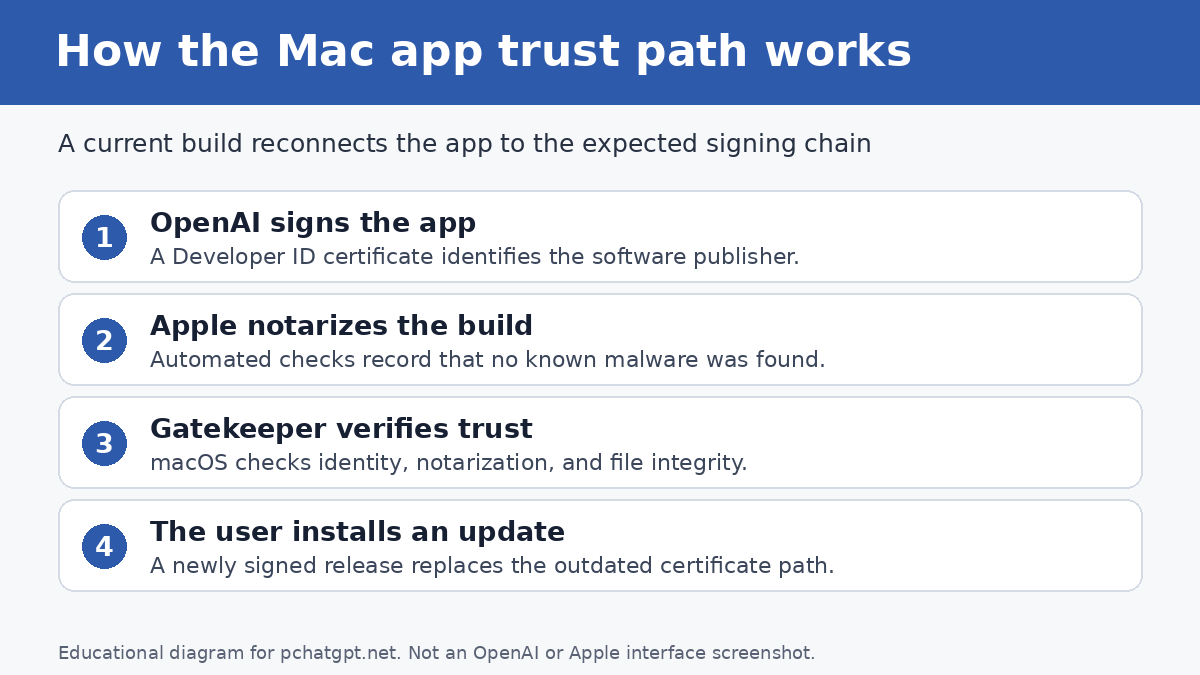
A code signature connects a particular application build to a developer identity and lets the operating system check whether the signed code has changed. Apple’s macOS code-signing documentation explains that apps distributed outside the App Store use an Apple-issued Developer ID certificate and private key. Under the default security settings, those apps also need Apple notarization.
Signing and notarization perform related but different jobs. A developer signs the app. macOS can then verify that the code has not been altered since the developer signed it. Notarization records that Apple received a copy for an automated malware check and found no known malware at that time. A notarization ticket can be stored online or attached to the app without changing the developer’s signature.
Apple’s Gatekeeper documentation describes the checks a Mac applies when software arrives from outside the App Store. Gatekeeper checks that the app came from an identified developer, has appropriate notarization, and was not altered. It also asks for approval the first time downloaded software opens. These checks are why an old or revoked certificate can affect a fresh download or first launch even if the application file itself was once legitimate.
A certificate is not a permanent guarantee that every action inside an app is safe. It is one part of the trust chain. It identifies the signer and helps detect post-signing changes. Users still need a legitimate download source, current software, sensible permissions, and caution around unexpected prompts.
Why rotation can require an application update
When a developer replaces a signing certificate, it publishes new application builds signed with the replacement. Existing builds keep the signature they received when they were created. They do not silently acquire the new signature because changing a signed application after release would defeat the integrity check. Users therefore need a newly signed build.
OpenAI said it stopped new notarization with the earlier certificate material. That step reduces the chance that someone could create a new, fraudulent app, sign it with old material, and obtain a fresh notarization that passes default checks. OpenAI then coordinated the full revocation while giving legitimate users time to receive updated builds through normal channels.
Apple explains that it can respond to discovered malware by revoking associated Developer ID certificates, issuing notarization revocation tickets, and updating XProtect signatures. Its macOS malware protection guide also notes that the system checks for revocation information in the background. In this OpenAI case, the company’s stated reason for the rotation was precautionary exposure of signing material, and it reported no malicious OpenAI-signed app. The platform mechanics still explain why old releases can lose support or fail a later trust check.
How to update the ChatGPT Mac app safely
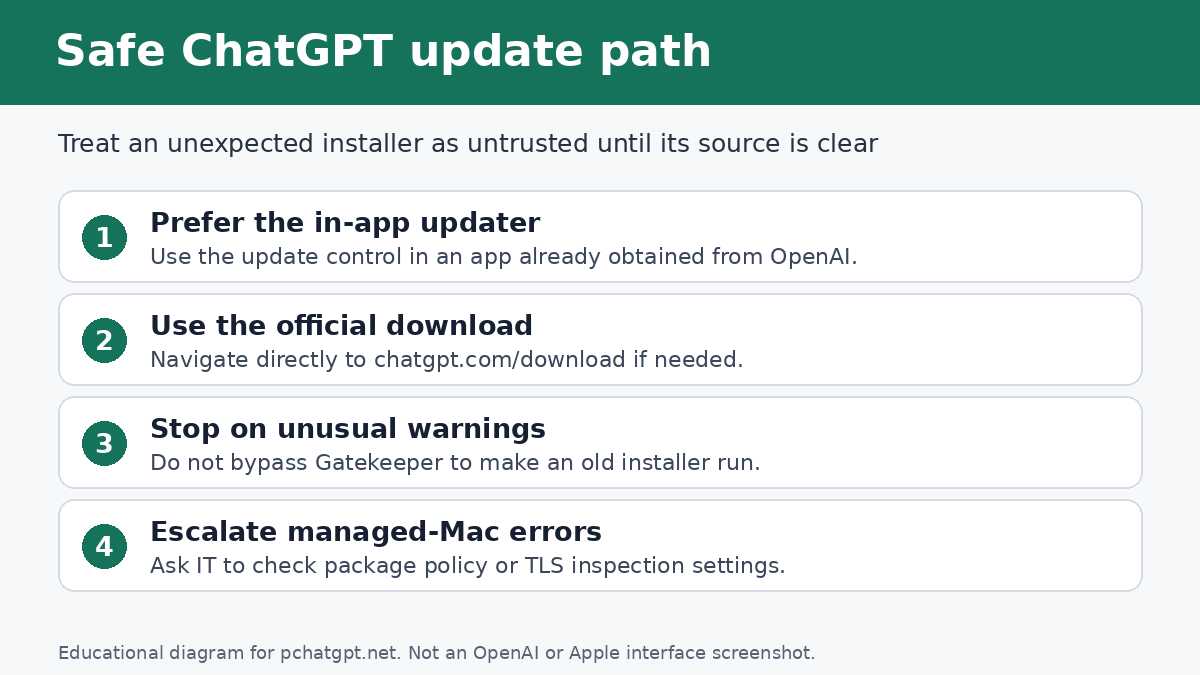
The safest route is the update control inside an app you already installed from OpenAI. If that route is unavailable, type the OpenAI or ChatGPT address yourself and use the official download page. OpenAI’s current macOS download article points users to chatgpt.com/download. The help article says the newer desktop app combines Chat, Work, and Codex. It also says the previous macOS app is now called ChatGPT Classic and remains supported.
Do not fetch an installer from an email attachment, a file-sharing service, a search ad, a direct message, or a site that offers a convenient mirror. The TanStack advisory warns specifically against installers sent through email, messages, ads, file-sharing links, and third-party download pages. A message can copy OpenAI’s logo and wording. The address and delivery path are harder for a fake prompt to imitate when you navigate independently.
- Open the installed OpenAI app and accept its normal in-app update if one is offered.
- If the updater fails, close the app and visit the official ChatGPT download page in a browser using an address you entered or a saved trusted bookmark.
- Download the macOS build offered for your hardware and operating system.
- Install the current build without changing macOS security settings or bypassing a Gatekeeper warning.
- Launch the app and confirm that it opens normally. Keep the web version available as a temporary fallback if a managed network blocks the desktop client.
The current OpenAI help page lists macOS 14 and either Apple silicon or an Intel processor as the requirements for the new desktop application. That is useful if a very old Mac cannot install the current build. It is not a reason to use an old installer from another site. A user who needs the earlier interface can use the official ChatGPT Classic download linked from OpenAI’s desktop download page, subject to OpenAI’s current support terms.
Do not bypass Gatekeeper to make an old installer work
If macOS blocks a downloaded installer, pause before using “Open Anyway” or disabling security controls. A block can mean the app lacks an acceptable signature, notarization, or current trust status. It can also mean the file was altered or came through an unusual delivery path. The correct first response is to delete the questionable file and download a current copy from OpenAI.
Gatekeeper overrides exist because there are legitimate development and administration cases where a user may need them. They are a poor repair for a consumer app that should already be signed and notarized. OpenAI’s advisory says a fraudulent app using previous material would be blocked by default unless a user explicitly bypassed macOS protections. Overriding the warning removes the exact barrier that the certificate response depends on.
If an organization manages the Mac, contact IT rather than changing system policy. Device management may intentionally prevent overrides. An administrator can confirm the approved package, deployment source, and installed version across the fleet without asking users to weaken local controls.
A certificate warning may be a network problem instead
Not every certificate message in ChatGPT for macOS points to the 2026 signing-certificate rotation. OpenAI’s network troubleshooting guide describes a “wrong SSL certificate” message caused by SSL inspection or decryption on a network. That is about the certificate presented during a secure network connection, not the Developer ID signature attached to the application bundle.
The symptoms and remedies differ. For the app-signing issue, install a current OpenAI release through an official channel. For a TLS inspection issue, OpenAI recommends upgrading and restarting the app, checking whether the problem follows the company network, and involving the network administrator. It says organizations should avoid SSL inspection for public OpenAI domains when possible. If corporate policy requires inspection, the administrator may need guidance from OpenAI Support.
A quick isolation test can help. If the same current app connects on a trusted personal hotspot but fails on company Wi-Fi, the network path deserves attention. Do not interpret that result as permission to remove company security software yourself. Give IT the error text, the affected network, whether coworkers see it, and whether the web version works.
What users do not need to do
OpenAI’s TanStack FAQ says customer passwords and API keys were not affected, so the advisory did not instruct users to reset them. A password change is appropriate if you reused a password, approved a suspicious login, entered credentials into a fake installer, or saw an account alert. It is not part of the routine certificate migration described by OpenAI.
You also do not need to import a certificate into Keychain Access, download a profile, run a Terminal command from an email, or install a browser extension to “restore trust.” OpenAI’s remediation is delivered as newly signed application builds. An unsolicited guide that asks for an administrator password or tells you to disable Gatekeeper should be treated as suspicious.
Windows and iOS users did not need to perform a special update for this certificate deadline, according to the TanStack response. OpenAI said it was re-signing applications across platforms but identified macOS users as the group that had to take action. Normal operating-system and app updates remain sensible on every platform.
Practical checks for a personal Mac
Start with provenance. Ask where the installed application came from. If you used OpenAI’s site or the app’s own updater, that is a much better starting point than a download directory or software mirror. Then check whether the app updates and launches without a macOS trust override.
Review unexpected files in Downloads, especially disk images or packages named ChatGPT, OpenAI, Codex, or Atlas that arrived through a message. Delete copies you did not request. If you entered your Mac password into a suspicious installer, disconnecting from the network and seeking qualified incident-response help is more appropriate than repeatedly launching the file.
For current product use after the update, PChatGPT’s ChatGPT Mac app guide covers shortcuts, app permissions, voice, and low-risk ways to test integrations. Keep the security question separate from feature setup: a legitimate app can still request permissions that do not make sense for your workflow, so grant access only when a feature needs it.
Checklist for IT and security teams
A managed fleet needs more than a broadcast telling employees to click Update. First, inventory the OpenAI applications in use. The TanStack notice names ChatGPT Desktop, Codex App, Codex CLI, and Atlas. Current packaging has since changed, so inventory both present and legacy names rather than assuming every user has one standard application.
Second, distribute packages from an approved source and document who owns future updates. If users cannot run in-app updates because of permissions or network policy, push the current package through device management. Test on a small group before broad deployment, but do not preserve an old certificate build merely because it still opens on a Mac that launched it before revocation.
Third, monitor help-desk tickets for two separate patterns: macOS trust blocks during installation, and TLS certificate errors during connection. The first points toward package provenance, signing, notarization, or an outdated build. The second may come from an inspecting proxy or secure web gateway. Treating both as “the certificate problem” wastes time and may lead users toward unsafe workarounds.
Finally, remind staff that update deadlines create good phishing material. An attacker does not need a stolen signing key to send a convincing fake notice. Clear internal instructions should name the approved update route and say that support will never send a disk image through chat or ask a user to disable Gatekeeper. For the publication’s broader sourcing and correction standards, see About PChatGPT.
What the incident means for everyday users
The incident was serious because development credentials can sit close to the systems that establish software identity. OpenAI’s public findings were also limited: two corporate devices, a subset of repositories, and limited credential material. The company did not report customer data theft, altered public builds, or malicious software signed with its certificates. Both halves belong in an accurate account.
The user action is deliberately ordinary. Install a current build from the developer, let macOS perform its checks, and avoid unfamiliar download routes. There is no benefit in turning a precautionary update into a panic about every existing conversation or account.
There is one lasting habit worth keeping. When a vendor announces a security-driven update, read the current advisory rather than a screenshot of its first version. In this case the deadline changed, the desktop product lineup later changed, and the official download instructions remained the reliable anchor.
FAQ
Was the ChatGPT Mac app itself hacked?
OpenAI said it found no evidence that its published software was altered or that malicious software was signed with an OpenAI certificate. The incident affected two employee devices and exposed limited credential material from some internal repositories, which is why OpenAI rotated signing certificates as a precaution.
Is the update deadline June 12 or June 26, 2026?
June 12 was the original deadline shown in parts of OpenAI’s notice. An amendment at the top of the official page extended the macOS update deadline to June 26, 2026. Both dates have passed, so users with an old build should update through the app or an official OpenAI download page now.
Should I change my ChatGPT password or API key?
Not because of this advisory alone. OpenAI said customer passwords and API keys were not affected. Change credentials if you entered them into a suspicious installer, received an account security alert, or have another reason to believe your own account was exposed.
Where should I download the current ChatGPT app for Mac?
Use the application’s built-in updater or OpenAI’s official download page at chatgpt.com/download. Do not use installers delivered through email, messages, ads, file-sharing links, or third-party download sites, and do not bypass a macOS security warning to force an old package to open.