
Most people meet ChatGPT through a blank message box. That makes the product look like a writing assistant, even though some of its best time savers live around the conversation itself. The useful gains come from keeping context organized, editing only the passage that needs work, checking a spreadsheet with executable analysis, or asking for a reminder that returns when it matters.
This guide covers 11 underrated ChatGPT features for practical work. Each one solves a different kind of friction. You do not need to adopt all of them. Pick the feature that removes a repeated step from a task you already do, test the result on low risk work, and keep human review at the point where an error would matter.
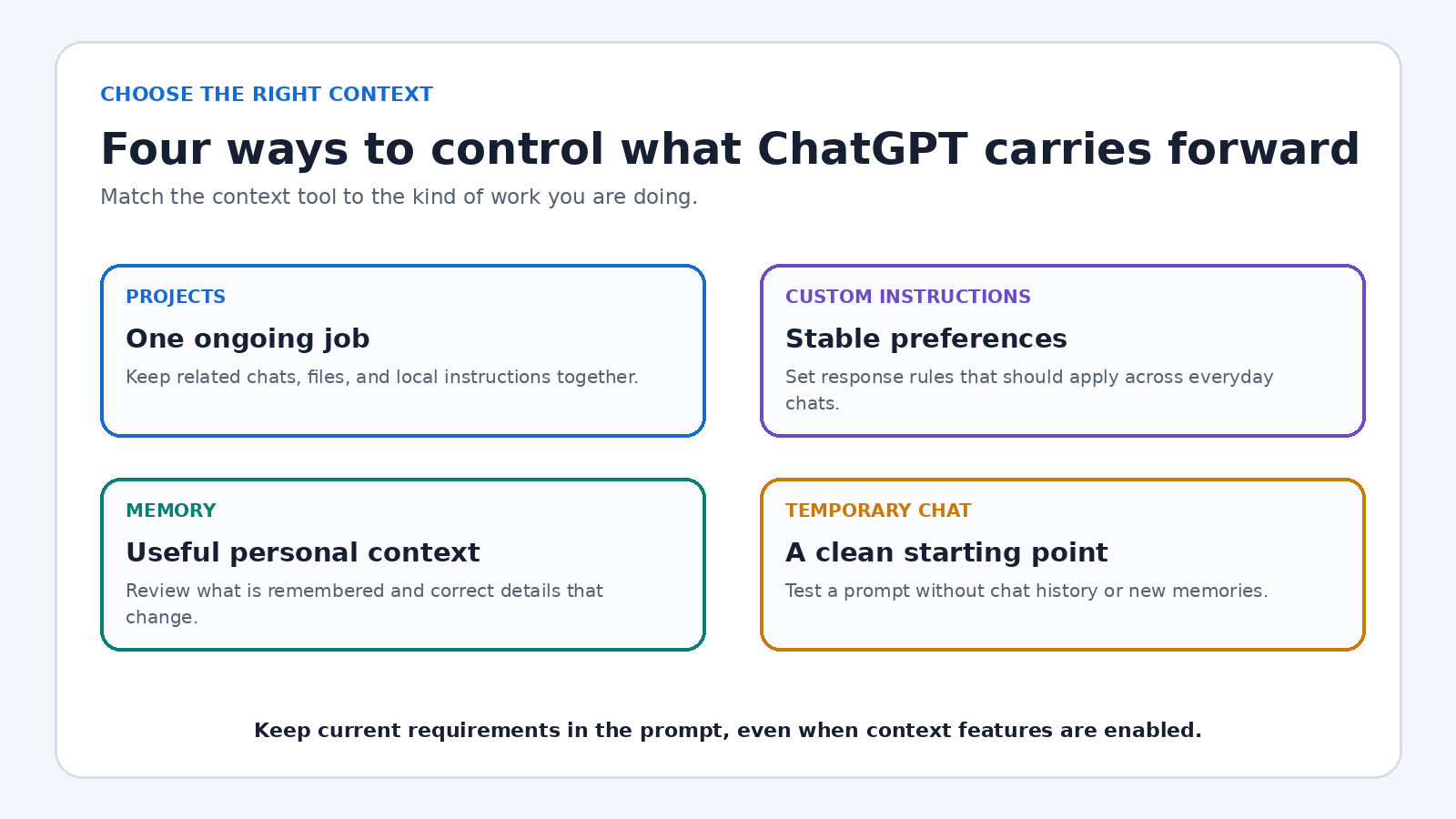
Quick answer: Start with Projects for recurring work, Custom Instructions for stable preferences, and Search for current facts. Use Canvas when a draft needs several revisions, Data Analysis when numbers need calculation, Deep Research when a question needs many sources, and Scheduled Tasks when the value depends on timing. Memory can reduce repetition, while Temporary Chat gives you a cleaner context when personalization is not wanted.
1. Projects keep recurring work from starting at zero
A long running job rarely fits neatly in one chat. A client launch might involve a brief, audience notes, research, drafts, and weekly decisions. Copying that context into every new conversation wastes time and increases the chance that an old instruction gets missed.
OpenAI describes Projects as workspaces that group chats, reference files, and project instructions. Create one for a real stream of work rather than a vague topic. A project called “May customer newsletter” is more useful than one called “Writing.” Add the approved style guide, current product notes, and a short instruction that defines the audience and output format.
The underrated move is saving a strong ChatGPT response as a project source. A confirmed decision, final outline, or approved terminology list can then become context for later conversations. Review the sources occasionally, remove stale files, and remember that project instructions can override your global custom instructions inside that project.
2. Project instructions create a local working style
Global preferences are convenient, but every job does not need the same voice. A legal document review, a lesson plan, and a friendly newsletter should not inherit identical rules. Project instructions let you define behavior for one body of work without repeatedly pasting a large prompt.
Write instructions like a compact editorial card: state the reader, goal, constraints, preferred structure, and what the assistant must flag rather than invent. For example: “Write for first time managers. Use plain English. Put risks before recommendations. If a figure is absent from the source files, label it unknown.” That is specific enough to guide responses without burying the task in ceremony.
Keep these instructions short and test them with two different requests. If both outputs make the same mistake, repair the instruction once. This turns prompt correction into maintenance of a reusable setting instead of a repeated conversation.
3. Custom Instructions remove everyday repetition
Some preferences really do apply almost everywhere. Perhaps you want concise answers, measurements in metric units, accessible explanations, or a clear distinction between facts and assumptions. Custom Instructions let you store guidance that ChatGPT considers across chats.
The best entries are durable. Include your role only if it changes the answer, name the formats you routinely use, and specify a behavior you can observe. “Ask before assuming a budget” is testable. “Always be brilliant” is not. Avoid loading this field with confidential client details or temporary campaign facts. Those belong in an appropriate controlled workspace or the individual prompt.
Revisit the setting after a few weeks. Preferences that sounded useful can create awkward answers in unrelated chats. A small, current set of instructions saves more time than a long personal manifesto.
4. Memory can carry useful context between conversations
Memory addresses the small facts you otherwise repeat: your dietary preference, the level of technical detail you understand, or a continuing goal. According to OpenAI’s current Memory FAQ, memory can use context from chats, files, and connected apps when enabled, and its controls live under Personalization.
Use memory deliberately. Ask ChatGPT what it remembers, correct information that has changed, and remove details that should not influence future answers. A remembered preference is helpful only while it is accurate. Do not treat memory as an authoritative database or a substitute for giving the current requirements of an important task.
A good rule is to let memory hold stable preferences, while the prompt holds today’s objective and constraints. That division reduces setup time without allowing old context to quietly steer a high stakes answer.
5. Temporary Chat gives you a clean room
Personalization is not always useful. You may want to test whether a prompt stands on its own, explore an unrelated topic, or avoid adding a conversation to history and memory. OpenAI’s Temporary Chat documentation says these conversations begin with a blank slate, do not appear in history, and do not create memories. Custom instructions may still apply, so a temporary chat is not necessarily free of every account level preference.
This feature saves time during quality control. Open the same prompt in a temporary chat and compare the answer with your regular conversation. If the clean version is confusing, your original result may depend on context that a colleague or customer will not have. That quick test is useful before publishing a reusable prompt or documenting a process.
Temporary Chat is a context control, not a blanket promise that any sensitive material is safe to paste. Follow your organization’s policies and review OpenAI’s current data controls before handling confidential information.
6. File uploads replace long copy and paste sessions
If the source already exists as a document, upload it rather than feeding fragments through dozens of messages. Projects can hold PDFs, spreadsheets, documents, images, and pasted text, subject to current plan and workspace limits. A file gives the model more coherent context and leaves you with a clearer record of what was consulted.
Ask for a bounded result. Useful examples include extracting action items with page references, listing contradictions between two policies, converting headings into a study plan, or identifying missing fields in a brief. Tell ChatGPT to distinguish direct evidence from inference and to quote the relevant passage when precision matters.
File quality still sets the ceiling. Scanned pages, complicated layouts, hidden spreadsheet logic, and obsolete versions can produce incomplete answers. Confirm names, figures, dates, and citations against the original. For a broader workflow on files and research, see our practical ChatGPT how to guide.
7. Data Analysis turns questions into inspectable calculations
A spreadsheet does not need to become a manual sequence of filters and formulas. OpenAI’s guide to Data Analysis with ChatGPT says the tool can inspect supported files, summarize trends and outliers, create tables and charts, and run Python based calculations for some tasks.
Prepare the sheet before uploading it. Put descriptive headers in the first row, keep one record per row, and separate unrelated tables. Then ask a precise question: “Group net revenue by month, show the formula, list excluded rows, and chart the result.” A request like “find insights” leaves too many choices hidden.
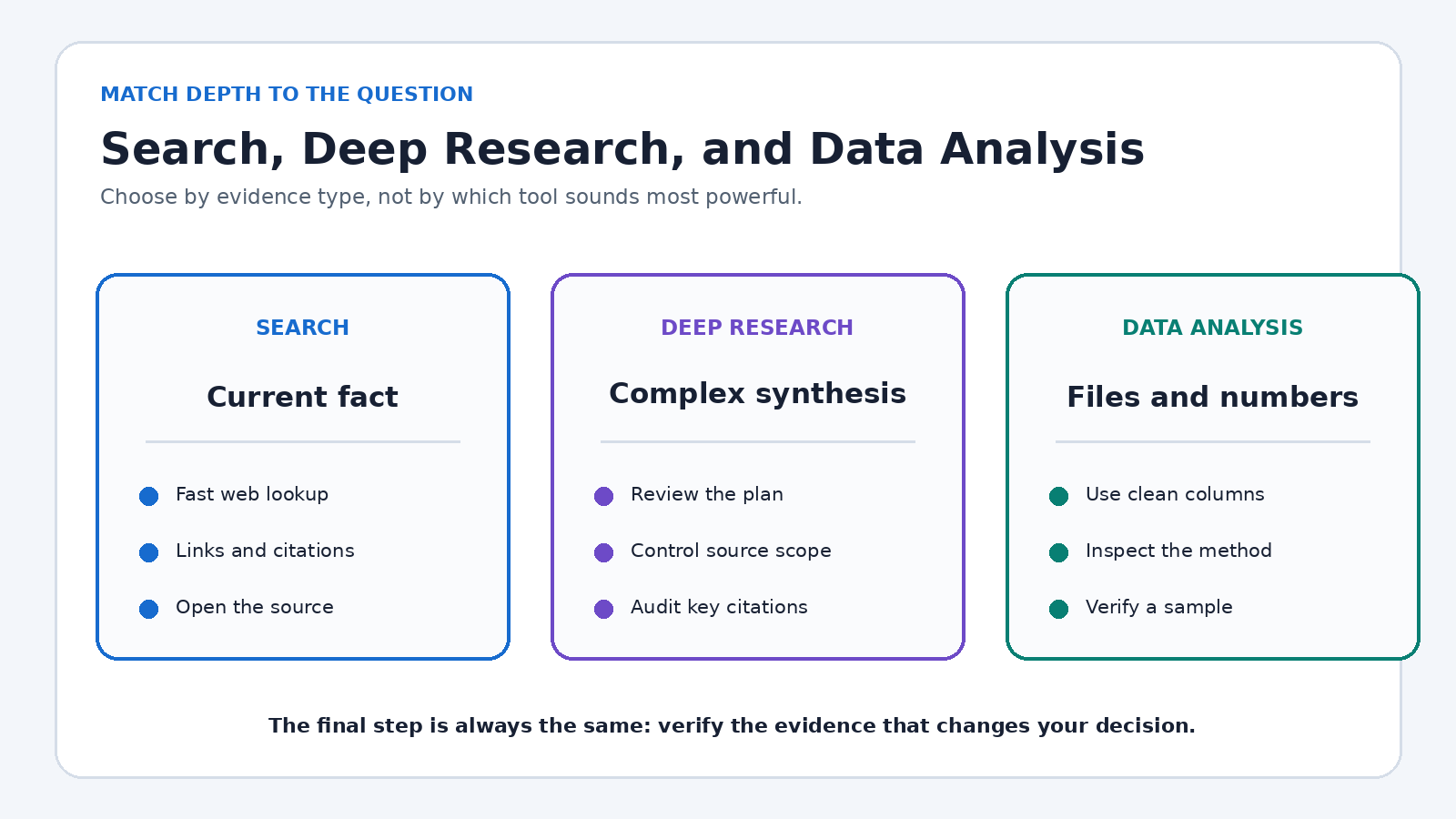
The real time saver is the review trail. When code is available, inspect it. Check which columns were used, how missing values were handled, and whether a median would be more meaningful than a mean. Download or recreate the result only after the calculation matches a small sample you can verify manually.
8. Canvas makes revision surgical
Chat is excellent for generating options, but a long conversation becomes clumsy when you need to fix paragraph seven without changing everything else. OpenAI’s Canvas introduction explains that Canvas provides a separate workspace where you can edit directly, highlight a section, request focused feedback, and restore previous versions.
Use Canvas after the outline is stable. Select the weak passage and give a local instruction such as “shorten this to 90 words and preserve all three numbers.” Then compare the revision with the source. Local edits reduce accidental drift in sections you already approved.
Canvas also helps with code because changes and comments remain connected to the larger artifact. It is not a replacement for version control, tests, or editorial review, but it is far easier to inspect than a chain of complete rewrites. If tone is the main problem, our guide to getting ChatGPT to write in your preferred style provides a useful companion process.
9. Search is the right tool for a current fact
Ordinary model knowledge and live web evidence are not the same thing. When a question depends on current documentation, a recent announcement, availability, opening hours, or a changing price, use Search. OpenAI says ChatGPT Search can return timely answers with links, inline citations, and a Sources panel.
Ask for sources you would trust even without AI. For product behavior, request the vendor’s documentation. For a public rule, prioritize the responsible agency. Open the links and make sure each citation supports the sentence attached to it. A citation can be real yet irrelevant, outdated, or too weak for the claim.
Search is usually faster than deep research when the answer is narrow. A request for today’s exchange rate needs a quick lookup. A comparison of five regulatory approaches needs a plan, many documents, and a more substantial review.
10. Deep Research handles questions with many moving parts
Some questions cannot be answered responsibly from three search results. OpenAI’s Deep Research guide says the feature can work across the public web, specified sites, uploaded files, and enabled apps, then produce a structured report with citations or source links. You can review its proposed research plan and adjust the source scope.
Give it a decision, not just a topic. “Compare these three payroll platforms for a 40 person UK company, using official pricing and security documents, and identify missing evidence” is stronger than “research payroll.” Define the date cutoff, geography, required sources, evaluation criteria, and output table before the run begins.
Then audit the report. Open the decisive citations, check dates, separate vendor claims from independent facts, and look for evidence the tool could not access. Deep Research can compress collection and synthesis, but the decision and accountability remain yours.
11. Scheduled Tasks move work to the right moment
A good answer delivered too late has little value. Scheduled Tasks can support one time reminders, recurring work, and monitoring that notifies you when a meaningful change appears. Current availability, limits, and supported tools vary by plan, so check the product interface and official page for your account.
Schedule outcomes with clear stop conditions. “Every Friday afternoon, remind me to review unresolved support tickets” is better than “help with support.” For monitoring, define what counts as meaningful, where to look, and when the task should stop. Review the Scheduled page periodically so obsolete tasks do not become background noise.
Do not assume a scheduled task can access every project file or tool. The official documentation notes feature limitations. Test the first run while the task is low risk, verify notifications, and keep critical deadlines in your established calendar or operations system.
A simple way to choose the feature
- You repeat context: use a Project, project instructions, Custom Instructions, or Memory.
- You need isolation: use Temporary Chat and still check which account preferences apply.
- You have source material: upload the file, then request evidence tied to the original.
- You have numbers: use Data Analysis and inspect the method.
- You are revising an artifact: use Canvas for targeted changes.
- You need a recent fact: use Search and open the cited source.
- You need broad synthesis: use Deep Research and audit decisive citations.
- You need action later: use Scheduled Tasks, then confirm the schedule and notification path.
The pattern is simple: match the feature to the friction. More tools do not automatically create a better workflow. A small setup that removes one repeated action, while preserving a clear review step, is usually the better investment.
A five minute setup that pays off
- Choose one recurring task that took at least 20 minutes last week.
- Name the bottleneck: missing context, manual calculation, revision, research, or timing.
- Select one feature from the list above and define a test output.
- Run it on a low risk example, then check every important fact or calculation.
- Save only the parts that worked, such as a project instruction, chart prompt, or scheduled reminder.
After three uses, compare the setup and review time with your old process. Keep the workflow if it saves effort without lowering quality. If review takes longer than the original task, narrow the request or return to the simpler method.
Frequently asked questions
Which underrated ChatGPT feature should I try first?
Try Projects if your work spans several conversations or files. It solves a common problem without requiring an elaborate system. Add only current reference material and a short project instruction, then use separate chats for distinct tasks.
Is ChatGPT Search the same as Deep Research?
No. Search is suited to quick, current answers and provides links to sources. Deep Research is intended for complex questions that require a plan, broader source collection, and a documented synthesis. Use the lightest tool that fits the decision.
Can I trust charts and calculations from Data Analysis?
Treat them as work to verify, not automatic truth. Inspect the selected columns, code, assumptions, treatment of missing data, and a small manual sample. Errors in the source file or an ambiguous prompt can still produce a polished but incorrect result.
Do these features work on every ChatGPT plan?
Not always. Availability, limits, models, labels, devices, countries, and workspace permissions can differ. Check the current OpenAI documentation linked above and the tools visible in your own account before building a critical process around a feature.
Final takeaway
The most valuable ChatGPT feature is rarely the flashiest one. It is the feature that removes a predictable piece of friction while leaving you a reliable way to review the result. Organize context with Projects, control personalization with instructions and memory, isolate work with Temporary Chat, inspect files and data, revise in Canvas, choose Search or Deep Research according to depth, and schedule only what you can monitor. That combination turns occasional prompting into a calmer, repeatable way of working.