Home Blog Page 12

Samsung Galaxy AI Reaches 100 Million Users: The Rise of On-Device AI

0

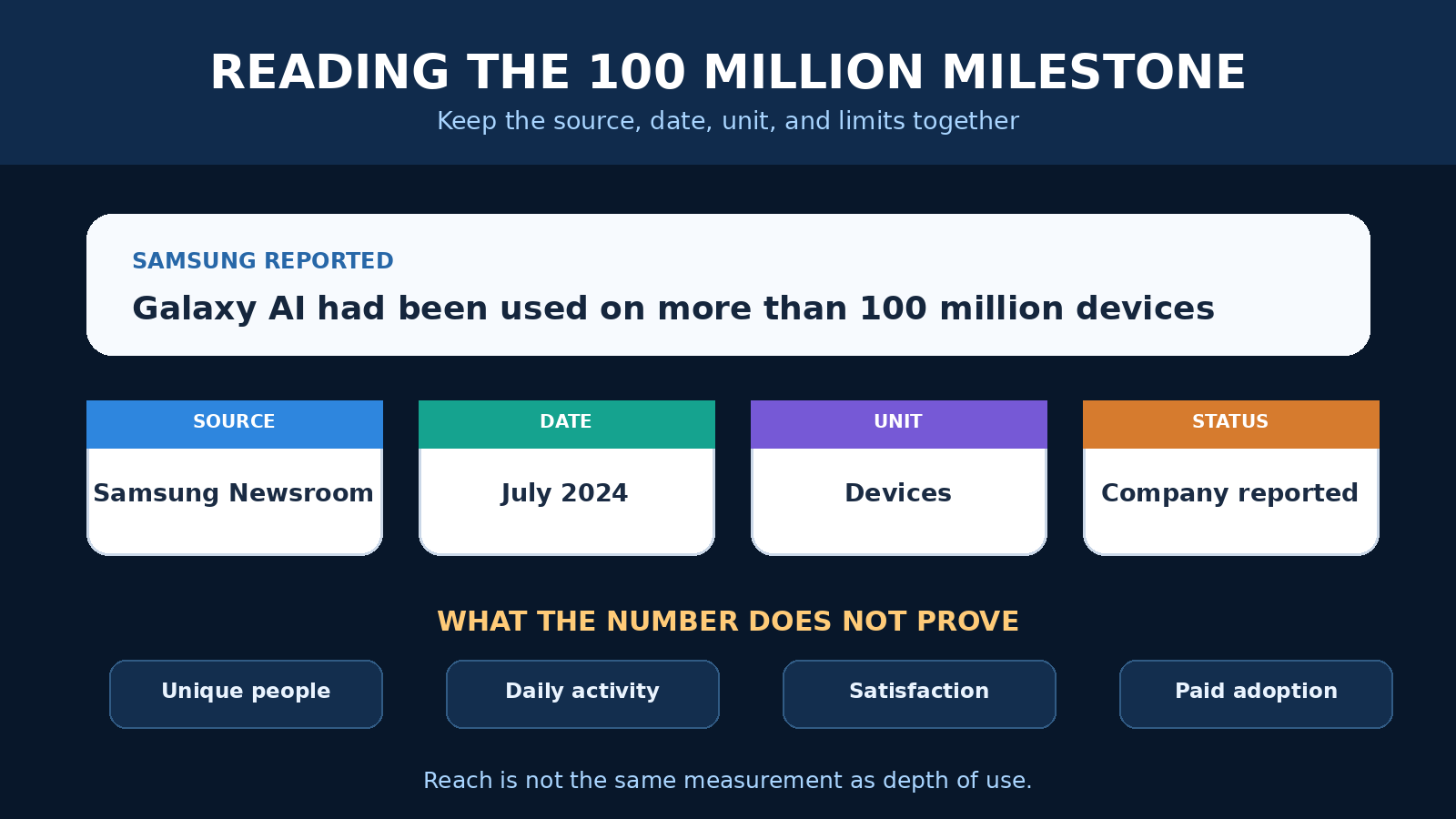
In a landmark announcement that signals the mainstream adoption of artificial intelligence, Samsung revealed this week that its Galaxy AI features have been activated on 100 million devices worldwide. This milestone represents more than a marketing achievement—it demonstrates that consumers are ready to embrace AI in their daily lives when privacy, performance, and practicality align.

The 100 Million Milestone: What It Really Means

Reaching 100 million active users is a significant achievement in the technology industry. To put this in perspective, this user base rivals the population of several European countries combined. More importantly, these aren’t just trial users or passive installations—these are people actively engaging with AI features on a daily basis.

Samsung’s announcement comes at a critical moment in the AI industry. While companies like OpenAI and Google have captured headlines with powerful cloud-based AI models, Samsung has taken a different approach. By processing AI capabilities directly on the device rather than in the cloud, Samsung has addressed one of the biggest barriers to AI adoption: privacy concerns.

The 100 million figure represents devices across Samsung’s ecosystem, including the Galaxy S24 series, Galaxy Z Fold and Flip models, and select Galaxy S23 devices through software updates. This broad availability has democratized access to AI capabilities that were previously limited to specialized applications or cloud-based services.

Why On-Device AI Changes Everything

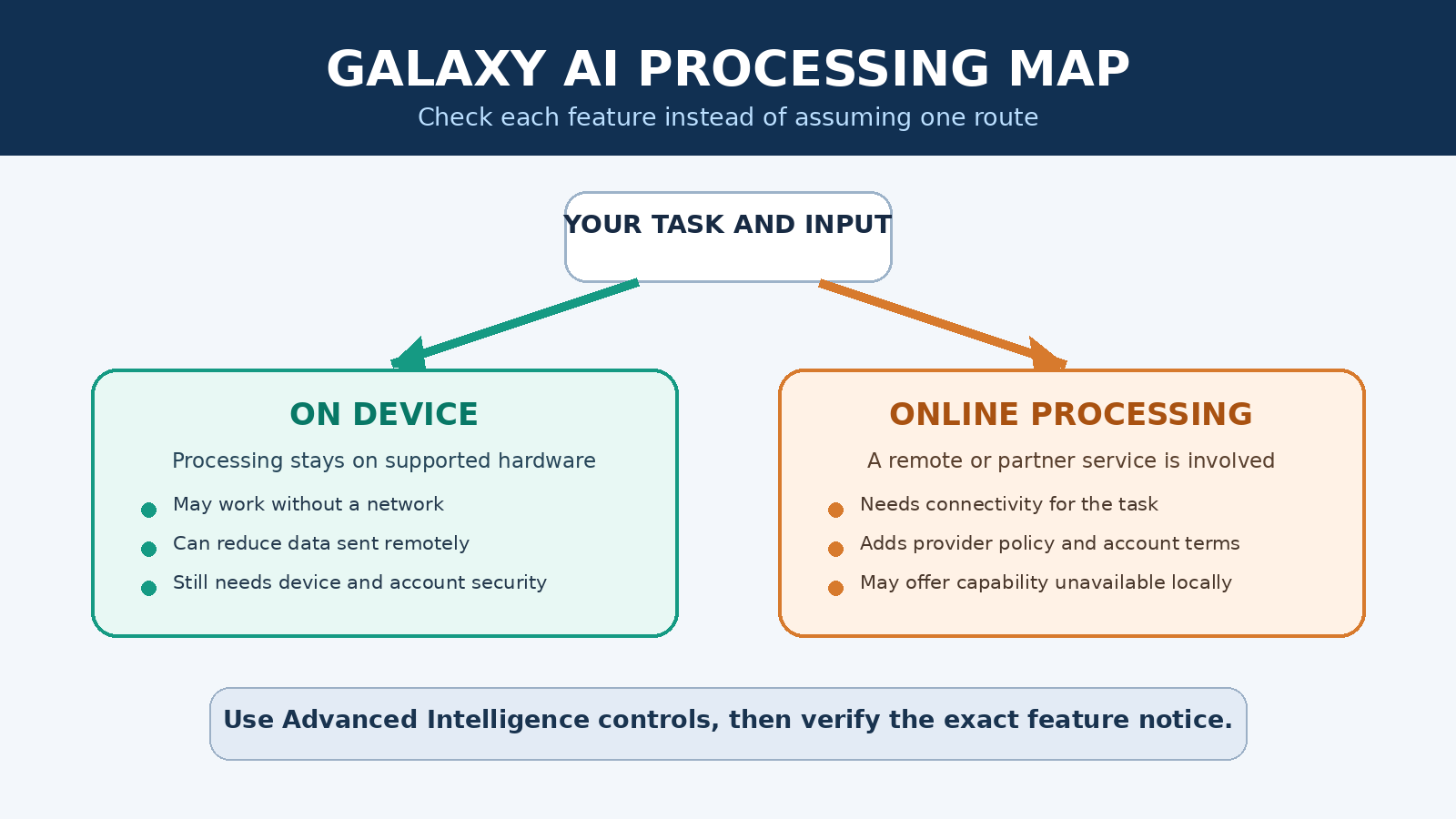
Samsung’s decision to prioritize on-device AI processing represents a fundamental shift in how we think about artificial intelligence. Traditional AI services send your data to remote servers for processing, raising concerns about privacy, security, and data ownership. Samsung’s approach keeps your data on your device, addressing these concerns while delivering powerful capabilities.

The technical challenges of running AI models on mobile devices are significant. Smartphones have limited processing power, memory, and battery life compared to data center servers. Samsung has addressed these challenges through a combination of efficient neural network architectures, dedicated AI hardware (Neural Processing Units), and clever software optimization.

The benefits of this approach are substantial. Users can access AI features without an internet connection, ensuring functionality in remote areas or during network outages. Processing happens instantly, without the latency of cloud communication. Most importantly, sensitive data—personal photos, private messages, confidential documents—never leaves the device.

Deep Dive: Galaxy AI Features Users Love

Samsung’s Galaxy AI suite includes several features that have resonated strongly with users. Understanding these capabilities helps explain why 100 million people have embraced the technology.

Live Translation: Breaking Down Language Barriers

The Live Translation feature enables real-time translation during phone calls and messaging, supporting up to 13 languages. Unlike previous translation tools that required awkward pauses or separate apps, Live Translation integrates seamlessly into the calling experience. When you receive a call in a foreign language, the feature automatically translates both incoming and outgoing speech, displaying text transcripts on screen while maintaining the natural flow of conversation.

This capability has proven particularly valuable for international business communication, travel, and connecting with family members who speak different languages. The on-device processing ensures that private conversations remain private, addressing concerns that have limited adoption of cloud-based translation services.

Note Assist: AI-Powered Productivity

Note Assist transforms how users interact with text on their devices. The feature can automatically format messy notes into organized structures, generate summaries of lengthy documents, correct spelling and grammar, and even create bullet points from rambling text. For students, professionals, and anyone who takes notes, this capability saves significant time and improves organization.

What makes Note Assist particularly powerful is its integration across the Samsung ecosystem. Notes created on a Galaxy phone sync with tablets and laptops, with AI enhancements available on every device. The feature learns from user behavior, improving its suggestions over time based on individual writing styles and preferences.

Generative Edit: Creative Control

Generative Edit brings Photoshop-level image manipulation to mobile devices. Users can remove unwanted objects from photos, expand image borders to change aspect ratios, move elements within images, and generate new background content. The AI understands image context and generates realistic content that matches lighting, perspective, and style.

This feature has transformed how users think about photography. A slightly flawed photo—marred by a photobomber, awkward composition, or unwanted background elements—can be transformed into a perfect image with just a few taps. The creative possibilities have resonated particularly with social media users who want their photos to look their best.

Chat Assist: Communication Enhancement

Chat Assist provides real-time suggestions for improving messages across any messaging app. The feature can adjust tone—making casual messages more professional or friendly messages more empathetic—check grammar and spelling, and suggest alternative phrasing. For professionals managing work communications and personal relationships through the same device, this capability helps maintain appropriate communication styles.

The feature integrates with Samsung Keyboard, making it available across all messaging platforms rather than being limited to specific apps. This universal availability has driven adoption, as users can access AI assistance regardless of whether they’re using WhatsApp, Telegram, SMS, or email.

The Competitive Response: Pressure on Apple and Google

Samsung’s success has sent shockwaves through the mobile industry, putting significant pressure on Apple and Google to accelerate their AI strategies. Both companies have announced AI initiatives, but neither has achieved the scale of adoption that Samsung has demonstrated.

Apple’s approach, branded “Apple Intelligence,” emphasizes on-device processing and privacy—similar to Samsung’s strategy. However, Apple’s rollout has been more limited, with AI features restricted to newer iPhone models and fewer capabilities available at launch. The company has promised broader availability over time, but Samsung’s 100 million user milestone sets a high bar.

Google, meanwhile, has taken a cloud-first approach with its Gemini AI. While this enables more powerful capabilities, it also raises privacy concerns that Samsung has successfully avoided. Google’s strategy makes sense given its cloud infrastructure strengths, but Samsung’s success suggests that consumers value privacy highly when it comes to AI.

The competitive dynamics are fascinating. Samsung, traditionally viewed as a hardware company, has outmaneuvered software giants Apple and Google in AI adoption. This success challenges assumptions about what differentiates mobile platforms and suggests that execution may matter more than raw technological capability.

Implications for Developers and the App Ecosystem

Samsung’s achievement creates significant opportunities for developers. The company has opened its Galaxy AI SDK, allowing third-party developers to build on-device AI capabilities into their applications. This democratization of AI technology could spark innovation in areas we haven’t yet imagined.

Developers can now create AI-powered applications that work offline, process data privately, and respond instantly. These capabilities were previously available only to large companies with massive cloud infrastructure. The playing field is leveling, enabling startups and independent developers to compete with tech giants.

The types of applications that benefit from on-device AI are diverse. Health apps can analyze medical data without sending sensitive information to external servers. Photography apps can offer advanced editing without requiring cloud processing. Educational apps can provide personalized tutoring that works without internet connectivity. The possibilities are vast.

Consumer Behavior and AI Acceptance

Samsung’s 100 million user milestone teaches us important lessons about consumer behavior and AI acceptance. The technology industry has often assumed that consumers prioritize capability above all else—more features, more power, more complexity. Samsung’s success suggests that consumers are more sophisticated, valuing privacy, reliability, and practical utility.

The features that have driven adoption—translation, note-taking, photo editing, message enhancement—aren’t flashy or futuristic. They’re practical tools that solve real problems people encounter daily. This grounded approach to AI, focusing on genuine utility rather than novelty, appears to resonate with mainstream consumers.

Privacy has emerged as a key differentiator. High-profile data breaches and growing awareness of surveillance capitalism have made consumers cautious about cloud-based AI services. Samsung’s on-device approach addresses these concerns directly, providing powerful capabilities without compromising privacy.

The Future of Mobile AI: What’s Coming Next

Samsung has announced plans to expand Galaxy AI to more device categories and regions throughout 2026. The company is also working with developers to integrate third-party AI experiences that maintain the privacy-first approach users have embraced. This ecosystem strategy could create network effects that strengthen Samsung’s position.

The future likely holds a hybrid approach to AI, where routine tasks run on-device while complex queries leverage cloud resources. Samsung’s current success positions it well for this evolution, as the company has demonstrated expertise in both on-device processing and cloud integration through its broader services ecosystem.

We can expect AI capabilities to become even more deeply integrated into mobile operating systems. Rather than being distinct features you activate, AI will become ambient—constantly working in the background to enhance your experience, anticipate your needs, and simplify your interactions with technology.

The competition will intensify. Apple and Google won’t cede this market without a fight, and new players may emerge with innovative approaches. But Samsung’s 100 million user milestone establishes it as a leader in consumer AI adoption, a position that will be difficult to displace.

Conclusion: The AI Era Has Arrived

Samsung’s announcement that Galaxy AI has reached 100 million users marks a watershed moment in the adoption of artificial intelligence. This isn’t just a corporate milestone—it’s evidence that AI has transitioned from experimental technology to mainstream utility.

The success factors are instructive: practical features that solve real problems, on-device processing that protects privacy, and seamless integration into daily workflows. Samsung’s approach demonstrates that AI doesn’t need to be flashy to be transformative—it just needs to work reliably and respect user privacy.

As we look toward the future, one thing is clear: AI will be an integral part of our mobile experience. Samsung’s 100 million users represent just the beginning. The AI era has arrived, and it’s changing how we communicate, create, and interact with technology in profound ways.

The question is no longer whether AI will transform mobile computing, but how quickly the transformation will occur. With 100 million users already embracing Galaxy AI, that transformation is happening faster than many anticipated. The future is here, and it’s powered by artificial intelligence.

Amazon Warehouse Robots in 2026: What Is Deployed and What AI Does

0

Amazon Warehouse Robots in 2026: What Is Deployed, What AI Does, and What the Numbers Mean

Amazon’s warehouse robotics story is easy to flatten into a headline about machines taking over a building. The reality is more specific and more interesting. A fulfillment center is not run by one all-purpose robot. It uses a collection of mobile drive units, robotic arms, storage systems, cameras, sensors, planning software, and employee workstations. Each component has a bounded job, such as moving an inventory pod, selecting an item, sorting a package, or carrying a loaded cart.

As of August 2026, Amazon says it has deployed more than 1 million robots across an operations network that includes more than 300 facilities worldwide. That is a company-reported fleet milestone, not a count of humanoid robots and not proof that every facility has the same level of automation. The fleet includes several different machine types accumulated since Amazon acquired Kiva Systems in 2012. It also includes systems that operate in restricted robotic areas as well as newer machines designed to move around people.

The clearest way to understand Amazon warehouse robots is to follow the work. Inventory must be stored, brought to a picker, consolidated, packed, sorted, and moved toward a loading dock. Amazon has developed specialized systems for several of those steps. AI and computer vision matter, but they do not erase the distinctions between a robot that follows floor markers, an arm that recognizes products, and software that coordinates traffic.

Amazon mobile warehouse robots carrying inventory pods through a fulfillment center
Amazon’s robotics fleet contains specialized machines for moving inventory, packages, and carts rather than one universal warehouse robot.

The million-robot milestone needs context

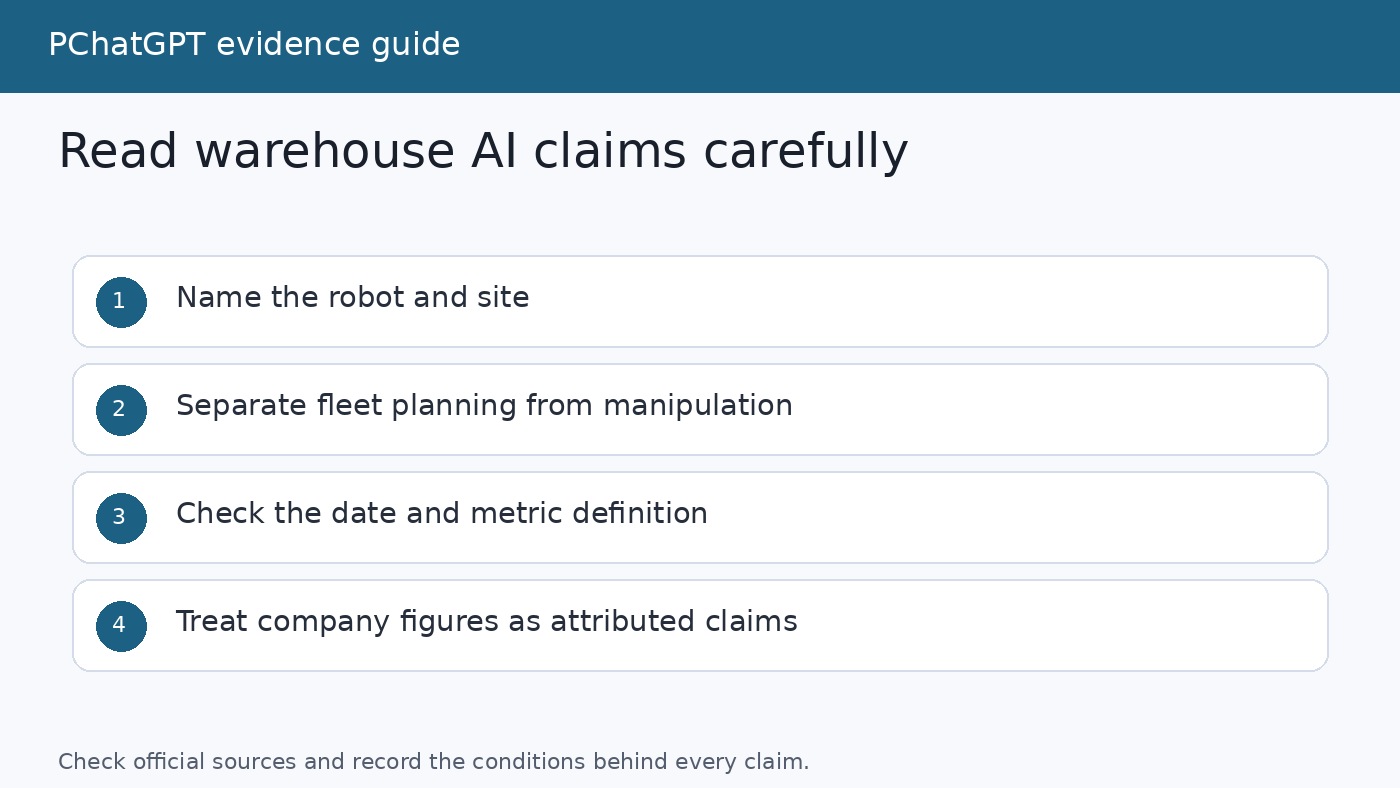
Amazon announced its one millionth deployed robot in 2025, saying that the unit went to a fulfillment center in Japan. The same announcement described the network as spanning more than 300 facilities. Those figures establish the breadth of Amazon’s deployment, but they do not reveal how many robots are active at a typical site, how utilization varies, or how much of each order is handled automatically.

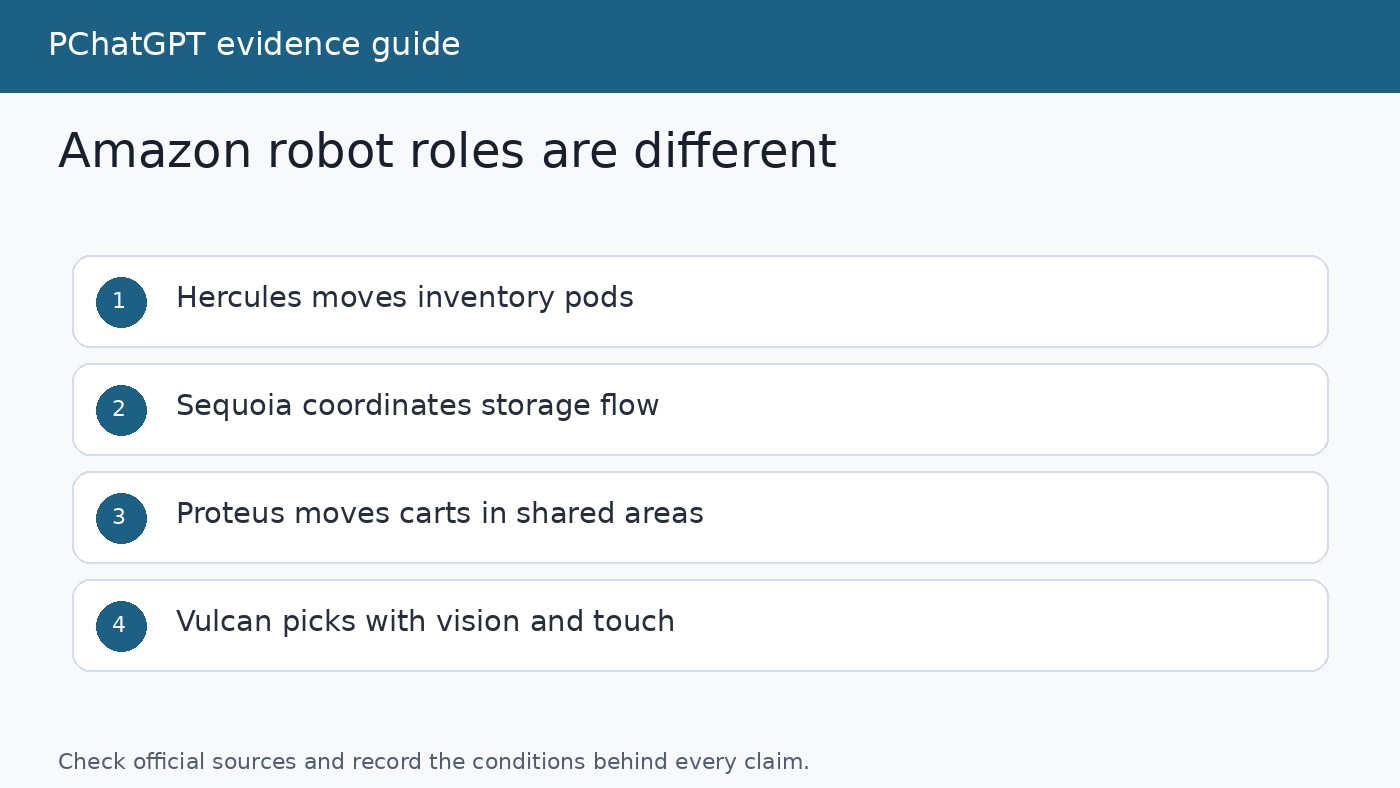
There is another reason to read the number carefully. Amazon uses the word robot for machines with very different capabilities. Hercules is a drive unit that lifts and moves inventory pods. Pegasus handles individual packages with a precision conveyor. Proteus carries carts through open areas. Sparrow, Robin, and Cardinal are robotic arms with different handling and sorting roles. Counting all of them together is useful for a fleet milestone, but the total does not describe one uniform level of intelligence.

Amazon has also published figures at different times as its fleet grew. An older Vulcan article refers to more than 750,000 robots, while the company’s updated robotics overview and DeepFleet announcement use more than 1 million. The newer figure should be used for the current fleet total. The older figure remains relevant only as historical context or as part of a claim tied to the date of that article.

How inventory comes to people

The core Amazon robotics idea predates today’s generative AI enthusiasm: move storage to a person rather than send a person walking through long aisles. Hercules drive units locate pods containing inventory and bring them to employees who select ordered items. Amazon says Hercules can lift and move as much as 1,250 pounds of inventory. It makes local movement decisions while receiving overall direction from centralized planning software. A forward-facing 3D camera helps it distinguish people, pods, robots, and other objects, while encoded markers on the floor provide position and navigation references.

Titan serves a related role for larger or bulkier goods. Amazon describes it as able to lift twice as much as Hercules. Like Hercules, Titan operates on a restricted robotics floor. This is a meaningful boundary. These machines are not freely roaming coworkers in every aisle. Their working area and navigation method are designed around a controlled environment.

Sequoia expands that goods-to-person model into an integrated inventory system. It combines mobile robots, gantries, robotic arms, containerized storage totes, and employee workstations. Mobile robots transport totes to the storage structure or send them to an employee who picks an item for an order. The workstation presents work between mid-thigh and mid-chest height, an area Amazon calls the ergonomic power zone. The aim is to reduce frequent overhead reaching and low squatting.

Amazon says Sequoia can identify and store incoming inventory up to 75% faster and can reduce order processing time by up to 25% when integrated with other technologies. Those percentages describe improvements reported by Amazon for a process and system configuration. They should not be translated into a claim that every Amazon order is 75% faster or that customer delivery time falls by the same amount. Delivery also depends on inventory placement, transport capacity, distance, demand, and the final mile.

The Shreveport, Louisiana, fulfillment center shows what a heavily integrated site looks like. Amazon says the facility opened in 2024 with eight robotics systems, and that its Sequoia installation can hold more than 30 million items. Thousands of mobile robots and multiple robotic arms bring goods to ergonomic stations. This is an important example of dense automation, but it should not be treated as a template already present in every building. Amazon says its newer systems were engineered for integration into existing facilities, which describes a scaling path rather than a completed network-wide conversion.

Robotic arms do different jobs

Once individual items and packages must be handled, the problem changes. A drive unit can move a pod without understanding every product inside it. A robotic arm needs to find a target, select a contact point, grip it, move it, and verify the result. Amazon uses several arms because picking loose retail products is not the same task as sorting closed shipping boxes.

  • Sparrow identifies individual products with AI and computer vision, then moves them from containers into the appropriate totes. Amazon’s Shreveport report says its latest version can handle more than 200 million unique products across varied shapes, sizes, and weights. That is a stated product-handling range, not a claim that every item can be picked successfully in every arrangement.
  • Robin sorts packed orders. It lifts packages from conveyor belts and places them on robotic drive units, while diverting damaged packages for quality control.
  • Cardinal selects a package from a pile delivered through a chute, lifts it using suction, reads the label, and places it in the correct cart. Amazon says Cardinal can handle packages weighing up to 50 pounds.
  • Vulcan works inside densely packed inventory pods. It can both stow and pick, combining cameras, suction, custom end-of-arm tools, and force feedback.

Vulcan is especially useful for seeing where vision alone stops. For stowing, its tool pushes existing products aside, senses contact force, grips the new item with paddles, and feeds it into a compartment. For picking, another arm uses a camera to locate the requested item and select a suction point. The camera then checks that the target, and not an extra product, was removed. Amazon says Vulcan can pick and stow about 75% of the item types held in its fulfillment centers at speeds comparable to front-line employees.

That 75% figure also exposes a practical boundary. Vulcan is not presented as infallible or universal. Amazon says it can identify cases it cannot handle and ask a human partner to step in. Its current ergonomic focus is the highest and lowest rows of storage pods, where people would otherwise use a step ladder or crouch. The human interaction is therefore part of the operating design, not merely a transition phase hidden from view.

Amazon Vulcan robotic arm using vision, suction, and force sensors to pick an item from a storage pod
Vulcan combines computer vision with force feedback, while handing difficult cases to an employee.

Proteus changes where a mobile robot can work

Proteus is Amazon’s first fully autonomous mobile robot. In Amazon’s terminology, that means it can navigate freely within open, unrestricted parts of a site, using sensors to detect and avoid obstacles. The original version moves heavy carts from outbound areas toward loading docks and can work around employees. This differs from Hercules and Titan, which operate in restricted robotic zones and use floor markers as navigation coordinates.

The distinction matters because safe navigation around people is not just object detection. Amazon Science describes autonomous mobility as a problem of semantic understanding. Cameras and lidar produce pixels, depth readings, and points in space. Machine learning helps classify those observations as a person, pillar, cable, forklift, pod, or another robot. Planning software can then treat a fixed pillar differently from a person whose path may change. Researchers also consider whether a robot’s motion is legible and comfortable to nearby people, not simply whether it avoids physical contact at the final moment.

Amazon has announced a next-generation Proteus that is intended to work beyond dock areas and accept plain-language task instructions. An employee could describe what needs to move, while the system determines priority, route, and timing. However, Amazon’s current page says this version is being piloted in its labs and is planned for European deployment in the first half of 2027. It should not be described as a network-wide 2026 deployment. The original Proteus is operational, while the conversational version remains a forthcoming system.

What AI does inside the warehouse

AI is not one control layer that independently runs the fulfillment center. It appears in specific perception, prediction, planning, and coordination tasks. Computer vision can classify a product or package, estimate where an arm should grip, verify a pick, and help a mobile robot distinguish obstacles. Machine learning can improve route choices or estimate how objects and people may move. Force data helps Vulcan learn physical interactions that images alone cannot describe.

DeepFleet sits at the fleet coordination level. Amazon calls it a generative AI foundation model trained on inventory movement data from its sites and built with AWS tools including Amazon SageMaker. The company compares its role to traffic management: it coordinates robot movement to reduce congestion and find more efficient paths. Amazon says it will improve robotic fleet travel time by 10%.

That wording calls for restraint. A 10% travel-time improvement is not the same as a 10% reduction in total order time, labor, energy use, or delivery time. Robot travel is one part of a longer chain. Amazon links the expected improvement to lower operating costs, faster delivery, and lower energy use, but it does not publish enough detail in that announcement to independently calculate those downstream effects. The honest interpretation is that 10% is Amazon’s stated fleet travel efficiency improvement for DeepFleet, not a universal logistics outcome.

This boundary resembles a broader lesson in deploying AI systems: useful autonomy is usually constrained by a defined task, data, permissions, monitoring, and escalation. Our guide to building AI agents that work in production explains why a controlled workflow is more credible than open-ended autonomy. Readers comparing software agents can also see the same distinction between assistance and unrestricted action in our AI browser agents safety guide.

People remain part of the operating model

Amazon frames its robots as tools that reduce repetitive movement, heavy lifting, awkward reaches, and long walking distances. The named examples support a narrower version of that claim. Hercules brings pods to pickers. Cardinal handles packages weighing up to 50 pounds. Proteus moves loaded carts. Sequoia places work in an ergonomic height range. Vulcan targets top and bottom storage rows and escalates items it cannot manage.

These examples do not settle the much larger question of automation’s total effect on employment. Amazon reports that more than 700,000 employees have participated in upskilling initiatives since 2019. It also says its Shreveport facility needs 30% more employees in reliability, maintenance, and engineering roles than its traditional fulfillment centers. That is a statement about certain role categories at a particular advanced facility, not evidence that robotics always raises total employment or produces the same mix of jobs everywhere.

The safest conclusion is operational: the systems described by Amazon still rely on employees to pick and pack at workstations, supervise flow, handle exceptions, maintain equipment, perform quality control, and make site-level decisions. Some tasks are automated, others are reshaped, and new technical work is introduced. Claims about broader job creation, displacement, or long-term workforce totals require evidence beyond product announcements.

How to read Amazon’s robotics claims

First, separate deployed systems from pilots and plans. Hercules, Titan, Sparrow, Robin, Cardinal, the original Proteus, Sequoia, and Vulcan all have documented operational deployments, although their presence varies by site. The next-generation conversational Proteus is a lab pilot with deployment planned for 2027. Amazon also updated its Blue Jay announcement in February 2026 to say the system is no longer used in operations, even though underlying technology may support other work. A product name in an announcement is not permanent proof of current deployment.

Second, identify the denominator behind every percentage. Sequoia’s 75% concerns the speed of identifying and storing received inventory. Vulcan’s roughly 75% concerns the variety of item types it can pick and stow. DeepFleet’s 10% concerns robot fleet travel time. These numbers measure different things and cannot be added together or converted directly into delivery speed.

Third, distinguish company evidence from independent evaluation. Amazon’s official pages are the primary sources for what the company built, where it says a system is running, and how it describes design goals. They are not independent audits. Phrases such as “Amazon says,” “the company reports,” and “Amazon expects” are not verbal clutter here. They tell the reader who measured or forecast the result.

Finally, look for exception handling. A credible warehouse system does not need to solve every physical problem. Vulcan can call a person when it cannot move an item. Restricted drive units operate inside controlled zones. Proteus uses sensors and planning to work in shared space. Those boundaries are evidence of engineering maturity because they define where a system should act and where another process must take over.

What Amazon’s warehouse robot strategy amounts to in 2026

Amazon is deploying robotics at substantial scale, but scale comes from combining many narrow systems. Mobile robots move shelves, totes, packages, and carts. Arms identify, pick, consolidate, and sort. Integrated storage systems coordinate those machines around ergonomic employee stations. AI contributes perception and route planning, while DeepFleet targets traffic across the mobile fleet. People handle exceptions, operate workstations, monitor flow, maintain equipment, and make decisions that the machines do not own.

The most important 2026 development is therefore not a humanoid robot replacing the warehouse. It is tighter coordination among specialized hardware, software, and human work. The million-robot figure shows how widely Amazon has adopted robotics. The operational details show what those robots actually do, and just as importantly, what they do not do.

FAQ

How many warehouse robots has Amazon deployed?

Amazon says it has deployed more than 1 million robots across its operations network, spanning more than 300 facilities worldwide. The count includes multiple kinds of mobile robots and robotic systems, not one model and not only humanoid machines.

Are Amazon’s warehouse robots fully autonomous?

Some are autonomous within defined conditions, but the fleet is not uniformly autonomous. Proteus can navigate open areas around people. Hercules and Titan work on restricted robotic floors and use encoded floor markers while taking overall direction from planning software. Robotic arms perform bounded picking or sorting tasks and may require human exception handling.

Does DeepFleet control every Amazon warehouse robot?

Amazon presents DeepFleet as a foundation model for coordinating movement across its mobile robot fleet. The company says it will improve robot travel time by 10%. That does not mean DeepFleet performs every physical task or controls every arm, workstation, and warehouse decision.

Will Amazon’s next-generation Proteus be deployed in 2026?

Amazon’s current announcement says the conversational next-generation Proteus is being piloted in its labs, with European deployment planned for the first half of 2027. The original Proteus is already operational at selected fulfillment centers, but the plain-language version should not be presented as broadly deployed in 2026.

Sources

GPT Multimodal Capabilities: ChatGPT vs API Guide

0

“Multimodal GPT” sounds as if one model accepts every kind of media through one universal box. That is not how OpenAI’s products are organized. In ChatGPT, you can add a photo, upload a document, speak in Voice, and, on some mobile Voice experiences, share video or a screen. In the API, image analysis, image generation, transcription, speech output, and live audio use documented models and endpoints. The useful skill is knowing which surface handles the input you have.

This guide explains the original GPT-5 multimodal claim in current terms. GPT-5 improved visual reasoning when OpenAI introduced it in August 2025, but the original GPT-5 models have since been retired from ChatGPT. OpenAI’s current model release notes list newer GPT-5 family options, while the API model page now calls GPT-5 a previous model and recommends the latest model family. The practical workflows below still apply: choose the product surface first, give the model readable evidence, and verify the answer against the source material.

What GPT multimodal capability means

A multimodal system works with more than one form of information. For ordinary users, that may mean combining a written question with a photograph or discussing an image during a spoken conversation. For a developer, it may mean sending text and image inputs to a vision-capable model, calling a speech-to-text model for audio, or opening a Realtime session with an audio-capable model.

OpenAI’s GPT-5 launch article reported stronger performance across visual, video-based, spatial, and scientific reasoning evaluations. It gave examples such as interpreting a chart, summarizing a photo of a presentation, and answering questions about a diagram. That is evidence about model evaluation and visual reasoning. It does not mean every ChatGPT upload box accepts raw video files, nor does it mean the API model named gpt-5 produces speech by itself.

There are three layers to keep separate:

  • The model capability describes what a model can process or produce.
  • The product surface describes what ChatGPT or an API endpoint lets you submit.
  • Your plan, workspace settings, region, app version, and usage limits can change which controls appear.

This distinction prevents a common mistake: reading a benchmark result, then assuming the same input is accepted in every product. Check the current model page or Help Center article for the surface you are using.

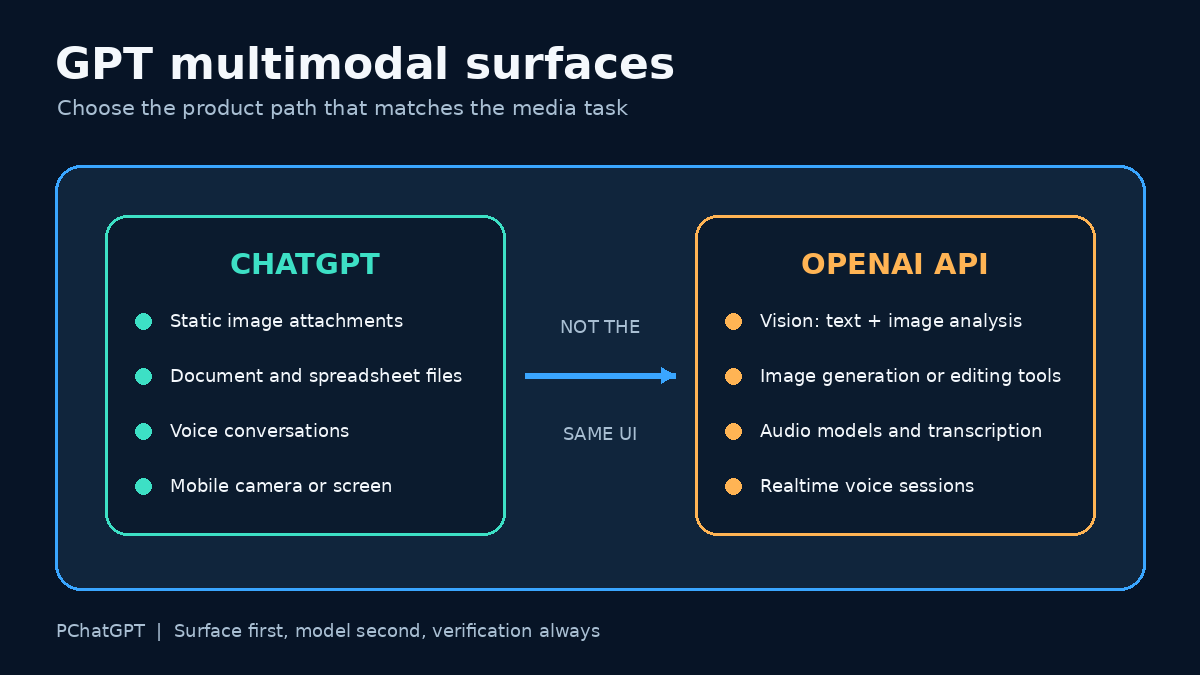
Map of GPT multimodal capabilities across ChatGPT image uploads, file analysis, Voice, and separate OpenAI API media endpoints
Start with the surface, not the word multimodal. ChatGPT and the API expose media through different controls.

ChatGPT: images, files, and Voice are different controls

Static image input in a normal chat

In a regular ChatGPT conversation, use the plus button to add photos and files. You can also drag an image into the text area or paste one from the clipboard. OpenAI’s current ChatGPT Image Inputs FAQ says image inputs can be used to ask about objects, analyze documents shown in an image, or continue a discussion with more images in later turns.

The same Help Center page draws a firm boundary: standard image input supports static images, not video. It lists PNG, JPEG, and non-animated GIF files, with a 20 MB limit per image. Availability details can change, so the control visible in your own account is the final check.

A good image request identifies the evidence and the desired output. Instead of “analyze this,” try: “Read the labels in this chart, list the two largest changes, and quote the axis titles before you interpret the trend.” That prompt gives the model a sequence it can follow and gives you details to verify.

Documents and spreadsheets

A file upload is not identical to a photo upload. OpenAI’s File Uploads FAQ describes document tasks such as comparing files, summarizing a paper, extracting references, and analyzing a spreadsheet. It also warns that visual retrieval inside PDFs depends on the plan. ChatGPT Enterprise supports visual retrieval for PDFs, while other plans and document types may use text-based retrieval that discards embedded images.

That detail matters when a PDF contains diagrams. If ChatGPT discusses the text but misses a figure, export the relevant page as a clear image and attach it separately. Tell the model which page, table, or chart matters. Do not assume it saw every visual element simply because the PDF uploaded successfully.

Voice, live video, and screen sharing

ChatGPT Voice is its own product experience. The current ChatGPT Voice guide describes Live, Advanced, and Standard options. Live supports spoken conversation and can work with text and images when those features are available for the account. At launch, Live does not support video or screen sharing. Eligible subscribers can still use video or screen sharing in Advanced on the iOS and Android apps.

This is why “Can GPT see video?” needs a more precise answer. OpenAI evaluated GPT-5 on video-based reasoning, but a normal ChatGPT image upload accepts static images only. Mobile screen or camera sharing may be available inside an eligible Advanced Voice session. Those are different claims about different surfaces.

For a broader walkthrough of the current consumer product, see the site’s ChatGPT cheat sheet for chat, files, Voice, and memory. If your main interest is spoken interaction, the ChatGPT Voice and GPT-Live guide covers the Voice interface in more depth.

The API: assemble the media path you need

The API is not a mirror of the ChatGPT interface. Developers choose a model, endpoint, input format, and output format. OpenAI’s current GPT-5 model page describes GPT-5 as a previous API model and points developers to the latest GPT-5 family. If you maintain an existing GPT-5 integration, check its model page before changing production code. A newer ChatGPT model name does not automatically change your API request.

Image analysis

The OpenAI Images and Vision guide documents image analysis through the Responses API and Chat Completions. An image can be supplied by URL or as a Base64 data URL, and multiple images can appear in one request. Images count toward token usage. The guide also distinguishes analysis from generation: vision-capable language models can interpret image input, while GPT Image models generate or edit images.

For reliable image analysis, prepare the input before you tune the prompt:

  1. Crop away irrelevant borders while keeping legends, labels, and units.
  2. Use a readable resolution and correct rotation.
  3. State whether the model should transcribe, compare, classify, or explain.
  4. Ask it to identify unreadable regions instead of guessing.
  5. Check names, counts, measurements, and small text yourself.

OpenAI’s documentation lists known vision limits. Models can struggle with rotated text, precise spatial localization, some graph styles, panoramic images, object counts, and unclear non-Latin text. A confident sentence is not proof that a tiny label was read correctly.

Audio input and output

Audio uses a separate documented path. OpenAI’s Audio and Speech guide separates speech to text, text to speech, speech to speech, and speech translation. Request-based audio APIs fit bounded files and generated speech. Realtime sessions fit live, low-latency conversations. The guide names current audio-capable models for those tasks rather than presenting ordinary GPT-5 as a universal audio endpoint.

A production audio workflow should decide whether it needs a transcript or a live conversation. For meeting notes, request-based transcription is easier to store, review, and correct. For a voice agent that must respond while a person is speaking, use a Realtime architecture and handle partial events, interruptions, network conditions, and session state.

Video input

Do not infer a public raw-video endpoint from a video benchmark. If the current model and endpoint documentation does not list video input for your chosen request, convert the task into supported evidence. A common editorial method is to sample representative frames, retain timestamps, pair them with a transcript, and ask the model to analyze only those supplied frames. This is a workflow design, not an OpenAI guarantee that sampled frames fully represent a video.

For motion-sensitive work, choose frames around the event rather than one thumbnail. Include the timestamp in each filename or prompt label. Then compare the model’s account with the original clip. Fast actions, off-screen audio, transitions, and events between samples can otherwise disappear.

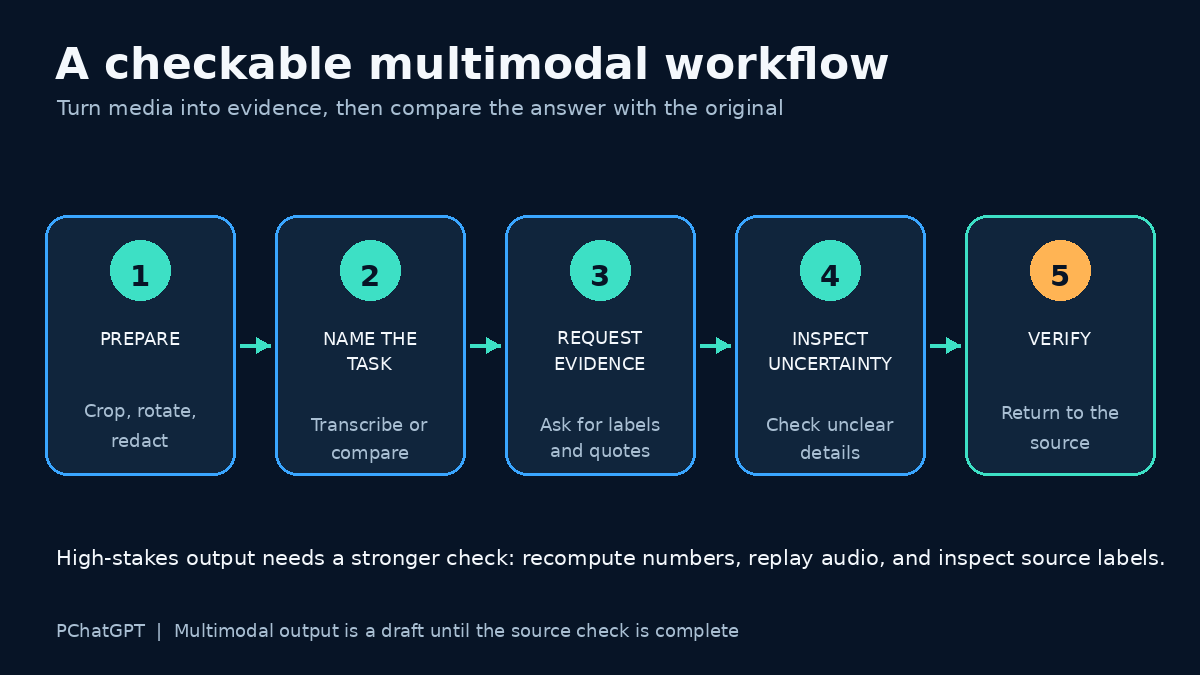
Verification loop for GPT multimodal work: prepare media, name the task, request evidence, inspect uncertain details, and compare with the original
A useful multimodal answer starts with prepared evidence and ends with a human check against the original media.

A practical workflow for mixed media

Suppose you have a photographed dashboard, a PDF report, and a short spoken explanation. Sending everything at once makes errors harder to diagnose. Process each source according to what it contains.

  1. Upload the dashboard image and ask for a literal transcription of headings, axes, dates, and values. Correct any reading errors first.
  2. Upload the report and ask for the passages that define the metrics. If its charts matter and your plan does not use visual PDF retrieval, attach those pages as images.
  3. Transcribe the recording through the appropriate Voice or audio path. Review names, figures, and technical terms in the transcript.
  4. Provide the corrected extracts in one final request. Ask for a comparison table that cites which input supports each conclusion.
  5. Open the original sources and verify every consequential number before using the result.

This staged approach is slower than one vague upload, but it shows where a mistake entered. It also lets you replace one bad transcription without repeating the whole task.

Prompt patterns that produce checkable answers

Use prompts that make evidence visible. These are editorial examples, not official OpenAI commands.

For a chart

“First transcribe the chart title, both axes, legend labels, and visible values. Mark any unreadable item as uncertain. Then describe the trend in five sentences. Do not estimate a value that is not labeled.”

For a screenshot of an error

“Copy the exact error message from the screenshot. Separate what the image shows from your diagnosis. Give two possible causes and one verification step for each. Do not claim a fix succeeded.”

For several product photos

“Treat each image as a separate item named A, B, and C. List visible differences only. Include color, ports, labels, and obvious damage. If an angle hides a feature, write not visible.”

For a voice transcript plus notes

“Compare the transcript with my notes. Make a list of agreements, contradictions, and missing decisions. Quote the relevant sentence for each contradiction. Flag names or numbers that may be transcription errors.”

Accuracy, privacy, and review

Multimodal inputs often contain more private information than a typed question. A screenshot may reveal account names, browser tabs, notifications, customer records, or location clues. Crop or redact unrelated details before uploading. For documents, remove hidden comments or pages that the task does not require. Follow your employer’s rules for confidential material and check OpenAI’s current data controls for the product and plan you use.

Accuracy checks should match the risk. A rough description of a vacation photo needs less scrutiny than a number copied from a financial chart. OpenAI’s image documentation warns about counting, spatial precision, and small or rotated text. The GPT-5 launch also says that language models can still make mistakes. For medical images, the ChatGPT image FAQ specifically says the feature is not suitable for specialized images such as CT scans and should not be used for medical advice.

Ask the model to expose uncertainty, but do not rely on self-reported confidence alone. Compare the answer with the original. For numbers, recompute totals. For quotations, search the document. For a diagram, inspect the arrows and labels. For audio, replay the segment around a doubtful name or amount.

How to choose the right surface

  • Use a normal ChatGPT image attachment for a static photo, screenshot, chart, or diagram.
  • Use ChatGPT file upload for document, presentation, or spreadsheet tasks, while checking whether embedded visuals are available to the plan.
  • Use ChatGPT Voice for spoken conversation. Check whether Live, Advanced, text, image, video, or screen sharing appears in your current account.
  • Use an API vision path when your application needs repeatable image analysis with structured requests.
  • Use audio-specific or Realtime API models for transcription, generated speech, or a live voice agent.
  • For unsupported video workflows, do not pretend a benchmark is an upload feature. Use a documented surface or build a reviewed frame-and-transcript process.

The original GPT-5 announcement was important because it documented better reasoning over visual and video-based evaluation tasks. The current lesson is more practical: “multimodal” does not erase product boundaries. Check the live documentation, select the right input path, and keep a human review step wherever a wrong reading would matter.

Frequently asked questions

Can I upload a video file to a normal ChatGPT conversation?

OpenAI’s ChatGPT Image Inputs FAQ says standard image input handles static images, not videos. Eligible subscribers may have live camera or screen sharing through Advanced Voice on supported mobile apps, which is a different feature from uploading a video file.

Does the GPT-5 API model accept audio directly?

OpenAI documents audio through audio-capable models, request-based audio APIs, and Realtime sessions. Do not assume a text-and-image GPT-5 request accepts or returns audio. Check the current model page and audio guide for the endpoint you plan to use.

Why did ChatGPT miss a chart inside my PDF?

Visual retrieval for PDFs depends on the plan. OpenAI says ChatGPT Enterprise supports visual retrieval for PDFs, while other plans and document files may use text-based retrieval that discards embedded images. Attach the chart page as a separate image when you need visual analysis.

How can I reduce errors in image analysis?

Use a clear, correctly rotated crop; preserve labels and units; name the exact task; ask for a transcription before interpretation; and verify small text, counts, measurements, and spatial claims against the original image.

Official OpenAI sources

Apple Ferret-UI 2: what it means for mobile AI interaction

0

Apple Ferret-UI 2 is research, not a consumer feature you can switch on in iOS. That distinction matters. The paper describes a multimodal large language model for understanding user interfaces across platforms, including iPhone, Android, iPad, web pages, and Apple TV. The practical question is not whether it has already changed every mobile app. The better question is what kind of AI tool becomes possible when a model can understand screens, text, icons, widgets, and user intent more precisely.

The older version of this article made the topic sound like a product launch. A more accurate reading is narrower and more useful. Ferret-UI 2 belongs to a line of work on UI understanding: recognizing elements on a screen, grounding a user request to a region, answering questions about an interface, and planning actions. Those abilities matter for accessibility, testing, app automation, and personal assistants, but they also need careful evaluation before they are trusted in real apps.

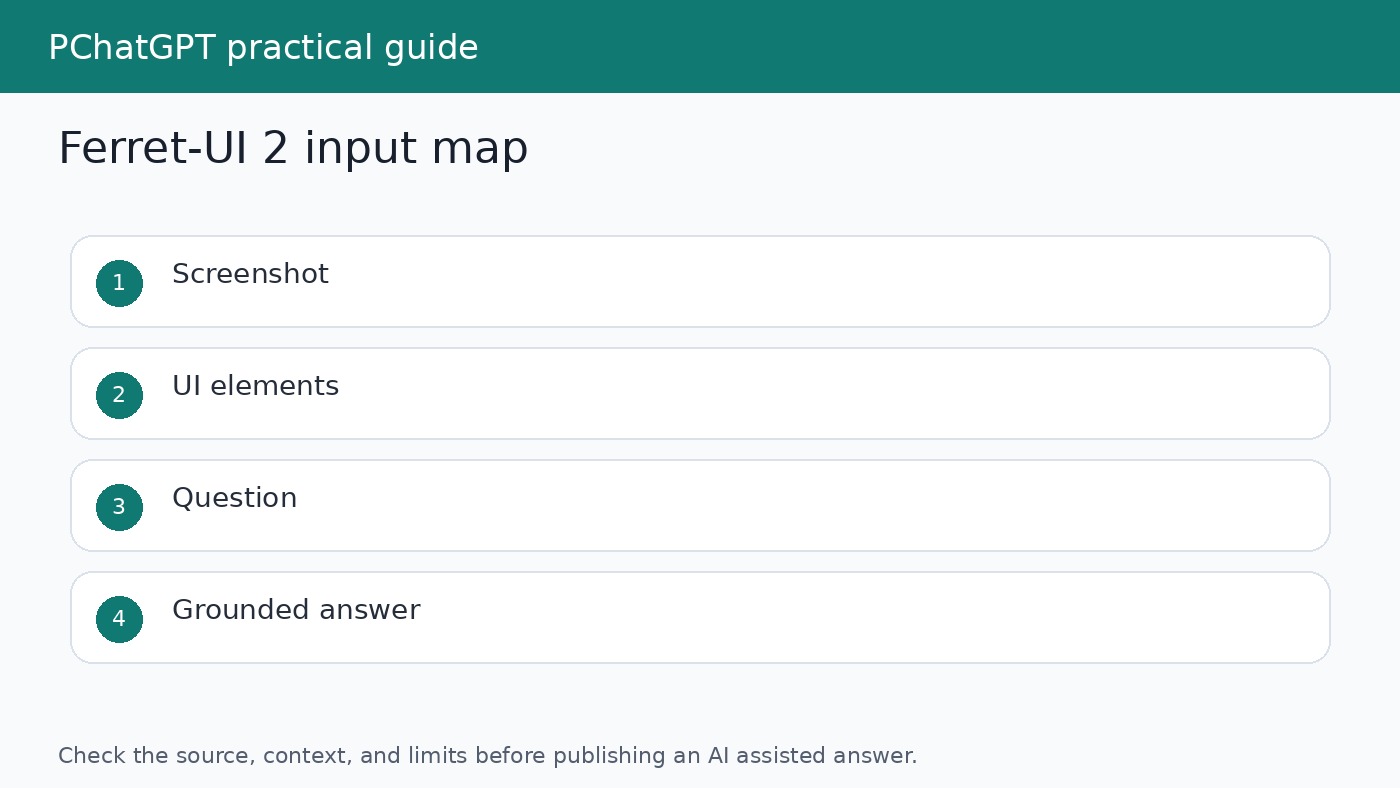
Diagram showing Ferret-UI 2 inputs from screenshots, text, icons, widgets, and user questions
Ferret-UI 2 research focuses on connecting screenshots, UI elements, text, and natural language questions.

What Ferret-UI 2 tries to solve

User interfaces are hard for AI systems because they combine visual layout, text, icons, hierarchy, and interaction rules. A button may be obvious to a human because of its position, color, label, and surrounding context. A model needs to connect those signals to the user request. If the user asks where to change privacy settings, the model has to understand both the words on the screen and the likely function of each element.

The Ferret-UI 2 paper says building a generalist UI understanding model is challenging because of platform diversity, resolution variation, element scale, and data limitations. A phone screenshot, a tablet layout, a web page, and a TV interface do not present information in the same way. A model trained too narrowly may perform well on one surface and fail on another.

Why cross platform UI understanding matters

Many AI assistant demos work best in controlled environments. Real users move across apps, browsers, devices, and screen sizes. A mobile assistant may need to understand a settings page, a checkout screen, a calendar app, and a web form. If the model only understands one screen style, it becomes brittle. Cross platform UI understanding is an attempt to make the model less dependent on a single app family or device format.

Ferret-UI 2 is interesting because the research frames UI understanding across several platforms. The paper describes training and evaluation across iPhone, Android, iPad, webpage, and Apple TV interfaces. That does not mean a single model is ready to control every app safely. It means the research problem is being treated as a general UI understanding task rather than a narrow screenshot labeling task.

The tasks behind the research

The paper discusses elementary tasks and advanced tasks. Elementary tasks include referring and grounding work, where the system links language to UI elements or regions. Advanced tasks include richer UI understanding, such as answering questions about the screen or reasoning about possible actions. These tasks are important because a useful AI assistant needs more than object recognition. It needs to connect the user request to the part of the screen that matters.

For example, a model might need to answer what a specific icon does, locate the option that changes a setting, or explain which field must be filled before a button becomes useful. Those examples sound simple, but they require visual recognition, OCR style text understanding, layout awareness, and task context at the same time.

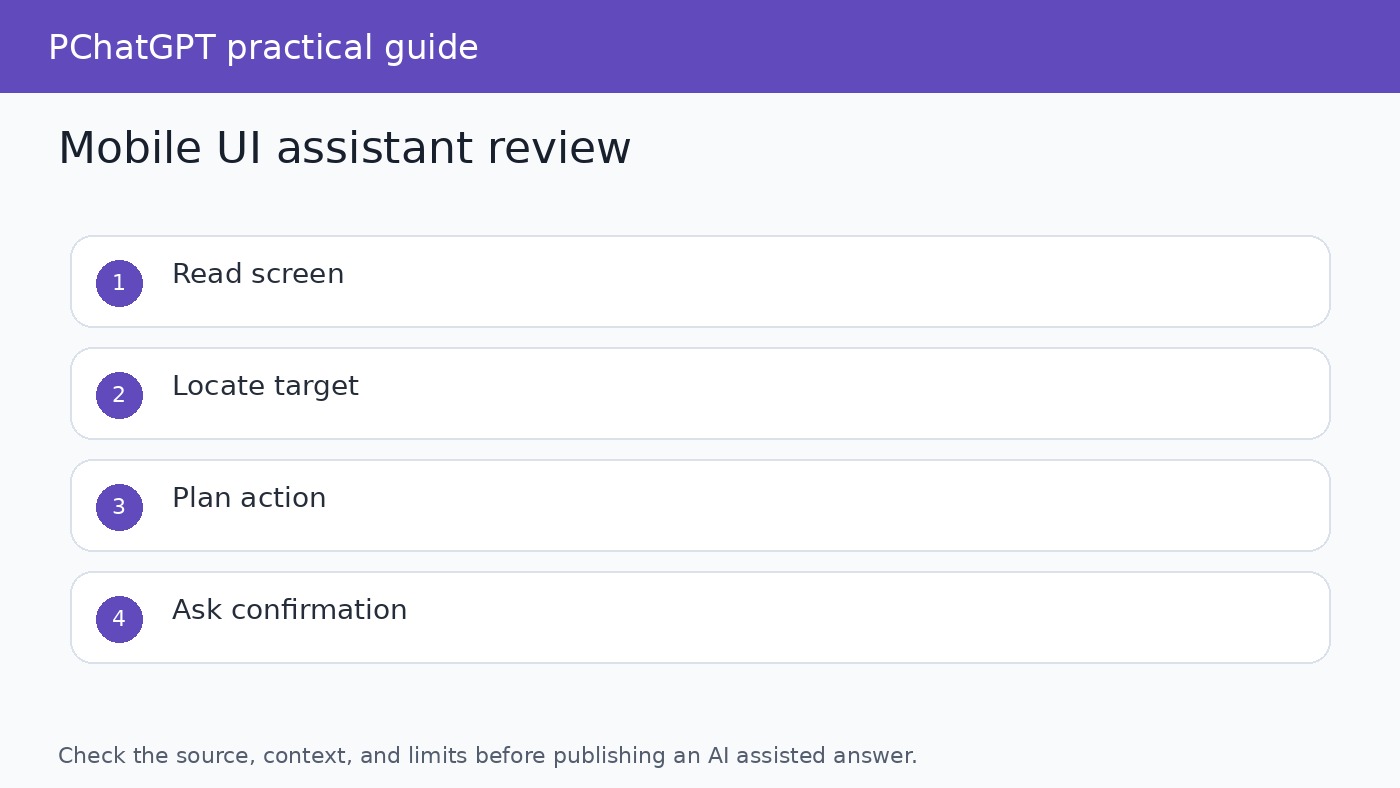
Checklist for evaluating a mobile UI AI assistant for screen reading, grounding, action planning, and review
A mobile UI assistant should be checked for screen reading, grounding accuracy, action planning, and human review.

What this could mean for app interaction

If UI understanding improves, AI tools could become better at explaining app screens to users. Instead of giving generic help text, an assistant could refer to what is visible: the selected tab, the disabled button, the missing field, or the warning message. That would be useful for onboarding, accessibility, support, and troubleshooting. It could also help people learn unfamiliar software without reading a long help article first.

Testing is another likely area. Developers and QA teams spend time checking whether screens behave as expected. A model that understands UI elements could help describe screen states, compare expected and actual layouts, and flag confusing flows. It would not replace formal testing, but it could make exploratory review faster and more understandable.

Why grounding is the hard part

Grounding means tying a natural language instruction to the correct part of the interface. If the model says “tap the settings button,” it should know which visible element it means. Bad grounding can frustrate users or cause harmful actions. In a mobile banking app, health app, or workplace admin tool, a wrong tap is not a harmless mistake. Any UI assistant needs strong confirmation and a clear boundary between explaining and acting.

This is why product claims around UI agents should be read carefully. Research progress does not remove the need for permissions, confirmations, accessibility review, security review, and user control. A model that can understand screens still needs rules about when it may act, when it must ask, and how it explains uncertainty.

What Ferret-UI 2 is not

Ferret-UI 2 is not a public Apple assistant feature described as available to iPhone users. It is not proof that every app can be controlled safely by AI. It is not a guarantee that a model can understand private app data without errors. The source documents describe research on UI understanding. Readers should avoid turning that into a product promise.

It is also not only about mobile phones. The paper includes multiple interface types, which is part of the point. The phrase mobile interaction is useful for readers because phones are where many people experience AI assistants, but the research scope is broader than one phone screen.

How to judge future UI AI tools

When a future AI tool claims it can operate an interface, ask four questions. First, what screens or platforms was it tested on? Second, can it point to the exact element it is referring to? Third, does it ask for confirmation before meaningful actions? Fourth, can the user inspect or undo what happened? These questions are more useful than asking whether the demo looked impressive.

For publishing and product evaluation, avoid vague phrases such as “revolutionizes mobile apps” unless the evidence shows a deployed product change. A research paper can be important without becoming a consumer feature. The honest version is more valuable for readers: Ferret-UI 2 shows one direction for multimodal UI understanding, and that direction could shape future assistants, testers, and accessibility tools.

Practical takeaways for AI tool users

If you build or review AI tools, keep UI understanding separate from general chat quality. A model may write well and still misunderstand a screen. Test with real screenshots, edge cases, small text, disabled controls, similar icons, and multi step flows. Ask the model to explain what it sees before asking it to recommend an action. That gives reviewers a chance to catch mistakes before the tool does anything.

If you are an everyday user, treat screen aware AI as assistance rather than authority. It may help explain a setting, summarize a visible page, or guide you through a workflow. Still, do not let any assistant make sensitive changes without reading the screen yourself. For related context on AI assistants and controls, see our guide to AI browser agent safety and our ChatGPT cheat sheet router.

The most useful lesson from Ferret-UI 2 is that interface understanding is becoming a serious AI research area. The next wave of assistants will not only answer text prompts. They will need to understand what people are looking at, what the screen allows, what the user intends, and what should remain under human control. That is a harder problem than making a chatbot sound helpful, and it is worth treating with care.

How writers should cover this research

When writing about Ferret-UI 2 or similar work, keep three labels separate: research capability, product availability, and user benefit. Research capability describes what the paper tested. Product availability describes whether a feature is shipping to users. User benefit describes what someone can actually do today. Mixing those labels creates inflated articles and disappointed readers.

A careful article can still be interesting. Explain the problem, show why UI grounding is difficult, describe the platforms studied, and name the checks future products will need. That gives readers a useful map without pretending the research has already become a finished assistant on their phone.

Where this connects to accessibility

Screen understanding is closely related to accessibility because many users already rely on software to describe interfaces, read text aloud, or support navigation. A multimodal UI model could help explain confusing screens in plainer language, but only if it is accurate and designed with user control. Accessibility work cannot depend on guesses. The assistant must identify what it sees, admit uncertainty, and let the user choose the next step.

This is also why evaluation needs real edge cases. Small labels, hidden states, disabled buttons, pop ups, and unusual layouts can change the meaning of a screen. A model that performs well on clean examples may still struggle when the screen is crowded or when two controls have similar names. Future tools should be judged on those ordinary messy cases, not only on polished demos.

Where this connects to app testing

For developers, UI understanding research can support better test review. A model may help describe what changed between two screens, identify whether a button is visible, or explain why a user flow feels confusing. That does not replace automated tests or human QA. It adds a layer of language around visual states, which can make bug reports easier to understand.

The useful workflow is modest: capture the screen, ask the model to describe the visible state, compare that description with the expected state, and ask a human reviewer to approve the result. If the model is wrong, the error should become part of the test set. Over time, that creates a practical benchmark for the product instead of relying only on public research scores.

Official sources

FAQ

Is Ferret-UI 2 available as an iPhone feature?

The cited Apple research page and paper describe a research model for UI understanding. They do not describe it as a consumer feature that users can enable on iPhone.

What platforms does the Ferret-UI 2 paper discuss?

The paper discusses UI understanding across iPhone, Android, iPad, web pages, and Apple TV interfaces.

Why does UI grounding matter?

Grounding connects a user instruction to the correct visible UI element. Without reliable grounding, an assistant may explain or act on the wrong part of the screen.

Can UI AI tools replace human review?

No. They can help explain screens or support testing, but important actions still need permissions, confirmations, and human review.

NVIDIA Rubin Architecture Explained: Vera Rubin Chips, Systems, and 2026 Timeline

0

NVIDIA Rubin architecture is not simply the name of one new GPU. NVIDIA uses Rubin to describe a coordinated data center platform built around the Rubin GPU, Vera CPU, NVLink 6 fabric, ConnectX-9 SuperNIC, BlueField-4 DPU, and Spectrum-6 Ethernet switch. That distinction matters. The company is pitching the data center, rather than an isolated processor, as the unit of AI computing.

The story also changed as NVIDIA moved from roadmap disclosure to production planning. At GTC in March 2025, NVIDIA identified Vera Rubin as an upcoming architecture in its annual infrastructure cadence. At CES on January 5, 2026, it formally launched Rubin as a six-chip platform and said Rubin-based partner products would arrive in the second half of 2026. At GTC in March 2026, NVIDIA widened the system description to seven chips by adding the Groq 3 LPU, arranged across five purpose-built rack types. By May 31, it said the platform was ramping into full production and that production shipments were set to begin in the fall.

This updated guide keeps that chronology intact while separating shipped facts, architectural descriptions, and NVIDIA’s own performance projections. It explains what each major component does, which system forms NVIDIA has described, and what buyers should verify before treating a headline number as a result for their own workload.

NVIDIA Vera Rubin platform showing coordinated compute, networking, and storage components
Rubin is presented as a complete AI infrastructure platform, not as a stand-alone graphics card.

Rubin’s place in NVIDIA’s architecture roadmap

NVIDIA named the platform for Vera Florence Cooper Rubin, the American astronomer whose observations helped transform scientific understanding of dark matter. The name follows NVIDIA’s pairing of a CPU and GPU identity in a larger platform: Vera is the CPU, Rubin is the GPU, and Vera Rubin is the integrated system family.

The historical starting point is important because early coverage often treated Rubin as a distant GPU codename. NVIDIA’s GTC 2025 recap was more specific about strategy than product specifications. It said the company would follow an annual rhythm for AI infrastructure and placed Vera Rubin after Blackwell and Blackwell Ultra. The emphasis was already broader than a faster accelerator. NVIDIA discussed GPUs, CPUs, networking, photonics, and storage as linked parts of the same data center roadmap.

CES 2026 supplied the first full launch description. NVIDIA called Rubin its first “extreme codesigned” six-chip AI platform and the successor to Blackwell. The phrase extreme codesign is marketing language, but it points to a concrete engineering idea: compute, memory movement, scale-up links, scale-out networking, storage offload, security, cooling, and software are designed together so that one layer is less likely to starve another.

The platform continued to evolve in NVIDIA’s public description. In March 2026, the company incorporated the Groq 3 LPU as a seventh chip and described five cooperating racks. That later announcement does not erase the six-chip CES launch. It records an expansion of the platform. Readers comparing January and March material should therefore look at publication dates instead of assuming one of the two component counts is a mistake.

What the six original Rubin platform chips do

The Rubin GPU is the primary accelerator for model training and inference. NVIDIA says it includes a third-generation Transformer Engine with hardware-accelerated adaptive compression and delivers 50 petaflops of NVFP4 compute for AI inference. NVFP4 is a low-precision format intended for high AI throughput. That 50 petaflop figure should not be read as universal application performance, nor should it be compared directly with a result measured at another precision.

The Vera CPU uses 88 custom NVIDIA Olympus cores and supports Armv9.2. Its role is not merely to boot the GPUs. NVIDIA positions it for data movement, orchestration, agentic reasoning support, reinforcement learning environments, and conventional data center work. NVLink-C2C provides the high-speed connection between CPU and GPU in supported Vera Rubin configurations.

NVLink 6 is the scale-up fabric that lets many Rubin GPUs operate as a closely connected compute domain. NVIDIA lists 3.6 TB/s of NVLink bandwidth per GPU and 260 TB/s across a Vera Rubin NVL72 rack. The switch fabric also includes in-network compute for collective operations. For large mixture-of-experts models, this communication layer can be as consequential as raw arithmetic throughput because experts, activations, and partial results must move quickly among accelerators.

The ConnectX-9 SuperNIC supports high-performance network connectivity, while the BlueField-4 DPU offloads infrastructure work and provides a programmable control point for networking, storage, isolation, and security. NVIDIA says BlueField-4 supports software-defined networking at up to 800 Gb/s. It is also central to NVIDIA’s Inference Context Memory storage approach, which is intended to share and reuse key-value cache data instead of repeatedly rebuilding context during long, multi-turn inference sessions.

The sixth original chip is the Spectrum-6 Ethernet switch. It is the basis of the Spectrum-X Ethernet Photonics systems NVIDIA designed for large Rubin deployments. The company’s May update said these co-packaged-optics switches, based on 200 Gb/s SerDes, had entered production. NVIDIA claims better power efficiency, uptime, and deployment time than networks built with traditional transceivers. Those are vendor comparisons, so a prospective operator should ask for the exact topology, optics assumptions, redundancy policy, and workload behind them.

From one rack to a five-rack AI system

Vera Rubin NVL72 is the central GPU rack. NVIDIA specifies 72 Rubin GPUs and 36 Vera CPUs linked through NVLink 6, plus ConnectX-9 SuperNICs and BlueField-4 DPUs. Quantum-X800 InfiniBand or Spectrum-X Ethernet can then connect racks into a larger cluster. This split between scale-up and scale-out matters: NVLink creates a fast domain inside the rack, while the network fabric expands work across racks and facilities.

The March 2026 platform added four complementary rack types around NVL72. A Vera CPU rack contains 256 Vera CPUs and targets CPU-heavy environments used in reinforcement learning, tool execution, evaluation, data processing, and orchestration. NVIDIA’s product page says one rack supports more than 22,500 concurrent sandbox environments. This gives buyers a clue about the intended workload, but not a guarantee for every sandbox image or agent framework.

The Groq 3 LPX rack targets low-latency decode and very large contexts. NVIDIA says a rack contains 256 LPU processors, 128 GB of on-chip SRAM, and 640 TB/s of scale-up bandwidth. In the combined design, Rubin GPUs contribute high-bandwidth memory and parallel compute while LPUs target deterministic token generation. NVIDIA said LPX systems integrated with Vera Rubin were planned for the second half of 2026.

The Vera BlueField-4 STX storage rack is designed as an AI-native context memory tier. Large language model inference produces key-value cache data that can become expensive to store, move, and reconstruct, especially when agents retain long histories or run many branches. STX uses BlueField-4 and NVIDIA DOCA Memos software to make that context accessible across the pod. This does not turn storage into GPU memory in a literal hardware sense. It creates a managed tier intended to reduce context handling bottlenecks.

The fifth element is the Spectrum-6 SPX Ethernet rack, which handles high-volume traffic between racks. NVIDIA says it can be configured with Spectrum-X Ethernet or Quantum-X800 InfiniBand switches. Put together, these systems illustrate the real ambition of Vera Rubin: it is a pod-scale architecture in which specialized compute, CPU environments, inference acceleration, context storage, and networking cooperate.

Diagram of Vera Rubin NVL72 and the supporting CPU, inference, storage, and networking racks
NVIDIA’s expanded Vera Rubin platform combines five purpose-built rack types into a pod-scale system.

NVL72, NVL8, and NVL4 serve different deployment needs

Not every organization will deploy the five-rack design. NVIDIA has announced several Rubin system forms. The flagship Vera Rubin NVL72 treats a rack as a unified accelerator. It is the configuration behind many of NVIDIA’s largest AI training and agentic inference claims.

HGX Rubin NVL8 links eight Rubin GPUs over NVLink and can pair with Vera or x86 CPU baseboards. NVIDIA positions it for generative AI, training, inference, and scientific computing in a more conventional server format. DGX Rubin NVL8 is NVIDIA’s own liquid-cooled system based on that eight-GPU approach, while DGX Vera Rubin NVL72 is the turnkey rack-scale product. The distinction between HGX and DGX is practical: HGX is a platform used by system builders, whereas DGX is an NVIDIA-branded integrated system.

Vera Rubin NVL4 connects four Rubin GPUs to two Vera CPUs through NVLink-C2C. NVIDIA introduced it for dense scientific computing and AI systems. Its June 2026 scientific computing announcement emphasized native FP64, CUDA-X libraries, direct liquid cooling, and configurations with up to 144 GPUs per rack. NVIDIA said NVL4-based systems from global manufacturers were expected in the fourth quarter of 2026.

These products should not be collapsed into one benchmark table without care. NVL72, NVL8, and NVL4 have different CPU pairings, density targets, interconnect domains, cooling needs, and intended workloads. A result quoted for the NVL72 rack is not automatically a result for one Rubin GPU or an NVL8 server.

The performance claims, read with the right qualifiers

NVIDIA’s January launch claimed up to a tenfold reduction in inference token cost and four times fewer GPUs to train mixture-of-experts models compared with Blackwell. Its March announcement described NVL72 as delivering up to ten times higher inference throughput per watt at one tenth the cost per token, while training large mixture-of-experts models with one fourth as many GPUs. In May, NVIDIA used a separate system-level measure, claiming ten times the agent throughput at scale compared with Grace Blackwell.

These statements are meaningful indicators of design goals, but the qualifiers carry weight. “Up to” describes a best observed or modeled case, not a floor. Cost per token depends on hardware price, utilization, power, cooling, software, model architecture, batch size, context length, service-level targets, and accounting method. Throughput per watt can change when a workload moves from prompt processing to token decode or spends more time calling external tools.

Precision is another key variable. Rubin’s headline 50 petaflops per GPU is an NVFP4 inference figure. Scientific simulations may require native FP64, where NVIDIA reports different measurements. Model quality controls also matter. A lower-precision run should be checked for accuracy, output consistency, and any extra calibration or retraining before its speed is compared with a higher-precision baseline.

For a fair evaluation, request the model name and version, parameter count, active mixture-of-experts parameters, input and output lengths, batch and concurrency settings, numerical precision, software versions, latency percentile, power boundary, and full system configuration. Ask whether the result is measured, projected, or simulated. Also ask whether networking, storage, and idle capacity are included in the cost model. NVIDIA itself states in its press releases that specifications, features, and availability can change, and that forward-looking statements are not guarantees.

Security, resilience, and cooling are part of the architecture

Rubin’s security story extends beyond a GPU feature. NVIDIA describes third-generation Confidential Computing across CPU, GPU, and NVLink domains in NVL72. Its May update said the system encrypts data across high-speed interconnects and supports hardware attestation. BlueField-4 and DOCA add multi-tenant isolation, policy enforcement, runtime threat detection, and infrastructure controls without assigning all of that work to host CPUs.

That is relevant for cloud and shared deployments, but buyers still need an operational threat model. They should verify which firmware, management controllers, network paths, storage tiers, and orchestration services are inside the attested boundary. Hardware capabilities do not remove the need for key management, patching, access control, logging, or tenant-level application security.

NVIDIA also describes a second-generation RAS engine spanning GPU, CPU, and NVLink. RAS means reliability, availability, and serviceability. Real-time health checks, fault tolerance, and proactive maintenance aim to keep a large system productive when individual components need attention. NVIDIA says the modular cable-free tray design can be assembled and serviced up to 18 times faster than Blackwell. Operators should validate service procedures with the actual system maker because rack integration and local facilities affect repair time.

Liquid cooling is not an optional footnote for these dense systems. NVIDIA’s Rubin product family and reference designs rely heavily on direct liquid cooling. A purchase plan therefore needs to include facility water temperature ranges, coolant distribution units, heat rejection, power delivery, floor loading, leak detection, redundancy, and maintenance skills. The accelerator invoice alone does not represent the deployment cost.

What the official rollout timeline actually says

The cleanest way to describe availability is as a sequence of dated NVIDIA statements. At GTC 2025, Vera Rubin was an upcoming generation on the roadmap. At CES on January 5, 2026, NVIDIA said Rubin was in full production and that partner products would be available in the second half of 2026. It named AWS, Google Cloud, Microsoft, OCI, CoreWeave, Lambda, Nebius, and Nscale among the first cloud providers expected to deploy Vera Rubin instances during 2026.

At GTC on March 16, NVIDIA said seven platform chips were in full production and again put partner availability in the second half of the year. On May 31, NVIDIA said Vera Rubin was ramping into full production across its manufacturing ecosystem and that production shipments were set to begin in the fall. On June 22, it gave the more specific Q4 2026 expectation for NVL4 systems from global manufacturers.

These milestones describe NVIDIA’s announced rollout, not universal customer access on one date. A cloud instance, an OEM server, an NVL72 rack, and an NVL4 scientific system can have different qualification and delivery schedules. Region, power availability, networking, liquid cooling readiness, and system integration may determine when a customer can run production work. NVIDIA’s own legal notes explicitly say release timing remains subject to change.

How readers and buyers should evaluate Rubin

Start with the workload rather than the architecture name. Training a sparse mixture-of-experts model, serving a low-latency coding assistant, running long-context agents, and executing FP64 climate simulation stress different parts of the platform. Rubin provides several system forms because no single rack layout is optimal for all of them.

Next, measure end-to-end behavior. An application can be GPU-fast but user-slow if retrieval, context loading, networking, or tool calls dominate. For agents, track successful completed tasks per unit of time and cost, not only raw tokens. For interactive inference, include time to first token and tail latency. For training, include checkpointing, failure recovery, and achieved utilization. For science, validate numerical accuracy and the libraries used.

Finally, compare Rubin with feasible alternatives at the same service level. That may include current cloud accelerators, a smaller on-premises system, or local models for private and bounded jobs. Our guide to local LLM tools and models helps frame the smaller-scale option, while the AI tools selection guide focuses on matching products to actual needs. Rubin is infrastructure for demanding data center workloads. It is not a consumer GPU announcement and does not by itself tell an individual which AI application will be most useful.

The grounded conclusion is more interesting than “a faster GPU.” NVIDIA Rubin architecture represents a move toward specialization at pod scale. GPUs, CPUs, low-latency inference processors, context storage, scale-up links, scale-out fabrics, security, cooling, and management are being treated as one production system. Whether that system delivers the advertised advantage for a buyer can only be established with workload-matched measurements and a complete cost boundary.

Frequently Asked Questions

Is NVIDIA Rubin a single GPU architecture or a complete platform?

Rubin is the GPU architecture, but NVIDIA commonly uses the Rubin or Vera Rubin name for a broader platform. The original CES 2026 platform joined six chips: Vera CPU, Rubin GPU, NVLink 6 switch, ConnectX-9 SuperNIC, BlueField-4 DPU, and Spectrum-6 Ethernet switch. NVIDIA later expanded the platform description with the Groq 3 LPU and five cooperating rack types.

When are NVIDIA Rubin systems expected to be available?

NVIDIA said partner products would begin appearing in the second half of 2026. Its May 31 update said production shipments were set to begin in the fall, and its June scientific computing announcement placed NVL4 systems in Q4 2026. Actual access depends on the product, partner, cloud, geography, and data center readiness. These are announced timelines and remain subject to change.

What is the difference between Vera Rubin NVL72 and Rubin NVL8?

Vera Rubin NVL72 is a rack-scale system with 72 Rubin GPUs and 36 Vera CPUs connected by NVLink 6. HGX Rubin NVL8 links eight Rubin GPUs and supports Vera or x86 CPU baseboards in a server-oriented form. NVL72 targets a large unified compute domain, while NVL8 gives system builders a smaller building block for training, inference, and scientific computing.

Does NVIDIA’s tenfold cost claim apply to every AI workload?

No. NVIDIA describes an “up to” tenfold reduction in inference token cost versus Blackwell under its comparison conditions. Real cost depends on model, precision, context, batching, utilization, power, software, latency target, networking, and storage. Buyers should request the benchmark methodology and reproduce a representative workload before using that multiplier in a budget.

Sources

Related update: AI Enters New Phase: From Instrument to Partner in 2026.

Gemini 2.5 Pro vs GPT-5: A Practical Historical and Current Comparison

0

Gemini 2.5 Pro vs GPT-5: A Practical Historical and Current Comparison

Gemini 2.5 Pro vs GPT-5 is best understood as a comparison between two important reasoning models, not as a permanent contest with one universal winner. Google introduced the experimental Gemini 2.5 Pro in March 2025, while OpenAI introduced GPT-5 in August 2025. Both releases pushed coding, complex analysis, multimodal work, and tool use forward. Today, they remain useful reference points for understanding how model choice affects real work, even as both companies offer newer model families.

Quick answer: Choose according to the task, interface, data flow, and measured results. Gemini 2.5 Pro has a clear case for large, mixed media inputs and workflows built around Google services. GPT-5 has a clear case for coding, instruction following, and agentic workflows in the OpenAI ecosystem. Test both with your own material before committing a production process to either one.

First, a correction to the original comparison

The original headline framed Gemini 2.5 Pro as challenging “GPT-5.4 dominance.” That wording was not suitable for a reliable comparison because the dominance claim was not supported by the original article or an official source. This corrected article compares Gemini 2.5 Pro against GPT-5. Google announced its first experimental 2.5 Pro release on March 25, 2025. OpenAI announced GPT-5 on August 7, 2025. This timeline matters because launch claims, benchmark setups, product access, and API features were not captured at the same moment.

This article therefore compares what each company officially documented about those named models. It also explains what the comparison means now. It does not claim that either model is the latest offering from its provider, and it does not turn provider benchmarks into a universal league table. A model can lead a published evaluation and still be the weaker option for a particular codebase, document set, language, latency target, or review process.

The short practical verdict

Decision area Gemini 2.5 Pro GPT-5
Historical position Google’s advanced thinking model for complex reasoning, coding, and long context work OpenAI’s unified GPT generation focused on stronger reasoning, coding, writing, and tool use
Large mixed inputs Official API documentation supports text, images, audio, video, and PDF input Strong multimodal reasoning was part of the launch, but exact input support depends on the selected OpenAI endpoint and model
Coding and agents Designed for complex codebases and supports function calling, code execution, structured output, and grounding in the Gemini API Launch materials emphasized repository work, instruction following, tool calling, and long running agentic tasks
Best ecosystem fit Often easier to evaluate when work already lives in Google products or Google Cloud Often easier to evaluate when a team already uses ChatGPT, the OpenAI API, or OpenAI centered developer tools
Best buying rule Use a task specific evaluation with current documentation, current access, and total workflow cost

That table is a starting point, not a purchasing decision. The best choice usually becomes obvious only after a small test set includes your difficult examples, required output format, tools, and human review criteria.

Gemini 2.5 Pro and GPT-5 practical comparison across reasoning, coding, multimodal input, and tool use

How the models arrived

Gemini 2.5 Pro began as an experimental release. Google’s announcement described Gemini 2.5 models as thinking models that reason before responding, with 2.5 Pro aimed at complex tasks. The company highlighted mathematics, science, code, native multimodality, and a long context window. The current Gemini API model page identifies gemini-2.5-pro as a stable model and documents its supported input types and tools. This distinction between the experimental launch and the stable API identifier prevents an old preview name from slipping into new production code.

GPT-5 arrived later as both a ChatGPT experience and an API model family. OpenAI described the ChatGPT release as a unified system with a fast model, a deeper reasoning model, and a router that decides how to handle a request. Its developer announcement made a crucial clarification: GPT-5 in the API was the reasoning model used for maximum performance, while the nonreasoning ChatGPT model had a separate API identifier. In other words, “GPT-5” did not mean an identical runtime behavior everywhere.

That historical difference still teaches a valuable lesson. Model names are product labels as well as technical identifiers. A comparison must say whether it is evaluating an app experience, a fixed API model, or a larger routed system. Otherwise, two testers can select what looks like the same brand and receive different tools, limits, system behavior, or reasoning settings.

Reasoning quality is task dependent

Both providers presented their models as major reasoning advances. Google emphasized performance on demanding math and science evaluations and explained that thinking was built into the 2.5 family. OpenAI emphasized gains in mathematics, coding, visual perception, health questions, instruction following, and factuality. These claims are useful signals, but they do not settle a general comparison.

Benchmark results depend on the prompt, tool access, reasoning configuration, test subset, scoring method, and model snapshot. Provider launch posts also compare against different competitors at different times. Reading two percentages side by side can be misleading when one run used tools, another did not, or one result came from a custom agent setup. The responsible interpretation is that both models were designed to spend more computation on difficult work, and both deserve direct testing on the tasks that matter to you.

For analysis, build a set of ten to thirty representative cases. Include straightforward examples, ambiguous requests, known failure cases, and inputs near your normal size limit. Score factual accuracy, use of evidence, compliance with instructions, clarity about uncertainty, and the amount of editing required. Keep the prompt and source material constant. If a model can use search or code execution, run a second track for that tool enabled configuration instead of mixing the results.

Coding and agentic work

Gemini 2.5 Pro was explicitly positioned for code generation, transformation, editing, and reasoning across substantial repositories. Its official API documentation lists function calling, code execution, structured outputs, file search, caching, URL context, and search grounding among supported capabilities. Those features can make the model more useful than a plain chat response, but each one requires implementation, permissions, error handling, and logging.

OpenAI positioned GPT-5 as its strongest coding model at launch. Its developer material focused on fixing bugs, editing repositories, frontend work, detailed instruction following, and chaining tool calls. The API release also introduced controls for reasoning effort and response verbosity, plus custom tools. These controls matter in real applications because the most elaborate answer is not always the best answer. A quick classification step and a repository repair task need different budgets and behavior.

Do not choose a coding model from a generated demo alone. Give each candidate the same real issue from a test repository. Require it to inspect relevant files, propose a patch, run tests, and explain any unresolved risk. Measure test pass rate, unnecessary file changes, tool errors, token usage, elapsed time, and reviewer effort. A model that writes attractive code but misses the test loop is not ready for autonomous work.

Long context and multimodal work

Gemini 2.5 Pro has a particularly clear documented profile for mixed inputs. Google’s model page supports audio, images, video, text, and PDF as input, with text as output. It also documents a large input context. That makes it a strong candidate for tasks such as reviewing a long report with diagrams, tracing a question across a large codebase, or combining a recorded session with supporting files.

OpenAI’s GPT-5 announcement highlighted multimodal reasoning and stronger retrieval from long context. In practice, however, developers should confirm the selected model identifier, endpoint, file handling method, and current limits in the official model documentation. The fact that ChatGPT accepts a file does not prove that every API model accepts the same file in the same way.

Large context also does not guarantee careful attention to every detail. Test retrieval by planting known facts at the beginning, middle, and end of a realistic input. Ask questions that require combining separated passages. Check citations against the source. For audio and video, verify names, dates, and exact statements manually. More input capacity is valuable only when the model can find and use the right evidence reliably.

Workflow for testing Gemini 2.5 Pro and GPT-5 with shared prompts, source files, tools, and human review

Keep the product surfaces separate

A common comparison error is to take a feature from a consumer app and attribute it directly to the underlying API model. The Gemini app, Google AI Studio, the Gemini API, and Vertex AI are related surfaces, but they are not interchangeable. They can differ in available models, connected services, quotas, data controls, tools, and release timing.

The same rule applies to ChatGPT and the OpenAI API. OpenAI described GPT-5 in ChatGPT as a routed system, while the API exposed specific models and controls for developers. A ChatGPT plan can include an app experience, interface features, and usage rules that do not translate into API credits or identical limits. API access is metered and governed separately.

For an individual choosing a chat assistant, compare the actual app plans and features available to the account. For a developer, compare API identifiers, supported inputs, tools, rate limits, regional availability, data handling, and deprecation policy. For an enterprise, add identity management, auditability, legal terms, retention controls, and support. Never copy a subscription price into an API cost model or assume an API feature automatically exists in the consumer app.

If you want a broader view of how the interfaces fit daily work, see this source checked comparison of everyday AI tools. For better controlled prompts in the ChatGPT product, our practical guide to ChatGPT custom instructions explains how to set stable preferences without treating them as a substitute for task specific context.

Pricing, limits, and availability

Pricing ages quickly, and the wrong comparison can be worse than no number at all. Gemini API billing must be checked on Google’s current pricing pages for the exact model, input type, output type, caching choice, and service tier. OpenAI API billing must likewise be checked for the exact model and endpoint. Consumer subscriptions belong in a separate table because they purchase access to a product, not a portable bucket of API usage.

Rate limits also vary by account tier, region, platform, and time. A model may look affordable per token but cost more per successful task if it produces longer answers, needs repeated calls, or requires more human correction. Conversely, a more expensive call may reduce total cost when it completes a complex task correctly on the first attempt.

Build a simple cost sheet using your own logs. Record input volume, output volume, cached content, tool calls, retries, latency, and reviewer minutes. Recheck the official pages before launch and at regular intervals. Model aliases and previews can change, so production applications should use the provider’s recommended stable identifier and maintain a tested migration path.

A fair five step evaluation

  1. Define the job. Write down the input, expected output, acceptable error rate, privacy level, and maximum response time. “Best AI” is not a measurable requirement.
  2. Create a locked test set. Use real but approved examples. Include difficult and ordinary cases. Remove secrets and personal data unless your agreement and controls explicitly permit them.
  3. Match configurations. Give both candidates equivalent source material and tools. Document reasoning settings, system instructions, temperature where relevant, and model identifiers.
  4. Score outcomes blind. Ask reviewers who do not know which model produced each answer to rate correctness, completeness, format compliance, and edit time.
  5. Run a limited pilot. Put the winner into a reversible workflow with human approval, monitoring, and a fallback. Reevaluate when a provider changes the model or your task changes.

This process is less exciting than declaring a winner from a launch chart, but it produces a decision you can defend. Our practical ChatGPT workflow guide offers related patterns for research, writing, and automation with an explicit verification step.

Which model should you choose?

Start with Gemini 2.5 Pro when your test centers on very large or mixed media inputs, the documented Gemini API tools match your architecture, or your organization is already set up around Google services. Start with GPT-5 when the test centers on coding agents, precise instruction following, adjustable reasoning behavior, or an existing OpenAI workflow. “Start with” is important: it means first candidate, not automatic winner.

For many teams, the practical answer is a small model portfolio. One model can handle large document analysis while another handles code changes or concise structured responses. That approach adds routing and governance work, so it only makes sense when measured quality or cost gains justify the complexity. A single well tested model is often safer than a clever router nobody monitors.

Whichever model you select, keep human review for high impact decisions. Both providers describe meaningful capability gains, not infallibility. Verify facts against original sources, execute generated code in a controlled environment, and require qualified review for medical, legal, financial, security, or employment decisions.

Frequently asked questions

Is Gemini 2.5 Pro better than GPT-5?

Not for every task. Gemini 2.5 Pro is a strong candidate for long context and mixed media analysis, while GPT-5 was strongly positioned for coding, instruction following, and agentic tool use. The reliable answer comes from a controlled test using your prompts, files, tools, and review criteria.

Is this really a comparison with GPT-5.4?

No. This corrected article compares Gemini 2.5 Pro with GPT-5, the model OpenAI officially introduced in August 2025. It does not preserve the original page’s unsupported dominance claim. The unchanged URL is only the page’s existing slug and should not be treated as evidence about the article’s scope.

Are Gemini and ChatGPT subscriptions the same as API access?

No. Consumer apps and developer APIs are separate product surfaces. They can use related model families while differing in routing, tools, limits, billing, privacy controls, and availability. Check the plan page for the app and the model documentation for the API, then budget them separately.

How should a business test Gemini 2.5 Pro and GPT-5?

Use a locked set of representative tasks, equivalent tools, documented model settings, blind review, and a limited pilot. Measure accuracy, format compliance, latency, retries, human edit time, and total cost per accepted result. Repeat the evaluation when model versions or business requirements change.

Official sources

Editorial note: Model availability, limits, and pricing can change. Consult the linked official documentation for current operational details before making a purchase or deployment decision.

10 ChatGPT prompts for better content creation

0

Most lists of ChatGPT prompts for content creation promise too much and explain too little. A prompt does not transform weak source material into a useful article by itself. What it can do is make the work more organized. It can force you to name the audience, define the job of the page, separate facts from opinion, and ask for a draft that is easier to review. That is the standard this guide uses.

OpenAI prompt guidance is plain about the basics: give clear instructions, include useful context, ask for a specific output format, and split complex work into smaller steps. For content teams, that means a good prompt is closer to an editorial brief than a magic phrase. The prompts below are written for blog posts, tutorials, newsletters, social posts, product education, and AI tool reviews. Use them as working templates, then replace the bracketed parts with your real notes.

Workflow diagram for turning a content brief into a ChatGPT prompt, draft, review, and final edit
A useful content prompt starts with the brief, then moves through drafting, review, and human editing.

Before you copy any prompt

Add four things before you ask ChatGPT to write: the audience, the content goal, the source material, and the review rule. The audience tells the model how much background to explain. The goal tells it whether the content should teach, compare, summarize, or help someone complete a task. The source material keeps the answer grounded. The review rule tells ChatGPT how to handle uncertainty instead of smoothing over missing facts.

If you use ChatGPT search or another web connected workflow, ask for links and then open them yourself. A linked answer can still misunderstand a source. If you are using your own notes, paste the notes and tell ChatGPT not to go beyond them unless it labels the extra material as an assumption. That one habit removes a lot of low value filler.

1. The audience first content brief

Prompt: “Act as an editor for [audience]. I need a [format] about [topic]. The reader already knows [background] and needs help with [problem]. Use the source notes below. Give me a practical outline with the main promise, the sections, and what each section must prove. Do not write the full draft yet.”

Use this when the idea is still vague. It stops ChatGPT from rushing into polished paragraphs before the structure is right. The best output is not a pretty outline. It is an outline where every section has a job. For example, an AI tools article might need one section for what the tool does, one for setup, one for privacy limits, and one for when a different tool is a better fit.

2. The source claim ledger

Prompt: “Read the notes and create a claim ledger. For each claim, show the exact source text or URL that supports it, mark whether it is official documentation, a company announcement, user opinion, or my interpretation, and flag anything that needs verification before publication.”

This prompt is slower than asking for a draft, but it pays for itself. It helps prevent invented details, outdated feature claims, and confident statements that the source does not support. Use it before writing product guides, comparison pages, policy explainers, or tutorials where readers may act on the advice.

3. The search intent outline

Prompt: “Create an outline for a reader searching [keyword]. Infer the likely intent, then organize the page so the first third answers the main question directly. Include sections for setup, mistakes, examples, and when the advice does not apply. Keep each heading specific.”

This is useful for SEO without turning the article into keyword stuffing. The prompt asks ChatGPT to think about the reader, not just the phrase. After you get the outline, remove any heading that feels generic. A heading such as “Benefits” is weak. A heading such as “When this prompt saves editing time” is easier to write and easier to verify.

4. The first draft from approved facts

Prompt: “Write a first draft from the approved claim ledger only. Use natural language, short paragraphs, and concrete examples. If a fact is not in the ledger, leave a note in brackets instead of inventing it. Do not add a conclusion that only says the topic is important.”

This prompt is designed for safer drafting. It gives ChatGPT permission to be incomplete rather than fake certainty. That matters for content creation because the fastest draft is not always the cheapest draft. A draft full of unsupported claims costs more time during editing than a plain draft with visible gaps.

5. The weak paragraph repair prompt

Prompt: “Review the draft and find paragraphs that are vague, promotional, repetitive, or unsupported. For each weak paragraph, explain the problem in one sentence and rewrite it using only the facts already present. Preserve the meaning. Do not add new claims.”

Use this after a draft exists. It is especially good for removing lines such as “this technology is revolutionizing workflows” when the article has not shown what changed. Ask for paragraph level edits instead of a full rewrite if you want to protect the good parts of the draft.

Checklist for reviewing ChatGPT content prompts for audience, sources, constraints, and verification
Review each ChatGPT content prompt for audience, sources, constraints, and a clear verification step.

6. The example builder

Prompt: “Create three examples for this section. Each example should use the same facts but serve a different reader: beginner, busy professional, and skeptical reviewer. Keep the examples realistic and avoid invented names, numbers, or results.”

Examples make content more useful, but they are also where AI drafts often invent details. This prompt narrows the job. It asks for scenario style examples without fake metrics or made up customer stories. Afterward, choose one example and adapt it to your real audience.

7. The repurposing prompt

Prompt: “Turn this approved article section into five reuse formats: a newsletter paragraph, a LinkedIn post, a short script, a checklist, and a meta description. Preserve the facts. Change the format, not the claims.”

Repurposing works best after the source article is correct. If you ask ChatGPT to create social posts from a messy draft, it will spread the same mistakes into more places. Use this prompt only after the main article has passed review. Then compare the shorter versions against the original to make sure the claim did not grow during compression.

8. The tone normalizer

Prompt: “Rewrite this section for a knowledgeable but busy reader. Remove hype, filler, generic positive conclusions, and repeated phrases. Keep the facts, examples, and links. Use contractions only where they sound natural. Do not use em dashes or en dashes.”

This prompt is useful when a draft sounds like AI wrote it. It does not ask for a more impressive style. It asks for less decoration. You can add your own writing sample if you want ChatGPT to match a house style, but review the result manually because tone prompts can flatten personality if they are too strict.

9. The FAQ builder

Prompt: “Write four FAQ questions that answer real objections or edge cases from the article. Do not repeat the headings. Each answer should be short, source aware, and honest about limits.”

FAQ sections often become filler. This prompt keeps them tied to real reader questions. In a ChatGPT tutorial, good FAQ questions might cover privacy, source verification, whether a prompt works in every plan, and what to do when the answer is weak. Avoid questions that only restate the title.

10. The final editorial checklist

Prompt: “Audit this draft before publication. Check for unsupported claims, stale product details, missing source links, repeated paragraphs, generic introductions, weak examples, unclear next steps, and overconfident wording. Return a table with the issue, where it appears, and the exact fix.”

This is the last prompt in the workflow because it checks the whole piece. It is not a substitute for human editing, but it catches patterns that are easy to miss when you have been looking at the same draft for an hour. Treat the table as a punch list. Fix the problems yourself or ask ChatGPT for narrow rewrites one issue at a time.

How to keep prompts from becoming boilerplate

Save prompt structures, not finished paragraphs. A good structure can be reused across topics. A finished paragraph copied across articles becomes a low value signal. If you manage a content library, keep a small prompt playbook and a separate source folder for each article. That makes it easier to prove why each page exists and what new help it gives the reader.

For related work, read our guide to writing better ChatGPT prompts and our ChatGPT cheat sheet router. Those guides help you choose the right ChatGPT surface before you spend time polishing a prompt.

A simple publishing workflow

A reliable content workflow uses these prompts in order. Start with the audience brief, then build the claim ledger, then create the outline, then draft from approved facts. After that, use the repair prompt and tone normalizer before repurposing anything. This order matters because it keeps source checking ahead of style. If the facts are weak, a polished draft only hides the problem for a few minutes.

Keep a small record of the prompts you used for each article. Save the source notes, the claim ledger, the draft, and the final checklist. That record helps editors understand why the article says what it says. It also makes later updates easier because you can see which claims came from official sources and which lines were editorial interpretation. For a site recovering from low value content signals, that kind of evidence is more useful than another generic paragraph about productivity.

One final habit is worth adding to the workflow: compare the finished page with a recent article on the same site. If the paragraph structure, examples, FAQ answers, or closing advice look nearly identical, rewrite before publishing. Readers can tell when a page has been assembled from a reusable shell. Search engines can detect repeated blocks too. A prompt library should make articles more useful, not more alike.

Official sources

FAQ

Can I use these prompts in the free ChatGPT plan?

Yes, but available features can vary by plan, region, workspace, and current product settings. The prompts themselves are plain text. Check your account if a prompt depends on search, files, projects, or other tools.

Should ChatGPT write the whole article in one prompt?

Usually no. Better results come from separate steps for briefing, outlining, source checking, drafting, editing, and final review.

How do I stop ChatGPT from inventing examples?

Tell it to use only your approved notes and to leave a bracketed gap when a detail is missing. Then review every example before publishing.

What is the most important prompt in this list?

The source claim ledger is the safest starting point for serious content because it separates supported facts from interpretation before drafting begins.

How to Get Better ChatGPT Answers Without Bypassing Safeguards

0

How to Get Better ChatGPT Answers Without Bypassing Safeguards

A disappointing ChatGPT answer can make it tempting to search for a magic phrase, a hidden persona, or a trick that supposedly forces the system to comply. That approach misses the real problem. Most ordinary failures are not caused by a lack of cleverness. They come from an unclear task, missing context, conflicting instructions, an oversized request, or no standard for judging the result.

You can get better ChatGPT answers without trying to defeat its safeguards. In fact, the reliable methods look much more like a good working conversation than a technical exploit. State what you need, explain why, provide the relevant material, set reasonable boundaries, ask for a useful format, and review the result. If the assistant cannot help with one part, revise the goal toward a safe and legitimate outcome instead of disguising the same prohibited request.

This guide presents a practical process for better answers while respecting the rules that apply to the service. It also explains when to start over, how to handle privacy settings, and what to do when an answer is cautious or incomplete. Product and policy details are based on OpenAI’s current official documentation linked throughout the article.

Better prompting is not safeguard bypassing

There is an important difference between making a valid request easier to understand and manipulating a system to ignore its rules. A clearer prompt supplies the details needed to do legitimate work. A bypass attempt hides intent, asks the model to disregard policy, or repeatedly repackages a disallowed outcome until something slips through.

OpenAI’s Usage Policies say that breaking or circumventing rules and safeguards may lead to loss of access or other penalties. The policies are part of a wider safety system, and they can change as products and risks evolve. That means an old online collection of supposed loopholes is neither a dependable workflow nor a responsible one.

A safe improvement preserves the purpose of the guardrail. Suppose a request for instructions that could enable harm is refused. Replacing a few keywords with euphemisms does not make the underlying task safer. Asking for prevention guidance, warning signs, defensive controls, historical context, or a high level explanation may create a genuinely different request that the assistant can address. The difference is the intended outcome, not the wording alone.

For normal writing, study, planning, coding, and analysis, there is rarely any reason to push against safeguards. OpenAI’s ChatGPT FAQ describes the assistant as a tool for tasks including brainstorming, writing, studying, planning, math, coding, and analyzing files or images. Better results in those areas usually come from task design and verification.

Build a prompt that gives the assistant a fair chance

A useful prompt answers several questions before ChatGPT has to guess: What is the job? Who is the result for? What source material matters? What constraints are real? What should the final answer look like? You do not need a complicated formula, but you do need enough information for the assistant to distinguish a good response from a merely plausible one.

Use this six-part structure as a checklist:

  1. Task: Begin with a concrete action such as compare, explain, rewrite, troubleshoot, classify, or draft.
  2. Purpose: Say what decision or next step the answer will support.
  3. Context: Include the audience, situation, current state, definitions, and relevant background.
  4. Input: Paste the text, data, requirements, error message, or notes that the assistant must use.
  5. Constraints: Set the length, tone, scope, exclusions, deadline, tools, or evidence standard.
  6. Output: Request a structure that makes the result easy to inspect, such as a table, checklist, draft, or ordered plan.

Consider the weak request, “Make this better.” It does not define what better means. A stronger version could say: “Rewrite the customer update below for small business owners. Keep it under 180 words, preserve every date and price, explain the delay in plain language, and end with the one action customers need to take. Do not add promises that are not in the source text. After the draft, list any fact that appears ambiguous.”

The improved prompt is not longer for its own sake. Each sentence removes a meaningful source of uncertainty. It identifies the audience, protects factual details, limits invention, and provides a review checkpoint. For more examples of turning loose requests into testable instructions, see our live guide to writing better ChatGPT prompts.

Six-part prompt checklist covering task, purpose, context, input, constraints, and output format

Use a conversation, not one enormous command

ChatGPT follows context within a conversation, according to the official FAQ. Use that ability deliberately. A complex assignment is often easier to manage as several visible stages than as one giant prompt that demands research, analysis, drafting, editing, and fact checking at once.

Start by asking for a plan or a short restatement of the task. Check whether the assistant understood the audience, boundaries, and deliverable. Then provide the source material and request the first substantive pass. Review it before asking for refinement. This creates places where you can correct direction without rewriting everything.

A practical sequence for a report might be:

  1. Ask ChatGPT to restate the objective, scope, and missing information.
  2. Answer necessary questions and supply the approved source material.
  3. Request an outline that maps each section to the purpose of the report.
  4. Revise the outline yourself before any polished prose is produced.
  5. Ask for one section or a complete draft based only on the agreed inputs.
  6. Run a separate review for unsupported claims, omissions, and contradictions.
  7. Make the final decisions and verify consequential details outside the chat.

This staged method is especially helpful when your initial request contains tensions. “Be comprehensive, but keep it to 200 words” may be impossible. “Use simple language, but preserve every specialist term” may need a glossary. Ask the assistant to identify conflicting requirements and propose options rather than silently choosing one.

Follow-up prompts should name the defect you see. “Try again” provides almost no diagnostic information. Say, “The structure works, but paragraphs two and three repeat the same point. Combine them, keep the example in paragraph three, and do not change the figures.” Precise feedback makes the next answer easier to compare with the last one.

Ask for uncertainty instead of confident guessing

A fluent answer can still be wrong. ChatGPT may misunderstand a term, infer facts that were never provided, or present an outdated detail. Better prompting cannot guarantee accuracy, but it can make uncertainty visible and create a stronger review process.

Tell the assistant what it should do when evidence is missing. Useful instructions include “Do not invent missing figures,” “Label assumptions,” “Separate supplied facts from your interpretation,” and “List the claims I should verify before publication.” If your task needs current web information and your ChatGPT experience supports search, the official FAQ says ChatGPT can search the web and cite sources. Even then, open the sources and confirm that they support the specific claims.

For a comparison, define the criteria before asking for a winner. For a summary, provide the original text and ask the model to flag passages it cannot interpret. For code, include the exact error, environment, expected behavior, and a minimal example. Ask for a test or reproduction procedure, not just a confident patch.

Do not ask the model to certify its own correctness. A request such as “Are you absolutely sure?” often produces another explanation, not independent proof. Instead, request a claim table with columns for claim, source, confidence, and verification step. Then perform the important checks yourself. Our guide to common ChatGPT mistakes covers additional ways confident outputs can mislead and how to review them.

Respond constructively to refusals and cautious answers

A refusal does not always mean the broader goal is impossible. Read what the answer actually says. It may decline a particular method while offering a safer direction. Your next prompt should clarify a legitimate use, reduce unnecessary operational detail, or request prevention and education rather than execution.

For example, a person securing an account may not need instructions for taking over someone else’s account. They can ask for a defensive checklist covering strong authentication, session review, recovery settings, phishing indicators, and incident reporting. A writer covering a dangerous activity may ask for social context, risks, legal considerations, and harm prevention without requesting actionable instructions that would facilitate it.

If a benign request was misunderstood, explain the real setting plainly. Provide the audience, authorized role, and desired safe deliverable. Do not fabricate credentials or hide intent. You can also ask, “Which part of my request can you help with safely?” That invites a useful boundary without demanding that the assistant reveal or ignore internal controls.

Sometimes the best revision is narrower. Ask for a conceptual explanation rather than procedural steps, synthetic sample data rather than personal records, or a review rubric rather than a completed high stakes decision. For medical, legal, financial, employment, or other consequential matters, use ChatGPT to organize questions and information, not as the sole decision maker.

Improve the working context without oversharing

More context can improve an answer, but more personal data is not automatically better context. Remove names, account numbers, private keys, medical identifiers, confidential client material, and any detail the task does not require. Replace them with consistent labels such as Customer A, Region B, or Server 1. A redacted input can still preserve the relationships needed for analysis.

OpenAI’s Data Controls FAQ explains that signed-in users can turn off “Improve the model for everyone” in Settings under Data Controls. The setting applies across the account, and conversations can remain in history while not being used to improve ChatGPT. That control is useful, but it is not a reason to paste material you are not permitted to share.

For a conversation that should not appear in history or create memories, consider Temporary Chat. OpenAI’s Temporary Chat FAQ says temporary chats do not appear in history, do not create memories, and are not used to improve models. It also says a copy may be retained for up to 30 days for safety purposes. Temporary Chat still follows custom instructions if they are enabled, and limited safety related context may still apply in rare, high risk situations.

There is another boundary to remember when using GPTs. OpenAI says that if a GPT has actions, information sent to third parties through those actions is governed by the recipient’s privacy policy. The recipient may retain it longer or use it for other purposes. Check where information is going before you submit it.

Decision flow for choosing a normal chat, disabled model training, redacted input, or Temporary Chat

A repeatable workflow for better ChatGPT answers

The following workflow combines clarity, safety, and verification without turning every simple request into a project.

  1. Define success. Write one sentence describing what you will be able to do with a good answer.
  2. Choose only necessary context. Include facts that affect the result and redact sensitive details that do not.
  3. Set the boundary. State what the assistant may assume, what it must not invent, and what remains out of scope.
  4. Request an inspectable format. Tables, labeled sections, checklists, and change logs are easier to review than an uninterrupted block of prose.
  5. Start with the smallest useful step. For complex work, confirm the scope or outline before requesting the final artifact.
  6. Give defect-specific feedback. Point to the exact omission, repetition, unsupported claim, tone problem, or constraint violation.
  7. Verify what matters. Check source text, calculations, citations, dates, names, code behavior, and high impact advice using appropriate external evidence or expertise.
  8. Keep human ownership. Decide what to accept, edit, publish, send, or act on. The assistant supplies material, not accountability.

A compact reusable prompt can put this into practice:

Help me [specific task] so that I can [purpose]. The audience is [audience], and the relevant context is [context]. Use only the information under “Input” unless you clearly label outside knowledge. Follow these constraints: [constraints]. Return [format]. If required information is missing or instructions conflict, ask up to three focused questions before drafting. Mark assumptions and finish with a short list of items I should verify.

Do not force every request into this exact template. Natural language is fine. The value comes from the decisions behind the fields. A two sentence prompt can be excellent when the task is simple and the shared context is clear. A detailed prompt is justified when errors are expensive or the deliverable has many constraints.

Frequently asked questions

Can a special persona make ChatGPT ignore its safeguards?

A persona can help set voice, expertise level, or audience, but it is not a legitimate way to override service rules. Requests to ignore policies, reveal hidden instructions, or disguise prohibited intent are not dependable prompt techniques. Define a safe role such as editor, tutor, or defensive security reviewer, then specify the actual deliverable and boundaries.

Why does ChatGPT give a different answer when I ask the same question again?

Generated responses can vary, and small differences in context may shift the result. Treat repeatability as a workflow problem. Preserve the source material, constraints, and approved outline; ask for structured outputs; and compare versions against a rubric. Start a new chat when earlier discussion has introduced irrelevant assumptions or conflicting directions.

Does Temporary Chat remove all retention and safety review?

No. OpenAI says Temporary Chats do not appear in history, create memories, or train models, but a copy may be kept for up to 30 days for safety purposes. The documentation also notes that they may be reviewed for abuse. Continue to minimize sensitive data and consider whether a third-party action is involved.

What should I do if a valid request is refused?

Clarify the legitimate purpose, your authorized role, the audience, and the safe outcome you need. Ask which part can be answered safely, or shift to prevention, high level explanation, risk recognition, or a review checklist. If the request still cannot be fulfilled, use an appropriate qualified source or professional rather than trying to trick the system.

The main lesson

The most reliable route to better ChatGPT answers is not adversarial. It is editorial. Give the assistant a defined job, enough relevant context, honest constraints, and an output you can inspect. Break complicated work into stages. Ask it to expose assumptions and uncertainty. Protect data before it enters the conversation. When a safeguard applies, revise the goal toward a genuinely safe result instead of hunting for a loophole.

That method will not make every answer perfect, and it should not replace expert judgment or source verification. It will, however, make failures easier to diagnose and improvements easier to reproduce. Better questions help, but the larger gain comes from a better process: clear intent, bounded assistance, visible evidence, and a human reviewer who remains responsible for the final decision.

Sam Altman’s Return as OpenAI CEO: Strategic Shifts Ahead

0

OpenAI Restores Sam Altman as CEO: Anticipating Future Innovations

In a surprising turn of events, OpenAI, the leading artificial intelligence research lab, has reinstated Sam Altman as its CEO. This strategic move signals a new chapter for the organization, known for its significant contributions to the AI field. Altman, who initially led OpenAI before stepping down, returns at a crucial juncture, with AI technology rapidly evolving and shaping various aspects of our digital and real-world experiences. This article delves into the implications of Altman’s return, analyzing its potential impact on OpenAI’s direction, AI innovations, and the broader tech industry.

A Strategic Reappointment: What It Means for OpenAI

Sam Altman’s reinstatement comes at a time when OpenAI is transitioning from research-oriented projects to more commercial endeavors. Under Altman’s previous leadership, OpenAI made groundbreaking strides in AI research, notably with GPT (Generative Pre-trained Transformer) models. These advancements not only set new benchmarks in natural language processing but also catalyzed a wave of innovation across industries. His return is expected to refocus OpenAI’s strategies, potentially steering the organization towards new horizons in AI applications.

The Impact on AI Research and Development

Altman’s leadership style, characterized by a mix of visionary foresight and practical execution, is anticipated to invigorate OpenAI’s research and development efforts. His expertise in identifying and nurturing AI potential could lead to revolutionary developments, particularly in areas like AI ethics, scalable models, and AI’s integration into everyday technology. With AI’s pervasive influence on sectors like healthcare, finance, and education, Altman’s vision could shape how AI solutions are developed and deployed, emphasizing user-centric and ethical considerations.

Navigating the Challenges of AI Ethics and Regulations

One of the critical areas where Altman’s influence will be crucial is in navigating the complex terrain of AI ethics and regulations. As AI becomes more integrated into societal frameworks, the need for responsible AI practices is paramount. Altman has been vocal about the importance of ethical AI development, advocating for transparent and equitable AI systems. His return could reinforce OpenAI’s commitment to developing AI that aligns with ethical standards and regulatory requirements, ensuring that advancements in AI are beneficial and safe for all users.

Anticipating Market Dynamics and Competitive Landscapes

Altman’s strategic acumen will be instrumental in anticipating and adapting to the dynamic AI market. The competitive landscape of AI is intensifying, with major players like Google, Microsoft, and Amazon rapidly advancing their AI capabilities. Altman’s experience and understanding of the market will be critical in positioning OpenAI as a leader in AI innovation. His approach to collaboration and competition could define OpenAI’s trajectory, influencing partnerships, product developments, and market strategies.

Reinforcing OpenAI’s Mission and Vision Under Altman’s Leadership

Sam Altman’s reinstatement as CEO of OpenAI marks a pivotal moment for the organization, reinforcing its mission to ensure that artificial general intelligence (AGI) benefits all of humanity. Altman, known for his visionary approach, is expected to amplify OpenAI’s commitment to developing AI in a safe, ethical, and transparent manner. This commitment is especially critical as AI technologies become increasingly sophisticated, raising important questions about their impact on society, economy, and governance.

Altman’s leadership is likely to bring a renewed focus on OpenAI’s core principles. His deep understanding of the technological and ethical dimensions of AI positions him uniquely to drive OpenAI’s mission forward. Under his guidance, we can expect OpenAI to continue its path of innovation while prioritizing the development of AI technologies that are aligned with human values and societal needs.

Expanding OpenAI’s Commercial and Research Horizons

The return of Sam Altman as CEO is expected to catalyze a strategic expansion of OpenAI’s commercial and research activities. Altman’s expertise in both the business and technical aspects of AI places him in an ideal position to bridge the gap between cutting-edge research and practical, scalable applications. This dual focus is crucial as OpenAI transitions from a predominantly research-focused organization to one that also emphasizes commercial viability.

Under Altman’s leadership, OpenAI is likely to explore new avenues for monetizing its AI technologies while ensuring that its research continues to push the boundaries of what is possible. This could involve the development of new AI-driven products and services, partnerships with other tech giants, or even entering new markets. Altman’s ability to navigate the complex landscape of AI commercialization will be key to OpenAI’s success in this new phase.

Strengthening Collaborations and Partnerships

One of the hallmarks of Altman’s previous tenure at OpenAI was the emphasis on collaboration and partnership. His return is expected to further strengthen OpenAI’s ties with academia, industry, and policy makers. These collaborations are essential for advancing AI research, addressing regulatory challenges, and ensuring that AI technologies are developed responsibly.

Altman’s leadership could lead to more strategic partnerships, both within and outside the tech industry. These collaborations could range from joint research initiatives to co-development of AI applications across various sectors. By leveraging these partnerships, OpenAI under Altman’s guidance can amplify its impact, driving innovation while addressing the global challenges posed by AI technologies.

Looking Ahead: The Future of AI and Society

Sam Altman’s return as CEO of OpenAI is not just significant for the organization but also for the broader AI landscape. His vision for AI’s role in society and his commitment to ethical AI development will likely influence how AI is perceived and utilized globally. With AI increasingly becoming an integral part of our lives, the decisions made by leaders like Altman will shape the future trajectory of AI development and its integration into various aspects of human life.

In conclusion, the reinstatement of Sam Altman as CEO of OpenAI is a strategic move that could have far-reaching implications for the AI industry and society at large. His leadership is expected to drive innovation, ensure ethical AI development, and strengthen collaborations, positioning OpenAI at the forefront of AI advancements. As we delve deeper into the potential impacts and future directions under Altman’s guidance, it’s clear that his return is a defining moment in the AI narrative, one that will be closely watched by the global community.

Enhancing OpenAI’s Focus on AI Safety and Ethics

Sam Altman’s leadership is expected to place a strong emphasis on AI safety and ethics, a cornerstone of responsible AI development. With the rapid advancement of AI technologies, ensuring their safe deployment has become a critical challenge. Altman’s approach is likely to involve strengthening OpenAI’s commitment to developing robust and reliable AI systems that prioritize user safety and data privacy. This could involve more rigorous testing protocols, enhanced transparency in AI decision-making processes, and ongoing dialogue with stakeholders on ethical considerations.

Moreover, Altman’s vision for an ethically grounded AI aligns with the growing global demand for responsible AI practices. His leadership could lead to more significant investments in research focused on understanding and mitigating AI’s potential negative impacts, including issues related to bias, fairness, and societal disruption. By addressing these challenges head-on, OpenAI under Altman’s guidance can set new standards for ethical AI development, influencing industry-wide practices.

Expanding the Frontiers of AI Research

Altman’s return to OpenAI is expected to invigorate the organization’s research agenda, potentially leading to groundbreaking developments in AI. His understanding of the intricacies of AI technology combined with his visionary outlook could steer OpenAI towards exploring new frontiers in AI research. This might include advancements in deep learning, reinforcement learning, and the pursuit of AGI (Artificial General Intelligence), a long-term goal of OpenAI.

Furthermore, Altman’s leadership could see OpenAI enhancing its focus on interdisciplinary research, integrating insights from fields like neuroscience, cognitive science, and psychology to develop more advanced and human-like AI systems. This interdisciplinary approach is crucial for tackling some of the most complex problems in AI and achieving breakthroughs that could significantly advance the field.

Fostering a Culture of Innovation and Excellence

Sam Altman’s leadership style, known for fostering a culture of innovation and excellence, is likely to permeate throughout OpenAI. Altman believes in empowering researchers and developers to push the boundaries of what is possible, creating an environment where innovative ideas are nurtured and pursued vigorously. This culture is essential for driving significant advancements in AI and maintaining OpenAI’s position as a leader in the field.

Under Altman’s guidance, we can expect OpenAI to continue attracting top talent in AI research and development. His leadership could further motivate the team to tackle ambitious projects, fostering a culture where challenging the status quo is encouraged, and bold ideas are welcomed.

Strengthening OpenAI’s Global Influence

Sam Altman’s reappointment as CEO of OpenAI is likely to strengthen the organization’s global influence. His understanding of the global tech landscape, combined with his ability to forge strategic partnerships, positions OpenAI to play a pivotal role in shaping the future of AI globally. Altman’s leadership could lead to increased collaboration with international organizations, governments, and global tech companies, expanding OpenAI’s reach and impact.

In conclusion, Sam Altman’s return as CEO of OpenAI marks a significant moment in the AI industry. His leadership is expected to drive advancements in AI safety and ethics, expand the horizons of AI research, foster a culture of innovation, and strengthen OpenAI’s global influence. As we delve deeper into the implications of this leadership change, it’s clear that OpenAI under Altman’s guidance is poised to make substantial contributions to the field of AI, shaping the future of technology and its impact on society.

ChatGPT Unblocked Safely: Legitimate Access at School and Work

0

“ChatGPT unblocked” sounds like a request for a clever way around a filter. On a school or workplace network, that is the wrong goal. A block may express a security, privacy, age, licensing, or acceptable-use decision. The useful goal is legitimate ChatGPT access: determine what failed, follow the network owner’s policy, and use an approved route or alternative.

This guide covers ordinary sign-in failures, local browser problems, OpenAI service incidents, and organization-managed network restrictions. It does not recommend proxy sites, mirrors, VPN tricks, DNS changes, tunnels, or any other method for defeating controls. If an administrator has intentionally blocked ChatGPT, stop and ask for an approved option.

What “ChatGPT unblocked” should mean

Safe access means using the official ChatGPT website or official app in a country where the service is supported, with an account and sign-in method you are authorized to use. On a managed device or network, it also means complying with the organization’s rules. A page that will not load is not proof that somebody is censoring the service. The cause might be an OpenAI incident, a stale session, an extension, an authentication mismatch, a firewall rule, TLS inspection, or a workspace membership problem.

Do not enter OpenAI credentials into a website that advertises itself as an “unblocked ChatGPT” mirror. A third-party page is not made trustworthy by copying the ChatGPT name or interface. Start from chatgpt.com or an official app listing, and use OpenAI Support when account-specific help is needed.

Safe ChatGPT access troubleshooting flow from service status to the correct support owner
Diagnose the scope before changing settings, and respect the network owner’s policy.

First, identify who owns the problem

A five-minute scope check can prevent hours of random changes. Write down the exact message, the time and time zone, the device, the browser or app version, and whether the failure affects one conversation or the entire service. Then ask whether colleagues or classmates see the same result. This separates a single account or device issue from a wider network or service problem.

  • OpenAI may own it if the official status page reports an incident or the same error appears across unrelated devices and networks.
  • You may own it if only one browser profile fails and a clean, policy-compliant browser session works.
  • Your workspace administrator may own it if SSO, membership, role permissions, or a managed workspace is involved.
  • Your IT team may own it if everyone on one approved network has the same failure, especially when another authorized environment does not.

OpenAI’s error troubleshooting guide recommends checking service status, refreshing or restarting, testing a private browser window, disabling interfering extensions, and comparing another browser, device, or network. On managed equipment, do only the steps your policy allows. A comparison test is evidence for IT, not permission to move work to an unapproved connection.

Check OpenAI Status before changing anything

Visit OpenAI Status and look for an active ChatGPT incident. If there is one, note the affected component and wait for an update. Reinstalling apps, clearing every browser setting, or asking IT to alter a firewall during a service incident adds work without fixing the cause.

The status page reports aggregate availability. Your plan, feature, or region can still behave differently, so a green status page does not close the investigation. It simply makes a local session, account, workspace, or network cause more likely. Keep the timestamp because Support will need to connect your report to logs.

Fix a normal browser or app session safely

If no incident is listed, reload ChatGPT or restart the official app. Try a new chat if only one long conversation is stuck. Sign out and sign back in. A private window can test whether cached site data or an extension is interfering without permanently deleting everything. If the private window works, return to the regular profile and review extensions or ChatGPT site data one item at a time.

Content blockers, script modifiers, privacy extensions, secure DNS products, and security software can interfere with loading or streaming. On a personal device, temporarily disabling an extension for a controlled test can identify the cause. On a managed device, do not disable required security software. Give the result to IT instead. Likewise, OpenAI’s general error guide may suggest turning off a VPN or proxy, but a company VPN may be mandatory. Follow company policy rather than a generic troubleshooting step.

Update the browser or official app, then retry. If the web version works but a desktop or mobile app does not, record that distinction. If text works but uploads fail, record the file type, approximate size, and exact upload error. Different symptoms can point to different blocked domains or client settings.

Troubleshoot ChatGPT sign-in and SSO

Use the same authentication method used when the account was created. An account created through Google, Microsoft, Apple, an organization’s SSO, or a password may require that original route. OpenAI’s authentication troubleshooting guide explains that an identity-provider mismatch means the attempted method does not match the original one.

If a workspace requires SSO, return to the sign-in page, enter the organization email, and choose SSO. A message saying that the signed-in email is not in the workspace usually needs a workspace administrator. The administrator should confirm that the identity provider returns the right email and that the user has been invited. Repeatedly creating personal accounts will not repair an organization membership or mapping issue.

Password-reset email will not solve every sign-in problem. OpenAI notes that an account created with social sign-in or SSO may not have an OpenAI password to reset. Use the identity provider’s recovery process when appropriate. Never send a password, one-time code, private key, or full authentication cookie to a help desk, administrator, or Support.

When the school or workplace network blocks ChatGPT

An intentional organizational block is a policy decision, not a browser puzzle. Ask the teacher, manager, IT service desk, or security team whether ChatGPT is approved for the task. Explain the educational or business purpose, the type of information you would enter, whether personal or confidential data is involved, and how the output will be reviewed. That gives the decision owner enough context to approve, limit, or reject the request.

If access should already be available, report a reproducible test. Include the official URL, exact error, timestamp and time zone, device and client version, network name or location, whether multiple users are affected, and whether the failure involves login, chat streaming, voice, or file upload. Screenshots are useful after personal information is removed.

Do not try public proxies, browser relays, “unblocked” game-style portals, unofficial wrappers, or credential-sharing. They can expose prompts and login data, violate policy, and make diagnosis harder. Do not change managed DNS, certificates, firewall settings, or security agents. Those controls belong to the administrator.

Administrator checklist for ChatGPT domains WebSocket traffic TLS inspection and diagnostic evidence
Administrators can compare a reproducible failure with OpenAI’s current network recommendations.

What network administrators should review

OpenAI maintains network recommendations for ChatGPT for IT teams. The page provides a current domain list and warns that URL filtering should not return unexpected content. Administrators should use that live list rather than copying a static allowlist from an old blog post because services and domains can change.

The same document says some ChatGPT features use secure WebSocket connections. Administrators may need to permit the standard WebSocket upgrade over TCP port 443 to the listed destinations. If sessions connect but streaming stalls, they can review gateway behavior, idle timeouts, and message limits. This is administrator work. End users should not reconfigure network controls themselves.

TLS inspection can also cause certificate errors, particularly in native apps. OpenAI advises administrators to review inspection or decryption for public OpenAI domains and contact Support when required enterprise policy prevents the recommended setup. The right answer is a documented exception, approved web access, or a supported configuration, not teaching users to evade inspection.

Approve the minimum access needed for the use case. A school may allow an institution-managed workspace but not consumer accounts. A company may permit text chat for public information while restricting uploads of internal files. Administrators should document which account, workspace, features, data classes, and devices are approved so users do not have to guess.

Approved alternatives when direct access is unavailable

If the official site remains intentionally unavailable, ask for an approved alternative rather than hunting for a workaround. The best alternative is the one your organization already governs. It might be a managed ChatGPT workspace, an institution-provided AI service, a teacher-led activity, an internal assistant built through an approved OpenAI deployment, or a non-AI research workflow using the library, textbook, knowledge base, or office tools.

For eligible educators, OpenAI documents ChatGPT for Teachers as a school-ready workspace with administrative controls. The current official page defines eligibility and clearly says it is not a student plan. Institutions considering broader deployments can evaluate ChatGPT Edu through official OpenAI channels. A managed offering still requires local approval, training, and rules for student or company data.

If your organization approves the official mobile app on a personal or managed device, our ChatGPT mobile guide explains everyday app and privacy settings. Approval matters: moving a work document to a personal phone can violate policy even when the app itself is legitimate. For personal data controls, see our guide to ChatGPT training and data settings.

Using ChatGPT while traveling

Before travel, check OpenAI’s current ChatGPT supported countries list. Availability can change, so do not rely on an old list or a search snippet. Follow local law, OpenAI’s terms, and your employer’s travel-security requirements. A regional availability limit is not an invitation to conceal location through a proxy or VPN.

Bring an approved fallback for important work. Save non-sensitive reference material through the organization’s authorized system, know how to contact the service desk, and avoid placing confidential information into hotel, airport, or conference systems unless your security policy permits the setup. If a required corporate VPN causes a ChatGPT error, report the conflict to IT. Do not turn off required protection simply to make the app load.

Escalate with evidence, not secrets

OpenAI Support is available through the chat bubble on the Help Center. Its support request guide asks for a concise description, steps to reproduce, timestamps with time zone, account and plan context, environment details, workspace information when relevant, and screenshots. Include the sign-in method, but never include a password or one-time code.

Support may request a HAR file for a web interface problem. A HAR records browser network interactions and may contain sensitive information. Follow OpenAI’s current capture instructions, use the browser’s sanitized export where available, inspect the file, and send it only through the approved support channel. On a work or school device, get IT approval before capturing or sharing network logs.

A good ticket says what happened without speculation: “At 14:20 UTC on 7 August, ChatGPT web sign-in returned this exact error in Chrome version X on the managed campus network. Two users reproduced it. OpenAI Status showed no incident. A private window produced the same result.” That is more actionable than “ChatGPT is blocked,” and it avoids unnecessary account changes.

A practical access checklist

  • Use only the official ChatGPT site or official app.
  • Check OpenAI Status and record the time.
  • Copy the exact error instead of paraphrasing it.
  • Test a clean session only when device policy allows it.
  • Use the account’s original sign-in method and the required workspace SSO.
  • Determine whether one user, one device, or the whole approved network is affected.
  • Ask the administrator whether the use case and data are approved.
  • Let IT review domains, WebSocket handling, filtering, and TLS inspection.
  • Use a managed alternative if direct access is not approved.
  • Send Support reproducible details, never authentication secrets.

The important distinction is simple. Troubleshooting restores access that is supposed to work. Bypassing defeats a control that somebody else owns. If you are unsure which situation you have, pause and ask. That protects the account, the network, and the information you planned to put into ChatGPT.

Official OpenAI sources

FAQ

How can I unblock ChatGPT at school?

Ask the teacher or IT administrator whether ChatGPT is approved for your task. If access should be available, provide the official URL, exact error, time, device, and scope. Use the institution’s approved workspace or alternative. Do not use a proxy, mirror, or tunnel to defeat the school’s filter.

Why can I open ChatGPT but not sign in?

The sign-in method may not match the method used to create the account, or the workspace may require SSO. Try the original Google, Microsoft, Apple, password, or SSO route. For a managed workspace, ask its administrator to confirm membership and identity-provider mapping.

Can I use mobile data if work WiFi blocks ChatGPT?

Only if your organization explicitly permits the device, connection, account, and data involved. A brief authorized comparison can help diagnose a network-specific fault, but moving work to a personal connection must not be used to evade policy. Ask IT for the approved route.

What should I send OpenAI Support about an access error?

Send the exact error, steps to reproduce, timestamp and time zone, browser or app version, operating system, network context, sign-in method, and workspace details when relevant. Remove sensitive information. Never send passwords, one-time codes, private keys, or unsanitized logs.