
Custom Instructions are one of the simplest ways to make ChatGPT feel less generic. Instead of repeating “be concise,” “write for a beginner,” or “use British English” in every new conversation, you can save durable preferences once and let ChatGPT consider them across your chats. The feature is useful, but only when the instructions are specific, safe to reuse, and easy to test.
This guide explains how to set Custom Instructions in the current ChatGPT interface, what belongs in them, what should stay in an individual prompt, and how they differ from Memory and project instructions. Every product claim here is grounded in current OpenAI documentation. The sample instructions are editorial examples that you can adapt to your own work.
Quick answer: how to set Custom Instructions in ChatGPT
On the web or desktop app, open your profile menu, choose Settings, select Personalization, then open Custom Instructions. Turn on Enable customization, enter your preferences, and save them. On iOS or Android, open Settings, choose Customize ChatGPT, turn on Enable customization, and enter your instructions.
OpenAI says changes apply immediately across chats, including existing conversations. It also says you can edit, remove, or disable instructions for future conversations. Interface labels can change, so consult OpenAI’s current Custom Instructions help page if your menu looks different.
What Custom Instructions actually do
Custom Instructions give ChatGPT explicit, reusable guidance about what you want it to consider and how you prefer it to respond. Think of them as account level defaults, not a complete request and not a guarantee. They can establish your usual audience, preferred tone, units, language, accessibility needs, or output habits. Your current prompt still needs to state the task and provide the material required to complete it.
A useful instruction might say, “Explain unfamiliar terms in plain English, put the recommendation first, and label assumptions.” That is durable because it can improve many kinds of answers. A weak instruction says, “Write my quarterly launch report using the attached spreadsheet,” because the task, source file, deadline, and audience belong in the relevant conversation or project.
OpenAI currently lists Custom Instructions as available on all plans on web, desktop, iOS, and Android. The documented storage limit is up to 1,500 characters for Free and Go users, and up to 5,000 characters for Plus, Pro, Enterprise, Business, and Education users. Limits and labels can evolve, so treat the Help Center as the source of truth rather than relying on an old screenshot.
Before you write: separate defaults from task details
The easiest way to build good instructions is to sort information into two buckets.
- Stable defaults: your normal audience, language, units, preferred structure, desired level of explanation, and recurring review rules.
- Task specific context: the document being edited, today’s goal, a private client detail, a deadline, required sources, and the exact deliverable.
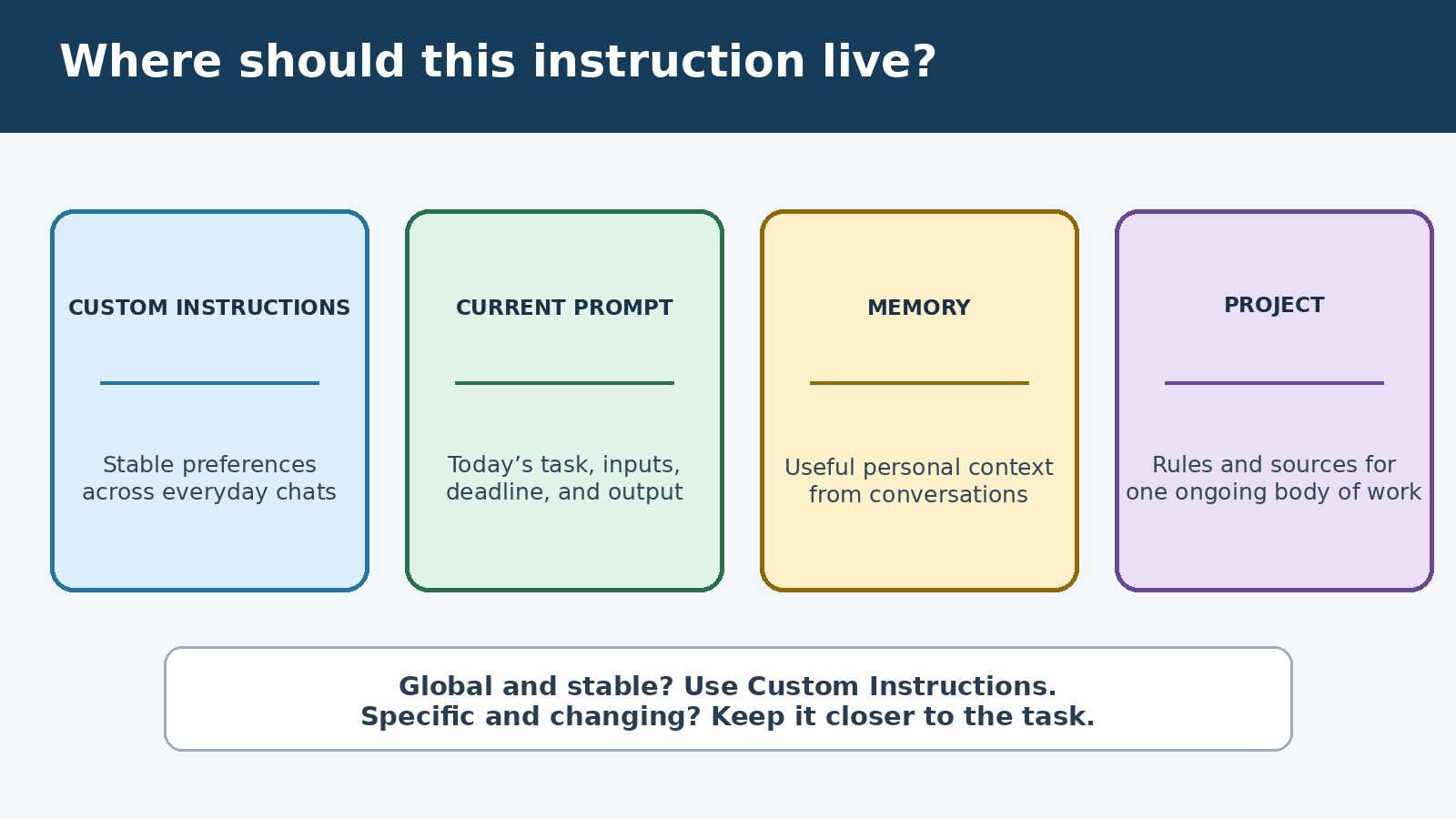
Put stable defaults in Custom Instructions. Put changing context in the prompt. If a set of rules belongs only to one ongoing body of work, use project instructions instead. This separation keeps global guidance short and reduces the chance that an old preference distorts an unrelated request.
For example, “Use Celsius and metric units” is a good global default. “Compare the three air conditioners in this week’s procurement file” is a conversation level task. “Use our product naming guide and address our retail team” may be best inside a dedicated project.
Step by step setup on web and desktop
- Open Settings. Select your profile menu in ChatGPT and choose Settings.
- Open Personalization. Choose Personalization, then select Custom Instructions.
- Enable customization. Confirm that the Enable customization control is on.
- Add a small first version. Start with four or five rules you can recognize in an answer. Avoid filling the entire field simply because space is available.
- Save and test. Ask a neutral question in a new chat and see whether the answer follows your preferred structure without becoming awkward.
Because OpenAI says updates apply immediately, you can revise a vague rule and test again without rebuilding your setup. Use a fresh prompt each time so the comparison is fair. Test with two or three different tasks, since a rule that helps summaries may hurt brainstorming.
Step by step setup on iOS and Android
- Open the ChatGPT app and go to Settings.
- Select Customize ChatGPT.
- Turn Enable customization on.
- Enter your instructions, save, and run a simple test.
If you do not see the expected control, update the official app, verify that you are signed into the intended account or workspace, and check the current OpenAI help article. Do not assume a tutorial recorded months ago still matches the interface you have today.
A practical formula for writing better instructions
A reliable set of instructions usually covers five things: context, response style, reasoning hygiene, boundaries, and uncertainty. You do not need every category. Choose only what genuinely recurs.
- Context: “I manage a small online shop and understand basic marketing terms.”
- Response style: “Lead with the answer, then give numbered steps. Keep routine replies under 400 words unless I ask for depth.”
- Reasoning hygiene: “State important assumptions and distinguish facts from suggestions.”
- Boundaries: “Do not invent statistics, quotations, links, or product capabilities.”
- Uncertainty: “If current information matters, say what should be verified and cite a source when browsing is used.”
Rules should describe observable output. “Be brilliant” cannot be checked. “Give the recommendation first and list three tradeoffs” can. Positive directions also work better than a wall of prohibitions. Tell ChatGPT what to produce, then add a short list of serious failure modes to avoid.
Copyable starter template
Use this as a starting point, not as a universal magic prompt:
I usually need practical answers for an informed beginner. Start with the direct answer, then give numbered steps when a process is involved. Define specialist terms the first time you use them. Use plain English, short paragraphs, metric units, and specific examples. State material assumptions. If information is uncertain or may have changed, say so clearly and identify what I should verify. Do not invent sources, quotations, statistics, or actions you did not perform. Ask one focused question only when missing information would materially change the answer.
This template is intentionally modest. It controls presentation and honesty without forcing every answer into the same shape. If you prefer detailed technical discussion, replace “informed beginner” with your actual level. If you often want tables, request them only when a comparison is clearer in rows and columns.
Three examples for real work
For a student: “Teach at first year university level. Define new terminology, use one concrete example, and end with three self test questions. Do not complete graded work as if it were mine. Help me understand the method and show where I should check course materials.”
For a manager: “Write for busy nontechnical stakeholders. Put the decision or request in the first paragraph. Separate evidence, assumptions, risks, and next actions. Use dates and owners when they are supplied. Never fabricate progress, approval, or metrics.”
For a developer: “Prefer minimal, maintainable solutions. State environment assumptions, preserve existing interfaces unless asked, and include commands to test changes. Explain security or data loss risks before destructive operations. Do not claim code was executed unless execution results are available.”
Even with these defaults, the live prompt must provide the actual objective, input, constraints, and acceptance criteria. For stronger day to day requests, see our guide to practical ChatGPT prompts for productivity.
Custom Instructions versus Memory
The distinction matters. Custom Instructions are direct guidance that you deliberately write. Memory can use relevant details from conversations to personalize later responses when that feature is enabled. OpenAI’s Memory FAQ recommends Custom Instructions for explicit information or rules, while Memory handles relevant information shared through conversations.
A simple test is to ask who controls the wording. If you want an exact standing rule such as “always define acronyms,” place it in Custom Instructions. If you want ChatGPT to remember useful context that emerges over time, that is a Memory use case. You can review and manage Memory separately in Settings under Personalization.
Temporary Chat is useful when you do not want a conversation to use or create memories, but it does not mean all personalization disappears. OpenAI’s current documentation says Temporary Chats do not use existing memories or create new ones. Review your own interface and settings before discussing anything sensitive.
Custom Instructions versus project instructions
Global instructions should remain broad enough for normal chats. Project instructions are better for rules tied to one body of work. According to OpenAI’s Projects documentation, project instructions apply only inside that project and override global Custom Instructions there.
Suppose your global preference is concise plain English, but one research project requires formal citations, a specific terminology list, and a detailed evidence table. Keep the general preference global and put the research rules in Project settings. That prevents a niche format from appearing in meal plans, travel questions, or casual brainstorming. Our guide to organizing ChatGPT project sources shows how instructions and reference material can support a recurring workflow.
Privacy and data choices
Do not place secrets, passwords, authentication tokens, private health records, confidential client details, or information you are not authorized to share in Custom Instructions. They are persistent account settings designed to influence many conversations, which makes them the wrong place for sensitive one time context.
OpenAI says instructions are not shown to viewers of shared links, but relevant information may be provided to third party plug-in developers when such tools are used. The company advises using only plug-ins you trust and not sharing information you would not want provided to those developers. OpenAI also states that Custom Instructions are included in ChatGPT data exports.
Data Controls are separate from response preferences. OpenAI’s Data Controls FAQ explains how signed in users can turn off “Improve the model for everyone” under Settings and Data Controls. Turning that option off does not remove chats from history. For a fuller walkthrough, read our internal guide on managing ChatGPT training preferences.
How to test your setup instead of guessing
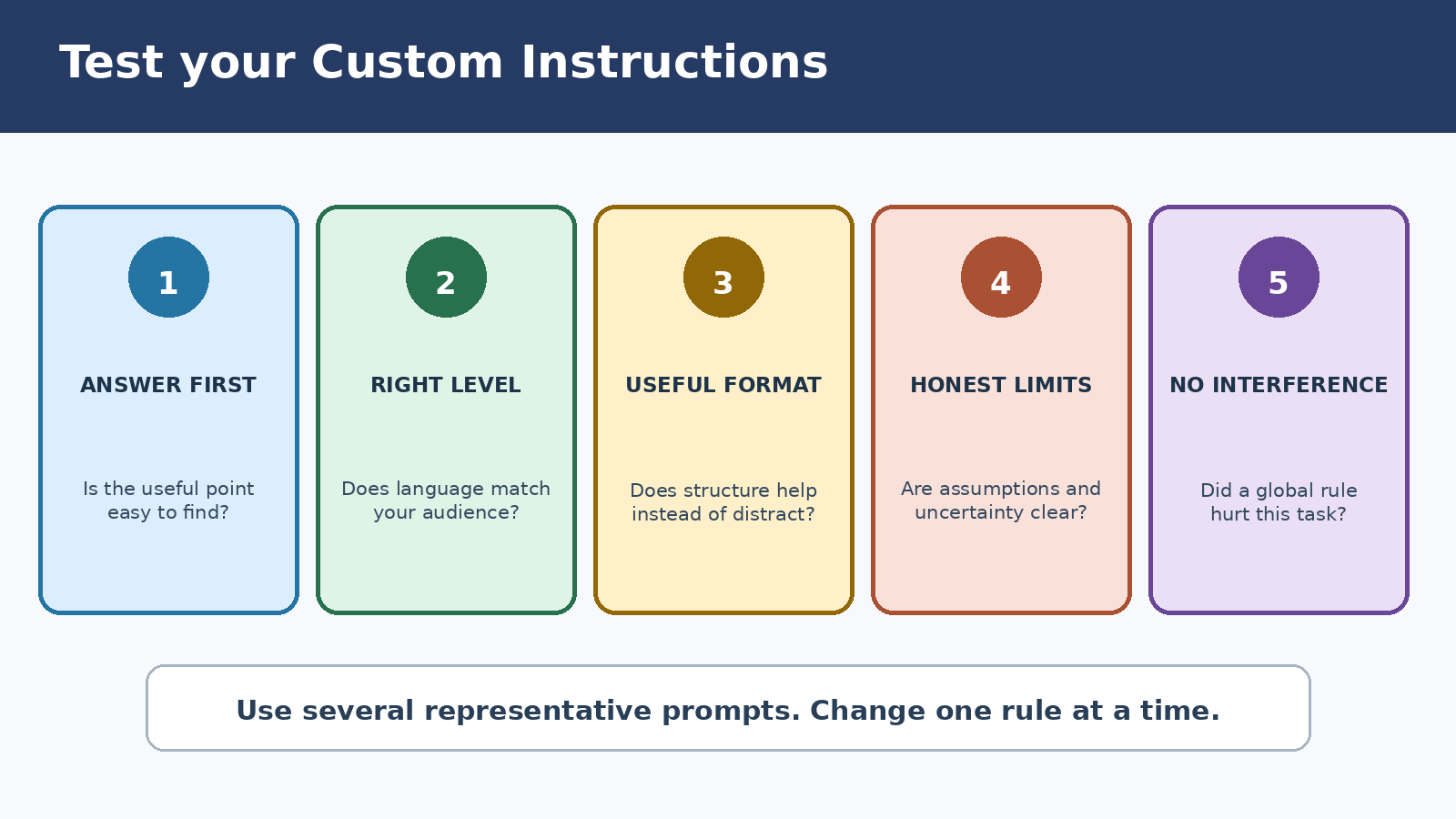
Use the same small test suite before and after changing instructions. Pick prompts that represent different work, such as explaining a concept, comparing options, and drafting a short email. Score each answer on five questions:
- Did the answer put the useful point where you expected it?
- Was the language appropriate for your stated audience?
- Did the format improve readability rather than add ceremony?
- Were assumptions and uncertainties handled clearly?
- Did any global rule interfere with the task?
Change one rule at a time. If every response starts with an unnecessary checklist, soften the formatting rule. If “be concise” removes essential caveats, specify a normal target length while allowing more detail for safety, legal, medical, financial, or technical risk. Good customization is not the longest configuration. It is the smallest set of defaults that reliably improves varied conversations.
Common mistakes and how to fix them
Too many rules: A crowded field can contain conflicts. Remove instructions you cannot test, merge duplicates, and rank the few behaviors that matter most.
Conflicting directions: “Always be brief” and “always provide exhaustive analysis” cannot both win. Add a priority, such as “Be concise by default, but include necessary safety caveats and expand when I ask.”
Embedding temporary facts: Prices, job titles, deadlines, software versions, and active campaigns become stale. Keep changing facts in the current prompt or relevant project.
Expecting factual perfection: Style guidance does not turn ChatGPT into an infallible database. Ask for sources when appropriate, inspect primary material, and verify consequential claims yourself.
Using rules as security controls: A written instruction is not a replacement for access controls, workplace policy, or professional review. Do not paste restricted data simply because you instructed the model to keep it private.
Forgetting overrides: A project may use its own instructions instead of your global ones. When behavior changes unexpectedly, check whether you are inside a project, which account or workspace is active, and whether customization is enabled.
Maintenance: a five minute monthly review
Open your instructions and remove anything tied to an old role, audience, or workflow. Look for vague commands, duplicated preferences, and rules that create repetitive answers. Then run one familiar test prompt. This small review is more useful than continually adding new lines whenever one response disappoints you.
Also review privacy choices when your work changes. A new employer, client, connected tool, or shared workspace can alter what information is appropriate to provide. Custom Instructions should contain only details you are comfortable using repeatedly in that account context.
Frequently asked questions
Do Custom Instructions apply to existing chats?
OpenAI’s current help article says updates to Custom Instructions apply immediately across all chats, including existing conversations. However, editing or removing the setting affects future responses, not text that was already generated. Old mentions remain in chat history unless you remove the relevant conversations.
What is the current character limit?
OpenAI currently documents up to 1,500 characters for Free and Go users, and up to 5,000 characters for Plus, Pro, Enterprise, Business, and Education users. Check the official help page for changes because plan names and limits can be updated.
Are Custom Instructions the same as Memory?
No. Custom Instructions are explicit directions you write about what ChatGPT should know or how it should respond. Memory can retain and synthesize relevant context from conversations when enabled. They can both shape personalization, but they have separate controls and different purposes.
Can I disable Custom Instructions without deleting them?
Yes. OpenAI documents an Enable customization toggle. On web and desktop, find it under Settings, Personalization, and Custom Instructions. On mobile, use Settings and Customize ChatGPT. You may optionally delete the instruction text if you no longer want it stored.
Final checklist
- Keep global instructions stable, short, and observable.
- Put the current task, source material, and deadline in the prompt.
- Use project instructions for a specific ongoing body of work.
- Do not store secrets or restricted personal information.
- Test with several tasks and revise one rule at a time.
- Verify important facts and decisions outside the model.
A strong setup should quietly improve your answers without drawing attention to itself. Start with a handful of durable preferences, test them against real tasks, and remove anything that makes responses more rigid than useful.