People often say they want a “ChatGPT assistant” for research, writing, planning, or coding. That phrase is useful shorthand, but it can hide an important product distinction. ChatGPT does not present a fixed catalog of assistant types that you must choose from. A role such as editor or analyst is usually a workflow you define in a prompt. A custom GPT, a Project, and a scheduled task are actual ChatGPT surfaces with different purposes, context, and limits.
This guide explains those differences using current OpenAI documentation. It also shows how to design reliable workflows without pretending that a writing assistant, research assistant, and coding assistant are separate OpenAI products. The best setup depends less on the label and more on four practical questions: how long the work will continue, what context it needs, who should reuse it, and whether it must run later without you starting a chat.
The short answer: choose a surface before choosing a role
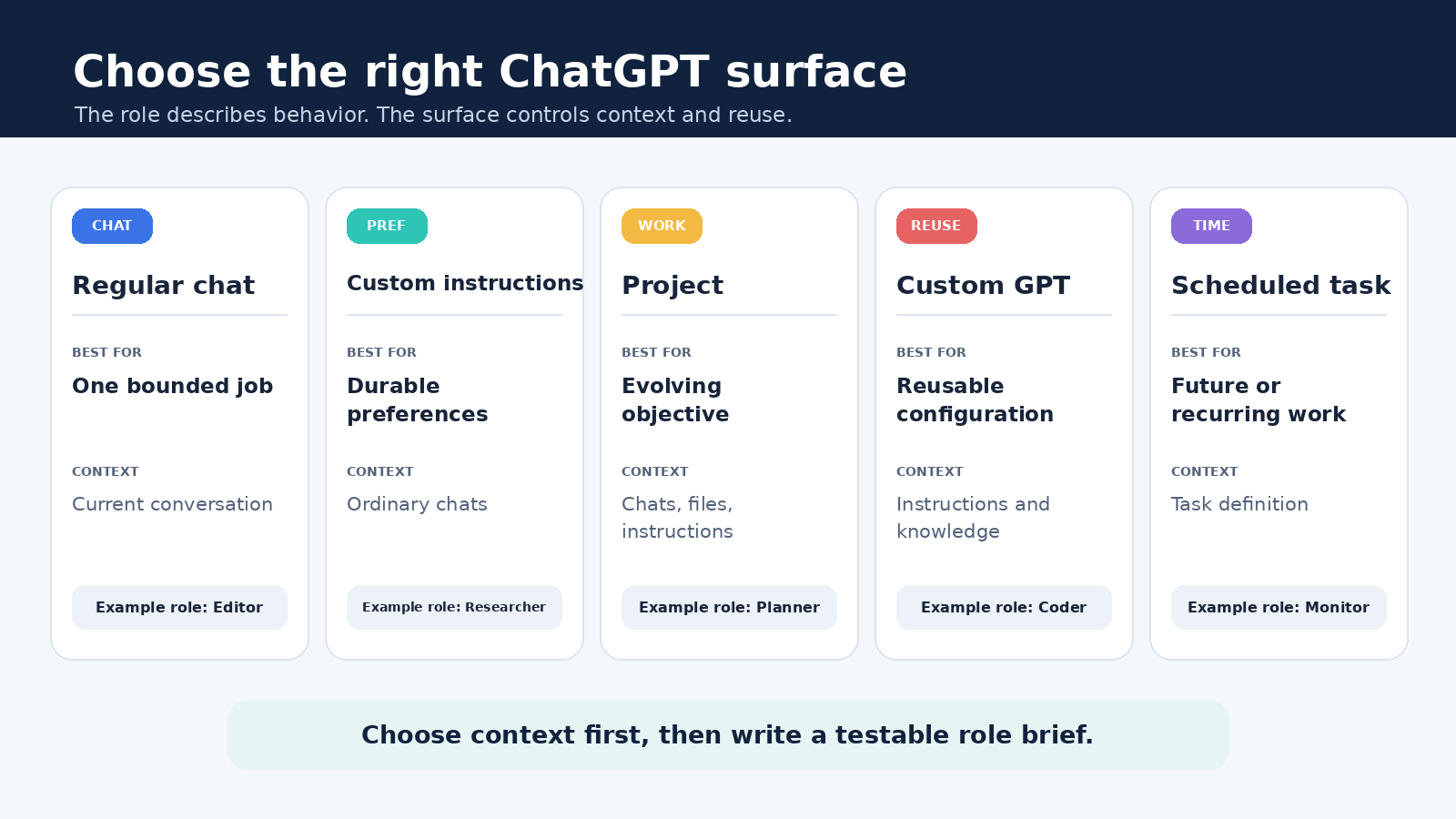
Use a regular chat for one focused conversation. Use custom instructions for durable account preferences. Use a Project when one ongoing effort needs related chats, files, and local instructions in one place. Use a custom GPT when an eligible account or managed workspace needs a reusable configured version of ChatGPT for a specific purpose. Use scheduled tasks for reminders, recurring briefings, or monitoring that should run at a future time.
Then assign a role inside the chosen surface. “Act as a skeptical editor” can be a prompt in a normal chat, a Project instruction, or part of a GPT configuration. The role describes behavior. The surface determines where context lives, how it is reused, and what product limits apply.
What ChatGPT assistant actually means
OpenAI describes ChatGPT itself as a conversational AI assistant. In everyday use, people also call any specialized workflow an assistant. That is fine as long as it does not become a claim that OpenAI offers official assistant categories such as “research assistant,” “marketing assistant,” or “coding assistant.” Those are practical roles, not distinct product types.
A role becomes useful when it has a clear job, inputs, boundaries, output format, and review step. For example, a research workflow might be instructed to separate sourced facts from hypotheses, quote source labels, and list unresolved questions. A writing workflow might preserve the author’s meaning, mark unsupported claims, and explain significant edits. Both can run in the same ordinary ChatGPT interface. No special assistant type is required.
The product surfaces do matter because they change the operating environment. A Project gathers ongoing context. A custom GPT packages instructions, knowledge, and selected capabilities for repeated use. A scheduled task runs later and can notify you. Treating these as interchangeable leads to missing files, misplaced instructions, privacy mistakes, and unrealistic expectations.
ChatGPT surfaces compared
| Surface | Best use | Context model | Important limit |
|---|---|---|---|
| Regular chat | A focused request, exploration, or short sequence | The current conversation and anything you add to it | It is not a durable team workflow by itself |
| Custom instructions | Stable preferences that should influence ordinary chats | Account level guidance, subject to settings and availability | Do not place changing project facts or sensitive secrets here |
| Project | Long running work with related chats, sources, and instructions | Project chats, project sources, project instructions, and project memory behavior | Sharing exposes project content to members, and file limits depend on plan |
| Custom GPT | A reusable configured experience for a defined purpose | Its configured instructions, knowledge, and enabled capabilities | OpenAI says GPTs do not use saved memory, custom instructions, or previous conversations |
| Scheduled task | A reminder, recurring briefing, or change check that runs later | The task definition and supported connected context | Tasks do not support GPTs, and a task created in a Project cannot access Project files |
Availability can change by plan, workspace, region, and administrator policy. OpenAI’s current GPTs in ChatGPT documentation says everyone can use GPTs they can access after signing in, but new GPT creation and publishing are not available on personal Free, Go, Plus, or Pro accounts. Creation, editing, and publishing in Business, Enterprise, and Edu workspaces depend on workspace permissions. That is a current product rule, not a permanent promise, so check the linked page if your interface differs.
Use a regular chat for a bounded job
A normal chat is the simplest choice when the work is temporary or still being defined. It is well suited to explaining a concept, reviewing one document, brainstorming options, debugging a contained issue, or testing a workflow before you formalize it. Starting here also prevents premature setup. You can learn what instructions and inputs actually matter before moving them into a Project or reusable configuration.
Give the chat a compact operating brief. State the goal, audience, available evidence, constraints, desired output, and quality check. Instead of “Be my research assistant,” try: “Compare the three attached policy excerpts for a manager. Use only those excerpts, cite each point by file name and section, distinguish direct statements from interpretation, and finish with questions the sources do not answer.”
That instruction defines observable behavior. You can inspect whether every comparison has a source and whether uncertainty is visible. A role label alone cannot provide that assurance.
Use custom instructions for durable preferences
Custom instructions are better for preferences that remain useful across unrelated ordinary chats, such as preferred language, accessibility needs, unit conventions, or a request to distinguish facts from assumptions. They are not the right home for a client brief that expires next week, a confidential password, or a long source library.
Keep standing guidance short enough to audit. If a rule matters only to one initiative, place it in that Project or prompt. If it matters to nearly everything you do, it may belong in custom instructions. Our ChatGPT custom instructions guide explains how to separate lasting preferences from local context and how to review stale guidance.
Remember that custom GPTs are a separate surface. OpenAI currently says GPTs do not use your saved memory, custom instructions, or prior conversations. Do not assume that preferences which shape an ordinary chat will automatically carry into a GPT conversation.
Use a Project for evolving work
A Project is usually the strongest home for a report, course, product launch, editorial program, research topic, or other effort that continues across multiple conversations. OpenAI describes Projects as workspaces that group chats, uploaded or linked sources, and project instructions. Project instructions apply inside that Project and override global custom instructions there.
Organize by objective rather than by persona. A “Q4 launch” Project can contain separate chats for audience research, risk review, copy editing, and status reporting. All of those chats serve one evolving effort, even though ChatGPT takes a different role in each. This structure is clearer than making four disconnected pseudo assistants and manually copying context among them.
Project sources should be curated. Add authoritative, current material that belongs to the objective. Remove or label obsolete versions. Use names that reveal date and status. Tell ChatGPT which source governs if two documents conflict, but still verify consequential claims in the originals. The detailed ChatGPT Projects guide covers files, project memory, sharing, and source maintenance.
Sharing changes the privacy boundary. Members of a shared Project can see content made available there according to their access. Review files, chats, instructions, member permissions, and connected sources before inviting anyone. A convenient shared context hub should not become an accidental disclosure channel.
Use a custom GPT for reusable configured behavior
A custom GPT is a configured version of ChatGPT for a specific purpose. According to OpenAI, its configuration can include instructions, conversation starters, uploaded knowledge, selected capabilities, apps, or actions. Apps and actions are alternatives in a GPT configuration, not two options that operate together. Availability depends on the account and workspace.
This surface makes sense when the same expertise or workflow should be reused across many separate conversations. An internal policy navigator, for example, could use approved policy files as knowledge, ask which jurisdiction applies, quote the relevant section, and escalate ambiguous cases. Its purpose is stable even though individual questions change.
Put behavior in instructions and reference material in knowledge. State what the GPT should do when evidence is missing. Add realistic conversation starters. If capabilities or external services are enabled, test what data may leave ChatGPT and what confirmation the user sees. OpenAI warns that relevant parts of an input may be sent to third party services used by apps or external APIs.
Do not confuse a custom GPT with an API integration. GPTs live inside ChatGPT. OpenAI’s GPT documentation directs developers who want an assistant embedded in a website or external product to use the API. Likewise, do not promise continuity that the product does not provide. Each GPT conversation starts fresh under the current documented memory behavior.
Use scheduled tasks when time is part of the requirement
Scheduled tasks are for work that should happen later, either once or repeatedly. Useful examples include a reminder before a deadline, a Monday briefing, or a periodic check that notifies you when a meaningful change appears. You can create and manage tasks from the Scheduled area, subject to plan and account availability.
A scheduled task is not a custom GPT that wakes up. OpenAI’s Scheduled Tasks documentation lists GPTs among unsupported features. It also states that a task created in a Project with files cannot access those Project files. Design the task with the context it can actually use, and verify notification permissions.
Write the trigger and expected result precisely. “Check for updates” is vague. A better task names the source or subject, frequency, qualifying change, format, and condition for silence. For a monitoring task, explain what counts as meaningful so routine repetition does not become noise. Review and pause tasks that no longer have an owner or purpose.
Five useful roles, without inventing product types
The following roles are reusable patterns. They are not official ChatGPT assistant categories. Choose the surface first, then adapt the pattern.
- Research partner: collects questions, compares supplied evidence, separates fact from inference, and produces a source trail. Use a Project for a long investigation and an ordinary chat for one comparison.
- Writing editor: protects intended meaning, identifies weak structure, flags claims needing evidence, and explains substantial revisions. Keep human authorship and final approval explicit.
- Planning partner: converts an objective into milestones, dependencies, owners, risks, and decision points. A Project works well when the plan will evolve across meetings.
- Coding reviewer: asks for the environment and failing behavior, proposes a minimal change, drafts tests, and states what it did not execute. Never treat generated code as verified until it runs in the real environment.
- Recurring monitor: checks a defined condition on a schedule and reports only when the threshold is met. Use scheduled tasks if the required sources and tools are supported.
These patterns can coexist. A single Project may use the research role in one chat and the editor role in another. A GPT can be configured around one stable role. A task can use a monitoring role. The names help people communicate, but the instructions and tests make the workflow reliable.
A setup method that works across surfaces
- Define the outcome. Name the decision, artifact, or action the workflow must support. “Help with marketing” is not testable. “Produce a weekly campaign risk summary for the channel owner” is.
- Choose the context boundary. Decide whether the work needs one chat, account preferences, Project context, reusable GPT knowledge, or a future schedule.
- List approved inputs. Identify source files, links, data owners, freshness dates, and information that must not be uploaded.
- Specify behavior. Give the role, sequence, output format, citation rule, uncertainty rule, and stop condition.
- Add a human checkpoint. Assign someone to verify facts, permissions, calculations, code execution, and external actions.
- Test normal and failure cases. Try a clean request, an ambiguous request, conflicting sources, missing evidence, and a request outside scope.
- Record the version. Save the instructions, source set, test prompts, known limits, owner, and next review date.
For more prompt patterns and review checklists, see the internal ChatGPT workflow guide for research, writing, and automation. It expands the context, task, rules, output, and verification method for everyday work.
Verification matters more than the assistant label
Any surface can produce a fluent error. Check factual claims against primary sources, run code and calculations in the intended environment, inspect quotations in context, and obtain approval before taking consequential action. Ask ChatGPT to expose uncertainty and source gaps, but do not treat its self assessment as proof.
Use a small acceptance checklist. A research output might require a working source link for every major claim, dates for time sensitive facts, and a separate unresolved questions section. A writing output might require preservation of meaning, no invented examples, and tracked factual changes. A coding output might require passing tests, security review, and a rollback plan.
Privacy also belongs in acceptance. OpenAI’s Data Controls FAQ explains the “Improve the model for everyone” setting and Temporary Chats. Turning off training does not create permission to upload material you do not own or are not authorized to share. Workspace rules, contracts, data classification, and applicable law still govern the input.
Common setup mistakes
- Starting with a persona instead of an outcome: a colorful identity cannot replace a clear deliverable and review rule.
- Using a Project as a file dump: stale and conflicting sources reduce trust. Curate the context and identify the governing version.
- Assuming all context follows everywhere: custom instructions, Project instructions, GPT configuration, memory, and task context are distinct.
- Expecting scheduled tasks to use unsupported context: current OpenAI documentation says tasks cannot use GPTs and cannot access Project files merely because the task was created there.
- Sharing before checking permissions: inspect every file, chat, connected service, and member role first.
- Skipping failure tests: test what happens when a source is absent, instructions conflict, or the request exceeds scope.
A practical decision rule
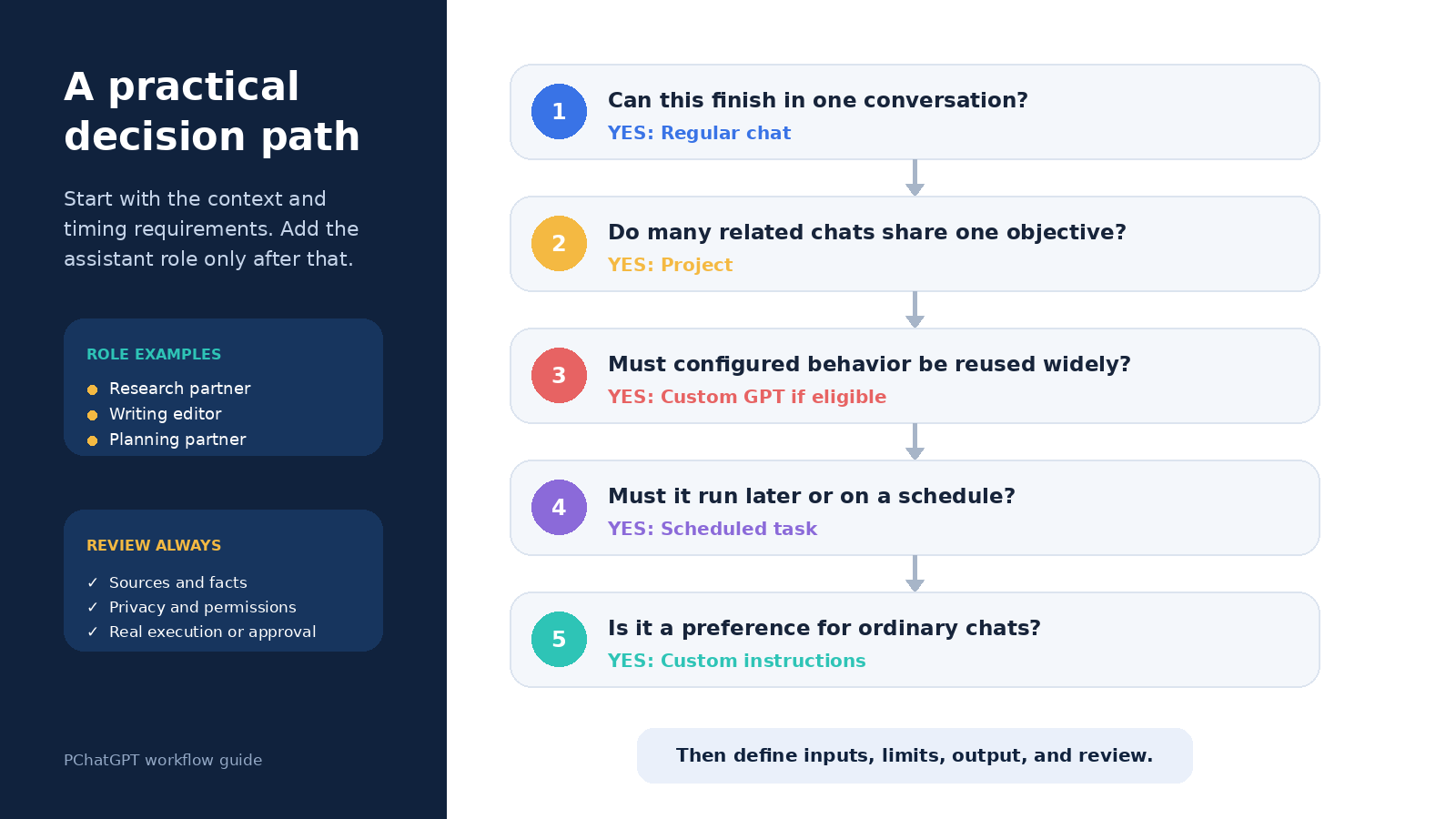
If you can finish the job in one conversation, start with a regular chat. If the preference should follow many ordinary conversations, consider custom instructions. If several chats and sources serve one evolving objective, use a Project. If an eligible workspace needs a reusable configured experience across separate conversations, consider a custom GPT. If the defining requirement is that work happens later and produces a notification, use a scheduled task.
Then add the role that fits the moment. This keeps the mental model honest: editor, researcher, planner, coder, and monitor are workflow patterns, while chat, custom instructions, Projects, GPTs, and scheduled tasks are product surfaces. Clear boundaries make better workflows than a long list of imaginary assistant types.
Frequently asked questions
Are research, writing, coding, and planning official ChatGPT assistant types?
No. They are useful role labels and workflow patterns, not a fixed set of OpenAI product types. You can prompt ChatGPT to take any of those roles in a regular chat, Project, or eligible custom GPT. Define observable instructions and a review checklist rather than relying on the name.
What is the difference between a Project and a custom GPT?
A Project is an evolving workspace for related chats, sources, instructions, and project context around an ongoing objective. A custom GPT is a reusable configured version of ChatGPT with its own instructions, knowledge, and selected capabilities. OpenAI also says GPT conversations do not use saved memory, global custom instructions, or previous conversations.
Can a scheduled task use my custom GPT or Project files?
Not under the current documented limits. OpenAI lists GPTs as unsupported for scheduled tasks and says a task created in a Project cannot access that Project’s files. Give the task only supported context and test it before relying on a notification.
Which surface should I use for a personal assistant workflow?
Start with a regular chat while the workflow is changing. Move an ongoing body of work into a Project when it needs multiple chats and shared sources. Use custom instructions only for durable preferences. Use a custom GPT when current account or workspace permissions allow it and the same configured behavior should be reused. Add a scheduled task only when future timing or monitoring is essential.