Home Blog Page 7

How to Build a Reusable ChatGPT Prompt Library

0

A useful prompt collection is not a page of clever commands. It is a small working library where every entry has a job, known inputs, a review method, and a version history. That difference matters after the first week. A copied prompt may look impressive yet be impossible to find when a deadline arrives. A cataloged prompt can be retrieved by task, adapted without losing its purpose, and retired when it stops producing acceptable drafts.

This guide shows how to build that kind of reusable ChatGPT prompt library for work, writing, and coding. It does not contain 200 prompts, despite the preserved historical wording in this page’s URL. Instead, it gives you a maintainable workflow and a compact set of editorial examples. The examples are created for this article and are not official OpenAI commands or a guarantee of a particular result.

Begin with jobs you repeat

Do not start by collecting every prompt you see. Open a note, spreadsheet, or database and list tasks that recur. A project manager might repeatedly turn meeting notes into action lists. An editor might compare a draft with a brief. A developer might ask for a failing test to be explained before touching the implementation. These are good library candidates because the input changes while the desired type of output stays recognizable.

Write each task as a verb plus an object: “summarize a decision log,” “diagnose a weak introduction,” or “review a patch against acceptance criteria.” If two entries do the same job, keep the clearer one. If an entry only says “be more creative” or “make this better,” it is probably a modifier rather than a standalone prompt.

OpenAI’s prompt engineering guidance for ChatGPT recommends clear, specific instructions, enough context, and iterative refinement. Those points are easier to apply when a library entry names the information a user must supply. A blank template should reveal its missing fields instead of hiding them inside a long paragraph.
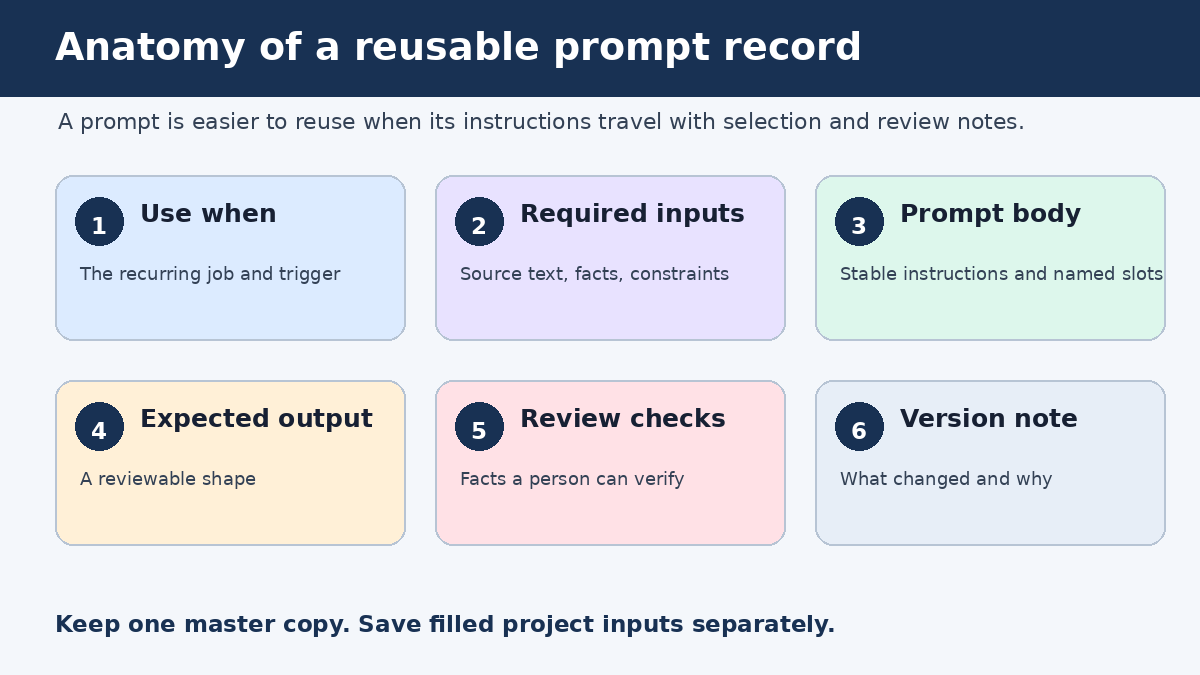
Reusable ChatGPT prompt library record showing task, inputs, prompt body, output, review checks, and version

Give every prompt a library card

A prompt becomes reusable when its supporting record explains when and how to use it. You can store each record as one spreadsheet row, one database item, or one Markdown file. The tool matters less than a consistent set of fields.

  • Name: a short, searchable label based on the task.
  • Use when: the situation that should trigger this prompt.
  • Required inputs: the facts, source text, code, audience details, or constraints needed before use.
  • Prompt body: the reusable instruction with visible placeholders.
  • Expected output: the shape of a satisfactory response, such as a table, annotated draft, or test plan.
  • Review checks: questions a person can answer after reading the result.
  • Version note: what changed, why it changed, and the date of the edit.

Add tags only when they help retrieval. A compact vocabulary such as work, writing, coding, analysis, draft, and review is easier to maintain than dozens of nearly identical labels. Keep the prompt’s name stable when you revise its wording so bookmarks and references still make sense.

Editorial example: a complete record

Name: Decision note from meeting notes
Use when: A meeting ended with choices, owners, or unresolved questions
Required inputs: Raw notes, participant names, project name, due-date conventions
Expected output: Decisions, actions, open questions, and unclear items
Review checks: Every owner appears in the notes; no deadline was invented
Version: 1.2, clarified how missing owners are labeled

Prompt:
Using only the meeting notes between <notes> tags, prepare a decision note for [project].
Separate confirmed decisions, assigned actions, and open questions.
For each action, include an owner and deadline only when the notes state them.
Write "not recorded" when either field is missing.
End with a short list of ambiguous passages that need human clarification.

<notes>
[PASTE APPROVED NOTES]
</notes>

This record is specific enough to run and simple enough to inspect. It also separates instructions from source material. OpenAI’s API prompt engineering best practices describe putting instructions first, separating context with clear delimiters, and specifying the desired result and format. The article is written for API users, but these basic organization ideas are also practical in an ordinary ChatGPT conversation.

Use slots, not vague placeholders

Brackets such as [TOPIC] are useful only when the person running the prompt knows what belongs there. Prefer slots that request a decision-ready input: [reader and what they already know], [approved sources], [language and maximum length], or [files changed and acceptance criteria]. A good slot doubles as a short intake form.

Keep permanent instructions outside the slots. If a coding review must always preserve public function signatures, put that rule in the prompt body. If the rule varies by repository, turn it into [compatibility constraints]. This makes the stable part of the prompt easy to distinguish from project-specific information.

Editorial example for work: compare options

I need to choose between the options listed below for [decision].
Build a comparison table using only the supplied evidence.
Use these criteria and weights: [criteria and weights].
For each score, quote or point to the supporting input.
Mark a cell "insufficient evidence" rather than estimating missing facts.
After the table, state which option ranks highest under these weights and list two facts that could change the ranking.

<evidence>
[PASTE APPROVED EVIDENCE]
</evidence>

The prompt does not outsource the decision. It asks for a traceable comparison whose assumptions can be challenged. Change the criteria or weights and save a new version only if that change will recur. One-time details belong in the run notes, not in the master prompt.

Editorial example for writing: diagnose before rewriting

Review the draft against the brief before rewriting anything.
Return a table with: requirement, evidence in the draft, problem, and proposed fix.
Pay special attention to unsupported factual claims, repeated ideas, audience mismatch, and missing transitions.
Then rewrite only the passages that need a change.
Preserve facts, names, numbers, citations, and link targets from the source.

<brief>
[PASTE BRIEF]
</brief>
<draft>
[PASTE DRAFT]
</draft>

This entry has a different purpose from a general request to “improve my writing.” It creates a diagnosis that an editor can review before accepting changes. For a focused set of drafting patterns, see PChatGPT’s writing prompt workflow. For a broader explanation of instruction design, use the site’s guide to writing more accurate prompts.

Editorial example for coding: explain a failure first

Analyze the failure using the provided error, relevant code, and acceptance criteria.
Do not propose a patch until you have listed:
1. the observed behavior,
2. the expected behavior,
3. the most likely fault location,
4. evidence for and against that diagnosis, and
5. the smallest test that would distinguish competing causes.
After the diagnosis, propose the smallest compatible change.
Preserve [public interfaces and compatibility constraints].
Return the test change before the implementation change.

<error>[PASTE ERROR]</error>
<code>[PASTE RELEVANT CODE]</code>
<criteria>[PASTE ACCEPTANCE CRITERIA]</criteria>

This coding entry controls the order of work. It asks for evidence and a discriminating test before a patch. That makes review easier than a large answer that mixes guesses, code, and explanation. It still requires a developer to run the tests and inspect the proposed change in the real environment.

Test a prompt with a small case set

A library should record evidence that an entry works for its intended job. Create a tiny test pack for each important prompt. Three to five cases are enough to expose many weaknesses: a normal case, an incomplete input, an unusually long input, and one case that previously produced a bad response. Use material you are allowed to process, with private details removed where necessary.

Before each test, write checks that do not depend on liking the prose. For the meeting prompt, you might verify that every named owner came from the notes, unknown deadlines use the requested label, and open questions remain separate from decisions. For code, you might check whether the response preserves the stated interface and proposes a test that fails for the observed bug. For writing, compare every factual detail in the rewrite with the source.

OpenAI says prompt refinement is iterative: review the response and adjust wording, context, or simplicity. Treat that as a controlled edit. Change one meaningful part, rerun the same cases, and note what improved or regressed. If you alter the task, format, examples, and review checks at once, you will not know which change mattered.
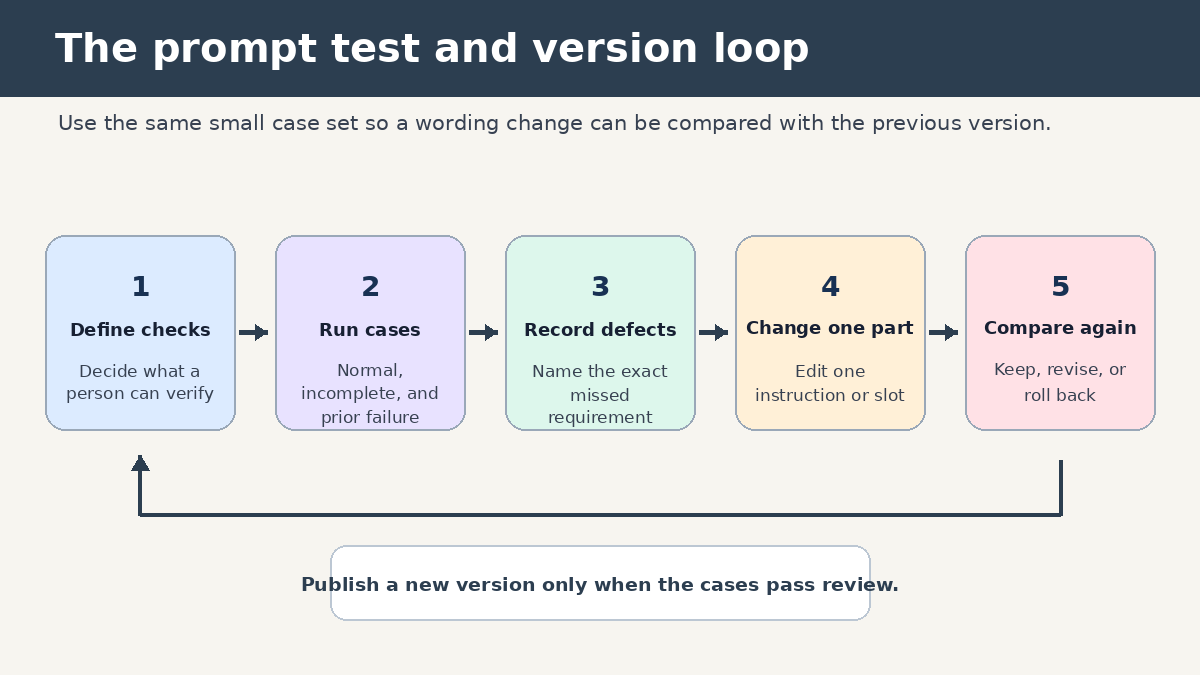
ChatGPT prompt library testing and version loop using repeatable cases and human review

Version prompts without creating a junk drawer

Use simple version numbers. A small wording fix can move 1.1 to 1.2. A change to the expected output or required inputs can become 2.0. Keep a one-sentence note such as “added an insufficient-evidence label after two runs invented missing dates.” That note is more useful than a full copy of every chat.

Do not fork a new prompt because one client prefers a different tone. Add a tone slot if tone varies often, or keep that preference in the run input. Fork only when two jobs need different review logic. A sales email draft and a legal clause comparison may both involve writing, but they should never share the same acceptance checks.

Retire entries that no longer match your tools or process. Mark them archived rather than deleting them immediately, especially if documents link to their names. A short replacement field can point users to the current entry. Review active entries on a regular calendar interval that fits your workload, and also after a visible failure. The failure-triggered review is often the one that produces the best version note.

Make retrieval faster than rewriting from scratch

A prompt library earns its keep at the moment of use. Choose names people will search for under pressure. “Weekly status from project log” is better than “Productivity prompt 14.” Put the most common entries in a short index grouped by job. Search can handle the long tail.

Each index item should show the name, use-when sentence, required inputs, and current version. That is enough to choose an entry without opening every record. If the same prompt appears in several tools, designate one master copy and treat the others as published copies. Otherwise, silent wording drift will make test results hard to interpret.

When a user runs an entry, save the filled inputs separately from the master. Never overwrite placeholders with live project data. This prevents a later user from inheriting an old customer’s name, an outdated requirement, or code from another repository.

Review facts, references, and code outside the prompt

Prompt quality cannot make every response true. OpenAI’s guidance on ChatGPT accuracy says the system can produce incorrect facts, fabricated quotes, and nonexistent citations, sometimes with confident wording. It advises users to verify important information and to visit cited links when accuracy matters.

Build that reality into the library card. A research entry can require links for factual claims, but the review checks should still say who opens those links and compares them with the claim. A coding entry can request tests, but a developer must run them. A work summary can ask for owners and dates, but a colleague should compare them with the meeting record before sending it.

Do not store confidential input inside a reusable template. The master should contain empty slots and handling notes. Follow your employer’s approved tools and data rules when filling those slots. That is a practical storage boundary, not a generic warning pasted onto every prompt.

A 30-minute starter build

  1. List five tasks you performed more than once during the past month.
  2. Choose one task whose output you can review confidently.
  3. Create its library card with the seven fields in this guide.
  4. Write one normal test case and one incomplete-input case.
  5. Run both, record failures, and revise one instruction at a time.
  6. Add the tested entry to a small index under work, writing, or coding.
  7. Set a review reminder and name the person who maintains the master copy.

Repeat this process when a new recurring task appears. A library of twelve tested entries is usually easier to trust and maintain than hundreds of unreviewed snippets. The useful count is the number of prompts your team can find, fill, review, and improve.

Frequently asked questions

What format should I use for a ChatGPT prompt library?

Use the simplest format that supports search, consistent fields, and version notes. A spreadsheet works for a small shared catalog. Markdown files work well when prompts live beside code or documentation. A database can help when you need filtered views, ownership, and linked test cases. Keep one master location regardless of format.

How many prompts should I add at the beginning?

Start with one prompt for a recurring task you understand well, then expand to a small set. Testing five useful entries teaches you more than importing a large collection with unknown assumptions. Add an entry when a repeated job and a reviewer are both clear.

Should I save good ChatGPT answers with the prompt?

Save a short, approved example when it clarifies the expected structure, but do not treat it as a permanent truth. Remove private details and label why the example passed review. Store project-specific filled prompts and outputs outside the master template so they do not leak into later runs.

When should I retire a reusable prompt?

Retire it when the underlying task disappears, the required tool or interface changes, another entry replaces it, or repeated tests show that its structure no longer helps. Archive the record with a reason and replacement link. That preserves useful history without leaving a broken entry in the active index.

Sources

GPT-5.5-Cyber Preview: What Vetted Defenders Could Actually Do

0

GPT-5.5-Cyber began as a limited OpenAI preview for a narrow group of verified defenders working on critical infrastructure and other authorized security tasks. OpenAI announced that preview on May 7, 2026, two days before the original publication date attached to this page. The headline’s central claim was therefore real, but the old article body did not explain it. It discussed generic prompt chaining instead of cybersecurity. This rewrite corrects that mismatch and follows the product from the initial preview to OpenAI’s later June update.

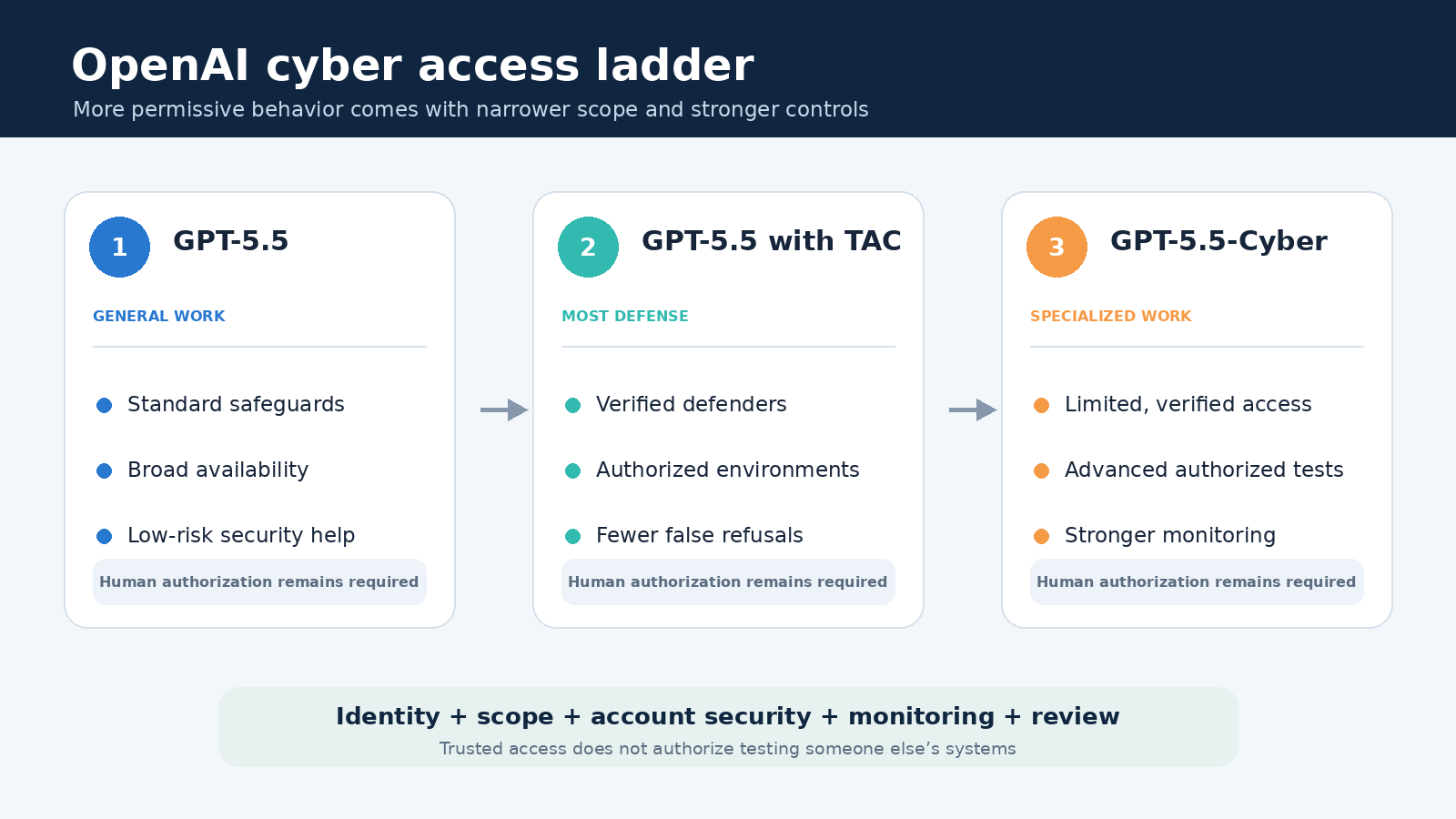
The most important distinction is easy to miss: GPT-5.5-Cyber was not simply a less restricted chatbot for anyone who wanted one. OpenAI described an access ladder. Standard GPT-5.5 served general work, GPT-5.5 with Trusted Access for Cyber supported most verified defensive workflows, and GPT-5.5-Cyber addressed a smaller set of specialized, authorized tasks that required more permissive behavior. Identity checks, account controls, monitoring, scoped use, and human review remained part of the design.

What OpenAI actually announced

In its official post, Scaling Trusted Access for Cyber with GPT-5.5 and GPT-5.5-Cyber, OpenAI said it was rolling out GPT-5.5-Cyber in limited preview to defenders responsible for securing critical infrastructure. The purpose was to support specialized cybersecurity workflows that could protect the wider ecosystem. That is more precise than saying the model was opened broadly to security professionals.

The preview sat beside, rather than replaced, GPT-5.5 with Trusted Access for Cyber. OpenAI presented the trusted-access version of its general model as the best starting point for most legitimate defense. It listed secure code review, vulnerability triage, malware analysis, binary reverse engineering, detection engineering, and patch validation among the workflows that approved defenders could perform with fewer unnecessary classifier refusals.

GPT-5.5-Cyber targeted the harder edge of the same problem. Authorized red teams and penetration testers sometimes need to demonstrate exploitability inside a controlled lab or an environment they are explicitly permitted to test. A general model may refuse such a request because the same instructions could be abused against someone else’s system. OpenAI designed the preview to explore how stronger verification and oversight could permit valid work without turning off protections for malicious conduct.

OpenAI cyber access ladder comparing GPT-5.5, GPT-5.5 with Trusted Access for Cyber, and GPT-5.5-Cyber
The access ladder separates general GPT-5.5 use, Trusted Access for Cyber, and the narrower GPT-5.5-Cyber preview.

Three access levels, not one unrestricted model

The first level was ordinary GPT-5.5 with standard safeguards. It was meant for general knowledge, development, and business work. Security teams could still use it for low-risk tasks, such as explaining defensive concepts, reviewing a secure configuration, summarizing an advisory, or drafting a remediation checklist. Its boundaries could become more cautious as a request moved closer to operational exploitation.

The second level was GPT-5.5 with Trusted Access for Cyber. Approval established more confidence about who was requesting help and why. OpenAI said this level used more precise safeguards for verified defensive work in authorized environments. It reduced false refusals, but did not permit credential theft, persistence, stealth, malware deployment, destructive action, or attacks on third-party systems. Trusted access changed the calibration around legitimate dual-use work; it did not erase the rules.

The third level was GPT-5.5-Cyber. In the May preview, its main difference was permissiveness on specialized security requests, not a guarantee that it was better than GPT-5.5 on every benchmark. OpenAI explicitly cautioned that the first preview was not expected to outperform GPT-5.5 across all cyber evaluations. That qualification matters because the product name can sound like proof of across-the-board technical superiority. At launch, it was better understood as a controlled deployment for requests that a broad model might decline.

This tiered model reflects the dual-use nature of cybersecurity. Reading a vulnerable function, constructing a test case, reversing suspicious code, or reproducing a published flaw may help a maintainer patch software. The same skills can help an attacker. Intent is hard to infer from a prompt alone. OpenAI’s answer was to combine model safeguards with identity, authorization, access scope, telemetry, and escalation rather than rely on a single content filter.

Why the preview focused on vetted defenders

Verification provides context that a standalone prompt cannot. A known organization can document what systems it owns, which clients have authorized testing, how researchers disclose vulnerabilities, and who is accountable for the work. That does not make every request safe, but it creates a stronger basis for granting capabilities and investigating misuse.

OpenAI also tied privileged access to stronger account security. Its May announcement said individual trusted-access members using the most capable and permissive cyber models would need Advanced Account Security beginning June 1, 2026. Organizations could instead attest to phishing-resistant authentication in their single sign-on setup. The principle is sensible: an account with unusually capable tools becomes a valuable target, so its authentication should be harder to steal.

Access was also scoped to authorized use. A professional role or security certification is not blanket permission to test any network. Defenders still need asset-owner authorization, a written scope, data-handling rules, safe test infrastructure, and a disclosure path. Teams evaluating any AI security assistant should treat those controls as prerequisites, not paperwork added after a model produces a risky artifact.

What the safeguards were trying to balance

Overly broad refusal can slow down defenders at exactly the moment speed matters. A team validating whether a critical patch works may need a faithful reproduction in an isolated environment. A malware analyst may need help understanding obfuscation that resembles malicious development. A detection engineer may need to describe an attack chain precisely enough to build a useful alert. If a model declines every request containing exploit terminology, it can become least helpful to the people doing the most demanding defensive work.

Overly permissive assistance creates the opposite problem. Detailed operational guidance can lower the effort required to compromise an exposed service, steal credentials, evade monitoring, or maintain access. OpenAI’s GPT-5.5 System Card describes cybersecurity as a High capability area under its Preparedness Framework and documents layered controls, evaluations, external red teaming, and monitoring. It also records limitations and testing findings rather than claiming that misuse can be eliminated.

The practical lesson is that model behavior is only one layer. Safe deployment also depends on authentication, least-privilege credentials, sandboxing, network boundaries, audit logs, rate limits, approval gates, and human review. Readers interested in the account and software side of that defense can also see our ChatGPT Mac app security update guide. A capable model running from a compromised device or overprivileged account can defeat careful workflow design.

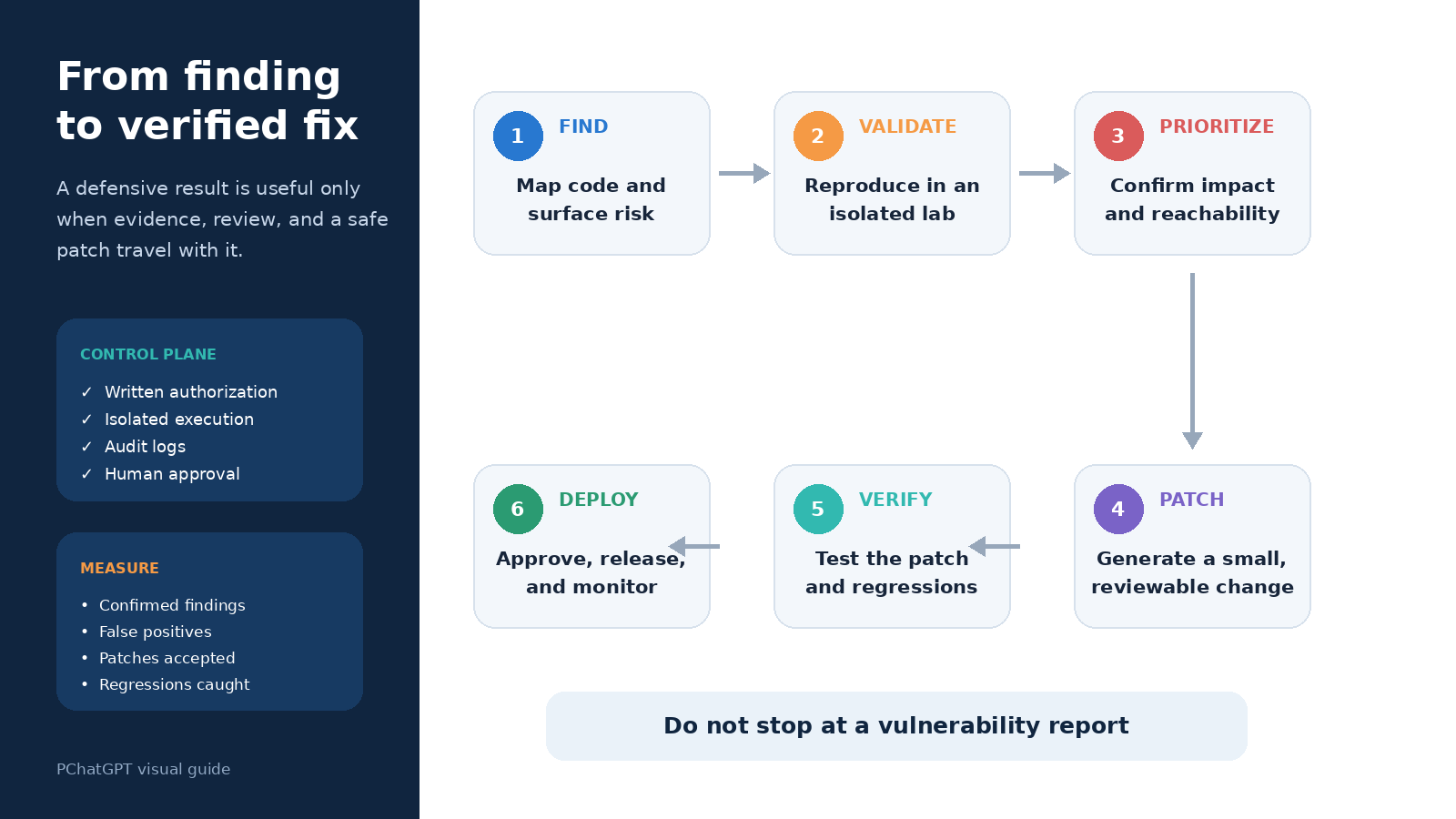
Defensive remediation loop from finding to validated fix with authorization and review controls
A safe defensive workflow moves from finding to validation, prioritization, patching, verification, deployment, and monitoring.

How GPT-5.5-Cyber changed after the preview

The story did not stop in May. On June 22, OpenAI published Daybreak: Tools for securing every organization in the world and announced an updated full version of GPT-5.5-Cyber. OpenAI said the initial preview had primarily reduced unnecessary refusals, while the update combined that permissiveness with stronger capability for advanced authorized work.

The updated description moved from access policy toward the full remediation loop. OpenAI said the model could analyze large codebases, identify security-relevant components, trace reachable vulnerable code, validate likely issues in controlled environments, develop and test patches, and prepare evidence for human review. This sequence is important. Finding a vulnerability does not protect a user until someone validates the finding, prioritizes it, lands a safe fix, tests that fix, and deploys it.

OpenAI reported that the updated model scored 85.6 percent on CyberGym in single-model evaluations, compared with 81.8 percent for GPT-5.5. It also published results on ExploitGym and SEC-bench Pro. Benchmarks can illuminate specific capabilities, but they do not prove that a model will be accurate on a team’s repository or safe in production. Test coverage, target selection, evaluation harnesses, and operational constraints all affect the result.

Even after the update, OpenAI maintained that GPT-5.5 with Trusted Access for Cyber and Codex Security remained the right starting point for most defenders. GPT-5.5-Cyber was for verified users whose authorized work genuinely required the most advanced capabilities and more permissive behavior. That repeated recommendation is a useful antidote to model-name chasing: choose the least privileged tool that reliably completes the approved job.

A responsible evaluation workflow for security teams

Start with a narrow, measurable defensive task. Good pilots include reviewing a known patch, triaging scanner findings in an owned repository, generating detection logic from a confirmed incident, or testing whether a fixed package still reproduces a published crash in a sandbox. Avoid a vague mandate to find anything interesting across production. A bounded target makes authorization, measurement, and cleanup much easier.

  1. Document authority. Record the asset owner, permitted targets, excluded systems, test window, and disclosure procedure.
  2. Minimize access. Give the workflow only the repositories, logs, tools, and network routes needed for the test.
  3. Isolate execution. Run generated tests in an ephemeral lab with synthetic credentials and no route to unrelated services.
  4. Require evidence. Ask for affected code paths, reproducible steps, assumptions, confidence, and a proposed fix, not just a severity label.
  5. Keep approval gates. A qualified person should review exploit validation, external communication, code changes, and production deployment.
  6. Measure outcomes. Track confirmed findings, false positives, review time, patches accepted, regressions, and incidents avoided.

Teams should also separate analysis from action. Letting a model read an approved repository and suggest a patch is different from letting it scan public infrastructure, run generated code, merge changes, or deploy to production. Each additional tool increases impact and deserves a separate permission decision. This is the security version of a broader AI-workspace lesson discussed in our ChatGPT for Excel and Google Sheets guide: convenience does not remove the need to verify inputs, formulas, assumptions, and final decisions.

What readers should not infer

First, the announcement did not make advanced cyber capability available to every ChatGPT account. The initial rollout was limited and identity-gated. Availability could depend on organization, use case, account security, geography, product surface, and OpenAI’s current approval process.

Second, trusted access did not authorize testing. Permission comes from the asset owner and applicable law, contract, and policy. OpenAI approval concerns access to its service; it does not grant rights over someone else’s software or infrastructure.

Third, a cyber-specialized model is not an autonomous security authority. It can misunderstand code, overstate exploitability, suggest a faulty patch, expose sensitive information, or generate an artifact that behaves differently outside the lab. Security professionals must validate findings and control execution. This article is educational, not cybersecurity or legal advice, as explained in the site’s disclaimer.

The corrected takeaway

The preserved URL says OpenAI opened a GPT-5.5-Cyber preview to vetted defenders, and official evidence supports the substance of that claim. The careful version is narrower: on May 7, 2026, OpenAI began a limited preview for defenders responsible for critical infrastructure, within a tiered trusted-access program. Most security teams were directed to GPT-5.5 with Trusted Access for Cyber, while GPT-5.5-Cyber served specialized authorized workflows under stronger controls.

OpenAI’s June update then turned the preview story into a broader remediation story, with an updated model intended to help verified defenders move from vulnerability analysis to tested patches. The durable idea is not that security models should have no restrictions. It is that capable defense requires proportional access: enough freedom to perform legitimate work, enough verification and monitoring to deter misuse, and enough human oversight to keep findings from becoming new risks.

Frequently asked questions

Was GPT-5.5-Cyber really announced in May 2026?

Yes. OpenAI’s official May 7, 2026 post announced a limited GPT-5.5-Cyber preview for defenders responsible for securing critical infrastructure. The original page body was unrelated to that news, which is why it has been replaced with sourced coverage.

Is GPT-5.5-Cyber available to every ChatGPT user?

No. OpenAI described identity-gated access for verified defenders and specialized authorized work. Product access and requirements can change, so applicants should consult OpenAI’s current official information rather than assume a normal subscription includes it.

How is Trusted Access for Cyber different from GPT-5.5-Cyber?

Trusted Access for Cyber is an access framework that makes GPT-5.5 more useful for verified defensive work by reducing unnecessary friction while retaining safeguards. GPT-5.5-Cyber is a specialized model for a smaller set of advanced, authorized workflows requiring more permissive behavior and stronger controls.

Can a team use the model to test any internet-facing system?

No. Model access is not permission to test a target. Teams need explicit authorization, a defined scope, safe infrastructure, data controls, and a disclosure plan. Generated findings and patches also require qualified human validation before use.

How to Get ChatGPT to Write in Your Preferred Style

0

Getting ChatGPT to write in your preferred style is less about finding one magic adjective and more about giving it a usable editorial brief. “Make it professional” leaves dozens of choices unresolved. A stronger request defines the reader, purpose, voice, structure, length, and boundaries. It also gives you a simple way to review the draft and correct what missed the mark.

ChatGPT now offers several style controls, including personality, Characteristics, custom instructions, project instructions, and directions inside the current conversation. They overlap, but they are not interchangeable. The best setup uses the broadest control for stable preferences and the current prompt for the specific piece you need today.

Start with the writing outcome, not a personality label

Before opening settings, describe what a successful draft should do. Who will read it? What should that person understand, feel, or do after reading? Where will the text appear? A customer support reply, executive summary, tutorial, and personal essay can all be “friendly,” yet each needs different pacing, vocabulary, evidence, and structure.

Translate taste into observable choices. Instead of asking for “my voice,” say that you want plain English, a direct opening, short paragraphs, concrete verbs, restrained enthusiasm, and no promotional claims. If you prefer depth, specify which ideas deserve explanation rather than simply asking for a long answer. OpenAI’s prompt engineering guidance for ChatGPT recommends clear, specific prompts, enough context, iterative refinement, and descriptive tone words.

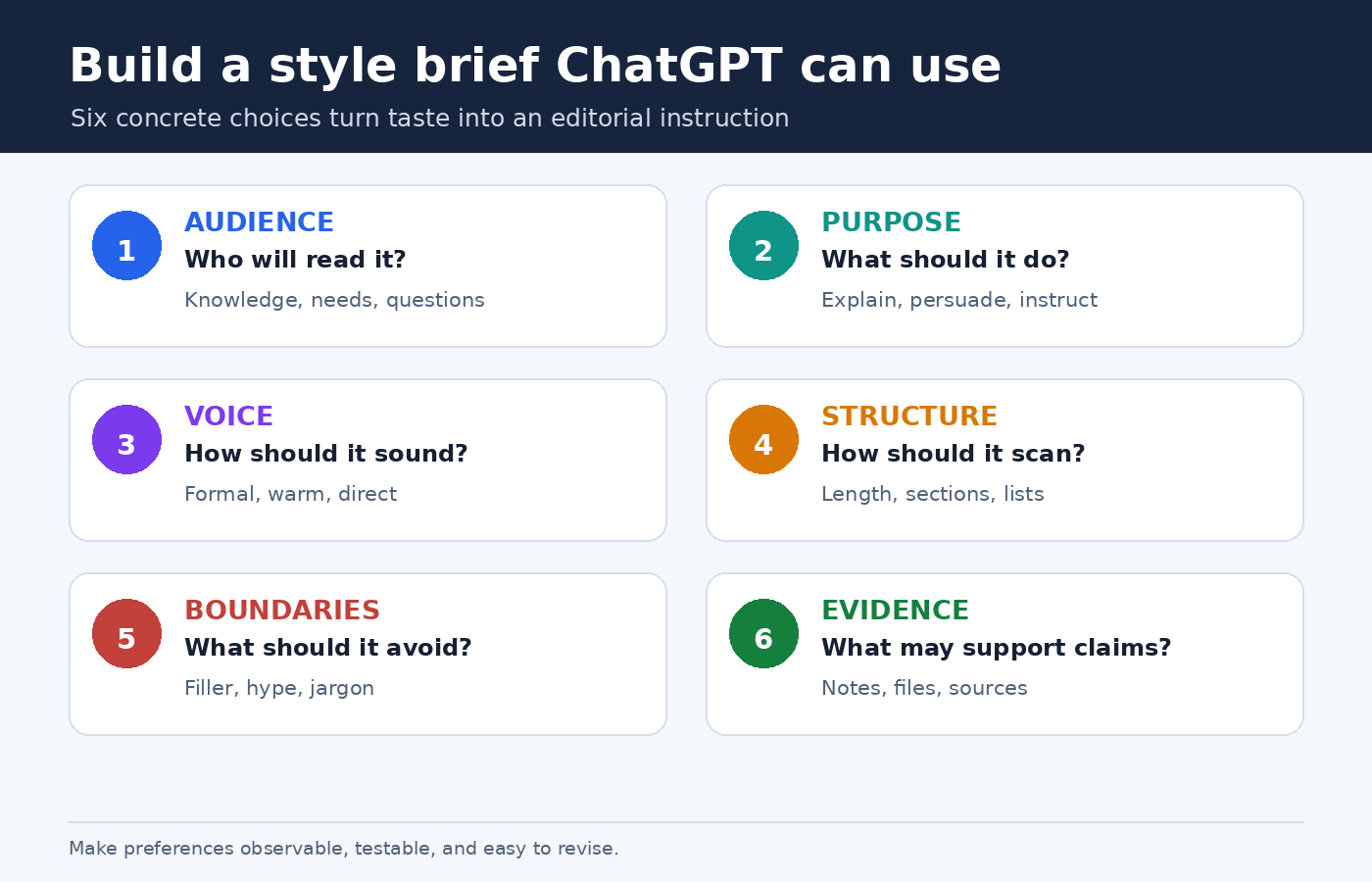
  • Audience: Name the reader’s knowledge, needs, and likely questions.
  • Purpose: State whether the text should explain, persuade, compare, reassure, or instruct.
  • Voice: Define formality, warmth, confidence, humor, and point of view.
  • Shape: Set the desired length, paragraph rhythm, headings, lists, or table use.
  • Boundaries: List unwanted habits, unsupported claims, jargon, or filler.
  • Evidence: Tell ChatGPT which supplied facts and sources it may use.

This makes the request testable. You can inspect whether the opening is direct or whether paragraphs are short. “Sounds better” is difficult to debug; “remove the throat clearing and keep each paragraph focused on one idea” gives the next revision a clear target.

Diagram showing six parts of a practical ChatGPT writing style brief: audience, purpose, voice, structure, boundaries, and evidence
A useful style brief turns a vague preference into six choices ChatGPT can apply and you can review.

Choose the right ChatGPT style control

Use settings for preferences that should travel across work, and use prompts for instructions that belong to one deliverable. This separation prevents a standing preference from becoming an accidental rule for every task.

Base style and tone is the broadest starting point. OpenAI describes personality as the style and tone ChatGPT uses when responding. In Settings > Personalization, you can choose a base personality such as Default, Professional, Friendly, Candid, Quirky, Efficient, or Cynical. The exact list can change. OpenAI also notes that personality guides communication rather than changing capabilities or safety rules. For created content such as an email or résumé, the immediate request and context can matter more than the selected personality. See OpenAI’s current personality guide for the documented choices.

Characteristics fine tune dimensions such as warmth, enthusiasm, use of headers and lists, and emoji use. OpenAI says this feature is rolling out gradually, so it may not appear in every account. Where available, Characteristics live under Personalization and work alongside personality, custom instructions, and saved memories. Use them for broad preferences, not precise editorial rules. The official Characteristics guide shows what increasing or decreasing each setting is intended to change.

Custom instructions are better for recurring, explicit rules. On web and desktop, OpenAI directs users to Settings > Personalization, where customization can be enabled and instructions entered. On mobile, the path begins in Settings and Customize ChatGPT. OpenAI says changes apply immediately across chats, including existing conversations, while an older version can remain visible in old chat history. Put stable guidance here, such as your usual audience, spelling convention, preference for direct openings, or requirement to explain specialist terms.

Project instructions fit a particular body of work. OpenAI’s Projects guide says project instructions apply only inside that project and override global custom instructions. A project can keep related chats, files, and instructions together. This makes it a good home for a publication’s house style, a client’s terminology, or a course’s citation rules without imposing those choices on unrelated conversations.

The current prompt should always state the immediate assignment. Include the format, reader, goal, source material, and any exception to your defaults. Even a carefully configured account cannot infer that today’s internal memo must be shorter than your usual article or that this particular customer email should avoid humor.

Write a compact style brief ChatGPT can follow

A style brief does not need to be ornate. In fact, a short hierarchy of priorities is often easier to maintain than a dense list of near synonyms. Start with positive instructions that describe the desired result. Then add a few prohibitions only for habits that repeatedly cause trouble.

Reusable style brief
Write for [audience] who already know [background] but need [outcome]. Use a [formal or conversational] voice that feels [two or three specific traits]. Lead with [the main point, answer, or scene]. Prefer [sentence and paragraph pattern]. Use [headings, bullets, examples] only when they improve scanning. Define [type of unfamiliar term]. Avoid [specific unwanted habits]. Preserve all supplied facts, names, and qualifications. If information is missing, mark the gap rather than inventing it.

Notice that the template separates style from truthfulness. A confident voice should never become permission to fill gaps. If accuracy matters, identify the source material and say what to do when it does not support a claim. For broader prompt quality checks, the PChatGPT guide to common ChatGPT mistakes explains why specificity, source checking, and human review belong in the workflow.

Give priorities when rules can conflict. “Be concise” and “explain every unfamiliar term” may pull in different directions. You can resolve that by saying, “Keep the main answer under 500 words, then add a glossary for terms that cannot be replaced with plain English.” ChatGPT now has an order it can act on instead of guessing which preference matters more.

Use examples without asking for imitation

A short sample can reveal rhythm and detail that labels miss. Choose text you wrote or have permission to use. Ask ChatGPT to identify observable features, such as average paragraph length, level of formality, transitions, use of examples, and how the author handles uncertainty. Then review that analysis before asking for a new draft.

A safe and practical instruction is: “Use the sample only to infer high level traits. Do not copy phrases, distinctive metaphors, or sentence sequences.” The goal is not to reproduce another writer’s identity. It is to convert your own preferences into a checklist. When the sample contains facts unrelated to the new task, explicitly say that it is a style reference, not a factual source.

One sample can also be misleading. A short announcement may not represent how you write tutorials. Keep separate references for materially different formats, or store format specific guidance in separate projects. Compare the first output with your sample and update the brief using concrete observations. If the draft is too polished and distant, for example, ask for contractions, simpler transitions, and one concrete example per section rather than merely saying “more human.”

Draft in stages instead of demanding perfection

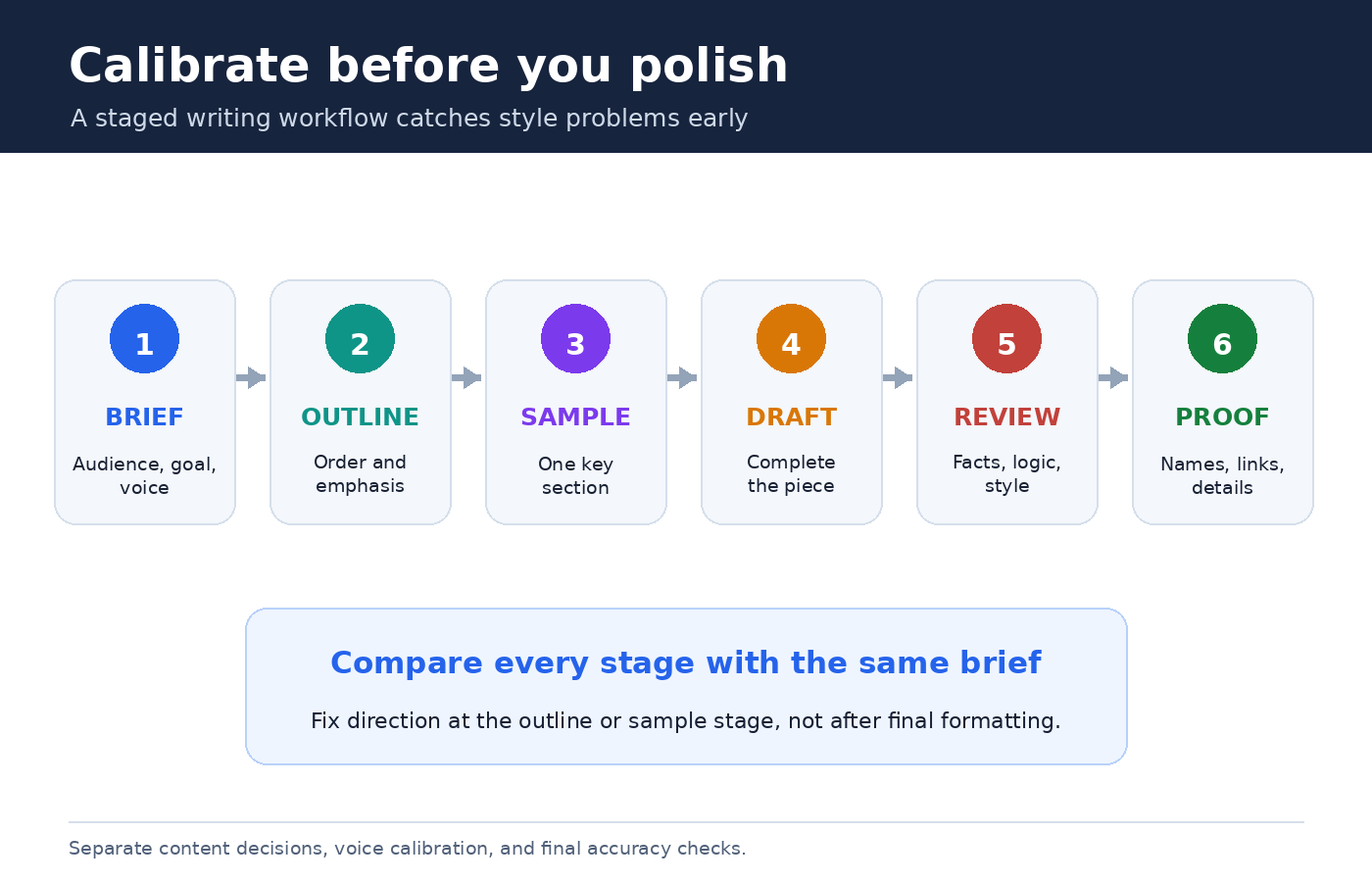
Style becomes easier to control when content decisions and sentence polishing do not happen all at once. Begin with an outline that shows the argument and order. Correct missing sections before ChatGPT invests words in the wrong structure. Next, request one representative section. If its voice is right, continue with the full draft. If not, edit the brief while the cost of revision is still low.

  1. Brief: Supply the audience, purpose, source material, style choices, and limits.
  2. Outline: Check sequence, emphasis, and whether every section earns its place.
  3. Calibration passage: Generate a short opening or one central section.
  4. Full draft: Carry the approved pattern through the remaining text.
  5. Editorial pass: Review facts, logic, voice, repetition, and formatting separately.
  6. Final proof: Read for accidental changes in names, numbers, quotations, and links.

This staged process follows OpenAI’s recommendation to refine prompts iteratively. It also makes feedback more useful. “Sentence four repeats sentence two” is actionable. “I don’t like it” is not.

Workflow diagram for calibrating ChatGPT writing style through a brief, outline, sample section, full draft, editorial review, and final proof
Calibrate early with an outline and sample passage, then review the complete draft against the same brief.

Turn revision comments into durable rules

Do not paste a long emotional reaction after a weak draft. Separate diagnosis from repair. First ask what changed relative to the brief. Then name the two or three most important fixes. You might say: “The opening repeats the headline, several paragraphs begin with generic setup, and the conclusion introduces new advice. Rewrite the opening with the answer first, remove repeated setup, and make the conclusion summarize existing points only.”

After the revision, decide whether each correction is global, project specific, or temporary. A preference for US spelling may belong in custom instructions. A brand’s capitalization rules belong in its project. A one time word limit stays in the current prompt. This small housekeeping habit keeps your permanent setup from filling with contradictory exceptions.

You can also ask ChatGPT to perform a checklist review before rewriting. Have it report where the draft violates the brief, quote only the short passage needed to identify each issue, and propose a fix. Review that diagnosis yourself. Then authorize the rewrite. This gives you a chance to reject an incorrect interpretation before it spreads through the document.

Resolve conflicts between personality, instructions, and context

When the output seems inconsistent, look for competing guidance. OpenAI says personality works alongside saved memories and custom instructions, and that instructions in a conversation can adjust or obscure personality behavior. Project instructions override global custom instructions inside the project. A saved preference for serious professional responses can also reduce the visible effect of a different personality.

Troubleshoot from the most local layer outward. Read the current prompt for conflicts. Check project instructions if the chat is in a project. Review global custom instructions and saved memory. Finally, inspect personality and Characteristics. Do not change every setting simultaneously. Change one layer, start a clean test prompt if needed, and compare the result against the same short task.

For recurring work, the PChatGPT tutorial on setting custom instructions in ChatGPT offers a complementary workflow for deciding what belongs in account settings and what should remain in a prompt.

A complete prompt you can adapt

You are helping me draft a 700 word guide for first time small business owners. Explain how to prepare a simple project brief. The reader is capable but unfamiliar with agency terminology. Open with the practical benefit in two sentences. Use plain US English, short paragraphs, and calm confidence. Prefer concrete examples to abstract claims. Use descriptive headings and one checklist. Do not use hype, rhetorical questions, or invented statistics. Base factual claims only on the notes below. If a note is ambiguous, flag it in brackets. First provide a six point outline. Wait for my approval before drafting the article. After drafting, audit it against these requirements and list any remaining concern.

This prompt controls audience, purpose, format, language, evidence, and workflow. Adapt the parts that actually matter. Adding twenty rules to every prompt can create more conflict than clarity. A short, ordered brief plus a deliberate review usually produces a more stable voice.

Frequently asked questions

What is the fastest way to change ChatGPT’s writing tone?

For one response, state the tone and observable traits directly in the prompt, such as “friendly but restrained, answer first, short paragraphs, no emojis.” For a broad account preference, choose a Base style and tone in Personalization. If available, Characteristics can adjust dimensions such as warmth, enthusiasm, formatting, and emoji use.

Should I put my entire style guide in custom instructions?

Usually not. Put stable, account wide preferences in custom instructions. Keep publication, client, or course rules in project instructions and relevant reference files. Put the current deliverable’s audience, purpose, format, sources, and exceptions in the prompt. This makes conflicts easier to spot and maintain.

Why does ChatGPT ignore my selected personality when writing an email?

OpenAI says created content can follow your instructions and the request’s context rather than the selected personality. Custom instructions, saved memories, project instructions, and directions in the conversation can also influence or override the visible style. Review those layers for conflicts and make the email’s desired tone explicit.

Can I give ChatGPT a sample of my writing?

Yes, if you have the right to use it. Tell ChatGPT that the sample is a style reference, not a factual source. Ask it to extract high level traits, review the analysis, and prohibit copying distinctive phrases or sentence sequences. Remove confidential or unnecessary personal information before sharing any sample.

Official OpenAI sources

How to Use ChatGPT for Email Writing and Replies

0

Using ChatGPT for email writing works best when you treat it as a drafting partner, not an automatic sender. It can turn rough notes into a clear message, suggest a more tactful reply, shorten a long update, or show you where a request sounds vague. You remain responsible for the recipient, facts, promises, attachments, privacy, and final tone.

The difference between a useful draft and bland AI prose usually comes down to context. “Write an email” gives ChatGPT almost nothing to work with. A compact brief that names the relationship, desired outcome, essential facts, tone, and length produces a much better starting point. This guide shows a repeatable process for new messages and replies, including practical prompts, privacy checks, and ways to preserve your own voice.

What ChatGPT can and cannot do for email

OpenAI’s current ChatGPT Capabilities Overview lists drafting, rewriting, and summarizing among ChatGPT’s core uses. Those three actions cover most email work. You can ask for a first draft from notes, request a rewrite of your own text, or reduce a long thread to decisions and unanswered questions before composing a response.

ChatGPT does not know the hidden history of a relationship unless you provide it in the conversation or an appropriate workspace. It may infer the wrong level of formality, invent a missing detail, soften a firm boundary too much, or write a confident sentence that commits you to something you never approved. It also cannot reliably know whether the address in your mail client is correct or whether you remembered the attachment.

That division of labor is healthy. Let the model help with structure, wording, alternatives, and compression. Keep judgment, authorization, and sending with a person. For a high-stakes message involving money, employment, health, legal rights, security, or a public statement, use the organization’s required review process as well.

Start with an email brief, not a vague command

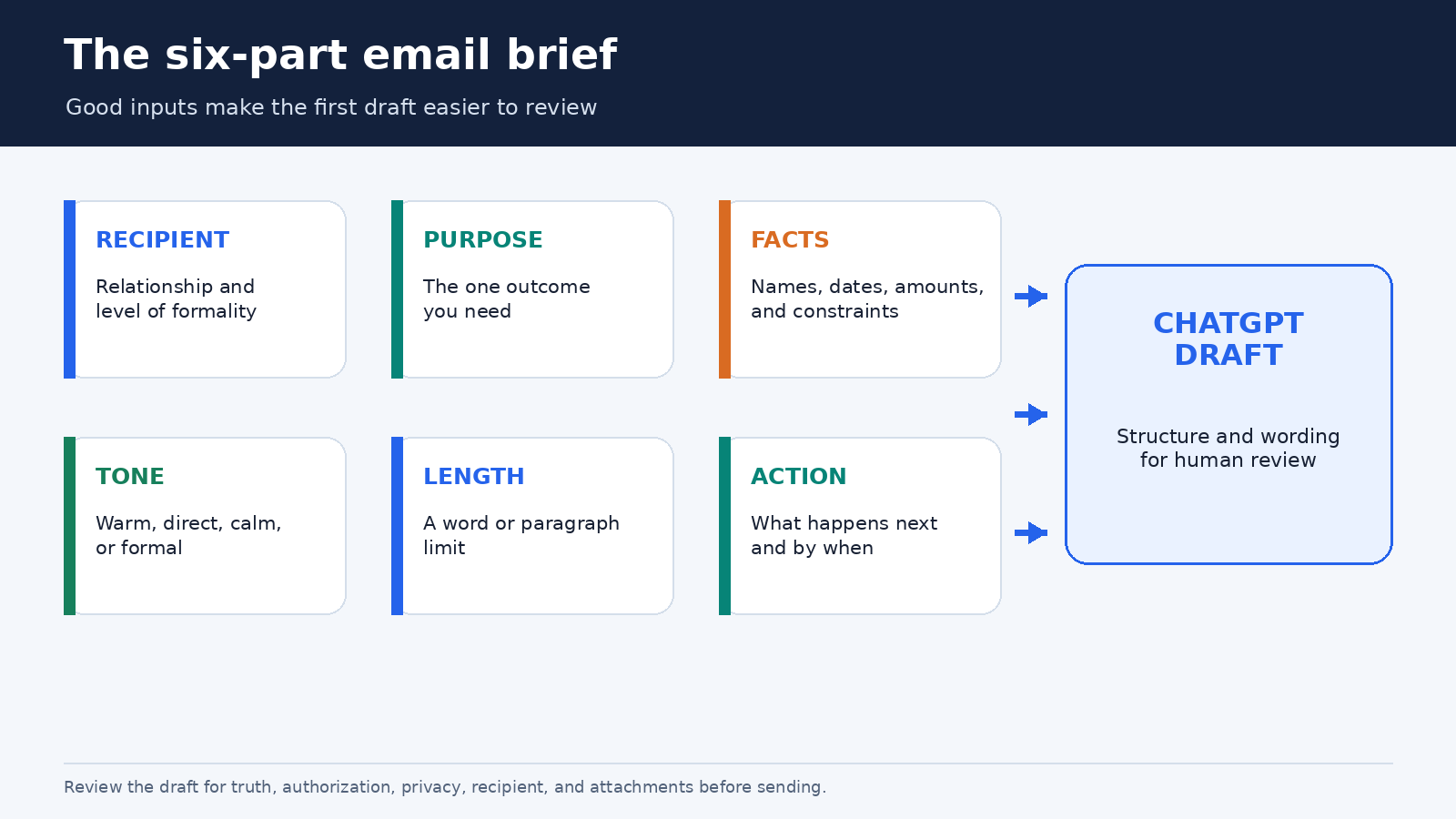
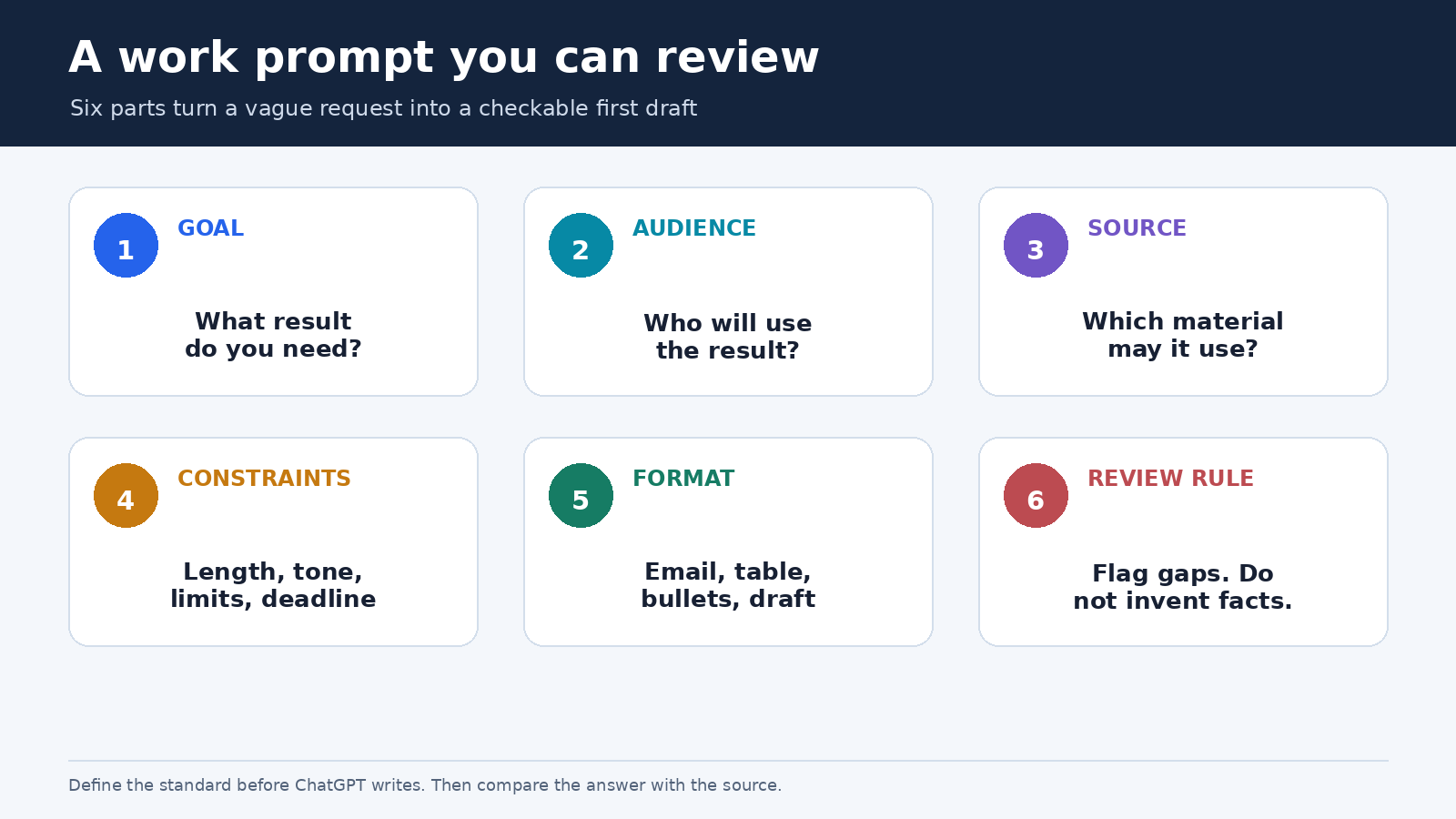
A strong email brief can fit in six lines. Give ChatGPT only the information it needs, in a form that is easy to inspect:

  • Recipient and relationship: a longtime client, a new manager, a colleague, or a vendor you have not met.
  • Purpose: request approval, decline an invitation, correct a misunderstanding, or confirm next steps.
  • Required facts: dates, amounts, names, links, decisions, and constraints that must appear.
  • Tone: warm and direct, calm but firm, formal, or conversational.
  • Length: for example, under 140 words or three short paragraphs.
  • Call to action: the exact response or action you need, plus a deadline if one is real.

Here is a reusable prompt:

Draft an email to [recipient and relationship]. My goal is [outcome]. Include only these facts: [facts]. Use a [tone] tone and keep it under [length]. End with a clear request for [action]. Do not invent names, dates, policies, or commitments. Put any missing information in square brackets.

The instruction about square brackets is especially useful. Instead of quietly filling a gap, ChatGPT has a visible place to mark it. You can also ask it to list assumptions before drafting. Neither method guarantees that every unsupported statement will be caught, so review the result against your notes.

Email brief diagram showing recipient, purpose, facts, tone, length, and call to action feeding a ChatGPT draft for human review
A compact brief gives ChatGPT enough direction without handing over the final decision.

A reliable workflow for a new email

First, write the facts in plain language. Do not polish them yet. A note such as “delivery moved from Tuesday to Thursday because the warehouse closes Wednesday; ask whether Thursday morning works” is easier to verify than a finished paragraph. Remove unrelated personal or confidential details before placing the note in ChatGPT.

Second, request one draft and one alternative. Ask the alternatives to differ in a meaningful way, such as “one concise and one warmer,” rather than requesting five nearly identical versions. Compare the opening, level of detail, and request. Often the best email combines the direct opening from one version with the considerate closing from the other.

Third, edit in your own words. Replace generic phrases such as “I hope this message finds you well” if you would never write them. Add the small signals that make the message sound like you: a familiar greeting, a precise reference to the previous conversation, or a natural sign-off. The aim is not to hide AI involvement. It is to make the email accurate and appropriate for a real relationship.

Fourth, run a constraint check. You can paste your revised draft and ask: “Check this email against the following facts and requirements. Do not rewrite it. List any mismatch, unsupported claim, unclear pronoun, missing request, or ambiguous date.” A critique-only pass is useful because it separates checking from another wholesale rewrite.

Finally, verify outside ChatGPT. Confirm names, numbers, time zones, links, quoted language, and deadlines against the authoritative source. In your email client, check the To, CC, and BCC fields, then check the subject and attachment. Read the message once from the recipient’s point of view before sending.

How to reply to a long or emotional thread

A reply needs more context than a new email because it must answer what was actually said. Before sharing a thread, remove signatures, phone numbers, addresses, tracking codes, and unrelated quoted history where practical. For sensitive work, follow your employer’s approved tools and policies. If the original message can be summarized safely, use your own summary instead of pasting it verbatim.

Ask ChatGPT to separate the thread into four buckets: decisions already made, questions you must answer, actions assigned to you, and points that remain unclear. Then verify that summary yourself. This reduces the chance that a polished reply skips the one question that mattered to the sender.

A useful reply prompt is:

Help me draft a reply based only on the summary below. Acknowledge the concern without admitting facts I have not confirmed. Answer questions 1 and 2, say that question 3 is still being checked, and propose the next step. Keep the tone calm and specific. Do not add policy language or a deadline unless it appears in my notes.

When the exchange is tense, ask for a neutral reading before asking for a reply: “Identify phrases in my draft that could sound blaming, evasive, or dismissive. Explain why, then offer a plainer alternative for each phrase.” That keeps you in control of the substance while using ChatGPT as a tone reviewer. Avoid asking it to diagnose the sender’s motives. The words in the thread may support several interpretations.

Prompt patterns for common email jobs

Make a request easier to answer: “Rewrite my draft so the request, owner, and deadline are explicit. Preserve every factual detail. If the deadline is missing, insert [confirm deadline] rather than inventing one.”

Decline without overexplaining: “Draft a respectful decline in 80 to 100 words. Thank the sender, give only this reason, avoid false future promises, and close warmly.”

Follow up after silence: “Write a short follow-up that references the original request and makes replying easy. Do not imply blame or urgency. Offer two next steps: approve, or suggest a change.”

Turn notes into a meeting recap: “Organize these verified notes into decisions, action items with owners, and open questions. Then draft a concise email. Keep unknown owners marked [owner needed].”

Adjust formality without changing meaning: “Provide a more conversational version and a more formal version. Preserve dates, amounts, names, conditions, and the requested action exactly. After each version, list any phrase where meaning might have shifted.”

Shorten a draft: “Reduce this email by 30 percent. Keep the decision, reason, deadline, and call to action. Remove repetition and throat-clearing, but do not make the tone abrupt.”

Good prompts describe the job and the boundary. “Make it better” invites broad changes. “Cut repetition while preserving these four facts” gives you an output that is easier to audit.

Keep your voice consistent without creating a robot template

You can give ChatGPT a small style card instead of an archive of personal correspondence. For example: “Use short paragraphs, contractions where natural, plain English, no exclamation marks in business mail, and a direct request near the end.” Add two brief samples that you have permission to use, ideally with names and sensitive details removed.

For recurring work, OpenAI’s Projects documentation says a Project can keep related chats, files, and instructions together. Project instructions apply inside that Project and override global custom instructions there. A Project for approved customer support language or a weekly internal update can be useful, but keep its scope narrow and review old source material. Our guide to project-only memory explains how to separate a Project’s conversational context from unrelated work.

Do not freeze every message into one formula. A payment reminder, a condolence note, and a quick teammate update should not share the same rhythm. Treat your style card as a default, then tell ChatGPT what is different about this recipient and moment.

For a longer or delicate draft, Canvas may be easier than repeated full-message rewrites. OpenAI describes Canvas as a workspace for iterative writing, and its current capabilities page says you can work with inline suggestions and focused edits. Highlight only the paragraph you want changed and state what must remain untouched. This reduces collateral changes elsewhere in the email.

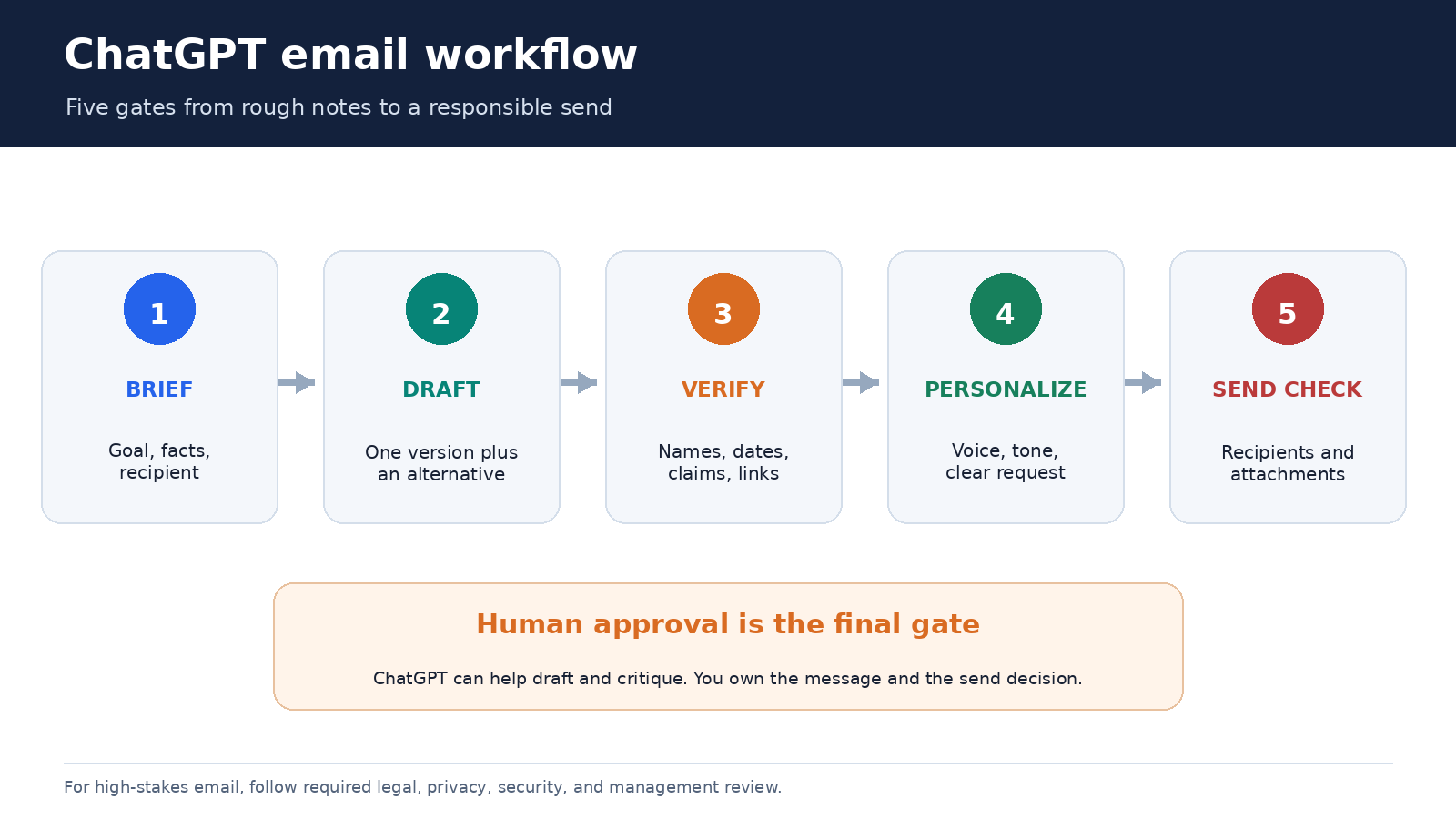
Five-step ChatGPT email workflow showing brief, draft, fact check, tone edit, and final recipient and attachment review
The final gate belongs in the email client, after content and tone checks are complete.

Privacy and data controls deserve a separate check

Email often contains information about people who never chose to place their data in an AI tool. Minimize what you share. Replace real names with roles, remove contact details and account numbers, and summarize the relevant passage when exact wording is unnecessary. Never paste passwords, authentication codes, private keys, or confidential material that your policy forbids.

OpenAI’s current Data Controls FAQ says signed-in users can turn off “Improve the model for everyone” under Settings and Data Controls. Their chats can remain in history even when that training control is off. OpenAI also says Temporary Chats do not appear in history, do not create memories, are not used to train models, and are deleted from its systems after 30 days, although they may be reviewed for abuse monitoring.

Those controls are useful, but they do not replace your workplace rules or a confidentiality assessment. Business and institutional plans may have additional controls. If you are unsure whether a message can be processed in ChatGPT, ask the relevant privacy, security, legal, or IT owner before sharing it. Our practical guide to ChatGPT memory controls covers memory and Temporary Chat as separate context choices.

The final send checklist

  • Does the subject accurately describe the message?
  • Are the recipient names, addresses, and CC or BCC choices correct?
  • Can every date, amount, quote, link, and factual claim be verified?
  • Does the message make only commitments you are authorized to make?
  • Is the requested action obvious, realistic, and assigned to the right person?
  • Could any sentence sound harsher, more evasive, or more certain than intended?
  • Is every promised attachment actually attached?
  • Did you remove comments, placeholders, private notes, and AI instructions?

For important mail, pause before sending. Reading it aloud catches missing words and unnatural phrasing. If the message could materially affect another person, a second human reviewer is often more valuable than another AI rewrite.

Frequently asked questions

Can ChatGPT write a complete email from a few bullet points?

Yes, it can produce a draft from bullet points. Include the recipient relationship, goal, required facts, tone, length, and call to action. Tell it to mark missing information instead of inventing it, then verify the result before sending.

Should I paste an entire email thread into ChatGPT?

Not by default. Remove irrelevant quoted history and sensitive identifiers, or provide a verified summary if exact wording is unnecessary. Follow your organization’s approved-tool and data-handling rules, especially for confidential, regulated, legal, health, employment, or security-related email.

How do I make a ChatGPT email sound like me?

Provide a short style card and one or two permitted, de-identified examples. Ask for targeted edits rather than endless full rewrites. Then replace generic phrases with language you naturally use and check that the tone suits this particular relationship.

Can ChatGPT send the email for me?

Features and connected apps vary by plan, workspace, and current product settings. Even where an action is available, keep a human approval step. Confirm recipients, facts, authorization, attachments, and the exact final text in the sending interface.

Use AI to reduce friction, not responsibility

ChatGPT is most useful for email when it removes the blank page, not the human judgment. A clear brief leads to a better draft. A separate fact check catches unsupported details. A tone pass can expose wording that feels sharper or vaguer than intended. The last review protects the relationship and the record.

Build the habit around a simple sequence: brief, draft, verify, personalize, and send. That workflow is quick enough for everyday messages and disciplined enough to scale to recurring work. The result should not merely sound polished. It should be true, purposeful, appropriately private, and recognizably yours.

Sources

The Best Ways to Use ChatGPT for Brainstorming

0

The Best Ways to Use ChatGPT for Brainstorming

ChatGPT is most useful for brainstorming when you treat it as a thinking partner, not an idea vending machine. A vague request may produce a long list, but a clear decision, realistic constraints, and a deliberate review process can turn that list into something you can actually use.

This practical guide shows you how to move from a blank page to a focused, testable plan. The method follows official OpenAI guidance: define the task, provide context, specify the expected output, generate widely, then evaluate and refine with human judgment.

Why ChatGPT works well as a brainstorming partner

Brainstorming often fails in one of two ways. You cannot get beyond the first obvious ideas, or you generate so many options that nobody knows what to do next. OpenAI’s Academy describes ChatGPT as a structured thought partner that can generate options, organize them into themes, and turn a rough direction into an actionable plan. That combination is more valuable than raw volume alone.

The key is to give ChatGPT a defined job. It can help you explore different angles, identify assumptions, compare tradeoffs, and impose structure on scattered notes. It does not know your unwritten priorities, office politics, customer nuances, or operational limits. Your expertise supplies those missing pieces.

A productive session therefore has two distinct modes. In expansion mode, you want variety and you postpone judgment. In selection mode, you introduce criteria and ask for comparison. Mixing the modes too early usually produces safe, repetitive options. Staying in expansion mode forever leaves you with an impressive list and no decision.

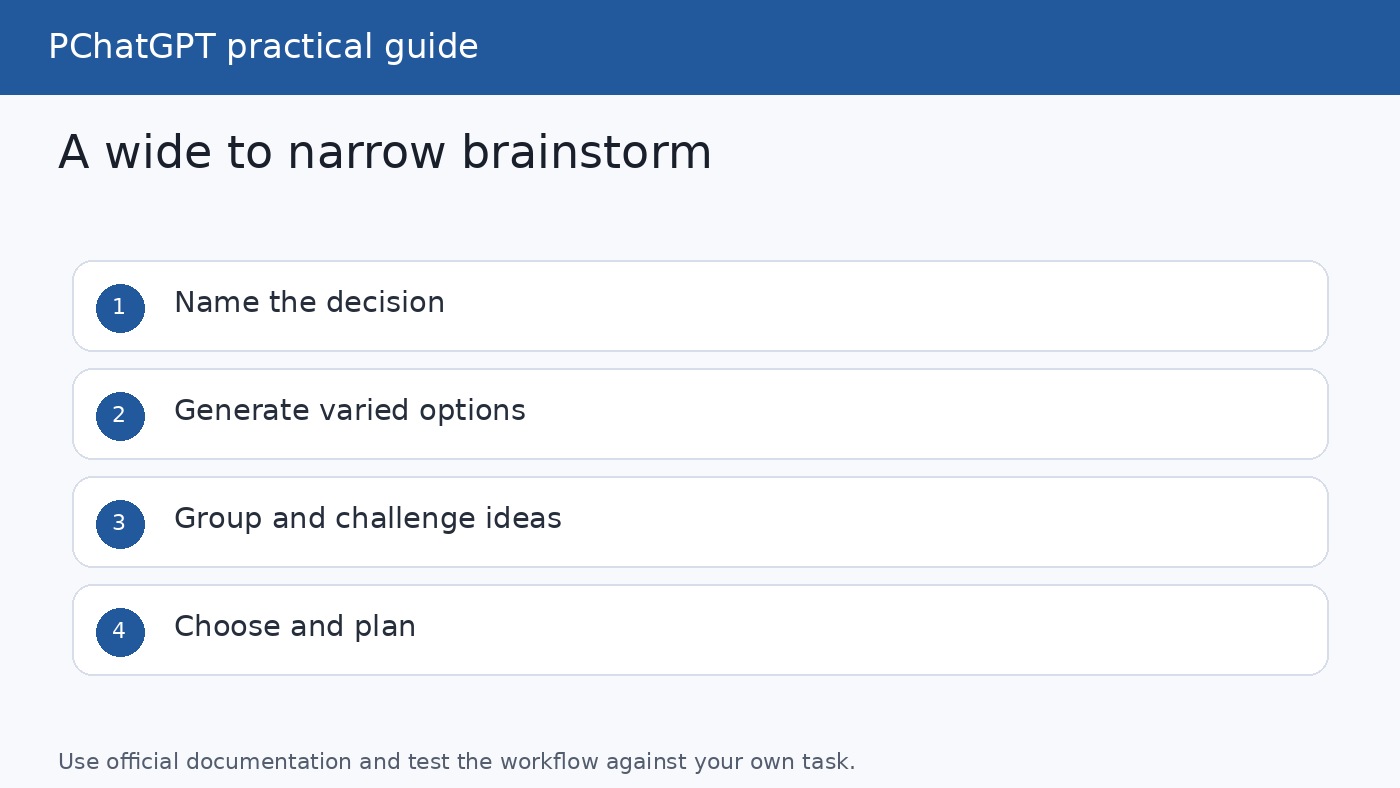
Wide to narrow ChatGPT brainstorming workflow from goal and constraints to ideas, themes, shortlist, and action plan
A useful brainstorm expands the option space first, then narrows it using explicit criteria.

Start with the decision, not a request for ideas

Before opening ChatGPT, finish this sentence: “At the end of this brainstorm, I need to decide…” Your answer gives the session a destination. “Give me marketing ideas” is open ended. “Help me choose three campaign concepts that a two-person team can launch in six weeks” is a decision brief.

Official OpenAI materials repeatedly emphasize three prompt ingredients: the task, the context, and the expected output. The OpenAI Cookbook also recommends making the audience, format, and definition of success clear. You do not need an elaborate formula. A compact handoff is usually enough.

  • Decision: What will you choose, approve, test, name, create, or improve?
  • Context: Who is involved, what has already happened, and why does the decision matter?
  • Audience: Who must understand, use, or respond to the result?
  • Constraints: State the deadline, budget, capacity, channels, policies, and non-negotiables.
  • Success criteria: Explain what a strong option must achieve.
  • Output: Request a specific number of ideas and a useful format.

For example, do not merely ask for webinar topics. Explain that the webinar is for first-time managers, must fit 30 minutes, should solve an immediate workplace problem, and needs a practical takeaway. Ask for 15 distinct topics grouped into three themes, with one sentence explaining the value of each. The added detail does not limit creativity. It directs creativity toward your real problem.

If you are unsure how to structure the request, read our guide to writing better ChatGPT prompts. The page was confirmed live before this draft was prepared.

Use this wide to narrow brainstorming workflow

OpenAI Academy recommends separating idea generation from evaluation. The following workflow turns that principle into a repeatable session. Keep the conversation in one chat while the topic stays the same so ChatGPT can use the context and decisions already stated. Start a new chat when you switch to an unrelated problem, as the ChatGPT 101 resource guide advises.

  1. Write a one-paragraph brief.

    State the decision, audience, context, constraints, and desired output. Include relevant failed attempts so ChatGPT does not simply recycle them. Do not paste confidential material unless your organization permits it.

  2. Generate for range, not perfection.

    Ask for 15 to 25 ideas that differ in strategy, tone, effort, or risk. Explicitly request a mix of straightforward, unconventional, low-cost, and ambitious options. At this stage, do not ask ChatGPT to select the winner.

  3. Expose repetition and missing angles.

    Ask which ideas are essentially duplicates. Then request overlooked perspectives, such as the customer’s objections, a frontline employee’s needs, an accessibility concern, or a simpler approach that removes work rather than adding it.

  4. Group the ideas into themes.

    Request three to six meaningful clusters and a short label for each. Ask ChatGPT to explain the common logic behind every cluster. This step turns a flat list into a map of the option space.

  5. Define the selection criteria yourself.

    Useful criteria might include customer value, expected impact, effort, cost, speed, reversibility, strategic fit, and risk. Choose only criteria that matter to the decision. If one criterion matters more, assign it a higher weight and explain the reason.

  6. Compare and challenge the shortlist.

    Ask for a table showing how the strongest options perform against each criterion. Treat scores as discussion aids, not facts. Then ask what assumption would need to be true for each option to succeed and what evidence would disprove it.

  7. Turn one direction into a small test.

    Choose the direction yourself, then request a pilot with an owner, first action, timeline, resources, success signal, and review date. OpenAI’s brainstorming guide specifically recommends moving from selection into planning with milestones, ownership, and a basic timeline.

This staged approach is a form of prompt chaining. Each prompt has one clear purpose, and your review controls what moves to the next step. For a deeper explanation, see our live guide to prompt chaining in ChatGPT.

Copyable ChatGPT brainstorming prompts

Replace the bracketed text with your details. These templates are starting points, not magic commands. Adjust them after you see what ChatGPT misunderstood or left out.

1. Start a broad but relevant brainstorm

I need to decide [decision]. The audience is [audience], and the relevant context is [context]. We must work within [budget, time, team, channel, and policy constraints]. A strong idea should [success criteria]. Generate 20 genuinely distinct options. Include a mix of low-effort, moderate, and ambitious approaches. For now, do not rank or reject them. Group the final list loosely by approach and explain each idea in two sentences.

2. Find less obvious directions

Review the ideas above for repetition and conventional thinking. Identify the assumptions they share. Then add 10 options that challenge those assumptions without violating my constraints. Include at least two ideas based on simplifying the problem, two based on combining existing ideas, and two inspired by how a different industry might approach the same need.

3. Organize a messy collection of ideas

Organize these notes into four to six themes. Give each theme a plain-English name, explain the shared logic, and place every idea in the most appropriate group. Flag duplicates, contradictions, and ideas that are too vague to assess. Do not invent missing evidence. End with three questions that would make the collection easier to evaluate.

4. Improve a team process

Brainstorm 15 ways to improve [process]. Current friction includes [problems]. The team has [capacity] and needs to show progress within [timeline]. Include quick fixes and larger changes. For every option, list the likely benefit, effort, main tradeoff, people who need to participate, and a small first test.

5. Generate content or campaign concepts

Create 12 campaign concepts for

aimed at [audience]. The goal is [goal], the available channels are [channels], and the tone should feel [tone]. Avoid [cliches, claims, or prohibited themes]. Give each concept a name, one-sentence premise, audience insight, sample headline, and reason it differs from the others.

6. Compare options without pretending certainty

Compare the shortlisted ideas against these criteria: [criteria]. Use a table with a brief rationale for each assessment. Separate facts I supplied from assumptions you inferred. Do not choose a winner yet. For each option, identify the biggest uncertainty, the cheapest way to test it, and the evidence that would cause us to reject the idea.

7. Run a pre-mortem

Assume we selected [idea] and it failed six months later. Generate 10 plausible reasons for the failure, covering audience response, execution, resources, timing, dependencies, and unintended effects. Rank the reasons by likelihood and severity, label every estimate as an assumption, and propose one preventive action or early warning signal for each.

8. Convert the choice into an experiment

Turn [chosen idea] into a limited pilot we can run within [time and budget]. Provide the objective, target participants, scope, owner, dependencies, first five actions, success measures, stop conditions, and review date. Keep claims provisional and list the decisions that still require a human owner.

Ways to make the ideas more original and useful

Asking ChatGPT to “be creative” is less useful than changing the dimensions it explores. Give it a set of lenses. Ask how the answer changes for a new user versus an expert, for a one-day deadline versus a quarter, or for no budget versus a modest budget. Ask for one option that removes a step, one that reuses an existing asset, and one that changes the delivery channel.

You can also request combinations. Have ChatGPT select two ideas from different themes and explain whether a hybrid preserves their advantages or merely adds complexity. Another strong move is inversion: ask what would guarantee a bad outcome, then translate those failure conditions into design principles.

Role perspectives can reveal blind spots, but use them carefully. Ask ChatGPT to examine an idea from the perspective of a skeptical customer, an operations lead, or an accessibility reviewer. Do not present the simulated reaction as real research. It is a hypothesis generator that helps you decide whom to interview and what to test.

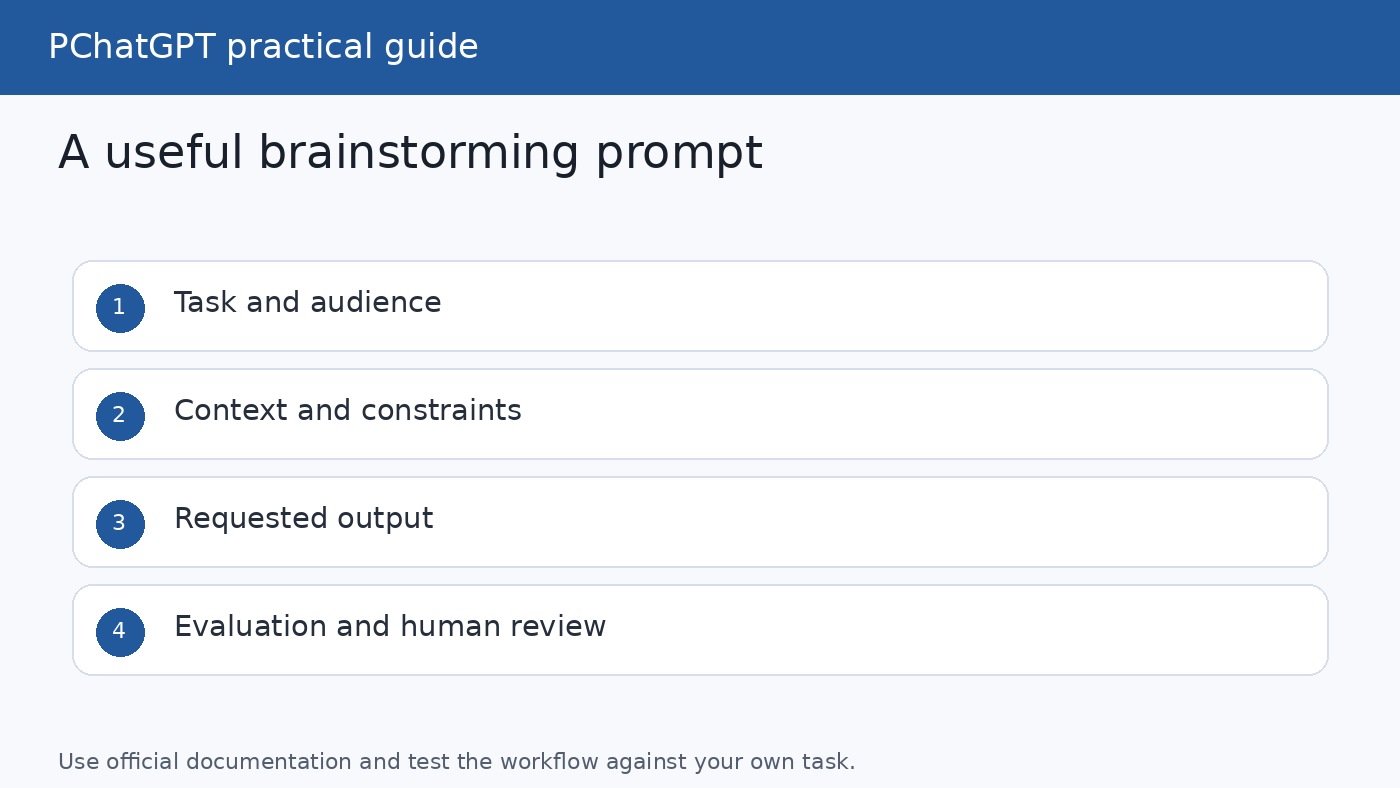
ChatGPT brainstorming prompt framework showing task, context, constraints, expected output, evaluation, and human review
Specific context and review criteria make a brainstorm easier to steer and audit.

Evaluate the output with human judgment

ChatGPT can make ideas sound polished before they are proven. A confident explanation is not evidence that customers want the idea, that a budget estimate is accurate, or that a plan complies with policy. OpenAI Academy advises keeping a human in the loop and reviewing outputs. Its brainstorming guidance also frames the model as a fast draft partner rather than a replacement for context, expertise, or judgment.

Use the following review questions before acting:

  • Does this idea solve the decision we actually defined?
  • Which statements come from our brief, and which did ChatGPT infer?
  • What customer, market, technical, legal, or financial facts need verification?
  • Does the idea conflict with company policy, privacy obligations, or brand standards?
  • Who is missing from the review, especially people who must execute the plan or experience its effects?
  • Can we test the riskiest assumption cheaply before making a large commitment?

For team sessions, consider giving people quiet time to generate ideas before showing the model’s list. This reduces the chance that ChatGPT’s first framing anchors the room. Combine human ideas with model-generated ideas, remove duplicates, and evaluate the mixed set without labeling the source. The objective is better thinking, not proving that either humans or AI “won.”

When the topic needs current information, use ChatGPT’s web search tools and inspect the cited sources. The official ChatGPT 101 guide notes that search can provide up-to-date resources and lets users open the sources behind a response. For consequential decisions, verify important claims at the original source rather than relying on a summary.

Common brainstorming mistakes to avoid

  • Starting too broadly: A request such as “brainstorm business ideas” omits the decision, audience, resources, and success criteria.
  • Ranking immediately: Early evaluation favors familiar ideas and prevents the session from exploring a wider range.
  • Requesting quantity without diversity: Twenty lightly reworded ideas are not twenty strategic options. Ask for distinct mechanisms and lenses.
  • Letting the model invent context: If a key fact is missing, ask ChatGPT to list questions or assumptions instead of filling gaps silently.
  • Accepting numerical scores as objective: A scoring table reflects your criteria, weights, inputs, and model assumptions. It supports a decision but does not make it for you.
  • Stopping at the list: A useful session ends with a shortlist, a testable assumption, an owner, and a next action.
  • Sharing sensitive data carelessly: Follow your organization’s AI and data policies. Remove unnecessary confidential or personal information from the brief.

A simple 30-minute brainstorming session

If you need a lightweight routine, use five minutes to define the decision and constraints. Spend the next seven minutes asking ChatGPT for a wide set of options. Use five minutes to request missing angles and cluster the list. Then spend eight minutes applying your chosen criteria and discussing assumptions. Reserve the final five minutes for selecting one or two ideas to test, naming an owner, and setting a review date.

Do not worry about finding a perfect first prompt. The OpenAI Cookbook says prompting is iterative and recommends clarity rather than cleverness. Notice where the response drifts, revise the brief, and continue. A good conversation becomes more specific as your own thinking becomes clearer.

For more reusable starting points, browse our ChatGPT prompts for daily productivity, which was also confirmed to return a successful live response during preparation.

Frequently asked questions

Is ChatGPT good for brainstorming?

Yes, especially for generating multiple directions, organizing ideas into themes, exposing assumptions, and drafting a first action plan. Its suggestions still require your context and judgment. Treat outputs as options to inspect and test, not authoritative recommendations.

How many ideas should I ask ChatGPT to generate?

There is no universal number. For a focused problem, 15 to 25 ideas usually creates room for variety without making review unmanageable. Ask for distinct approaches rather than a high count alone, then remove duplicates and expand the most promising themes.

How can I stop ChatGPT from giving generic ideas?

Define the decision, audience, constraints, prior attempts, and success criteria. Specify the kinds of variation you want, such as low-cost, unconventional, fast, or ambitious approaches. If the first response is generic, ask it to identify shared assumptions and generate alternatives that challenge them.

Should I use one prompt or several prompts for brainstorming?

Several focused prompts are usually easier to control. Use one prompt to generate widely, another to find gaps, another to group themes, and a later prompt to compare a shortlist. Review each stage before carrying its output forward.

Final takeaway

The best way to use ChatGPT for brainstorming is to design a process, not hunt for a magic phrase. Begin with a real decision and enough context to make the task meaningful. Generate broadly without ranking, organize the option space, apply explicit criteria, challenge the assumptions, and finish with a small test. ChatGPT supplies speed and structure. You remain responsible for evidence, judgment, and the final call.

Official OpenAI sources

How to Use ChatGPT for Content Ideas When You Feel Stuck

0

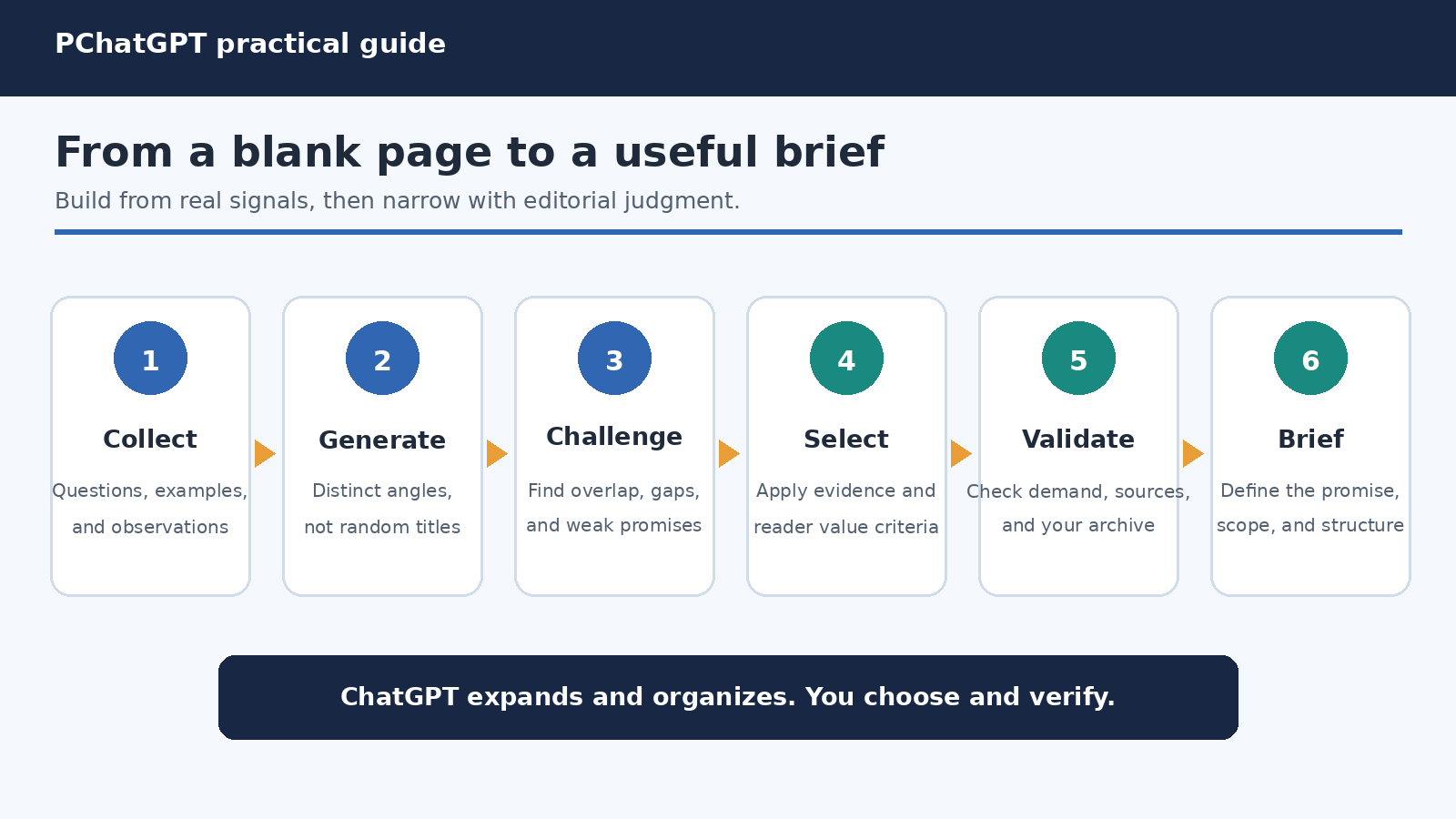
Running out of content ideas rarely means you have nothing useful to say. More often, you are trying to invent a topic, judge its value, choose a format, and write the opening all at once. That is a crowded decision, especially when a deadline is close. ChatGPT can help by separating those jobs. It can widen the field, organize possibilities, challenge predictable angles, and turn one promising thought into a workable brief. You still decide what deserves to be published.

This guide shows how to use ChatGPT for content ideas without handing over your editorial judgment. The method works for articles, newsletters, videos, podcasts, social posts, and campaign themes. It starts with material you already know, not a request for random viral topics. Then it moves through audience tension, angle generation, selection, and validation. The result should sound like your publication because the raw ingredients and final choices remain yours.

Start with the reason you feel stuck

“I need ideas” describes the symptom, not the blockage. You might have too many broad themes and no sharp angle. Perhaps every idea feels familiar. Maybe you know the subject but cannot connect it to a reader’s immediate problem. You could also be exhausted and asking an empty document to provide the first clue. Name the blockage before opening ChatGPT, because each one needs a different task.

  • No starting material: collect questions, observations, objections, and examples first.
  • A topic is too broad: divide it by audience, stage, constraint, or desired outcome.
  • Ideas feel repetitive: look for contrasts, mistakes, decisions, experiments, or overlooked details.
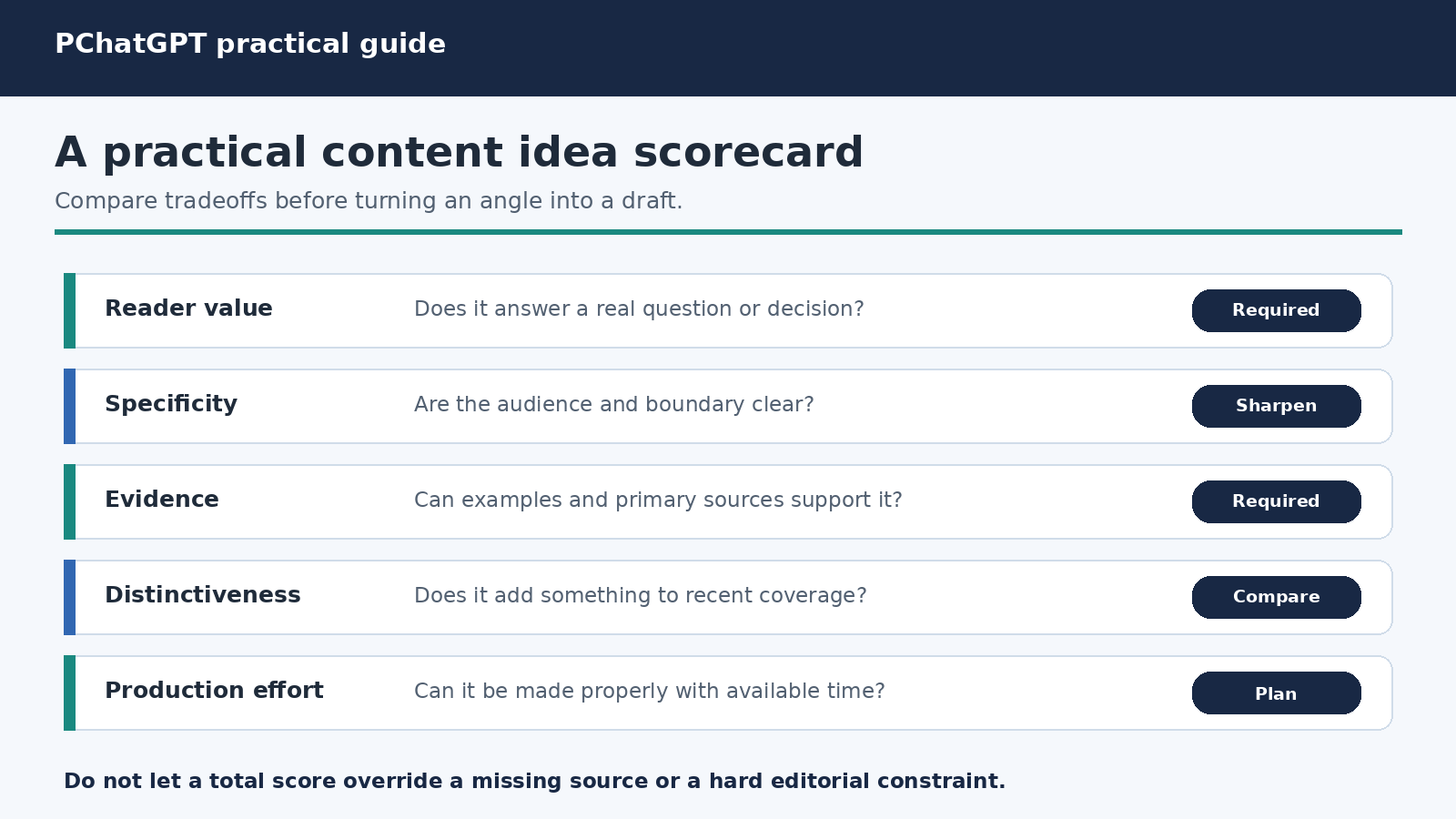
  • You cannot choose: score candidates against reader value, evidence, originality, and effort.
  • You have an angle but no structure: ask for several outlines rather than more topics.

This diagnosis keeps the conversation focused. OpenAI’s prompt engineering guidance for ChatGPT recommends clear, specific requests with enough context, followed by iterative refinement. That advice is particularly useful during ideation. A vague request such as “give me blog ideas” invites generic answers. A clear description of your reader, goal, available evidence, and constraints gives ChatGPT something meaningful to work with.

Build a small idea inventory before prompting

The strongest content ideas usually come from contact with real work. Spend ten minutes gathering fragments before asking ChatGPT to brainstorm. Useful inputs include questions from customers, notes from sales calls, search queries, support issues, comments, failed attempts, lessons from a project, changes in your field, and claims you can support with primary sources. An unfinished thought is enough. You are creating a box of parts, not drafting the finished piece.

Remove confidential information and details you do not need to share. Replace a customer’s name with a role, and summarize sensitive conversations rather than pasting them. Then label each fragment. Is it a question, frustration, misconception, decision, result, example, or source? Labels make patterns easier to see and help ChatGPT combine related material without pretending that every note has equal value.

If you have no recent notes, interview yourself. Write answers to five questions: What did I explain more than once this month? What mistake do beginners keep making? What decision looks simple but is not? What have I changed my mind about? What useful process happens behind the scenes? These answers are first party material. They give an ordinary topic a point of view that a generic list cannot provide.

Use a clear handoff, not a magic phrase

A productive prompt resembles a brief to a capable collaborator. OpenAI’s ChatGPT Enterprise Prompting Guide suggests organizing a request with context, instructions, and additional information or constraints. It also emphasizes that there is no single perfect template. For idea generation, a compact handoff can contain the following pieces:

  1. Context: your publication, subject area, and what prompted this session.
  2. Audience: who the reader is, what they already know, and what they are trying to do.
  3. Goal: the outcome the content should create, such as helping someone make a decision.
  4. Raw material: your inventory of questions, examples, observations, and credible sources.
  5. Constraints: format, scope, tone, claims to avoid, and available production time.
  6. Output: exactly what you want back, including the fields for each proposed idea.

Reusable prompt: I create [format] for [specific audience]. They understand [baseline knowledge], but struggle with [problem]. My goal is to help them [outcome]. Below are notes from my work. Generate 12 distinct content angles grounded only in these notes. For each, provide a working title, the reader question, a one sentence promise, the evidence I would need, and the main risk of becoming generic. Group similar ideas and explain the meaningful difference between them. Do not invent facts or results. Notes: [paste your safe, relevant inventory].

The output fields matter. A title alone can look exciting while hiding a weak premise. Asking for the reader question, promise, evidence, and genericity risk exposes whether an idea has substance. For more detail on constructing precise instructions, see our guide to writing better ChatGPT prompts.

Content idea workflow moving from real audience signals through angles, selection, validation, and a content brief
A useful idea session moves from evidence to options, then back to human selection and validation.

Generate angles, not just subjects

“Email marketing” is a subject. “How a small service business can plan a welcome sequence when it has only three customer stories” is an angle. An angle identifies a reader, tension, boundary, and useful destination. When ChatGPT returns broad subjects, do not keep requesting a larger list. Ask it to transform a few subjects through different editorial lenses.

Useful lenses include a beginner’s first decision, an expert’s tradeoff, a common mistake, a before and after process, a myth tested against evidence, a comparison under a defined constraint, an annotated example, and a behind the scenes explanation. You can also vary the reader’s stage. Someone discovering a problem needs different content from someone comparing methods or implementing a choice.

Take ideas 2, 5, and 8. Create four substantially different angles for each: one decision guide, one mistake analysis, one practical walkthrough, and one evidence led argument. Keep the audience and source notes unchanged. Explain what new reader value each angle adds. If two angles would lead to essentially the same article, merge them.

This second turn is often more valuable than the first. OpenAI’s ChatGPT prompting guidance explicitly recommends reviewing an initial response and refining the request. Iteration is not a repair for failure. It is the normal way to move from a wide search to a precise editorial choice.

Make ChatGPT challenge the obvious ideas

Brainstorming can produce a neat list of familiar headlines. Use a separate critical pass before falling in love with one. Ask ChatGPT to identify assumptions, overlaps, missing reader stages, and reasons an idea may not earn attention. The purpose is not to let the model veto your work. It is to make weaknesses visible while change is cheap.

Act as a skeptical editor. Review this shortlist for repetition, vague promises, unsupported claims, and mismatch with the stated audience. For each idea, name the strongest reason to publish it and the strongest reason to reject it. Suggest one concrete revision where the core insight is worth saving. Do not score writing style because these are concepts, not drafts.

Also ask what is absent. A set of ideas may focus entirely on acquisition while ignoring retention, or explain tools without addressing decisions. Try: “Map these ideas to the reader journey and show which questions remain uncovered.” This turns a one day brainstorm into a view of your editorial gaps.

Choose with an editorial scorecard

ChatGPT can organize a scorecard, but you should set the criteria and make the final call. Use a short scale and define what each criterion means. A practical scorecard might cover audience relevance, specificity, evidence available, distinctiveness from your recent work, timeliness, and production effort. Do not hide hard constraints inside a total. If an idea requires data you cannot verify, a high relevance score does not make it publishable.

Criterion Question to ask Warning sign
Reader value Does this solve a real question or decision? The promise is only “learn about” a broad topic.
Specificity Can the audience and boundary be named? The same headline could fit any publication.
Evidence What examples or sources can support it? The idea depends on invented results or vague trends.
Distinctiveness What will this add to existing coverage? Only the wording is new.
Effort Can we produce it properly with available time? The scope exceeds the reporting or review budget.

Ask ChatGPT to fill the table using only information you supplied and to mark missing evidence as “unknown.” Then inspect the reasoning, not just the total. A lower effort idea can be the right choice for tomorrow’s newsletter, while a research heavy idea belongs in next month’s calendar. Editorial value depends on context.

Turn the winner into a brief

Once you choose an angle, stop generating more options. Convert it into a brief with a single reader promise, key questions, source requirements, examples to gather, proposed structure, and exclusions. This transition prevents endless ideation from becoming procrastination. It also separates what you know from what you still need to report.

Build a content brief for the selected idea. Include the target reader, their situation before reading, the useful change after reading, the central question, five supporting questions, evidence required for each section, likely objections, and topics that are outside scope. Label every claim that needs external verification. Do not draft the article and do not fill evidence gaps with assumptions.

You can then ask for two or three outlines with genuinely different logic. One might proceed step by step, another by decision, and another from problem to diagnosis to solution. Choose the structure that makes the evidence easiest to follow. Our broader ChatGPT workflow guide for research and writing explains how to carry a defined task into drafting and review.

Editorial content idea scorecard comparing reader value, specificity, evidence, distinctiveness, and production effort
Score ideas to reveal tradeoffs, then apply hard editorial constraints before making the final choice.

Five prompts for different kinds of creative block

When every topic feels too broad

“Break [topic] into reader stages, decisions, constraints, and common failure points. Produce a matrix rather than titles. Use my audience description and notes. Mark any cell that lacks enough information.” This creates a map you can inspect instead of another random headline list.

When your recent content feels repetitive

“Here are the titles and summaries of my last 15 pieces. Cluster them by reader problem, format, and promise. Identify repeated territory and three important questions that remain unanswered. Suggest angles only for those gaps.” Include summaries so the model does not judge novelty from titles alone.

When you have one useful example

“Interview me about this example before suggesting content. Ask one question at a time about the starting situation, decision, constraint, process, result, and lesson. After my answers, propose five formats that could communicate the lesson without overstating what one example proves.” This keeps the idea anchored to what happened.

When you need a content series

“Turn this audience problem into a five part learning sequence. Each part must answer a different question and prepare the reader for the next. State the job of each installment, evidence needed, and what would be redundant. Avoid stretching one article into five.” A series should have progression, not merely matching titles.

When you need a fast, small idea

“From these notes, identify three ideas I can produce responsibly in 60 minutes using evidence already available. Limit each to one reader question and one practical takeaway. List exactly what I must verify before publishing.” The time limit narrows the production plan, not the standard of accuracy.

Validate ideas outside the chat

A plausible idea is not proof of demand. Check it against evidence you control: actual audience questions, site search terms, support logs, newsletter replies, sales conversations, community discussions, and performance patterns from comparable content. Search the web to see what already exists, but do not mistake a crowded results page for automatic demand or originality.

Open the primary sources behind factual claims. ChatGPT can help list questions and possible sources, but it may misunderstand a source or present an unsupported detail confidently. OpenAI’s official guide on clear and effective instructions recommends being specific about the desired context, outcome, length, format, and style. Clear prompting improves relevance, but it does not replace reporting, source review, or subject expertise.

Run a quick originality check against your own archive too. If you covered the same promise recently, decide whether new evidence, a narrower audience, or a changed decision justifies another piece. A new title is not a new contribution. The question is what a reader can understand or do after this piece that your existing work did not provide.

Common mistakes that keep creators stuck

  • Requesting huge lists: fifty shallow titles create more sorting work. Ask for fewer ideas with reasons and evidence needs.
  • Providing no audience context: the model fills gaps with broad assumptions, so the ideas could belong to anyone.
  • Confusing novelty with value: a strange angle is not useful merely because competitors have not covered it.
  • Combining ideation and drafting: a polished introduction can make a weak premise feel settled. Choose and validate first.
  • Accepting invented evidence: never treat a proposed statistic, quotation, customer story, or test result as real.
  • Publishing the model’s voice: add your observations, examples, reporting, and judgment. Remove generic transitions and repeated conclusions.
  • Brainstorming forever: set a stopping rule, such as selecting one viable idea after two expansion rounds and one critical review.

A repeatable 25 minute rescue session

For the first five minutes, diagnose the block and gather ten raw notes. For the next five, use the structured handoff to request a dozen grounded angles. Spend five minutes expanding the best three through different lenses. Use another five for the skeptical editor review and scorecard. In the final five, choose one angle and create the brief. If no idea survives, the useful result is a clearly named evidence gap. Go talk to readers or gather material rather than asking for more synthetic variety.

Save the prompts that work, but update the context each time. A template is a checklist, not an autopilot. Your audience’s questions change, your archive grows, and your available evidence differs from one week to the next. The enduring habit is simple: begin with real signals, define the editorial job, generate distinct options, challenge them, and validate the winner before drafting.

Frequently Asked Questions

Can ChatGPT give me original content ideas?

It can produce fresh combinations and help you see angles you missed, but originality cannot be guaranteed by a prompt. Add your own observations, audience evidence, examples, and point of view. Compare the proposed angle with your archive and existing coverage before calling it original.

How much context should I include in an idea prompt?

Include details that change the answer: audience, goal, raw notes, relevant history, constraints, and desired output. Leave out decoration and sensitive information. If the response is generic, add the missing decision context rather than simply making the prompt longer.

Should I ask for 10 ideas or 100?

Start with about 10 to 15 well described angles. Require a reader question, promise, and evidence need for each. A smaller set is easier to critique and expand. Ask for another round only when you can specify which territory is missing.

Can I publish an idea or outline directly from ChatGPT?

Treat it as working material, not a finished editorial product. Verify claims, review primary sources, add first party insight, check overlap with existing work, and edit for your audience and voice. A human remains responsible for what is selected and published.

Official OpenAI sources

How to Use ChatGPT to Summarize Long Articles and Notes

0

How to Use ChatGPT to Summarize Long Articles and Notes

A useful summary is not merely a shorter version of a document. It preserves the author’s central claim, the evidence that supports it, the qualifications that limit it, and the details you need for your next decision. ChatGPT can help with that work, but the quality of the result depends heavily on how you provide the source and define the brief.

This guide presents a practical, source-first method for summarizing articles, reports, lecture notes, meeting notes, and other long documents. It covers pasted text, uploaded files, carefully managed chunks, quotations, citations, fact checking, and privacy controls. The aim is not to make ChatGPT sound confident. It is to produce a summary that you can trace back to the material.

Source-first ChatGPT summarization workflow from document intake to verified final brief

Start with the source, not a broad topic prompt

If you ask, “Summarize an article about remote work,” ChatGPT has no way to know which article you mean. It may provide a general explanation instead of a faithful summary. Give it the actual text, upload the actual document, or share the article through an available workflow. Then explicitly limit the answer to that material.

OpenAI’s File Uploads FAQ lists document summarization, quote extraction, topic searches, and section extraction among the intended uses of file uploads. It also says common formats for text, documents, presentations, and spreadsheets are supported. Availability and interfaces can vary by plan, account, workspace, and device, so use the attachment control shown in your own ChatGPT interface when it is available.

There are three sensible ways to supply a source:

  • Paste the text when the material is short enough to transfer cleanly and you want complete control over what is included.
  • Upload the document when you need to preserve headings, work across a long report, compare documents, or find quotations.
  • Use ChatGPT search when you need a current public web source and want links to the pages used. For exact summarization, still identify the desired article and ask ChatGPT not to blend it with unrelated coverage.

Do not assume that every part of a visually complex document was read. OpenAI explains that, outside supported visual PDF retrieval, document retrieval can be text based and embedded images may be discarded. That matters for scanned pages, charts, figures, handwritten notes, and diagrams. If a chart carries the main result, provide its underlying data or a clear transcription and verify that information separately.

Write a summary brief before asking for the summary

“Summarize this” leaves several decisions open. ChatGPT must guess the audience, length, purpose, level of detail, and format. A summary for a manager deciding whether to fund a project is different from revision notes for a student, even when both begin with the same source.

A good brief answers these questions:

  • Who will read the summary?
  • What will they use it for?
  • Which parts of the source matter most?
  • What format should the answer use?
  • How should uncertainty, missing information, quotations, and citations be handled?

Use a prompt such as this:

Summarize only the attached document for a project manager who needs to decide whether to investigate the proposal. Start with a concise overview, then list the main claim, supporting evidence, assumptions, risks, unresolved questions, and recommended follow-up checks. Preserve important dates, names, and figures exactly as written. Label anything that the source does not establish as “not stated in the source.” Do not add outside facts. After each major point, cite the page, section heading, or another location marker that I can verify.

This prompt separates content from presentation. It also gives ChatGPT permission to say that something is absent. That is important because a polished answer can otherwise blur the difference between what the source says and what seems plausible.

If you want to improve prompts beyond summarization, see How to Ask ChatGPT Better Questions. For a broader process that connects research, writing, and review, use the ChatGPT How-To Guide for Research, Writing, and Automation.

Ask for a source map before a polished summary

For important work, begin with an inventory. Ask ChatGPT to identify the document title, author if stated, publication date if stated, section headings, appendices, tables, and apparent gaps in the extracted text. A source map catches obvious problems before they are hidden inside smooth prose.

A useful first request is:

Before summarizing, map the source. List its title, stated author and date, major sections, and the location of tables or appendices. Note any pages, passages, or visual elements that appear unreadable or missing. Do not infer missing content.

Compare that map with the document. If a section is absent, fix the input before continuing. If page references are unreliable because the pasted text has no page markers, ask for section headings or distinctive opening words instead. Traceability matters more than a citation style that only looks formal.

Choose the type of summary you actually need

A single document can support several valid summaries. Choose one deliberately instead of mixing them.

  • Executive brief: the conclusion, evidence, risk, and decision implications.
  • Study notes: concepts, definitions, examples, relationships, and review questions.
  • Meeting digest: decisions, owners, deadlines, disagreements, and open items.
  • Research abstract: question, method, findings, limitations, and implications.
  • Argument map: thesis, supporting claims, counterarguments, assumptions, and rebuttals.
  • Extractive digest: important quotations with source locations and minimal paraphrase.

For rough notes, ask ChatGPT to distinguish an explicit decision from a suggestion. Tell it not to invent owners or deadlines. For academic reading, request separate sections for the author’s findings and your own follow-up questions. For legal, medical, financial, or other high-impact material, treat the output as an aid to review, not professional advice or a substitute for the original document.

Handle very long material with controlled chunks

If the whole source cannot be handled reliably in one pass, or if an upload produces an incomplete map, split the text at meaningful boundaries. Use sections, chapters, agenda items, or dated note blocks. Avoid cutting a paragraph, table, quotation, or argument in half.

Use the same brief for every chunk and label each part consistently. Include the document title, part label, section heading, and source location. Ask for structured notes rather than a finished overall summary:

This is Part [label] of [document title], covering [section or pages]. Create provisional source notes only. Record the main claim, evidence, named entities, dates, figures, qualifications, contradictions, and useful quotations with locations. Do not write the final document summary yet. Do not carry a claim into another section unless that later section repeats or supports it.

Once every part has provisional notes, ask ChatGPT to consolidate those notes. The consolidation prompt should remove duplicates while preserving disagreements and changes in emphasis:

Combine the provisional notes into a source-wide outline. Merge duplicate points, but do not merge claims that differ in scope or certainty. For each major conclusion, identify which parts support it. Flag contradictions, missing transitions, and points supported by only one part. Then draft the requested summary from this outline only.

This staged method reduces a common failure: a vivid detail from one section dominating the whole summary. It also makes correction easier because you can return to the affected section instead of starting again.

Chunked document summarization process with section notes, consolidation, and source verification

Preserve claims, numbers, and uncertainty

Compression can accidentally increase certainty. “May improve retention in this sample” can become “improves retention.” A preliminary observation can become a conclusion. An estimate can lose the assumptions that produced it. Tell ChatGPT to preserve the source’s strength of language, including words such as “may,” “suggests,” “estimated,” and “under the stated conditions.”

Ask for a claim table before final prose when accuracy matters:

Summary claim Source location Evidence type Qualifier or limitation
Main finding in plain language Page or section Experiment, survey, quotation, or assertion Scope, uncertainty, or missing evidence

Then manually compare names, dates, percentages, monetary amounts, units, and causal language with the original. If a detail is important enough to drive a decision, read the surrounding passage too. A number can be copied correctly but summarized misleadingly when its denominator or timeframe disappears.

Use quotations and citations as verification tools

Ask for short quotations only when the exact wording matters. Require a location and enough surrounding context to understand each quote. Never trust quotation marks by themselves. Search the original document for the wording and verify it before publishing or relying on it.

For uploaded material, page numbers may work when they are present and extracted consistently. Section headings, table labels, paragraph openings, timestamps, or note dates can be better anchors in other sources. Ask ChatGPT to say “location unavailable” rather than create a page or section reference.

For current public information, ChatGPT search can provide links. OpenAI’s ChatGPT Search documentation says search responses may include inline citations and a Sources panel. Click those citations, open the original pages, and confirm that they support the nearby statement. Search is useful for checking whether an article has been corrected or whether a more recent official version exists, but it should not silently add outside facts to a source-only summary.

Keep the two tasks separate:

  1. Source summary: What does this document say?
  2. External verification: Do authoritative outside sources support, dispute, or update it?

If you want both, request two clearly labeled sections and citations for the external check. This prevents later readers from attributing outside information to the original author.

Run a fact-check pass against the source

Do not ask ChatGPT merely to “check accuracy.” Give it a mechanical comparison task. Supply the draft summary and the source in the same conversation when practical, then request a claim-by-claim audit:

Audit this draft against the provided source. Break the draft into factual claims. For each claim, mark it as directly supported, partially supported, contradicted, or not found. Quote the shortest relevant source passage and give its location. Check names, dates, figures, units, comparisons, and causal wording separately. Do not repair the draft until the audit table is complete.

After reviewing the audit yourself, ask for a corrected version. A second pass can test coverage: “Which central claims, limitations, or counterarguments in the source are missing from this summary?” Accuracy and completeness are different. A summary can contain no false statements and still omit the caveat that changes the meaning.

Finish with a human read of both texts. Check whether the opening reflects the source’s actual priority, whether examples have been mistaken for rules, and whether minority views or dissenting notes were erased. ChatGPT can accelerate comparison, but the person using the summary remains responsible for the final judgment.

Protect private and confidential material

Before pasting or uploading notes, remove information that ChatGPT does not need. That may include passwords, API keys, financial account details, health identifiers, customer records, private addresses, unpublished results, and confidential contractual terms. Replace identities with stable labels such as “Client A” when the relationship between entries matters.

For consumer ChatGPT, OpenAI’s Data Controls FAQ explains that you can turn off “Improve the model for everyone” in Settings under Data Controls. The conversations remain in history but are not used to improve ChatGPT. OpenAI also states that this account setting syncs across web and mobile.

Temporary Chat offers a different control. According to OpenAI, Temporary Chats do not appear in history, do not create memories, and are not used to improve models, although a copy may be retained for up to 30 days for safety. OpenAI also warns that data sent through a GPT action can be subject to the third party recipient’s privacy policy. Temporary Chat therefore does not make it appropriate to share material you are not authorized to disclose.

File handling also deserves attention. OpenAI’s current chat and file retention documentation says that files saved to Library are managed separately from chats, so deleting a chat does not necessarily delete a Library file. Review Library and delete saved files there when needed. Organization policies may impose stricter rules, and business workspaces can have separate retention and data controls. Follow your employer, school, or client policy first.

A repeatable end-to-end workflow

  1. Define the decision. Write down who needs the summary and what they will do with it.
  2. Prepare the source. Remove unnecessary sensitive data, confirm the file is readable, and preserve headings and location markers.
  3. Map the input. Ask ChatGPT to list sections and gaps before summarizing.
  4. Choose a summary form. Select an executive brief, study guide, meeting digest, research abstract, argument map, or extractive digest.
  5. State source boundaries. Tell ChatGPT whether it may use only the supplied material or may perform a separately labeled web check.
  6. Chunk when needed. Create consistent provisional notes for meaningful sections, then consolidate them.
  7. Audit claims. Compare every important statement, number, quotation, and qualifier with the source.
  8. Check omissions. Look for absent caveats, counterarguments, methods, and unresolved questions.
  9. Edit for the reader. Remove repetition and jargon without changing the source’s level of certainty.
  10. Keep traceability. Save the final summary with the source title, version or date, and verification anchors.

This process takes longer than a one-line prompt, but it produces something far more useful: a compact document whose important statements can be checked.

FAQ

Can ChatGPT summarize a PDF or Word document?

Yes, file upload features are designed to work with common text and document formats, and OpenAI specifically lists summarizing complex papers and documents as supported tasks. Access can vary by plan and interface. Verify the extracted structure first, especially when a file contains scans, charts, or embedded images, because text-based retrieval may not capture those visual elements.

Should I paste a long article or upload it?

Paste text when you want tight control over a manageable excerpt. Upload the file when headings, sections, comparison, or quote extraction matter. In either case, ask for a source map and specify that unsupported details must be labeled as absent. If extraction appears incomplete, divide the material at meaningful boundaries and summarize it through consistent section notes.

How do I stop ChatGPT from inventing details in a summary?

You cannot replace verification with a prompt, but you can reduce risk. Restrict the answer to the supplied source, require location markers, preserve uncertainty words, and ask for “not stated in the source” when information is missing. Then run a claim-by-claim audit and manually check important quotations, names, dates, numbers, units, and causal statements.

Is it safe to upload private notes to ChatGPT?

Assess authorization and sensitivity before uploading anything. Remove unnecessary personal or confidential information. Consumer users can turn off “Improve the model for everyone,” and Temporary Chat is not used for model improvement or saved in history, although OpenAI says a copy may be retained for up to 30 days for safety. Check Library separately for saved files, avoid third party actions unless you accept their policies, and follow your organization’s rules.

Official sources

ChatGPT for Work: 8 Ways to Save Time Every Week

0

ChatGPT can save time at work, but usually not in the dramatic way a product demo suggests. The dependable gains are smaller and more practical: turning rough notes into a clean action list, getting a first draft on the page, comparing two documents, or finding the awkward parts of a report before a colleague sees it. Done several times a week, those minutes add up.

The trick is to improve a real workflow rather than collect clever prompts. Choose work that is repetitive, easy to check, and low risk. Give ChatGPT the material it needs, ask for a defined output, then review the result. This guide shows how to do that with planning, meetings, email, writing, document review, and simple data analysis. It also explains where Projects, files, search, and privacy controls fit into a sensible working routine.

Start with a task you already understand

Before opening ChatGPT, look at your last working week. Which tasks appeared more than once? Where did you spend time rearranging information rather than making a decision? Good candidates include cleaning meeting notes, drafting status updates, preparing an agenda, turning feedback into revisions, or summarizing a document you have already read.

Avoid beginning with a high stakes decision or a task whose correct answer you cannot recognize. If you do not know what a good result looks like, you cannot judge whether the tool helped. A routine weekly update is a stronger first experiment than legal advice, a hiring decision, or an unsupervised message to a client.

Use a simple test: run the same workflow three times and measure the whole job. Count preparation, prompting, checking, and editing, not just the seconds before an answer appears. A draft produced in one minute is not a time saving if it needs twenty minutes of repair. Keep the workflow only if it reduces total effort without lowering quality.

Use a six-part request instead of a vague prompt

Most weak results begin with missing context. “Write my weekly update” forces ChatGPT to guess the audience, purpose, source material, tone, and length. You can fix that without writing a page of instructions. A useful workplace request has six parts:

  1. Goal: state the outcome you need.
  2. Audience: name the person or group who will use it.
  3. Source: paste or upload the material it may rely on.
  4. Constraints: set length, tone, exclusions, and deadlines.
  5. Format: ask for bullets, a table, an email, or another usable shape.
  6. Review rule: tell it to flag uncertainty and avoid inventing missing facts.

For example: “Turn the notes below into a Friday update for my project lead. Use three sections: completed, blocked, and next week. Keep it under 180 words. Preserve dates and owner names exactly. If a detail is missing, label it ‘not provided’ rather than guessing.” This request is easy to evaluate because the standard is visible before the answer arrives.

If you want more examples, the site’s daily productivity prompt guide offers reusable patterns. Treat those patterns as starting points. The best prompt is the shortest one that reliably produces work you can check and use.

Diagram of a six-part ChatGPT work prompt covering goal, audience, source, constraints, format, and a final human review rule
A clear request defines the job and makes the answer easier to review.

Build a fifteen-minute weekly planning routine

Weekly planning is a good first use because the judgment remains yours. Gather your open tasks, calendar commitments, and known deadlines in one place. Remove private details that are not necessary. Then ask ChatGPT to group the work, identify clashes, and propose a realistic order.

A practical prompt might say: “Using only the task list and calendar notes below, create a plan for Monday through Friday. Reserve two focused blocks for the proposal, keep Wednesday afternoon free for meetings, and do not move fixed deadlines. List any scheduling conflict separately. Do not add tasks.”

The first answer is a draft, not your calendar. Check whether task durations are realistic, whether dependencies are in the right order, and whether the plan leaves room for interruptions. Then make the actual choices yourself. The value is not that ChatGPT knows your priorities better than you do. It saves the clerical effort of grouping and reshaping the information so you can see the tradeoffs sooner.

At the end of the week, compare plan and reality. Which items repeatedly moved? Which estimates were wrong? Add one useful lesson to next week’s prompt. That small feedback loop is more valuable than endlessly rewriting the template.

Turn meeting notes into actions without losing the record

Meeting follow-up often combines two different jobs: preserving what happened and creating a concise next-step list. Keep those jobs separate. Save the original notes, then ask ChatGPT to create a derivative action list rather than replacing your record.

Give it a fixed schema: decision, action, owner, due date, and open question. Add a rule that absent owners or dates must be marked as missing. Afterward, compare every action with the source notes. This catches a common problem where confident wording makes an inference look like an agreed commitment.

You can also ask for a short follow-up email based on the verified table. Review names, dates, promises, attachments, and recipients before sending. Never let polished prose hide an unverified detail. If the meeting involved sensitive commercial, personnel, health, or customer information, follow your employer’s approved tools and data policy before entering anything into an AI service.

Draft email faster while keeping your voice

Email is a useful drafting task because you retain a clear final checkpoint: the Send button. Start with your own facts and desired outcome. Ask for a draft that is direct, respectful, and specific about the next action. If tone matters, provide one short example you wrote rather than relying on broad labels such as “professional.”

For a difficult reply, try a two-pass process. First ask ChatGPT to identify the recipient’s questions, commitments, and emotional signals. Correct that analysis if needed. Then request a response that addresses each verified point. This is often safer than asking for an instant reply to a long thread.

Before sending, read the draft aloud. Remove stock phrases you would never use. Confirm that it does not promise budget, timing, scope, or approval you cannot grant. A good assisted email should sound like a clearer version of you, not like a generic corporate announcement.

Use files for comparison, extraction, and first-pass analysis

OpenAI’s current File Uploads FAQ says ChatGPT can work with common documents, spreadsheets, and presentations. It describes three broad uses: synthesizing information, transforming it into another form, and extracting specific details. In daily work, that can mean comparing two policies, pulling deadlines from a brief, reviewing presentation structure, or summarizing a spreadsheet.

Be precise about scope. Instead of “analyze this spreadsheet,” ask: “Using the revenue and region columns, calculate the total by region, identify any missing values, and show the result in a table. State which rows were excluded and why.” Then spot-check calculations against the source. A nicely formatted chart can still be built from misunderstood labels or incomplete rows.

Document comparison works best with an explicit rubric. Ask for changes in dates, responsibilities, pricing, definitions, and approval steps. Require a quote or page reference for every reported difference. If a PDF is image-heavy, remember that file handling can differ by plan and format. OpenAI notes that, outside supported visual retrieval cases, document retrieval may use extracted digital text and discard embedded images. Inspect visual material yourself when it matters.

Keep recurring work together in a Project

When one task stretches across many chats, repeating background information becomes its own form of waste. OpenAI’s Projects guide describes Projects as workspaces that group chats, files, and project instructions around a shared objective. They are suited to repeated work such as weekly research, planning, and content drafts.

Create one Project for a genuine stream of work, not one for every small task. A project called “Q3 customer research” might contain the research brief, an approved terminology list, interview notes, and instructions for how summaries should be formatted. Start a fresh chat for each interview or deliverable so the threads remain understandable.

Project instructions should contain stable preferences, such as audience, terminology, and output conventions. Put changing facts in the current request. OpenAI says project instructions apply inside that Project and override global custom instructions, so review them when a response feels oddly constrained. Delete stale sources, label versions clearly, and check access before sharing a Project. In a shared workspace, anything added as context may inform responses visible to other members.

For a broader method that connects research, writing, and repeatable review, see the ChatGPT workflow guide.

Workflow diagram for a safe weekly ChatGPT routine moving from select and prepare to prompt, verify, use, measure, and improve
Time savings count only after the answer has been checked and used.

Choose the right ChatGPT tool for the job

The official ChatGPT capabilities overview lists tools including web search, deep research, file uploads, data analysis, Canvas, memory, and Projects. Availability can depend on your subscription and settings. The useful question is not “Which feature is most powerful?” It is “What evidence and output does this task require?”

  • Ordinary chat: use it for brainstorming, rewriting, outlining, and short transformations when you provide the source material.
  • Search: use it when facts may have changed and you need current, linked sources. Open the sources and verify important claims.
  • File upload: use it when the answer should come from a document, presentation, or spreadsheet you already have.
  • Data analysis: use it for structured data, calculations, cleaning, tables, and charts. Check assumptions and sample the math.
  • Canvas: use it when a draft needs several rounds of focused editing rather than a stream of separate replies.
  • Projects: use them when files, instructions, and multiple chats belong to one continuing objective.

Do not stack tools simply because they are available. More moving parts create more places for context, permissions, or facts to go wrong. Use the least complex setup that produces a reviewable result.

Protect private information before you paste

Time saved is not worth an avoidable data incident. Follow your organization’s rules first. Remove personal identifiers, secrets, credentials, unpublished financial details, and confidential client material unless your approved workspace and policy explicitly allow them. Replace names with roles when identity is irrelevant to the task.

OpenAI’s Data Controls FAQ explains that signed-in users can turn off “Improve the model for everyone” in Settings under Data Controls. Conversations can remain in history while not being used to improve models. The same page says Temporary Chats do not appear in history, do not create memories, are not used to train models, and are deleted from OpenAI’s systems after 30 days, subject to abuse monitoring.

Those controls are useful, but they do not replace workplace authorization, careful redaction, retention requirements, or access management. Also remember that uploaded files follow retention rules tied to their chat or GPT context. If you do not need a piece of information to complete the task, the safest and fastest choice is not to include it.

A simple Friday review for every saved workflow

Spend ten minutes each Friday reviewing the prompts you actually used. For each one, record the source preparation time, response time, checking time, number of factual corrections, and whether the output was used. One line in a spreadsheet is enough.

Keep prompts that save total time across at least three comparable tasks. Revise prompts that repeatedly miss the same constraint. Retire workflows that create more checking than they remove. This prevents a prompt library from turning into a museum of impressive examples that nobody trusts.

When a workflow works, save the prompt with a short note: purpose, allowed inputs, expected output, review checklist, and owner. If colleagues will use it, include a realistic example and a clear warning about data that must not be entered. A modest template with good guardrails is more useful than an elaborate automation no one can audit.

Frequently asked questions

Which work task should I try first?

Start with a repeated, low-risk task whose output you can quickly compare with a source, such as turning your own meeting notes into an action table or converting a task list into a weekly plan. Measure all preparation and review time before calling it a saving.

Can ChatGPT replace my review step?

No. It can prepare, reorganize, and critique material, but you remain responsible for factual accuracy, permissions, tone, commitments, and decisions. Review becomes more important when an output will be published, sent externally, or used in a consequential choice.

Should I keep one long chat for all my work?

Usually not. Separate unrelated tasks so context does not become confusing. For continuing work, use a clearly named Project with current files and focused instructions, then create distinct chats for individual deliverables or work sessions.

How do I know whether ChatGPT really saved time?

Compare at least three similar tasks and include setup, prompting, fact-checking, editing, and corrections. Also track whether the result was actually used. Faster generation alone is not productivity if the output creates extra review or weakens the final work.

Sources

Product features and limits can change. Check the linked OpenAI pages for current availability and account-specific details.

How to Write Better ChatGPT Prompts for More Accurate Answers

0

How to Write Better ChatGPT Prompts for More Accurate Answers

A better ChatGPT answer usually begins with a better definition of the job. The useful question is not, “What magic words make the model accurate?” It is, “What information would a capable assistant need to complete this task well, and how will I check the result?” That shift matters because a polished answer can still misunderstand your goal, rely on missing context, or state an unsupported claim.

OpenAI’s official guidance consistently recommends clear, specific requests, enough context, appropriate scope, and iterative refinement. None of those practices guarantees truth. They do, however, reduce avoidable ambiguity and make errors easier to spot. This guide turns that advice into a practical workflow you can use for writing, research, planning, analysis, and everyday questions.

Accuracy starts with a well-defined task

“Accurate” can mean several things. A factual answer should be supported by reliable evidence. A summary should faithfully represent the supplied document. A calculation should use the right inputs and method. A recommendation should fit your stated priorities. A piece of writing may be factually sound but still fail because it addresses the wrong audience or uses the wrong format.

Before writing a prompt, finish this sentence: “I need ChatGPT to produce [deliverable] so that [audience or decision] can [goal].” For example, “I need a one-page comparison of these three supplier proposals so our operations manager can choose which two deserve interviews.” This is much more actionable than “Compare these suppliers.” It establishes the output, reader, and purpose without resorting to elaborate prompt jargon.

OpenAI’s ChatGPT Enterprise Prompting Guide says there is no single perfect prompt template. It advises treating a prompt like a handoff to a capable new intern who does not yet know the project, preferences, or standards. That is a useful mental model. Include what the assistant needs to know, but do not bury the task beneath irrelevant history.

Anatomy of a clear ChatGPT prompt showing context, task, constraints, and output format

A practical structure for better ChatGPT prompts

For anything more involved than a simple question, build the prompt from five parts. You do not have to use all five every time. The structure is a checklist, not a ritual.

1. Context

State the background that changes the answer. Useful context can include your audience, location, skill level, available source material, prior decisions, definitions, or the reason you need the result. “Explain compound interest” is workable. “Explain compound interest to a 16-year-old who understands percentages but has not studied investing” gives ChatGPT a much clearer target.

Distinguish context from decoration. A long biography of your company does not help if you only need an email subject line. Include details that affect content, reasoning, terminology, or tone. If information is essential and private, consider whether it should be shared at all. Replace names, credentials, customer records, and confidential numbers with safe labels where possible.

2. The task

Use a direct verb and name one primary deliverable: summarize, compare, classify, rewrite, extract, explain, critique, or draft. “Help with this report” makes ChatGPT infer the action. “Summarize the attached report for a board member” removes that uncertainty.

If the job contains several distinct stages, do not force them into one enormous request. OpenAI recommends right-sizing complex tasks and splitting workflows into focused follow-up prompts. You might ask for an outline, correct it, request a draft, and then run a separate review. This gives you an approval point before each expensive or consequential step. For more examples of staged workflows, see this practical ChatGPT how-to guide.

3. Source material

Provide the text, file, data, or links the answer should rely on when the task depends on specific evidence. Then state the evidence boundary explicitly. For example: “Use only the attached policy. Do not add general employment-law advice. If the policy does not answer a question, write ‘Not specified.’” That instruction makes omissions visible instead of inviting a plausible guess.

Separate instructions from source material with headings or clear delimiters. A simple layout such as “Context,” “Task,” “Source,” and “Requirements” helps both you and ChatGPT see where each part belongs. If a source contains instructions of its own, make clear whether they are content to analyze rather than directions to follow.

4. Constraints and success criteria

Constraints define what the answer must and must not do. Specify the audience, length, tone, date range, jurisdiction, required topics, prohibited assumptions, and citation expectations only when they matter. Prefer observable requirements over vague praise. “Make it excellent” offers little guidance. “Use plain English, define technical terms on first use, and keep the response under 600 words” can be checked.

Tell ChatGPT how uncertainty should appear. Useful requirements include: label assumptions, distinguish facts from recommendations, identify missing inputs, quote only text present in the source, and say when the evidence is insufficient. These do not make every claim correct. They make the response more inspectable.

5. Output format

Name the form you can actually use: a table with specified columns, numbered steps, a short brief, JSON with named fields, or an email with a subject line. If order matters, define it. If you need alternatives, request a fixed number and criteria for comparing them.

Format is not merely cosmetic. It can expose gaps. A comparison table with one row per option and columns for price, source date, limitation, and missing information makes unsupported conclusions easier to notice than a flowing paragraph does.

A reusable prompt template

# Context
I am [role or situation]. The answer is for [audience] and will be used to [goal or decision].

# Task
Create [one primary deliverable].

# Source material
Use [attached text, supplied data, or named sources].
Do not rely on information outside these sources unless I explicitly ask.

# Requirements
- Cover [required points].
- Use [tone and level of detail].
- Label assumptions and missing information.
- Do not invent facts, quotations, dates, or citations.

# Output
Return [format, sections, length, or fields].

Replace the brackets with real information and delete irrelevant lines. More text is not automatically better. The goal is enough precision to define success. If you want ready-made ideas for routine tasks, the site’s collection of ChatGPT prompts for daily productivity offers practical starting points that you can adapt with your own context.

Improve weak prompts by removing ambiguity

Consider the weak request, “Write about our new service.” ChatGPT has to guess the audience, purpose, service details, channel, length, and allowable claims. A stronger version would be:

Draft a 250-word website introduction for small accounting firms evaluating our document-review service. Use only the product notes pasted below. Explain the problem, the three listed capabilities, and the next step. Use a professional, plain-English tone. Do not claim that the service saves a specific amount of time because the notes provide no measured result. End with one call to action.

The improvement does not come from assigning an impressive persona or adding theatrical language. It comes from giving the model the decision-relevant facts and a testable definition of the output.

Roles can still help when they clarify perspective or standards. “Review this as a procurement manager concerned with renewal terms and data handling” identifies a lens. “You are the greatest genius in the world” does not supply knowledge, evidence, or acceptance criteria. Use a role to narrow attention, not to manufacture authority.

Use iteration instead of searching for a perfect first prompt

OpenAI explicitly recommends iterative refinement: start, inspect the response, then adjust wording, context, scope, or complexity. Treat the first response as a draft or diagnostic. It reveals what ChatGPT understood and where your request was underspecified.

A useful refinement cycle has four moves:

  1. Inspect: Compare the response with your success criteria. Mark omissions, unsupported claims, unwanted tone, and misunderstood terms.
  2. Correct: Supply the missing fact or point to the exact sentence, section, or assumption that needs repair.
  3. Narrow: Split an overloaded job into smaller deliverables. Ask for the comparison before the recommendation, or the outline before the article.
  4. Recheck: Review the revised output from the beginning. A local edit can introduce a contradiction elsewhere.

Specific follow-ups beat “Try again.” Say, “The analysis treats setup cost and annual cost as the same metric. Rebuild the table with separate columns, using only the quoted proposal figures.” If the response chose the wrong reading of an ambiguous term, define it. If it is too broad, state what to omit.

You can also ask ChatGPT to help clarify the prompt before attempting the task. Give it your rough notes and ask it to list missing decisions or ask a small set of necessary questions. OpenAI’s enterprise guide calls this meta-prompting. It can improve the handoff, but it does not replace subject knowledge or trustworthy source material.

Iterative ChatGPT prompting workflow from draft to review, correction, and verification

Build verification into the request and the workflow

A request such as “Be accurate” is not a verification method. Ask for outputs that let you inspect the basis of the answer. When working from a document, request page, section, or quotation support for important claims. When current external facts matter, ask for source links and publication dates, then open those sources yourself. Check that each source exists, supports the nearby claim, and is authoritative for the topic.

For a high-value task, create a small set of known-answer questions or representative cases and compare responses against the answers. OpenAI’s enterprise guide recommends a small evaluation for accuracy-sensitive work. Do not report a made-up success percentage or treat a handful of cases as universal proof. Record the prompt, source set, expected answer, actual answer, and failure type. That gives you evidence for improving a repeated workflow.

A separate critique pass can also help. Ask ChatGPT to check the output for accuracy, completeness, format, tone, assumptions, contradictions, and claims unsupported by the supplied material. This is an additional review, not independent confirmation. The same model can overlook its own error. For consequential medical, legal, financial, safety, or business decisions, use qualified human review and authoritative primary sources.

Custom instructions, chat prompts, and memory are different

Use the current chat prompt for requirements unique to the immediate task, such as the source document, deadline, audience, exact output, or facts that changed today. This local context should override the temptation to put every preference into a permanent setting.

Custom instructions are for explicit guidance you want ChatGPT to consider broadly, such as “Use concise headings,” “Define acronyms,” or “When information is missing, ask rather than assume.” OpenAI says custom instructions apply across chats and can be edited or removed for future conversations. Because they are broad, avoid placing task-specific facts there, and periodically remove outdated or conflicting preferences.

Memory is distinct. OpenAI describes custom instructions as direct guidance about what you want ChatGPT to know and how to respond, while memory can retain relevant information shared through conversations when enabled. Availability and controls can vary by account or product experience. Neither feature is a substitute for including decisive, current facts in the prompt. If a detail must govern the answer, state it directly in that conversation.

For API use, do not confuse the ChatGPT interface feature with developer controls. OpenAI’s Custom Instructions help article says the comparable mechanism in the Chat Completions API is a system message, rather than a Custom Instructions API.

Know what prompting cannot fix

A strong prompt cannot provide missing evidence, guarantee a current fact, or turn a language model into an authoritative witness. ChatGPT may produce an answer that is coherent and wrong. It may misread a source, omit a condition, invent a citation, make an arithmetic mistake, or apply an outdated assumption. Confidence and fluency are not proof.

Prompting also cannot resolve an objective you have not defined. If you ask for the “best” option without stating whether you prioritize cost, speed, privacy, quality, or risk, the model must choose a standard for you. Supply a ranking rubric or ask for tradeoffs instead of a single winner.

Do not ask ChatGPT to cite sources that it cannot access and then assume the resulting citations are real. Provide the sources, use an appropriate search or research capability when available, and verify links and quotations. Do not paste secrets or unnecessary personal information merely to create richer context. Accuracy is valuable, but data minimization still matters.

A final checklist before you use the answer

  • Is the primary task stated with a clear verb and deliverable?
  • Does the prompt name the audience and purpose when they affect the result?
  • Did you provide the facts or source material the task requires?
  • Are scope, constraints, and the meaning of success observable?
  • Does the requested format make missing evidence easy to see?
  • Are assumptions, uncertainties, and unavailable information labeled?
  • Did you split unrelated or overloaded work into stages?
  • Have you checked important claims against authoritative sources?
  • Have you reviewed dates, numbers, quotations, links, and calculations yourself?
  • For high-stakes use, has an appropriate expert reviewed the result?

The most dependable prompting habit is simple: define the work, provide the relevant evidence, inspect the response, and refine it with specific corrections. Better wording helps, but a better process matters more.

Frequently asked questions

Do longer ChatGPT prompts always produce more accurate answers?

No. A prompt should contain enough relevant context and constraints to define the task, but irrelevant detail can obscure the main request. Prefer a focused prompt with a clear deliverable, evidence boundary, and output format. Split a large workflow into follow-ups when it contains several distinct jobs.

Should I tell ChatGPT to say “I don’t know”?

It can be useful to require ChatGPT to label missing information, uncertainty, and assumptions rather than fill gaps. That instruction does not guarantee that every unsupported claim will be caught. Verify important claims independently and ask for traceable support from the provided sources.

When should I use custom instructions instead of putting instructions in a prompt?

Use custom instructions for broad, recurring preferences you want considered across chats. Put task-specific facts, sources, deadlines, formats, and decision criteria in the current prompt. Review persistent instructions periodically because an old preference can conflict with a new task.

Can ChatGPT verify its own answer?

It can critique an answer, identify possible gaps, and compare the output with a checklist or supplied source. That is helpful, but it is not independent verification. Open cited sources, confirm quotations and dates, test calculations, and involve a qualified person when the consequences are significant.

Official sources

How to Compare ChatGPT Responses and Improve Weak Outputs

0

Two ChatGPT answers can look equally polished and still differ sharply in usefulness. One may follow the brief, preserve the facts, and make the next step obvious. The other may sound confident while quietly changing a requirement or filling a gap with an unsupported claim. Comparing responses is how you tell the difference.

You do not need a complicated scoring system. You need a stable task, a short rubric, and a habit of checking claims instead of rewarding smooth prose. This guide gives you a practical method for comparing ChatGPT responses, diagnosing weak outputs, and revising the prompt without turning the conversation into an endless cycle of “make it better.”

Start by defining what a good answer must do

Do not generate several responses and then decide what you wanted. Write the acceptance criteria first. If the task is an email, perhaps the result must be under 180 words, confirm a delivery delay without admitting fault, propose two meeting times, and sound calm. If the task is a summary, perhaps it must use only the supplied document, distinguish facts from recommendations, and keep every number intact.

A useful rubric usually covers five questions:

  • Task fit: Did the answer complete the requested job rather than a nearby job?
  • Accuracy: Are factual statements supported by the material or reliable sources?
  • Completeness: Did it include every required point and respect every constraint?
  • Clarity: Can the intended reader understand and use it without decoding vague language?
  • Risk: Does it invent facts, expose private information, overstate certainty, or encourage an unsafe action?

Make each criterion observable. “Professional” is open to interpretation. “Uses a neutral greeting, avoids blame, and ends with one clear action” is easier to judge. OpenAI’s official prompt engineering guidance for ChatGPT recommends clear, specific prompts with enough context, followed by iterative refinement. A concrete rubric turns that advice into a repeatable review process.

Five-part rubric for comparing ChatGPT responses by task fit, accuracy, completeness, clarity, and risk
Judge each response against the same observable criteria before choosing a winner.

Use the same input for a fair comparison

If you change the source text, audience, or constraints between attempts, you are not comparing responses fairly. Save one test prompt and run it without editing. Keep the same attachments and reference material. If you are comparing work from different conversations or different settings, note those differences instead of pretending they do not matter.

ChatGPT outputs can vary, so one answer is not proof of consistent quality. For an important repeatable workflow, try the same prompt more than once and look for recurring failures. The goal is not to find the prettiest isolated response. It is to find a prompt and review process that performs acceptably across the kinds of inputs you actually use.

Avoid testing with a prompt whose correct answer you cannot evaluate. Begin with a familiar, low-risk example. A customer support lead might use an approved policy excerpt and an old, anonymized ticket. A writer might use a public source and a brief with known requirements. Once the method catches obvious errors, expand it to more difficult cases.

A simple response comparison workflow

  1. Freeze the brief. Copy the task, source material, audience, required format, and exclusions into one reference prompt.
  2. Write the rubric. Choose three to five criteria and identify any automatic failure, such as an invented quotation or a missing legal disclaimer.
  3. Generate candidates. Obtain two or three answers from the unchanged prompt. Label them A, B, and C to reduce attachment to the first one.
  4. Review independently. Read each answer against the brief before comparing them with one another. This stops an impressive candidate from redefining the standard.
  5. Verify important claims. Open sources, compare numbers with the input, and check quotations word for word.
  6. Record the failure pattern. Note exactly what went wrong, where it happened, and which instruction should have prevented it.
  7. Change one prompt element. Add missing context, clarify a constraint, provide an example, or split the task. Then rerun the same test.

This process separates selection from repair. First you decide which candidate best meets the original standard. Then you improve the instructions based on evidence. For broader ways to structure work around reviewable stages, see the site’s practical ChatGPT workflow guide.

Score without pretending the numbers are scientific

A small scorecard can keep your attention on the brief. Use a simple scale such as pass, partial, or fail for each criterion. You can also mark a criterion “not applicable.” The labels matter less than writing one sentence of evidence beside each judgment.

Criterion Response A Response B Evidence to record
Task fit Pass Partial Which requested deliverables are present?
Accuracy Partial Pass Which claims match the supplied or primary source?
Completeness Pass Fail Which constraint or section is missing?
Clarity Partial Pass What would the intended reader misunderstand?
Risk Pass Fail What unsupported or sensitive detail appears?

The sample labels above illustrate the method, not results from a benchmark. Do not add the marks into a grand score unless every criterion deserves equal weight. Accuracy may be non-negotiable in a research summary, while tone may be easier to fix. A single fabricated source can disqualify an answer that wins every style category.

For team reviews, ask reviewers to cite a sentence or omission rather than saying “A feels better.” If two reviewers disagree, the dispute usually reveals a vague criterion. Improve the rubric before blaming the reviewers or the model.

How to diagnose a weak ChatGPT response

“Weak” is not a diagnosis. Name the failure before changing the prompt. Most disappointing outputs fall into one or more of these groups.

  • Instruction failure: The answer ignores a requested format, audience, length, or exclusion.
  • Context failure: The prompt did not provide a policy, definition, example, or background detail needed for the task.
  • Evidence failure: The answer makes a claim that the supplied material does not support.
  • Reasoning gap: The conclusion may be plausible, but the answer skips a necessary comparison, condition, or tradeoff.
  • Communication failure: The content is mostly right but buried in repetition, jargon, or an unsuitable tone.
  • Scope failure: The answer tries to solve too much at once and gives every part shallow treatment.

OpenAI explicitly warns that ChatGPT can produce incorrect facts, fabricated quotations or references, and overconfident answers. Its official article Does ChatGPT tell the truth? advises users to verify important information, including quotes, data, technical details, and external references. That warning belongs inside the comparison process, not in a footnote after publication.

Improve the prompt by fixing the diagnosed failure

Once the failure has a name, make the smallest prompt change likely to address it. A full rewrite can accidentally remove an instruction that was working.

If task fit is weak, restate the deliverable. Put the action near the start: “Draft a customer reply,” “Compare these two proposals,” or “Extract the obligations into a table.” Name the audience and intended use. Replace “discuss” with the exact operation you need.

If completeness is weak, use a checklist. List required sections and say that each one must appear. Ask for a final self-check against the listed requirements, but still perform your own review. A model’s claim that it complied is not proof.

If accuracy is weak, constrain the evidence. Tell ChatGPT to use only the supplied source for the requested summary, cite the relevant section, and mark information as unavailable when the source does not contain it. For current information, use an available research tool where appropriate and open the cited pages yourself.

If the answer is vague, provide a real example. A short example can show desired specificity, structure, or tone better than a stack of adjectives. Make clear which features of the example should be copied and which facts must not be reused.

If the task is overloaded, split it. Ask first for an outline or extraction, review that intermediate result, and only then request the draft. This makes the point of failure visible. The site’s guide to using ChatGPT for email writing and replies shows how a narrow brief and human review can improve a common writing task.

Decision path for repairing a weak ChatGPT output by clarifying instructions, adding context, constraining evidence, or splitting the task
Repair the cause of the failure instead of asking vaguely for a better answer.

Use contrastive feedback instead of vague criticism

“Try again” gives ChatGPT almost no information about the failure. Contrastive feedback identifies what to keep, what to change, and why. For example: “Keep the three-step structure from Response A. Replace its unsupported cost estimate with ‘not provided in the source.’ Use the clearer opening from Response B, but remove its extra recommendation because the brief asks only for a summary.”

This works because the revision request points to observable differences. It also leaves an audit trail for you. If the new answer still fails, you can tell whether the model ignored the correction or whether the correction itself was incomplete.

Do not paste two long answers and ask “Which is better?” without a standard. Ask for a comparison against your rubric and request quoted evidence from each candidate. Treat that model-assisted comparison as a second opinion, not the final judgment. The model can miss the same subtle error in both the answer and its critique.

Separate factual review from writing review

Fact checking and editing are different jobs. If you blend them, a graceful rewrite can distract you from an unsupported premise. Review claims first. Identify names, dates, numbers, quotations, technical statements, and recommendations that depend on external facts. Trace each important item to the supplied material or a primary source.

Then review communication. Remove repetition, tighten headings, make pronouns unambiguous, and check whether the tone fits the audience. Preserve verified details during the rewrite. A shorter sentence is not an improvement if it drops a condition that changes the meaning.

For calculations, structured data, or current web information, use appropriate tools when available and inspect their inputs and outputs. Tool use can help, but it does not remove the need to check assumptions, sources, and interpretation.

Build a small test set for work you repeat

If you regularly use ChatGPT for the same kind of task, save a few representative, non-sensitive examples. Include an ordinary case, a difficult case, and a case that previously caused trouble. Attach the expected requirements, not necessarily one perfect answer. When you revise the prompt, test all cases so that fixing one does not break another.

This is the everyday version of evaluation. OpenAI’s model optimization guidance notes that model output is non-deterministic and that behavior can change between model snapshots and families. It recommends measuring results against test inputs that resemble production use. A personal user does not need an evaluation platform to apply the principle: keep the prompt, examples, criteria, and results together.

Do not put confidential customer records or private documents into a casual test library. Use approved, anonymized, or synthetic material that preserves the task’s difficulty without preserving identifying data. Follow your organization’s rules for tools, retention, and review.

A reusable prompt for comparing two responses

You can adapt the following template. Replace every bracketed item with your real standard:

Compare Response A and Response B against this task: [task]. The intended audience is [audience]. Required constraints are [constraints]. Evaluate task fit, accuracy against the supplied source, completeness, clarity, and risk. For each criterion, mark each response pass, partial, or fail and quote brief evidence. Treat invented facts, quotations, or sources as an automatic failure. Do not choose a winner until every criterion is reviewed. End with: 1) the stronger response and why, 2) defects that still need correction, and 3) one revised prompt that addresses those defects.

The template is intentionally explicit, but it cannot supply domain expertise you do not have. For legal, medical, financial, safety, or other high-impact material, use qualified review and authoritative sources. A polished comparison table does not make an unsafe conclusion reliable.

Common comparison mistakes

  • Choosing the longest answer: Length can hide repetition and unsupported detail.
  • Choosing the most confident answer: Confidence is a presentation style, not evidence.
  • Changing the criteria after reading: This rewards whichever candidate happens to match your new preference.
  • Counting every criterion equally: A pleasant tone should not offset a wrong number.
  • Testing only easy examples: A workflow must survive ambiguity, missing data, and edge cases you expect to encounter.
  • Asking the model to be its only judge: Automated critique can help organize review, but important claims still need human and source checks.
  • Editing without preserving evidence: A rewrite can make a claim harder to trace or subtly change its meaning.

Frequently Asked Questions

How many ChatGPT responses should I compare?

Two or three are usually enough for a practical review. More candidates create more reading without necessarily revealing a new failure pattern. For repeatable work, it is more useful to test a small number of candidates across several representative inputs than to generate many answers for one easy prompt.

Should I ask ChatGPT to grade its own responses?

You can ask it to apply a rubric and quote evidence, but do not make it the only reviewer. It may overlook the same unsupported claim when critiquing that claim. Verify important facts yourself and use a knowledgeable human reviewer when the decision has meaningful consequences.

What should I do when both responses are weak?

Do not combine them automatically. Identify whether the shared problem comes from missing context, vague instructions, weak evidence, or an overloaded task. Change one prompt element, rerun the same test, and compare the new result against the original acceptance criteria.

Can a better prompt guarantee an accurate answer?

No. Clear prompts can improve relevance and make uncertainty easier to see, but they cannot guarantee factual accuracy. Check quotes, numbers, references, and consequential claims against reliable primary sources. Use ChatGPT as assistance in the workflow, not as the final authority.

Final checklist

  • Define acceptance criteria before generating candidates.
  • Use the same prompt, context, and source material for each candidate.
  • Judge every answer against the brief before comparing style.
  • Record evidence for pass, partial, or fail decisions.
  • Disqualify serious factual or safety failures even when the prose is polished.
  • Fix the diagnosed cause with one focused prompt change.
  • Retest representative examples and verify important claims independently.

The strongest ChatGPT response is not the one that sounds most finished. It is the one that meets a defined need, respects the evidence, exposes uncertainty, and survives review. Once you compare outputs that way, weak answers become useful feedback. They show exactly what the prompt, source material, or review process needs next.