The best ChatGPT writing prompts are not magic sentences. They are reusable work orders for a particular stage of writing. One prompt helps you find an angle. Another turns rough notes into an outline. A different prompt diagnoses a draft without rewriting it too soon. Treating those jobs separately keeps your choices visible and makes weak output easier to repair.
This guide gives you seven prompt patterns and shows where each one belongs in a practical writing workflow. The examples are editorial templates, not official OpenAI commands. They work by applying principles from OpenAI’s current guidance: make the request clear and specific, include the context that affects the answer, describe the desired format, separate instructions from reference text, and improve the result through iteration.
ChatGPT can still produce incorrect facts, invented quotations, or references that do not exist. Use it to help with drafting and revision, but verify claims against original sources before you publish or submit the work. Keep private client material, personal data, and confidential documents out of a prompt unless you are authorized to use them there.
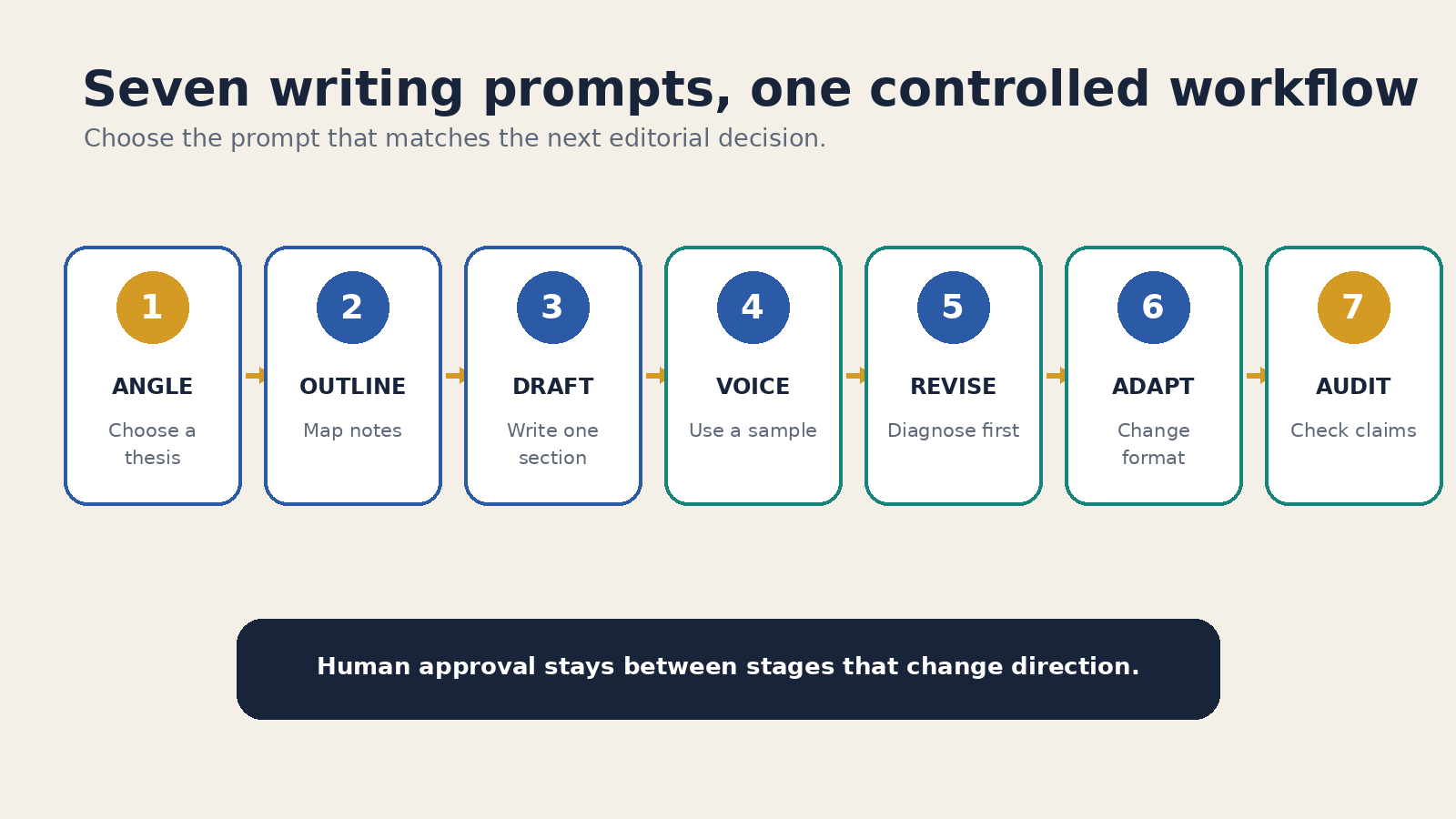
A writing workflow built from seven prompts
You do not need to run every pattern for every assignment. A short email may need only a draft and a tightening pass. A sourced article may need all seven. The useful distinction is between deciding, drafting, and checking. If you ask ChatGPT to do all three at once, it can quietly make decisions that should have remained yours.
- Define the brief and choose an angle.
- Build an outline from supplied material.
- Draft one controlled section.
- Match a voice from a real sample.
- Diagnose the draft before revising it.
- Adapt the approved copy for another format.
- Audit factual claims and citations.
OpenAI’s prompt engineering best practices recommend placing instructions early, being specific about context and outcome, and showing the desired format when it matters. Those recommendations are useful for writing because they force you to state what the piece is supposed to do.
1. The angle finder
Use this pattern when you have a topic but no clear point of view. The prompt should not ask for a random list of catchy ideas. Give it the audience, purpose, evidence you already have, and boundaries. Then ask for a small set of meaningfully different angles that you can compare.
Topic: [topic]
Reader: [specific audience]
Purpose: [what the piece should help the reader understand or do]
Material I already have: [notes, observations, source summary]
Do not cover: [out-of-scope claims or tired angles]

Propose five distinct angles. For each one, give:
1. a one-sentence thesis
2. the reader question it answers
3. the evidence I would need
4. the main risk or weakness

Do not draft the article. End by asking me to choose or combine angles.
The last instruction matters. Brainstorming and drafting are different decisions. If the model writes an introduction immediately, its first angle can become the default before you have compared alternatives. Review the options yourself. Reject any angle that depends on evidence you cannot obtain.
For creative fiction, replace “evidence” with the story elements you want to preserve, such as setting, point of view, central conflict, or an ending you have already chosen. The pattern still works because it asks for alternatives inside stated boundaries.
2. The source-bound outline builder
Once you know the angle, use your notes to build a structure. Separate the instructions from the source material with headings or clear delimiters. OpenAI’s developer documentation explains that Markdown headings and lists can communicate hierarchy, while delimiters can mark the boundary around supporting text. In an ordinary chat, simple labels are usually enough.
Task:
Create an outline for a 1,200-word guide based only on my notes.

Audience:
[reader and level of knowledge]

Thesis:
[approved thesis]

Outline rules:
- Give each section one job.
- Put the sections in a logical reading order.
- Under each heading, list the note IDs that support it.
- Mark unsupported sections as "source needed."
- Do not invent examples, statistics, quotations, or citations.

Notes:
[N1] ...
[N2] ...
[N3] ...
Numbering the notes creates a simple trail from outline to source. It does not guarantee that the interpretation is correct, but it makes unsupported sections easier to spot. If a heading has no note ID, either find a source or remove the heading. Do that before prose makes the gap less obvious.
This pattern is deliberately narrower than a general guide to prompt construction. If you need help organizing long instructions, read the site’s ChatGPT prompt engineering guide. For this workflow, the outline is an editorial checkpoint, not an excuse to make the prompt longer.
3. The controlled section drafter
Draft one section after you approve the outline. Supply the section’s purpose, the source notes it may use, the claims it must not make, and a concrete output shape. A page full of constraints can become self-defeating, so keep only the rules that you will actually check.
Draft the section "[heading]" from the approved outline.

Section job:
[what this section must explain]

Use only these notes:
[paste the relevant notes]

Requirements:
- 250 to 350 words
- plain English for [audience]
- open with the practical problem, not a broad trend
- explain each technical term on first use
- retain the source labels in parentheses for my review

Do not write the introduction, conclusion, or next section.
If the notes do not support a requested detail, insert [SOURCE NEEDED].
This is where specificity helps most. “Write an engaging section” leaves the model to decide what engagement means. A section job and a word range give you something observable to review. OpenAI’s guidance also recommends describing what you want rather than relying only on prohibitions. Tell the model to open with the reader’s practical problem instead of merely saying “do not be generic.”
4. The voice sample matcher
Tone labels such as “professional” or “friendly” are broad. A short sample of writing you own or are allowed to use gives the model a more concrete pattern. Ask it to identify useful characteristics before it rewrites anything. Do not ask for imitation of a living writer or paste material you do not have permission to share.
Study the writing sample below. Describe its observable traits:
- typical sentence length and rhythm
- level of formality
- paragraph length
- use of examples
- words or habits to avoid

Then revise my draft to match those traits without copying phrases from the sample.
Preserve every factual claim, number, name, quotation, and citation.
Do not add facts.

Writing sample:
[approved sample]

Draft:
[your draft]
Review the trait summary before accepting the rewrite. The model may focus on superficial features while missing why the sample works. You can correct that with a follow-up such as, “Keep the short paragraphs, but remove the sales language and preserve my technical terms.” If you often need the same baseline preferences, the site’s guide to ChatGPT custom instructions explains the difference between reusable preferences and details that belong in the current task.
5. The revision diagnostician
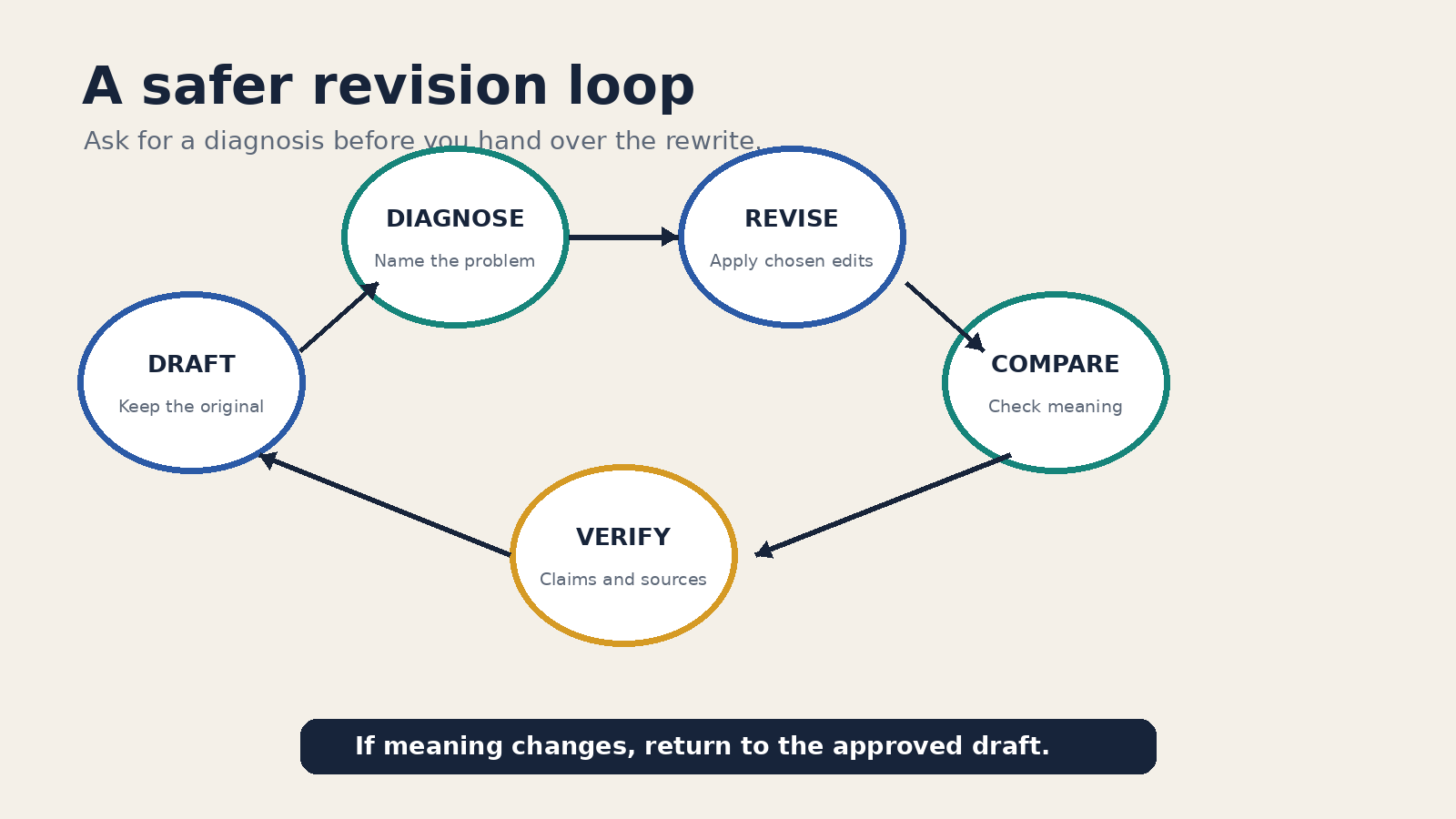
A common mistake is asking ChatGPT to “improve” a draft and accepting a complete rewrite. That can erase a deliberate voice, change a qualified claim, or introduce polished filler. Ask for a diagnosis first. You stay in control of which problems deserve a revision.
Review this draft as an editor. Do not rewrite it yet.

Evaluate:
- whether the opening states a clear purpose
- where the logic jumps or repeats
- claims that need evidence
- sentences that are vague or overloaded
- sections that do not serve the reader

Return a table with four columns:
Passage | Problem | Why it matters | Smallest useful fix

After the table, list the three highest-priority edits.
Draft:
[paste draft]
Choose the edits you agree with, then request a constrained revision: “Apply priorities one and three only. Show the revised paragraphs followed by a short change log.” This two-step exchange makes it easier to compare the result with your original. It also follows OpenAI’s advice to work iteratively rather than expecting one prompt to settle every detail.
Read the revised copy aloud. Check whether sentence length varies naturally, whether transitions say something useful, and whether the model has turned specific language into generic advice. The goal is not maximum polish. It is a draft that sounds like the intended writer and does its assigned job.
6. The format adapter
Only adapt a piece after the source version is approved. Otherwise, you may reproduce the same weak claim across an email, post, summary, and script. Tell ChatGPT which facts and wording must survive, what the new format is for, and what can be cut.
Adapt the approved article excerpt into a customer email.

Audience: [audience]
Purpose: [single purpose]
Length: 140 to 180 words
Required details: [facts, date, link, action]
Tone: direct and calm

Preserve the meaning of all factual statements.
Do not introduce urgency, discounts, testimonials, or new claims.
Use one subject line, a short body, and one call to action.

Approved source copy:
[paste copy]
Format adaptation is not summarization by default. An email needs a reason to read and a clear action. A social post may need one self-contained idea. A script needs language that sounds natural when spoken. Change the prompt’s purpose and acceptance criteria for each destination rather than asking for every format in one batch.
If email is your main use case, the related ChatGPT email writing guide provides task-specific examples. Keep the approved long-form version as the reference copy so you can compare every adaptation against it.
7. The claim and citation auditor
Run the final pattern before publication, submission, or client delivery. It is an inventory, not an automatic fact checker. OpenAI warns that ChatGPT can state incorrect information confidently and can fabricate quotes, studies, citations, or references. Asking it to verify itself does not remove that risk.
Audit the draft below. Do not rewrite it.

Create three lists:
A. Externally verifiable factual claims
B. Quotations, numbers, dates, and named references
C. Statements that are opinion, advice, or interpretation

For every item in A and B, quote the exact draft sentence and identify the source currently attached to it. If no source is attached, write "unverified."
Do not create or guess a citation.

Draft:
[paste final draft]
Open each cited source yourself and check that it exists, supports the exact wording, and is current enough for the claim. The OpenAI accuracy guidance for ChatGPT specifically recommends checking important quotations, data, technical information, and external references. For high-stakes work, use the review process required by your field or organization.
How to run the full sequence without losing control
Start a working document outside the chat. Save the approved brief, chosen angle, source notes, outline, and latest draft as separate blocks. Chat history is useful context, but your own document should remain the record of what you approved.
At each handoff, paste only what the next prompt needs. The outline builder needs the brief and notes. The section drafter needs the approved heading and its supporting notes. The revision prompt needs the current draft and your review criteria. This reduces the chance that an abandoned idea from an earlier exchange returns later.
When an answer misses the mark, change one meaningful variable. Add a missing audience detail, narrow the section job, provide a better sample, or clarify the output. Do not keep typing “try again” without saying what failed. Iteration works when the feedback is specific enough to guide the next attempt.
A compact quality check for every prompt
- Task: Is the requested action visible in the first lines?
- Context: Did you include the facts that change the answer?
- Boundaries: Is source material clearly separated from instructions?
- Output: Can you describe and inspect the requested deliverable?
- Review: Does a person decide what to keep and verify?
If a prompt fails this check, repair the missing part instead of adding decorative language. A useful writing prompt should make the editorial decision easier to see.
Frequently asked questions
Should I use all seven ChatGPT writing prompts for every piece?
No. Use the patterns that match the risk and complexity of the assignment. A short internal note may need a drafting prompt and a quick revision. A sourced public guide benefits from an outline, controlled drafting, revision diagnosis, and a claim audit.
Can one long prompt replace the whole workflow?
It can contain the same instructions, but that removes your chance to approve the angle, outline, and evidence before drafting. Separate prompts are most useful where a human decision changes the next step. Combine stages only when the task is simple and the result is easy to check.
Do detailed prompts guarantee accurate writing?
No. Detail can clarify the task and format, but it does not guarantee factual accuracy. ChatGPT may still produce incorrect information or fabricated references. Verify important claims and citations at their original sources.
What should I do when ChatGPT changes my meaning during revision?
Return to the original passage and identify the exact claim, qualification, or term that must stay. Ask for the smallest useful edit, preserve named facts and citations, and compare the revised paragraph line by line. If the change still alters the meaning, keep your original wording.
Sources and editorial boundary
- OpenAI Help Center: Best practices for prompt engineering with the OpenAI API
- OpenAI developer documentation: Prompt engineering
- OpenAI Help Center: Does ChatGPT tell the truth?
The seven templates above are practical editorial examples created for this guide. OpenAI documents the underlying prompting and accuracy principles, but it does not present these seven patterns as official commands or promise a particular writing outcome.