
The best ChatGPT prompts for productivity do not sound magical. They make the work visible. A useful prompt names the job, supplies the material, defines the output, and tells ChatGPT where judgment still belongs to you. That structure can help with a crowded morning, messy meeting notes, an awkward email, a first draft, or an end-of-day review without pretending that fluent text is automatically correct.
This guide gives you a practical prompt library for a normal workday. Each template is designed to be edited, not copied blindly. Replace the bracketed fields, remove sensitive details, and inspect the result against your actual calendar, documents, policies, and goals. A prompt earns a place in your routine only when the reviewed output saves more time than it creates.
Start with a five-part prompt brief
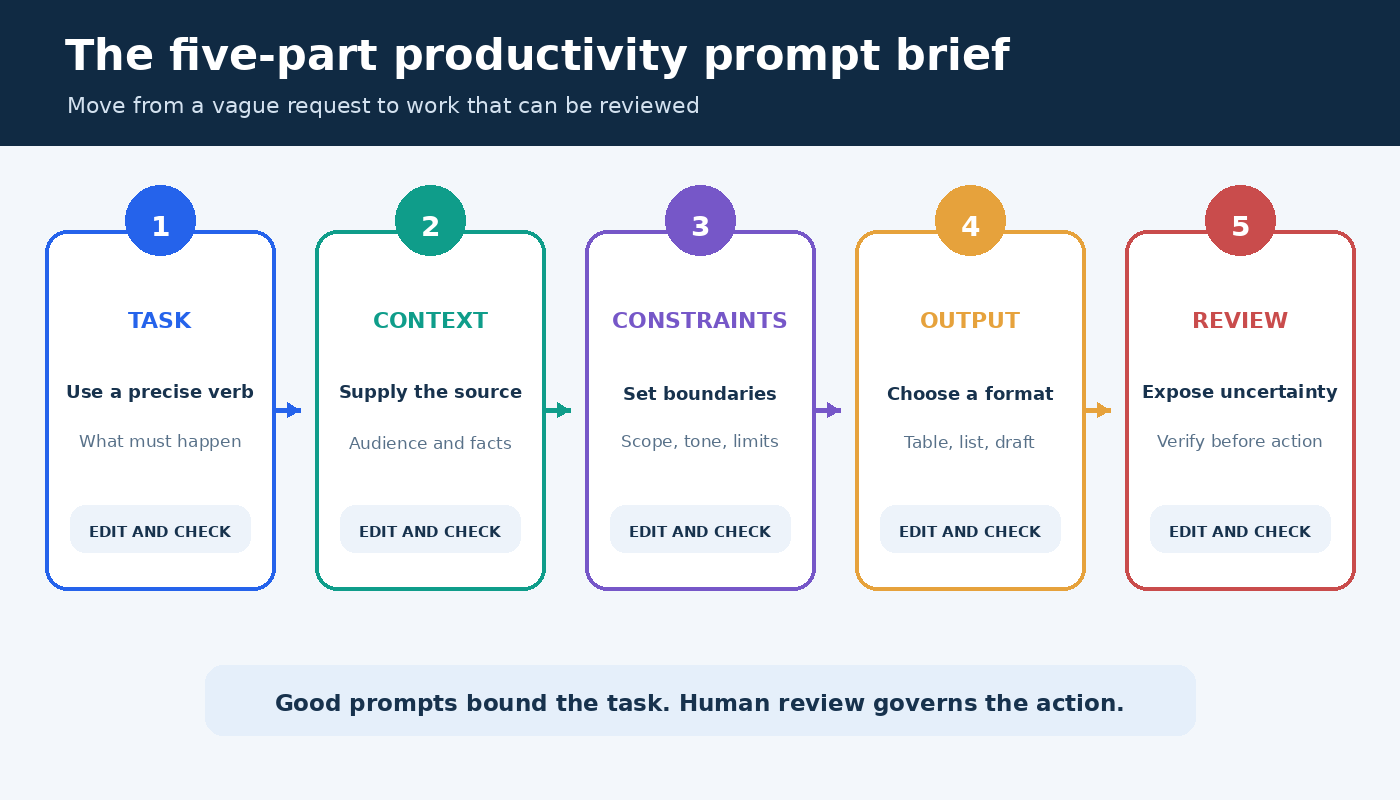
OpenAI’s official prompt engineering guidance recommends clear, specific requests, enough context, and iterative refinement. You can turn that advice into a compact brief with five parts: task, context, constraints, output, and review. You do not need every part for a simple request, but this sequence is a strong default when the result matters.
- Task: State the action with a precise verb such as rank, extract, compare, draft, or critique.
- Context: Paste the relevant source material and explain the audience or situation.
- Constraints: Set limits on length, tone, scope, deadlines, and what the answer must not assume.
- Output: Specify a format you can use, such as a table, checklist, agenda, or email draft.
- Review: Ask the model to flag uncertainty, missing inputs, and claims that require verification.
Reusable base prompt: Help me [task]. Use only [context or pasted material]. The audience is [audience], and success means [outcome]. Follow these constraints: [limits]. Return [format]. Separate facts from suggestions, identify missing information, and mark anything I should verify before acting.
Notice that the brief does not ask ChatGPT to be an all-knowing expert. It gives the model a bounded role and creates an inspection point. If the first result misses the mark, change one variable at a time. Add a sample, narrow the audience, define a stronger constraint, or ask for a critique before requesting another draft.
Morning prompts for deciding what matters
Planning prompts work best when you provide a real list. ChatGPT cannot see your commitments unless you share them or use a connected feature that you have deliberately configured. Keep names, customer data, financial details, and private company information out of a consumer chat unless your organization has approved that use.
Build a realistic daily plan
I have [number] hours available today. Here are my tasks with deadlines and rough effort: [list]. Rank them using deadline, consequence, dependency, and effort. Create a time-blocked plan with one buffer period and a clear stopping point. Do not invent meetings or deadlines. Put any scheduling conflict in a separate warning list.
The value here is not the ranking alone. It is the explicit tradeoff. Compare the proposed order with promises you have already made, then move the blocks into your calendar yourself. If two jobs compete for the same hour, ask for two versions: one optimized for deadline risk and one optimized for strategic value.
Choose the next action for an unclear project
Turn this project description into the smallest useful next actions: [description]. Group actions under decide, gather, create, review, and send. Each action must start with a verb and be completable in one work session. List blocked actions separately with the input or decision needed to unblock them.
This prompt is especially useful when a task such as “prepare launch” hides several different kinds of work. The categories reveal whether you actually need to make a decision, collect evidence, or produce something. Delete unnecessary actions rather than treating the generated list as an obligation.
Prompts for meetings and scattered notes
Meeting summaries are safer when ChatGPT transforms notes you provide instead of reconstructing an event from memory. Label speakers only when your notes identify them. Preserve uncertainty rather than assigning an ambiguous commitment to a person. For a deeper evidence workflow, see our practical guide to using ChatGPT for research.
Turn notes into decisions and actions
Use only the meeting notes below. Produce four sections: confirmed decisions, action items, open issues, and follow-ups. For each action, include owner and due date only when explicitly stated. Write “not specified” when either is missing. Quote the short source phrase that supports each decision. Notes: [paste notes].
Read the quoted phrase beside each decision. This makes silent errors easier to catch. Then send the summary to participants for confirmation if it will become the record. The model can organize a record, but it cannot resolve a disagreement that the meeting left unsettled.
Prepare a focused agenda
Create a [length]-minute agenda from this objective and background: [material]. Include the decision required, preparation attendees must complete, time per item, and the person responsible for leading each item. Reserve the final five minutes for decisions and owners. Flag any topic that should be handled asynchronously.
A good agenda protects the decision from a long status update. Before sending it, check that every named person and assigned role is accurate. If there is no decision or collaborative work, replace the meeting with a short update when that fits your team’s norms.
Writing prompts that preserve your voice
For writing, source material and audience matter more than theatrical role instructions. Give ChatGPT a few representative sentences, the facts that must remain unchanged, and a clear purpose. If you use preferences repeatedly, OpenAI documents how custom instructions can apply information across chats. Review those settings periodically because a standing preference can be inappropriate for a new task.
Draft a concise email from facts
Draft an email to [recipient role] using only these facts: [facts]. The purpose is [purpose]. Use a direct, warm tone and keep it under [number] words. Open with the reason for writing, make one clear request, and end with the next step. Do not add promises, dates, prices, or policy claims that are not in the facts.
Read the draft once for factual accuracy and once from the recipient’s perspective. Names, numbers, attachments, permissions, and commitments deserve a separate check. For sensitive or consequential messages, treat the output as a structural suggestion and write the final wording yourself.
Revise without flattening the message
Edit the draft below for clarity and flow while preserving its meaning and level of formality. Keep the examples, technical terms, and any deliberate uncertainty. First list the three most important problems. Then provide a revised version and a short change log. Do not make unsupported claims stronger. Draft: [paste draft].
Asking for a diagnosis before the rewrite lets you decide whether the edit is justified. You can reject a change and request a narrower pass. This is often more efficient than repeatedly asking the model to make prose “better,” a word that gives it no stable target.
Analysis prompts for comparing options
ChatGPT can help impose a common structure on options, but a neat table does not prove that its contents are true. Provide the source data, distinguish required criteria from preferences, and preserve missing values. Never let a generated score hide a policy, legal, safety, hiring, medical, or financial decision that requires qualified human judgment.
Create a decision matrix
Compare these options using only the supplied material: [options and evidence]. Use the criteria [list] and weights [weights]. Create a table with evidence, score, rationale, and missing information for each criterion. Do not estimate a value when the source is silent. After the table, show how the ranking changes if the top two weights are reversed.
The sensitivity check is important. If a small change in weights reverses the result, the apparent winner is fragile. Go back to the underlying evidence and discuss the tradeoff instead of accepting the total score as an objective answer.
Find gaps in a plan
Review this plan as a critical collaborator: [plan]. Separate your response into assumptions, dependencies, failure modes, missing evidence, and reversible tests. Rank issues by impact and likelihood, but explain the basis for each rank. End with the three cheapest checks that would reduce the most uncertainty.
This prompt works because it asks for tests, not just criticism. Keep domain experts in the loop. ChatGPT may surface a useful possibility, overlook an obvious constraint, or overstate a weak inference. The plan owner remains accountable for the final decision.
Use a prompt chain for work that needs several passes
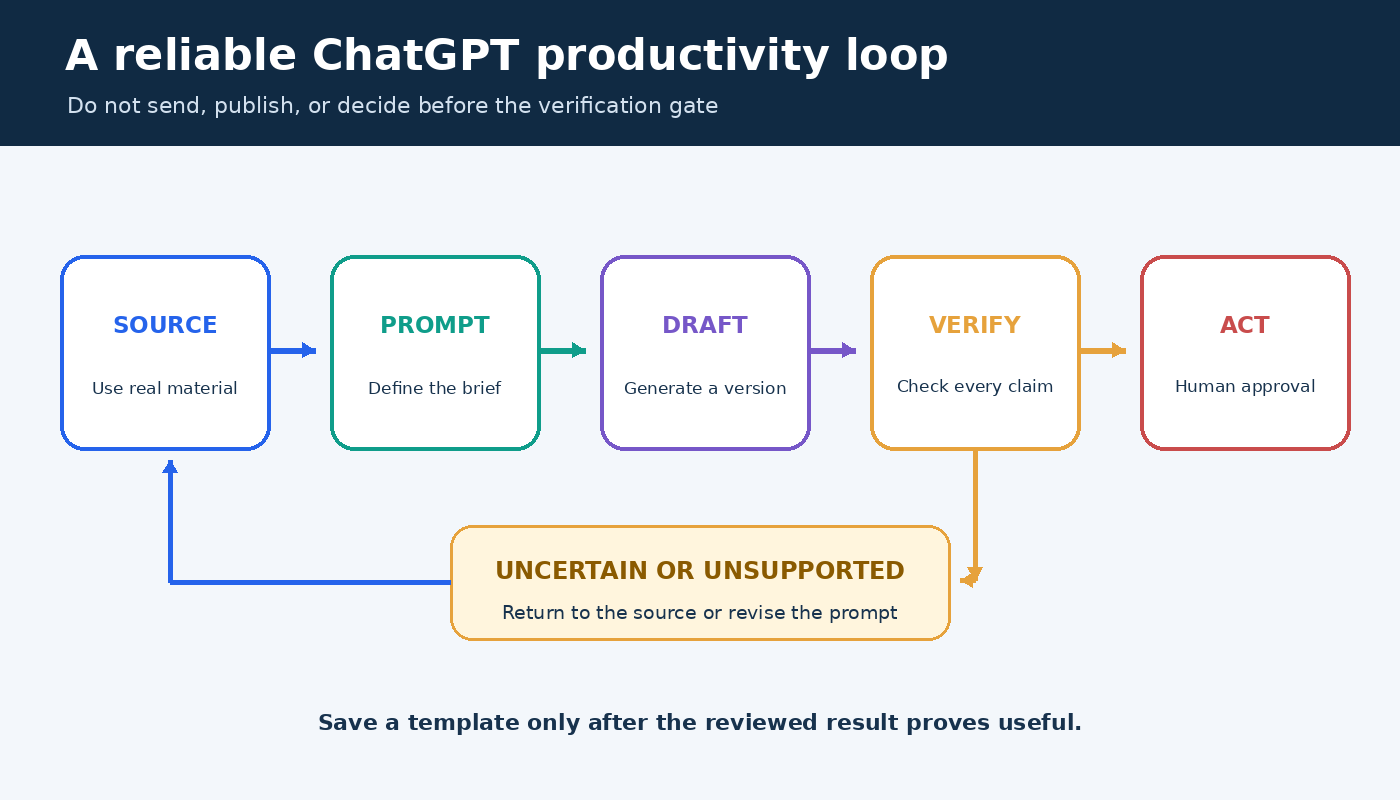
One huge prompt often mixes discovery, drafting, verification, and formatting. Split substantial work into stages so you can inspect the direction before investing in the next step. A practical chain is: define the outcome, inventory the evidence, propose an outline, draft one section, critique it against criteria, revise, and perform a final source check.
- Frame: Restate the goal, audience, constraints, and unresolved inputs.
- Extract: Pull relevant facts from supplied material without interpretation.
- Organize: Group the facts and offer two possible structures.
- Draft: Write only after you approve a structure.
- Challenge: Test the draft against accuracy, completeness, tone, and usefulness.
- Verify: Match every important claim to the source or mark it for checking.
- Finalize: Apply the required format after content is settled.
This sequence also makes recovery easier. If the tone is wrong but the facts are right, return to the draft stage rather than starting over. If the evidence is weak, stop before polishing. Our editorial and sourcing approach explains why useful AI-assisted work still needs transparent human review.
Privacy and accuracy checks before you paste
Remove information that the task does not require. Replace personal names with roles, reduce customer records to representative examples, and summarize confidential strategy rather than pasting it. Follow your employer’s approved tools and retention rules. OpenAI’s Data Controls FAQ explains consumer controls for chat history and model improvement, but a product setting does not replace your organization’s policy or a duty to protect someone else’s data.
- Check every name, date, amount, quotation, and citation against its source.
- Confirm that the output did not turn an assumption into a fact.
- Review links and current product details close to publication or action.
- Use a qualified professional for decisions with legal, medical, financial, safety, or employment consequences.
- Keep an audit trail when a decision requires documented evidence or approval.
Build a small prompt library that stays useful
Save templates by outcome, not by impressive name. “Meeting actions from notes” is easier to retrieve than “ultimate meeting assistant.” Store the prompt, a safe example input, the expected output format, and a review checklist together. Add a note about situations where the template should not be used.
Review the library after real use. Keep a template if it repeatedly saves time after correction. Revise it if the same error appears twice. Retire it when the underlying workflow, policy, or product changes. The goal is not to collect hundreds of prompts. It is to maintain a few dependable starting points for recurring work.
Frequently asked questions
What makes a ChatGPT productivity prompt effective?
An effective prompt defines a concrete task, supplies relevant context, sets meaningful constraints, requests a usable format, and makes uncertainty visible. Its quality is measured by the reviewed work it saves, not by the length of the response.
Should I use one long prompt or several short prompts?
Use one compact prompt for a bounded transformation such as formatting supplied notes. Use a prompt chain when the task includes choices, evidence gathering, drafting, and review. Separate stages let you correct direction before errors spread.
Can ChatGPT manage my priorities automatically?
It can organize the tasks and constraints you provide, but it may not know your full calendar, commitments, relationships, or consequences. Treat its plan as a proposal, reconcile it with the real sources, and make the final tradeoffs yourself.
Is it safe to paste work documents into ChatGPT?
Safety depends on the data, account, settings, contracts, and your organization’s rules. Minimize the material, remove unnecessary personal or confidential details, use approved services, and consult current OpenAI documentation and workplace policy before sharing sensitive content.