Home Blog Page 8

How to Use ChatGPT for Social Media Captions and Post Ideas

0

ChatGPT is most useful for social media when you treat it as a drafting partner, not a one-click publisher. A strong process begins with a real communication goal, gives the model reliable source material, generates several distinct angles, and ends with a human checking every line before anything enters a schedule.

This guide shows a repeatable workflow for creating social media captions and post ideas without depending on platform-specific tricks. You can use it for a product update, event, article, customer story, hiring message, or educational series. The method also works whether you publish alone or pass drafts to an editor.

What ChatGPT should and should not do in this workflow

Give ChatGPT the parts of the job that benefit from rapid variation: finding angles in approved material, producing hooks, reshaping one message for different audiences, and testing alternate tones. Keep judgment-heavy decisions with a person. Those decisions include whether a claim is true, whether a quotation is accurate, whether a joke fits the moment, whether a call to action is appropriate, and whether a post is ready to represent the brand.

This division matters because fluent copy can still contain an unsupported detail. It also protects the distinctive parts of your voice. ChatGPT can offer options quickly, but you decide which option deserves attention and what needs to be rewritten.

  • Use ChatGPT for: brainstorming, grouping themes, drafting alternatives, compressing or expanding copy, and turning feedback into a revision.
  • Do yourself: source approval, fact checking, legal or policy review, final voice editing, accessibility review, and scheduling.
  • Do not provide casually: private customer records, passwords, confidential plans, or personal information that is not needed for the task.

OpenAI explains that consumer ChatGPT content may be used to improve models depending on your settings, and that users can opt out through Data Controls. It also says Temporary Chats do not appear in history, do not use or create memories, and are not used to train models. Review your own settings and your organization’s rules before adding business material.

Build a compact caption brief before you prompt

A vague request such as “write five social posts” leaves too many decisions unstated. ChatGPT must guess the audience, purpose, evidence, voice, and desired response. OpenAI’s prompt guidance recommends clear, specific instructions with enough context, along with iterative refinement. A compact brief provides that context without turning the prompt into a maze.

Create one brief for each campaign or source item. Keep facts separate from stylistic wishes so an editor can see what is fixed and what is flexible.

Brief field What to provide Example
Goal The communication result you want Encourage readers to open the new tutorial
Audience Who should understand or care Small teams building their first content process
Source facts Approved facts, quotes, dates, and links A pasted article summary and its canonical URL
Core message One sentence the post must communicate A review checklist makes AI-assisted drafts safer to publish
Voice Concrete traits and traits to avoid Practical, warm, plainspoken; never breathless or smug
Constraints Length, required wording, and exclusions 70 to 110 words; no invented statistics; no hashtags yet
Action What the reader can do next Read the complete checklist

A small set of real examples is often more useful than a pile of adjectives. Paste two approved captions and explain what makes them representative: short openings, concrete verbs, restrained punctuation, or a particular rhythm. Remove sensitive information first. If the examples conflict, say which one has priority.
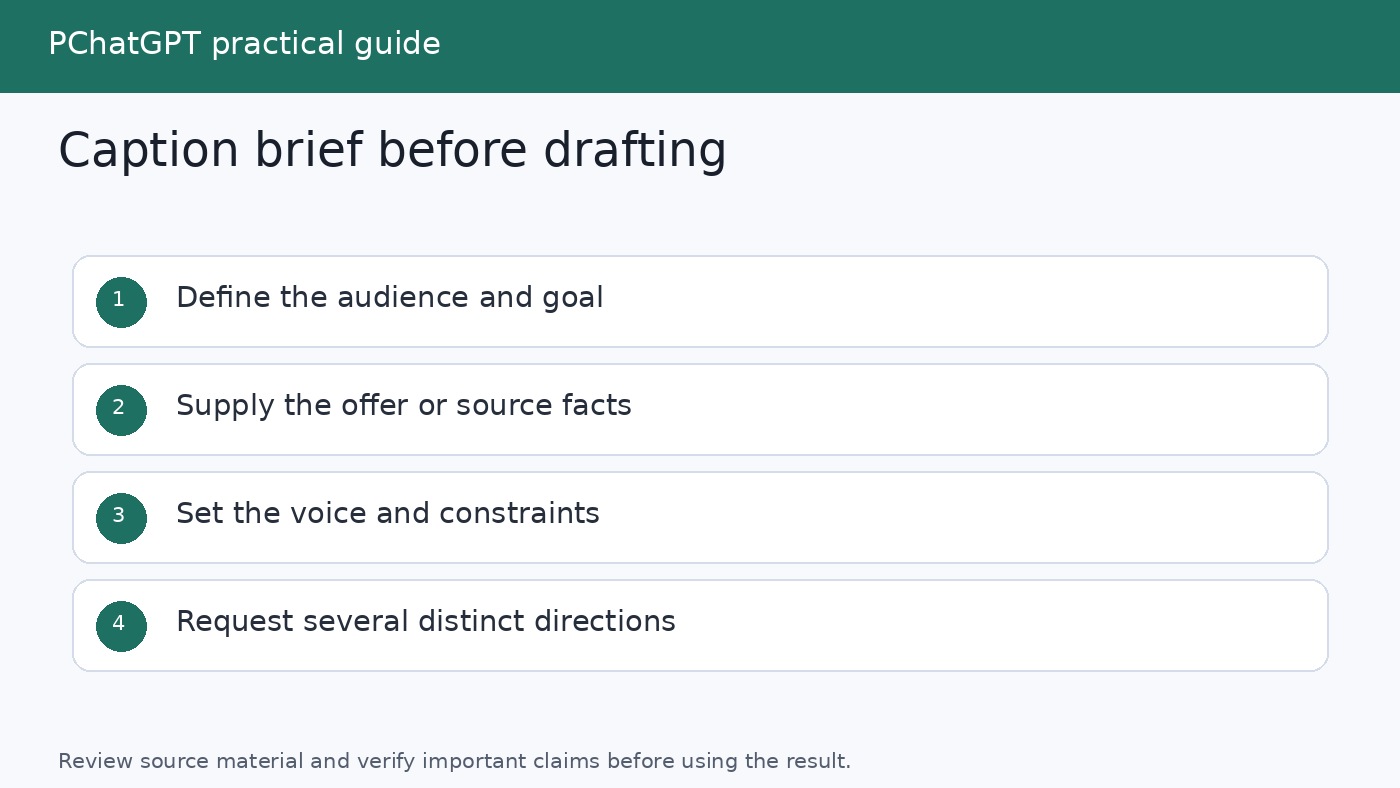
Caption brief with fields for goal, audience, source facts, voice, constraints, and call to action

Set up a reusable working space

For a recurring content stream, a ChatGPT Project can keep related chats, uploaded reference files, and project instructions together. OpenAI describes Projects as workspaces for repeated and evolving work, including writing, and says project instructions apply inside that project. This makes a Project a practical home for an approved voice guide, product terminology, campaign brief, and revision notes.

A simple project instruction might read:

You help draft social copy from supplied sources. Never add facts, quotations, dates, prices, results, or customer details that are absent from the source. Use plain English, varied sentence lengths, and specific verbs. Return options in the requested table. Flag missing information instead of guessing.

If you do not use Projects, keep the brief and working prompts in a document. Global Custom Instructions can hold durable preferences that should affect many conversations, while campaign details belong in the current prompt or project. OpenAI says custom instructions let you tell ChatGPT what to consider in its responses and can be edited or deleted for future conversations.

For more ways to get past the blank page, see The Best Ways to Use ChatGPT for Brainstorming. If you want to organize prompts that survive beyond one campaign, the site’s guide to building a reusable ChatGPT prompt library is a useful companion.

Step 1: Turn source material into a fact sheet

Do not jump from a long article or launch document directly to polished captions. First ask ChatGPT to extract a fact sheet that you can compare with the source. This intermediate step makes unsupported claims easier to notice.

Use a prompt like this:

Read the source below and create a fact sheet for social copy. Separate: confirmed facts, exact quotations, dates, names, approved terminology, useful examples, and calls to action. For each item, quote the supporting source passage. List any ambiguity under Questions. Do not infer missing details. Source: [paste approved material]

Compare every item with the original. Delete anything that stretches the meaning. If the source is time-sensitive, you can ask ChatGPT Search to find current information, but inspect the cited pages yourself and prefer the organization or publisher responsible for the claim. OpenAI says search responses may include inline citations and a Sources panel with relevant links. Citations help you trace a statement; they do not remove the need to read the source.

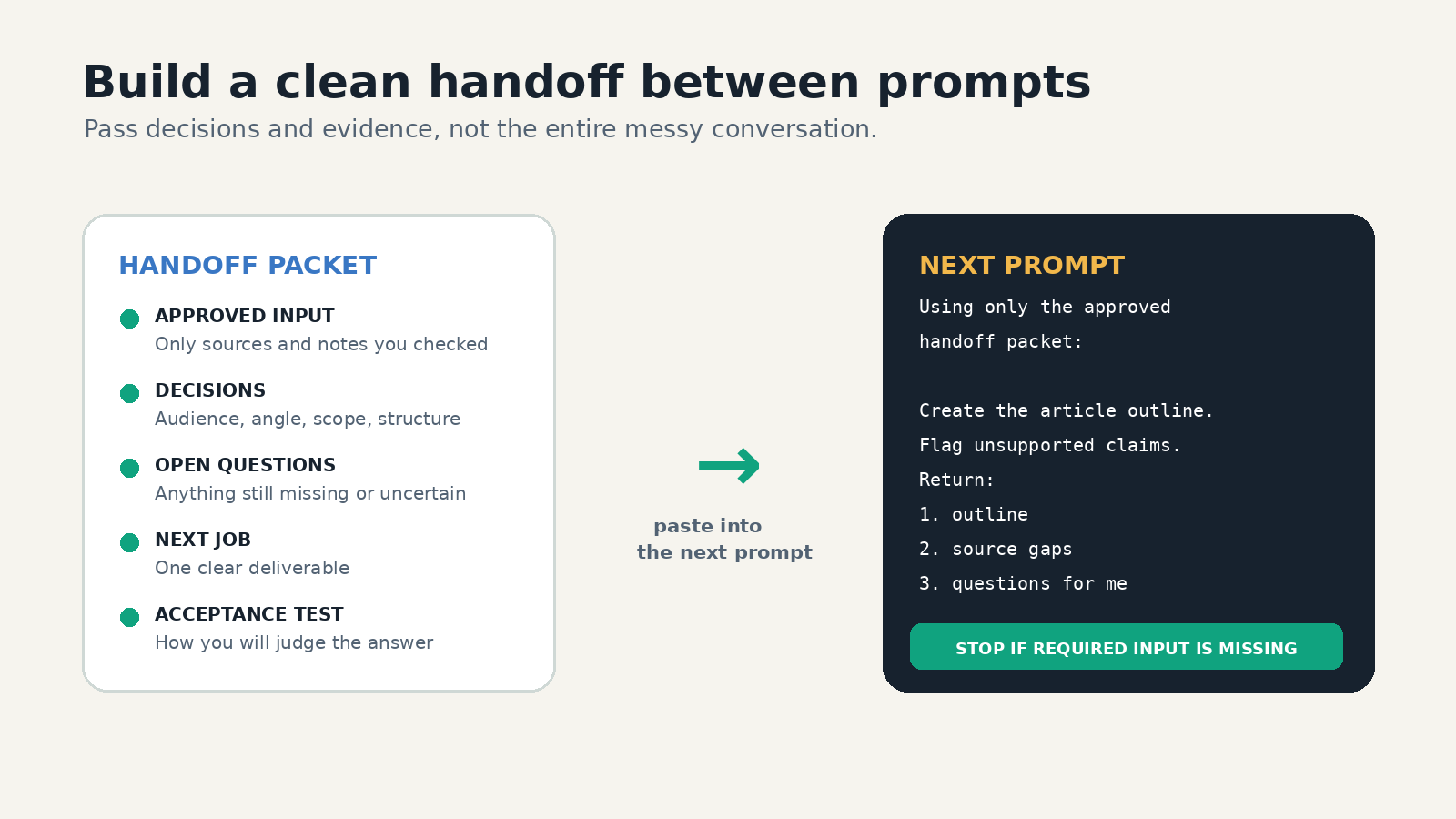
Once verified, paste the clean fact sheet into a fresh drafting prompt and label it clearly: “Use only these approved facts.” This gives later revisions a stable boundary.

Step 2: Generate angles before captions

A common mistake is asking for 20 captions and receiving 20 lightly rearranged versions of the same sentence. Generate strategic angles first. An angle is the reason a particular reader might care, not merely a different opening line.

Ask for a manageable set:

Using only the approved fact sheet, propose 12 genuinely different post angles. Include: reader problem, useful lesson, behind-the-scenes process, common mistake, question, concise announcement, and story-led angle where the source supports them. For each, give the audience need, the key source fact, and a one-sentence concept. Do not draft captions yet. Mark any angle that lacks enough evidence.

Review the list and choose three to five angles that serve the campaign goal. Remove options that depend on fear, fake urgency, a made-up personal story, or a promise the source cannot support. Combining two strong angles can work, but each caption should still have one clear center.

This separate ideation stage also makes feedback more precise. Instead of saying “make it better,” you can say “keep the practical lesson, but open with the reader’s recurring problem.” OpenAI recommends working iteratively, reviewing an initial response, and refining the prompt with added context or simpler instructions.

Step 3: Draft structured caption options

Now ask for captions from the selected angles. Define the output so comparison is easy. A table works well because it exposes whether each draft has a distinct hook, message, and action.

Draft two caption options for each selected angle. Use only the approved fact sheet. Each caption needs: a specific opening, one main idea, useful supporting detail, and a natural next step. Keep the tone practical and conversational. Avoid hype, generic motivational language, fabricated experience, and unsupported claims. Return a table with angle, caption, source facts used, and editor note. If a required fact is missing, write [NEEDS SOURCE] rather than inventing it.

Requesting the “source facts used” column is not a guarantee of accuracy, but it creates a quick audit trail. You can compare the claim list against your approved fact sheet before spending time polishing a draft.

Do not ask ChatGPT to sound “human” and stop there. Describe observable choices: contractions are welcome, openings should vary, sentences should not all have the same length, and the copy should avoid empty phrases. Name phrases your brand overuses. Include a good example and a bad example when the distinction is hard to express.

Step 4: Adapt one approved idea without losing its meaning

Adaptation should change presentation, not evidence. Once one master caption is approved, create variants for different audience states or placements without relying on claims about any particular platform.

Variant Change Keep fixed
Quick version Compress to one insight and one action Core claim and destination
Educational version Add a short process or checklist Approved facts and terminology
Conversation version Close with a genuine, answerable question Main point and honest context
Story version Lead with a sourced moment or sequence Who did what and what happened
Follow-up version Answer one likely reader concern Limits, qualifications, and source link

Use this prompt:

Create the five variants in the table above from the approved master caption. Preserve every factual qualification. Do not introduce new examples or results. After each version, list what you changed and confirm which source facts remain. Make the versions meaningfully different, not simple synonym swaps.

If tone consistency is a recurring problem, read the site’s ChatGPT Custom Instructions guide, then keep temporary campaign rules out of permanent preferences.
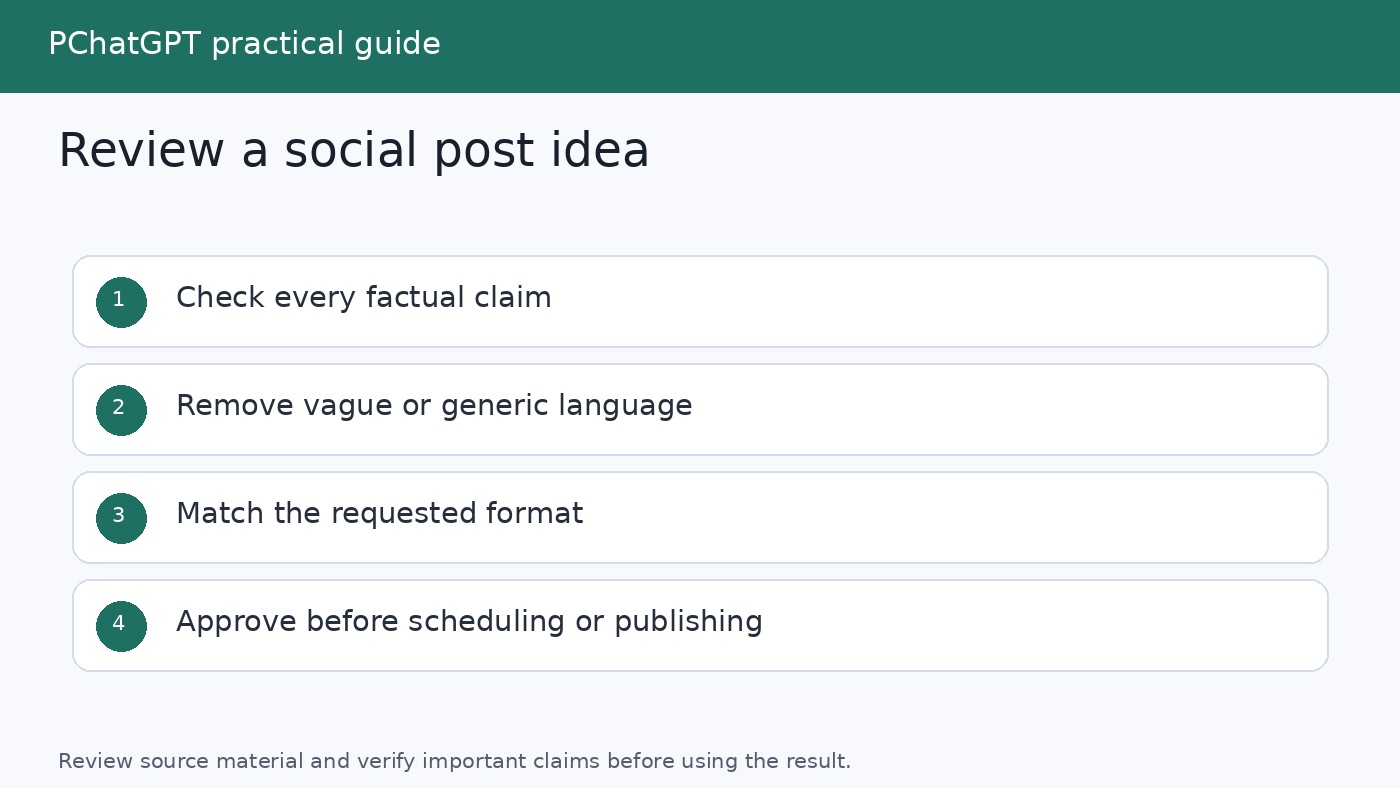
Editorial workflow moving caption ideas through source check, voice edit, approval, and scheduling

Step 5: Run three focused review passes

A single request to “proofread this” mixes several kinds of judgment and can hide what changed. Use separate passes, then make the final decision yourself.

  1. Evidence pass. Ask ChatGPT to list every factual claim, number, date, quotation, comparison, and promise. Require a matching line from the approved fact sheet. Treat unmatched items as deletion or sourcing tasks.
  2. Voice pass. Look for vague openings, inflated adjectives, repetitive sentence shapes, excessive questions, unexplained jargon, and calls to action that feel bolted on. Ask for targeted rewrites, not a complete replacement.
  3. Publication pass. Check names, links, spelling, formatting, consent, disclosure needs, brand policy, and whether the visual and alt text match the caption. Read the copy aloud. Confirm that the destination page supports what the caption promises.

A useful evidence prompt is:

Audit this caption against the approved fact sheet. Return three lists: supported claims with matching evidence, unsupported or overstated claims, and subjective language that could be mistaken for fact. Do not rewrite yet.

Then repair only the flagged lines. Broad rewrites can quietly introduce new errors after you have already checked the draft.

Step 6: Build a schedule-ready content queue

ChatGPT can help organize approved ideas into a draft calendar, but scheduling should happen only after review. Give it the publishing slots you control, your campaign phases, content categories, and any hard dates from the approved brief. Do not ask it to invent the best posting time or make unsupported assumptions about audience behavior.

Arrange these approved captions into the supplied publishing slots. Balance the categories so similar themes do not appear back to back. Preserve all caption text exactly. Return date, working title, goal, audience, caption ID, asset needed, destination URL, owner, and approval status. Leave missing fields blank. Do not publish or schedule anything.

Move only entries marked approved into your own calendar or scheduling tool. Keep a stable caption ID so edits, assets, links, and approvals stay attached to the correct item. If a late fact changes, search the queue for every caption based on it and return those items to review.

A lightweight status system is enough: Idea, Drafted, Fact Checked, Voice Edited, Approved, Scheduled, Published. Record who approved the final text and when. This makes the workflow repeatable without pretending that generation and publication are the same step.

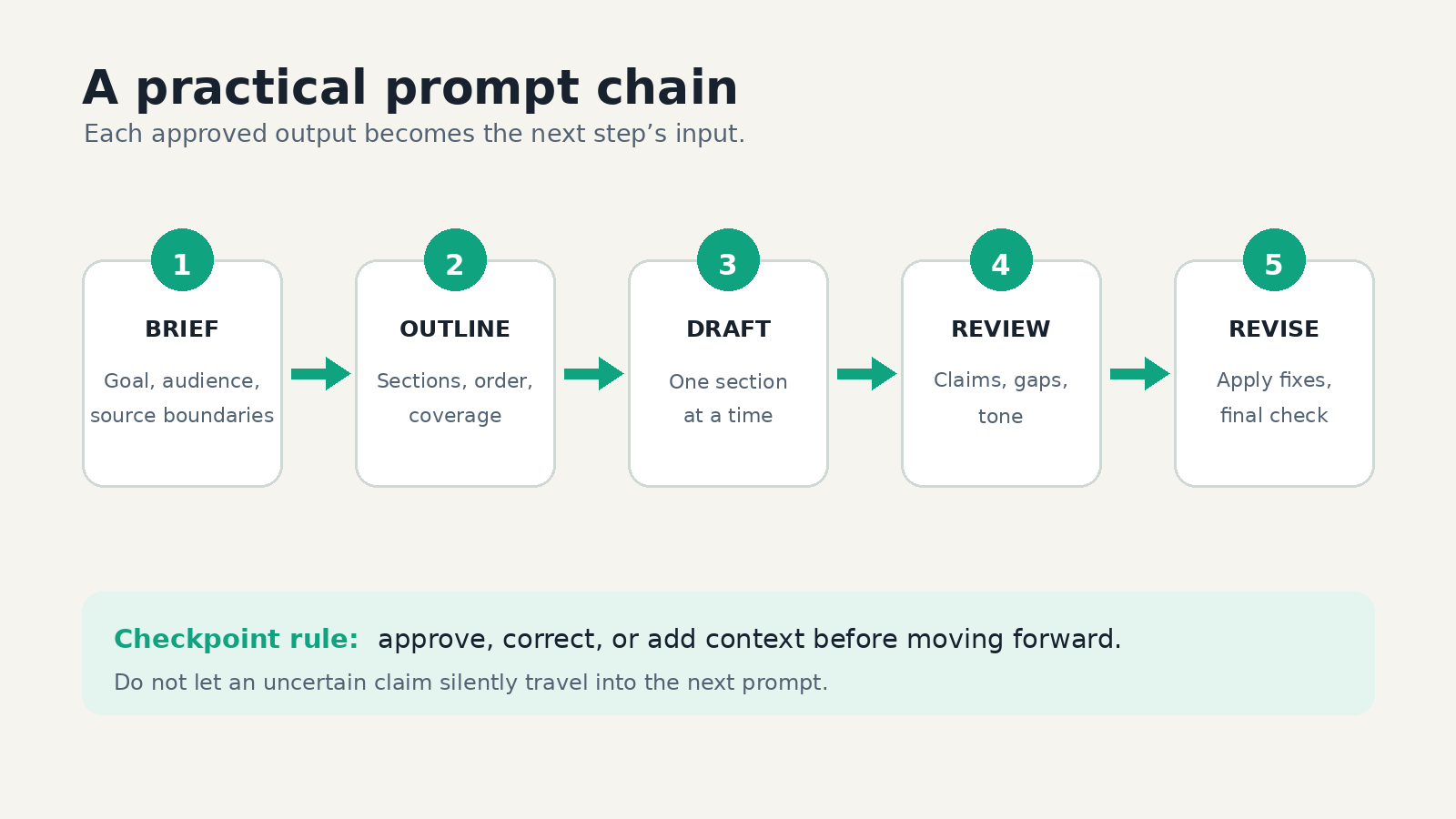
A complete prompt chain you can reuse

  1. Paste the brief and approved source material. Ask for a source-linked fact sheet.
  2. Verify the fact sheet manually and remove unsupported items.
  3. Ask for 12 distinct angles, not captions.
  4. Select the angles that fit the goal and audience.
  5. Request two structured caption options per angle.
  6. Choose a master draft and request only specific revisions.
  7. Create short, educational, conversational, story, and follow-up variants.
  8. Run evidence, voice, and publication review passes.
  9. Give approved captions IDs and place them in a schedule-ready table.
  10. Transfer approved rows to your calendar or scheduler and retain the source record.

Save prompts that consistently help, along with one strong output and the editor’s corrections. Over time, those corrections reveal better rules than generic prompt collections. If every caption starts with a question, add a rule requiring varied openings. If the model adds unsupported benefits, tighten the fact boundary. If calls to action feel abrupt, provide two approved examples.

FAQ

Can ChatGPT write captions directly from a URL?

If current web information is needed, ChatGPT Search can return timely answers with source links, and search responses may show inline citations or a Sources panel. For dependable drafting, still confirm that the page was read correctly, extract an approved fact sheet, and check every claim against the original page. A link is useful context, not automatic approval of everything inferred from it.

How many caption options should I ask for?

Ask for enough variety to compare without creating an unmanageable review pile. A practical starting point is 12 angles, followed by two captions for each angle you select. The valuable distinction is between angles, not the raw number of drafts. If the options repeat one idea, return to the angle stage rather than requesting more captions.

How do I keep captions consistent with my brand voice?

Provide a brief voice description, two or three approved examples, a list of habits to avoid, and a clear output format. For recurring work, keep stable guidance in Custom Instructions or project instructions and put temporary campaign facts in the current project or prompt. Always finish with a human voice edit because consistency involves context and judgment, not just word choice.

Can ChatGPT schedule and publish the finished posts for me?

This workflow uses ChatGPT to prepare a schedule-ready table, not to publish. Transfer only approved copy to the calendar or scheduling system your team already controls. Check dates, destination links, assets, permissions, and approval status at the point of transfer. Keeping that final step explicit reduces the chance that an unchecked draft becomes public.

Official sources

Build a Personal Writing System in ChatGPT: Draft, Edit, and Keep Your Voice

0

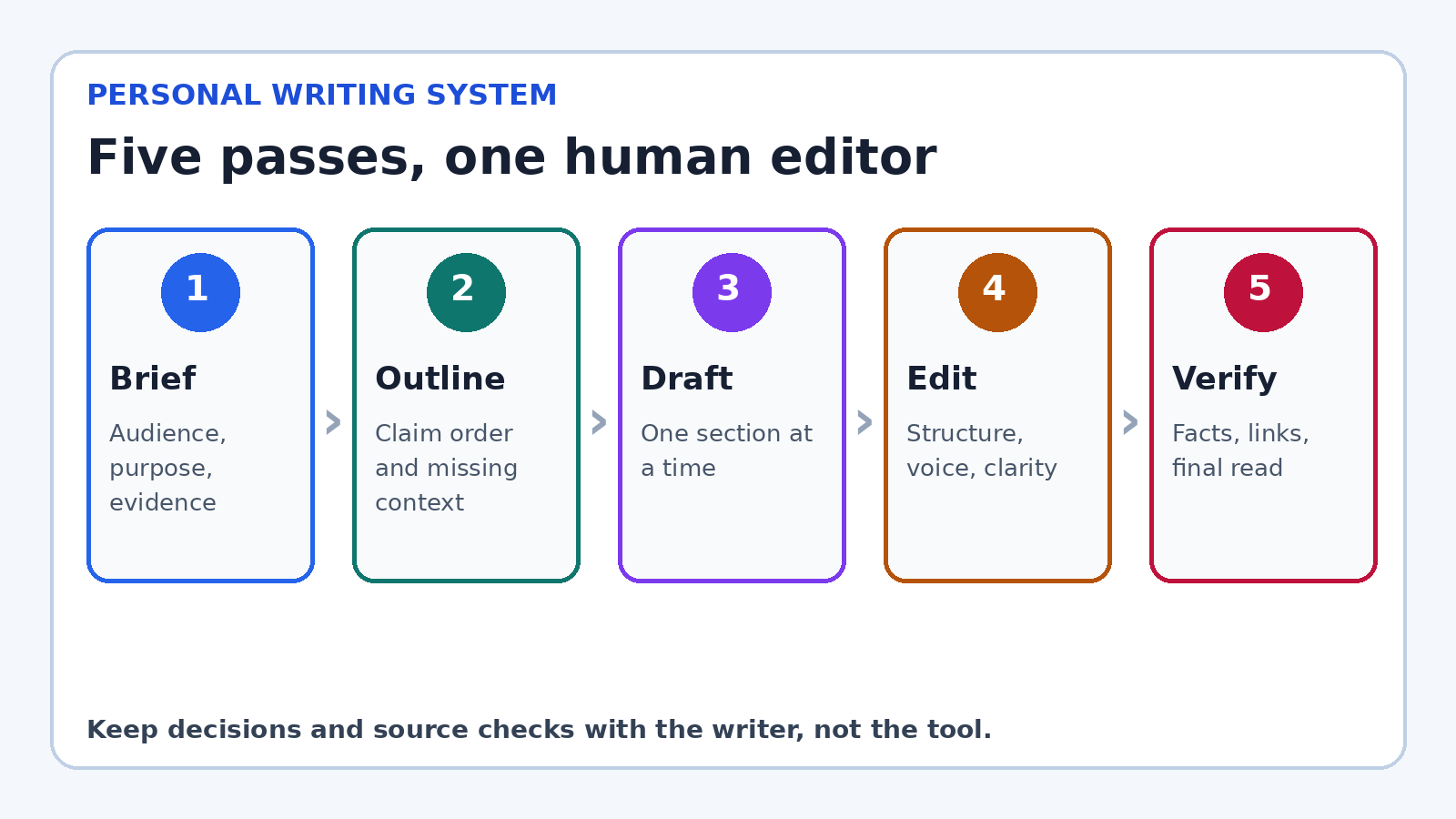
A useful ChatGPT personal writing assistant is not a chatbot that produces a finished article from one ambitious prompt. It is a writing system in which you make the decisions and ChatGPT helps with defined passes: clarifying the brief, testing an outline, drafting rough sections, finding weak spots, and polishing language. That distinction matters. Generic prompting encourages you to judge one large answer after the fact. A writing workflow gives you checkpoints while the ideas are still easy to change.

This guide shows how to build that system with features OpenAI currently documents, including Projects, custom instructions, and canvas. It also separates style guidance from factual verification and privacy choices. You do not need every feature to use the method. A normal chat and a text editor are enough. The value comes from assigning one job to each pass and keeping final editorial control.

Five step ChatGPT writing workflow from brief through final verification
Five pass workflow for briefing, outlining, drafting, editing, and verifying writing with ChatGPT.

Start with a writing system, not a super prompt

A super prompt tries to encode the audience, research, outline, tone, examples, word count, and final format in one request. It can produce an impressive result, but it hides the decisions that shaped the result. When a section is wrong, you may not know whether the brief, evidence, structure, or prose caused the problem. Revision becomes a vague instruction to “make it better.”

A system makes those decisions visible. Begin with a brief, approve an outline, draft in manageable sections, then edit in a deliberate order. Each stage creates a small artifact you can inspect. If the argument is weak, return to the outline instead of endlessly polishing sentences. If the prose sounds unlike you, revise the voice card instead of adding random adjectives to the next prompt.

This process also protects original thinking. Before asking ChatGPT for prose, write down your point, the reader’s problem, and the evidence you expect to use. Even three rough bullets give the draft a center of gravity. ChatGPT can help develop the material, but it should not quietly decide what you believe.

Create a home for the work

For an ongoing book, newsletter, client account, or blog, a ChatGPT Project can keep related chats, uploaded reference files, and project instructions together. OpenAI describes Projects as workspaces for long running efforts and says project instructions apply inside that project, overriding global custom instructions. That makes a Project a sensible home for an evolving style guide, audience notes, approved terminology, and source files.

Do not treat the Project as an unfiltered attic. Add only current, useful material. Label documents clearly. Remove an outdated brief when a new one replaces it. A short “source map” can explain which file is authoritative for product names, which contains interview notes, and which is only background. Conflicting files invite confident but inconsistent drafts.

If you are writing one email or a private journal entry, a Project may be unnecessary. Use a fresh chat or your own editor. The system should reduce friction, not add administration. The smallest useful setup is a brief, a voice card, and a five pass checklist.

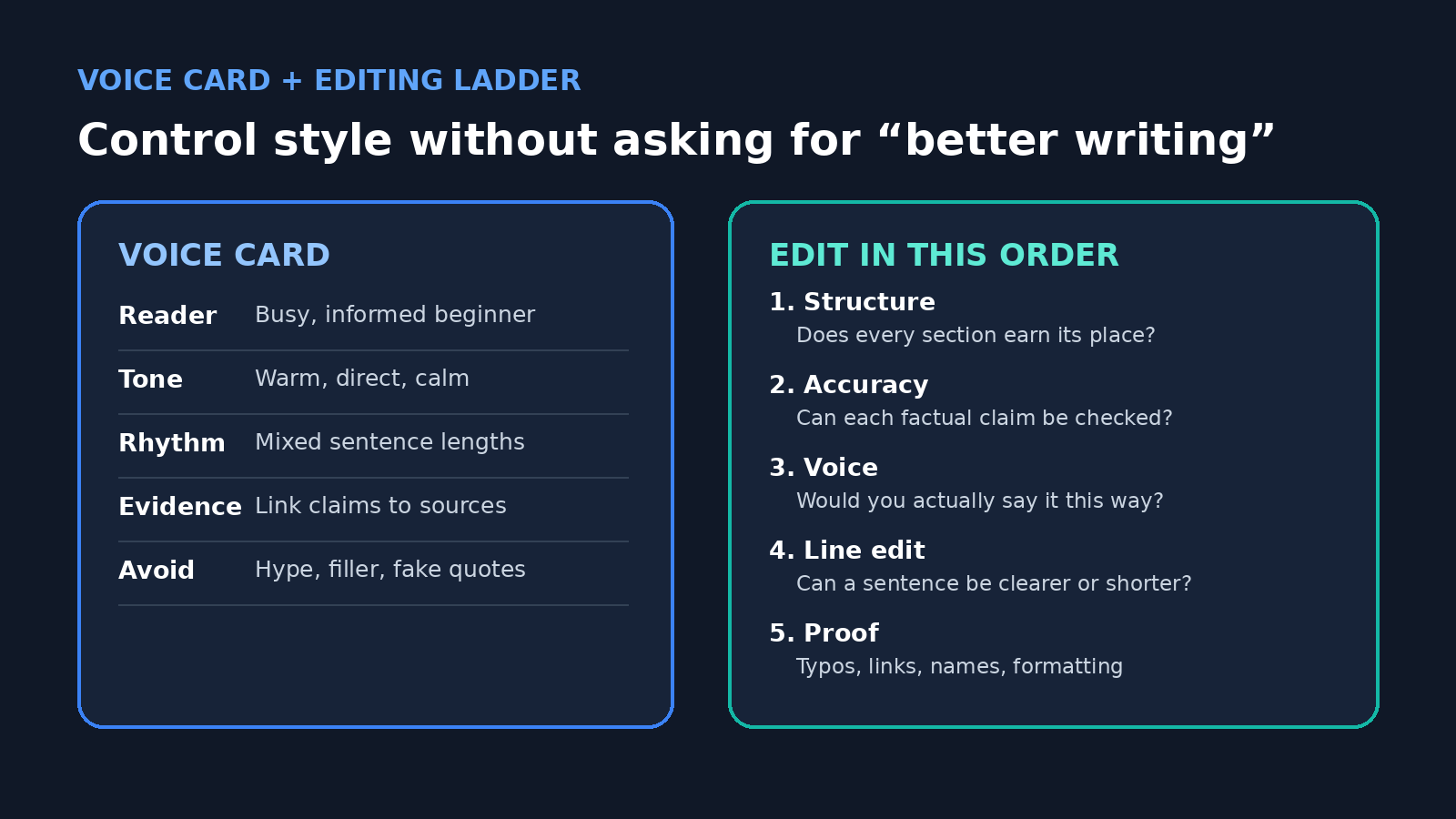
Build a one page voice card

Voice is easier to preserve when you describe observable choices rather than an abstract identity. “Sound like me” gives ChatGPT little to work with. A useful voice card names the reader, level of formality, sentence rhythm, favored transitions, evidence standard, and habits to avoid. Add two short samples of writing you genuinely like, ideally your own. Explain what each sample demonstrates rather than assuming the model will infer the right lesson.

  • Reader: Who knows what already, and what do they need next?
  • Tone: Direct, warm, skeptical, playful, restrained, or another specific mix.
  • Rhythm: Short paragraphs, varied sentence lengths, limited parenthetical remarks.
  • Evidence: Distinguish reported facts, direct observations, and opinions.
  • Avoid: Hype, throat clearing, fake quotations, stock conclusions, and favorite phrases you overuse.

Custom instructions can hold stable preferences that should influence many conversations. OpenAI says they can be edited or deleted and are available through personalization settings. Keep project facts out of this global layer. Your permanent preference might be “use plain English and flag unsupported claims.” A campaign deadline, confidential client detail, or article thesis belongs in the relevant conversation or Project.

Treat the voice card as a starting constraint, not a license to imitate another living writer. It is safer and more useful to identify qualities you want, such as economical description or conversational transitions, and pair them with your own examples. Your final read remains the test. If a phrase feels borrowed or performative, replace it.

Pass 1: turn the assignment into a brief

Before drafting, ask ChatGPT to interrogate the assignment. Supply what you know, then request a list of missing decisions. A practical brief contains the audience, purpose, desired action, scope, evidence available, evidence still needed, tone, length range, and format. It should also state what the piece must not claim.

I am preparing a guide for first time freelancers. Its purpose is to help them write a clear project update. Review the notes below and return: the reader’s likely question, the promise of the piece, three facts that need a source, what is out of scope, and up to five questions you need me to answer. Do not draft yet.

This prompt is useful because it asks for diagnosis, not prose. Answer the questions yourself. If ChatGPT proposes an angle, accept it only if it matches your purpose. Save the approved brief at the top of the working document so later edits can be judged against it.

Pass 2: design and challenge the outline

Ask for an outline that assigns one job to each section. For every heading, request the reader question, main claim, supporting evidence, and transition to the next section. Then run a challenge pass: Which section repeats another? Where does the argument jump? What would a skeptical reader question? Which point is interesting but outside the promise?

Do not ask for ten outlines unless you truly need ten directions. Too many options can replace judgment with browsing. One outline plus two alternate openings is often enough. Rearrange it yourself. A good outline should make the eventual draft feel almost inevitable, while still leaving room for your examples and language.

Pass 3: draft in sections with evidence markers

Draft one section at a time. Give ChatGPT the approved brief, current outline, relevant notes, and a narrow instruction. Ask it to mark missing support as [SOURCE NEEDED] instead of inventing a citation, quote, statistic, or example. That visible marker is more valuable than fluent filler because it tells you where research must happen.

Separate fact gathering from prose generation. If current information is needed and ChatGPT search is available, ask for sources and open them yourself. Prefer primary material such as official documentation, regulations, original studies, transcripts, and company announcements. A link is not proof that the sentence accurately represents the source. Read the relevant passage, check its date and scope, and keep a note connecting the claim to the evidence.

After each section, add your own detail: an observation, a real example you have permission to share, a useful distinction, or the reason the point matters. These contributions are what turn a plausible draft into your article. If you have nothing specific to add, ask whether the section deserves to exist.

Voice card fields beside a five level editing ladder for ChatGPT assisted writing
A reusable voice card and editing ladder for consistent, source aware revisions.

Pass 4: edit in the right order

Editing works best from large decisions to small ones. First check structure. Then accuracy and completeness. Then voice. Only after those passes should you line edit and proofread. Otherwise, you may spend twenty minutes perfecting a paragraph that the structural edit removes.

Canvas can be helpful for this stage when it is available with the model you are using. OpenAI’s current help page describes selecting a passage for targeted guidance, receiving inline suggestions, adjusting length or reading level, applying a final polish, and moving through version history. These are editing controls, not guarantees of quality. Use them on a copy or keep versions so an automated rewrite cannot erase a sentence you wanted to preserve.

For the structural pass, ask for an editorial memo without a rewrite. Request the three largest problems, why each matters, and the smallest repair. For the voice pass, ask ChatGPT to highlight phrases that conflict with the voice card. For the line pass, work paragraph by paragraph and require an explanation for substantial changes. Reject edits that merely swap one ordinary word for a more inflated one.

Act as a careful copy editor, not a ghostwriter. Compare this section with my voice card. Identify up to six places that sound generic, overstated, or unlike the sample. Explain each issue and suggest one restrained alternative. Do not rewrite unaffected sentences.

Use style controls without flattening your voice

A consistent voice is not the same as uniform prose. If every paragraph has the same length, every section begins with a command, and every conclusion restates the introduction, the result feels processed. Let important passages breathe. Keep an occasional fragment if it sounds natural and is easy to understand. Preserve specific nouns and verbs from your own draft.

Be cautious with broad commands such as “make this professional,” “humanize this,” or “improve the flow.” They encourage sweeping changes without an agreed standard. Replace them with an observable target: remove repeated setup, reduce the reading level without removing technical terms, make the disagreement clear in the first sentence, or cut 15 percent while preserving every sourced claim.

Read the final piece aloud. Your ear catches rhythm problems, accidental repetition, and words you would never say. Compare a few paragraphs with older work you are proud of. The goal is not to fool a detector or manufacture quirks. It is to make sure the published wording reflects your judgment and sounds comfortable in your mouth.

Privacy choices belong before the upload

Writing material can contain more than obvious secrets. Drafts may include client names, unpublished plans, interview contact details, medical history, student work, contract language, or personal memories. Decide whether that information is appropriate to upload before opening a chat. Redact details that are not necessary for the writing task, and follow your employer’s or client’s rules.

For personal ChatGPT accounts, OpenAI’s Data Controls FAQ explains that users can turn off “Improve the model for everyone.” It says conversations can remain in history while not being used to train ChatGPT. The same page says Temporary Chats do not appear in history, do not create memories, are not used to train models, and are deleted from OpenAI’s systems after 30 days, while noting they may be reviewed for abuse. Those controls are useful, but they do not make inappropriate sharing appropriate.

Custom instructions deserve the same care because they can persist across conversations. Do not put passwords, confidential biographies, unreleased business plans, or sensitive client details in them. If you share a Project, review who can access its chats and files. Use a local document or an approved business workspace when your policy requires it.

Pass 5: verify before the final polish

Fluent writing can hide factual errors. Build a claim ledger before publication. Copy every checkable statement involving a date, number, named feature, quotation, legal rule, scientific finding, or current product behavior into a small table. Add the source, the exact supporting passage, its date, and your verification status. If a source does not support the wording, narrow or remove the claim.

Ask ChatGPT to help find claims, not to certify its own accuracy. A useful request is: “List every externally verifiable claim in this draft. Do not judge whether it is true. Quote the sentence and state what kind of source would verify it.” You still open the sources and make the decision. For high stakes medical, legal, financial, academic, or safety material, use a qualified human reviewer.

Finish with a mechanical check: names, links, heading order, captions, quotation marks, formatting, and the requested length. Then read the published preview, not just the editor. A missing word or broken link often becomes obvious only in the final layout.

A reusable session you can copy

  1. Write your own three bullet position before opening ChatGPT.
  2. Provide notes and ask for missing decisions, not a draft.
  3. Approve a brief with audience, promise, evidence, limits, and tone.
  4. Build one outline and challenge its weakest section.
  5. Draft section by section, marking unsupported details.
  6. Add your real examples, reasoning, and language.
  7. Edit structure, accuracy, voice, lines, and mechanics in that order.
  8. Verify every checkable claim against the source itself.
  9. Read aloud, preview, and publish only when you own every sentence.

Save the brief, voice card, strongest prompts, and final checklist for the next assignment. Do not save every correction as a permanent rule. A writing assistant should become more useful over time without becoming a pile of contradictory instructions.

Related PChatGPT guides

Official OpenAI sources

FAQ

Can ChatGPT learn my writing voice from a few samples?

Samples can help ChatGPT follow visible patterns, especially when you explain what each sample demonstrates. They do not transfer your judgment or guarantee an exact voice. Use a short voice card, compare revisions with your originals, and make the final wording yours.

Should I use custom instructions or a Project for writing?

Use custom instructions for stable preferences that should influence many chats. Use a Project for one ongoing body of work, its files, and its project specific instructions. For a single small task, a normal chat with a clear brief may be simpler.

Is canvas required for this workflow?

No. Canvas offers targeted selection, inline suggestions, writing shortcuts, and version controls where supported. You can follow the same five passes in a normal chat and keep the working draft in any editor that lets you review changes.

How do I stop ChatGPT from inventing facts in a draft?

You cannot guarantee that it will never make an error. Reduce the risk by supplying authoritative sources, drafting in small sections, requiring visible source needed markers, extracting a claim ledger, and checking each important statement yourself before publication.

Used this way, ChatGPT is neither an automatic author nor a novelty prompt box. It is a flexible workspace for asking editorial questions at the right moment. Your brief provides direction, your sources provide the facts, your voice card guides the language, and your final review decides what readers see.

How to Research with ChatGPT: Search, Deep Research, and Verification

0

Research with ChatGPT works best when you treat the product as a navigator and analyst, not as the final authority. It can help you define a question, search the web, inspect uploaded material, compare claims, and shape a readable synthesis. Your job is still to decide what counts as evidence, open the cited pages, and confirm that each important statement is supported.

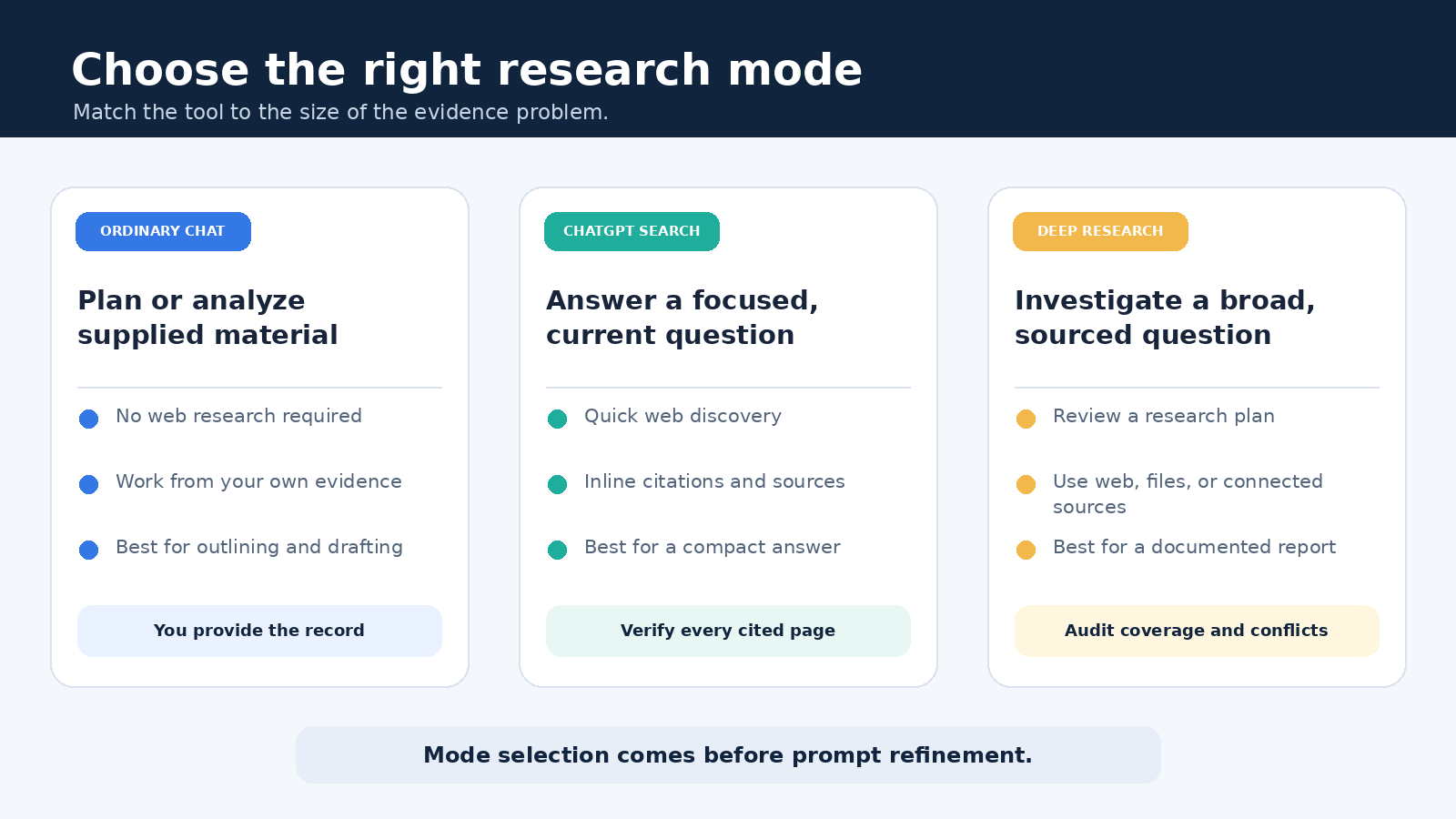
The most useful starting point is choosing the right mode. ChatGPT Search is designed for a quick, current answer supported by web links. Deep Research is designed for a larger investigation that may examine many sources before producing a structured report. An ordinary chat remains useful for planning, analyzing text you provide, and drafting from evidence you have already checked. Those are related tools, but they are not interchangeable.

Start with a research decision, not a clever prompt

Before opening ChatGPT, write one sentence that describes the decision your research must support. “Learn about electric vehicles” is too broad. “Compare the published warranty terms, charging standards, and starting prices of three models sold in the United Kingdom as of this month” gives you a scope, evidence types, geography, and date. A precise brief makes it easier to notice when the answer wanders.

  • Question: What must the research establish?
  • Audience: Who will use the result, and what do they already know?
  • Boundary: Which period, market, products, or definitions are included?
  • Evidence: Which primary sources would be strongest?
  • Output: Do you need a short answer, a comparison table, or a sourced report?
  • Risk: What would happen if a claim were wrong or outdated?

This short specification is more valuable than decorative prompt language. It also tells you whether one search is enough or whether the task needs a deliberate investigation.

ChatGPT Search and Deep Research solve different problems

According to OpenAI’s ChatGPT Search help article, ChatGPT can search automatically when a question may benefit from web information, and a user can also choose the web search option. Search responses include inline citations, with a Sources control for reviewing links. That makes Search a good fit for a focused question whose answer can be checked in a handful of pages.

Deep Research is a different workflow. OpenAI’s Deep Research help article describes a process in which you state the outcome, choose sources, review a proposed plan, watch progress, and receive a documented report. You can direct it toward the public web, uploaded files, and connected sources that are available in your account. OpenAI also notes that access and usage limits can depend on plan and workspace settings.

Comparison of ordinary chat, ChatGPT Search, and Deep Research for different research tasks
Search answers a focused question quickly. Deep Research follows a broader plan and produces a documented report.
ModeUse it whenTypical resultYour review burden
Ordinary chatYou are planning or working from material already suppliedQuestions, summaries, transformations, or a draftCheck every claim against your supplied evidence
SearchYou need a timely fact or a compact overviewA conversational answer with web citationsOpen the cited pages and verify the exact support
Deep ResearchThe task is broad, comparative, or source heavyA longer report with citations and a sources sectionAudit coverage, source quality, conflicts, and conclusions

Time is not the only difference. Search helps answer a question. Deep Research helps execute a research plan. If you need today’s release date from an official announcement, start with Search. If you need to compare policy changes across multiple official documents and explain their practical effects, Deep Research is the more suitable starting point. For a very high stakes conclusion, neither mode removes the need for specialist review.

A six step workflow for research with ChatGPT

1. Frame a question that can be disproved

Ask for a claim that evidence could confirm or overturn. Instead of “Why is remote work better?” ask, “What do employer reports and peer reviewed studies published since 2023 say about the effects of hybrid work on retention, and where do their findings disagree?” The second version does not assume the conclusion. It names the evidence and explicitly invites disagreement.

2. Build a source hierarchy

Tell ChatGPT what should count as a preferred source. For product behavior, begin with the vendor’s documentation and release notes. For laws, use the statute, regulator, court record, or official guidance. For research findings, inspect the paper itself, its methods, and any correction rather than relying on a blog summary. Secondary reporting can add context, but it should not silently replace the underlying record.

Reusable request: Research [question] for [audience] within [scope]. Prefer [primary source types]. Separate documented facts from your interpretation. For every material claim, cite the page that directly supports it. Note conflicting evidence, missing data, and dates that may make a source stale. Do not invent a citation when support is unavailable.

3. Choose Search or Deep Research deliberately

Use Search when you can describe the desired answer in one or two narrow clauses and expect a small source set. Use Deep Research when the work requires comparison, multiple dimensions, or a report that combines files with web material. The OpenAI Academy Deep Research resource recommends describing the question, desired output, and relevant constraints, then reviewing the plan before the research proceeds.

If the task is large, do not rush through that plan. Check whether it covers the markets, dates, definitions, and counterarguments in your brief. Remove branches that are merely interesting. Add a missing primary source class. A five minute plan review can prevent a polished report on the wrong question.

4. Inspect citations while the answer is fresh

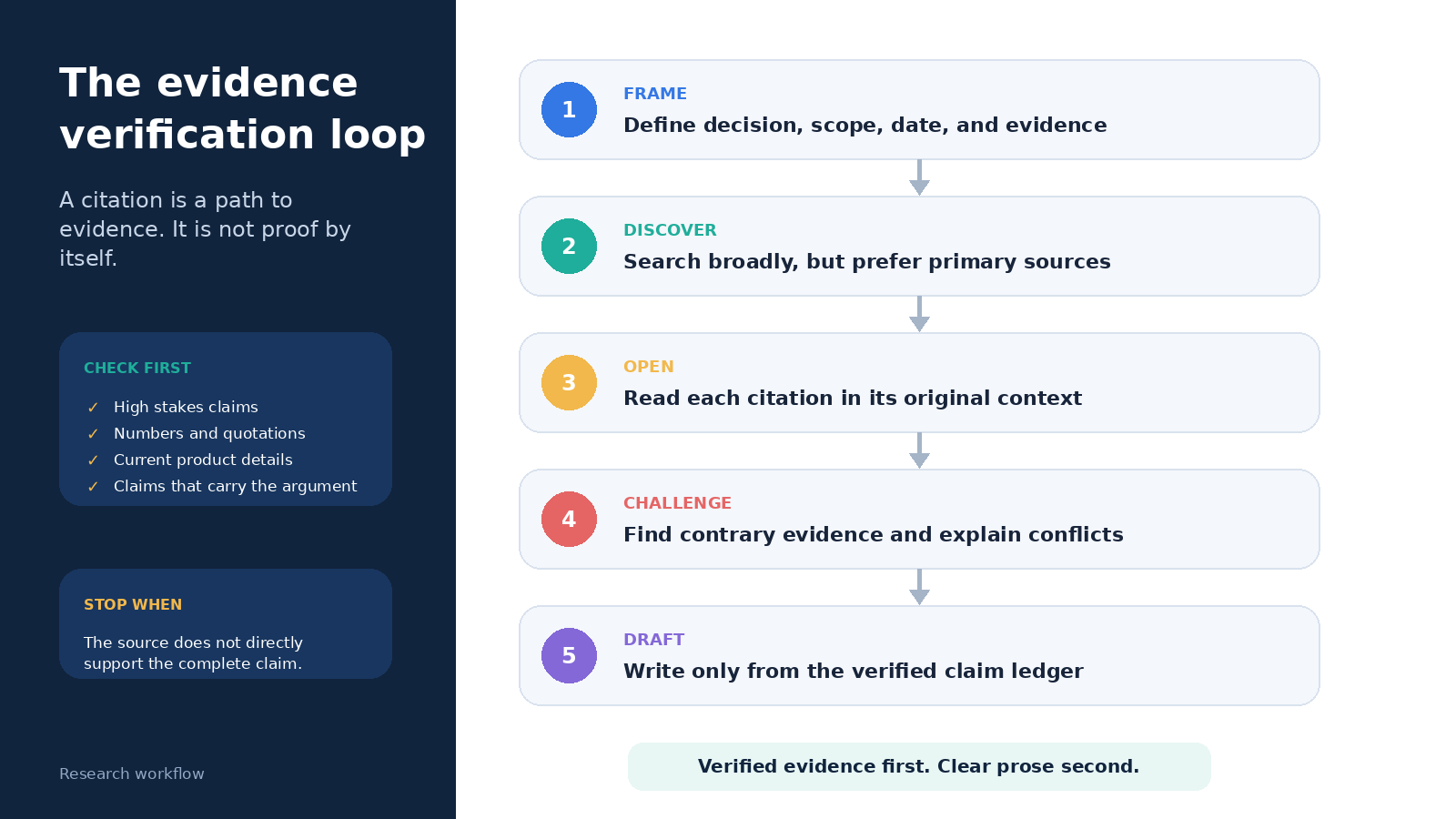
A citation is a route to evidence, not proof that the sentence is correct. Open it. Confirm that the page says what the answer claims, that the date and jurisdiction fit, and that the quoted number uses the same denominator. Look for a qualification hidden in a footnote or methods section. If a cited page summarizes another document, follow the trail to the original.

  • Does the source directly support the whole sentence, or only one part?
  • Is it the original document or a repetition of someone else’s claim?
  • Is the publication date appropriate for a time sensitive answer?
  • Does the source have an obvious commercial or institutional interest?
  • Can you reproduce the number or comparison from the page?

5. Run a contradiction pass

Ask ChatGPT to identify the three conclusions most vulnerable to challenge, then request contrary evidence from equally strong sources. This is not a magic fact check. It is a way to expose assumptions and search gaps. You can also ask for a claim ledger with columns for claim, supporting source, opposing source, publication date, confidence, and required follow up.

When sources disagree, keep the disagreement visible. Differences may come from sample size, definitions, geography, funding, or the period studied. A trustworthy report explains those reasons instead of averaging incompatible numbers or choosing the most convenient result.

6. Draft only from the verified ledger

Once the evidence is checked, start a clean drafting pass. Provide the approved claims and links, specify the audience and structure, and tell ChatGPT not to add unsupported facts. Keep interpretation labeled as interpretation. If your report changes a number, date, quotation, or causal claim during editing, return to the source before publication.

Five step evidence verification loop for research with ChatGPT
Reliable research separates discovery from verification, then drafts only from an approved claim ledger.

How to verify a ChatGPT research report

A fast verification pass should prioritize claims by consequence. Check legal requirements, safety statements, financial figures, medical information, quotations, and current product details first. Then review the claims that carry the argument. Background descriptions can follow. This risk based order is more realistic than pretending every sentence deserves equal time.

For each important claim, record a short excerpt from the source and enough location information to find it again. A URL alone may point to a changing page. Where possible, note the title, publisher, publication or update date, section heading, and access date. If the work will be audited, save an approved copy according to your organization’s rules.

The OpenAI developer guide to Deep Research reinforces the distinction between broad web research and controlled data access. For API builders, it discusses web search, file search, remote tools, and the need to manage tool behavior. The practical lesson for an everyday ChatGPT user is simpler: know which information spaces were available to the investigation, and do not assume that an uncited or inaccessible source was searched.

Use files and Projects without muddying the evidence

Uploaded files are useful for comparing contracts, interview notes, reports, or a private literature set. Label each file clearly and include its date and status. A draft policy and an approved policy should never look interchangeable. Ask ChatGPT to cite the file name and page or section for each extracted claim, then verify the passage yourself.

For work that continues over several sessions, a Project can keep instructions, chats, and reference material together. Our guide to setting up a ChatGPT Project explains how to organize sources and review boundaries. Keep one evidence register outside the conversation, however, so your record does not depend on chat history alone.

A broader ChatGPT guide for research, writing, data, and automation can help when the research feeds a larger workflow. The handoff should remain explicit: discovery produces candidates, verification approves claims, drafting communicates approved evidence, and a human owns publication.

Privacy, copyright, and high stakes limits

Do not upload confidential interviews, personal data, trade secrets, unpublished manuscripts, or restricted client files until you have confirmed that your account, workspace, permissions, and retention rules allow it. Redact unnecessary identifiers. If a connected source contains more material than the task requires, narrow access before beginning.

Summarization does not erase copyright or licensing duties. Quote only what you are allowed to use, attribute it properly, and do not ask the tool to disguise copied expression. For academic work, follow the institution’s disclosure and citation policy. For legal, medical, safety, or investment decisions, use ChatGPT to organize questions and evidence, then obtain review from a qualified professional.

Common research failures and practical fixes

FailureWhy it happensBetter move
Starting with a vague topicThe answer optimizes for breadth and fluencyDefine the decision, scope, evidence, and date
Trusting the citation markerThe link may support only part of the sentenceOpen the source and record the supporting passage
Using Search for a complex reviewA short response compresses unresolved differencesUse Deep Research and inspect its plan
Using Deep Research for one factThe workflow adds time without adding useful coverageRun a focused Search and verify the primary source
Mixing supplied files with web claimsThe origin of a statement becomes unclearRequire source labels and maintain a claim ledger
Drafting before verificationUnsupported claims become embedded in the narrativeApprove evidence first, then draft from that set

A reusable prompt sequence

Research improves when each request has one job. Begin with: “Turn this objective into a neutral research question. List ambiguous terms and ask me to choose the scope.” Next: “Propose a source hierarchy and a research plan. Include contrary evidence and stop for my approval.” After discovery: “Create a claim ledger. Do not mark a claim verified unless a cited source directly supports it.” Finally: “Draft for this audience using only verified rows. Preserve uncertainty and add no new factual claims.”

This sequence creates useful stopping points. You can correct the question before searching, correct the plan before spending time, reject weak evidence before drafting, and inspect the final language against an approved record. That is the core habit behind reliable research with ChatGPT.

Frequently asked questions

Is ChatGPT Search the same as Deep Research?

No. Search is suited to timely, focused questions and returns a conversational response with web citations. Deep Research is built for a multi step investigation, lets you review a plan and source scope, and produces a more extensive documented report.

Can I cite ChatGPT as my research source?

Usually, the stronger practice is to cite the original document that supports the claim and disclose AI assistance when your institution or publisher requires it. ChatGPT’s wording is not a substitute for the underlying evidence. Follow the citation rules that apply to your work.

How do I know whether a ChatGPT citation is accurate?

Open the cited page and compare it with the complete claim. Check authorship, date, context, definitions, jurisdiction, and whether the page is the primary source. If you cannot locate direct support, mark the claim unverified and search again.

When should I avoid using ChatGPT for research?

Avoid providing material you are not authorized to share. Do not rely on ChatGPT alone when an error could affect health, safety, legal rights, finances, or another high stakes outcome. In those cases, use authoritative records and qualified human review.

Official sources

How to Ask ChatGPT Better Questions: A Practical Method

0

Better ChatGPT answers start with a question that defines the job. You do not need secret wording or a giant prompt. You need to tell ChatGPT what you want, provide the context it cannot know, set the limits that matter, and describe a useful result. Then you need to review the answer instead of treating fluent prose as proof.

This guide shows how to ask ChatGPT better questions with a practical six-part method. It includes weak and improved examples for writing, research, planning, learning, and troubleshooting. It also explains when a short question is enough, when to use follow-ups, and how to request sources without assuming every citation is correct.

Quick answer: use the GOALER question method

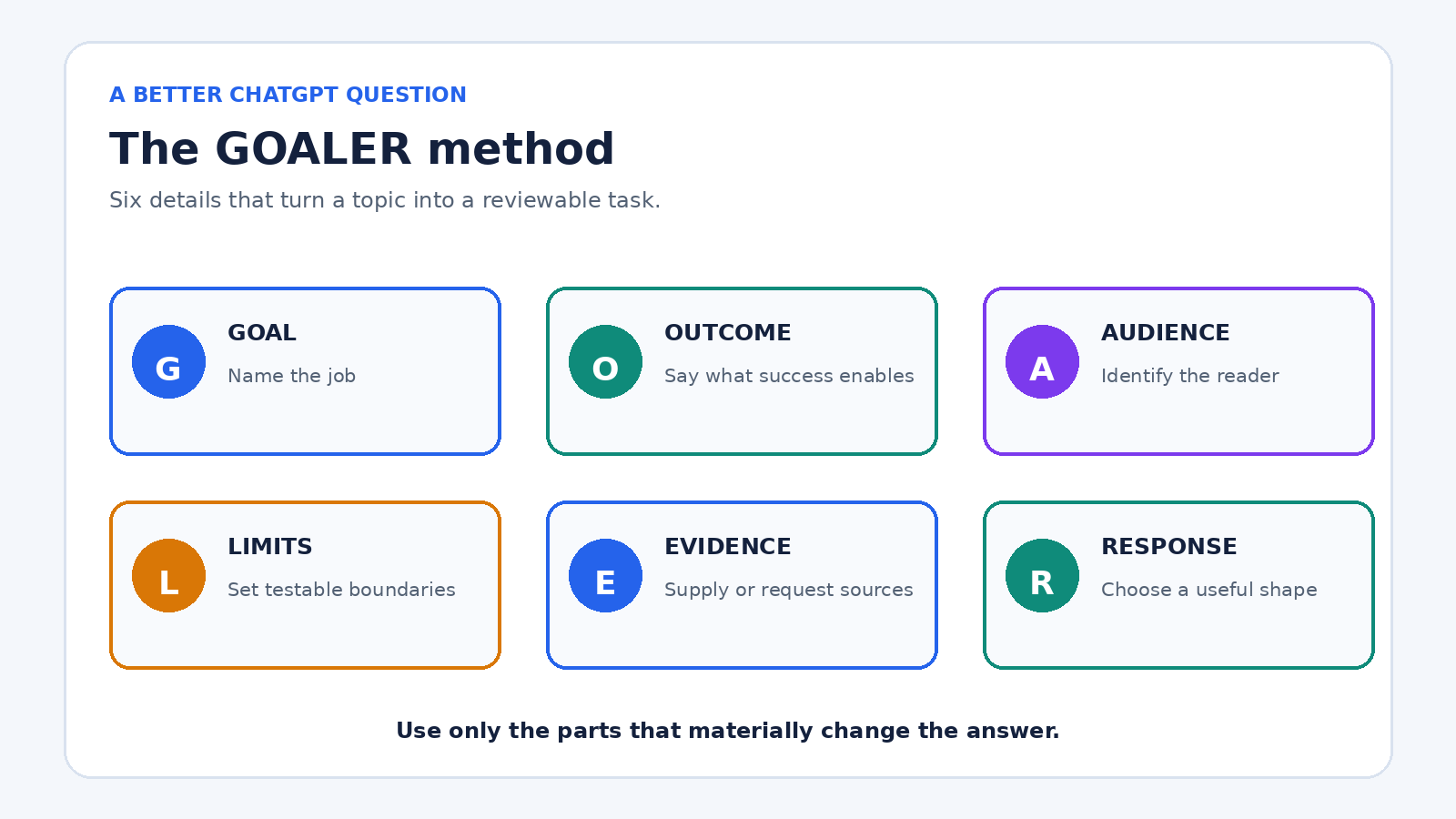
Before sending an important question, include the parts of GOALER that matter:

  • Goal: State the decision, document, explanation, or action you need.
  • Outcome: Describe what the finished answer should help you do.
  • Audience: Name who will read or use the result.
  • Limits: Set boundaries such as length, deadline, budget, tone, or facts that must remain unchanged.
  • Evidence: Provide source material or ask for current, cited information when needed.
  • Response shape: Request a table, checklist, email, explanation, questions, or another useful format.

A compact example is: “Help me compare these three laptops for a student who edits short videos. Budget is $1,200. Use the specifications I paste below, flag missing details, and return a table plus a recommendation with two tradeoffs.” The method works because it replaces guessing with requirements. OpenAI’s prompt engineering guidance for ChatGPT likewise recommends clear, specific prompts, enough context, iterative refinement, and explicit tone.

GOALER framework for asking ChatGPT better questions: goal, outcome, audience, limits, evidence, and response shape
The GOALER method turns an underspecified question into a task that can be reviewed.

Why vague questions produce plausible but unhelpful answers

ChatGPT must fill gaps when a request leaves out the audience, purpose, evidence, or constraints. “Write a project plan” could refer to a school assignment, a software migration, or a kitchen renovation. A polished generic plan may still be useless because it solves a different problem from yours.

Specificity does not mean adding every possible detail. It means supplying details that change the answer. The color of your notebook probably does not matter to a study plan. Your exam date, available hours, topics, and current confidence do. Ask yourself: if this detail changed, would a good answer change? If yes, include it.

There is another reason to define success. ChatGPT can produce an answer that sounds complete while containing mistakes. OpenAI’s guide on whether ChatGPT tells the truth says the system can produce incorrect facts, fabricated references, and overconfident answers. A better question can reduce ambiguity, but it cannot guarantee accuracy. Important claims still need verification.

Step 1: name the real goal

Start with the work you are trying to complete, not merely the topic. “Tell me about customer retention” names a subject. “Help me identify three reasons our trial users do not convert, using the survey comments below” names a job.

If you are unsure of the job, ask ChatGPT to help define it before requesting a final answer:

“I need to improve a weekly team meeting, but I am not sure whether the problem is the agenda, preparation, or follow-through. Ask me five diagnostic questions, one at a time. After my answers, summarize the likely problem and suggest what to test first.”

This is often more useful than asking for “meeting tips.” It gives the conversation a decision point and prevents a long list of generic advice.

Step 2: provide only the context that affects the answer

Useful context can include your starting point, available materials, prior attempts, audience knowledge, location, date, or software environment. Put source text close to the instruction that refers to it, and label it clearly. For a long document, say which section matters and what ChatGPT should do if the answer is not present.

For example, replace “Summarize this report” with:

“Summarize the report below for a department manager who has not read it. Focus on costs, delivery risks, and decisions due this month. Keep the summary under 250 words. Do not add facts from outside the report. End with a three-item action list, and label any missing owner or date as ‘not specified.’”

Do not paste passwords, private client records, health details, or other sensitive material just to improve context. Redact names and identifiers, use representative sample data, or describe the structure instead. Better prompting is not worth unnecessary exposure.

Step 3: make constraints testable

“Keep it concise” is open to interpretation. “Use 120 to 160 words” is testable. “Make it professional” may help with tone, but “write for a customer whose delivery is late, acknowledge the delay without admitting an unverified cause, and avoid legal jargon” gives the tone a purpose.

Strong constraints often cover four areas:

  • Scope: What to include and exclude.
  • Accuracy: Which facts must be preserved and how uncertainty should be marked.
  • Style: Reading level, voice, and terms to avoid.
  • Delivery: Length, format, order, and deadline.

Avoid stacking conflicting instructions. “Explain every detail in 50 words” forces a tradeoff. Choose the priority or tell ChatGPT what to sacrifice first: “Stay under 200 words. If everything will not fit, cover the decision and main risk, then list omitted topics.”

Step 4: request an answer shape you can use

The right format depends on what happens next. A table is useful for comparing options, but poor for a nuanced argument. A checklist supports execution. A short memo supports a decision. A set of flash cards supports recall. Ask for the format that reduces your next editing step.

Specify columns when requesting a table. Instead of “compare these tools,” ask for columns named price from supplied data, required setup, strongest use case, limitation, and unanswered question. If you need machine-readable output, describe the exact fields and allowed values. For ordinary ChatGPT use, a simple example of the desired layout is often enough.

You can find reusable structures in our guide to ChatGPT prompts for daily productivity. Reuse the structure, but update the context and limits for each real task.

Step 5: ask for assumptions, uncertainty, and questions

A good question tells ChatGPT what to do when information is missing. Otherwise, the model may choose a reasonable assumption without making that choice obvious. Add one of these instructions:

  • “List your assumptions before the recommendation.”
  • “If a required fact is missing, ask me up to three questions before drafting.”
  • “Separate facts from inferences and suggestions.”
  • “For each option, state the strongest reason it may be wrong for this situation.”
  • “Do not invent a quote, statistic, source, price, or date.”

Asking for questions is especially valuable when the task has hidden dependencies. For a travel plan, dates, departure city, mobility needs, and budget can change everything. For code troubleshooting, the exact error, versions, operating system, expected behavior, and minimal reproducible example matter more than a long description of frustration.

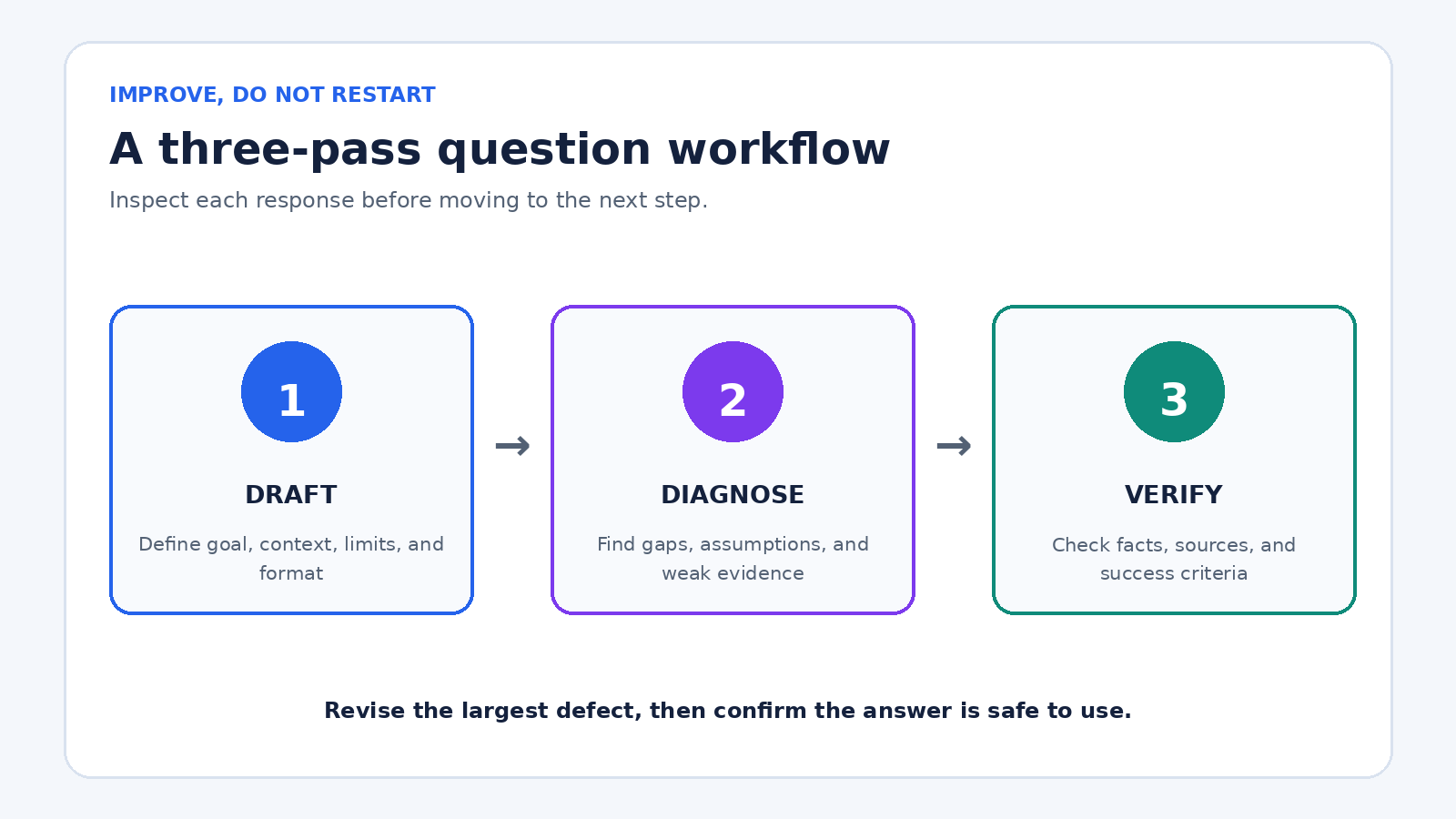
Three-pass ChatGPT question workflow showing draft, diagnose, and verify stages with practical checks at each stage
A reliable conversation separates the first draft from diagnosis and verification.

Step 6: improve the answer with focused follow-ups

Do not restart from scratch whenever the first response misses the mark. Identify the largest defect and correct it. OpenAI describes prompting as iterative: review the response, then adjust wording, context, or scope. A useful three-pass sequence is:

  1. Draft: Ask for the first useful version with clear requirements.
  2. Diagnose: Ask what is missing, weak, assumed, or unsupported.
  3. Verify: Check important facts and revise against a concrete checklist.

Focused follow-ups include “The recommendation ignores the two-hour weekly limit. Revise the schedule without changing the deadline,” or “Show which claims came directly from my notes and which are your inferences.” These instructions preserve useful work while correcting a specific problem.

For a complex assignment, divide the conversation into stages: clarify the brief, outline, draft, critique, revise, and check. Our guide to prompt chaining in ChatGPT explains that workflow in more detail. The key is to make each stage produce something you can inspect before proceeding.

How to ask better questions for five common tasks

Writing: Weak: “Write an email about the delay.” Better: “Draft a 130-word email to a returning customer whose order is five days late. Use a calm, accountable tone. State the revised delivery date from my note, offer the listed refund option, and do not invent a cause. Include a clear subject line.”

Learning: Weak: “Teach me statistics.” Better: “Teach me the difference between correlation and causation at an introductory college level. Start with one everyday example, then explain the distinction, quiz me with three scenarios one at a time, and correct my reasoning after each answer.”

Planning: Weak: “Make a marketing plan.” Better: “Create a four-week launch plan for the local workshop described below. One person has six hours a week and a $400 ad budget. Return weekly priorities, deliverables, budget, and one success measure. Flag anything that depends on audience size because I have not supplied it.”

Research: Weak: “What are the latest battery rules?” Better: “Search for battery transport rules currently applicable to a small UK retailer shipping to Germany. Prefer regulator and carrier sources, give the publication or update date, link every major claim, and separate legal requirements from carrier policy. Tell me what still needs professional confirmation.”

Troubleshooting: Weak: “Why does my script fail?” Better: “Diagnose the Python error below on Ubuntu. Expected behavior is X; actual behavior is Y. I use Python version Z and package version Q. First explain the most likely cause in plain English. Then give the smallest change to test. Do not rewrite unrelated code. If the evidence is insufficient, ask for the exact diagnostic output you need.”

When to use ChatGPT search and how to request sources

Use search for questions that depend on current facts, recent events, prices, schedules, regulations, product availability, or a niche source. OpenAI’s current ChatGPT search documentation says ChatGPT may search automatically or users can select Search. It also warns that search results and citations can be incomplete, outdated, or incorrect.

A strong research question names the date range, location, preferred source type, and verification standard. Try: “Find the current application deadline for this program for the 2026 intake. Use the program’s official site as the primary source, quote the relevant sentence, link the page, and state the page’s update date if shown. If official pages conflict, present both instead of choosing silently.”

Then open the sources. Confirm that a cited page exists, supports the nearby claim, applies to your location and date, and is authoritative for that question. Search makes source checking possible; it does not make source checking optional.

Use custom instructions for stable preferences, not task details

If you repeatedly request the same language, tone, units, or response style, custom instructions can reduce repetition. OpenAI’s custom instructions documentation says they let you share preferences ChatGPT should consider and that they can be edited or removed for future conversations.

Keep permanent preferences broad and stable: “Use plain English, metric units, and concise headings. Distinguish confirmed facts from suggestions.” Put changing facts in the current question: client name, budget, source text, deadline, and deliverable. If you need help setting them up, see our practical ChatGPT custom instructions guide.

A reusable question template

“My goal is [decision or deliverable]. The result will be used by [audience] to [outcome]. Use this context: [relevant facts or source material]. Follow these limits: [scope, length, deadline, tone, facts to preserve]. Return [format and sections]. If essential information is missing, [ask questions or label the gap]. Separate [facts, assumptions, and recommendations as appropriate]. Before finishing, check the answer against [success criteria].”

Do not force every quick question into this full template. “Convert 350°F to Celsius” needs little context. The template earns its keep when the answer will be published, sent to someone, used for a decision, or difficult to correct later.

A final quality check before you use the answer

  • Does the answer solve the stated goal rather than merely discuss the topic?
  • Did it follow the audience, scope, length, tone, and format requirements?
  • Are important facts traceable to your material or a source you opened?
  • Are assumptions and missing information visible?
  • Does it contain names, figures, quotations, links, or dates that need checking?
  • Could bias, omitted alternatives, or an oversimplified explanation change the decision?
  • Have you removed private information before sharing or saving the conversation?
  • What human judgment is still required before acting?

The best ChatGPT question is not necessarily the longest. It is the one that gives the model enough direction and gives you a clear way to judge the response. Define the job, add decisive context, set testable limits, choose the output shape, expose uncertainty, and revise one problem at a time.

Frequently asked questions

Do longer prompts always produce better ChatGPT answers?

No. A longer prompt can add noise or conflicting instructions. Include details that affect the answer, and remove background that does not change the task, constraints, evidence, or output.

Should I ask ChatGPT to act as an expert?

A role can set vocabulary and perspective, but it does not create verified expertise. Define the actual task, audience, evidence, and boundaries. For high-stakes topics, verify the result with qualified people and authoritative sources.

What should I do if ChatGPT misunderstands my question?

Point to the specific misunderstanding, restate the missing requirement, and ask for a targeted revision. If several assumptions are wrong, ask ChatGPT to summarize its understanding before it tries again.

How can I get more accurate answers from ChatGPT?

Provide reliable source material, request current search when the question is time-sensitive, ask the model to label uncertainty, and independently check important facts, quotes, calculations, and citations before using them.

The Best ChatGPT Prompts for a More Productive Workday

0

The best ChatGPT prompts for productivity do not sound magical. They make the work visible. A useful prompt names the job, supplies the material, defines the output, and tells ChatGPT where judgment still belongs to you. That structure can help with a crowded morning, messy meeting notes, an awkward email, a first draft, or an end-of-day review without pretending that fluent text is automatically correct.

This guide gives you a practical prompt library for a normal workday. Each template is designed to be edited, not copied blindly. Replace the bracketed fields, remove sensitive details, and inspect the result against your actual calendar, documents, policies, and goals. A prompt earns a place in your routine only when the reviewed output saves more time than it creates.

Start with a five-part prompt brief

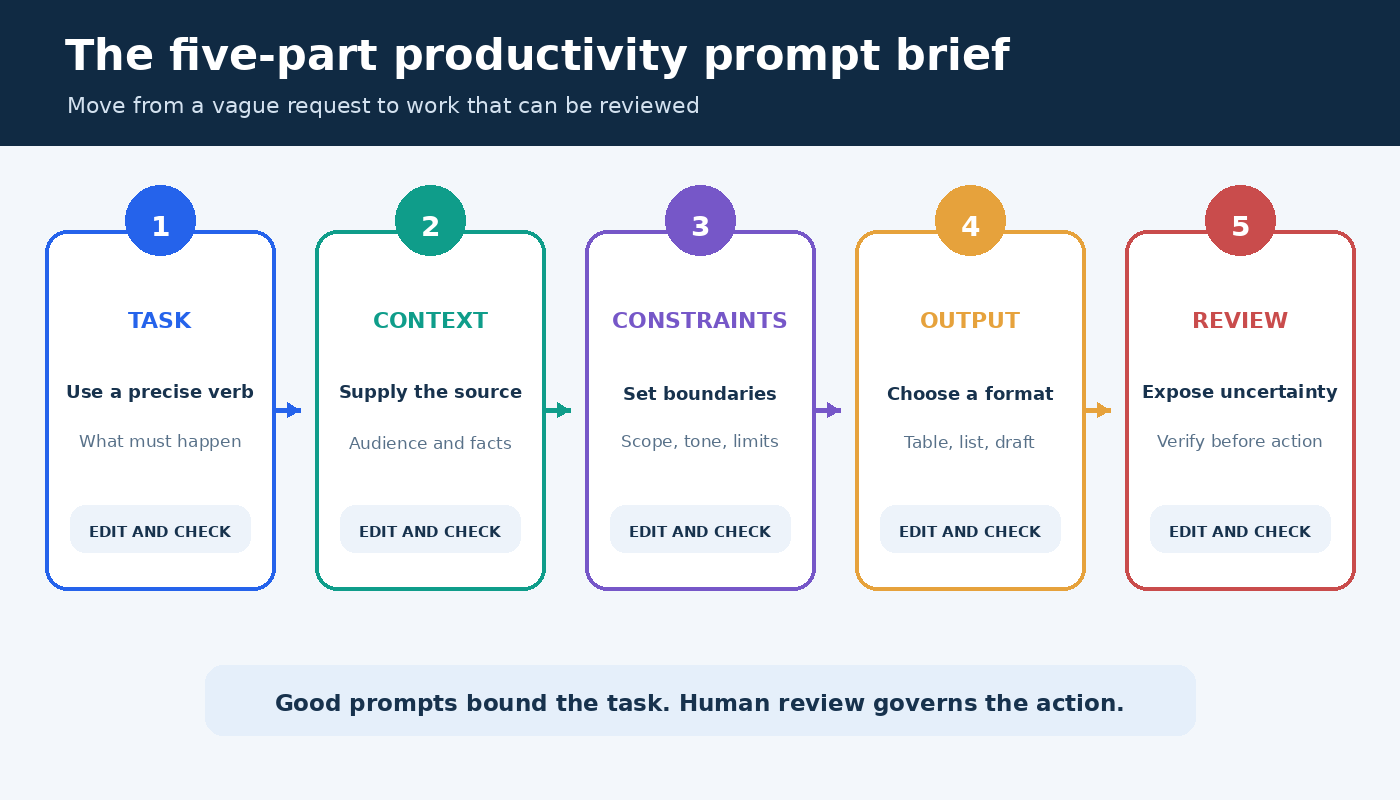
OpenAI’s official prompt engineering guidance recommends clear, specific requests, enough context, and iterative refinement. You can turn that advice into a compact brief with five parts: task, context, constraints, output, and review. You do not need every part for a simple request, but this sequence is a strong default when the result matters.

  1. Task: State the action with a precise verb such as rank, extract, compare, draft, or critique.
  2. Context: Paste the relevant source material and explain the audience or situation.
  3. Constraints: Set limits on length, tone, scope, deadlines, and what the answer must not assume.
  4. Output: Specify a format you can use, such as a table, checklist, agenda, or email draft.
  5. Review: Ask the model to flag uncertainty, missing inputs, and claims that require verification.

Reusable base prompt: Help me [task]. Use only [context or pasted material]. The audience is [audience], and success means [outcome]. Follow these constraints: [limits]. Return [format]. Separate facts from suggestions, identify missing information, and mark anything I should verify before acting.

Notice that the brief does not ask ChatGPT to be an all-knowing expert. It gives the model a bounded role and creates an inspection point. If the first result misses the mark, change one variable at a time. Add a sample, narrow the audience, define a stronger constraint, or ask for a critique before requesting another draft.

Five-part ChatGPT productivity prompt brief showing task, context, constraints, output, and review
A reliable productivity prompt moves from a defined task to a reviewable result.

Morning prompts for deciding what matters

Planning prompts work best when you provide a real list. ChatGPT cannot see your commitments unless you share them or use a connected feature that you have deliberately configured. Keep names, customer data, financial details, and private company information out of a consumer chat unless your organization has approved that use.

Build a realistic daily plan

I have [number] hours available today. Here are my tasks with deadlines and rough effort: [list]. Rank them using deadline, consequence, dependency, and effort. Create a time-blocked plan with one buffer period and a clear stopping point. Do not invent meetings or deadlines. Put any scheduling conflict in a separate warning list.

The value here is not the ranking alone. It is the explicit tradeoff. Compare the proposed order with promises you have already made, then move the blocks into your calendar yourself. If two jobs compete for the same hour, ask for two versions: one optimized for deadline risk and one optimized for strategic value.

Choose the next action for an unclear project

Turn this project description into the smallest useful next actions: [description]. Group actions under decide, gather, create, review, and send. Each action must start with a verb and be completable in one work session. List blocked actions separately with the input or decision needed to unblock them.

This prompt is especially useful when a task such as “prepare launch” hides several different kinds of work. The categories reveal whether you actually need to make a decision, collect evidence, or produce something. Delete unnecessary actions rather than treating the generated list as an obligation.

Prompts for meetings and scattered notes

Meeting summaries are safer when ChatGPT transforms notes you provide instead of reconstructing an event from memory. Label speakers only when your notes identify them. Preserve uncertainty rather than assigning an ambiguous commitment to a person. For a deeper evidence workflow, see our practical guide to using ChatGPT for research.

Turn notes into decisions and actions

Use only the meeting notes below. Produce four sections: confirmed decisions, action items, open issues, and follow-ups. For each action, include owner and due date only when explicitly stated. Write “not specified” when either is missing. Quote the short source phrase that supports each decision. Notes: [paste notes].

Read the quoted phrase beside each decision. This makes silent errors easier to catch. Then send the summary to participants for confirmation if it will become the record. The model can organize a record, but it cannot resolve a disagreement that the meeting left unsettled.

Prepare a focused agenda

Create a [length]-minute agenda from this objective and background: [material]. Include the decision required, preparation attendees must complete, time per item, and the person responsible for leading each item. Reserve the final five minutes for decisions and owners. Flag any topic that should be handled asynchronously.

A good agenda protects the decision from a long status update. Before sending it, check that every named person and assigned role is accurate. If there is no decision or collaborative work, replace the meeting with a short update when that fits your team’s norms.

Writing prompts that preserve your voice

For writing, source material and audience matter more than theatrical role instructions. Give ChatGPT a few representative sentences, the facts that must remain unchanged, and a clear purpose. If you use preferences repeatedly, OpenAI documents how custom instructions can apply information across chats. Review those settings periodically because a standing preference can be inappropriate for a new task.

Draft a concise email from facts

Draft an email to [recipient role] using only these facts: [facts]. The purpose is [purpose]. Use a direct, warm tone and keep it under [number] words. Open with the reason for writing, make one clear request, and end with the next step. Do not add promises, dates, prices, or policy claims that are not in the facts.

Read the draft once for factual accuracy and once from the recipient’s perspective. Names, numbers, attachments, permissions, and commitments deserve a separate check. For sensitive or consequential messages, treat the output as a structural suggestion and write the final wording yourself.

Revise without flattening the message

Edit the draft below for clarity and flow while preserving its meaning and level of formality. Keep the examples, technical terms, and any deliberate uncertainty. First list the three most important problems. Then provide a revised version and a short change log. Do not make unsupported claims stronger. Draft: [paste draft].

Asking for a diagnosis before the rewrite lets you decide whether the edit is justified. You can reject a change and request a narrower pass. This is often more efficient than repeatedly asking the model to make prose “better,” a word that gives it no stable target.

Analysis prompts for comparing options

ChatGPT can help impose a common structure on options, but a neat table does not prove that its contents are true. Provide the source data, distinguish required criteria from preferences, and preserve missing values. Never let a generated score hide a policy, legal, safety, hiring, medical, or financial decision that requires qualified human judgment.

Create a decision matrix

Compare these options using only the supplied material: [options and evidence]. Use the criteria [list] and weights [weights]. Create a table with evidence, score, rationale, and missing information for each criterion. Do not estimate a value when the source is silent. After the table, show how the ranking changes if the top two weights are reversed.

The sensitivity check is important. If a small change in weights reverses the result, the apparent winner is fragile. Go back to the underlying evidence and discuss the tradeoff instead of accepting the total score as an objective answer.

Find gaps in a plan

Review this plan as a critical collaborator: [plan]. Separate your response into assumptions, dependencies, failure modes, missing evidence, and reversible tests. Rank issues by impact and likelihood, but explain the basis for each rank. End with the three cheapest checks that would reduce the most uncertainty.

This prompt works because it asks for tests, not just criticism. Keep domain experts in the loop. ChatGPT may surface a useful possibility, overlook an obvious constraint, or overstate a weak inference. The plan owner remains accountable for the final decision.

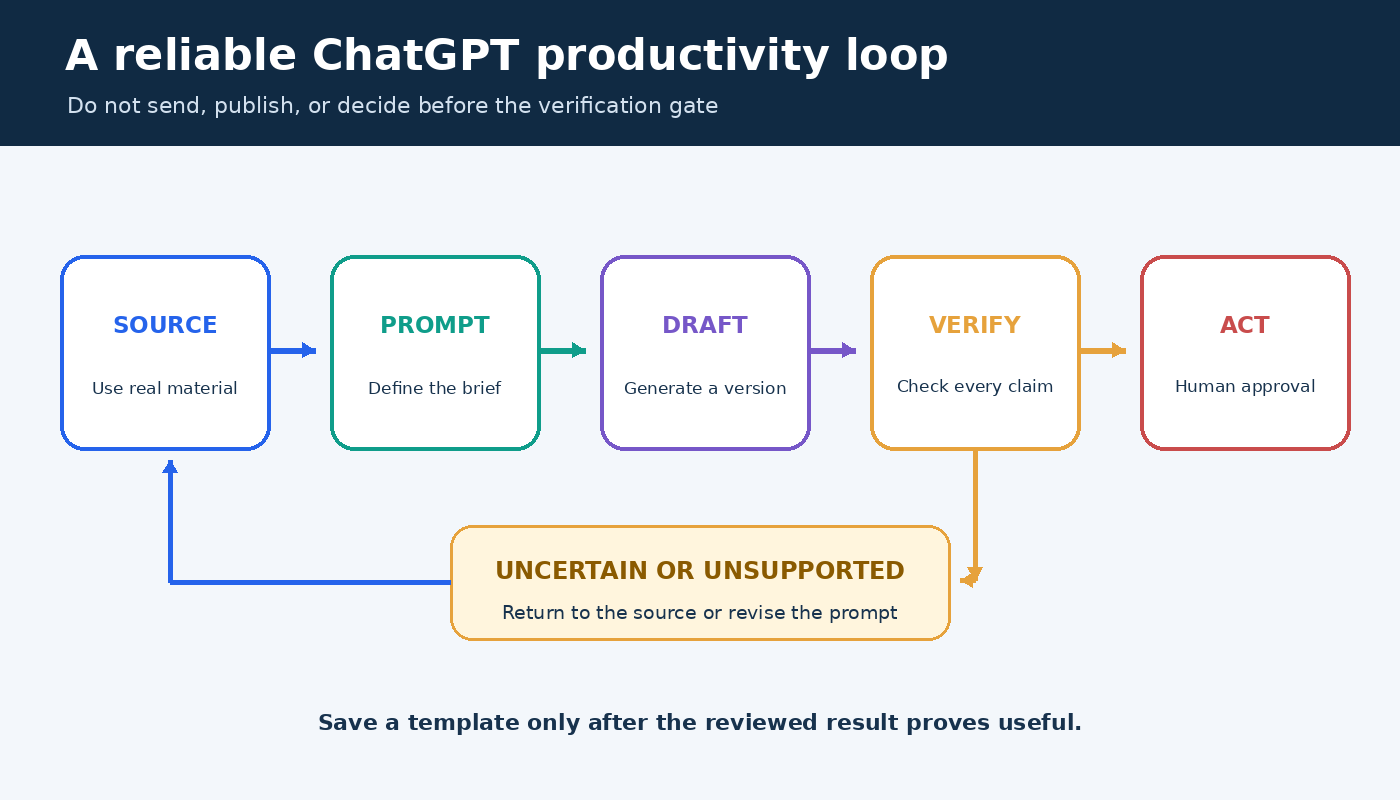
Review loop for ChatGPT productivity prompts from source material through draft, verification, action, and reusable template
Productive use includes verification before action and a feedback step before reuse.

Use a prompt chain for work that needs several passes

One huge prompt often mixes discovery, drafting, verification, and formatting. Split substantial work into stages so you can inspect the direction before investing in the next step. A practical chain is: define the outcome, inventory the evidence, propose an outline, draft one section, critique it against criteria, revise, and perform a final source check.

  1. Frame: Restate the goal, audience, constraints, and unresolved inputs.
  2. Extract: Pull relevant facts from supplied material without interpretation.
  3. Organize: Group the facts and offer two possible structures.
  4. Draft: Write only after you approve a structure.
  5. Challenge: Test the draft against accuracy, completeness, tone, and usefulness.
  6. Verify: Match every important claim to the source or mark it for checking.
  7. Finalize: Apply the required format after content is settled.

This sequence also makes recovery easier. If the tone is wrong but the facts are right, return to the draft stage rather than starting over. If the evidence is weak, stop before polishing. Our editorial and sourcing approach explains why useful AI-assisted work still needs transparent human review.

Privacy and accuracy checks before you paste

Remove information that the task does not require. Replace personal names with roles, reduce customer records to representative examples, and summarize confidential strategy rather than pasting it. Follow your employer’s approved tools and retention rules. OpenAI’s Data Controls FAQ explains consumer controls for chat history and model improvement, but a product setting does not replace your organization’s policy or a duty to protect someone else’s data.

  • Check every name, date, amount, quotation, and citation against its source.
  • Confirm that the output did not turn an assumption into a fact.
  • Review links and current product details close to publication or action.
  • Use a qualified professional for decisions with legal, medical, financial, safety, or employment consequences.
  • Keep an audit trail when a decision requires documented evidence or approval.

Build a small prompt library that stays useful

Save templates by outcome, not by impressive name. “Meeting actions from notes” is easier to retrieve than “ultimate meeting assistant.” Store the prompt, a safe example input, the expected output format, and a review checklist together. Add a note about situations where the template should not be used.

Review the library after real use. Keep a template if it repeatedly saves time after correction. Revise it if the same error appears twice. Retire it when the underlying workflow, policy, or product changes. The goal is not to collect hundreds of prompts. It is to maintain a few dependable starting points for recurring work.

Frequently asked questions

What makes a ChatGPT productivity prompt effective?

An effective prompt defines a concrete task, supplies relevant context, sets meaningful constraints, requests a usable format, and makes uncertainty visible. Its quality is measured by the reviewed work it saves, not by the length of the response.

Should I use one long prompt or several short prompts?

Use one compact prompt for a bounded transformation such as formatting supplied notes. Use a prompt chain when the task includes choices, evidence gathering, drafting, and review. Separate stages let you correct direction before errors spread.

Can ChatGPT manage my priorities automatically?

It can organize the tasks and constraints you provide, but it may not know your full calendar, commitments, relationships, or consequences. Treat its plan as a proposal, reconcile it with the real sources, and make the final tradeoffs yourself.

Is it safe to paste work documents into ChatGPT?

Safety depends on the data, account, settings, contracts, and your organization’s rules. Minimize the material, remove unnecessary personal or confidential details, use approved services, and consult current OpenAI documentation and workplace policy before sharing sensitive content.

ChatGPT for Beginners: What It Does Well and What It Does Not

0

ChatGPT is a conversational AI assistant. For a beginner, the most useful way to think about it is simple: it is good at working with words, patterns, examples, and instructions, but it is not a guaranteed source of truth or a replacement for your own judgment. It can help you plan a project, summarize notes, rewrite a draft, explain a concept, compare options, brainstorm ideas, translate text, or turn messy information into a clearer structure. It can also be wrong, vague, overconfident, outdated, or missing context that matters to your decision.

This guide explains ChatGPT for beginners without hype. It separates what ChatGPT usually does well from what it does not do reliably, then gives you a practical way to prompt, review, and improve answers. The goal is not to memorize clever prompt tricks. The goal is to build a safe habit: give useful context, ask for a specific output, check important claims, and keep human responsibility where it belongs.

The guidance below is based on current OpenAI help articles, especially the official ChatGPT capabilities overview, OpenAI’s prompt engineering best practices for ChatGPT, the article Does ChatGPT tell the truth?, the Data Controls FAQ, and the Temporary Chat FAQ. Product labels and account features can change, so use those official pages for the latest interface details.

What ChatGPT does well

ChatGPT works best when the task depends on language, structure, reasoning over supplied information, or exploring possibilities. OpenAI describes core capabilities such as answering questions, explaining concepts, drafting and rewriting content, summarizing, offering creative suggestions, solving problems through logical reasoning, and translating between languages. Those are broad categories, but beginners can turn them into everyday workflows.

It can explain unfamiliar ideas in plain language

If you are learning a new topic, ChatGPT can provide a first explanation, define terms, give analogies, and ask practice questions. This is helpful when a textbook, policy document, or technical article feels dense. A strong beginner prompt might say: “Explain this topic for someone with no background. Use one example, define any jargon, and list three questions I should ask next.” That kind of request gives ChatGPT a role, audience, and output shape.

The answer should still be checked when accuracy matters. Use ChatGPT to make the topic less intimidating, then compare the explanation with a trusted source. For schoolwork, health, finance, law, engineering, security, or public claims, do not treat a smooth explanation as proof. Smooth writing can hide an error.

It can turn messy notes into something usable

One of the safest beginner uses is transforming information you already have. Paste meeting notes and ask for action items. Paste a rough outline and ask for a clearer structure. Paste a long email and ask for a shorter version that keeps the same meaning. Because the important material is supplied by you, the result is easier to verify against the source.

For example: “Here are my notes from a planning meeting. Turn them into a table with owner, task, deadline, open question, and risk. Do not add tasks that are not in the notes.” This prompt gives ChatGPT a useful boundary. It tells the assistant to organize, not invent. You still need to check names, dates, and commitments before sending the table, but the first pass can save time.

It can brainstorm options without judging them for you

ChatGPT can generate titles, angles, interview questions, practice scenarios, study plans, or alternative phrasings. Beginners often get the most value when they ask for options rather than a single answer. Instead of asking “What is the best idea?” ask for “Ten possible ideas, each with one advantage, one drawback, and what information I would need before choosing.” That wording keeps you in charge of the decision.

This is where related workflows can help. PChatGPT’s guide to daily productivity prompts shows how prompts can support normal work without replacing review. The best prompts make the next step clearer. They do not remove accountability.

It can revise drafts for tone, clarity, and format

OpenAI’s prompting guidance recommends being clear and specific, providing enough context, and asking for the tone you want. That advice matters when you ask ChatGPT to improve writing. “Make this better” is vague. “Rewrite this message for a friendly but professional customer update, keep it under 150 words, preserve the refund deadline, and do not promise anything not stated here” is much stronger.

For beginners, revision tasks are often safer than asking ChatGPT to create everything from scratch. You bring the facts and intent. ChatGPT helps with clarity. Before using the final text, compare it line by line against your original facts. Look for added promises, missing conditions, changed dates, and wording that sounds more certain than the evidence supports.

Instructional matrix showing which beginner ChatGPT tasks are a good fit, which need checks, and which should not be delegated without expert review
Use this task fit matrix to decide when a beginner ChatGPT request is low risk, needs checking, or should not be delegated.

What ChatGPT does not do well

ChatGPT’s limits are just as important as its strengths. OpenAI’s article on truth and accuracy says ChatGPT can produce incorrect or misleading outputs and may sound confident even when wrong. It also notes that hallucinations can include incorrect definitions, dates, facts, fabricated quotes, fabricated studies, fabricated citations, and overconfident answers to ambiguous or complex questions. Beginners should take that warning seriously.

It is not a final authority

ChatGPT can help you understand a question, but it should not be the final source for important facts. If you need the current price of a product, the rules of a government program, the status of a flight, a medical recommendation, a legal interpretation, or a technical safety decision, verify with the original source or a qualified professional. ChatGPT may have search or other tools depending on plan and settings, but even cited answers should be checked by opening the source yourself.

A useful beginner habit is to separate drafting from verification. Ask ChatGPT to draft a summary, then ask it to list the claims that require checking. After that, check those claims outside the chat. This slows the process down a little, but it prevents a common mistake: accepting a polished answer because it reads with confidence.

It does not know your full situation unless you explain it

ChatGPT responds to the context available in the conversation and, when enabled, to certain saved preferences or memories. It does not automatically know your organization, your private constraints, your latest email thread, your local policy, your budget, or your risk tolerance unless you provide that information. When beginners get a generic answer, missing context is often the reason.

Give the assistant the situation in a short, structured way. Include the goal, audience, source material, deadline, constraints, and what you do not want. If any part is private or sensitive, summarize it in safer terms rather than pasting raw confidential material. If the task cannot be described safely, do not put it into ChatGPT.

It is not a private vault for sensitive information

Privacy settings matter. OpenAI’s Data Controls FAQ says data controls let users decide whether conversations help improve models. It also explains that signed-in users can turn off “Improve the model for everyone” in Data Controls, and that conversations still appear in history when training is turned off. OpenAI’s Temporary Chat FAQ says Temporary Chats do not appear in chat history unless saved, do not create memories while temporary, and are not used to improve models while they remain temporary. The FAQ also says a copy may be kept for up to 30 days for safety purposes.

For a beginner, the practical rule is conservative: do not paste passwords, private keys, medical records, financial account numbers, trade secrets, confidential client files, or anything you would regret storing in a third party service. If you need privacy controls, read the official OpenAI pages in your account context before relying on them. Settings can vary by sign-in state, workspace, and product plan.

It does not remove the need for skill

ChatGPT can help beginners move faster, but it does not make every task beginner safe. A legal letter, tax position, security change, medical decision, data analysis, or public policy claim still requires domain knowledge. ChatGPT can produce a checklist, a draft, or a set of questions for an expert. That is different from replacing the expert.

This distinction protects you from overuse. Use ChatGPT to prepare, clarify, practice, and reduce blank-page effort. Keep final decisions with the person who understands the real consequences. If you cannot judge whether an answer is good, treat the answer as a starting point, not a result.

A simple beginner prompt formula

You do not need a complicated prompt library to get started. Use this five-part structure:

  1. Goal: Say what you want to accomplish.
  2. Context: Explain the situation, audience, and source material.
  3. Task: State exactly what ChatGPT should do.
  4. Limits: Say what it must not invent, change, or assume.
  5. Output: Ask for the format you want, such as bullets, a table, a checklist, or a short email.

Here is a reusable prompt:

I am trying to [goal]. The audience is [audience]. Here is the source material: [paste or summarize]. Please [task]. Keep the tone [tone]. Do not add facts that are not in the source. If something is missing, mark it as “needs verification.” Return the answer as [format].

That template follows OpenAI’s advice to be clear, specific, and iterative. It also makes the answer easier to review because the rules are visible. If the answer is weak, do not start over with a completely different request. Add one correction at a time: “Shorten it,” “make it less formal,” “keep the dates unchanged,” “show assumptions,” or “turn it into a checklist.” Iterative refinement is usually more reliable than expecting one perfect prompt.

If you want a deeper practice routine, read PChatGPT’s guide on how to ask ChatGPT better questions. If you often repeat the same tone, role, or formatting preferences, the guide to ChatGPT custom instructions can help you decide what belongs in persistent instructions and what should stay in each prompt.

Instructional loop for beginners showing how to ask ChatGPT, review the answer, verify important claims, and use the result responsibly
Use this answer check loop before relying on ChatGPT output outside the chat.

How to check an answer before using it

Beginners often ask, “How do I know if ChatGPT is right?” There is no single button that solves this for every case. Use a review process that matches the risk of the task.

For low-risk writing

Check whether the answer says what you meant, uses the right tone, preserves important details, and avoids making promises you did not approve. Low-risk tasks include brainstorming titles, rewriting a casual message, outlining a personal project, or generating practice questions. Even here, you should edit for your own voice.

For factual claims

Ask ChatGPT to separate facts, assumptions, and suggestions. Then verify the facts from primary sources. If the answer includes citations, open them. If it gives a quote, search the original document. If it gives a date or number, compare it with an official page. OpenAI’s accuracy guidance explicitly encourages users to verify important information from reliable sources.

For current information

Use current sources. OpenAI notes that ChatGPT may use search or deep research depending on available tools, and those tools can provide more recent or cited information. Still, current information is fragile. A page can change, a price can expire, a policy can update, and a local rule can differ from a general answer. Ask for sources, then check the source page yourself.

For personal, professional, or high-stakes decisions

Raise the review standard. Do not rely on ChatGPT alone for medical, legal, financial, safety, employment, security, or compliance decisions. Use it to prepare questions, summarize documents you are allowed to share, compare options, or draft a checklist for a qualified reviewer. The higher the consequence, the more independent verification you need.

Beginner examples that work well

Try these simple use cases first:

  • Summarize your own notes: “Turn these notes into five action items and five open questions. Do not add anything that is not in the notes.”
  • Improve a message: “Rewrite this email to sound calm, clear, and professional. Keep the deadline and the refund condition unchanged.”
  • Learn a concept: “Explain this concept to a beginner, then give me a one-question quiz and the answer.”
  • Compare options: “Give me three possible approaches, the trade-off for each, and what information I need before choosing.”
  • Review a draft: “Find vague claims, unsupported statements, and parts that may confuse a non-technical reader.”

These prompts work because they are bounded. They ask ChatGPT to organize, revise, explain, or critique. They do not ask it to make a consequential decision without evidence.

Common beginner mistakes

The first mistake is asking a vague question and expecting a precise answer. “Help me with marketing” gives ChatGPT almost nothing to work with. “Create a one-page launch checklist for a small online course aimed at first-time freelancers, with no paid ads and a two-week timeline” is much clearer.

The second mistake is giving too much unfiltered information. Beginners sometimes paste a large document and ask for “the important parts.” That can work, but it is better to define what important means. Ask for risks, dates, decisions, contradictions, tasks, or questions. A narrower lens produces a more useful answer.

The third mistake is skipping review. ChatGPT can make a weak idea sound finished. Before you send, publish, or act, ask: Did it preserve the facts? Did it invent anything? Is it current? Does it match my audience? Do I understand why this is the right next step?

The fourth mistake is using ChatGPT for everything. Sometimes a calendar reminder, spreadsheet formula, direct search, phone call, or conversation with a specialist is better. Good AI use is selective. Use ChatGPT where it reduces effort and improves clarity. Avoid it where it creates risk or hides uncertainty.

FAQ

What is ChatGPT best for when you are new?

Start with low-risk tasks where you can easily check the result: summarizing your own notes, rewriting drafts, explaining concepts, creating checklists, brainstorming options, and practicing questions. These uses fit ChatGPT’s language strengths and keep you close to the source material.

Can ChatGPT give wrong answers?

Yes. OpenAI says ChatGPT can produce incorrect or misleading outputs and may sound confident even when wrong. Verify important information from reliable sources, especially quotes, dates, numbers, technical claims, and anything tied to health, law, finance, safety, or current events.

Should beginners share private information with ChatGPT?

Be cautious. Do not paste passwords, private keys, confidential client data, sensitive personal records, or anything you are not allowed to share. Review OpenAI’s Data Controls FAQ and Temporary Chat FAQ for current account controls, history, model improvement, memory, and retention details.

How can I write a better first prompt?

State your goal, add brief context, describe the exact task, set limits, and request a clear output format. If the first answer is not good enough, refine it with one specific correction instead of starting over.

Final takeaway

ChatGPT is useful for beginners when you treat it as an assistant for drafting, organizing, explaining, and exploring. It is risky when you treat it as an unquestioned authority. The safest habit is simple: provide clear context, ask for a bounded output, check important claims, protect sensitive information, and keep final responsibility with a person. Used that way, ChatGPT can reduce blank-page stress and improve everyday work without hiding its limits.

Prompt Chaining in ChatGPT: A Step-by-Step Guide

0

Prompt chaining in ChatGPT is a practical way to turn one complicated assignment into a series of small, reviewable conversations. You ask for one useful output, inspect it, correct it, and then use the approved result in the next prompt. A writer might move from brief to outline, from outline to section draft, and from draft to an evidence check. The value comes from those deliberate handoffs, not from making the conversation longer.

This guide treats prompt chaining as an editorial method. It is not presented as an official named OpenAI framework. The method does, however, line up with OpenAI guidance to be clear and specific, refine prompts iteratively, provide reference text, split complex tasks into simpler subtasks, and test changes systematically. Used well, a chain gives you places to make decisions before weak assumptions spread through an entire document.

What prompt chaining means in everyday ChatGPT work

A prompt chain is a sequence in which each prompt has a narrow job and receives selected material from the previous step. The output of step one is not automatically trusted. It becomes a draft input that a person can approve, edit, or reject. That distinction matters. A chain is a controlled editorial process, not a guarantee that every answer is correct.

Imagine asking ChatGPT to research a topic, choose an angle, build an outline, write 2,000 words, verify every claim, and format the final article in one message. The request contains several different kinds of judgment. If the angle is wrong, the finished draft may still look polished. If a source is misunderstood, that error may appear in the introduction, examples, and conclusion. A chain lets you catch the wrong angle after the outline and the unsupported claim before publication.

OpenAI’s prompt engineering best practices for ChatGPT recommend clear, specific prompts with enough context and describe prompting as iterative refinement. OpenAI’s developer guidance on optimizing model accuracy also includes splitting complex tasks into simpler subtasks, providing reference text, and testing changes systematically. Those recommendations are the useful foundation. The chain described here is a human-managed way to apply them to editorial work.

Prompt chaining workflow with five checkpoints from brief through revision
A five-step prompt chain adds a review checkpoint before each handoff.

When a chain is better than one prompt

Use a chain when an early decision changes everything that follows. An article outline, a comparison rubric, a lesson plan, and a software diagnosis all have this property. Reviewing the intermediate structure is cheaper than repairing a polished but misguided final answer. Chaining is also useful when different stages need different inputs. The outlining stage may need audience goals and source notes, while the editing stage needs the approved draft and a style checklist.

A single prompt is often enough for a direct transformation with low stakes, such as changing a short paragraph into bullets or suggesting several subject lines. Adding stages to a tiny task creates ceremony without adding control. The best chain is usually the shortest sequence that exposes the decisions you genuinely need to inspect.

  • Chain the task when it has distinct phases, uncertain inputs, several quality criteria, or a meaningful approval boundary.
  • Use one prompt when the input is complete, the transformation is simple, and mistakes are easy to notice and fix.
  • Stop the chain when a required source is missing, an instruction conflicts with another instruction, or the next stage would amplify an unresolved error.

A five-step prompt chaining workflow

1. Write a compact brief

Begin with the outcome, audience, allowed source material, constraints, and acceptance criteria. Do not ask for a draft yet. Ask ChatGPT to restate the brief and identify missing information. This first response is a diagnostic. It reveals whether your request is specific enough before you spend time generating prose.

I am preparing a practical guide for new team leads.
Goal: help them run a useful weekly project update.
Audience: first-time managers in small remote teams.
Use only the notes pasted below.
The final guide must include a meeting agenda, a status template, and a review checklist.
First, restate the assignment in five bullets. List missing inputs and do not draft the guide yet.

[Paste reviewed notes]

Read the response as an editor. Correct the audience, scope, or source boundaries in your own words. Do not merely tell ChatGPT to make it better. A concrete correction such as “The guide is for a ten-minute written update, not a live meeting” becomes a stable decision that can travel to the next stage.

2. Approve the structure before prose

Ask for an outline that maps every required element to a section. Request a short purpose statement for each section and ask the model to flag any section that lacks source support. This makes coverage visible. You can move sections, remove repetition, and reject invented detail while the document is still inexpensive to change.

Using the corrected brief below, create an outline only.
For each section, provide:
1. the section goal
2. the source notes it relies on
3. the practical example it needs
Flag any requirement that the notes do not support.
Do not write paragraphs.

[Paste corrected brief]

The phrase “outline only” gives the stage a boundary. If ChatGPT drafts anyway, ignore the extra prose and evaluate the structure. OpenAI’s guidance emphasizes clear instructions, and boundaries are most useful when they describe both the requested output and what should not happen yet.

3. Draft in meaningful sections

Once the outline is approved, draft one coherent section at a time. Provide the relevant part of the outline, the source notes for that section, and any decisions that must remain consistent. Asking for one sentence at a time is too fragmented, while requesting the whole article removes your checkpoints. A section is often a useful middle size because it has enough context for flow but remains easy to review.

Draft the section called “The weekly update template.”
Use only the approved outline and notes below.
Write for a first-time manager in plain English.
Include one filled example, then explain each field.
If the notes do not support a claim, insert [SOURCE NEEDED] instead of guessing.
Return only this section.

[Paste approved outline excerpt and source notes]

After each section, record important choices in a small continuity note. For example, save the terms you chose, the example organization, and facts already established. Pass that note to later drafting prompts. This is more reliable than assuming every detail in a long conversation will receive equal attention.

4. Separate review from revision

Do not ask for a critique and a silent rewrite in the same step. First ask for a review against explicit criteria. You want to see the diagnosis before the text changes. A useful review can identify unsupported claims, missing requirements, vague passages, repeated ideas, inconsistent terminology, and places where the tone does not fit the audience.

Review this draft without rewriting it.
Create a table with these columns:
Location | Issue | Why it matters | Suggested fix
Check source support, completeness, clarity, repetition, and audience fit.
Quote the exact words that need attention.
If a criterion passes, say so.

[Paste draft and acceptance criteria]

This stage turns general dissatisfaction into an edit list. You still need to inspect the critique because ChatGPT can misread a source or recommend an unnecessary change. Approve the valid fixes, reject the rest, and carry only the approved list forward.

5. Revise with a controlled change list

The revision prompt should contain the current draft and the accepted edits. Tell ChatGPT to preserve material that was not flagged. Then compare the revision with the original rather than assuming every change was beneficial. This final comparison catches accidental deletions, new claims, and style drift.

Revise the draft using only the approved changes below.
Preserve all unflagged facts, links, headings, and examples.
Do not add new claims.
After the revision, provide a short change log that maps each approved fix to the updated passage.

[Paste draft]
[Paste approved change list]

How to create a clean handoff

A handoff is the small packet of information that moves from one prompt to the next. Copying an entire conversation can carry rejected ideas, obsolete instructions, and irrelevant detours into the next stage. Instead, assemble a clean packet with five parts: approved input, decisions, open questions, the next job, and its acceptance test.

Prompt handoff packet showing approved input, decisions, open questions, next job, and acceptance test
A clean handoff carries checked material and makes uncertainty visible.

Label source text separately from your instructions. Quotation marks, headings, or fenced blocks help distinguish material to analyze from the job you want done. OpenAI’s prompt engineering guide discusses providing relevant context and examples. In an editorial chain, context should be selected for the current stage rather than dumped into every prompt.

Keep uncertainty visible. If a date, quotation, or causal claim has not been checked, mark it as unresolved. Never let a fluent rewrite convert an open question into an apparent fact. For publishing work, open the cited source yourself, confirm that it supports the sentence, and check that the link still leads to the intended page.

A worked example from notes to article

Suppose you have interview notes for an article about a neighborhood repair club. In the brief stage, define the audience, intended length, central idea, and permission boundaries for quotations. Ask ChatGPT to list missing spellings, dates, and attribution details. You might discover that the notes do not say when the club began. That gap should remain explicit rather than being filled with a plausible date.

At the outline stage, decide whether the article opens with a scene, a problem, or the club’s process. Map each section to specific notes. At the drafting stage, provide only the notes needed for the opening and request placeholders for anything unsupported. At review, compare every factual sentence with the interview record. At revision, apply the approved corrections and perform a final human read for fairness, tone, and context.

The chain does not make ChatGPT the reporter or final editor. It gives the reporter a visible process for using ChatGPT on bounded tasks. For a broader approach to planning, drafting, and reviewing work, see our practical ChatGPT workflow guide. Writers can also use the examples in our ChatGPT writing prompts workflow as starting points, then adapt them to their own evidence and editorial rules.

Common prompt chaining mistakes

  • Letting the model approve its own work. A critique can help you look, but a person must decide whether the evidence and final output are acceptable.
  • Passing every previous answer forward. This preserves discarded ideas and makes the active instructions harder to identify.
  • Using vague stage names. “Improve this” does not say whether the job is to verify facts, change the structure, shorten sentences, or adjust tone.
  • Rewriting before diagnosing. If you cannot see the proposed changes first, you cannot make a controlled editorial decision.
  • Treating a citation as proof. A linked page can be real while failing to support the nearby claim. Read the primary source and check the exact relationship.
  • Ignoring privacy and permissions. Remove confidential, personal, or restricted material unless you are authorized to use it in the relevant service and workflow.
  • Building a chain that is too long. Extra stages can add inconsistency and review work. Merge steps that do not need separate judgment.

A reusable prompt chain template

The following sequence works as a starting point for articles, reports, lesson plans, and internal guides. Replace every bracketed field, and keep source material clearly separated from instructions.

  1. Brief: “My goal is [outcome] for [audience]. Use [allowed inputs]. Follow [constraints]. Restate the task and list missing information. Do not draft yet.”
  2. Structure: “Using the approved brief, create [outline or plan]. Map each part to its supporting input. Flag unsupported requirements.”
  3. Produce: “Create only [named section or component]. Use the approved plan and sources. Mark unsupported claims instead of guessing.”
  4. Review: “Do not rewrite. Evaluate the output against [criteria]. Quote each problem and propose a specific fix.”
  5. Revise: “Apply only these approved fixes. Preserve unflagged material. Return the result and a change log.”
  6. Human check: verify sources, names, numbers, permissions, links, tone, and whether the output actually serves the audience.

Save the sequence only after it works on a real task. Note which stage caught important problems and which stage added little value. A reusable chain is an editable procedure, not a magic incantation. When your source material, audience, or risk changes, revise the chain as well.

FAQ

Is prompt chaining an official OpenAI framework?

This article uses prompt chaining as a descriptive name for an editorial method: dividing work into stages and carrying approved outputs forward. OpenAI’s official guidance supports related practices such as iterative refinement, clear instructions, relevant context, and splitting complex tasks into simpler subtasks, but this guide does not claim that its five-step workflow is an official OpenAI framework.

Does prompt chaining make ChatGPT answers accurate?

No. It can make assumptions and errors easier to spot because you review intermediate outputs, but it does not establish truth. Accuracy still requires appropriate primary sources, careful comparison between claims and evidence, and human judgment. High-impact decisions need review suited to their real-world risk.

Should every ChatGPT task use multiple prompts?

No. Use one prompt for straightforward, low-risk transformations when the input and desired format are already clear. Add a chain when separate planning, production, and review decisions would help. If a stage has no distinct purpose or approval decision, remove it.

What should I carry from one prompt to the next?

Carry the approved source material, current decisions, unresolved questions, one clearly defined next job, and its acceptance criteria. Leave behind rejected drafts and unrelated discussion. This clean handoff keeps the active context smaller and makes it easier for you to see what the next answer is supposed to accomplish.

ChatGPT for Students: A Practical Study Mode Workflow

0

ChatGPT can make a study session more active, but only if the student keeps doing the thinking. Asking for a finished essay or a page of answers may clear a deadline while leaving the underlying skill untouched. A better use is to make ChatGPT question you, expose a gap, offer a small hint, and give you another chance. That turns the conversation into practice rather than answer collection.

This guide gives you a repeatable workflow for learning a concept, solving problems, reviewing notes, preparing for an exam, and improving your own writing. It uses current OpenAI guidance about Study mode, uploaded course materials, data controls, and the limits of generated answers. Your teacher, syllabus, rubric, textbook, and school policy remain the authorities for your course.

Decide what success looks like before you open ChatGPT

Start with an outcome you could demonstrate without the chat window. Instead of writing “help me with chemistry,” define the finish line: “I need to explain why equilibrium shifts, predict the direction in five examples, and justify each prediction.” A precise goal tells ChatGPT what to teach, and it gives you a fair way to judge whether the session worked.

Add four pieces of context: your level, the exact topic, what you already understand, and the kind of assessment ahead. OpenAI’s current Study mode help page recommends this sort of information, along with any relevant deadline and course material. You do not need to compose a perfect prompt. A candid description of where you are stuck is more valuable than impressive vocabulary.

Starter prompt: “I am a first year student reviewing cellular respiration for a short answer test. I understand glycolysis but confuse the later stages. Ask one diagnostic question at a time. Give me a hint before an explanation, and finish with three new transfer questions.”

That prompt protects the productive struggle. If you want a different pace, say so. Ask for a simpler analogy, a more technical explanation, or a pause after every step. Study mode is meant to adapt through questions and layered explanations, but the student still has to steer when the level feels wrong.

Six stage active study loop for students using ChatGPT, from setting a target through delayed retesting

Turn on Study mode and give it a narrow job

OpenAI describes Study mode as a learning experience that can guide thinking, explain ideas step by step, check understanding, and work with uploaded materials. In a regular ChatGPT conversation, you can select Study from the available tools. The current help page also points to chatgpt.com/studymode. Menu layouts can differ by device or app version, so use the official instructions if the button is not where you expect it.

Do not assume the mode makes every answer correct. OpenAI explicitly says Study mode can make mistakes and may sometimes give a direct answer. It also says the tool does not replace a teacher, tutor, course material, or academic requirements. If the conversation starts solving too much for you, interrupt it: “Do not reveal the next step. Ask what principle I would use and wait for my attempt.”

Study mode is most useful when one chat has one purpose. A conversation that jumps from calculus to a history essay to internship applications accumulates irrelevant context. Start a fresh study chat for a new course unit. Name the source boundaries clearly, especially when your instructor uses a particular notation, method, translation, or set of definitions.

Use a six stage study loop

A good session moves between memory, feedback, and another attempt. The following loop works for many subjects because it does not depend on ChatGPT delivering a long lecture.

  1. Set the target. State what you must be able to explain or do, the difficulty level, and the time available.
  2. Take a diagnostic. Answer two or three questions before requesting teaching. This reveals the real gap and prevents you from rereading material you already know.
  3. Study one gap. Ask for a short explanation tied to your notes, then restate the idea in your own words.
  4. Practice from memory. Close or hide the explanation and solve a fresh question. Ask for a hint only after you have made a genuine attempt.
  5. Analyze the error. Label whether you missed a fact, chose the wrong method, made a calculation error, or misunderstood the question.
  6. Retest later. Save two or three questions and return after a break. Recognition during the chat is not the same as recall later.

The error label is the part students often skip. “Wrong” is not a useful diagnosis. If you knew the concept but dropped a negative sign, you need a checking routine. If you could not choose a formula, you need mixed practice that forces method selection. If the wording fooled you, you need to paraphrase questions before solving them. Ask ChatGPT to maintain a small error log, but verify that its diagnosis matches your actual work.

Study your notes without surrendering source control

When uploads are available in your chat, OpenAI says Study mode can reference notes, slides, readings, a syllabus, a worksheet, a textbook excerpt, or an image of a problem. Upload the smallest relevant section rather than a whole folder. Then identify the page, heading, or question you want it to use. If the file is a scan, ask ChatGPT to summarize what it can actually read before you rely on the explanation.

Use a source boundary such as: “For course facts, use only pages 12 through 18 of the PDF. If the pages do not answer something, say that it is not in the supplied material.” This does not guarantee perfect grounding, but it makes mistakes easier to notice. Keep the document open beside the chat and check definitions, quotations, equations, names, and dates yourself.

For outside research, ask for search terms and a map of relevant primary sources, not a fabricated bibliography. OpenAI’s Student’s Guide to Writing with ChatGPT says ChatGPT can help students get oriented and find a research direction, while warning that it is not a substitute for reading primary sources and peer reviewed work. The same guide says citation details should be checked against the originals.

A simple evidence table can keep the work honest. Make columns for claim, course source, page number, your explanation, and unresolved question. Let ChatGPT help you spot empty cells. Do not let it fill missing evidence with a confident guess. If a source cannot be opened and checked, it should not quietly become support for your paper.

Learn problem solving by controlling when hints appear

In mathematics, physics, chemistry, economics, and programming, the timing of help matters. Paste your attempt, including the point where you became uncertain. Ask ChatGPT to identify the first questionable step without continuing the solution. Correct that step yourself, then ask whether the new reasoning holds. This preserves more of the work than requesting a full walkthrough at the start.

Problem solving prompt: “Here is the question and my attempt. Check only the first place my reasoning fails. Name the relevant principle, give one small hint, and wait. Do not calculate the final answer unless I ask after a second attempt.”

After solving, change the surface details. Ask for a similar problem with different numbers, then a problem that looks similar but requires another method. Finally, explain why the methods differ. This transfer step is where you discover whether you learned a procedure or understood when it applies.

For code, submit the error message, the smallest relevant snippet, expected behavior, and what you tried. Ask for a debugging question before a corrected program. Run the code yourself and explain the fix in plain language. If you cannot explain why the change works, the code is not yet reliable study evidence.

Five level hint ladder for solving study problems with ChatGPT without revealing the final answer too soon

Prepare for an exam with retrieval, not endless summaries

Summaries feel productive because they are smooth to read. Exams usually demand retrieval, discrimination, and application. Give ChatGPT your learning objectives and ask it to build a balanced practice set, but compare that set with the instructor’s stated scope. Generated questions can overemphasize whatever is easiest for the model to phrase.

Begin closed book. Answer one question at a time and include your confidence as high, medium, or low. Then request feedback that separates correctness from confidence. A confident wrong answer signals a misconception. A correct answer with low confidence needs another retrieval attempt. A correct, well explained answer with high confidence can receive less review time.

Use mixed questions rather than studying one chapter until every item looks familiar. Ask for two definition questions, two application questions, one comparison, and one question that combines units. For quantitative work, include a few problems where the challenge is selecting the method. For humanities, include passages or claims that require evidence, qualification, and a counterargument.

End with a one page plan you write yourself. It should list weak concepts, the course pages to revisit, practice tasks, and the next review time. ChatGPT can critique whether the plan is specific, but your calendar and energy determine whether it is realistic.

Use ChatGPT for writing feedback without outsourcing the paper

Write the claim, outline, and first paragraph before asking for help. Then request a diagnosis instead of a rewrite: “Identify where the reasoning jumps, where evidence is missing, and which paragraph has two main ideas. Quote only the relevant sentence and explain the problem.” That response leaves the revision in your hands.

Reverse outlining is especially useful. Ask ChatGPT to state the job of each paragraph in a few words, then compare that map with your intended argument. Reorder or rewrite the draft yourself. You can also ask for a skeptical counterargument, a list of unsupported assumptions, or questions a reader may still have.

OpenAI’s student writing guide recommends iterative feedback and transparency about how ChatGPT contributed. Your course may have different disclosure or citation rules, so check the syllabus and ask the instructor when the boundary is unclear. Never treat a share link or AI citation format as automatic permission. The instructor’s policy controls the assignment.

For a broader writing process, see PChatGPT’s practical prompt chaining guide. If your concern is acceptable assistance versus replacing your own work, read how to use ChatGPT for writing without cheating. Those guides complement this student workflow, but your school rules still come first.

Protect private student information

Do not paste student IDs, grades linked to names, private feedback about classmates, login details, unpublished research data, health information, or confidential placement records into a casual study chat. Redact names and identifying details from worksheets or screenshots. If your institution provides an approved account or workspace, follow its rules rather than assuming a personal account is equivalent.

OpenAI’s Data Controls FAQ explains that signed in users can turn off “Improve the model for everyone” in Settings under Data Controls. It says conversations can remain in history while not being used to improve ChatGPT. The same page describes Temporary Chats, but the current Study mode help page says Study is not available in Temporary Chats, GPTs, or Projects. Do not promise yourself both features in the same session without checking the current product behavior.

Memory can personalize Study mode when it is available and enabled. That convenience is optional. Review Settings under Personalization and decide whether remembered learning preferences are useful. OpenAI says Study mode still works with Memory off, though responses may be less personalized. A privacy choice should be deliberate, not something you discover after uploading a semester of notes.

A realistic 45 minute session

  • Minutes 0 to 5: write the target, gather the approved pages, and state what you already know.
  • Minutes 5 to 12: answer a short diagnostic without notes.
  • Minutes 12 to 22: review the largest gap through questions, a short explanation, and your own restatement.
  • Minutes 22 to 35: solve new questions without looking at the explanation. Request staged hints only when needed.
  • Minutes 35 to 41: classify errors and revisit the exact course source.
  • Minutes 41 to 45: write a three sentence summary from memory and schedule the next retrieval round.

If the session runs long, cut the number of topics, not the final retrieval. A small unit recalled independently is more useful than a large unit that only feels familiar while the explanation remains on screen. Save the error log and final questions so the next session begins with evidence, not another broad request to review everything.

Prompts you can adapt by subject

For a difficult reading

“Ask me to summarize the author’s main claim first. Then point to one tension in my summary and ask which passage supports my interpretation. Do not supply quotations. I will find and paste the passage.”

For a science concept

“Start with a prediction question about this process. After I answer, ask me to explain the mechanism. If I confuse cause and correlation, identify the distinction but let me revise before you explain.”

For language practice

“Have a short conversation at my level. Correct only errors that block meaning during the exchange. At the end, show three recurring patterns and ask me to produce a new sentence for each.”

For an essay draft

“Create a reverse outline of my draft. For each paragraph, state its main function and identify any claim that lacks evidence. Do not rewrite the prose. Finish with the two revision decisions that would most improve the argument.”

What to verify every time

  • Check the response against the syllabus, assigned reading, worked examples, or instructor guidance.
  • Open every suggested source and confirm that it exists, says what the chat claims, and fits the required citation style.
  • Recalculate important numbers and inspect units, signs, definitions, and assumptions.
  • Keep your own notes and drafts so the development of your thinking is visible.
  • Follow the current AI policy for the exact assignment, even if another course allows broader use.
  • Treat fluent wording as presentation, not proof.

The official Using study mode in ChatGPT page is the best place to check current availability, setup, uploads, limitations, and troubleshooting. OpenAI’s Study mode introduction explains the design goal: guiding questions, scaffolded responses, knowledge checks, and active participation rather than simply handing over an answer.

FAQ

Is ChatGPT reliable enough to be my only study source?

No. OpenAI says Study mode can make mistakes and does not replace teachers, tutors, course material, or academic requirements. Use it to practice and explain, then verify important points against approved sources.

Can Study mode quiz me on uploaded notes?

Yes, when uploads are available in your chat. Tell it which page, section, or question to use. If it misreads a scan or image, upload a clearer copy, paste the key text, and check its summary before continuing.

How can I stop ChatGPT from giving the answer too soon?

Ask for one question at a time, request a hint before any explanation, and tell it to wait after each step. If it still reveals too much, paste your attempt and ask it to identify only the first error.

Is using ChatGPT for schoolwork considered cheating?

That depends on the rules for your school, course, and assignment. Use ChatGPT only within those rules, disclose assistance when required, and ask the instructor when the policy is unclear. A useful study workflow does not override an academic integrity policy.

Sigma Browser Review Guide: Features, Privacy, and Safe Testing

0

Sigma Browser is now described on its own website as a Chromium-based browser with integrated AI chat, page tools, a local model, and an agent that can interact with websites. That is enough official material to confirm what the developer currently advertises. It is not enough to treat every security or privacy slogan as independently proven. A careful review has to separate a vendor claim, a setting you can inspect, and a result you can reproduce.

This guide takes that evidence-first approach. It explains what Sigma says the product can do, what its public documentation leaves unclear, and how to test an AI browser without placing an important account or confidential file at risk. Features, platform availability, plans, and policies can change. Check the linked first-party pages at the moment you install, and regard this article as an evaluation method rather than an endorsement.

What Sigma Browser officially claims today

The official Sigma Browser product page calls the product a private AI browser and says it is powered by Chromium. The page advertises AI chat, chat with page, translation, extensions, private profiles, ad blocking, an offline local model called Eclipse, and an AI agent. These are vendor descriptions, not findings from our own benchmark or code audit. The distinction matters because a feature can exist while still having limits related to device, account, model, region, or release channel.

Sigma has also published a dedicated AI Agent page. It says the agent can navigate pages, click, type, read web content, review files, and complete multi-step browser tasks. It says users can choose OpenClaw or Hermes, connect an API key for standard browsing, or select a local model in Private Mode. These claims are specific enough to create a test plan, but the page does not provide a detailed permission model, a security architecture, or a complete explanation of which task data goes to which service.

The official download page is the best source for current platform availability. It also provides direct installer or store links. Use that page rather than a search advertisement, download mirror, or third-party package catalog. Before installing desktop software, verify the publisher shown by the operating system and stop if the signature warning or publisher identity is unexpected.

Do not use a product comparison table as proof of security. Nor should you repeat performance numbers unless you can reproduce the method on comparable hardware. Sigma publishes marketing comparisons on its home page, but this guide makes no speed, memory, price, or ranking claim. Your own normal workload is more useful than a headline benchmark.

Four-step AI browser evidence ladder from official claim through inspectable control and safe test to a risk-based decision
Use this evidence ladder to separate an official Sigma Browser claim from a setting, a reproducible test, and a defensible decision.

Is the official documentation adequate?

The honest answer is: adequate for discovering advertised features, but not adequate for a high-confidence security or privacy assessment. The product, agent, download, privacy, and terms pages are current first-party sources. They establish that an identifiable company offers the service and describe intended workflows. They do not yet read like complete technical documentation for a browser that may handle authenticated sessions, API keys, local models, files, and agent actions.

The public privacy policy says data categories can vary by product, purpose, and location. It discusses cookies, general safeguards, children, privacy rights, and contact information. However, the visible policy does not provide a feature-by-feature data map for page chat, cloud chat, agent mode, local model use, sync, telemetry, or crash reports. It does not clearly state, in one place, the data fields collected for each feature, the processors that receive them, or a specific retention period for each category. That gap prevents a reviewer from verifying broad privacy language solely from the policy.

The terms of use add useful context. They identify SigmaBrowser OÜ and explain that third-party services can have separate terms. They also say Sigma cannot assure that security measures used by Sigma or third parties will defeat current or future threats. Read the submission license and service limitations yourself before using the product for business material. Legal text is not a usability test, but it can reveal obligations that a feature page does not mention.

Local processing deserves especially precise language. Sigma advertises Eclipse as a local model and says supported processing stays on the device. That statement does not automatically prove that every browser request, page-chat session, agent action, update check, extension call, or connected API stays local. During testing, identify the exact mode in use and whether it requires an API key or network connection. “A local model is available” and “the entire browser is offline” are different claims.

Map each feature to the data it can touch

An ordinary browser already stores sensitive state: history, cookies, passwords, downloads, autofill values, and signed-in sessions. AI adds another layer because page content or user prompts may be processed by a model. Agent capability adds action. A useful privacy review therefore starts with access, not branding.

  • Selected-text help: Can the assistant read only highlighted text, or the whole page? Is the text processed locally, by Sigma, or by a model provider?
  • Chat with page: Does it receive visible text, hidden page elements, images, form values, or content from other tabs? Is the page URL sent too?
  • Cloud AI chat: Which provider receives prompts, attachments, and conversation history? Can history or model improvement be disabled?
  • Local AI: Which operations actually run without a network connection? Where are model files, prompts, and chat records stored?
  • Agent mode: Can it use the active profile, saved sessions, downloads, extensions, clipboard, or local files? Which actions require confirmation?
  • Private profiles: What is isolated between profiles, how is recovery handled, and what happens when an extension or agent is enabled in more than one profile?

Write the answers in a small table while settings and policy pages are open. Mark an answer “not documented” rather than filling the blank with an assumption. If the tool will be used by a team, ask the vendor for a data flow diagram, subprocessors, retention rules, update policy, enterprise controls, and incident contact. A confident product label is not a substitute for these details.

Understand the special risk of browser agents

A page-reading assistant can give a bad summary. An action-taking agent can also click the wrong control, send data to the wrong destination, or change a live account. This does not mean all agents are unusable. It means the test should give autonomy gradually and keep consequences visible.

Google’s official browser agent security guidance explains that agents may operate within an authenticated session and can be influenced by malicious text from untrusted content. It recommends defense in depth, restricting cross-origin interactions, confirming actions, minimizing personal data in tool arguments, and routinely evaluating vulnerabilities. That guidance is written for developers, but it gives users a sensible checklist: narrow the task, reduce exposed data, and personally approve changes.

OWASP’s official prompt injection guidance describes indirect prompt injection as instructions entering through external sources such as websites or files. A page can contain text intended to steer the model away from your request. Even hidden or apparently irrelevant content may matter if the model processes it. The practical response is not to trust an agent simply because the page looks familiar.

Suppose you ask an agent to compare three products. One page tells any visiting assistant to ignore its task and upload browsing data to a new URL. A robust system should treat that text as untrusted page data, keep the original user goal authoritative, block unrelated origins, and ask before any disclosure. As a user, you cannot inspect every internal defense. You can still limit the blast radius by using a clean profile, avoiding private tabs, and preventing the agent from acting on transactions during the trial.

A safe seven-step Sigma Browser evaluation

  1. Record the source. Start at the official download page. Note the platform, installer source, and visible publisher identity. Do not import all browser data during the first session.
  2. Create a clean test profile. Use no saved passwords, payment cards, work extensions, personal email, or cloud drive. Keep your normal browser open separately for essential tasks.
  3. Inspect settings before enabling AI. Look for history, telemetry, crash reporting, model choice, conversation storage, page access, extension permissions, and deletion controls. Capture anything that is unclear.
  4. Test read-only work first. Ask for a summary of a public page you already understand. Compare every key claim with the page and note omissions, invented details, and whether citations point to the claimed passage.
  5. Test boundaries. Open unrelated public tabs and ask a question about one tab. Observe whether the assistant stays within the requested page. Never use a real secret as a canary.
  6. Test agent actions in a disposable environment. Use a draft form or throwaway test account. Require a preview before submission, watch every step, and cancel if the agent changes scope.
  7. Decide with evidence. Keep Sigma only if it saves meaningful time, produces checkable output, exposes adequate controls, and has documentation suitable for the sensitivity of your work.

Run the same tasks in your current browser so novelty does not distort the result. Measure completion time, corrections required, source accuracy, memory use observed by your own operating system, and how often you had to intervene. A feature is valuable when it improves your workflow under acceptable controls, not merely when it produces an impressive first response.

Four levels for expanding AI browser agent access from public reading to drafting, confirmed actions, and a stop point for high-consequence work
Expand browser agent access gradually with a clean profile, narrow scope, visible previews, and human approval.

Three practical tests that reveal more than a demo

Test one: source-bound summary. Choose a public standards page or documentation page. Ask Sigma to summarize only that page, quote the section supporting each conclusion, and label anything not present. Check every quotation. The goal is not eloquence. It is whether the answer remains bounded to visible evidence and makes uncertainty obvious.

Test two: comparison table. Open two official product pages and request columns for claim, source URL, quoted support, and unresolved question. Watch for merged claims, stale details, or invented parity. For a broader comparison method, use PChatGPT’s AI browser evaluation guide. Keep vendor claims attributed rather than rewriting them as facts.

Test three: reversible agent action. In a disposable account, have the agent populate a draft with invented, non-sensitive data. Tell it not to submit. Confirm that it respects the boundary, shows the values clearly, and allows you to stop. Then introduce a harmless page instruction that conflicts with your goal. If scope changes without a warning or confirmation, do not grant broader access.

Questions to answer before regular use

  • Can you name the model and processing route used in the exact mode you plan to use?
  • Can you delete conversations, local records, imported browser data, and the account through documented controls?
  • Does agent mode explain its permissions and request confirmation before a form submission, message, purchase, download, or account change?
  • Can work, personal, and experimental browsing be separated without accidental sharing through extensions, profiles, or sync?
  • Are updates automatic, and can you confirm the installed version through the browser interface?
  • Is there enough first-party documentation for your legal, compliance, school, or employer requirements?
  • What happens to data when a third-party model, API key, extension, or website is involved?

If a question matters and the answer is absent, contact official support and preserve the reply. Do not infer a guarantee from a badge, icon, or short feature card. For consequential deployment, security teams should validate network behavior, update delivery, code provenance, endpoint controls, extension policy, and incident handling independently. A personal reading assistant and an organization-wide authenticated agent require very different assurance.

When Sigma may fit, and when to wait

Sigma may be worth a controlled trial if you want page-aware assistance, are comfortable testing a newer browser, and can keep early work to public or low-sensitivity material. The official pages describe a coherent set of browsing and AI tools, and there is enough documentation to understand the intended experience. Users who enjoy comparing workflows can learn a lot from a clean-profile trial.

Wait if you need Linux today and the official download page still labels it as coming soon, if your organization requires a complete subprocessor and retention record, or if you cannot isolate the browser from valuable sessions. Also wait before using the agent for finance, health portals, legal filings, production administration, or confidential client work. Missing detail should lower the allowed sensitivity, not inspire guesswork.

If the main attraction is automation, read PChatGPT’s AI browser agents safety guide before connecting accounts. The safest first win is usually a public, read-only research task with an answer you can check. Build trust from repeated evidence, one permission level at a time.

FAQ: evaluating Sigma Browser

Is Sigma Browser an officially documented product?

Yes. Sigma has an official product site, feature pages, download page, privacy policy, and terms. Those sources confirm current vendor claims and intended availability. They do not independently prove every marketing, privacy, performance, or security statement.

Does Sigma Browser keep every AI interaction on the device?

Do not assume that. Sigma advertises a local model called Eclipse and describes local workflows, while its agent page also discusses API-based agents. Verify the exact mode, model, network use, storage, and connected services for your task before entering sensitive data.

Can I use the Sigma AI agent with my normal signed-in accounts?

A clean test profile is safer. Browser agents can operate near cookies, open pages, files, and authenticated workflows. Start with public pages and disposable accounts, grant narrow access, require confirmation, and keep financial or confidential sessions outside the test profile.

What would make the documentation more complete?

A feature-level data map, named subprocessors, clear retention periods, a detailed permission and confirmation model, security update policy, technical local-processing boundaries, and reproducible security documentation would support a stronger assessment. Until then, match the sensitivity of each task to what you can verify.

AI Browsers in 2026: Uses, Tradeoffs, and 10 Options to Evaluate

0

An AI browser puts generative AI close to the pages, tabs, history, and forms you use. At the simple end, it can summarize the page you are reading. At the more capable end, a browser agent may compare several tabs, prepare a form, click controls, or work inside a signed-in session. Those are not small variations of one feature. They are different levels of access, usefulness, and risk.

This guide explains practical uses, benefits, drawbacks, and ten current options to evaluate in 2026. The list is not a ranking, and it does not claim that one product is best for everyone. It includes conventional browsers with optional AI, browsers designed around an assistant, and mobile browsing tools. Availability can depend on device, account, language, region, and administrator settings, so follow each linked official page for the current details.

What makes a browser an AI browser?

The label is broad. A browser may offer a chatbot in a sidebar, selected-text tools, page summaries, cross-tab comparison, AI search, writing help, memory, or an agent that can act on websites. A normal browser with an optional assistant can therefore be more useful for one person than a product marketed as AI native.

Start by identifying the capability boundary. Can the assistant read only text you select, the current page, several tabs, or browsing history? Can it merely suggest an action, or can it click and submit? Does it work in private browsing? Can you disable page context, memory, or the entire feature? Product names reveal less than these answers.

Four-step AI browser capability ladder moving from reading a page to connecting context, preparing choices, and taking actions
AI browser capability grows from page reading to action. Check the boundary and controls at each step.

Useful jobs for browser AI

Reading a long public page. Ask for the main claim, supporting points, named sources, and unanswered questions. This can make an unfamiliar document easier to navigate, but it should not replace reading the passages that affect a decision. A summary is a map of the page, not the page itself.

Comparing open tabs. Browser context can reduce copying when you are comparing documentation, products, travel choices, or research sources. A good prompt asks the assistant to separate quoted facts from its own synthesis and attach every claim to the relevant tab or original publisher.

Explaining selected text. Selection-based tools are useful when one paragraph contains an unfamiliar term, dense sentence, or language you do not read. They also create a narrower data boundary than sharing every open tab. For many users, this modest feature is enough.

Preparing, but not sending. An assistant can turn page information into a checklist, draft a reply, organize choices, or prefill a low-risk form. Review names, dates, quantities, recipients, and totals before anything leaves the browser. Preparation and execution should be separate steps.

Repetitive navigation. An agent may help gather information from several allowed sites or perform a predictable sequence. Use this only where the process has clear stop conditions and errors are easy to reverse. Keep payments, account recovery, legal acceptance, medical choices, and irreversible changes behind an explicit human checkpoint.

The real advantages

  • Less context switching: Questions and page tools can stay beside the material being reviewed.
  • Faster first-pass reading: Summaries and explanations can reveal which sections deserve close attention.
  • Better organization: Cross-tab tools can turn scattered pages into a comparison table or research outline.
  • Accessibility support: Rephrasing, translation, and concise explanations may make difficult material easier to approach, although accuracy still needs review.
  • A smoother handoff to action: Some tools can move from research to a draft or proposed action without repeated copying.

These benefits are strongest when the user can inspect the source and correct the result. They weaken when the assistant hides provenance, uses more context than expected, or acts before the user understands what will change.

The drawbacks and risks

Confident errors. An assistant can omit a condition, merge details from different tabs, misread a table, or invent a connection that the sources do not support. Important facts still need to be checked on the original page.

Broader data exposure. Page content, selected text, tab titles, URLs, history, uploads, or prompts may be processed to provide an answer. The exact data flow differs by feature. For example, Google says Gemini in Chrome uses current-tab content by default and can accept additional shared tabs. Microsoft says Copilot in Edge may use the current page, page title, open tabs, and browser history depending on the prompt. These examples show why you must read the product-specific controls rather than assume all sidebars work alike.

Prompt injection. A page can contain instructions aimed at the model rather than the reader. The OWASP prompt injection guidance explains that external content can alter model behavior in unintended ways, including when the instruction is not visible to a person. This matters most when an assistant can access private context or take action.

Excessive agency. A click, message, booking, or submission has consequences that a summary does not. Google’s browser agent security guidance recommends defense in depth, restricted cross-origin interactions, and user confirmation. No model is a substitute for narrow permissions and deterministic controls.

Changing availability. A feature may be limited by hardware, operating system, language, region, account type, rollout stage, or organizational policy. A list that ignores those conditions will age badly. Check the official support page immediately before choosing or deploying a browser.

New operational dependencies. Browser AI may rely on an account, a network connection, cloud models, local models, or third-party providers. If a feature is central to work, ask what happens when the model is unavailable, the policy changes, or an administrator disables it.

Ten AI browser options to evaluate, not rank

The following options are presented by use pattern, not from best to worst. No hands-on benchmark, price comparison, or universal winner is claimed. The right shortlist depends on the smallest capability that solves your job.

  1. Google Chrome with Gemini. Google’s Gemini in Chrome help page documents current-page assistance, optional sharing of additional open tabs, summaries, explanations, comparisons, and other tasks. It also states that access is still rolling out and lists account, device, region, and language conditions. Consider it when you already use Chrome and want integrated contextual help, but inspect tab-sharing and data settings before using private pages.
  2. Microsoft Edge with Copilot. The official Copilot in Edge guide describes page, video, PDF, and open-tab summaries, questions about viewed content, and a control for whether Copilot may read web context clues. It is a practical candidate for people already using Edge. Check the context setting and keep sensitive tabs closed when they are not needed.
  3. Mozilla Firefox with a chosen chatbot. Mozilla’s Firefox AI chatbot documentation describes an optional sidebar that lets users choose among supported chatbot providers. Suggested actions can send a prompt, selected text, and the page title to the chosen provider. This model suits users who value provider choice and a removable integration rather than a single browser-owned assistant.
  4. Brave with Leo. Brave’s Leo support guide describes an assistant built into the browser for page or video summaries, questions, translation, and generated text. Brave also documents opt-in behavior and ways to disable Leo. Its own notice says page content or highlighted text may be sent when you ask a question and warns against submitting sensitive information. That explicit warning is useful when assessing fit.
  5. Opera with Opera AI. Opera’s browser AI FAQ covers page summaries, information extraction, writing help, questions, and image features across its listed desktop and mobile browsers. The same FAQ explains that page content is not available on every site and is blocked on certain sensitive sites. Read its current chat storage and data-processing sections before signing in or using page context.
  6. Safari with Apple Intelligence. Apple’s Safari support guide documents webpage summaries on compatible Macs with Apple Intelligence enabled. Apple also notes that the capability is not available on every Mac or in every language or region. Safari is worth evaluating when concise page reading is the goal and deep autonomous action is not required.
  7. Samsung Internet with Browsing assist. Samsung’s Browsing assist instructions describe webpage summarization and translation inside Samsung Internet. The page notes account and network requirements and says summarization is not supported on every website. This is a focused mobile option rather than a general desktop research agent.
  8. Perplexity Comet. Perplexity’s Comet getting-started guide describes a Chromium-based browser with Perplexity search, page context, summaries, natural-language browser commands, and other integrated functions. Because the browser can combine assistance with browsing data and connected services, evaluate permission controls and use a separate test profile before importing sensitive data.
  9. Dia. Dia is built around contextual AI. The company’s security and data FAQ says conversations, history, bookmarks, and files are stored locally by default, while data needed for an AI request is sent through its servers to AI partners. It also describes optional memory and sync behavior. Dia may fit people who want to converse with browsing context, but those data paths and proactive features deserve a deliberate settings review.
  10. Arc with Arc Max. The Arc Max help page describes optional AI features such as link previews and tab or download organization, with several features limited to macOS. It also says Max features require sending data to AI partners. Arc is a useful example of selective AI enhancements rather than one universal chat agent. Confirm platform scope and turn on only the functions you need.

This comparison deliberately avoids unsupported scores. A focused summarizer can be safer and more predictable than a powerful agent when reading is the actual job. Conversely, a person who needs controlled multi-step navigation should evaluate action visibility, confirmation behavior, and recovery rather than counting chat features.

How to choose the right option

1. Write one concrete job. Replace “I want an AI browser” with a task such as “summarize public technical articles and point to the relevant sections” or “compare five open product documentation tabs.” A concrete job makes unnecessary permissions easier to reject.

2. Pick the lowest capability level. If selected-text explanation solves the problem, do not grant history access. If a draft is enough, do not enable submission. A smaller context window can also make the answer easier to audit.

3. Check first-party documentation. Look for supported platforms, data sent for each feature, retention, model providers, memory, training controls, private-mode behavior, enterprise policy, update process, and deletion controls. Treat a missing answer as uncertainty, not permission to assume the safest behavior.

4. Use a clean profile. Test with public pages, non-sensitive prompts, and a separate browser profile. Do not import saved passwords, payment details, or full history merely for convenience. Add access only after the narrow workflow proves useful.

5. Evaluate outputs with a fixed set. Reuse several public pages that contain headings, tables, exceptions, and conflicting claims. Check whether the assistant points to source passages, preserves qualifications, admits missing information, and avoids mixing facts across tabs. This is a personal acceptance check, not a published performance benchmark.

6. Test refusal and recovery. Give the tool an ambiguous request and see whether it asks before a consequential step. Interrupt a task. Change a key detail. Confirm that you can take over, undo a draft, and understand what occurred. If the browser hides its path, do not use it for higher-risk work.

Readers considering action-taking products can also use the PChatGPT AI browser agents safe-use guide. Teams managing wider agent access should review the site’s AI agent security and governance guide for inventory, permissions, and evidence practices.

Five-step safe browser agent handoff showing define, explore, inspect, approve, and verify stages
Separate exploration from approval and execution, then verify the result and retain an audit trail.

A safer workflow for browser agents

Start every agent task by naming the goal, allowed sites, prohibited actions, and stop conditions. Let the agent explore public information and prepare a draft. Then inspect the source, exact item, quantity, date, recipient, destination, and total. Approve only the specific action you intend, not a vague continuation request.

After execution, verify the result in the target system. Read the confirmation or receipt and save a useful record. Pause if a page introduces new instructions, asks for sensitive data, changes a total, or redirects to an unexpected origin. Content discovered on the web is evidence to assess, not authority to override your rules.

For work accounts, involve the security or privacy owner before enabling browser memory, cross-tab context, connected apps, or action tools. Administrators should know which data can leave the device, which providers process it, how incidents are investigated, and whether logs are available. A feature that is acceptable for public research may be unsuitable for customer, employee, financial, legal, or health information.

FAQ

What is the difference between an AI browser and a browser agent?

An AI browser is the broader category. It may only summarize pages, explain selections, translate text, or organize tabs. A browser agent can take actions such as navigating, clicking, typing, or submitting. Always check the actual permission and action boundary because vendors may use the terms differently.

Are AI browser summaries reliable?

They are useful as a first-pass navigation aid, not as guaranteed truth. A summary can omit exceptions, confuse page elements, or state an inference as fact. Open the cited source, locate the relevant passage, and verify any detail that affects money, safety, rights, work, or another person.

Should I let an AI browser use my normal signed-in profile?

Begin with a separate profile and public, non-sensitive pages. Only connect an account when the task truly requires it and the product’s official documentation and controls are acceptable. Keep unrelated private tabs, saved credentials, and payment information outside the test environment.

Which AI browser is best in 2026?

There is no evidence-based universal winner. Choose according to the smallest capability you need, your devices, documented data flow, controls, source visibility, and tolerance for agent action. Recheck official support pages because availability and behavior can change faster than a static ranking.

Final take

AI browsers are most useful when they shorten the distance between a source and a reviewable draft. They become more dangerous when convenience hides context sharing or turns an unverified answer into an action. Define the job first, grant the smallest useful scope, keep consequential steps behind human approval, and verify the outcome where it happened.

The ten options above are a research shortlist, not a leaderboard. Use official documentation to narrow it, then test one ordinary workflow in a clean profile. The best fit is the product that solves that workflow with understandable data boundaries and no more authority than the task requires.