ChatGPT advertising became a real product story in 2026, but it should not be treated as a finished, fully predictable ad channel. OpenAI says it is testing ads in ChatGPT, starting with logged-in adult users on Free and Go plans in the United States, then expanding the pilot to more countries. The company also says Plus, Pro, Business, Enterprise, and Edu accounts will not have ads, and that ads do not influence ChatGPT answers. Those claims matter because old coverage often described ChatGPT ads as if a large auction marketplace, search replacement, or brand dashboard was already settled. The official record is more limited and more useful: OpenAI is testing, measuring, expanding carefully, and publishing privacy and control principles as it goes.
This refreshed guide separates what OpenAI has officially said from what marketers can reasonably infer. It covers how ChatGPT ads differ from search ads, what the privacy language means, how publishers and brands should prepare, and what remains uncertain. The short version is simple: ChatGPT ads may create new discovery moments, but the safest strategy is still to build trustworthy pages, answer real user questions, respect privacy, and avoid assuming that paid placement can rewrite the assistant’s organic response.
What OpenAI has officially announced
OpenAI’s current ads announcement says the test began in ChatGPT in 2026 and is meant to support broader access while keeping answers independent. The original February 2026 announcement described a U.S. test for logged-in adults on Free and Go tiers. Later updates said OpenAI planned pilots in Canada, Australia, New Zealand, the United Kingdom, Mexico, Brazil, Japan, and South Korea, then stated that ChatGPT Ads had launched in the United Kingdom, Mexico, Brazil, Japan, and South Korea. OpenAI also tells interested businesses to sign up through its advertiser page, which describes advertising as a way to connect with people while they are researching, comparing options, and planning what to do next.
Just as important, OpenAI’s wording is cautious. It calls the program a test or pilot in several places. It says formats, objectives, buying models, and business interactions may evolve over time. That means brands should not turn every rumor about future ad products into a planning assumption. The official evidence supports a narrower claim: ads are being tested and expanded in selected markets, with a stated emphasis on answer independence, conversation privacy, user controls, and long-term usefulness.
Source: OpenAI’s announcement, Testing ads in ChatGPT, and OpenAI’s advertiser interest page.
How ChatGPT ads differ from classic search ads
Search ads usually begin with a short keyword query. A user types a phrase, the ad system estimates intent, and a paid result appears near organic results. ChatGPT is different because users may explain a goal across several turns. Someone might compare software, plan a trip, choose a meal kit, write a proposal, or ask follow-up questions before deciding what to buy. OpenAI’s ChatGPT search announcement already framed search inside chat as a conversational experience with links to relevant web sources. Ads now sit near that broader trend: discovery can happen inside a conversation, not only on a results page.
That difference creates a higher trust bar. In search, people already expect a sponsored result area. In a chat interface, the answer itself can feel like advice. OpenAI’s ads FAQ says ads are paid placements, are separate and clearly labeled, and do not mean OpenAI endorses the advertiser. For users, that distinction is essential. For brands, it means paid visibility should not be confused with being recommended by ChatGPT’s model.
Source: OpenAI’s ChatGPT search announcement and OpenAI’s Ads in ChatGPT FAQ.
Answer independence is the central promise
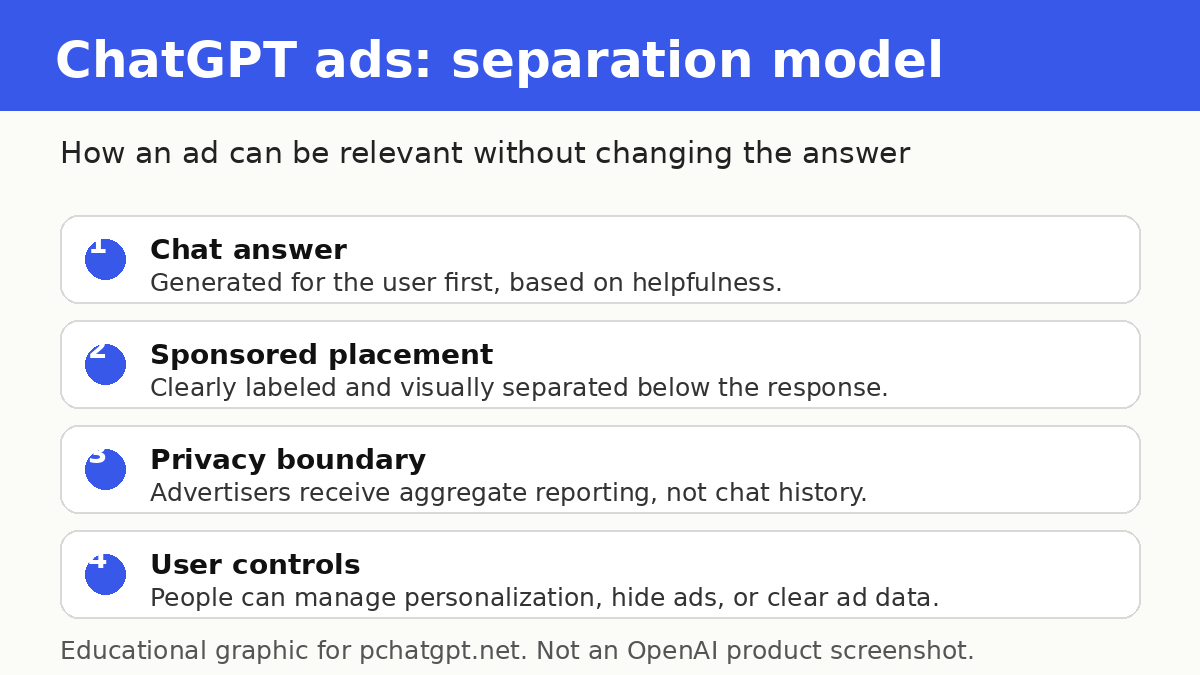
OpenAI states that ads do not influence the answers ChatGPT gives. Its help article goes further: ads run on separate systems from the chat model, and advertisers have no ability to shape, rank, or alter ChatGPT’s responses. The ad can appear below the end of a response when there is a relevant match, but the ad is not supposed to become the answer.
For readers, the practical takeaway is to keep evaluating answers the same way you should evaluate any AI output. Check sources, compare important claims, and do not treat an adjacent sponsored card as a recommendation. For brands, the takeaway is equally direct: optimize the actual usefulness and reliability of your public information. If your page is thin, misleading, unsafe, or confusing, an ad may get a click, but it will not fix the trust problem that users bring to high-intent conversations.
There is still uncertainty. OpenAI can say the model answer is independent, but users will judge the full screen experience. If the ad is too close to the answer, too repetitive, or too weakly labeled, it may still feel influential. That is why OpenAI’s own language about learning from feedback and protecting trust is important. The product experience, not only the policy, will decide whether users accept ads in ChatGPT.
What the privacy guidance says
OpenAI’s current ads FAQ says advertisers do not receive ChatGPT conversations, chat history, memories, names, emails, precise locations, IP addresses, or sensitive information. It says advertisers receive aggregated, non-identifying performance information such as views or clicks. If a user chooses to message an advertiser through an ad, the advertiser sees only the messages the user sends directly. OpenAI also says it never sells user data to advertisers.
The FAQ also explains that ad selection can use the context and intent of the current conversation, the ad landing page, ad copy, advertiser-provided context hints and targeting selections, and, when personalization is enabled, selected signals from the broader ChatGPT experience. That is a meaningful privacy distinction. OpenAI says the signals are used inside ChatGPT to select ads, not handed to advertisers as raw chats. Users who do not want broader personalization can turn off ad personalization, and Free users in eligible regions can choose an ads-free option with lower usage limits. Paid Plus and Pro plans are described as ad-free.
OpenAI’s general privacy policy is also relevant because it describes how OpenAI collects, uses, retains, and controls personal data across its services. The policy includes a note that it may receive information from advertisers and data partners for purposes such as measuring and improving the effectiveness of services and helping show more relevant ads to Free and Go users. Readers should review the policy directly because privacy terms can change over time.
Sources: OpenAI’s Ads in ChatGPT FAQ and Privacy Policy.
Who can see ads and where they may appear
OpenAI says ads may appear for users on Free and Go plans, while Plus, Pro, Business, Enterprise, and Edu accounts will not have ads. It also says it does not show ads to accounts identified as belonging to users under 18, using account-level age information and age prediction where available. The FAQ says ads can appear below the end of a response, are clearly labeled as sponsored, and are visually separated from ChatGPT’s response. It also says ads do not appear in the ChatGPT Atlas browser during the test.
OpenAI says ads are not eligible to appear near sensitive or regulated topics, including personal health, mental health, or politics. It also says some advertisers in sensitive or regulated categories may be eligible if they meet strict criteria, while political advertising is currently not allowed in ChatGPT. This is an area where marketers should be especially careful. If your product sits in finance, health, insurance, legal, employment, housing, or another regulated area, do not assume broad eligibility from a general advertising announcement. Read the current ad policies, expect extra review, and avoid building campaigns around topics that OpenAI says are restricted or sensitive.
What advertisers can do now
OpenAI’s advertiser page is short. It says people use ChatGPT to ask questions, explore ideas, compare options, and plan what to do next, and that OpenAI is exploring advertising as a way for businesses to connect with people in those moments. The official page does not provide public pricing, guaranteed availability, detailed auction mechanics, or a complete self-serve playbook. Brands should therefore treat this as a preparation phase unless they have direct access from OpenAI.
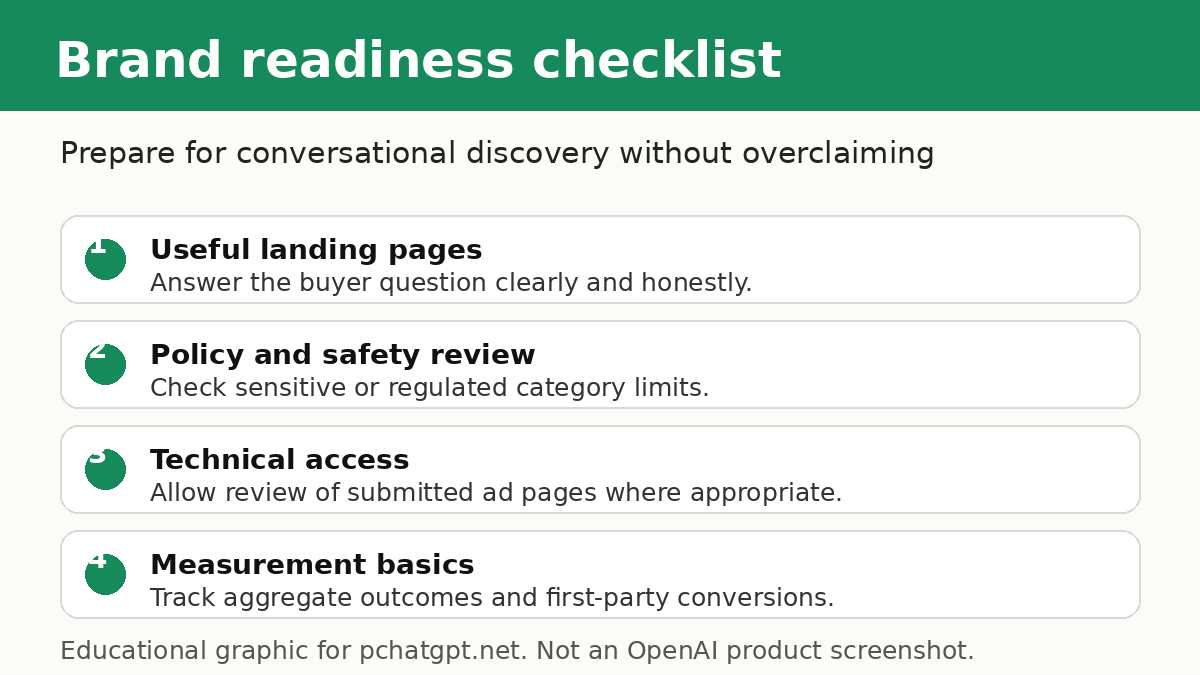
Preparation still matters. A strong ChatGPT ad program will likely depend on landing pages that are clear, safe, and genuinely helpful. Product pages should explain who the product is for, what problem it solves, what limitations apply, what a user should check before buying, and how the company handles privacy and support. Comparison pages should avoid fake objectivity. Guides should answer practical questions rather than stuffing keywords. If users arrive from a chat where they already explained their goal, a vague page will feel like a step backward.
OpenAI’s crawler documentation is also relevant. It describes OAI-AdsBot as a bot used to validate the safety of pages submitted as ads on ChatGPT. The same documentation says OAI-AdsBot may use landing page content to determine when it is most relevant to show the ad to users, and that data collected by OAI-AdsBot is not used to train generative AI foundation models. Site owners should make sure important landing pages are technically accessible, load cleanly, avoid manipulative redirects, and accurately represent the offer.
Source: OpenAI’s crawler documentation.
What this means for SEO and AI search
ChatGPT search already gives users answers with links to relevant web sources. OpenAI says any website or publisher can choose to appear in ChatGPT search by allowing the relevant search crawler, while the crawler documentation separates OAI-SearchBot for search from GPTBot for model training and OAI-AdsBot for ad landing page review. For publishers, this separation matters. Search visibility, training opt-outs, and ad validation are not the same thing.
Organic visibility still depends on being useful enough to cite, link, or visit. Ads may create a paid discovery surface, but they do not replace the need for clear public pages. A practical content strategy should include source-backed explainers, product documentation, comparison pages that disclose criteria, support pages that solve real problems, and editorial updates when official policies change. If you need a broader workflow for using AI tools in research and content planning, see PChatGPT’s ChatGPT how-to guide for research, writing, and automation.
There is also a measurement challenge. Classic SEO tools can report rankings and referral traffic, but conversational discovery may create fewer clean keyword reports. OpenAI says advertisers receive aggregate ad reporting such as views and clicks during the early test. It may explore additional measurement insights over time while protecting privacy. Until official reporting is clearer, brands should connect ad clicks to first-party analytics, landing page quality, conversion paths, and support outcomes without trying to identify individual chats.
Practical checklist for brands
First, separate paid visibility from answer quality. Do not write copy that implies OpenAI recommends your product just because an ad appears. Second, audit landing pages for accuracy, safety, and usefulness. Third, prepare privacy language that ordinary users can understand. Fourth, review regulated-topic restrictions before building campaigns. Fifth, design post-click experiences around the user’s task, not around generic traffic acquisition. Sixth, monitor official OpenAI pages because availability and controls may evolve.
Brands should also train teams not to overclaim. Avoid saying ChatGPT ads are available everywhere unless OpenAI says so for the relevant market. Avoid quoting prices, targeting options, or launch dates that do not come from official documentation. Avoid building dashboards around data that OpenAI has not promised. A better internal message is: ChatGPT ads are a developing channel, official guidance emphasizes trust and privacy, and our job is to be ready with helpful pages if and when access expands.
What users should watch
Users should look for labels, placement, and controls. OpenAI says ads are labeled as sponsored and separated from responses. It says users can dismiss ads, provide feedback, see why an ad appeared, clear ads data, and manage personalization where controls are available. It also says turning off personalization is not the same as going ads-free. Turning off personalization changes how ads are selected, while the ads-free Free option removes ads with reduced access. Paid ad-free plans remain another option.
Users should also remember that ads are not endorsements. If an ad appears under an answer about a product category, open the landing page carefully, compare alternatives, check the advertiser’s policies, and use independent sources for important decisions. That advice is consistent with PChatGPT’s editorial stance: AI tools are useful, but important claims still deserve verification. You can read more about the site’s sourcing approach on About PChatGPT.
What remains uncertain
Several important details are still not fully settled in public official sources. OpenAI has not published a complete public list of all future ad formats, global rollout dates, pricing structures, or long-term measurement products. It says the program will evolve and that it is learning from real-world usage. That uncertainty is not a weakness in the story. It is the story. ChatGPT ads are important because they may reshape discovery, but responsible coverage should not pretend the final shape is already known.
The safest expectation is gradual change. OpenAI will likely keep testing relevance, controls, placement, eligibility, advertiser quality, and user reaction. Regulators, publishers, brands, and users will keep watching how clearly ads are labeled and how privacy commitments are enforced. If the experience remains helpful and clearly separated from answers, it could become a durable new ad surface. If users feel that ads blur the line between advice and sponsorship, trust will be harder to protect.
Bottom line
ChatGPT advertising in 2026 is best understood as an official, expanding test rather than a fully mature replacement for search ads. OpenAI says ads support free access, do not influence answers, keep conversations private from advertisers, and give users controls. It also says businesses can express interest as the program expands. For users, the priority is understanding labels, privacy settings, and the difference between an answer and a sponsored placement. For brands, the priority is preparing helpful, honest, policy-safe pages and avoiding claims that go beyond official sources.
If ChatGPT becomes a major place where people compare options and plan decisions, ads could become valuable. But the brands that benefit most will probably be the ones that treat conversational discovery as a trust problem first and a media-buying problem second.
FAQ
Are ads in ChatGPT available to everyone in 2026?
No. OpenAI describes ads as a test or pilot with phased expansion. Its official pages say ads may appear for Free and Go users in eligible markets, while Plus, Pro, Business, Enterprise, and Edu accounts are ad-free.
Do ChatGPT ads change the answer ChatGPT gives?
OpenAI says no. Its FAQ says ads run on separate systems from the chat model, advertisers cannot shape or rank ChatGPT responses, and ads are labeled as sponsored and separated from the answer.
Do advertisers receive my ChatGPT conversations?
OpenAI says advertisers do not receive chats, chat history, memories, personal details, precise location, IP address, or sensitive information. It says advertisers receive aggregate, non-identifying performance data such as views and clicks.
What should brands do before buying ChatGPT ads?
Brands should follow official availability guidance, prepare accurate and useful landing pages, review OpenAI’s ad and crawler documentation, avoid regulated-topic assumptions, and measure post-click quality without relying on individual chat data.