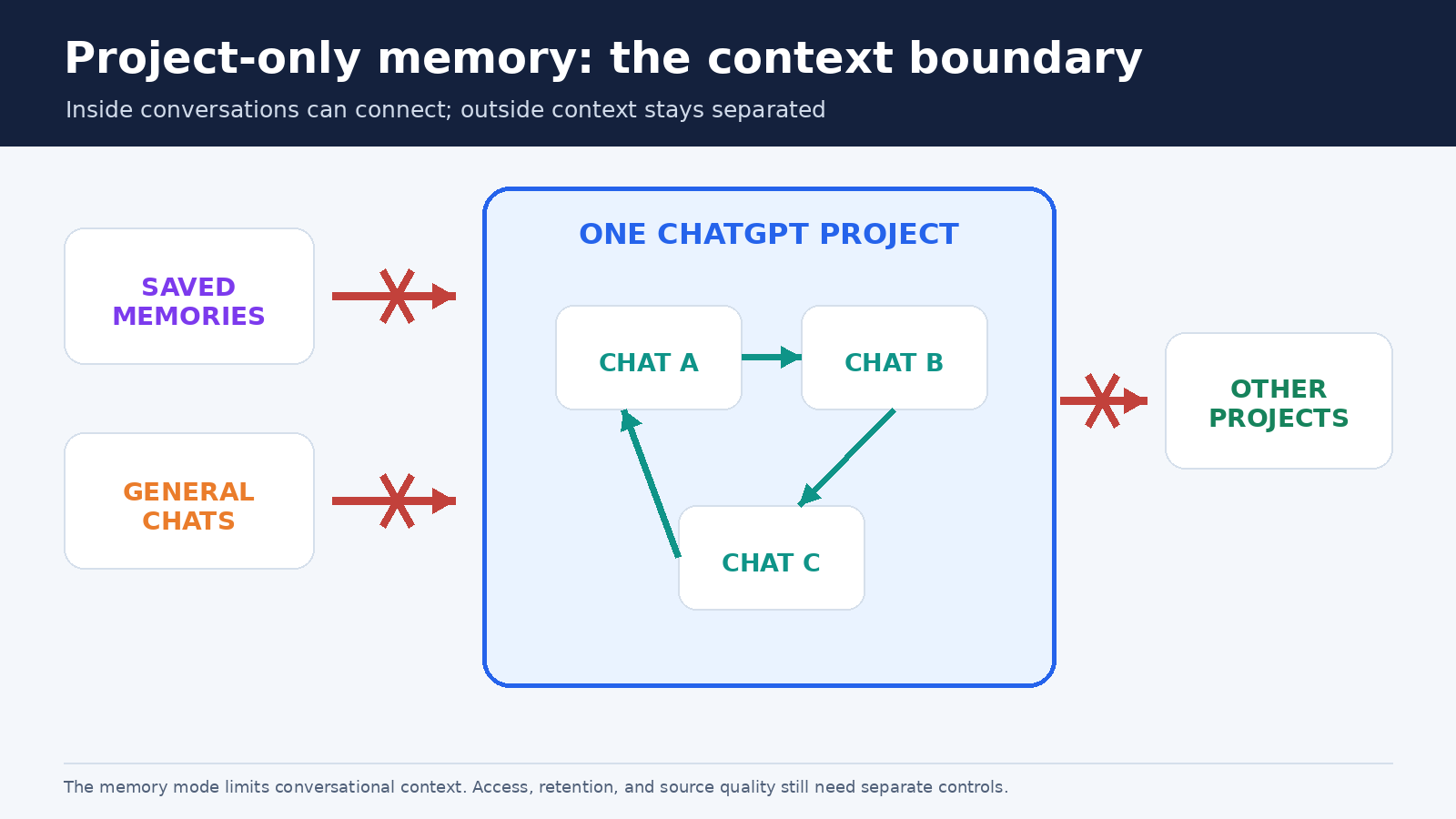
ChatGPT project-only memory gives a Project a clearer context boundary. Conversations inside the Project can use relevant chats from that same Project, while saved memories and conversations outside it stay out. Information from the Project is also kept from shaping chats elsewhere. That makes the setting useful when a client account, research topic, course, or private planning task should not blend with unrelated work.
The important word is context, not storage. Project-only memory does not turn ChatGPT into a perfect database, and it does not make every item in a Project appear in every answer. It defines where ChatGPT may look for conversational context. You still need well-labeled sources, current instructions, careful membership, and fact checking. OpenAI also now lets eligible users change an existing unshared Project between default and project-only memory, so older advice that always required a new Project is no longer current.
What project-only memory separates
A ChatGPT Project can contain several kinds of material: conversations, uploaded or linked sources, saved responses, and Project instructions. Project memory is the mechanism that can bring relevant context from one conversation into another conversation in the same Project. According to OpenAI’s current Projects in ChatGPT documentation, project-only memory applies four practical boundaries:
- Previously saved personal memories are not referenced in Project chats.
- A chat may reference other conversations inside the same Project.
- A chat cannot reference general ChatGPT conversations or conversations in another Project.
- Chats outside the Project cannot reference conversations from inside it.
This is a two-way separation. It reduces both accidental input from outside and accidental influence on future work outside. Imagine that you use ChatGPT for a confidential acquisition review and also for public marketing. In a project-only workspace, a marketing chat should not draw on the acquisition Project’s conversations, and the acquisition work should not inherit your unrelated personal memories.
The boundary does not mean that every output is automatically correct, private from authorized collaborators, or suitable for sensitive data. Anyone who can access a shared Project may be able to see its chats and files according to their role. Workspace retention, access, and data controls still apply. Treat project-only memory as a context-routing control, not as a substitute for organizational security policy.
Project-only memory versus default memory
Default memory is less isolated. It can reference saved memories and can draw on conversations within the Project. For non-Enterprise subscriptions, including Business, OpenAI says Project chats may also reference non-Project conversations when account memory is enabled, unless another Project has a project-only boundary. Conversations outside may likewise reference those default-memory Project chats. Plus and Pro users get priority for Project chats and files when ChatGPT answers inside a Project, but priority is not the same as exclusivity.
Enterprise and Edu behave differently under default memory. Their Project chats remain contained within the Project and cannot reference outside conversations or be referenced from outside. Saved memories can still be available under default memory when required personal and workspace settings permit them. This plan distinction matters. A consumer user and an Enterprise user can both see “Default memory” yet have different conversational boundaries.
Project-only memory is the simpler choice when separation is the goal. It does not reference previously saved memories, regardless of whether those memories would have been convenient. If your usual saved preference says that all reports should use a casual voice, that preference will not enter the project-only space. Put the needed rule in Project instructions instead. Project instructions apply only inside their Project and override global custom instructions there.
Our broader guide to ChatGPT memory and controls explains memory summaries, past-chat sources, deletion, and Temporary Chat. Those account controls solve different problems. General memory personalizes work across conversations. Project-only memory narrows context to one Project. Temporary Chat avoids using or creating personalization memory for a single temporary conversation, but OpenAI says a Temporary Chat cannot be added to a Project.
How to enable or change the setting
For a new Project, choose the memory mode during creation when the option is available. For an existing eligible unshared Project, open the Project, select the three-dot menu, choose Project settings, and select Default memory or Project-only memory under Memory. Save the choice. OpenAI’s August 14, 2026 release note says changes may take a few hours to take effect.
That ability to change an existing Project is new enough to deserve emphasis. Earlier documentation said users had to create a new Project to adopt project-only memory. The current Help Center and release notes now say eligible unshared Projects can switch modes in settings. Shared Projects remain project-only and cannot be switched to default memory. If an older pChatGPT article or screenshot says conversion is impossible, use the current official instructions instead.
Project memory also depends on higher-level settings. OpenAI currently lists these requirements:
- Enterprise: Enable Reference saved memories in personal settings, while Memory must also be enabled in Workspace settings.
- All other subscriptions: Enable Reference saved memories and Reference chat history in personal settings.
If the control is missing in Business or Enterprise, a workspace setting may be the reason. OpenAI’s FAQ says project-only memory is available there only when workspace Memory and personal memory are enabled. Product labels and availability can change, so check the live official Projects page if your screen differs.
When you switch to project-only memory, OpenAI says information from the Project is removed from memory used outside it. The chats and files remain inside the Project and can continue to provide context there. Switching back to default restores the behavior appropriate to your plan and account or workspace settings. Do not expect an instant visible change because the documentation allows several hours for the update.
Build a clean Project before relying on the boundary
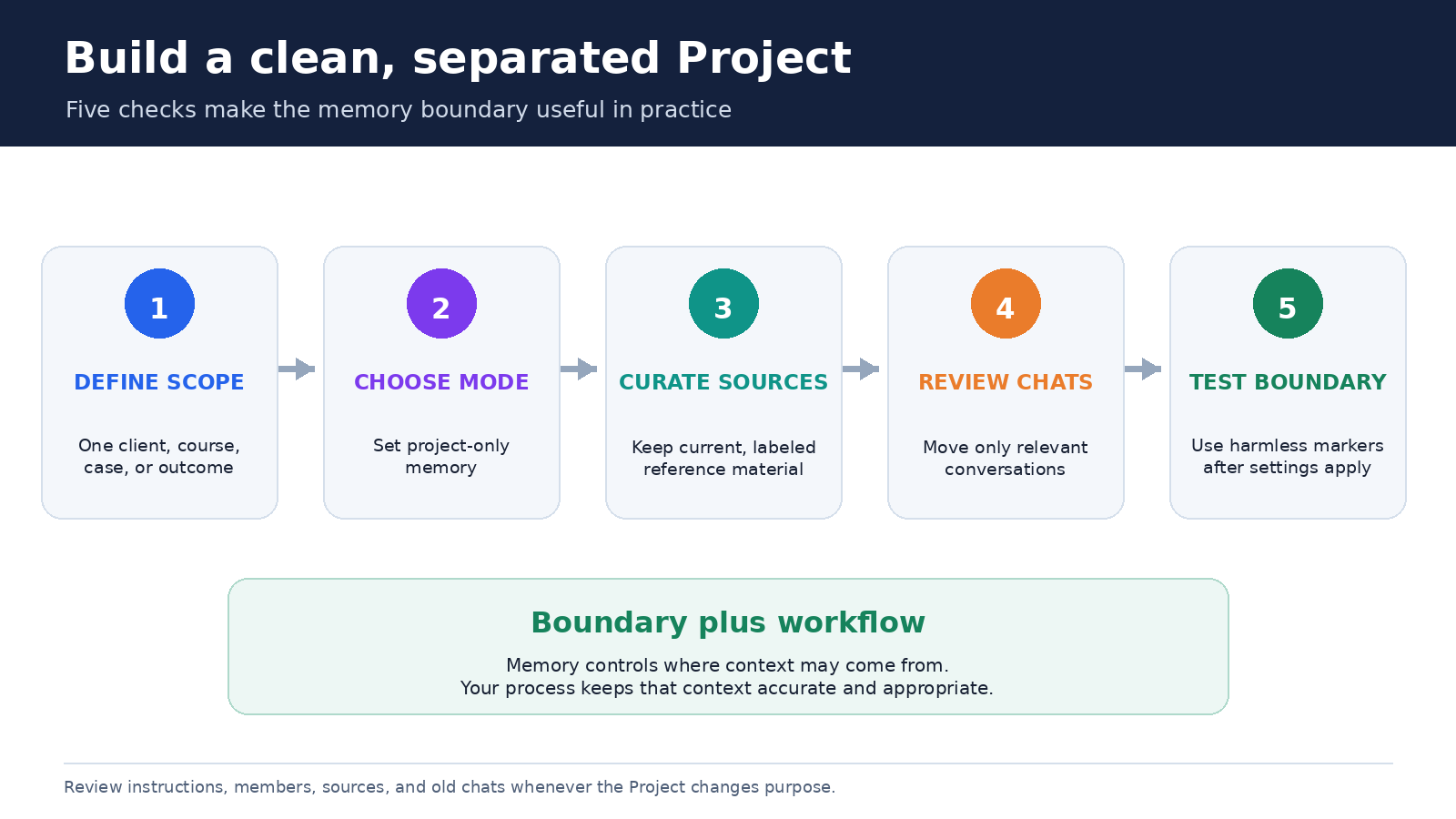
A context boundary works best when the material inside it belongs together. Start with one outcome, such as “2027 supplier selection,” rather than a broad container such as “All operations.” Separate clients, legal matters, courses, or product lines when their assumptions should never mix. A Project can hold multiple chats without becoming a catch-all folder.
Write Project instructions for durable rules: audience, tone, source hierarchy, output format, and how uncertainty should be handled. For example: “Use the approved policy file as the controlling source. Separate quotations from interpretation. If two files conflict, identify both versions and ask which governs.” Keep the immediate assignment in the current prompt. This distinction makes instructions reusable and chat prompts specific.
Add authoritative source material, not every related file you possess. Use dates and version labels in filenames. Remove or clearly retire superseded drafts. The pChatGPT guide to organizing Project sources offers a fuller source workflow. Memory can help continue a discussion, but a controlling price, deadline, clause, or citation belongs in a source that a reviewer can inspect.
Move old chats selectively. OpenAI says an eligible existing chat can be dragged into a Project or moved through its menu, after which it inherits Project instructions and file context. A moved conversation still contains its earlier assumptions. Read it first, then add a transition message naming the current governing source and any assumptions that must be discarded. Chats created with a GPT cannot currently be moved into a Project.
A practical boundary test
Do not test by asking ChatGPT to reveal private text from elsewhere. Use harmless marker phrases. Before changing the setting, place a fictional preference such as “use the code phrase amber lighthouse in test summaries” in a disposable outside chat or saved memory. Put a different marker, such as “blue orchard,” in a disposable conversation inside the Project. After the documented waiting period, start fresh chats inside and outside the Project and ask each to state the test marker it can use.
- Confirm the Project is set to project-only memory and that required account or workspace memory controls are enabled.
- Create one harmless marker outside the Project and a different harmless marker inside it.
- Wait for the setting change to take effect, since OpenAI says this can take a few hours.
- Ask a new Project chat what relevant test preference it can recall. It should not rely on the outside marker.
- Ask a new general chat the same question. It should not rely on the Project marker.
- Delete the disposable test chats and markers when the review is complete.
This is a functional check, not a formal security audit. Memory is selective, so failure to mention a marker does not prove that no context could ever be referenced. The stronger evidence is the configured mode plus the product’s documented boundary. The test simply helps catch obvious setup mistakes, delayed changes, or work placed in the wrong Project.
How to remove unwanted context
There is no separate list of “Project memories” comparable to a personal memory list. OpenAI says that if you want a Project to ignore a specific conversation, you need to delete that conversation or move it to another Project. Removing a file handles that file, but it does not erase statements repeated in chats. Review all places where the unwanted detail appears.
General memory controls are also separate. OpenAI’s Memory FAQ says fully deleting something ChatGPT may know about you can require deleting every source where it appears, including past and archived chats, files, the memory summary, and connected apps containing the information. Turning memory off does not delete past chats. Deleting a chat may not remove a separately stored legacy saved memory.
Deleting an entire Project permanently removes its files, chats, and instructions and cannot be undone. In a shared Project, collaborators lose access too. Export or retain required records through an approved process before deletion, and confirm that retention obligations permit removal.
Sharing changes the audience, not just the memory mode
Shared Projects automatically use project-only memory. They do not gain access to a member’s outside context, custom instructions, or memories. That is a useful default, but joining members can see the material shared within the Project according to access. OpenAI distinguishes chat access, which allows viewing and interaction, from edit access, which also allows instruction and file changes plus invitations.
Before sharing, review the full Project rather than only the chat you intend to discuss. Remove abandoned drafts, personal notes, and unrelated uploads. Check Project instructions for internal comments that collaborators should not see. Review membership regularly, especially when contractors or temporary teams finish their work. A project-only boundary protects against outside memory crossing into the Project, but it does not hide Project content from authorized members.
Training controls remain another separate layer. OpenAI says shared Project data is used for training only if every contributor and the owner has “Improve the model for everyone” enabled. Business, Enterprise, and Edu data controls and retention policies may differ. Use the applicable workspace policy rather than inferring training treatment from the memory label.
Frequently asked questions
Can I change an existing Project to project-only memory?
Yes, for an eligible unshared Project. Open Project settings, choose Project-only memory under Memory, and save. OpenAI announced this change on August 14, 2026 and says it may take a few hours to apply. Shared Projects remain project-only and cannot switch to default.
Does project-only memory prevent ChatGPT from using saved memories?
Yes inside that Project. Previously saved personal memories are not referenced. Put any necessary response rules in Project instructions, which apply within the Project. The required personal or workspace memory switches still need to be enabled for Project memory to function.
Can I inspect a list of everything remembered inside a Project?
No. OpenAI does not provide a separate list of Project memories. Project chats may use relevant context from other chats in the same Project. To stop a particular conversation from influencing the Project, delete it or move it elsewhere.
Is project-only memory the same as Temporary Chat?
No. Project-only memory allows conversations in one Project to reference other conversations there while separating outside context. Temporary Chat does not use or create personalization memories and cannot be added to a Project. Choose based on whether you need continuing context within a bounded workspace or a one-off conversation.
The takeaway
Project-only memory is the clearest ChatGPT setting for ongoing work that should have its own conversational context. It blocks outside saved memories and chats from entering, blocks Project conversations from influencing chats elsewhere, and still allows continuity among conversations inside the Project. As of August 2026, eligible unshared Projects can change modes without being rebuilt, while shared Projects stay project-only.
Use that boundary with clean sources, focused instructions, selective chat moves, membership review, and independent verification of important facts. The setting controls where context may come from. Your workflow determines whether that context is current, understandable, and appropriate for the people who can access it.