
ChatGPT can make a study session more active, but only if the student keeps doing the thinking. Asking for a finished essay or a page of answers may clear a deadline while leaving the underlying skill untouched. A better use is to make ChatGPT question you, expose a gap, offer a small hint, and give you another chance. That turns the conversation into practice rather than answer collection.
This guide gives you a repeatable workflow for learning a concept, solving problems, reviewing notes, preparing for an exam, and improving your own writing. It uses current OpenAI guidance about Study mode, uploaded course materials, data controls, and the limits of generated answers. Your teacher, syllabus, rubric, textbook, and school policy remain the authorities for your course.
Decide what success looks like before you open ChatGPT
Start with an outcome you could demonstrate without the chat window. Instead of writing “help me with chemistry,” define the finish line: “I need to explain why equilibrium shifts, predict the direction in five examples, and justify each prediction.” A precise goal tells ChatGPT what to teach, and it gives you a fair way to judge whether the session worked.
Add four pieces of context: your level, the exact topic, what you already understand, and the kind of assessment ahead. OpenAI’s current Study mode help page recommends this sort of information, along with any relevant deadline and course material. You do not need to compose a perfect prompt. A candid description of where you are stuck is more valuable than impressive vocabulary.
Starter prompt: “I am a first year student reviewing cellular respiration for a short answer test. I understand glycolysis but confuse the later stages. Ask one diagnostic question at a time. Give me a hint before an explanation, and finish with three new transfer questions.”
That prompt protects the productive struggle. If you want a different pace, say so. Ask for a simpler analogy, a more technical explanation, or a pause after every step. Study mode is meant to adapt through questions and layered explanations, but the student still has to steer when the level feels wrong.
Turn on Study mode and give it a narrow job
OpenAI describes Study mode as a learning experience that can guide thinking, explain ideas step by step, check understanding, and work with uploaded materials. In a regular ChatGPT conversation, you can select Study from the available tools. The current help page also points to chatgpt.com/studymode. Menu layouts can differ by device or app version, so use the official instructions if the button is not where you expect it.
Do not assume the mode makes every answer correct. OpenAI explicitly says Study mode can make mistakes and may sometimes give a direct answer. It also says the tool does not replace a teacher, tutor, course material, or academic requirements. If the conversation starts solving too much for you, interrupt it: “Do not reveal the next step. Ask what principle I would use and wait for my attempt.”
Study mode is most useful when one chat has one purpose. A conversation that jumps from calculus to a history essay to internship applications accumulates irrelevant context. Start a fresh study chat for a new course unit. Name the source boundaries clearly, especially when your instructor uses a particular notation, method, translation, or set of definitions.
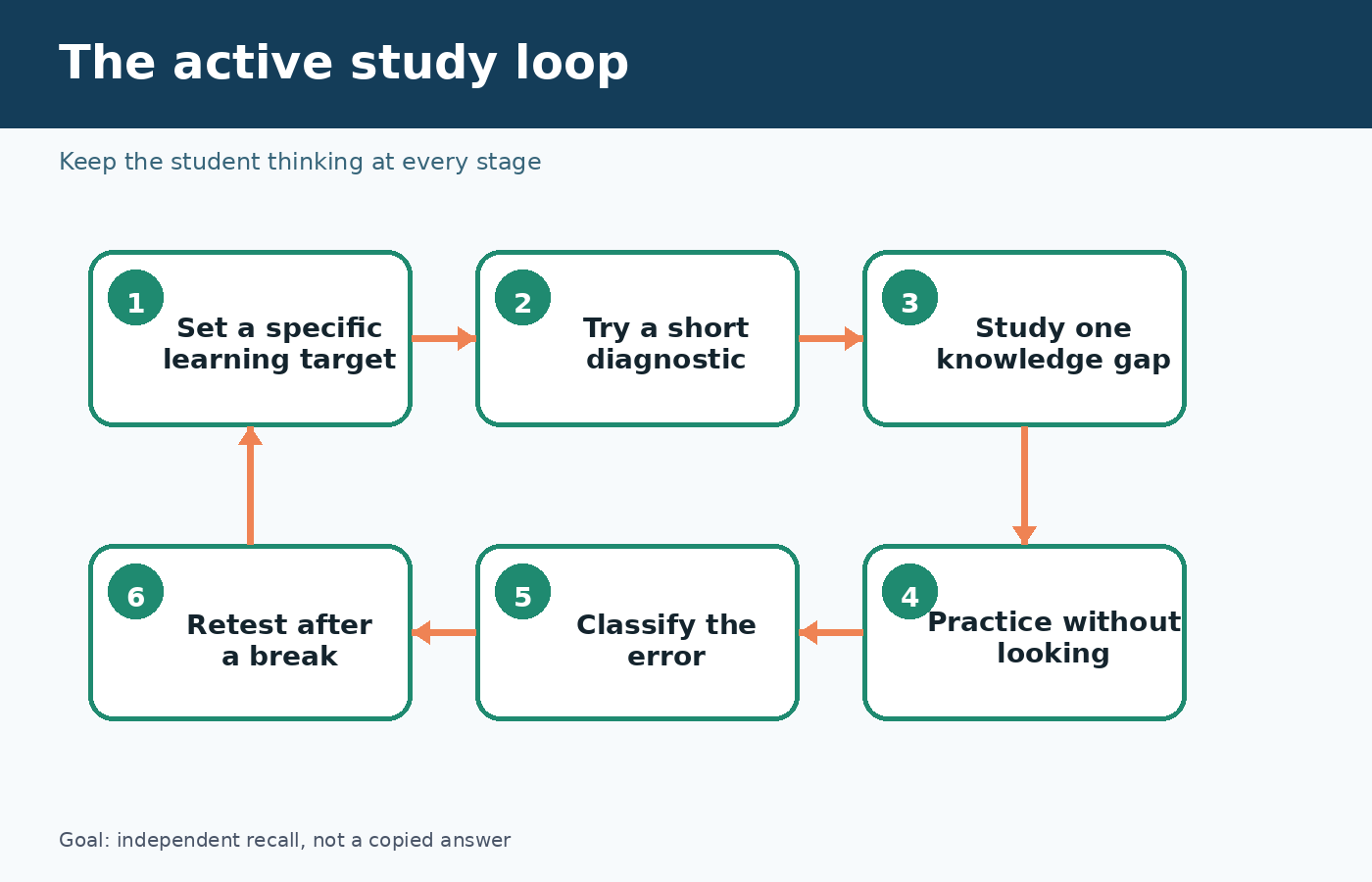
Use a six stage study loop
A good session moves between memory, feedback, and another attempt. The following loop works for many subjects because it does not depend on ChatGPT delivering a long lecture.
- Set the target. State what you must be able to explain or do, the difficulty level, and the time available.
- Take a diagnostic. Answer two or three questions before requesting teaching. This reveals the real gap and prevents you from rereading material you already know.
- Study one gap. Ask for a short explanation tied to your notes, then restate the idea in your own words.
- Practice from memory. Close or hide the explanation and solve a fresh question. Ask for a hint only after you have made a genuine attempt.
- Analyze the error. Label whether you missed a fact, chose the wrong method, made a calculation error, or misunderstood the question.
- Retest later. Save two or three questions and return after a break. Recognition during the chat is not the same as recall later.
The error label is the part students often skip. “Wrong” is not a useful diagnosis. If you knew the concept but dropped a negative sign, you need a checking routine. If you could not choose a formula, you need mixed practice that forces method selection. If the wording fooled you, you need to paraphrase questions before solving them. Ask ChatGPT to maintain a small error log, but verify that its diagnosis matches your actual work.
Study your notes without surrendering source control
When uploads are available in your chat, OpenAI says Study mode can reference notes, slides, readings, a syllabus, a worksheet, a textbook excerpt, or an image of a problem. Upload the smallest relevant section rather than a whole folder. Then identify the page, heading, or question you want it to use. If the file is a scan, ask ChatGPT to summarize what it can actually read before you rely on the explanation.
Use a source boundary such as: “For course facts, use only pages 12 through 18 of the PDF. If the pages do not answer something, say that it is not in the supplied material.” This does not guarantee perfect grounding, but it makes mistakes easier to notice. Keep the document open beside the chat and check definitions, quotations, equations, names, and dates yourself.
For outside research, ask for search terms and a map of relevant primary sources, not a fabricated bibliography. OpenAI’s Student’s Guide to Writing with ChatGPT says ChatGPT can help students get oriented and find a research direction, while warning that it is not a substitute for reading primary sources and peer reviewed work. The same guide says citation details should be checked against the originals.
A simple evidence table can keep the work honest. Make columns for claim, course source, page number, your explanation, and unresolved question. Let ChatGPT help you spot empty cells. Do not let it fill missing evidence with a confident guess. If a source cannot be opened and checked, it should not quietly become support for your paper.
Learn problem solving by controlling when hints appear
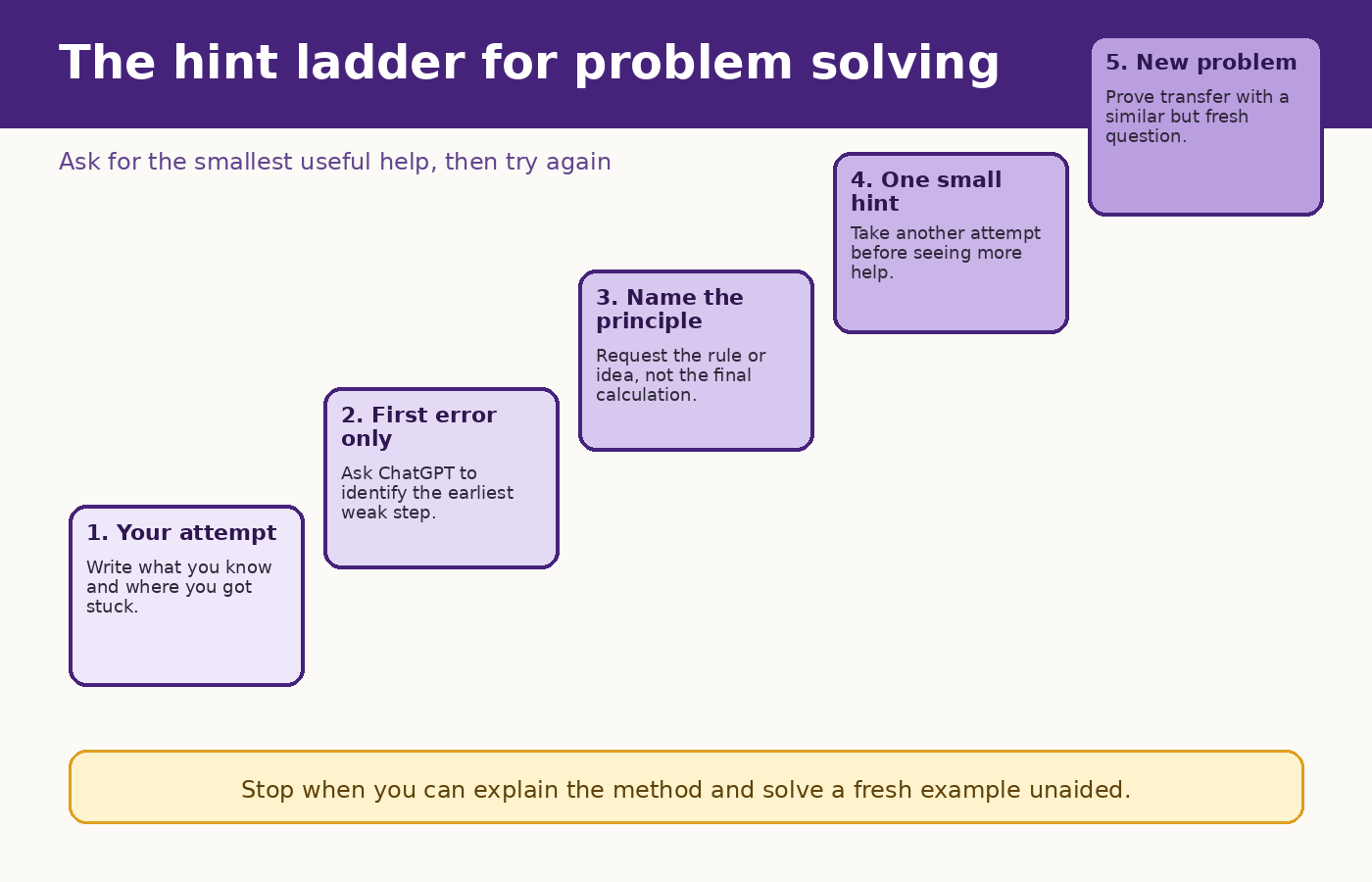
In mathematics, physics, chemistry, economics, and programming, the timing of help matters. Paste your attempt, including the point where you became uncertain. Ask ChatGPT to identify the first questionable step without continuing the solution. Correct that step yourself, then ask whether the new reasoning holds. This preserves more of the work than requesting a full walkthrough at the start.
Problem solving prompt: “Here is the question and my attempt. Check only the first place my reasoning fails. Name the relevant principle, give one small hint, and wait. Do not calculate the final answer unless I ask after a second attempt.”
After solving, change the surface details. Ask for a similar problem with different numbers, then a problem that looks similar but requires another method. Finally, explain why the methods differ. This transfer step is where you discover whether you learned a procedure or understood when it applies.
For code, submit the error message, the smallest relevant snippet, expected behavior, and what you tried. Ask for a debugging question before a corrected program. Run the code yourself and explain the fix in plain language. If you cannot explain why the change works, the code is not yet reliable study evidence.
Prepare for an exam with retrieval, not endless summaries
Summaries feel productive because they are smooth to read. Exams usually demand retrieval, discrimination, and application. Give ChatGPT your learning objectives and ask it to build a balanced practice set, but compare that set with the instructor’s stated scope. Generated questions can overemphasize whatever is easiest for the model to phrase.
Begin closed book. Answer one question at a time and include your confidence as high, medium, or low. Then request feedback that separates correctness from confidence. A confident wrong answer signals a misconception. A correct answer with low confidence needs another retrieval attempt. A correct, well explained answer with high confidence can receive less review time.
Use mixed questions rather than studying one chapter until every item looks familiar. Ask for two definition questions, two application questions, one comparison, and one question that combines units. For quantitative work, include a few problems where the challenge is selecting the method. For humanities, include passages or claims that require evidence, qualification, and a counterargument.
End with a one page plan you write yourself. It should list weak concepts, the course pages to revisit, practice tasks, and the next review time. ChatGPT can critique whether the plan is specific, but your calendar and energy determine whether it is realistic.
Use ChatGPT for writing feedback without outsourcing the paper
Write the claim, outline, and first paragraph before asking for help. Then request a diagnosis instead of a rewrite: “Identify where the reasoning jumps, where evidence is missing, and which paragraph has two main ideas. Quote only the relevant sentence and explain the problem.” That response leaves the revision in your hands.
Reverse outlining is especially useful. Ask ChatGPT to state the job of each paragraph in a few words, then compare that map with your intended argument. Reorder or rewrite the draft yourself. You can also ask for a skeptical counterargument, a list of unsupported assumptions, or questions a reader may still have.
OpenAI’s student writing guide recommends iterative feedback and transparency about how ChatGPT contributed. Your course may have different disclosure or citation rules, so check the syllabus and ask the instructor when the boundary is unclear. Never treat a share link or AI citation format as automatic permission. The instructor’s policy controls the assignment.
For a broader writing process, see PChatGPT’s practical prompt chaining guide. If your concern is acceptable assistance versus replacing your own work, read how to use ChatGPT for writing without cheating. Those guides complement this student workflow, but your school rules still come first.
Protect private student information
Do not paste student IDs, grades linked to names, private feedback about classmates, login details, unpublished research data, health information, or confidential placement records into a casual study chat. Redact names and identifying details from worksheets or screenshots. If your institution provides an approved account or workspace, follow its rules rather than assuming a personal account is equivalent.
OpenAI’s Data Controls FAQ explains that signed in users can turn off “Improve the model for everyone” in Settings under Data Controls. It says conversations can remain in history while not being used to improve ChatGPT. The same page describes Temporary Chats, but the current Study mode help page says Study is not available in Temporary Chats, GPTs, or Projects. Do not promise yourself both features in the same session without checking the current product behavior.
Memory can personalize Study mode when it is available and enabled. That convenience is optional. Review Settings under Personalization and decide whether remembered learning preferences are useful. OpenAI says Study mode still works with Memory off, though responses may be less personalized. A privacy choice should be deliberate, not something you discover after uploading a semester of notes.
A realistic 45 minute session
- Minutes 0 to 5: write the target, gather the approved pages, and state what you already know.
- Minutes 5 to 12: answer a short diagnostic without notes.
- Minutes 12 to 22: review the largest gap through questions, a short explanation, and your own restatement.
- Minutes 22 to 35: solve new questions without looking at the explanation. Request staged hints only when needed.
- Minutes 35 to 41: classify errors and revisit the exact course source.
- Minutes 41 to 45: write a three sentence summary from memory and schedule the next retrieval round.
If the session runs long, cut the number of topics, not the final retrieval. A small unit recalled independently is more useful than a large unit that only feels familiar while the explanation remains on screen. Save the error log and final questions so the next session begins with evidence, not another broad request to review everything.
Prompts you can adapt by subject
For a difficult reading
“Ask me to summarize the author’s main claim first. Then point to one tension in my summary and ask which passage supports my interpretation. Do not supply quotations. I will find and paste the passage.”
For a science concept
“Start with a prediction question about this process. After I answer, ask me to explain the mechanism. If I confuse cause and correlation, identify the distinction but let me revise before you explain.”
For language practice
“Have a short conversation at my level. Correct only errors that block meaning during the exchange. At the end, show three recurring patterns and ask me to produce a new sentence for each.”
For an essay draft
“Create a reverse outline of my draft. For each paragraph, state its main function and identify any claim that lacks evidence. Do not rewrite the prose. Finish with the two revision decisions that would most improve the argument.”
What to verify every time
- Check the response against the syllabus, assigned reading, worked examples, or instructor guidance.
- Open every suggested source and confirm that it exists, says what the chat claims, and fits the required citation style.
- Recalculate important numbers and inspect units, signs, definitions, and assumptions.
- Keep your own notes and drafts so the development of your thinking is visible.
- Follow the current AI policy for the exact assignment, even if another course allows broader use.
- Treat fluent wording as presentation, not proof.
The official Using study mode in ChatGPT page is the best place to check current availability, setup, uploads, limitations, and troubleshooting. OpenAI’s Study mode introduction explains the design goal: guiding questions, scaffolded responses, knowledge checks, and active participation rather than simply handing over an answer.
FAQ
Is ChatGPT reliable enough to be my only study source?
No. OpenAI says Study mode can make mistakes and does not replace teachers, tutors, course material, or academic requirements. Use it to practice and explain, then verify important points against approved sources.
Can Study mode quiz me on uploaded notes?
Yes, when uploads are available in your chat. Tell it which page, section, or question to use. If it misreads a scan or image, upload a clearer copy, paste the key text, and check its summary before continuing.
How can I stop ChatGPT from giving the answer too soon?
Ask for one question at a time, request a hint before any explanation, and tell it to wait after each step. If it still reveals too much, paste your attempt and ask it to identify only the first error.
Is using ChatGPT for schoolwork considered cheating?
That depends on the rules for your school, course, and assignment. Use ChatGPT only within those rules, disclose assistance when required, and ask the instructor when the policy is unclear. A useful study workflow does not override an academic integrity policy.