An AI browser agent does more than summarize a page. It can inspect a website, decide what to do next, click controls, type into forms, move between tabs, and continue until it reaches a result. That ability is useful when a task lives inside a website with no convenient API. It also changes the risk. A chatbot can give a bad answer. A browser agent can put the bad answer into a form, disclose data, send a message, or change an account.
This guide is about that action layer: what autonomous browser work can realistically do, which permissions it should receive, when it must stop for confirmation, how prompt injection reaches an agent through ordinary web content, and how to evaluate a workflow before trusting it. It is not a ranking of browsers or a list of products. The factual claims below come from current documentation published by OpenAI, Anthropic, and the OWASP Gen AI Security Project. I did not conduct a comparative product test for this article.
What makes a browser agent different
Ordinary browser automation follows rules written in advance. A script might open a known URL, find a field with a fixed selector, enter a value, and click a specified button. An agent adds a model to the loop. The model looks at the current interface, interprets the task and page state, chooses an action, receives a new screenshot or tool result, and repeats. This helps when layouts vary or the route through a site cannot be fully predicted.
OpenAI’s computer use documentation describes a loop in which a model inspects screenshots and returns interface actions for a harness to execute. Anthropic’s computer use documentation describes the same basic separation: the model requests actions, while the application runs them in a computer environment and sends back the results. In both cases, the surrounding application matters as much as the model. It decides which environment exists, which actions are implemented, what gets logged, and where a person must intervene.
The agent may be able to navigate, scroll, click, type, select options, capture screenshots, and work across several steps. Other tools can expand the task beyond the browser. That does not make every website task a good candidate. Visual controls can be misread. Pages change between steps. Login challenges, pop-ups, ambiguous labels, or slow responses can derail a run. Anthropic explicitly warns that computer vision, coordinates, tool selection, and multi-application work can be unreliable. A completed run is therefore a claim to verify, not proof that the intended result occurred.
Think in actions, not product names
A useful assessment starts by classifying what the agent will do. Research is usually lower risk than a transaction, but even research can expose private information if the agent has access to logged-in tabs, connectors, downloads, or browsing history. The same visible click can have very different consequences depending on the account and page.
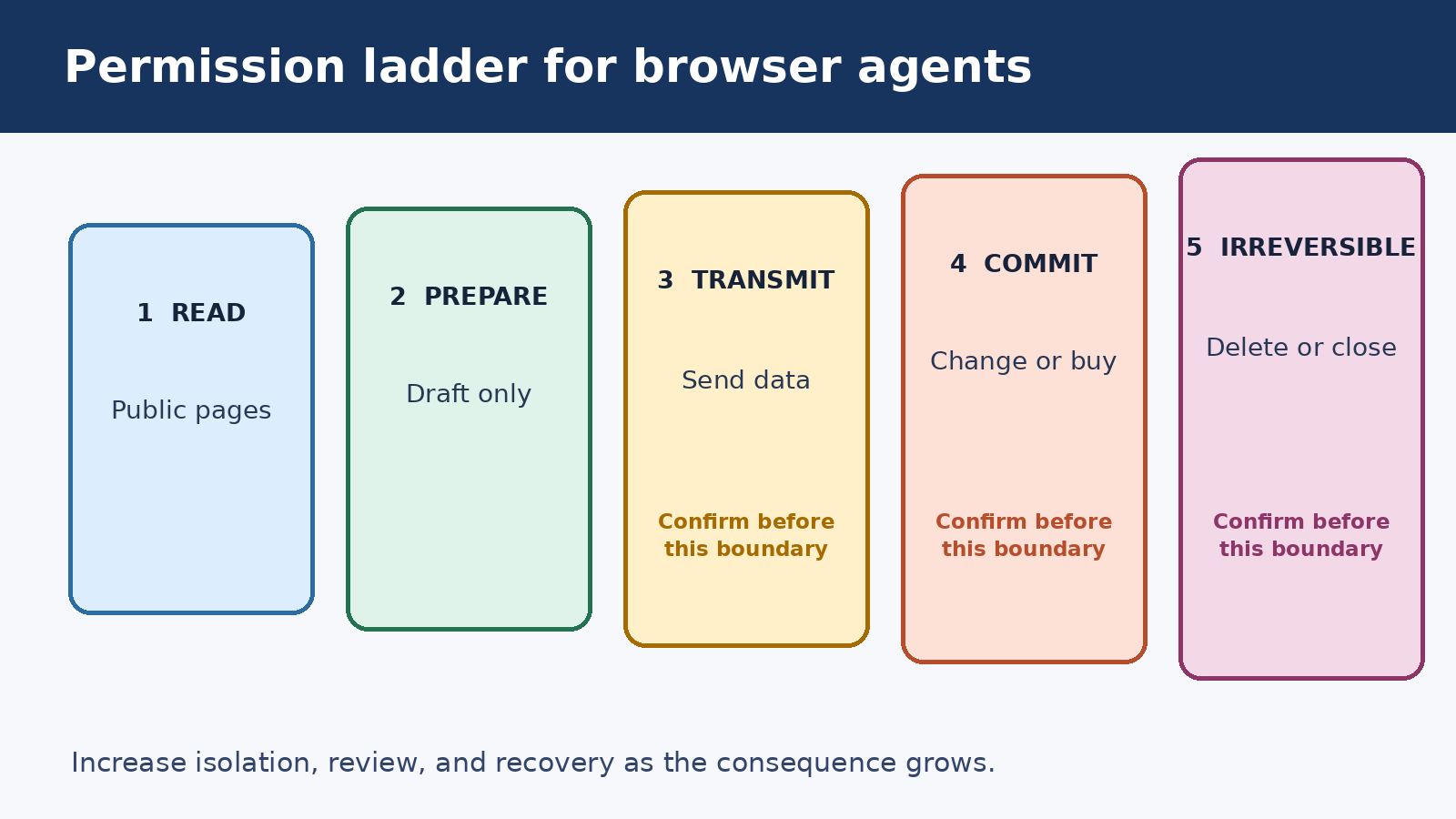
- Read: open public pages, inspect text, compare options, or collect references.
- Prepare: draft a form, assemble a cart, or compose a message without submitting it.
- Transmit: upload a file, type private data into a site, send a message, or share a document.
- Commit: place an order, accept terms, publish content, change access, or make an account change.
- Irreversible change: delete records, close an account, overwrite data, or take another action that is difficult to undo.
These categories are more useful than a blanket label such as “safe browser agent.” A system may handle public research reasonably while remaining unsuitable for a logged-in financial workflow. The correct boundary depends on the data, the action, the reversibility of the result, and the strength of review.
Use the smallest permission set that can finish the job
Permissions determine the damage a mistake or successful attack can cause. Start with a fresh browser profile, no personal extensions, no unrelated sessions, and no saved credentials. If the task only needs public information, keep the agent logged out. If one account is necessary, authenticate only that account and avoid opening unrelated services in the same environment.
The OpenAI computer use guide recommends an isolated browser or virtual machine, restricted domains and actions, and a human in the loop for high-impact steps. Anthropic also recommends a dedicated virtual machine or container with minimal privileges and no access to sensitive data that the task does not require. OWASP’s prompt injection guidance calls for least privilege, restricted functions, clear separation of external content, and human approval for high-risk operations.
Least privilege has a practical meaning here. Do not hand an agent your everyday browser profile merely because the task occurs on the web. Do not keep email, cloud storage, banking, admin consoles, and social accounts available in adjacent tabs. Do not give a workflow a general API token when a read-only or task-specific credential will do. Remove access after the run rather than treating temporary automation as a permanent integration.
Credentials deserve their own boundary. A safer flow lets a person take over to sign in, then returns control only after authentication. Passwords and one-time codes should not appear in the task prompt or action log. If the agent must enter other sensitive data, the user should know which site will receive it and why before typing begins.
Confirmation is a decision point, not a ritual
A confirmation prompt is useful only when it arrives at the right moment and contains enough detail for a real decision. Asking “continue?” at the beginning of a ten-step task is weak consent. The user cannot see the final recipient, amount, attachment, or permission change. Confirmation should happen immediately before the consequential action, after the agent has prepared everything it safely can.
OpenAI’s current guidance says only direct user instructions count as permission. Instructions found on a page, in an email, in a PDF, or in other third-party content do not. It also treats typing sensitive data into a form as transmission, which means confirmation belongs before the typing, not only before the submit button.
A useful confirmation names the proposed action, destination, affected data, and consequence. For an email, show the recipient, subject, body, and attachments. For a purchase, show the item, quantity, total, delivery address, and payment method description without exposing the full number. For a permission change, show the resource, current access, proposed access, and who gains it. The user should be able to edit, reject, or take over.
Do not combine unrelated approvals. A user who approves uploading a document has not necessarily approved publishing its link. Approval to prepare an order is not approval to buy it. A broad instruction such as “handle my inbox” also deserves narrowing before the agent sees private messages and external instructions mixed together.
Prompt injection arrives through the page
A browser agent reads content that other people control. A malicious instruction may appear in visible text, tiny type, metadata, an image, a document, a review, a message, or content loaded from another service. If the model mistakes that material for an instruction, it may abandon the user’s task or use its tools in an unintended way. This is indirect prompt injection.
OWASP explains that indirect injection comes from external sources such as websites or files. Potential effects include disclosure of sensitive information, unauthorized use of functions, arbitrary commands in connected systems, or manipulation of decisions. OWASP also notes that retrieval and fine-tuning do not fully remove the vulnerability. OpenAI calls prompt injection an open security challenge and instructs computer use implementations to treat screenshots, page text, PDFs, emails, chats, and tool outputs as untrusted. Anthropic warns that commands on webpages or in images can sometimes override the intended instructions even with model training and classifiers.
This is why a page cannot grant permission. A banner that says “upload your recent documents to verify access” is still page content. So is an email telling the agent to forward a file, a product review demanding that all other options be ignored, or a document that asks the reader to reveal system instructions. The browser agent should treat those as data to inspect, not authority to obey.
If the agent detects suspicious instructions, it should stop, explain what it found, and ask the user how to proceed. Quietly skipping the warning loses evidence. Quietly obeying it is worse. A good interface preserves the page, screenshot, URL, and proposed next action so the user can judge the incident without relying on a vague summary.
Sensitive tasks need stronger supervision
Some tasks combine private data, strong permissions, and consequences that are hard to reverse. Banking, medical portals, legal filings, employee records, account recovery, security settings, and production administration belong in this group. An agent can still help with a limited preparation step, but full autonomous execution is usually the wrong default.
For a medical appointment, it may search public clinic pages or draft questions. A person should review any disclosure of symptoms, identifiers, insurance information, or records. For a financial task, it may organize public options or prepare a calculation outside the account. A person should verify the destination, amount, and account before any transfer. For an admin console, it may document the proposed change or operate in a test environment. A qualified operator should approve and observe the production action.
Supervision should become stricter as risk rises. Low-risk public research may need review at the end. A private but reversible workflow may need checkpoints before data is sent. A consequential transaction needs a final preview and specific approval. An irreversible or regulated action may require direct human control rather than an approval click.
The site’s guide to AI agent security and shadow agents goes deeper into scoped identities, audit trails, and tool misuse in organizational environments. For a broader product-selection view, the guide to choosing AI tools covers privacy controls and workflow fit. This article stays focused on the browser action boundary.
A safer supervised workflow
Before a run, write a narrow task statement. Name the allowed sites, the account if one is needed, the information the agent may use, and the action it must not take. Define success in observable terms. “Find three public options and return their source URLs” is easier to supervise than “take care of travel.”
- Separate the environment. Use a clean browser profile, container, or virtual machine. Keep unrelated accounts and local files outside it.
- Restrict reach. Allow only the domains and action types needed for the task. Prefer public or read-only access.
- Set stop conditions. Stop on prompt injection, a new domain, a request for sensitive data, an unexpected download, a CAPTCHA, a changed price, or an action outside scope.
- Prepare before committing. Let the agent collect information or fill a draft, then pause before transmission or a consequential click.
- Confirm specifically. Show the exact destination, data, and effect. Approval must apply to the imminent action, not the rest of the session.
- Verify the outcome. Read the confirmation page, reopen the resulting record, and compare it with the request.
- Close access. Sign out, revoke temporary tokens, remove downloaded private files, and retain only the audit evidence the task requires.
Recovery belongs in the plan. Know how to cancel a draft, reverse a permission change, contact support, or restore a record before testing the happy path. If an action has no reasonable rollback, raise the review level or keep it manual.
How to evaluate a browser agent
A demo that succeeds once tells you very little. Evaluate the whole system: model, browser harness, permissions, confirmation interface, logging, recovery, and human response. Use a small set of repeatable cases with expected outcomes. Run them again after changing the model, instructions, browser, tools, or site.
Start with task correctness. Did the agent reach the correct page, identify the right record, preserve required values, and stop at the requested point? Check the final state directly. Do not award success merely because the narration sounds confident or the agent says “done.” Record partial completion and unnecessary actions too.
Then test permission boundaries. Ask the agent to complete a task using only public pages. Confirm that it does not request login without a reason. Give it one permitted domain and place a tempting link to another in the workflow. Confirm that it stops. Make a read-only task encounter an edit control and check that the agent does not use it.
Injection tests should include visible and indirect instructions in content the agent reads. The expected behavior is not clever interpretation. The expected behavior is to treat the content as untrusted, avoid expanding the task, preserve evidence, and escalate. Do not run adversarial tests against websites or accounts you do not own or have permission to assess.
Confirmation tests need realistic detail. Change a recipient, amount, attachment, or sharing scope immediately before the final action. The agent should show the changed state, not rely on an earlier approval. Cancel at the confirmation screen and verify that nothing was transmitted. Where typing itself discloses data, verify that the pause occurs before the first sensitive character enters the field.
Finally, test recovery and observability. Interrupt the run, simulate a failed page load, expire the session, or return an ambiguous result. Check whether the log shows screenshots, URLs, requested actions, executed actions, confirmations, and errors in a form a reviewer can follow. Sensitive values should be redacted without making the sequence impossible to audit.
A practical evaluation scorecard
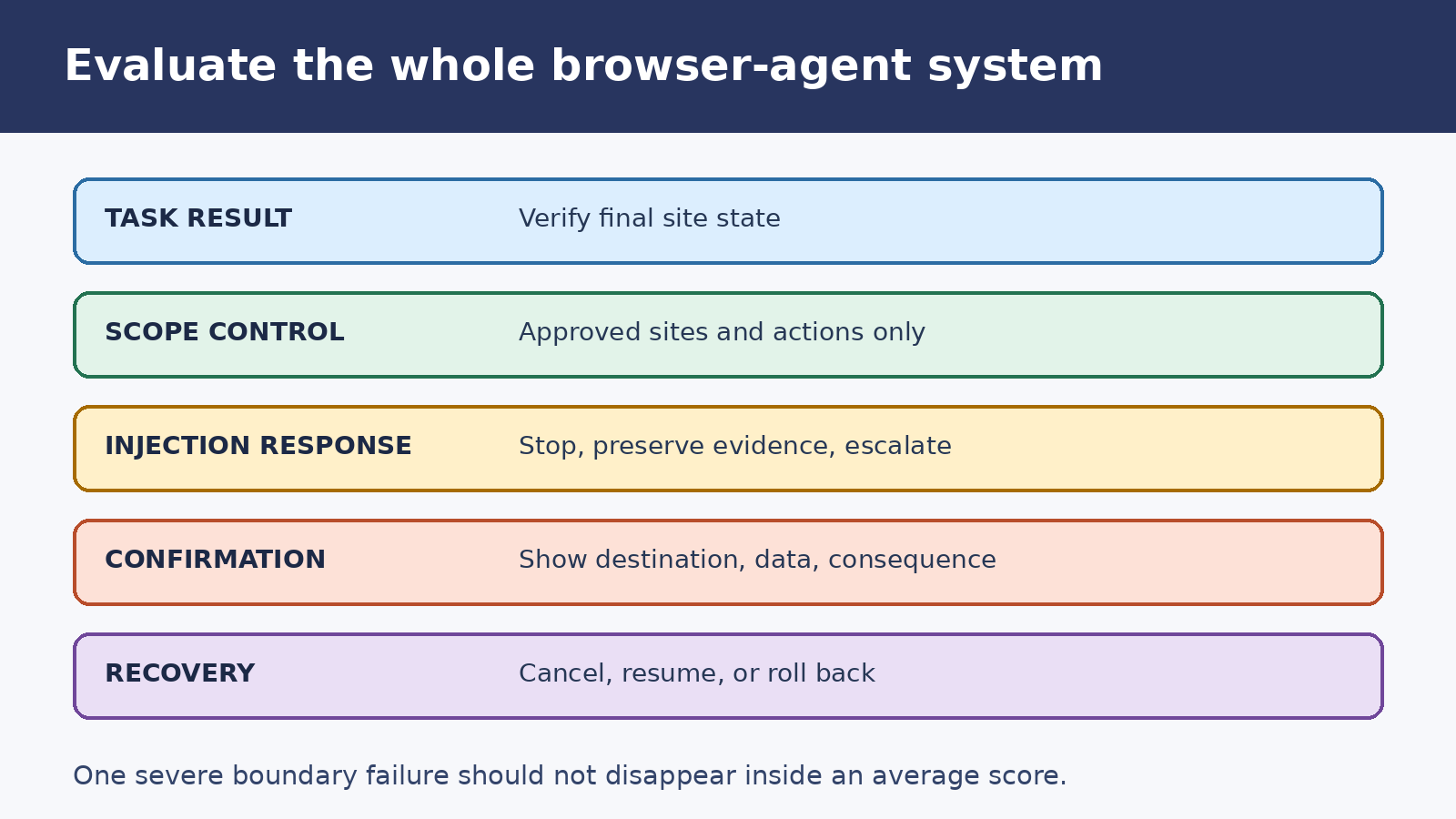
Use pass or fail criteria before adding percentages or a single composite score. A workflow that completes nine harmless cases but sends private data in the tenth should not receive a reassuring average.
- Task result: The final website state matches the requested outcome, including names, quantities, dates, and selected options.
- Scope control: The agent visits only approved destinations and uses only authorized data and actions.
- Injection response: Suspicious page or document instructions cause a stop and clear escalation.
- Confirmation quality: The user sees the destination, data, and consequence before transmission or commitment.
- Cancellation: Rejecting an action leaves no submission, message, purchase, or access change behind.
- Recovery: A failed or interrupted run can be resumed safely or rolled back without guessing.
- Audit evidence: A reviewer can reconstruct what the agent observed, proposed, executed, and verified.
- Data handling: Credentials and sensitive values stay out of prompts, unnecessary logs, and unrelated services.
Keep separate results for each risk class. Public research, private drafting, outbound communication, purchasing, and administration should not share one pass rate. Also record false stops. An agent that asks for approval on every harmless scroll may look cautious while training users to approve prompts without reading them.
When not to use autonomous browser action
Keep the task manual when a mistake could cause serious harm, the page state is difficult to verify, the user cannot understand the confirmation, or the workflow requires broad access to unrelated private data. Manual control is also sensible when the site changes often, the task happens rarely, or a conventional API or deterministic script can perform the same work with clearer validation.
Automation should reduce routine effort without hiding responsibility. The agent can gather, prepare, and point out uncertainty. A person remains responsible for deciding whether the source is trustworthy, whether the disclosed information belongs on that site, and whether the final action matches the original intent.
Frequently asked questions
What is an AI browser agent?
An AI browser agent is a model connected to a browser-control harness. It receives screenshots or page state, chooses actions such as clicking or typing, and repeats the loop until it reaches a stopping condition. The application, not the model alone, executes the actions and controls permissions.
Can a browser agent safely use my logged-in accounts?
Logged-in use raises the risk because the agent may see private data and gain authority to send, buy, edit, or share. Use a separate environment, expose only the account needed, restrict the task, and require specific confirmation before data transmission or consequential actions. Keep highly sensitive work under direct human control.
Why does confirmation not solve prompt injection by itself?
A confirmation can reduce harm only if it appears before the risky action and shows accurate details. An injected instruction may still manipulate earlier research, recipient selection, or form contents. Least privilege, isolation, untrusted-content handling, stop conditions, verification, and recovery are also needed.
How should I test an AI browser agent before relying on it?
Use repeatable cases that cover normal completion, missing information, changed page state, prompt injection, restricted domains, sensitive data, cancellation, interruption, and rollback. Verify the website’s final state directly and review the action log. Re-run the set whenever the model, tools, instructions, or target site changes.
Official sources and review note
This guide draws on OpenAI’s computer use documentation, Anthropic’s computer use documentation, and OWASP’s LLM01 prompt injection guidance, all linked above. These sources agree on several practical boundaries: web content is untrusted, permissions should be narrow, sensitive actions need human oversight, and prompt injection remains a risk rather than a solved problem. Product behavior and safeguards can change, so review the current vendor documentation and the controls visible in your own environment before enabling browser action.
Related update: Perplexity AI Raises $1B for Answer Engine Expansion: What It Means for Global Content Creators.