
ChatGPT becomes much more useful when you stop treating every conversation as a fresh request and start treating it as part of a controlled workflow. The practical goal is not to get a perfect answer in one try. It is to move from a real source, through a visible process, to an output that a person can check and use.
This guide shows how to use ChatGPT for research, writing, data work, and cautious automation. Each workflow has a clear input, a specific job, an expected deliverable, and a review point. That structure matters more than a collection of magic words. It also makes a successful process easier to repeat or hand to a colleague.
Begin with a one minute task brief
Before opening a new chat, write a compact brief. Name the outcome, reader, source material, boundaries, and acceptance test. If one of those pieces is unknown, say that it is unknown instead of letting ChatGPT quietly fill the gap.
- Outcome: the decision, document, analysis, or action you need.
- Audience: who will read or use the result and what they already know.
- Evidence: the notes, files, websites, or data that may support the work.
- Boundaries: subjects to exclude, confidential details to remove, and claims that need approval.
- Format: a table, outline, email, report, checklist, or another defined deliverable.
- Review: the person responsible for checking facts, tone, calculations, and consequences.
A useful opening prompt is: Help me produce [deliverable] for [audience]. Use only [provided material or named sources]. Preserve [important terms]. Mark missing evidence instead of guessing. Return [format], followed by a short verification checklist. This does not guarantee accuracy. It creates a contract that makes omissions and drift easier to spot.
Choose the lightest ChatGPT tool that fits
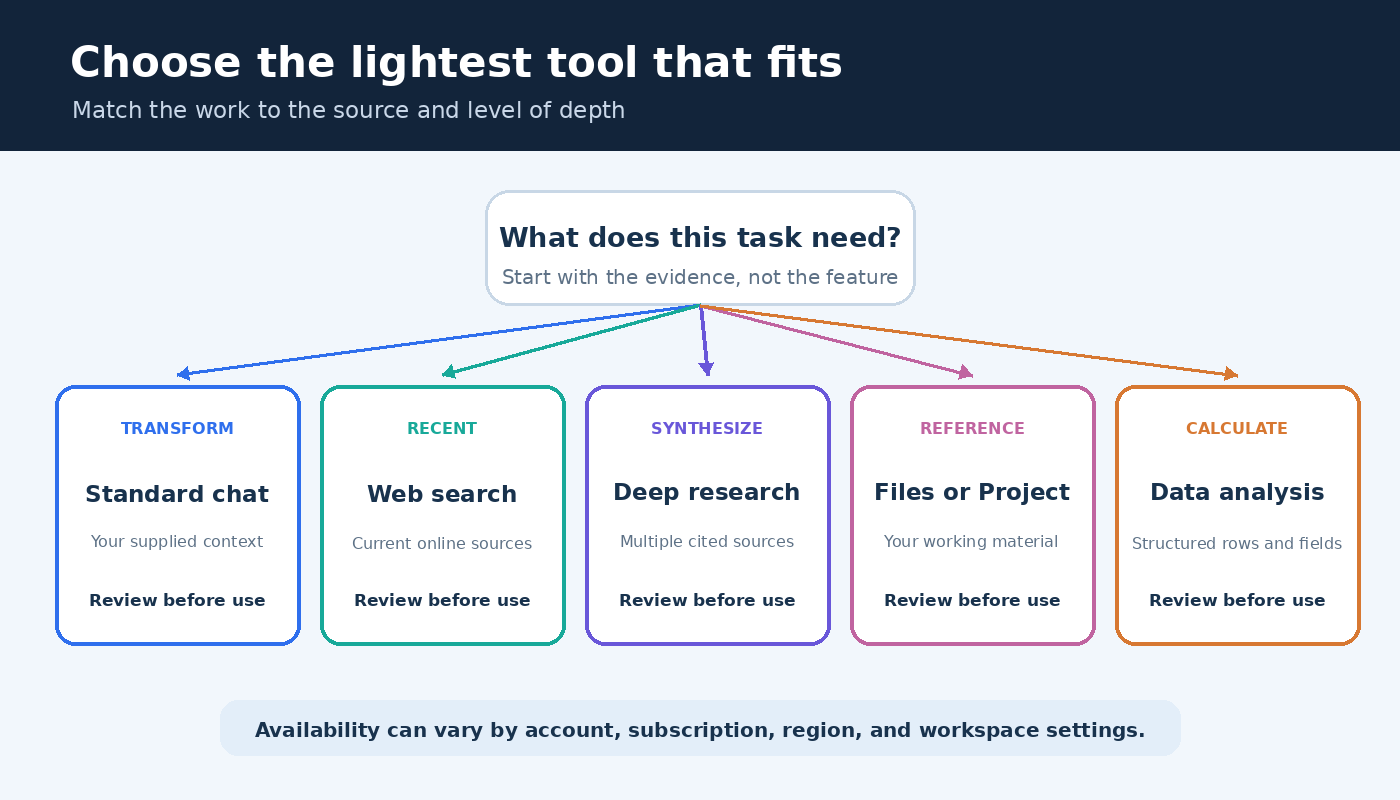
Standard chat is a good starting point for explanation, transformation, brainstorming, and work grounded in material you paste. Web search is more appropriate when recency or online sources matter. Deep research is designed for multi-step questions that require synthesis across sources. OpenAI says deep research can work with the public web, uploaded files, selected sites, and enabled apps, then produce a report with citations or source links. Its plan can be reviewed and adjusted before work begins. Read the official deep research guide for the current controls and availability.
Uploaded files are useful when the answer should be anchored to your own documents. Structured data may be better handled with data analysis than with a long pasted table. Projects can keep chats, files, and project instructions together for ongoing work. OpenAI’s Projects documentation explains how those sources and instructions are organized. Feature access can vary by account, subscription, region, and workspace settings, so use the tools visible in your interface rather than assuming every account looks the same.
A source-first research workflow
Research quality improves when source selection happens before summary writing. Begin by turning the assignment into a small question tree. Write the main question, the decisions the answer will inform, the claims that need evidence, and the kinds of sources that could settle each claim. This prevents an attractive report from hiding a weak evidence base.
- Define scope. State the topic, geography, audience, exclusions, and what a satisfactory answer must cover. Do not add dates or numerical thresholds unless they come from the assignment or a source.
- Set source rules. Prioritize primary documentation, original research, official statistics, or direct records as appropriate. Tell ChatGPT to separate source statements from its own synthesis.
- Review the plan. For deep research, inspect the proposed plan and source choices. Add missing questions and remove branches that do not support the decision.
- Request an evidence table. Ask for columns covering claim, source, exact support, caveat, and verification status. A prose answer can come later.
- Open important sources. Confirm that each link works, the cited page says what the report claims, and the context has not changed the meaning.
- Write from verified notes. Ask for a synthesis based only on entries you have accepted. Keep unresolved disagreements visible.
Use a prompt such as: Create a research plan for the question below. Break it into answerable subquestions. For each one, name the preferred source type and explain what evidence would support or challenge the conclusion. Do not begin the final report until I approve the plan. After approval, request the evidence table. If a source is inaccessible or only partially relevant, label that limitation rather than treating it as support.
Citations are navigation aids, not automatic validation. Open the decisive references yourself. Check whether a source is primary, whether the passage supports the exact claim, and whether qualifications were dropped. When sources disagree, preserve the disagreement and explain what additional evidence would resolve it. This workflow is slower than accepting the first summary, but much faster than rebuilding a decision after a bad claim is discovered.
A writing workflow that keeps the author in control
Writing is easier to review when planning, drafting, and editing are separate passes. Start with your own purpose and evidence. Ask ChatGPT to diagnose the material before it writes prose: identify the central point, likely reader questions, missing support, and possible structures. Select the structure yourself.
Next, create an evidence-aware outline. Every major section should have a job and a source note. If a section has no evidence, decide whether it is interpretation, an example, or a gap. Then draft one section at a time. Smaller drafts make it easier to catch unsupported transitions and keep your voice. Our guide to using ChatGPT for writing without cheating adds practical guidance for authorship, disclosure, and review.
A strong section prompt can read: Draft this section from the approved outline and notes. Keep the stated audience and purpose. Do not add facts, quotations, examples, or references. If the notes do not support a sentence, insert [evidence needed]. End with a list of claims I should verify.
Do not ask for vague improvement in the revision pass. Assign one editorial lens at a time:
- Accuracy pass: list factual claims and connect each one to supplied support.
- Structure pass: find repeated ideas, missing transitions, and sections that do not advance the purpose.
- Reader pass: flag jargon, undefined terms, and steps that assume hidden knowledge.
- Voice pass: identify generic phrases and sentences that do not sound like the author.
- Final proof: check grammar and formatting without changing meaning.
Compare revisions instead of replacing your draft blindly. Accept the changes that solve a named problem and reject those that flatten your viewpoint. Keep original source notes beside the draft until publication. If you want reusable starting points for narrower daily tasks, see these ChatGPT productivity prompts, then adapt their structure to your own evidence and approval rules.
A data workflow built around inspection
For tables and spreadsheets, prepare the file before asking for analysis. OpenAI recommends descriptive headers, plain language column names, and one record per row. Avoid unrelated tables in one sheet and blank rows or columns that split the data. The official data analysis guide also advises reviewing generated code, outputs, methods, and assumptions before relying on a result.
Begin with a data inventory, not a conclusion. Ask ChatGPT to report the sheet names, columns, data types, missing values, duplicate patterns, and suspicious units. Then confirm the intended unit of analysis. A row might represent a transaction, customer, survey response, or monthly total, and confusing those levels can invalidate the result.
After the inventory, state the calculation in ordinary language. Define filters, groupings, denominator, treatment of missing values, and desired output. Ask for an analysis plan before execution. When code is used, inspect it or have a qualified reviewer inspect it. Reconcile at least one important total with the source file or another trusted method. Charts need the same care: check labels, scales, grouping, and whether the visual answers the intended question.
A practical request is: First inspect this file and describe its structure and quality issues. Do not calculate the final metric yet. Then propose a method using the definition below, list assumptions, and show the fields involved. Wait for approval before running the analysis. This staged approach makes a wrong column or denominator visible while it is still easy to correct.
Turn a successful conversation into a reusable system
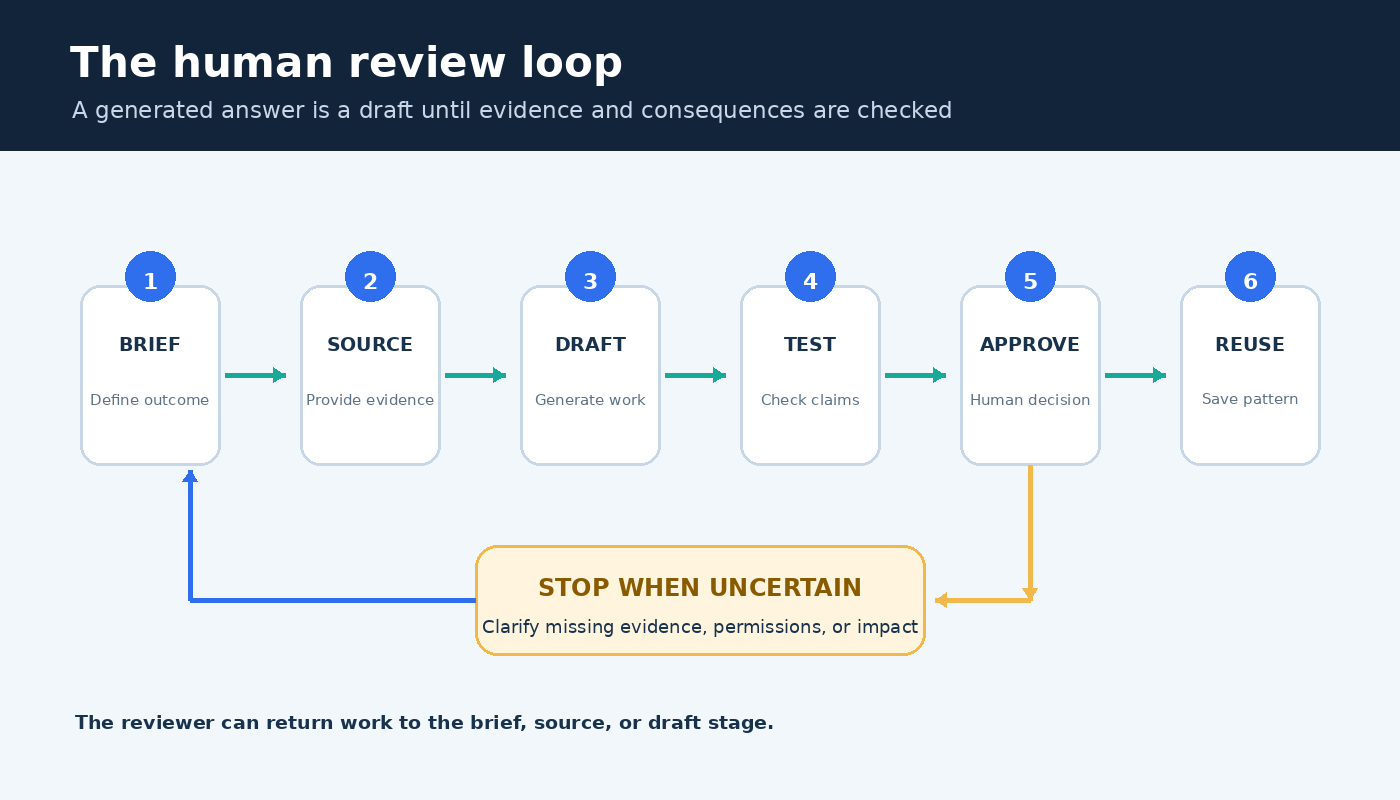
Reuse should begin only after a workflow has succeeded on real material. Save the brief, input pattern, prompt sequence, expected output, review checklist, and a sanitized example. Record failure conditions as carefully as the happy path. A template that works only when the source is complete should say so.
For ongoing work, a Project can keep relevant chats, references, and instructions together. Keep project instructions short and operational: name the audience, preferred format, approved sources, vocabulary rules, and when to stop for clarification. Do not use project context as an excuse to omit the current task. Files change, goals shift, and an explicit brief helps expose stale assumptions.
Version reusable prompts like working documents. Note what changed and why. Test a revision against an ordinary example, an incomplete input, and an awkward edge case from your real workflow. The objective is not identical prose every time. It is predictable handling of evidence, uncertainty, formatting, and escalation.
Approach automation as controlled delegation
Automation begins when output can trigger a later step, such as creating a ticket, updating a record, sending a message, or scheduling another task. That raises the cost of an error. Start with read-only or draft-only assistance. Let ChatGPT classify incoming material, prepare a proposed update, or draft a response while a person approves the actual change.
Map the workflow before connecting anything. List the trigger, data read, transformation, destination, permissions, possible side effects, and recovery method. Remove unnecessary private information. Use the narrowest access available. Keep a visible log that lets a reviewer connect the input, generated output, approval, and final action.
Define a stop condition for ambiguity. If the input is incomplete, the recipient is uncertain, a claim lacks support, or an action is difficult to reverse, the workflow should pause. The right fallback is often a short review queue, not a more elaborate prompt. OpenAI’s capabilities overview is a useful starting point for checking which built-in tools may be available, but actual controls depend on the account and workspace.
The review gate before you use an answer
Use a final checklist that matches the consequence of the work. A private brainstorming list needs a lighter review than a public claim, customer message, financial calculation, or system update. For important output, confirm that the answer addresses the brief, every material fact has support, calculations match the intended method, private data is handled appropriately, and a named person owns approval.
Also inspect what is absent. ChatGPT may produce a polished answer without exposing missing evidence, competing explanations, or an unasked stakeholder need. Ask it to critique the output against the original acceptance test, but do not let that self-critique replace human review. The person using the result remains responsible for its fit, accuracy, and consequences.
Frequently asked questions
What is the best first ChatGPT workflow for a beginner?
Choose a low-risk task with a source and an answer you can easily compare, such as turning your own meeting notes into an action list. Provide the intended format and ask ChatGPT to mark uncertain items. Check every owner, commitment, and deadline against the notes before using the list.
When should I use deep research instead of normal chat?
Use normal chat for quick explanations, transformations, or discussion based on supplied context. Consider deep research for a multi-step question that needs synthesis across several sources and a documented report. Review its plan and verify the decisive citations yourself.
Can ChatGPT verify its own writing or analysis?
It can help expose claims, assumptions, inconsistencies, and possible errors, but that is not independent verification. Check important claims against original sources and reconcile calculations with the source data or another trusted method. Use a qualified reviewer when the subject requires specialist judgment.
How do I make a ChatGPT workflow safe to automate?
Begin with draft-only output, narrow permissions, clear logs, defined stop conditions, and human approval before consequential actions. Test with ordinary and incomplete inputs. Automate only the portion that remains predictable after review, and keep a recovery path for mistakes.