
The phrase “ChatGPT 5.5” needs a date attached to it. The old title and URL of this page referred to the label on April 19, 2026, four days before OpenAI’s official GPT-5.5 announcement on April 23. That earlier page did not have an official source for the claim. OpenAI later did release GPT-5.5, followed by GPT-5.5 Instant and then GPT-5.6 reasoning options. This guide therefore treats the preserved URL as historical and uses current OpenAI documentation to explain what the label means now.
The short version is that GPT-5.5 is a documented OpenAI model family, but the exact model behind a ChatGPT response depends on the product surface, plan, rollout, workspace controls, model picker setting, and fallbacks. OpenAI currently describes GPT-5.5 Instant as the default for fast everyday replies, while eligible paid plans can use GPT-5.6 Sol for higher reasoning levels. A label in an old article, screenshot, shared chat, or conversation title is not enough to prove which model is available to your account today.
What OpenAI has confirmed about GPT-5.5
OpenAI’s April 23 GPT-5.5 announcement introduced GPT-5.5 for complex work, including coding, research, information analysis, document work, and tool use. At launch, GPT-5.5 Thinking rolled out to Plus, Pro, Business, and Enterprise users in ChatGPT. GPT-5.5 Pro rolled out to Pro, Business, and Enterprise. OpenAI added an update saying GPT-5.5 and GPT-5.5 Pro became available in the API on April 24.
On May 5, OpenAI published a separate GPT-5.5 Instant announcement. It said Instant was replacing GPT-5.3 Instant as ChatGPT’s default model for all users, subject to account limits and rollout conditions. The announcement described improvements in everyday answers, image understanding, STEM questions, decisions about when to search the web, and use of past chats or connected context where those features were available and enabled.
Those are two different launch moments. The April release centered on the Thinking and Pro experience for harder work. The May release made GPT-5.5 Instant the everyday default. Neither announcement proves that every GPT-5.5 variant remains manually selectable on every plan. OpenAI changes model availability, picker labels, and legacy access over time.
What “ChatGPT 5.5” can mean today
People often use “ChatGPT 5.5” as if it were one fixed product. In practice, it can refer to the GPT-5.5 family, GPT-5.5 Instant, the earlier GPT-5.5 Thinking option, GPT-5.5 Pro, or simply a ChatGPT conversation whose interface exposed a speed or reasoning label rather than a model name. These are not interchangeable claims.
The current OpenAI guide to models in ChatGPT says GPT-5.5 Instant remains the default for fast, everyday responses. It also says GPT-5.6 Sol powers Medium, High, and Extra High reasoning on eligible plans, with GPT-5.6 Sol Pro behind the Pro option where available. This means a reader can use ChatGPT in August 2026, see “Instant,” and be using GPT-5.5 Instant, while a switch to a higher reasoning level may move the conversation to a later family.
This is why the visible control matters more than a remembered model list. OpenAI’s interface may present task-oriented choices such as Instant, Medium, High, Extra High, or Pro. The underlying model can change as OpenAI updates the service. For a current family comparison, see our GPT-5.6 Sol, Terra, and Luna guide. That article covers the newer family in detail. This page stays focused on verifying GPT-5.5 labels and managing a change safely.
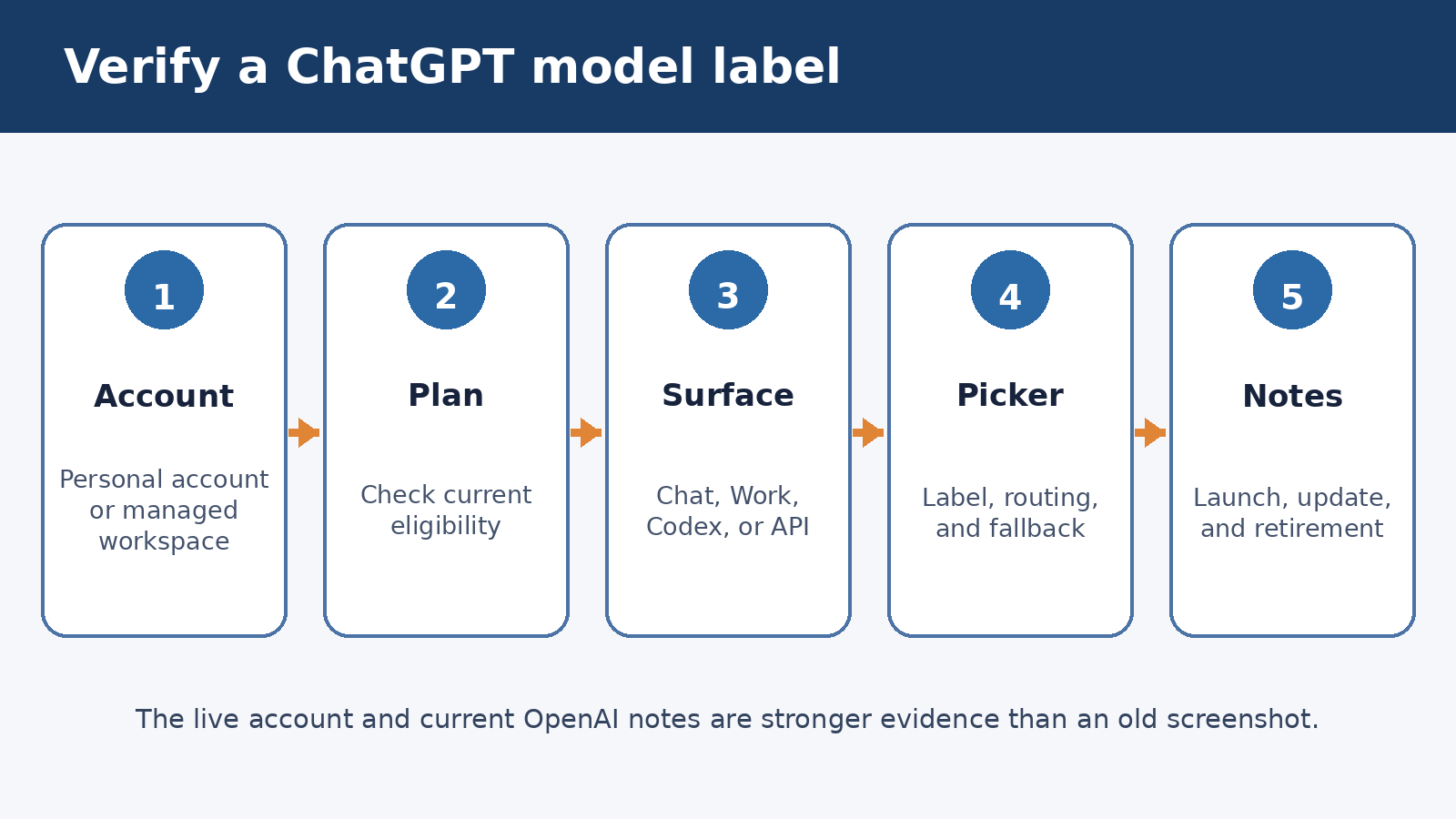
A five-part check for model availability
Do not start with a search result that says a model “is available.” Start inside the account and surface where you intend to work. A plan can include a family while a rollout is incomplete, a workspace administrator has hidden an option, or the option exists in Codex or the API but not in a standard ChatGPT conversation.
- Confirm the account. Check that you are signed in to the intended personal account or managed workspace. A user who belongs to several workspaces can see different model options after switching between them.
- Confirm the plan. Open the plan or billing view rather than inferring a plan from an old receipt or invitation. Plan eligibility sets an outer boundary, but it does not override rollout and workspace controls.
- Confirm the product surface. Standard ChatGPT, Work, Codex, custom GPTs, and the OpenAI API can expose different families. API model availability does not prove that the same name appears in the ChatGPT picker.
- Inspect the live picker and Configure menu. Record the visible speed or reasoning label. If automatic switching is available, check whether it is on. A routed response may use a different reasoning path than a manually selected Instant response.
- Check current official notes. Compare what you see with the OpenAI Model Release Notes and ChatGPT Release Notes. Release notes provide dated changes, while the live account shows whether the rollout and permissions have reached you.
Save the date, workspace name, app or web surface, visible picker label, and automatic routing state with any test result. This small record prevents a common mistake: comparing output from two dates and attributing every difference to a model upgrade when settings, tools, memory, or source files also changed.
Why the model picker may not show a model name
The model picker is increasingly a choice about response speed and reasoning effort. OpenAI’s current Business documentation says the underlying model for Instant can change as newer models roll out. Medium and High ask for more deliberate reasoning, while availability depends on the workspace and rollout status. The interface is telling you what kind of response path you selected, not promising that the same model identifier will sit behind that label forever.
Automatic routing adds another layer. On eligible plans, ChatGPT can switch from Instant to a reasoning option for a complex request. OpenAI says users can manage automatic switching through Configure where the control is available. If you need a controlled comparison, turn off routing for the test or record that it was enabled. Otherwise, two apparently identical runs may take different routes.
Fallbacks matter too. When an account reaches a limit, ChatGPT may move to a smaller fallback model until the allowance resets. OpenAI’s release notes say GPT-5.5 Instant Mini can serve as a fallback and may not appear in the picker. An absent label therefore does not prove that a fallback was never used. Look for the notice ChatGPT displays when a limit is reached, and avoid treating a rate-limited session as a clean benchmark.
Plan and workspace access are separate checks
A personal subscription and a managed workspace do not behave the same way. A plan may be eligible for a model, but Business, Enterprise, or Edu administrators can control access for members. Options a member cannot use may be hidden rather than shown as disabled. Role, workspace policy, regional rollout, and temporary service conditions can all affect what appears.
OpenAI’s legacy model access guide says a legacy model appears only while OpenAI still supports it and the workspace has legacy access enabled. Retired models disappear from the picker, and existing conversations may continue on a newer supported model. It also states that API availability is managed separately.
For a managed account, ask an administrator a precise question: “Is this reasoning level or legacy model enabled for my role in this workspace?” A screenshot from a coworker is weak evidence because that person may have a different role, workspace, staged rollout, or account. Administrators should compare workspace settings with the current rate card and release notes rather than maintaining a static model list in an internal handbook.
Capabilities that are documented, and what they do not guarantee
OpenAI positioned GPT-5.5 Thinking for demanding coding, research, synthesis, analysis, and document-heavy tasks. The launch post also reports results on coding, knowledge-work, computer-use, and science evaluations. Those results describe the tested model under stated evaluation conditions. They do not guarantee that it will solve a particular company task, reproduce the same score in ChatGPT, or outperform every later model on every prompt.
GPT-5.5 Instant was presented as the everyday option. OpenAI reported fewer hallucinated claims than GPT-5.3 Instant in its internal evaluations and improvements in visual reasoning, math, science, and web-search decisions. “Fewer” does not mean “none.” A fluent answer can still contain an incorrect date, invented source, bad calculation, or unsupported interpretation. Keep verification proportional to the cost of an error.
Tools also affect the outcome. Search, file analysis, connected sources, memory, and workspace plugins can provide context that a plain model call does not have. If you compare two model settings, keep tool access and source material fixed. Our guide to GPT-5.5 Instant personalization and privacy explains how past chats, files, and connected Gmail can change the context available to a response.
Limits readers should keep in view
Availability is conditional. Usage allowances can depend on plan, workspace, system conditions, and current policy. A model may be the default without being manually selectable. A reasoning option may be available in one product and absent in another. Release announcements are snapshots, not permanent entitlement contracts.
Model labels also do not describe the complete run. Automatic routing, fallback behavior, enabled tools, connected sources, memory, custom instructions, and the conversation history can all affect output. If a result must be reproducible, capture those variables alongside the label. For sensitive work, use source documents and a review process rather than relying on a model name as a quality seal.
Finally, current documentation takes precedence over the dated slug of this page. The April 19 wording was premature because OpenAI had not yet announced GPT-5.5. The official April 23 and May 5 releases support the family and Instant labels after those dates. Later Help Center pages establish the current relationship between GPT-5.5 Instant and GPT-5.6 reasoning options.
A safe migration and testing routine
A model transition should begin with representative work, not a polished demo prompt. Choose a small set of tasks that reflect normal inputs, awkward inputs, and a few costly failure cases. Keep the prompt, files, tools, memory state, and required output format fixed. Remove personal or confidential data unless the test environment and account policy permit it.
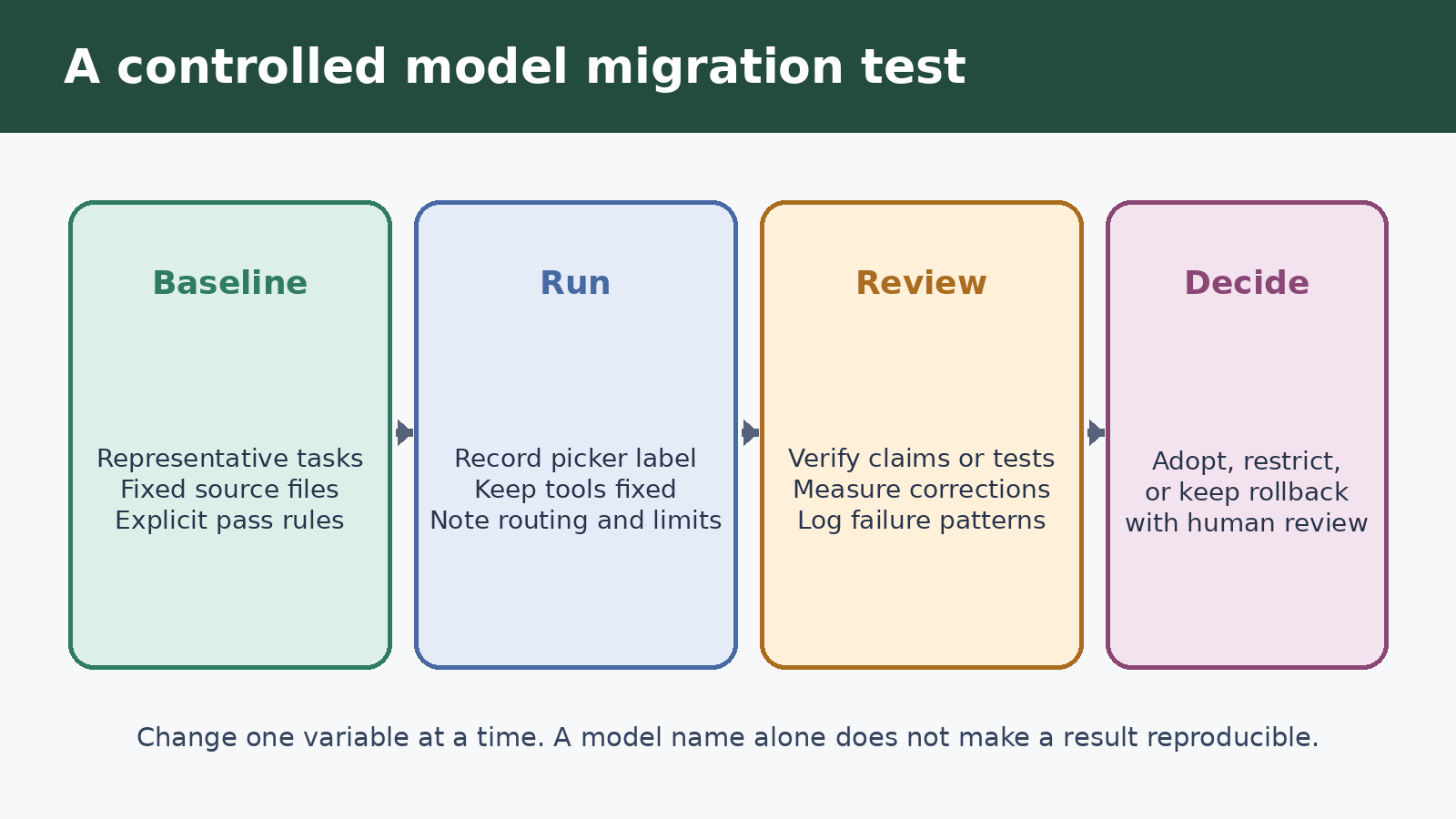
Run the same cases on the old available setting and the new one while both can still be selected. If the older model has already retired, compare a saved, reviewed output with a fresh run and clearly mark the limitation. Do not claim an A/B comparison when the runs used different documents, search results, or automatic routing settings.
Use a simple review sheet with the task ID, date, account or workspace, product surface, picker label, routing state, tools enabled, result accepted or rejected, factual errors, missing requirements, review time, and any fallback notice. For writing, inspect source fidelity and unsupported claims. For code, run tests and review changes. For calculations, recompute independently. For documents, compare required fields and formatting against the source brief.
Decide in advance what counts as a pass. A migration might require zero invented citations, all mandatory fields present, tests passing, and review time no worse than the current process. One impressive answer should not outweigh repeated failures on ordinary cases. The aim is a dependable workflow, not a winner in an informal model contest.
Keep a rollback path while a legacy option remains available. Save prompt templates, expected outputs, source versions, and settings. In a managed workspace, coordinate retirement dates and picker changes with administrators. If a model is retired, the rollback may be procedural rather than technical: reduce the task’s scope, add a human checkpoint, disable an unreliable tool, or move a critical step to deterministic software.
How to read future release notes
Read release notes in date order and separate launch, update, and retirement events. A launch post explains what OpenAI intended to introduce. A current Help Center page explains present controls and plan conditions. A retirement note explains what happens to old conversations. When the pages disagree because the product moved on, use the newest page for current availability and retain the older page only for history.
Pay attention to nouns. “ChatGPT,” “Codex,” “Work,” and “API” are different surfaces. “Instant,” “Medium,” and “High” are picker choices. “GPT-5.5 Instant” and “GPT-5.6 Sol” are model labels. “Available to a plan” does not always mean enabled in every managed workspace. Precise reading is more useful than memorizing a family tree that may change next month.
Frequently asked questions
Was ChatGPT 5.5 officially available on April 19, 2026?
The official sources cited here do not establish availability on April 19. OpenAI announced GPT-5.5 on April 23 and added API availability on April 24. The older April 19 title was unsupported, so this updated article preserves the URL but corrects the timeline.
Is GPT-5.5 still the default in ChatGPT?
OpenAI’s current ChatGPT model guide says GPT-5.5 Instant remains the default for fast, everyday responses. Eligible paid plans can use GPT-5.6 Sol for Medium, High, and Extra High reasoning, while Pro uses the corresponding Pro option where available.
Why can another user see a model option that I cannot?
The users may have different plans, workspaces, roles, rollout status, regions, or administrator settings. Confirm the account and product surface, inspect the live picker, and ask a workspace administrator whether the option is enabled for your role.
How should I test a move to a newer model?
Use representative tasks with fixed prompts, files, tools, and routing settings. Record the visible picker label and date, check outputs against explicit acceptance criteria, verify factual or executable results independently, and keep a procedural rollback for failures.
Source and review note
This guide was reviewed against current OpenAI launch posts, Help Center model documentation, release notes, and legacy-access guidance. It reports documented product behavior rather than personal testing. OpenAI can change models, limits, picker labels, and workspace controls, so verify the options visible in your account before making a purchasing or migration decision.