A custom GPT is useful when you keep repeating the same setup in new ChatGPT conversations. Instead of pasting the same role, reference notes, output rules, and opening questions each time, you configure a version of ChatGPT for one defined purpose. That can make a recurring task easier to start and easier to review. It does not turn ChatGPT into reliable software, remove the need for judgment, or guarantee that every answer follows the configuration.
OpenAI describes GPTs as versions of ChatGPT configured for a specific purpose. They can combine instructions, uploaded knowledge, selected capabilities, apps, or actions. The practical question is not whether you can build one. It is whether the work is stable enough to deserve a reusable configuration. This guide uses only current OpenAI documentation for product behavior and keeps plan and workspace claims conditional where OpenAI does.
Start with the shape of the work
Use an ordinary chat when the request is temporary, the context is small, or you are still discovering what you need. A custom GPT makes more sense after you have repeated a task enough to identify stable rules. A Project is usually the better home for a long-running effort whose chats, files, and context keep changing over time.
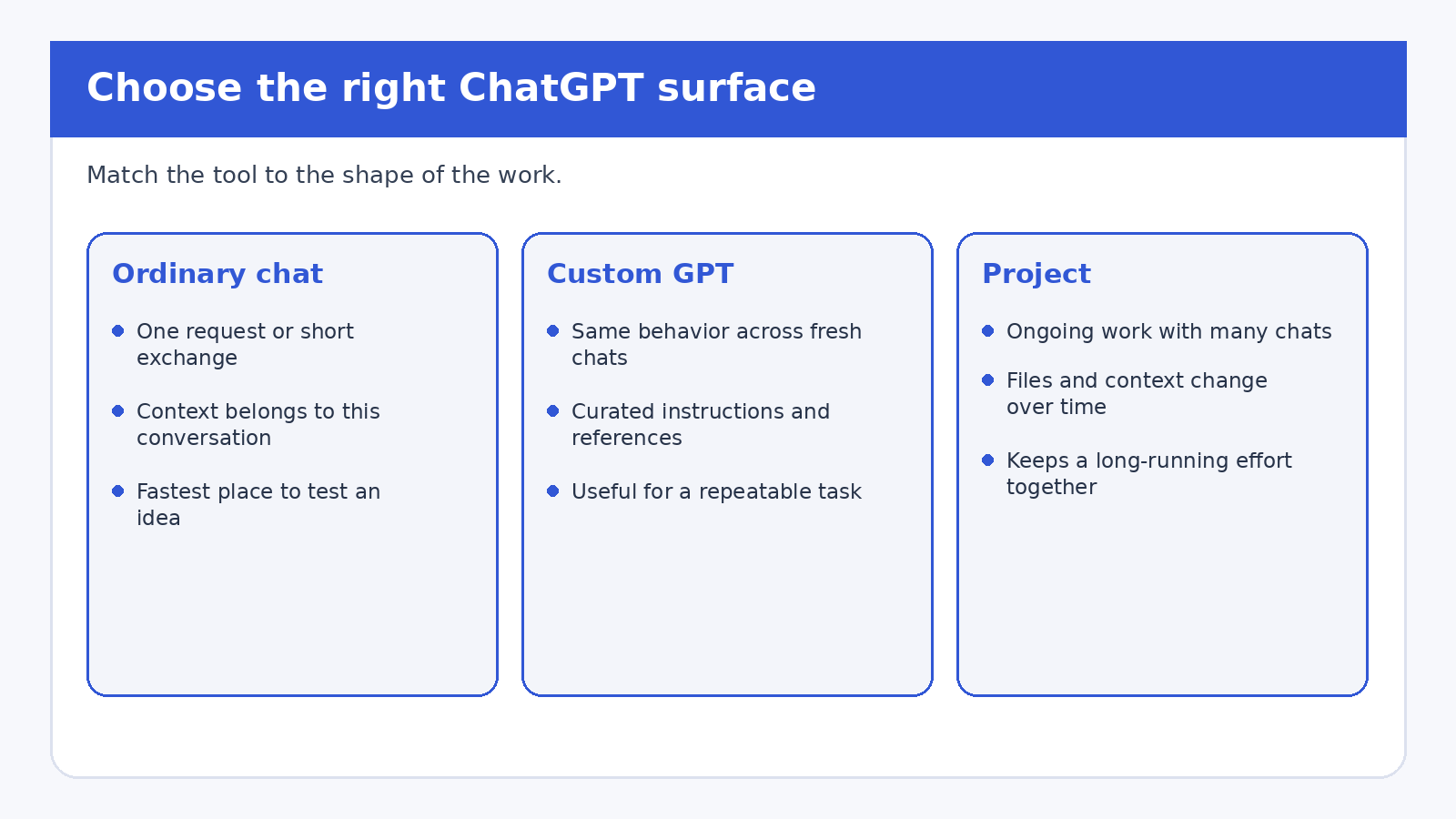
The distinction matters because these surfaces solve different problems. According to OpenAI’s overview of GPTs in ChatGPT, custom GPTs are tailored versions of ChatGPT that start each conversation fresh. They do not use saved memory, global custom instructions, or previous conversations. A GPT can still be reused, but its continuity comes from its configuration, not from remembering earlier sessions.
OpenAI’s Projects documentation describes Projects as workspaces that group chats, files, and instructions around an ongoing effort. Project memory can draw on conversations inside that project, subject to the documented memory mode and account or workspace settings. If you are managing a research project over several weeks, a Project can preserve the evolving context. If you want a fresh assistant to apply the same editorial checklist whenever anyone opens it, a custom GPT is the clearer fit.
An ordinary chat remains underrated. Build nothing until a simple conversation proves that the task has a repeatable shape. Draft your instructions in a regular chat, try them on several examples, and note the decisions you keep correcting. Those corrections are the raw material for a useful GPT.
A five-question fit test
A task is a reasonable custom GPT candidate when you can answer yes to most of these questions:
- Does the task recur? You perform substantially the same job in separate conversations, such as checking a brief against a house style or explaining a fixed policy handbook.
- Are the rules stable? The desired behavior can be written as clear steps, boundaries, and output criteria rather than reconstructed from changing history.
- Can a user verify the result? Someone can check the answer against a source, calculation, checklist, or professional review.
- Is a fresh start acceptable? The task does not depend on the GPT remembering last week’s conversation.
- Can the data be handled safely? The intended users are authorized to provide the material, and any external service involved is understood and trusted.
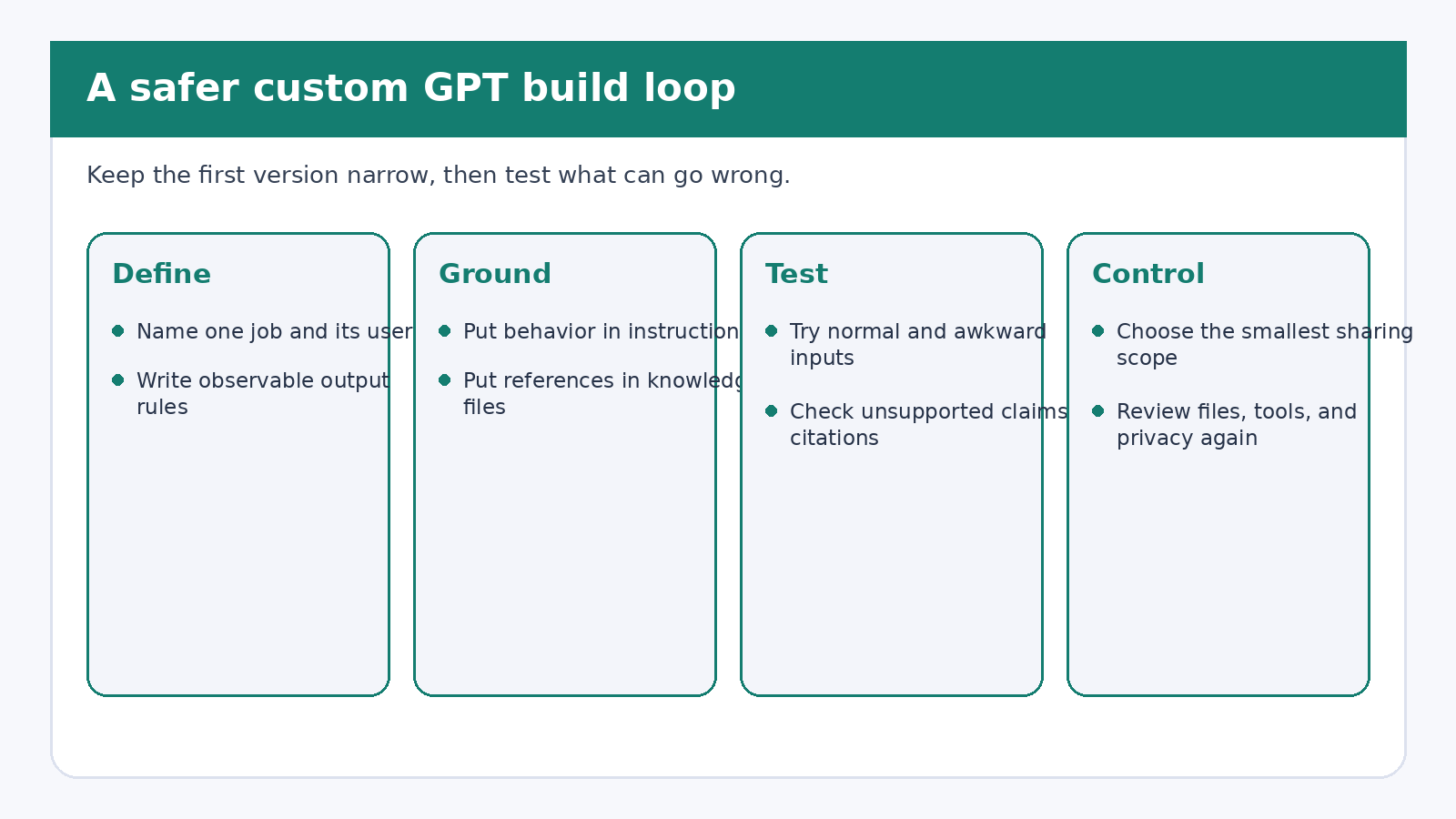
Do not build a GPT merely to give a one-off prompt a permanent icon. A narrow GPT that handles one recurring job is easier to test than a general “company assistant” with vague authority. It also creates fewer opportunities for conflicting instructions and accidental disclosure.
Write instructions as an operating procedure
Instructions define behavior. OpenAI’s current creating and editing GPTs guide recommends explicit step structure for multi-step workflows, positive and concrete directions, clear sections, and examples when the GPT must apply definitions or classifications. Translate your task into an observable procedure.
A workable first draft can include these sections:
- Purpose: one sentence naming the task and intended user.
- Required input: what the user must provide before the GPT begins.
- Process: the order in which it should inspect, ask, compare, and respond.
- Boundaries: decisions it must leave to a person and claims it must not invent.
- Output: the exact sections, labels, or table columns a reviewer expects.
- Failure behavior: what to say when information is missing, conflicting, or outside scope.
For example, a policy explainer might first identify the user’s jurisdiction and policy version, then retrieve the relevant passage, quote it with a section label, explain it in plain language, and mark any question the files do not answer. The instructions should forbid pretending that silence in the source is a rule. They should also tell the GPT to recommend an authorized human contact when the answer requires interpretation or an exception.
Conversation starters are different. They are user-facing examples that show how to begin. A starter such as “Compare this draft with our accessibility checklist” is useful only if the GPT then asks for the draft or provides a safe way to supply it. Treat starters as doors into the procedure, not as hidden instructions.
Use knowledge files for sources, not behavior
Knowledge files give the GPT reference material. Instructions tell it what to do with that material. OpenAI explicitly recommends putting rules, tone, and workflow guidance in instructions rather than burying them in uploaded files. This separation makes maintenance simpler: update the procedure when behavior changes, and replace the source file when the underlying facts change.
Choose clear, text-forward files where possible. Complex layouts can be harder for the GPT to use. OpenAI says a GPT can have up to 20 files, each up to 512 MB, but the product limit is not a target. A smaller, curated collection is easier to inspect for stale versions, duplicates, and contradictory passages. Remove old copies rather than hoping the GPT will infer which one governs.
If answers need citations to the uploaded material, say so in the instructions and specify a format, such as document title plus section heading. Then test whether citations actually point to the claimed text. A neat citation can still support the wrong interpretation. For consequential work, open the cited source yourself and check the passage.
Knowledge files also have a retention consequence. OpenAI’s File Uploads FAQ says files uploaded as custom GPT knowledge are retained until the custom GPT is deleted. Do not upload secrets, personal records, client data, copyrighted material you lack permission to use, or an internal document simply because it would make testing convenient.
Add capabilities only when the task requires them
A GPT can use selected capabilities such as web search, image generation, Canvas, or data analysis when those options are available for the account, workspace, and region. It can also connect to apps or to actions that call APIs. OpenAI notes that a GPT can use apps or actions, but not both at the same time.
Every tool widens the test surface. If a document reviewer only needs uploaded guidance and structured text output, it may not need web search or an external action. Start with instructions and knowledge. Add a capability only when you can name the input it needs, the result it should return, and the failure case a user must see.
External connections deserve special caution. OpenAI says relevant parts of a user’s input may be sent to a third-party service when a GPT uses apps or external APIs. OpenAI does not control how that service stores or uses the data. Review the service, its data practices, and the exact information the GPT might transmit. Do not assume that the GPT builder’s inability to read chats also prevents an external API from receiving data sent through an action.
Test for failure, not just a good demo
The GPT editor includes Preview, and OpenAI recommends testing there before sharing. A friendly first response is not enough. Build a small evaluation set that represents the work you expect and the mistakes you fear.
- Try a normal, complete request and check every required output field.
- Leave out a required input and see whether the GPT asks for it.
- Provide conflicting source passages and check whether it exposes the conflict.
- Ask for a fact that is absent from the knowledge files.
- Use an edge case that should be escalated to a person.
- If citations are required, open each cited passage and compare it with the answer.
- If a tool can send or change data, test confirmation, cancellation, and service failure.
Record the prompts, expected behavior, actual result, and revision made. This can be a short table. Repeat the set after changing instructions, files, capabilities, or actions. Version history can help restore an earlier configuration, but a version label does not prove that the answers remain correct.
For a broader approach to checking factual output, see our guide to using ChatGPT for research without trusting made-up citations. If your main problem is reusable account-wide preferences rather than a specialized assistant, read the practical guide to ChatGPT custom instructions.
Choose the smallest useful sharing scope
Keep the GPT private while you build and test it. OpenAI documents several possible sharing levels, but the options depend on the plan, workspace settings, role permissions, and the GPT’s configuration. They may include invite-only access, workspace sharing, anyone with the link, or the GPT Store. Do not promise a sharing option until you see it in the current editor for that account.
The official sharing and publishing guide also distinguishes permission levels. Depending on the sharing level, people may only chat, may be able to view settings and duplicate the GPT, or may be allowed to edit it. Public link and GPT Store sharing do not support permission to view settings. In a managed workspace, administrators can limit or disable broader sharing.
Public publishing adds requirements. A builder profile may need completion, policy checks may apply, and public actions need a valid Privacy Policy URL. Apps can also block some public sharing or publishing choices. Publishing is a distribution decision, not evidence that the GPT is accurate, private enough for every input, or suitable for professional reliance.
Privacy boundaries users should understand
OpenAI says GPT builders cannot view individual conversations that users have with their GPTs. That is an important boundary, but it is not the whole privacy picture. Training treatment depends on the user’s plan and data controls. OpenAI says Business, Enterprise, and Edu data is not used for training by default. For consumer plans, conversations may be used depending on whether the user has opted out.
Users should still avoid entering data they are not authorized to disclose. If the GPT uses an app or action, relevant input may go to an external service. If a team shares configuration access, some permission levels can expose the GPT’s settings or permit edits. Review these paths separately instead of relying on a single “private” label.
Maintain it like a small internal tool
A useful GPT needs an owner. Set a review date for knowledge files and instructions. Keep a short note of which source version is current. Re-run the evaluation set after each change. Remove capabilities that no longer serve the task. If the GPT is shared, tell users what changed when the update affects required inputs, output format, or risk.
Retire the GPT when the process stops being stable. Move the work to a Project if it depends on accumulating chats and changing context. Use the API if you need an assistant inside a website or application, because OpenAI says custom GPTs are built and used within ChatGPT and are not an embedding mechanism. Return to ordinary chats when the task has become exploratory again.
Frequently asked questions
Do custom GPTs remember previous conversations?
No. OpenAI says GPTs do not use saved memory, global custom instructions, or previous conversations. Each conversation starts fresh. Use a Project when the work needs continuity across chats, subject to the Project’s memory settings.
Should rules go in instructions or knowledge files?
Put behavior, workflow, tone, and boundaries in instructions. Use knowledge files for reference material such as handbooks or documentation. OpenAI recommends this separation, and it makes testing and updates easier.
Can a GPT builder read users’ chats?
OpenAI says builders cannot view individual conversations with their GPTs. However, an app or external API connected to the GPT may receive relevant parts of a user’s input. Users should review and trust any connected service before sending sensitive information.
Is a custom GPT better than a Project for repeated work?
It depends on what must persist. A custom GPT applies a reusable configuration to fresh conversations. A Project keeps chats, files, instructions, and project context together for an ongoing effort. Use an ordinary chat when neither kind of reusable setup is needed.
Sources and review note
This guide was reviewed against current OpenAI Help Center pages for GPTs, creation and editing, Projects, sharing, and file uploads. It describes documented product behavior, not personal product testing. OpenAI can change features and workspace controls, so check the linked help pages and the options visible in your account before relying on a specific setting.