A useful ChatGPT prompt does more than name a topic. It tells the model what you need, what material it should use, what the finished answer should look like, and how you will judge it. That may sound obvious, but most weak answers begin with a request that leaves one of those decisions unstated.
OpenAI defines prompt engineering as designing and improving inputs so a language model is guided toward the response you want. Its current ChatGPT prompt guidance starts with clear, specific instructions and enough context. It also recommends iteration: review the first answer, then adjust the wording, context, or scope. This guide turns those principles into a practical ten-tip workflow for writing, research, planning, and analysis.
These are working methods, not secret commands. A polished prompt can still produce an incorrect answer. OpenAI warns that ChatGPT can give wrong facts, fabricated quotations, or references that do not exist, sometimes in a confident tone. Check important claims at their original sources, especially when the answer affects health, money, safety, school, or professional decisions.
Start with a prompt brief, not a clever phrase
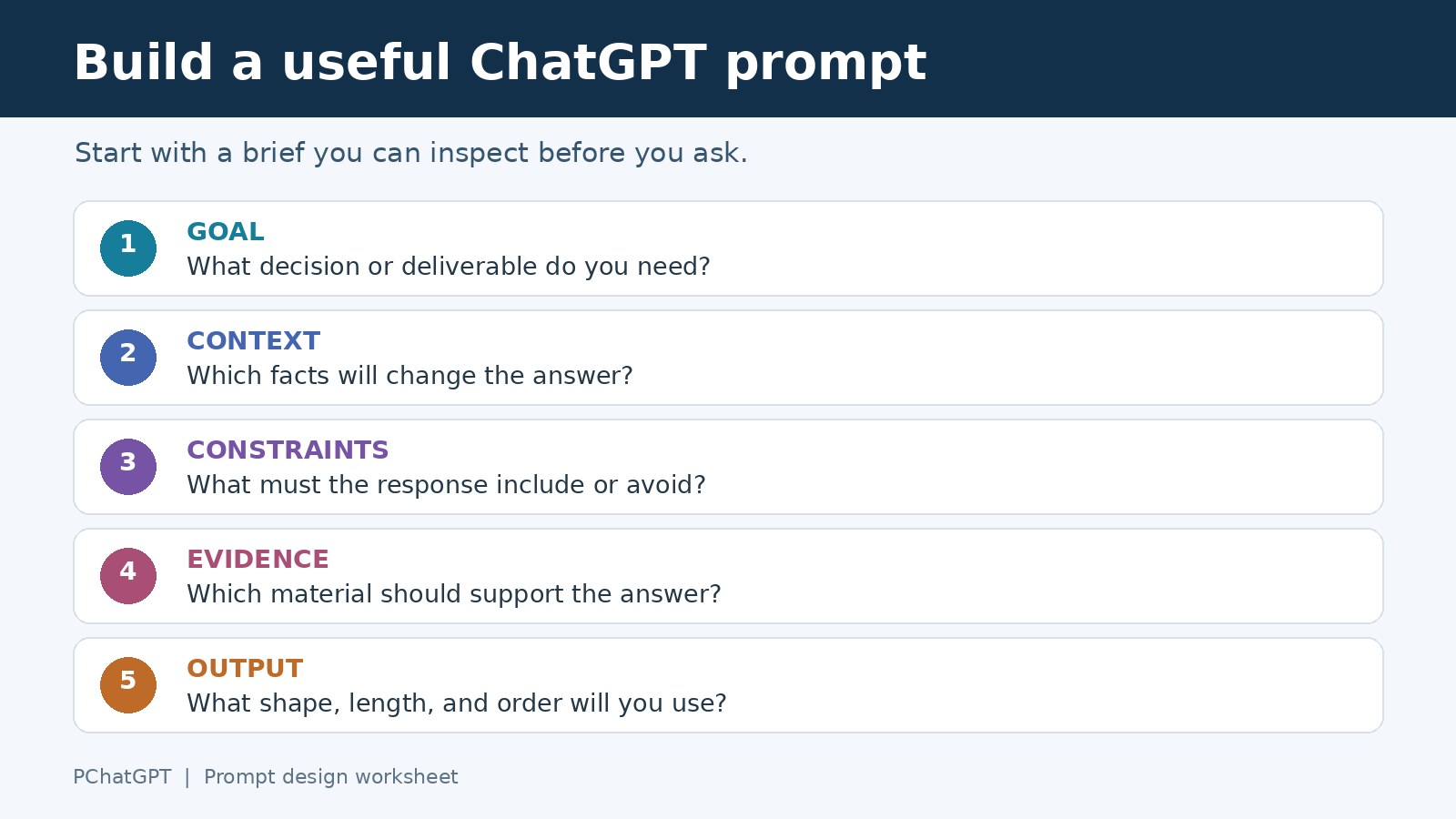
Before the ten tips, write a four-line brief. It prevents you from spending time polishing a prompt for a task that is still vague.
Goal: What decision or deliverable do I need?
Context: What does ChatGPT need to know?
Constraints: What must the answer include or avoid?
Evidence: What sources or supplied material should support it?
For example, “Help with a launch email” names a topic. “Draft a 180-word launch email for existing customers who use our free plan. Explain the new calendar feature, avoid urgency language, and end with one link to the setup page” defines a deliverable. You can evaluate the second answer without guessing what success means.
1. Put the task and outcome first
Open with a direct verb and a visible outcome: compare, draft, classify, explain, extract, revise, or plan. Then state who will use the result. A role can help when it supplies a relevant viewpoint, but a theatrical persona often adds less than a precise task.
Weak prompt: “You are the world’s best marketer. Tell me about onboarding.”
Stronger prompt: “Review the onboarding copy below for a first-time user. Identify the three sentences most likely to cause confusion, explain the problem in plain English, and rewrite each sentence.”
The stronger version identifies the material, reader, action, and deliverable. If your request contains several jobs, say which one matters most. Otherwise, ChatGPT may spend most of the answer on background you did not need.
2. Supply the context that changes the answer
Context is useful when it changes the recommendation. Include the audience, starting point, available resources, location when relevant, and definitions that are specific to your organization. Leave out history that has no bearing on the task.
OpenAI’s API prompt engineering guide recommends including relevant context and explains that supporting material can be placed in the prompt or supplied through tools such as file search. In an ordinary ChatGPT conversation, you can apply the same idea by pasting a short source passage, attaching an available file, or summarizing the facts that the answer must respect.
Context:
- Audience: department managers with no analytics training
- Current problem: weekly report takes two hours to read
- Available data: the attached table and glossary
- Decision: which two metrics should appear at the top
Do not paste confidential, personal, or regulated information merely to make a prompt more detailed. Use the minimum information needed and follow your employer’s data rules.
3. Separate instructions from source material
Long prompts become easier to read when the request and the reference text occupy different sections. OpenAI’s developer documentation says Markdown headings and lists can mark hierarchy, while XML tags can show where a supporting document begins and ends. You do not need XML for every chat. A plain heading such as “Source text” is often enough.
Task:
Summarize the policy for a new employee.

Rules:
- Use only the source text.
- If the source does not answer a question, say so.
- Keep the summary under 250 words.

Source text:
[paste the policy excerpt here]

Output:
A short overview followed by a five-item checklist.
This structure also makes revisions safer. You can change the output request without accidentally editing the source passage.
4. Define the output before asking for the content
“Make it better” forces ChatGPT to decide what better means. Name the format, length, order, level of detail, and any fields you need. If the answer will feed another step, specify a stable structure.
For a meeting review, you might request: “Return four sections in this order: decisions, unresolved questions, owners, and deadlines. Use a table only for owners and deadlines. Do not add an owner or date that is missing from the notes.” For an explanation, state whether you want a short analogy, a technical account, or both.
A format request should serve the task. Tables are poor containers for long reasoning. Bullet lists can hide relationships between ideas. Choose the shape you will actually use rather than the most elaborate one ChatGPT can produce.
5. Add acceptance criteria that can be checked
Constraints tell the model where the boundaries are. Acceptance criteria tell you whether the answer crossed the finish line. Write them as observable checks.
- Every recommendation must cite one of the supplied passages.
- The draft must include the product name in the first paragraph.
- The calculation must show the formula and units.
- Unknown values must be labeled “not provided” rather than estimated.
- The final response must stay between 600 and 800 words.
Avoid stuffing a prompt with dozens of minor rules. Rank the important constraints, and remove any that conflict. If two requirements pull in opposite directions, such as “be comprehensive” and “use 100 words,” tell ChatGPT which one wins.
6. Show an example when the pattern is hard to describe
Examples are useful for classification, house style, field extraction, and other tasks where a pattern matters. OpenAI’s prompt engineering documentation describes few-shot learning as supplying a small set of input and output examples so the model can apply the pattern to a new input. It recommends using examples that cover a varied set of likely inputs.
One representative example can be more informative than several adjectives. If you need customer comments labeled as “bug,” “billing,” or “how-to,” show one clear example of each. Keep examples consistent with your written instructions. A contradictory example can pull the answer away from the rule you intended.
Examples can also expose an underspecified task. If you cannot write one acceptable output yourself, the requested format may still be unclear.
7. Break dependent work into reviewable passes
Do not ask for research, strategy, a final draft, and quality control in one huge request when later steps depend on earlier choices. Split the work at the points where you need to inspect or decide something.
- Ask ChatGPT to restate the goal, assumptions, and missing information.
- Request two or three approaches with tradeoffs.
- Select an approach and ask for an outline or plan.
- Generate one section or deliverable.
- Review it against the acceptance criteria and revise only the weak parts.
This is not a claim that every task needs five prompts. A simple rewrite may work in one. The point is to keep human decisions visible. Our guide to common ChatGPT mistakes covers failure modes and verification. Here, the emphasis is different: design the request so each pass has one job and a clear handoff.
8. Ask for uncertainty and source boundaries
A request for citations does not guarantee that every citation is real. OpenAI’s accuracy guidance for ChatGPT says the model can produce incorrect facts and fabricated sources. It advises checking important quotations, data, technical information, and references.
Build that review into the prompt:
Use only the attached report.
For each conclusion, quote the supporting sentence and give its page number.
Separate direct evidence from your interpretation.
If the report does not contain enough evidence, write "insufficient evidence."
Do not create a citation.
If current information matters and ChatGPT has an appropriate search or research tool available, ask it to use that tool and provide sources. Then open the links. For a high-stakes question, treat the answer as a starting point for review, not the final authority.
9. Diagnose the first answer instead of restarting
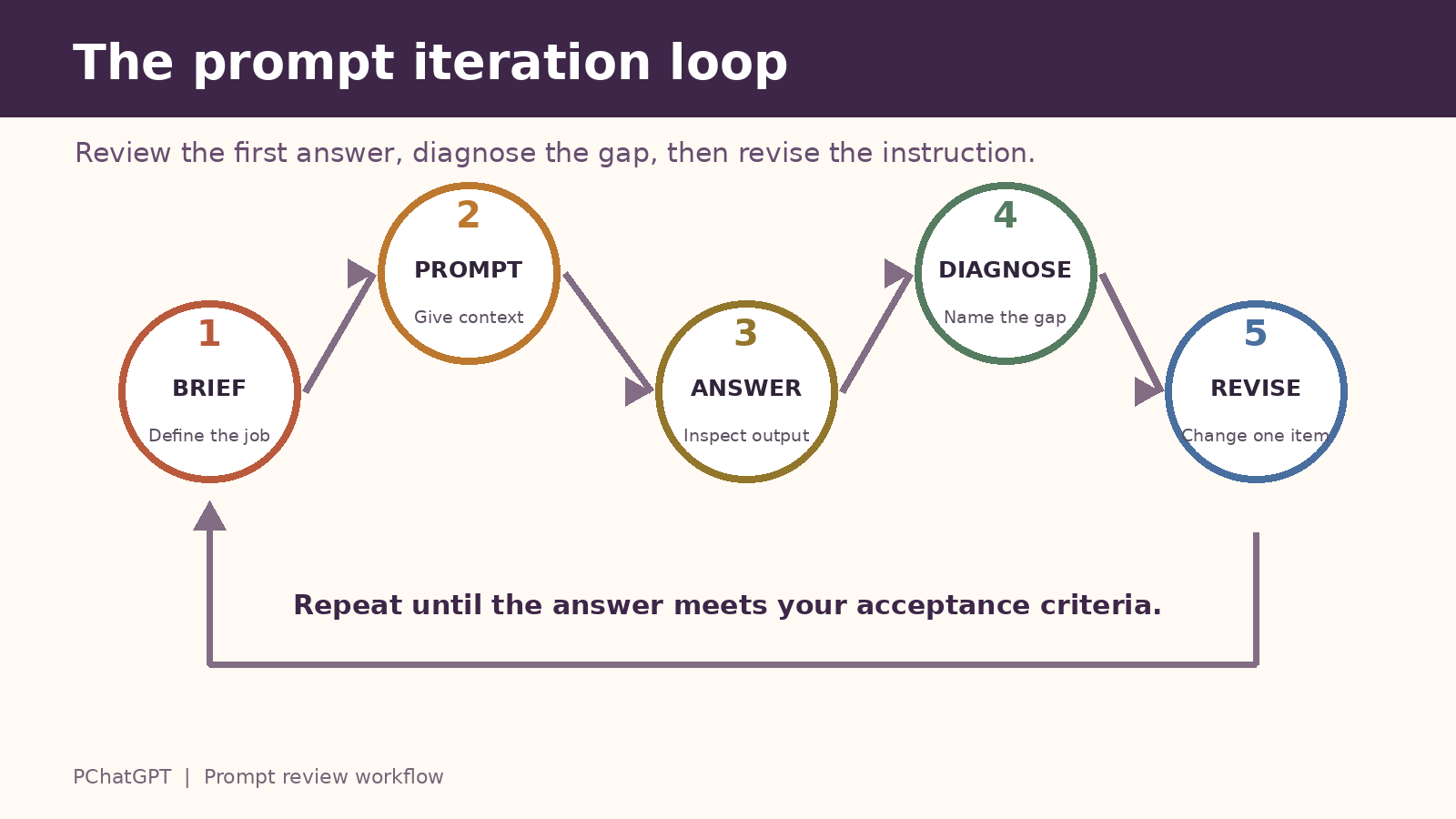
OpenAI recommends iterative refinement: start with an initial prompt, inspect the response, and adjust the words, context, or complexity. The fastest revision is usually a specific diagnosis.
- If the answer is generic, add the audience, decision, source material, or an example.
- If it is too long, identify the section to cut and set a length for the replacement.
- If the structure is wrong, provide the exact heading order.
- If it invents details, restrict it to supplied evidence and require unknowns to be marked.
- If the tone is off, name the intended relationship, such as colleague to colleague, rather than stacking vague adjectives.
A useful follow-up is: “Compare your answer with these five criteria. List each failure with the sentence that caused it, then revise only those parts.” This turns iteration into editing rather than another roll of the dice.
10. Save the method, then adapt the task
When a prompt works, save its structure as a reusable template. Replace project details with labeled fields such as [AUDIENCE], [SOURCE], and [OUTPUT]. Keep the fixed portion short enough that you can see what changes from one task to the next.
ChatGPT custom instructions can hold account-level preferences, but they are not a substitute for the facts and constraints of the current job. For setup and scope, read our practical custom instructions guide. Put durable preferences there. Put the current audience, evidence, deadline, and deliverable in the prompt you are writing now.
Maintain a tiny prompt log for repeated work: task, prompt version, what failed, what changed, and whether the revision passed. You do not need a complex scoring system. A few dated notes will show which instructions consistently matter.
A reusable ChatGPT prompt template
Task:
[State the action and final deliverable.]

Audience and purpose:
[Who will use it, and what will they do next?]

Context:
[Include only facts that change the answer.]

Source material:
[Paste or attach the evidence. State whether outside knowledge is allowed.]

Requirements:
[List the essential content and constraints in priority order.]

Output format:
[Specify headings, fields, length, and order.]

Accuracy check:
[Explain how to mark uncertainty, cite evidence, and handle missing information.]

Before answering:
[Ask one necessary clarifying question, or state assumptions if you want the model to proceed.]
Use the template as a checklist, not a ritual. Delete sections that add nothing. For a two-sentence rewrite, task, audience, and length may be enough. For a policy comparison, source boundaries and missing-information rules matter far more.
Worked example: revise a weak prompt in three passes
Suppose the first request is: “Write a project update.” It does not identify the reader, source, decision, or desired format.
Pass one defines the deliverable: “Draft a project update for the client. Use the notes below. Cover progress, delays, and next steps in 250 words.”
Pass two adds boundaries: “Do not promise a delivery date. Label the date as pending because the notes do not confirm it. Use a calm, direct tone. End with the two questions that need the client’s answer.”
Pass three reviews the result: “Check the draft against these rules: no invented dates, no blame language, exactly two client questions, and no more than 250 words. List any failure, then return a corrected draft only.”
Each pass solves a visible problem. None depends on a magic phrase. You can keep the final prompt as a template because its parts correspond to real review decisions.
Frequently asked questions
What is prompt engineering in ChatGPT?
Prompt engineering is the process of designing and refining the input given to a language model so its response better fits the intended task. In practical ChatGPT use, that means clarifying the goal, relevant context, constraints, evidence, and output format, then revising the request after reviewing the answer.
Do longer ChatGPT prompts always produce better answers?
No. Useful detail can improve a prompt, but irrelevant background and conflicting rules make the task harder to follow. Include information that changes the answer. A short, specific prompt can be better than a long prompt that never defines the deliverable.
Should I ask ChatGPT to act as an expert?
A relevant role can establish a viewpoint or vocabulary, but it does not guarantee expertise or factual accuracy. Describe the work, audience, source material, and checks. Verify important claims even when the response sounds confident.
How should I improve a disappointing ChatGPT answer?
Name the failure before you request a revision. Add missing context if the answer is generic, provide an output structure if it is disorganized, restrict it to supplied evidence if it invents details, or show one example if the desired pattern is hard to describe. Then ask for a targeted correction rather than starting over without a diagnosis.
The practical rule
A good prompt makes the next decision easier. State the task, supply only the context that matters, define the output, set evidence boundaries, and review the result against observable criteria. Then revise the instruction that failed. That cycle is more dependable than collecting hundreds of prompts you do not understand.