ChatGPT Work documents, decks, and websites can now begin with one substantial request, but “one prompt” should not be confused with “one click and done.” The first prompt is a project brief. It tells Work what outcome you need, where the facts live, which formats to create, and what a good result looks like. ChatGPT can then gather context, propose a plan, build several related deliverables, and ask for decisions when judgment matters.
That is a meaningful change from asking an ordinary chat to write a few paragraphs. OpenAI describes ChatGPT Work as an agent for longer tasks across apps, files, and workflows. It can create finished documents, presentations, spreadsheets, analyses, and interactive Sites. The practical advantage is not that every artifact appears perfectly from a short sentence. It is that one well-framed goal can keep the same sources, audience, terminology, and decisions connected across a brief, a slide deck, and a website.
What ChatGPT Work actually does
OpenAI introduced Work on July 9, 2026 as an agent that can stay with a complex task, split it into smaller steps, and continue while the user reviews and steers. Its official ChatGPT Work announcement shows the intended pattern: connect relevant tools, give Work an outcome, follow its progress, answer questions, and approve important actions. On desktop, Work can also use local files and a built-in browser where those capabilities are available.
The product has three useful layers. First, it gathers context from attachments, local files, the web, and connected systems. Second, it plans and produces artifacts. Third, it can act on supported tools, such as creating or updating a native file, after the required permissions and approvals. Each layer can be limited by your plan, workspace policy, role, region, app connection, and the surface you are using.
This means a request such as “make a launch brief, executive deck, and customer FAQ site from these research files” is plausible. It does not mean Work silently knows which research is authoritative, what your legal reviewer will allow, or which slide master the company uses. You supply those boundaries. Work supplies continuity and execution.
Why one prompt can support three deliverables
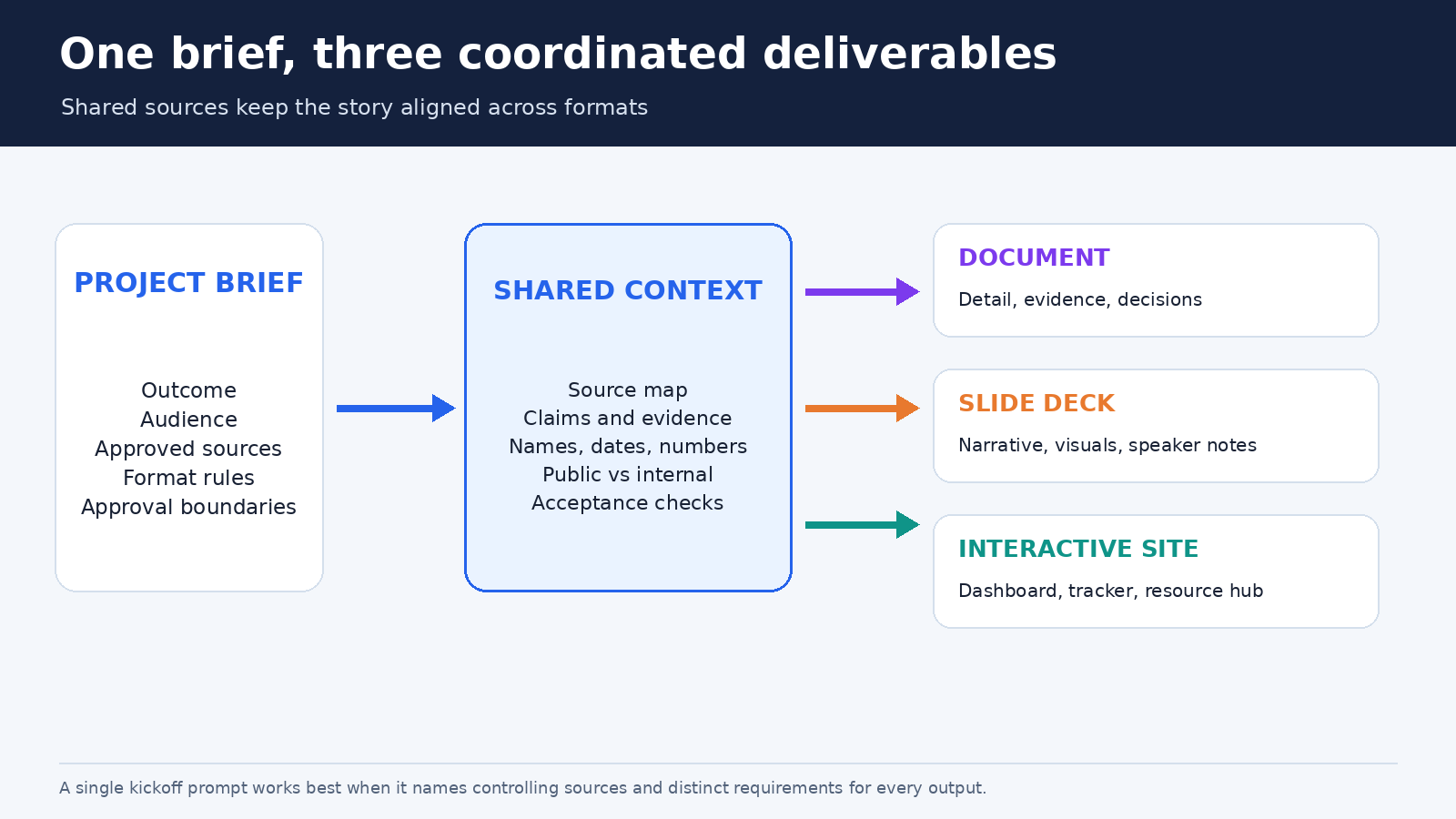
A document, deck, and Site may look different, yet they can share a common content model. All three need an audience, a central claim, supporting evidence, terminology, and a call to action. If those elements are settled once, Work can adapt them instead of independently inventing three stories.
- The document carries detail: background, evidence, assumptions, decisions, and implementation notes.
- The deck compresses the argument into a sequence that works in a meeting, with concise slides and speaker guidance.
- The Site makes selected information interactive or easy to revisit, perhaps as a launch calendar, dashboard, resource hub, prototype, or report.
There should still be one source of truth. If a revenue number changes, tell Work which approved table controls all three outputs. If the website is for customers but the brief contains internal risk notes, specify that the Site must use only material labeled public. Shared context is useful only when distribution rules are equally clear.
Prepare the source pack before you prompt
Start by removing the material you do not want used. A folder containing a final pricing sheet, two obsolete price lists, an anonymous meeting export, and an unlabeled draft invites conflict. Keep current source files, add dates or versions to filenames, and create a short index that says what each file controls. Our guide to organizing ChatGPT Project sources provides a fuller cleanup method.
Use a reference file when you want Work to imitate an example for this request. Use a template when the structure and instructions should be reused for future work. OpenAI’s current file creation guide makes that distinction explicit. A previous board deck can be a one-time reference. A maintained master deck plus recurring rules for fonts, section order, and chart labels is closer to a reusable template.
Mark factual authority inside the brief. For example, say that the signed launch plan controls dates, the approved finance workbook controls numbers, and the brand guide controls visual language. Ask Work to list conflicts instead of choosing silently. Also identify material that may inform internal analysis but must never appear in an external artifact.
Connected tools can reduce manual uploading, though a connection is not blanket access. The current Apps in ChatGPT documentation explains that app capabilities remain subject to the access granted in the source system. If you cannot open a restricted Drive file or CRM record, a plugin should not bypass that restriction.
A reusable one-prompt brief
The prompt below is deliberately longer than a casual request. Replace the bracketed fields and attach or connect the named sources. It gives Work enough information to plan without forcing it to guess the business rules.
Goal: Create a decision brief, an executive slide deck, and an interactive Site for [initiative]. The audience is [audience], and the decision or action we need is [outcome].
Sources: Use [named files, folders, websites, or connected tools]. Treat [source] as authoritative for dates, [source] for numbers, and [source] for approved language. Flag conflicts and missing evidence. Do not invent figures, quotations, customer claims, or citations.
Document: Create a [length] [Google Doc or supported file] with an executive summary, evidence, options, recommendation, risks, and next steps. Preserve [tone, headings, brand terms, or template rules].
Deck: Create [number] slides using [master deck or reference]. Include a clear narrative, one message per slide, source notes for factual claims, and speaker notes. Check text fit, chart labels, contrast, and consistency.
Site: Build a [dashboard, resource hub, launch calendar, prototype, or report] for [internal or public audience]. Include [pages or interactions]. Exclude [restricted material]. Do not publish or share it until I approve the preview.
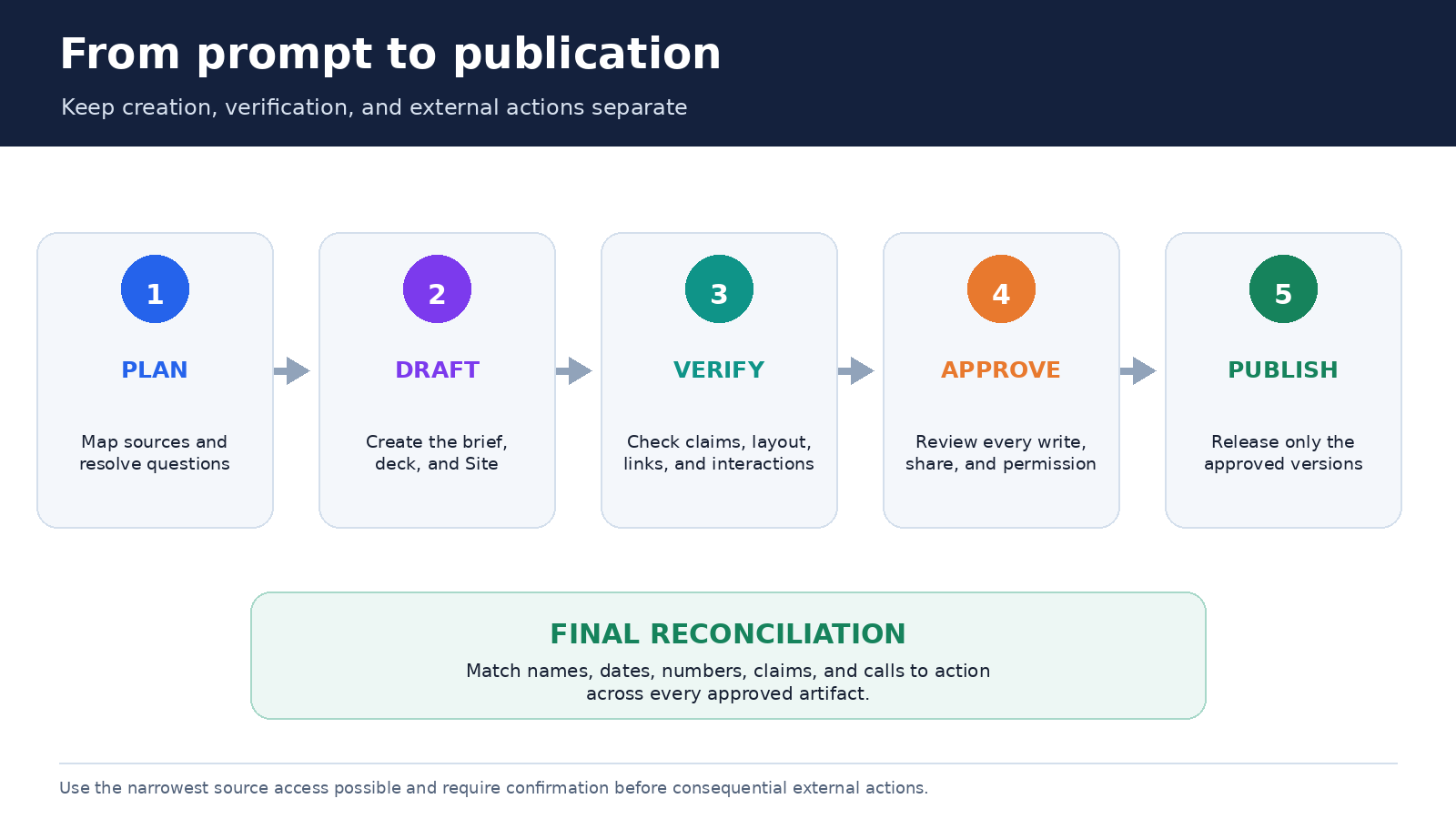
Process: Begin in Plan mode. Show the source map, assumptions, unresolved questions, deliverable outline, and proposed actions. Ask before changing connected files, sharing anything, or publishing a URL. After approval, create drafts and run the acceptance checks below.
Acceptance checks: Reconcile names, dates, numbers, claims, and calls to action across all three outputs. List unsupported statements. Confirm links work. Produce a short change log and a reviewer checklist.
This is still one prompt, but it establishes a review loop. For a smaller job, shorten it. Keep the five essentials: outcome, audience, controlling sources, deliverable specifications, and approval boundaries.
Build the document first when accuracy matters
For most strategy, sales, research, and launch work, the document is the best place to settle substance. It has room for caveats and competing interpretations that do not fit neatly on a slide. Ask Work to produce a claim table before polishing prose. Each row can show the claim, source, date, confidence, and destination artifacts.
Review quotations against the original. Recalculate critical totals from source data. Check whether a statement is an observed fact, an estimate, or a recommendation. If Work cannot support something, either provide evidence, qualify it, or remove it. A polished sentence is not proof.
When native Google Workspace actions are supported and enabled, Work can create or edit Google Docs, Sheets, and Slides. The official file guide notes that availability varies by plan, workspace settings, file type, and surface. It also says PowerPoint is not included in the Work desktop flow at launch. Separate ChatGPT for PowerPoint offerings may exist for eligible managed workspaces, so check your actual interface rather than assuming every presentation path is identical.
Turn the approved narrative into a deck
Do not ask for “a professional presentation” and leave the word professional undefined. Name the meeting, duration, audience knowledge, slide count, visual density, and decision. Attach the approved master or a reference deck. Tell Work which layouts may be reused and which elements must remain untouched.
A useful deck check has two passes. The content pass tests the argument: Does each slide earn its place? Are numbers consistent with the brief? Is the recommendation visible? The visual pass tests the artifact: Is any text clipped? Are labels readable? Do charts start at sensible baselines? Are colors distinguishable and images licensed or generated appropriately?
Speaker notes should add context, not repeat slide text. Ask for a source note for every factual slide and a short talk track sized to the meeting. Then open the actual presentation in its native application. Rendering, fonts, and layout can change outside the preview.
Build and test a Site without publishing too soon
Sites is the interactive branch of ChatGPT Work. OpenAI describes it as a public beta for dashboards, trackers, launch calendars, prototypes, internal portals, and interactive reports. You can test a Site inside ChatGPT and, where supported, share it with a team or publish it through a URL. Work can also update it as underlying information changes.
Choose the Site because interaction helps, not because “website” sounds impressive. A static policy may be better as a document. A release calendar with filters, a KPI dashboard, or a guided product comparison may genuinely benefit from a Site. Define the user’s task, required pages, data source, update frequency, accessibility needs, and empty or error states.
Preview every path. Test links, filters, forms, mobile layout, keyboard navigation, contrast, and what appears when data is missing. Verify that internal notes and connected-source details did not leak into public text. If the Site depends on changing data, show a last-updated time and define who owns refresh and review.
Control apps, permissions, and approvals
ChatGPT now uses the Plugin Directory as the main discovery layer for workflow capabilities. Plugins may package skills, apps, and app templates. Apps are still the integrations that reach external data or perform actions. The difference matters because installing a workflow package does not necessarily enable every underlying system or action.
Before starting, inventory what Work can read and write. Prefer the smallest source scope that completes the task. Use a dedicated folder rather than an entire drive when possible. Keep the first run read-only until the source map is correct, then enable only the writes you need.
OpenAI says the default app permission is Important actions, which allows reading automatically but asks before consequential actions. If every change should require confirmation, choose Any changes where available. Approval settings do not grant extra source-system access. They govern when ChatGPT asks before using access that already exists.
Read the third-party app’s terms and privacy policy before connecting sensitive data. In managed environments, admins can limit roles, apps, actions, domains, and sync scope. The safest workflow is not merely “approve when asked.” It is to decide in advance which actions should never be available for this project.
Review all three outputs as one system
Cross-format drift is the quiet failure to watch. The deck can retain an old launch date after the brief changes. The Site can round a percentage differently. A customer-facing headline can promise more than the internal evidence supports. Ask Work for a final reconciliation table containing every key name, number, date, claim, and call to action, with its value in each artifact.
- Verify the source map and resolve conflicts.
- Approve the document’s claims and recommendation.
- Check the deck narrative, notes, citations, and rendering.
- Test the Site’s content, interactions, privacy boundary, and accessibility.
- Reconcile shared facts across formats.
- Approve connected-file changes, sharing, and publication separately.
Save the final source list and change log with the deliverables. If this becomes recurring work, turn the successful instructions, references, and acceptance checks into a template. Do not freeze product-specific steps forever. OpenAI’s ChatGPT release notes already show that Work changes quickly. For example, the August 14 notes state that Work is not available inside Projects using project-only memory. Our project-only memory guide explains that boundary if you need isolated Project context instead.
Frequently asked questions
Can ChatGPT Work really create a document, deck, and website from one prompt?
Yes, one detailed prompt can start a coordinated workflow for all three. Expect Work to plan, ask questions, create drafts, and request approvals rather than deliver three unquestionable final assets instantly. Results depend on available tools, connected sources, permissions, templates, and your acceptance criteria.
Do I need to connect Google Drive or another app?
No for every task. You can begin with instructions and attached source material. A supported connection is useful when Work must search authorized files or create and edit native files. Availability depends on plan, workspace, role, region, surface, and app configuration.
Is a ChatGPT Site the same as a fully managed production website?
No. Sites is a public beta for interactive sites and web apps that can be previewed and shared where supported. You still need to test content, behavior, accessibility, privacy, data freshness, and publishing scope. Use an established production stack when your requirements exceed the feature’s current controls.
What should I review before sharing the outputs?
Check every material claim against its source, recalculate important numbers, inspect document formatting, open the presentation in its native app, and test every Site path. Reconcile names, dates, metrics, and calls to action across all formats. Finally, verify permissions and remove internal-only material before sharing or publishing.
The practical takeaway
ChatGPT Work makes one-prompt, multi-format creation useful because it can carry a coherent project brief through research, planning, drafting, and revision. The valuable unit is not the prompt alone. It is the source-governed workflow that follows.
Give Work a real outcome, a clean source pack, explicit format requirements, and clear approval boundaries. Settle the substance in the document, compress it thoughtfully for the deck, and use a Site only when interaction improves the result. Then review each artifact on its own and reconcile them together. That is how one prompt becomes three dependable deliverables without pretending human judgment has disappeared.