
You can use ChatGPT without creating an account, but the experience is deliberately lighter than the signed-in version. Open chatgpt.com in a supported region, type a request, and begin. There is no registration form to complete first. That makes signed-out ChatGPT useful for a quick explanation, a writing experiment, or a first look at an AI assistant.
The important details sit behind that simple start. A logged-out conversation is not saved like account history, only one conversation is available at a time, availability varies by location, and the training preference is tied to the browser. This guide explains what actually works, what you give up, and how to try ChatGPT without mistaking convenience for privacy.
Quick answer: how to use ChatGPT without an account
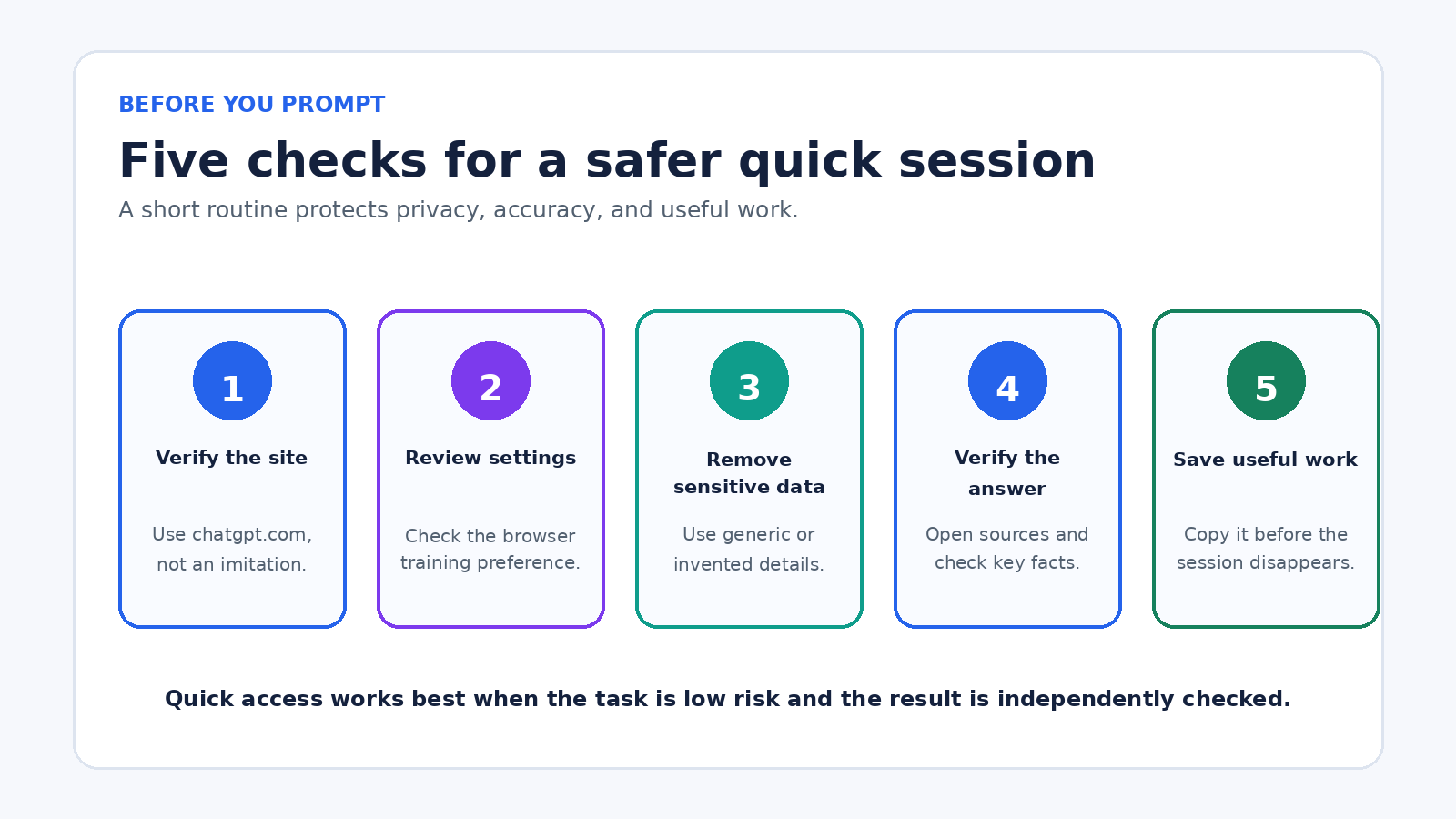
- Go directly to chatgpt.com. Check that the address is correct rather than using an imitation site.
- If the message box appears, enter a simple, non-sensitive request. No account is needed in supported regions.
- Continue with follow-up questions while the same chat remains open.
- Before sharing anything personal, open the question mark menu, choose Settings, and review the Improve the model for everyone control.
- Copy any useful result into your own notes before starting a new chat, closing the session, clearing site data, or changing browsers.
If ChatGPT immediately asks you to log in, that does not necessarily mean something is broken. OpenAI’s current ChatGPT home page guidance says access without an account is being made available in supported countries, while some regional restrictions remain. Network rules, age requirements, service availability, or a product change may also affect what you see.
What happens when you chat while signed out
The page creates a browser session so ChatGPT can remember earlier messages within the open conversation. This allows ordinary follow-ups. You might ask for a plain-language explanation, then request an example, then ask for a shorter version. Context inside that chat is different from a permanent account history.
OpenAI says logged-out users can have only one conversation at a time. Selecting New Chat makes the current conversation inaccessible. The chat also is not available as saved history after the session ends. In practical terms, treat every signed-out conversation as temporary working space. If the answer matters, save it somewhere you control before moving on.
Creating an account during the latest conversation may let that most recent thread appear in the sidebar, according to the same official home page article. It does not recover every earlier signed-out conversation. Do not use account creation as a backup strategy after several disposable chats.
This setup is convenient when persistence would be unnecessary. It is less suitable for a research project, a recurring work task, or anything that depends on returning to earlier decisions. Our practical ChatGPT workflow guide shows how to structure longer research and writing work when continuity matters.
What you can do without signing in
The safest description is simple: you can enter prompts, receive answers, and ask follow-up questions in the current chat. OpenAI’s current ChatGPT FAQ describes common uses such as brainstorming, writing, studying, planning, coding, and working through everyday questions. It also says ChatGPT can search the web and cite sources when it needs current information.
OpenAI’s search announcement was updated to state that ChatGPT search is available without signup in places where ChatGPT is available. A search answer may include source links that you can open and inspect. That is valuable for current topics, but a citation is an invitation to verify, not proof that every summary is correct.
Try tasks that are useful even if the session disappears:
- Explain a public concept at beginner, intermediate, or expert level.
- Turn your own non-sensitive bullet points into a clearer outline.
- Brainstorm names, questions, or approaches that you will judge yourself.
- Compare two public options and ask for the criteria behind the comparison.
- Search for current information, then open the cited primary sources.
- Debug a small generic code example that contains no credentials or private code.
Do not assume every tool shown in a tutorial will be present while you are signed out. Models, message limits, uploads, voice, image features, and other tools can depend on plan, device, region, current capacity, and product rollout. OpenAI also says limits can change. Describe the interface you actually see rather than forcing instructions written for a different account state.
The biggest limitation is continuity
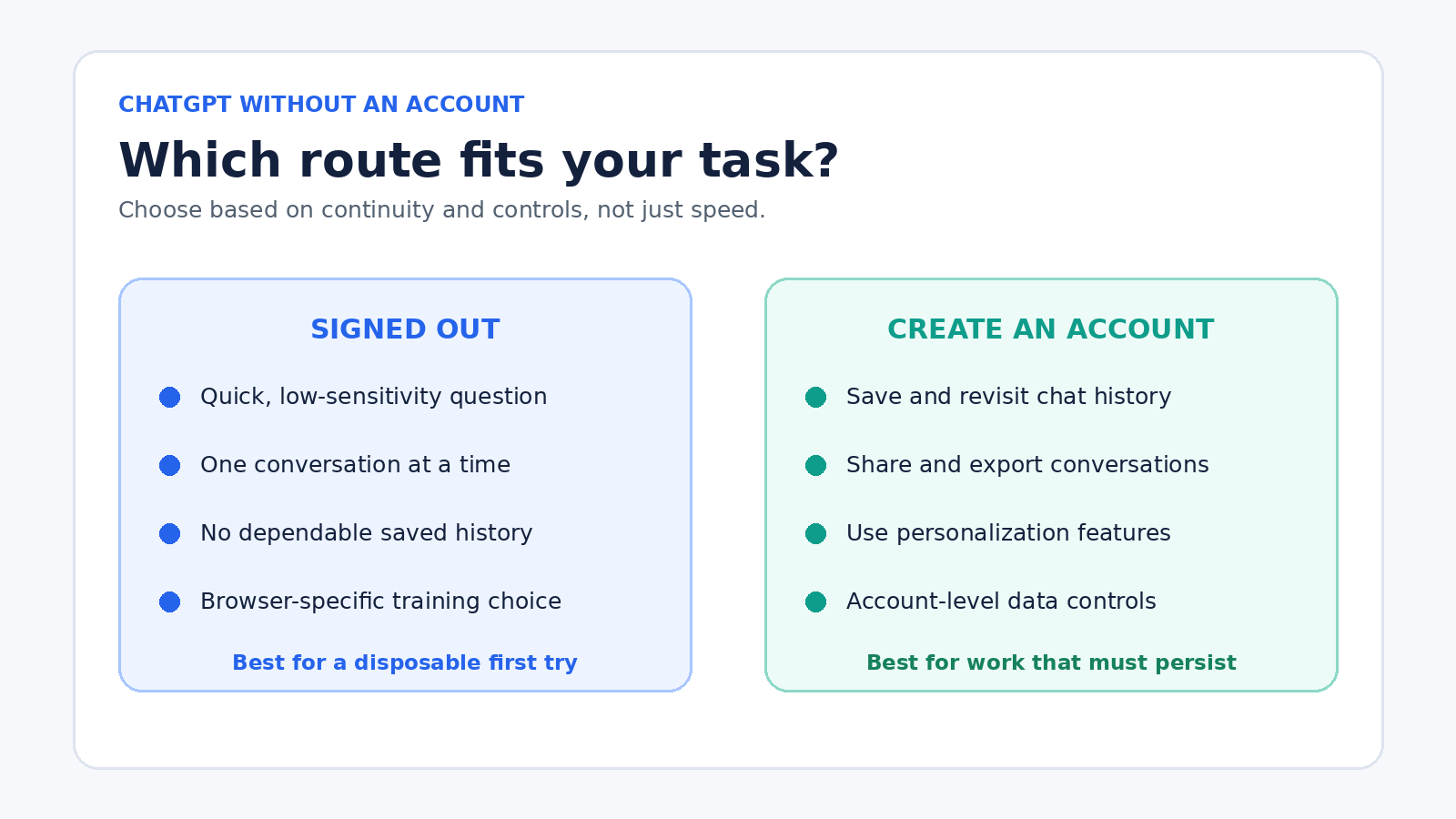
Without an account, there is no dependable library of past chats. You cannot organize a week of work around a thread that may vanish. You also lose account features that OpenAI identifies as benefits of signing in, including saved history, data export, chat sharing, and custom instructions. Those are not cosmetic extras when a task spans several sessions.
Imagine using ChatGPT to prepare for an interview. A signed-out chat can generate practice questions in a few minutes. If you then close the browser and return tomorrow, you should not expect the same thread to be waiting. For a one-time rehearsal, that may be fine. For a multi-day plan with feedback and revisions, save the material externally or use an account.
The same rule applies at work. A disposable chat can help rephrase a generic public announcement. It is a poor home for project records, source notes, approvals, or decisions. Your real system of record should remain a document, task manager, repository, or other approved workspace. ChatGPT output should never be the only copy of information you need.
Privacy and data controls before your first prompt
No account does not mean no data processing. OpenAI says chats may be used to improve its models by default. A signed-out user can change this through the question mark icon, Settings, and Improve the model for everyone. The current Data Controls FAQ documents those steps.
There is an important catch. For signed-out use, OpenAI says that preference is tied to the browser. It may reset if you clear cookies or switch browser, device, or profile. Check the setting again instead of assuming a choice made elsewhere follows you. Signed-in users get an account-level control that syncs across devices, along with options such as data export and account deletion.
Even with model improvement turned off, keep sensitive information out of casual prompts. Do not paste passwords, API keys, identity documents, private health details, confidential client records, unpublished financial data, or material your employer has not approved for an AI service. Removing a name is not always enough if the remaining details identify a person or organization.
A useful pre-prompt test is: would you be comfortable placing this text in a third-party cloud service under its published policies? If the answer is no or uncertain, stop. Replace real details with invented examples, summarize at a higher level, or use an approved tool and process.
Signed out is not the same as Temporary Chat
These two ideas are often confused. Signed-out ChatGPT means you are using the service without an account session. Temporary Chat is a separate ChatGPT mode described by OpenAI for signed-in use. Temporary chats do not appear in history, do not create or use memories, are not used to train models, and are deleted from OpenAI’s systems after 30 days. OpenAI notes that they may be reviewed for abuse monitoring.
A normal signed-out chat has its own controls and limitations. Its model-improvement setting is browser-specific, and the conversation is only accessible in the current browser session. Do not borrow the Temporary Chat promises and apply them to every logged-out conversation. If retention terms matter to your decision, read the current OpenAI page at the time you use the service.
A practical first session
Start with a task whose quality you can judge. For example: “Explain the difference between a savings account and a certificate of deposit for a beginner. Use a table with access, typical rate behavior, and major tradeoffs. Do not give personal financial advice. List anything that depends on the bank or country.”
This prompt works because it sets an audience, format, boundaries, and uncertainty rule. After the answer, ask: “Which statements could change over time, and what primary sources should I check?” Open the sources yourself. If the answer contains rates, laws, product terms, medical claims, or security instructions, verification is essential.
For writing practice, provide only material that is safe to share: “Turn these public bullet points into a friendly 120-word announcement. Preserve every date and number exactly. After the draft, list the facts I should confirm.” Compare the response with the source bullets. ChatGPT can produce fluent text while still changing a detail.
If you want more reusable request patterns, see our ChatGPT prompts for daily productivity. The examples focus on goals, source material, constraints, output format, and human review rather than magic phrases.
When creating an account makes sense
Stay signed out when you are exploring, the prompt is low sensitivity, one chat is enough, and you do not need the result to persist. Create an account when you need saved history, repeated access, sharing, exports, personalization, or account-level settings. The decision is less about whether ChatGPT can answer one question and more about whether you need a durable workspace.
An account does not eliminate the need for caution. You still need to inspect Data Controls, follow workplace rules, verify important claims, and decide what information is appropriate to enter. Signing in adds continuity and controls. It does not turn generated text into an authoritative source.
Also remember that a free account and a paid plan are not the same choice. You can create an account without deciding to buy a subscription. Compare the features and limits shown in the current product rather than relying on old screenshots or fixed quota claims from third-party articles.
Common mistakes to avoid
- Assuming access is global. Official guidance says availability depends on supported countries and rollout status.
- Calling the session anonymous. No registration is required, but the service still processes requests and applies its policies.
- Expecting chat history. Save useful work before starting over or leaving the browser session.
- Ignoring the default training choice. Review the signed-out Data Controls setting on each browser or device you use.
- Confusing signed-out use with Temporary Chat. They are different experiences with different controls.
- Trusting a confident answer without checking it. Verify consequential facts against current primary sources.
- Entering private data for convenience. A quick session is not a reason to bypass privacy, legal, school, or workplace rules.
Frequently asked questions
Can anyone use ChatGPT without an account?
Not necessarily. OpenAI says the web experience is available without an account in supported regions, but rollout and regional restrictions can affect access. If chatgpt.com presents a login screen instead of a message box, use the options actually offered and check current official availability information.
Will a signed-out ChatGPT conversation be saved?
It is not saved as account history. OpenAI says it remains accessible only during the current session in the same browser, and logged-out users can have one conversation at a time. Copy important output into your own notes before starting a new chat or leaving.
Are logged-out chats used to train OpenAI models?
OpenAI says they may be used by default. On the web, a signed-out user can open the question mark menu, select Settings, and turn off Improve the model for everyone. That choice is tied to the browser and can reset when cookies are cleared or another browser or device is used.
Do I need an account to use ChatGPT search?
OpenAI’s current search announcement says search is available without signup in regions where ChatGPT is available. You can ask a current question and inspect cited links, but search access and limits can still depend on availability. Always open the sources before relying on a consequential answer.
Bottom line
Using ChatGPT without an account is a real, official way to try the service in supported regions. It is best understood as a quick session, not a permanent workspace. You can prompt, follow up, and use web search where available, but you should expect limited continuity and browser-specific privacy settings.
Begin with non-sensitive information, check Data Controls, verify important claims, and save anything worth keeping. If your task grows into a project, creating an account gives you the history and management features that signed-out use intentionally leaves behind.