A useful prompt collection is not a page of clever commands. It is a small working library where every entry has a job, known inputs, a review method, and a version history. That difference matters after the first week. A copied prompt may look impressive yet be impossible to find when a deadline arrives. A cataloged prompt can be retrieved by task, adapted without losing its purpose, and retired when it stops producing acceptable drafts.
This guide shows how to build that kind of reusable ChatGPT prompt library for work, writing, and coding. It does not contain 200 prompts, despite the preserved historical wording in this page’s URL. Instead, it gives you a maintainable workflow and a compact set of editorial examples. The examples are created for this article and are not official OpenAI commands or a guarantee of a particular result.
Begin with jobs you repeat
Do not start by collecting every prompt you see. Open a note, spreadsheet, or database and list tasks that recur. A project manager might repeatedly turn meeting notes into action lists. An editor might compare a draft with a brief. A developer might ask for a failing test to be explained before touching the implementation. These are good library candidates because the input changes while the desired type of output stays recognizable.
Write each task as a verb plus an object: “summarize a decision log,” “diagnose a weak introduction,” or “review a patch against acceptance criteria.” If two entries do the same job, keep the clearer one. If an entry only says “be more creative” or “make this better,” it is probably a modifier rather than a standalone prompt.
OpenAI’s prompt engineering guidance for ChatGPT recommends clear, specific instructions, enough context, and iterative refinement. Those points are easier to apply when a library entry names the information a user must supply. A blank template should reveal its missing fields instead of hiding them inside a long paragraph.
Give every prompt a library card
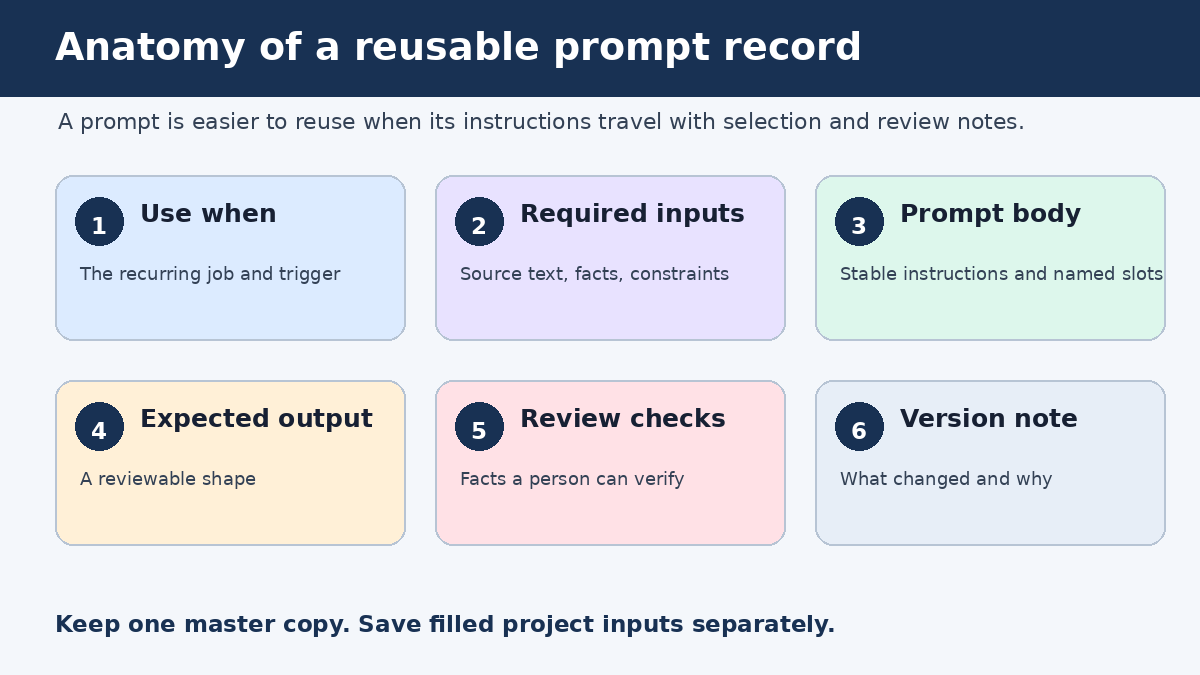
A prompt becomes reusable when its supporting record explains when and how to use it. You can store each record as one spreadsheet row, one database item, or one Markdown file. The tool matters less than a consistent set of fields.
- Name: a short, searchable label based on the task.
- Use when: the situation that should trigger this prompt.
- Required inputs: the facts, source text, code, audience details, or constraints needed before use.
- Prompt body: the reusable instruction with visible placeholders.
- Expected output: the shape of a satisfactory response, such as a table, annotated draft, or test plan.
- Review checks: questions a person can answer after reading the result.
- Version note: what changed, why it changed, and the date of the edit.
Add tags only when they help retrieval. A compact vocabulary such as work, writing, coding, analysis, draft, and review is easier to maintain than dozens of nearly identical labels. Keep the prompt’s name stable when you revise its wording so bookmarks and references still make sense.
Editorial example: a complete record
Name: Decision note from meeting notes
Use when: A meeting ended with choices, owners, or unresolved questions
Required inputs: Raw notes, participant names, project name, due-date conventions
Expected output: Decisions, actions, open questions, and unclear items
Review checks: Every owner appears in the notes; no deadline was invented
Version: 1.2, clarified how missing owners are labeled

Prompt:
Using only the meeting notes between <notes> tags, prepare a decision note for [project].
Separate confirmed decisions, assigned actions, and open questions.
For each action, include an owner and deadline only when the notes state them.
Write "not recorded" when either field is missing.
End with a short list of ambiguous passages that need human clarification.

<notes>
[PASTE APPROVED NOTES]
</notes>
This record is specific enough to run and simple enough to inspect. It also separates instructions from source material. OpenAI’s API prompt engineering best practices describe putting instructions first, separating context with clear delimiters, and specifying the desired result and format. The article is written for API users, but these basic organization ideas are also practical in an ordinary ChatGPT conversation.
Use slots, not vague placeholders
Brackets such as [TOPIC] are useful only when the person running the prompt knows what belongs there. Prefer slots that request a decision-ready input: [reader and what they already know], [approved sources], [language and maximum length], or [files changed and acceptance criteria]. A good slot doubles as a short intake form.
Keep permanent instructions outside the slots. If a coding review must always preserve public function signatures, put that rule in the prompt body. If the rule varies by repository, turn it into [compatibility constraints]. This makes the stable part of the prompt easy to distinguish from project-specific information.
Editorial example for work: compare options
I need to choose between the options listed below for [decision].
Build a comparison table using only the supplied evidence.
Use these criteria and weights: [criteria and weights].
For each score, quote or point to the supporting input.
Mark a cell "insufficient evidence" rather than estimating missing facts.
After the table, state which option ranks highest under these weights and list two facts that could change the ranking.

<evidence>
[PASTE APPROVED EVIDENCE]
</evidence>
The prompt does not outsource the decision. It asks for a traceable comparison whose assumptions can be challenged. Change the criteria or weights and save a new version only if that change will recur. One-time details belong in the run notes, not in the master prompt.
Editorial example for writing: diagnose before rewriting
Review the draft against the brief before rewriting anything.
Return a table with: requirement, evidence in the draft, problem, and proposed fix.
Pay special attention to unsupported factual claims, repeated ideas, audience mismatch, and missing transitions.
Then rewrite only the passages that need a change.
Preserve facts, names, numbers, citations, and link targets from the source.

<brief>
[PASTE BRIEF]
</brief>
<draft>
[PASTE DRAFT]
</draft>
This entry has a different purpose from a general request to “improve my writing.” It creates a diagnosis that an editor can review before accepting changes. For a focused set of drafting patterns, see PChatGPT’s writing prompt workflow. For a broader explanation of instruction design, use the site’s guide to writing more accurate prompts.
Editorial example for coding: explain a failure first
Analyze the failure using the provided error, relevant code, and acceptance criteria.
Do not propose a patch until you have listed:
1. the observed behavior,
2. the expected behavior,
3. the most likely fault location,
4. evidence for and against that diagnosis, and
5. the smallest test that would distinguish competing causes.
After the diagnosis, propose the smallest compatible change.
Preserve [public interfaces and compatibility constraints].
Return the test change before the implementation change.

<error>[PASTE ERROR]</error>
<code>[PASTE RELEVANT CODE]</code>
<criteria>[PASTE ACCEPTANCE CRITERIA]</criteria>
This coding entry controls the order of work. It asks for evidence and a discriminating test before a patch. That makes review easier than a large answer that mixes guesses, code, and explanation. It still requires a developer to run the tests and inspect the proposed change in the real environment.
Test a prompt with a small case set
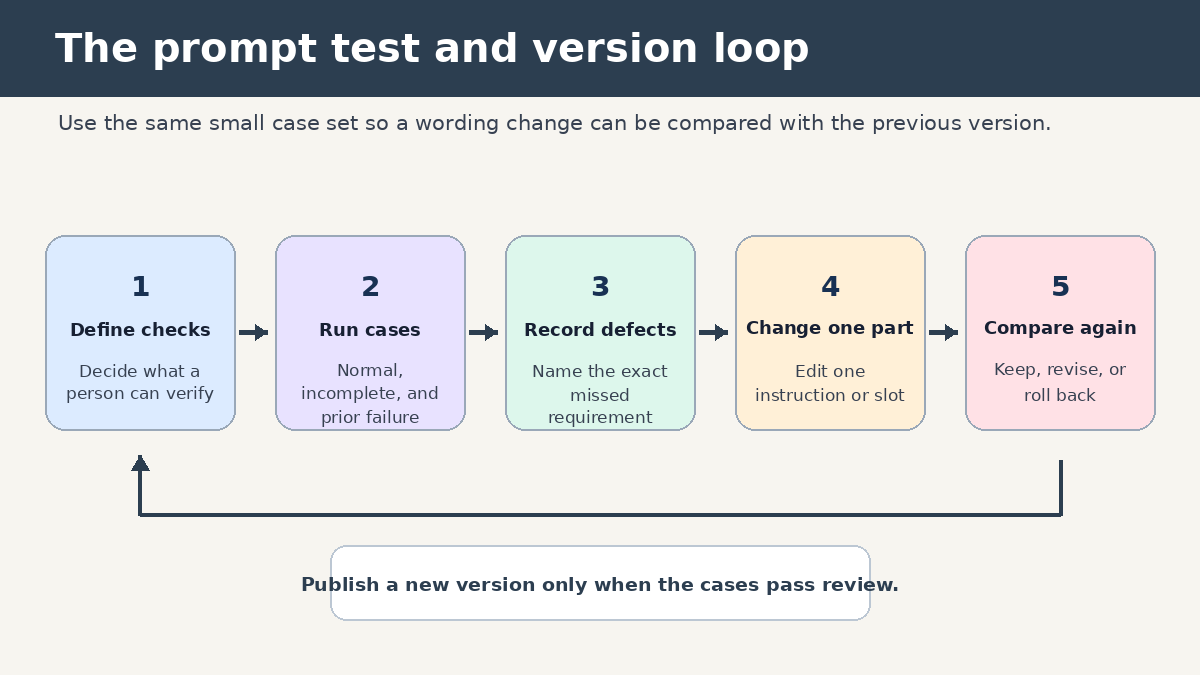
A library should record evidence that an entry works for its intended job. Create a tiny test pack for each important prompt. Three to five cases are enough to expose many weaknesses: a normal case, an incomplete input, an unusually long input, and one case that previously produced a bad response. Use material you are allowed to process, with private details removed where necessary.
Before each test, write checks that do not depend on liking the prose. For the meeting prompt, you might verify that every named owner came from the notes, unknown deadlines use the requested label, and open questions remain separate from decisions. For code, you might check whether the response preserves the stated interface and proposes a test that fails for the observed bug. For writing, compare every factual detail in the rewrite with the source.
OpenAI says prompt refinement is iterative: review the response and adjust wording, context, or simplicity. Treat that as a controlled edit. Change one meaningful part, rerun the same cases, and note what improved or regressed. If you alter the task, format, examples, and review checks at once, you will not know which change mattered.
Version prompts without creating a junk drawer
Use simple version numbers. A small wording fix can move 1.1 to 1.2. A change to the expected output or required inputs can become 2.0. Keep a one-sentence note such as “added an insufficient-evidence label after two runs invented missing dates.” That note is more useful than a full copy of every chat.
Do not fork a new prompt because one client prefers a different tone. Add a tone slot if tone varies often, or keep that preference in the run input. Fork only when two jobs need different review logic. A sales email draft and a legal clause comparison may both involve writing, but they should never share the same acceptance checks.
Retire entries that no longer match your tools or process. Mark them archived rather than deleting them immediately, especially if documents link to their names. A short replacement field can point users to the current entry. Review active entries on a regular calendar interval that fits your workload, and also after a visible failure. The failure-triggered review is often the one that produces the best version note.
Make retrieval faster than rewriting from scratch
A prompt library earns its keep at the moment of use. Choose names people will search for under pressure. “Weekly status from project log” is better than “Productivity prompt 14.” Put the most common entries in a short index grouped by job. Search can handle the long tail.
Each index item should show the name, use-when sentence, required inputs, and current version. That is enough to choose an entry without opening every record. If the same prompt appears in several tools, designate one master copy and treat the others as published copies. Otherwise, silent wording drift will make test results hard to interpret.
When a user runs an entry, save the filled inputs separately from the master. Never overwrite placeholders with live project data. This prevents a later user from inheriting an old customer’s name, an outdated requirement, or code from another repository.
Review facts, references, and code outside the prompt
Prompt quality cannot make every response true. OpenAI’s guidance on ChatGPT accuracy says the system can produce incorrect facts, fabricated quotes, and nonexistent citations, sometimes with confident wording. It advises users to verify important information and to visit cited links when accuracy matters.
Build that reality into the library card. A research entry can require links for factual claims, but the review checks should still say who opens those links and compares them with the claim. A coding entry can request tests, but a developer must run them. A work summary can ask for owners and dates, but a colleague should compare them with the meeting record before sending it.
Do not store confidential input inside a reusable template. The master should contain empty slots and handling notes. Follow your employer’s approved tools and data rules when filling those slots. That is a practical storage boundary, not a generic warning pasted onto every prompt.
A 30-minute starter build
- List five tasks you performed more than once during the past month.
- Choose one task whose output you can review confidently.
- Create its library card with the seven fields in this guide.
- Write one normal test case and one incomplete-input case.
- Run both, record failures, and revise one instruction at a time.
- Add the tested entry to a small index under work, writing, or coding.
- Set a review reminder and name the person who maintains the master copy.
Repeat this process when a new recurring task appears. A library of twelve tested entries is usually easier to trust and maintain than hundreds of unreviewed snippets. The useful count is the number of prompts your team can find, fill, review, and improve.
Frequently asked questions
What format should I use for a ChatGPT prompt library?
Use the simplest format that supports search, consistent fields, and version notes. A spreadsheet works for a small shared catalog. Markdown files work well when prompts live beside code or documentation. A database can help when you need filtered views, ownership, and linked test cases. Keep one master location regardless of format.
How many prompts should I add at the beginning?
Start with one prompt for a recurring task you understand well, then expand to a small set. Testing five useful entries teaches you more than importing a large collection with unknown assumptions. Add an entry when a repeated job and a reviewer are both clear.
Should I save good ChatGPT answers with the prompt?
Save a short, approved example when it clarifies the expected structure, but do not treat it as a permanent truth. Remove private details and label why the example passed review. Store project-specific filled prompts and outputs outside the master template so they do not leak into later runs.
When should I retire a reusable prompt?
Retire it when the underlying task disappears, the required tool or interface changes, another entry replaces it, or repeated tests show that its structure no longer helps. Archive the record with a reason and replacement link. That preserves useful history without leaving a broken entry in the active index.