ChatGPT is a conversational AI assistant. For a beginner, the most useful way to think about it is simple: it is good at working with words, patterns, examples, and instructions, but it is not a guaranteed source of truth or a replacement for your own judgment. It can help you plan a project, summarize notes, rewrite a draft, explain a concept, compare options, brainstorm ideas, translate text, or turn messy information into a clearer structure. It can also be wrong, vague, overconfident, outdated, or missing context that matters to your decision.
This guide explains ChatGPT for beginners without hype. It separates what ChatGPT usually does well from what it does not do reliably, then gives you a practical way to prompt, review, and improve answers. The goal is not to memorize clever prompt tricks. The goal is to build a safe habit: give useful context, ask for a specific output, check important claims, and keep human responsibility where it belongs.
The guidance below is based on current OpenAI help articles, especially the official ChatGPT capabilities overview, OpenAI’s prompt engineering best practices for ChatGPT, the article Does ChatGPT tell the truth?, the Data Controls FAQ, and the Temporary Chat FAQ. Product labels and account features can change, so use those official pages for the latest interface details.
What ChatGPT does well
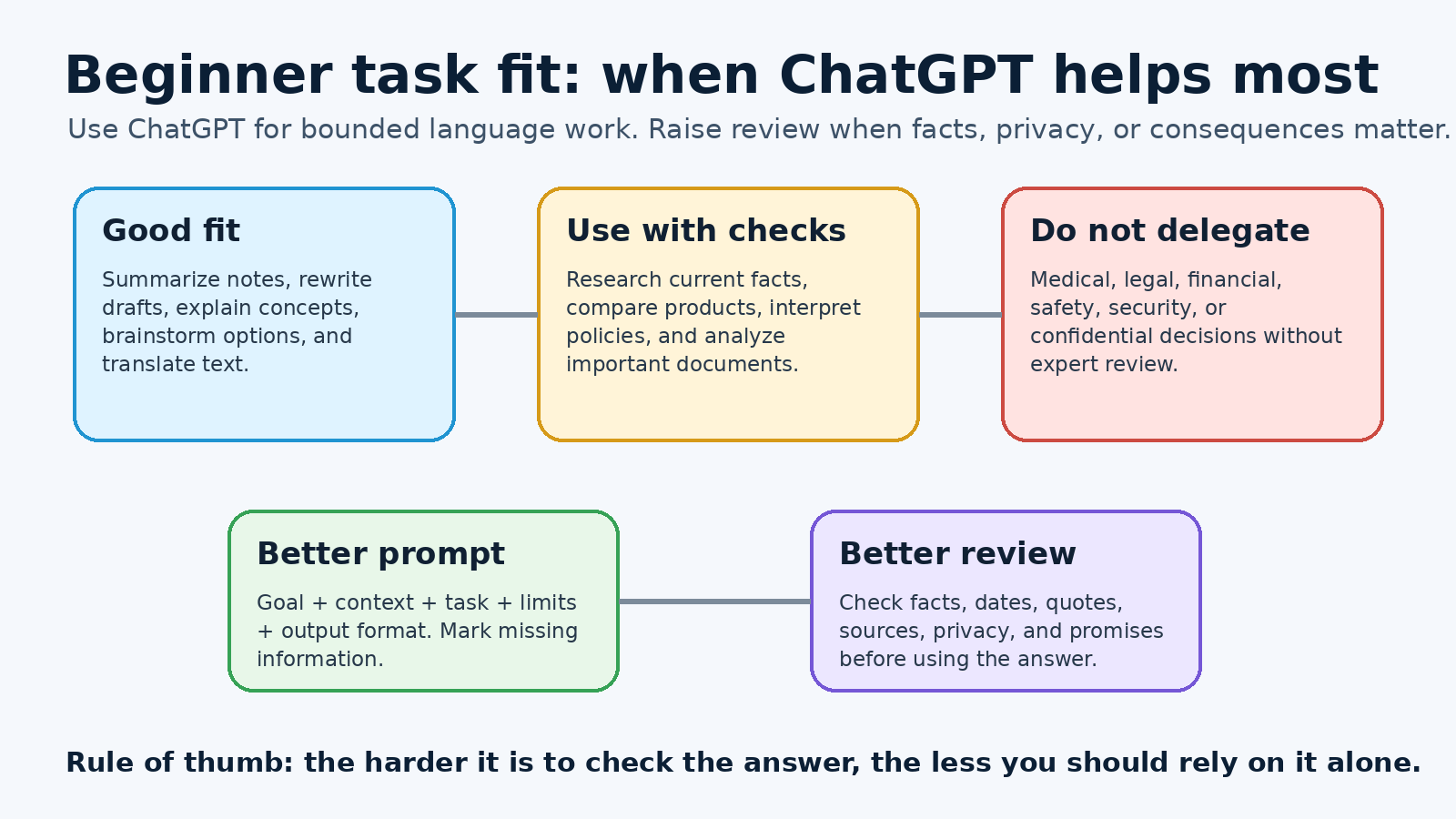
ChatGPT works best when the task depends on language, structure, reasoning over supplied information, or exploring possibilities. OpenAI describes core capabilities such as answering questions, explaining concepts, drafting and rewriting content, summarizing, offering creative suggestions, solving problems through logical reasoning, and translating between languages. Those are broad categories, but beginners can turn them into everyday workflows.
It can explain unfamiliar ideas in plain language
If you are learning a new topic, ChatGPT can provide a first explanation, define terms, give analogies, and ask practice questions. This is helpful when a textbook, policy document, or technical article feels dense. A strong beginner prompt might say: “Explain this topic for someone with no background. Use one example, define any jargon, and list three questions I should ask next.” That kind of request gives ChatGPT a role, audience, and output shape.
The answer should still be checked when accuracy matters. Use ChatGPT to make the topic less intimidating, then compare the explanation with a trusted source. For schoolwork, health, finance, law, engineering, security, or public claims, do not treat a smooth explanation as proof. Smooth writing can hide an error.
It can turn messy notes into something usable
One of the safest beginner uses is transforming information you already have. Paste meeting notes and ask for action items. Paste a rough outline and ask for a clearer structure. Paste a long email and ask for a shorter version that keeps the same meaning. Because the important material is supplied by you, the result is easier to verify against the source.
For example: “Here are my notes from a planning meeting. Turn them into a table with owner, task, deadline, open question, and risk. Do not add tasks that are not in the notes.” This prompt gives ChatGPT a useful boundary. It tells the assistant to organize, not invent. You still need to check names, dates, and commitments before sending the table, but the first pass can save time.
It can brainstorm options without judging them for you
ChatGPT can generate titles, angles, interview questions, practice scenarios, study plans, or alternative phrasings. Beginners often get the most value when they ask for options rather than a single answer. Instead of asking “What is the best idea?” ask for “Ten possible ideas, each with one advantage, one drawback, and what information I would need before choosing.” That wording keeps you in charge of the decision.
This is where related workflows can help. PChatGPT’s guide to daily productivity prompts shows how prompts can support normal work without replacing review. The best prompts make the next step clearer. They do not remove accountability.
It can revise drafts for tone, clarity, and format
OpenAI’s prompting guidance recommends being clear and specific, providing enough context, and asking for the tone you want. That advice matters when you ask ChatGPT to improve writing. “Make this better” is vague. “Rewrite this message for a friendly but professional customer update, keep it under 150 words, preserve the refund deadline, and do not promise anything not stated here” is much stronger.
For beginners, revision tasks are often safer than asking ChatGPT to create everything from scratch. You bring the facts and intent. ChatGPT helps with clarity. Before using the final text, compare it line by line against your original facts. Look for added promises, missing conditions, changed dates, and wording that sounds more certain than the evidence supports.
What ChatGPT does not do well
ChatGPT’s limits are just as important as its strengths. OpenAI’s article on truth and accuracy says ChatGPT can produce incorrect or misleading outputs and may sound confident even when wrong. It also notes that hallucinations can include incorrect definitions, dates, facts, fabricated quotes, fabricated studies, fabricated citations, and overconfident answers to ambiguous or complex questions. Beginners should take that warning seriously.
It is not a final authority
ChatGPT can help you understand a question, but it should not be the final source for important facts. If you need the current price of a product, the rules of a government program, the status of a flight, a medical recommendation, a legal interpretation, or a technical safety decision, verify with the original source or a qualified professional. ChatGPT may have search or other tools depending on plan and settings, but even cited answers should be checked by opening the source yourself.
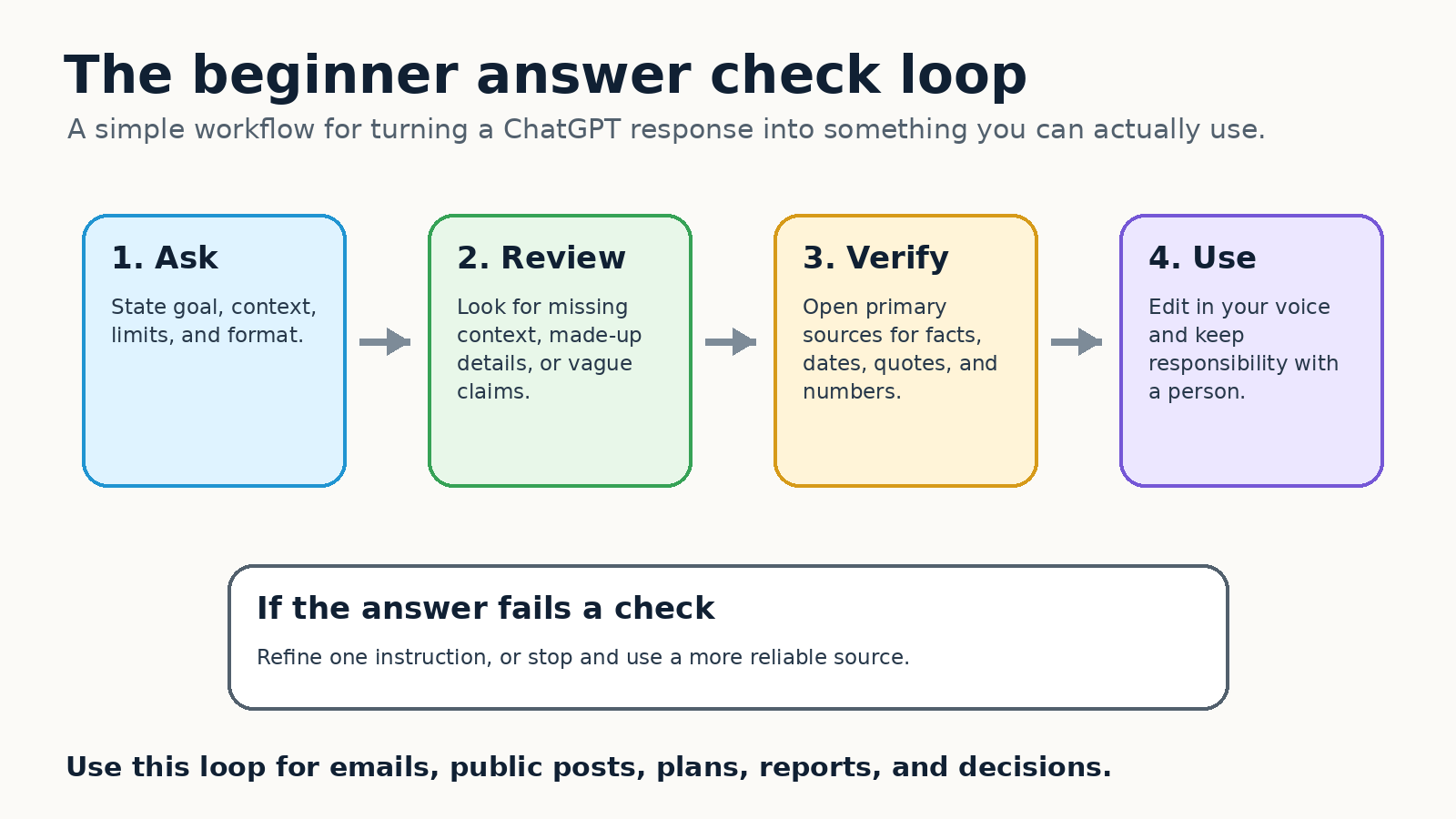
A useful beginner habit is to separate drafting from verification. Ask ChatGPT to draft a summary, then ask it to list the claims that require checking. After that, check those claims outside the chat. This slows the process down a little, but it prevents a common mistake: accepting a polished answer because it reads with confidence.
It does not know your full situation unless you explain it
ChatGPT responds to the context available in the conversation and, when enabled, to certain saved preferences or memories. It does not automatically know your organization, your private constraints, your latest email thread, your local policy, your budget, or your risk tolerance unless you provide that information. When beginners get a generic answer, missing context is often the reason.
Give the assistant the situation in a short, structured way. Include the goal, audience, source material, deadline, constraints, and what you do not want. If any part is private or sensitive, summarize it in safer terms rather than pasting raw confidential material. If the task cannot be described safely, do not put it into ChatGPT.
It is not a private vault for sensitive information
Privacy settings matter. OpenAI’s Data Controls FAQ says data controls let users decide whether conversations help improve models. It also explains that signed-in users can turn off “Improve the model for everyone” in Data Controls, and that conversations still appear in history when training is turned off. OpenAI’s Temporary Chat FAQ says Temporary Chats do not appear in chat history unless saved, do not create memories while temporary, and are not used to improve models while they remain temporary. The FAQ also says a copy may be kept for up to 30 days for safety purposes.
For a beginner, the practical rule is conservative: do not paste passwords, private keys, medical records, financial account numbers, trade secrets, confidential client files, or anything you would regret storing in a third party service. If you need privacy controls, read the official OpenAI pages in your account context before relying on them. Settings can vary by sign-in state, workspace, and product plan.
It does not remove the need for skill
ChatGPT can help beginners move faster, but it does not make every task beginner safe. A legal letter, tax position, security change, medical decision, data analysis, or public policy claim still requires domain knowledge. ChatGPT can produce a checklist, a draft, or a set of questions for an expert. That is different from replacing the expert.
This distinction protects you from overuse. Use ChatGPT to prepare, clarify, practice, and reduce blank-page effort. Keep final decisions with the person who understands the real consequences. If you cannot judge whether an answer is good, treat the answer as a starting point, not a result.
A simple beginner prompt formula
You do not need a complicated prompt library to get started. Use this five-part structure:
- Goal: Say what you want to accomplish.
- Context: Explain the situation, audience, and source material.
- Task: State exactly what ChatGPT should do.
- Limits: Say what it must not invent, change, or assume.
- Output: Ask for the format you want, such as bullets, a table, a checklist, or a short email.
Here is a reusable prompt:
I am trying to [goal]. The audience is [audience]. Here is the source material: [paste or summarize]. Please [task]. Keep the tone [tone]. Do not add facts that are not in the source. If something is missing, mark it as “needs verification.” Return the answer as [format].
That template follows OpenAI’s advice to be clear, specific, and iterative. It also makes the answer easier to review because the rules are visible. If the answer is weak, do not start over with a completely different request. Add one correction at a time: “Shorten it,” “make it less formal,” “keep the dates unchanged,” “show assumptions,” or “turn it into a checklist.” Iterative refinement is usually more reliable than expecting one perfect prompt.
If you want a deeper practice routine, read PChatGPT’s guide on how to ask ChatGPT better questions. If you often repeat the same tone, role, or formatting preferences, the guide to ChatGPT custom instructions can help you decide what belongs in persistent instructions and what should stay in each prompt.
How to check an answer before using it
Beginners often ask, “How do I know if ChatGPT is right?” There is no single button that solves this for every case. Use a review process that matches the risk of the task.
For low-risk writing
Check whether the answer says what you meant, uses the right tone, preserves important details, and avoids making promises you did not approve. Low-risk tasks include brainstorming titles, rewriting a casual message, outlining a personal project, or generating practice questions. Even here, you should edit for your own voice.
For factual claims
Ask ChatGPT to separate facts, assumptions, and suggestions. Then verify the facts from primary sources. If the answer includes citations, open them. If it gives a quote, search the original document. If it gives a date or number, compare it with an official page. OpenAI’s accuracy guidance explicitly encourages users to verify important information from reliable sources.
For current information
Use current sources. OpenAI notes that ChatGPT may use search or deep research depending on available tools, and those tools can provide more recent or cited information. Still, current information is fragile. A page can change, a price can expire, a policy can update, and a local rule can differ from a general answer. Ask for sources, then check the source page yourself.
For personal, professional, or high-stakes decisions
Raise the review standard. Do not rely on ChatGPT alone for medical, legal, financial, safety, employment, security, or compliance decisions. Use it to prepare questions, summarize documents you are allowed to share, compare options, or draft a checklist for a qualified reviewer. The higher the consequence, the more independent verification you need.
Beginner examples that work well
Try these simple use cases first:
- Summarize your own notes: “Turn these notes into five action items and five open questions. Do not add anything that is not in the notes.”
- Improve a message: “Rewrite this email to sound calm, clear, and professional. Keep the deadline and the refund condition unchanged.”
- Learn a concept: “Explain this concept to a beginner, then give me a one-question quiz and the answer.”
- Compare options: “Give me three possible approaches, the trade-off for each, and what information I need before choosing.”
- Review a draft: “Find vague claims, unsupported statements, and parts that may confuse a non-technical reader.”
These prompts work because they are bounded. They ask ChatGPT to organize, revise, explain, or critique. They do not ask it to make a consequential decision without evidence.
Common beginner mistakes
The first mistake is asking a vague question and expecting a precise answer. “Help me with marketing” gives ChatGPT almost nothing to work with. “Create a one-page launch checklist for a small online course aimed at first-time freelancers, with no paid ads and a two-week timeline” is much clearer.
The second mistake is giving too much unfiltered information. Beginners sometimes paste a large document and ask for “the important parts.” That can work, but it is better to define what important means. Ask for risks, dates, decisions, contradictions, tasks, or questions. A narrower lens produces a more useful answer.
The third mistake is skipping review. ChatGPT can make a weak idea sound finished. Before you send, publish, or act, ask: Did it preserve the facts? Did it invent anything? Is it current? Does it match my audience? Do I understand why this is the right next step?
The fourth mistake is using ChatGPT for everything. Sometimes a calendar reminder, spreadsheet formula, direct search, phone call, or conversation with a specialist is better. Good AI use is selective. Use ChatGPT where it reduces effort and improves clarity. Avoid it where it creates risk or hides uncertainty.
FAQ
What is ChatGPT best for when you are new?
Start with low-risk tasks where you can easily check the result: summarizing your own notes, rewriting drafts, explaining concepts, creating checklists, brainstorming options, and practicing questions. These uses fit ChatGPT’s language strengths and keep you close to the source material.
Can ChatGPT give wrong answers?
Yes. OpenAI says ChatGPT can produce incorrect or misleading outputs and may sound confident even when wrong. Verify important information from reliable sources, especially quotes, dates, numbers, technical claims, and anything tied to health, law, finance, safety, or current events.
Should beginners share private information with ChatGPT?
Be cautious. Do not paste passwords, private keys, confidential client data, sensitive personal records, or anything you are not allowed to share. Review OpenAI’s Data Controls FAQ and Temporary Chat FAQ for current account controls, history, model improvement, memory, and retention details.
How can I write a better first prompt?
State your goal, add brief context, describe the exact task, set limits, and request a clear output format. If the first answer is not good enough, refine it with one specific correction instead of starting over.
Final takeaway
ChatGPT is useful for beginners when you treat it as an assistant for drafting, organizing, explaining, and exploring. It is risky when you treat it as an unquestioned authority. The safest habit is simple: provide clear context, ask for a bounded output, check important claims, protect sensitive information, and keep final responsibility with a person. Used that way, ChatGPT can reduce blank-page stress and improve everyday work without hiding its limits.