Claims that Claude can hack autonomously deserve careful attention, but the headline alone tells you almost nothing about the actual risk. A model that solves a puzzle in a controlled cyber range is not automatically capable of compromising a defended organization. A coding assistant that finds a suspicious function is not the same as an agent that chooses a target, obtains access, persists, and achieves an objective without help. The useful question is not simply whether Claude can hack. It is what a specific model did, inside which boundary, with which tools, permissions, safeguards, human decisions, and evidence.
This guide explains how to interpret evidence about Claude autonomous hacking and AI security threats without turning the discussion into an intrusion manual. It focuses on evaluation, authorization, defensive use, and controls. Model behavior, product safeguards, and policy can change, so check current Anthropic documentation rather than carrying an old result forward as if it described every Claude model or deployment.
What autonomous hacking actually means
Autonomy is not a switch. At one end, a person asks a model to explain code and manually decides what to do. A tool enabled assistant can inspect an approved repository, run an authorized scanner, and summarize results. A more capable agent can choose among tools, adapt its plan after errors, and continue across many steps. Even then, the operator may still select the target, prepare credentials, approve commands, provide hints, reset the environment, or decide when success has occurred.
Those distinctions matter because each adds human contribution. When a report uses the word autonomous, look for a plain account of the initial prompt, available tools, network access, time budget, retry policy, human interventions, stop conditions, and success test. Also ask whether the environment contained intentionally vulnerable systems, weak defenses, synthetic data, or services already known to the evaluator. A strong result can still be important, but its meaning must stay attached to its test conditions.
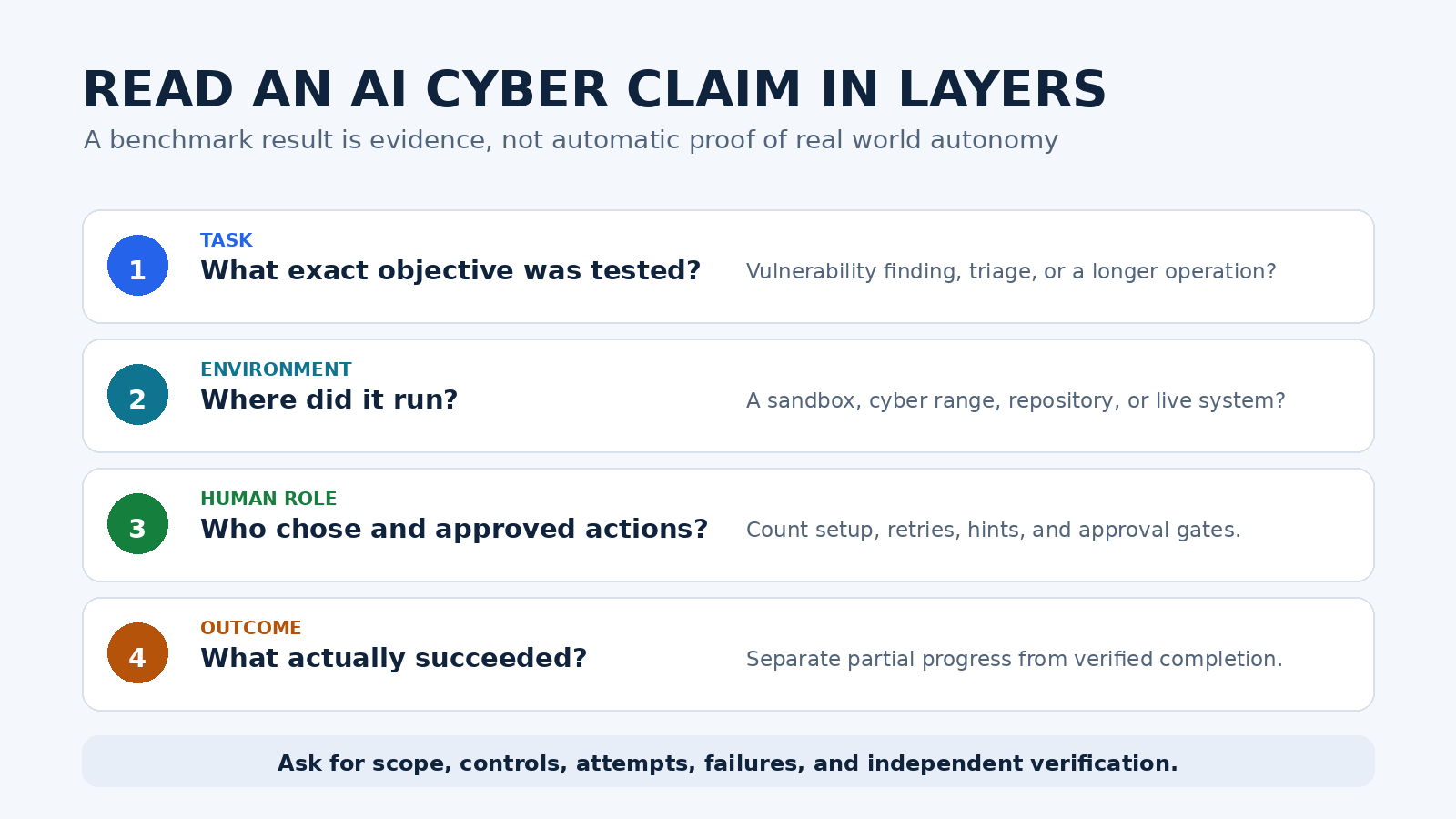
Read capability evidence in layers
Start with the exact model and configuration. The Claude name covers different models, access surfaces, system prompts, and tool arrangements. Anthropic’s Transparency Hub points readers to model summaries and system cards, including reported capability and safety evaluations. A result for one model should not be silently applied to another. Nor should a base model evaluation be treated as proof of how a managed product behaves with additional safeguards.
Next, identify the task. Vulnerability discovery, exploit validation, incident triage, log analysis, attack path reasoning, and long running network operations measure different things. A model can be strong at reading source code yet unreliable at operating a computer. It can make progress in a lab but fail under active monitoring, incomplete information, patched software, or changing credentials. Aggregate scores can also hide whether success came from many retries or a small subset of tasks.
Then examine the outcome. Did the evaluator independently verify that the issue existed? Was a claimed success merely model text, or did the environment record the intended state change? Were false positives counted? Did the report publish failures as well as successes? Reproducible evaluation needs machine logs, tool traces, timestamps, environment details, and a scoring rule set before the run. Without those pieces, a vivid transcript may be an illustration rather than strong evidence.
Why stronger cyber capability creates two effects
Cyber capable models can help defenders with repetitive analysis. Under proper authorization, they may organize alerts, explain unfamiliar code, suggest test cases, compare a patch with a vulnerability description, draft remediation notes, or help an analyst search a large body of logs. These uses can shorten the path from a signal to a reviewable hypothesis. They do not remove the need for a qualified person to confirm severity, scope, and remediation.
The same general skills are dual use. Better code reasoning and tool use may lower the effort required to search for weaknesses or coordinate actions. An agent also works at machine speed, can be copied, and can continue while an operator attends to something else. That changes scale even when the model is imperfect. Risk comes from the whole system: model capability combined with tools, credentials, reachable assets, persistence, operator intent, and the quality of monitoring.
This is why Anthropic’s Responsible Scaling Policy overview describes proportional protection, capability assessments, safeguard assessments, deployment controls, monitoring, and red teaming. It is also why readers should distinguish a provider’s frontier risk program from the controls needed in their own environment. A vendor safeguard is one layer. It does not replace asset ownership, access control, logging, incident response, or legal authorization.
The agent changes the threat model
A chat response is advice. An agent with tools can affect state. It may read files, call services, browse pages, execute code, or interact with a desktop. Every added tool expands what a mistake or manipulated instruction can reach. Anthropic’s current computer use documentation warns that instructions in webpages or images can conflict with the user’s instructions and recommends isolation from sensitive data and actions. It also calls for informing users about relevant risks and obtaining consent before enabling computer use in a product.
Indirect prompt injection is especially important. A hostile instruction can sit inside an email, web page, issue description, log entry, or source file that the agent reads. The text may try to redirect the agent, reveal information, or trigger an unintended tool call. The content does not need to exploit traditional software memory safety to be dangerous. It attacks the agent’s decision process and the trust boundary between instructions and data.
Anthropic’s prompt injection guidance recommends treating third party content as untrusted, limiting access to sensitive data and actions, sandboxing tools, screening tool outputs, red teaming the workflow, and monitoring results. These are sound design principles, but no single filter should be treated as perfect. Design the system so that one bad classification cannot become a destructive action.
A safer pattern for authorized defensive work
Begin with written authorization. Name the assets, accounts, dates, test methods, data handling rules, and people allowed to approve exceptions. Define what is forbidden, including adjacent systems that may be technically reachable but are outside scope. If ownership is unclear, stop. A public IP address, exposed service, bug bounty listing, or accessible repository is not by itself permission to test anything beyond the exact published terms.
Use a dedicated environment next. Give the agent synthetic or minimized data, temporary credentials, an allowlist of destinations, and only the tools required for the current task. Separate research from execution. Read only analysis can happen first, while state changing actions require a fresh approval. Do not place production secrets in a context that the agent can read merely for convenience. The related PChatGPT guide to non-human identity security explains why agent credentials need owners, limited scope, rotation, and monitoring.
Record the full run. Preserve the request, model and configuration, tool definitions, tool calls, returned data, approvals, errors, and final verification. Logs should be protected from the agent where practical so the system cannot quietly rewrite its own audit trail. Set budget limits for time, calls, and affected resources. Rate limits and circuit breakers make a looping or confused agent easier to contain.
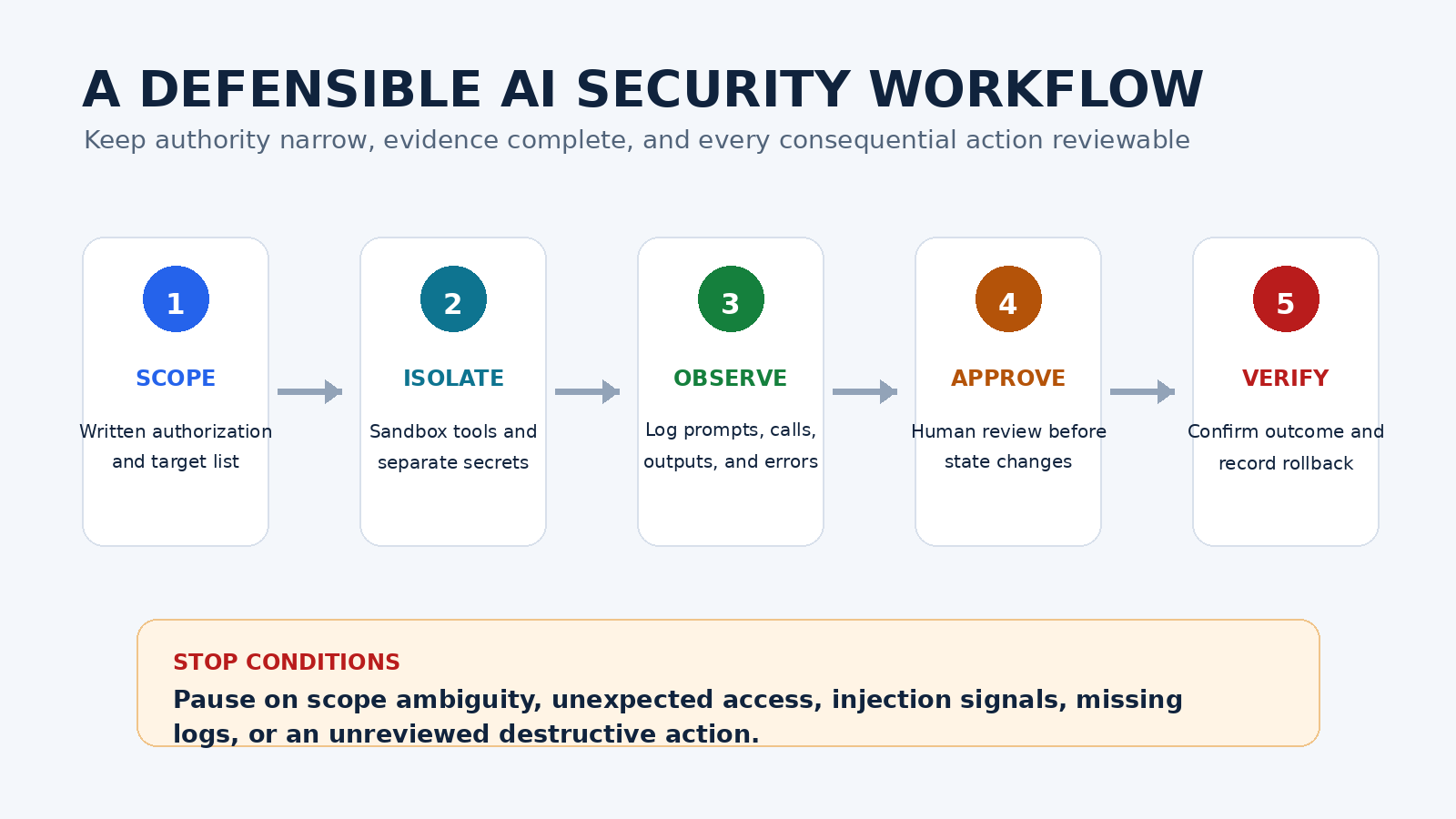
Place a human checkpoint before any action that changes access, executes untrusted code, sends data outside the approved boundary, alters a production service, creates persistence, deletes information, or contacts a third party. The reviewer should see the proposed action, target, reason, expected effect, rollback plan, and relevant evidence. Approval should expire after that exact action rather than becoming blanket permission for the rest of the session.
Finally, verify independently. A model saying that a vulnerability is fixed is not proof. Run the approved regression check, inspect the actual configuration, and confirm that logging and service health remain intact. Record unexpected effects and roll back when necessary. The broader AI agent security guide offers a useful inventory and governance framework for organizations that already have agents operating across cloud and development systems.
Practical evaluation questions for security leaders
- Identity: Which exact model, version, system prompt, tool set, and access surface produced the result?
- Authority: Who owned the target, and where is the written permission for each tested action?
- Environment: Was this a benchmark, a cyber range, an isolated repository, or a defended live system?
- Human input: Who selected targets, supplied credentials, approved commands, gave hints, or retried failures?
- Evidence: What logs independently demonstrate progress and final success?
- Denominator: How many tasks, attempts, and failures sit behind the highlighted example?
- Containment: Which network, identity, sandbox, and data controls limited the possible impact?
- Injection defense: How did the agent separate trusted instructions from hostile content returned by tools?
- Stop conditions: What caused an automatic pause, and who had authority to resume?
- Recovery: Could the operator revoke credentials, isolate the environment, and restore state quickly?
What not to conclude from a dramatic demonstration
Do not conclude that every Claude deployment has the same capability. Do not assume that a benchmark solve rate predicts success against your environment. Do not treat a refusal policy as a technical guarantee, or a sandbox as safe without checking its boundaries. Do not infer that defensive usefulness requires broad production access. Most valuable early deployments can begin with read only evidence, narrow repositories, synthetic data, and explicit review.
Also avoid the opposite mistake. Imperfect performance does not make the risk irrelevant. Automation can still increase throughput, and attackers can combine a model with conventional tools and human expertise. The defensible response is measured: track capability evidence, reduce unnecessary authority, test controls, monitor agent activity, and rehearse recovery. Anthropic’s current Usage Policy defines acceptable use boundaries for its services, but every organization must also meet its own contractual, regulatory, and professional duties.
A decision rule that survives the next model release
Model names and benchmark leaders will change. A durable policy ties authority to verified risk, not to brand reputation or a demo. Increase access only after the system passes tests that resemble the intended workflow. Require stronger safeguards as the agent gains sensitive context, broader tools, longer runtime, or permission to change state. Review new system cards and product documentation when the model or integration changes, then repeat the relevant tests.
The central lesson is straightforward. Claude’s cyber capability can be useful evidence of progress and a reason to improve defenses, but autonomy should be described precisely. Keep testing legal, isolated, observable, reversible, and human accountable. If a team cannot state the scope, permission, evidence, and rollback path in plain language, the agent should not receive the authority to proceed.
FAQ
Can Claude autonomously hack a real organization?
No broad yes or no answer is responsible. Results depend on the exact model, tools, credentials, environment, defenses, time, and human help. Controlled evaluations can demonstrate meaningful capability without proving reliable success against a defended real organization. Testing a real organization requires explicit authorization.
Is it safe to let a Claude agent test production systems?
Production access raises the consequence of mistakes and prompt injection. Start in an isolated environment with minimized data and temporary credentials. If production testing is justified, use written scope, least privilege, complete logging, narrow human approvals, stop conditions, and a tested rollback plan.
What is the most important control for an AI security agent?
No single control is enough. The strongest baseline combines explicit authorization, isolation, least privilege, separation of untrusted content, human approval for consequential actions, tamper resistant logs, continuous monitoring, and independent verification. These layers limit damage when another layer fails.
How should I judge a new autonomous hacking claim?
Find the primary report or system card. Check the exact model, task, environment, tools, retries, human interventions, success criteria, failures, safeguards, and independent evidence. Treat conclusions that omit these details as provisional, especially when a headline generalizes from a single demonstration.