
A useful ChatGPT personal writing assistant is not a chatbot that produces a finished article from one ambitious prompt. It is a writing system in which you make the decisions and ChatGPT helps with defined passes: clarifying the brief, testing an outline, drafting rough sections, finding weak spots, and polishing language. That distinction matters. Generic prompting encourages you to judge one large answer after the fact. A writing workflow gives you checkpoints while the ideas are still easy to change.
This guide shows how to build that system with features OpenAI currently documents, including Projects, custom instructions, and canvas. It also separates style guidance from factual verification and privacy choices. You do not need every feature to use the method. A normal chat and a text editor are enough. The value comes from assigning one job to each pass and keeping final editorial control.
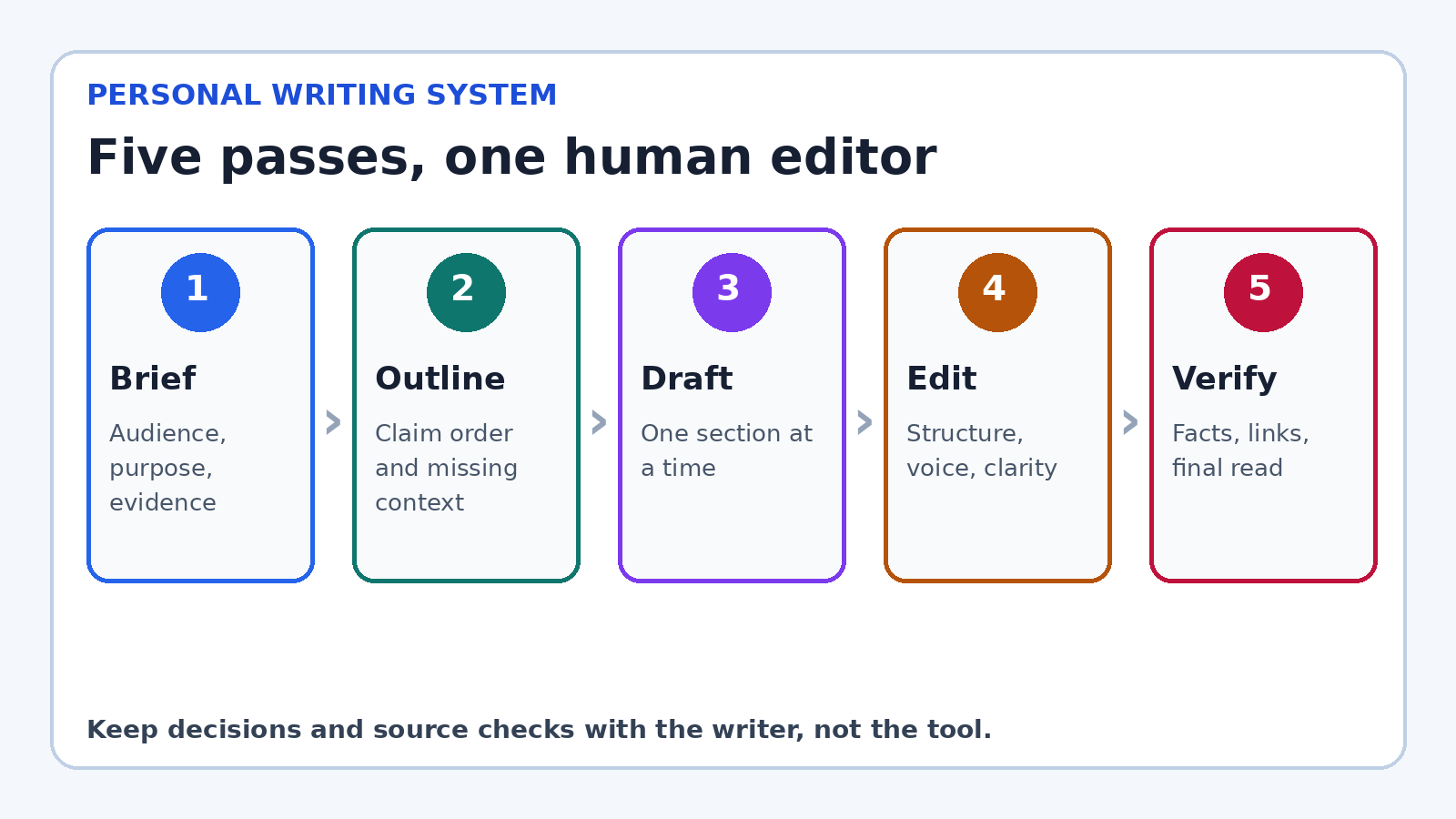
Start with a writing system, not a super prompt
A super prompt tries to encode the audience, research, outline, tone, examples, word count, and final format in one request. It can produce an impressive result, but it hides the decisions that shaped the result. When a section is wrong, you may not know whether the brief, evidence, structure, or prose caused the problem. Revision becomes a vague instruction to “make it better.”
A system makes those decisions visible. Begin with a brief, approve an outline, draft in manageable sections, then edit in a deliberate order. Each stage creates a small artifact you can inspect. If the argument is weak, return to the outline instead of endlessly polishing sentences. If the prose sounds unlike you, revise the voice card instead of adding random adjectives to the next prompt.
This process also protects original thinking. Before asking ChatGPT for prose, write down your point, the reader’s problem, and the evidence you expect to use. Even three rough bullets give the draft a center of gravity. ChatGPT can help develop the material, but it should not quietly decide what you believe.
Create a home for the work
For an ongoing book, newsletter, client account, or blog, a ChatGPT Project can keep related chats, uploaded reference files, and project instructions together. OpenAI describes Projects as workspaces for long running efforts and says project instructions apply inside that project, overriding global custom instructions. That makes a Project a sensible home for an evolving style guide, audience notes, approved terminology, and source files.
Do not treat the Project as an unfiltered attic. Add only current, useful material. Label documents clearly. Remove an outdated brief when a new one replaces it. A short “source map” can explain which file is authoritative for product names, which contains interview notes, and which is only background. Conflicting files invite confident but inconsistent drafts.
If you are writing one email or a private journal entry, a Project may be unnecessary. Use a fresh chat or your own editor. The system should reduce friction, not add administration. The smallest useful setup is a brief, a voice card, and a five pass checklist.
Build a one page voice card
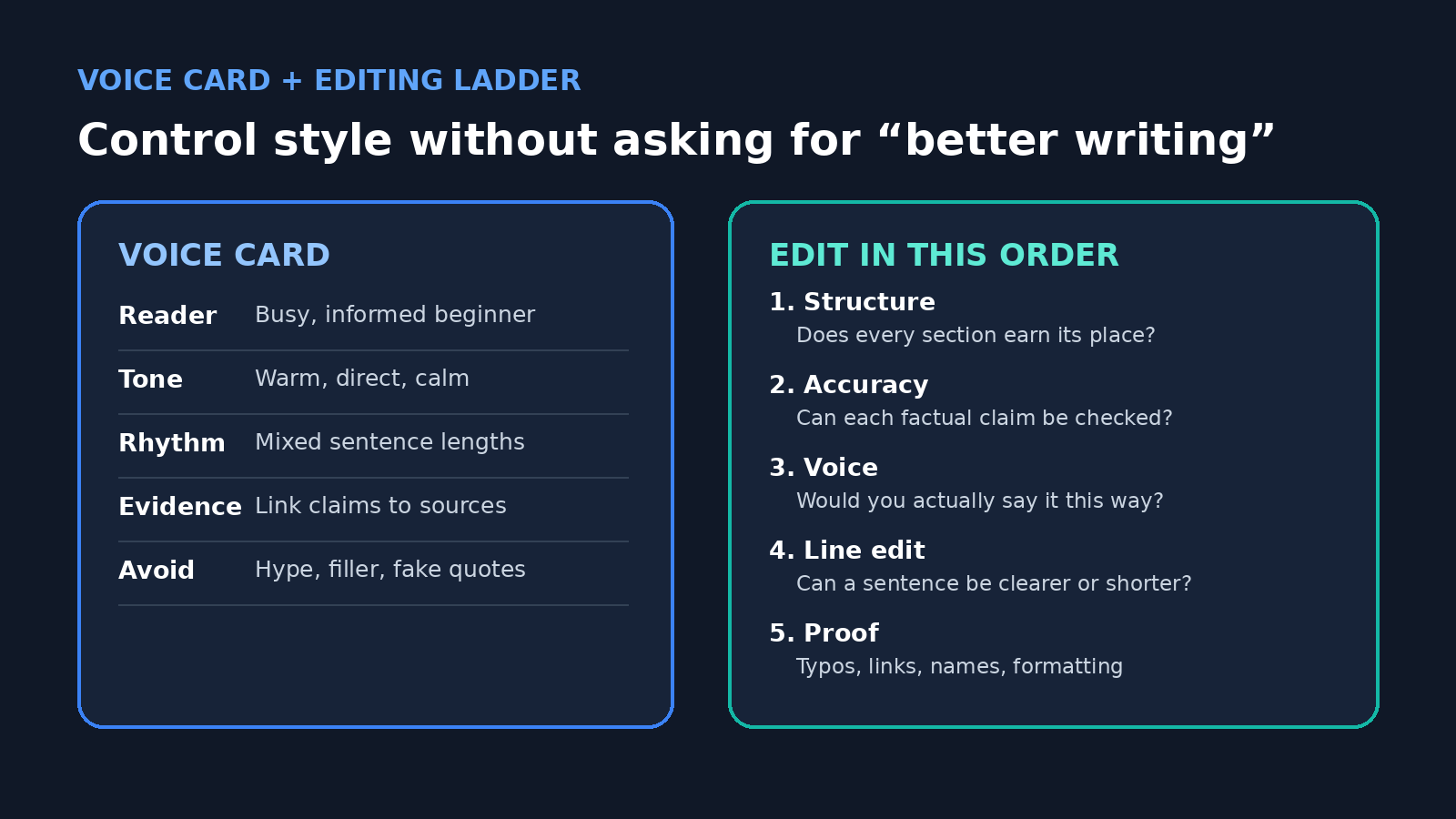
Voice is easier to preserve when you describe observable choices rather than an abstract identity. “Sound like me” gives ChatGPT little to work with. A useful voice card names the reader, level of formality, sentence rhythm, favored transitions, evidence standard, and habits to avoid. Add two short samples of writing you genuinely like, ideally your own. Explain what each sample demonstrates rather than assuming the model will infer the right lesson.
- Reader: Who knows what already, and what do they need next?
- Tone: Direct, warm, skeptical, playful, restrained, or another specific mix.
- Rhythm: Short paragraphs, varied sentence lengths, limited parenthetical remarks.
- Evidence: Distinguish reported facts, direct observations, and opinions.
- Avoid: Hype, throat clearing, fake quotations, stock conclusions, and favorite phrases you overuse.
Custom instructions can hold stable preferences that should influence many conversations. OpenAI says they can be edited or deleted and are available through personalization settings. Keep project facts out of this global layer. Your permanent preference might be “use plain English and flag unsupported claims.” A campaign deadline, confidential client detail, or article thesis belongs in the relevant conversation or Project.
Treat the voice card as a starting constraint, not a license to imitate another living writer. It is safer and more useful to identify qualities you want, such as economical description or conversational transitions, and pair them with your own examples. Your final read remains the test. If a phrase feels borrowed or performative, replace it.
Pass 1: turn the assignment into a brief
Before drafting, ask ChatGPT to interrogate the assignment. Supply what you know, then request a list of missing decisions. A practical brief contains the audience, purpose, desired action, scope, evidence available, evidence still needed, tone, length range, and format. It should also state what the piece must not claim.
I am preparing a guide for first time freelancers. Its purpose is to help them write a clear project update. Review the notes below and return: the reader’s likely question, the promise of the piece, three facts that need a source, what is out of scope, and up to five questions you need me to answer. Do not draft yet.
This prompt is useful because it asks for diagnosis, not prose. Answer the questions yourself. If ChatGPT proposes an angle, accept it only if it matches your purpose. Save the approved brief at the top of the working document so later edits can be judged against it.
Pass 2: design and challenge the outline
Ask for an outline that assigns one job to each section. For every heading, request the reader question, main claim, supporting evidence, and transition to the next section. Then run a challenge pass: Which section repeats another? Where does the argument jump? What would a skeptical reader question? Which point is interesting but outside the promise?
Do not ask for ten outlines unless you truly need ten directions. Too many options can replace judgment with browsing. One outline plus two alternate openings is often enough. Rearrange it yourself. A good outline should make the eventual draft feel almost inevitable, while still leaving room for your examples and language.
Pass 3: draft in sections with evidence markers
Draft one section at a time. Give ChatGPT the approved brief, current outline, relevant notes, and a narrow instruction. Ask it to mark missing support as [SOURCE NEEDED] instead of inventing a citation, quote, statistic, or example. That visible marker is more valuable than fluent filler because it tells you where research must happen.
Separate fact gathering from prose generation. If current information is needed and ChatGPT search is available, ask for sources and open them yourself. Prefer primary material such as official documentation, regulations, original studies, transcripts, and company announcements. A link is not proof that the sentence accurately represents the source. Read the relevant passage, check its date and scope, and keep a note connecting the claim to the evidence.
After each section, add your own detail: an observation, a real example you have permission to share, a useful distinction, or the reason the point matters. These contributions are what turn a plausible draft into your article. If you have nothing specific to add, ask whether the section deserves to exist.
Pass 4: edit in the right order
Editing works best from large decisions to small ones. First check structure. Then accuracy and completeness. Then voice. Only after those passes should you line edit and proofread. Otherwise, you may spend twenty minutes perfecting a paragraph that the structural edit removes.
Canvas can be helpful for this stage when it is available with the model you are using. OpenAI’s current help page describes selecting a passage for targeted guidance, receiving inline suggestions, adjusting length or reading level, applying a final polish, and moving through version history. These are editing controls, not guarantees of quality. Use them on a copy or keep versions so an automated rewrite cannot erase a sentence you wanted to preserve.
For the structural pass, ask for an editorial memo without a rewrite. Request the three largest problems, why each matters, and the smallest repair. For the voice pass, ask ChatGPT to highlight phrases that conflict with the voice card. For the line pass, work paragraph by paragraph and require an explanation for substantial changes. Reject edits that merely swap one ordinary word for a more inflated one.
Act as a careful copy editor, not a ghostwriter. Compare this section with my voice card. Identify up to six places that sound generic, overstated, or unlike the sample. Explain each issue and suggest one restrained alternative. Do not rewrite unaffected sentences.
Use style controls without flattening your voice
A consistent voice is not the same as uniform prose. If every paragraph has the same length, every section begins with a command, and every conclusion restates the introduction, the result feels processed. Let important passages breathe. Keep an occasional fragment if it sounds natural and is easy to understand. Preserve specific nouns and verbs from your own draft.
Be cautious with broad commands such as “make this professional,” “humanize this,” or “improve the flow.” They encourage sweeping changes without an agreed standard. Replace them with an observable target: remove repeated setup, reduce the reading level without removing technical terms, make the disagreement clear in the first sentence, or cut 15 percent while preserving every sourced claim.
Read the final piece aloud. Your ear catches rhythm problems, accidental repetition, and words you would never say. Compare a few paragraphs with older work you are proud of. The goal is not to fool a detector or manufacture quirks. It is to make sure the published wording reflects your judgment and sounds comfortable in your mouth.
Privacy choices belong before the upload
Writing material can contain more than obvious secrets. Drafts may include client names, unpublished plans, interview contact details, medical history, student work, contract language, or personal memories. Decide whether that information is appropriate to upload before opening a chat. Redact details that are not necessary for the writing task, and follow your employer’s or client’s rules.
For personal ChatGPT accounts, OpenAI’s Data Controls FAQ explains that users can turn off “Improve the model for everyone.” It says conversations can remain in history while not being used to train ChatGPT. The same page says Temporary Chats do not appear in history, do not create memories, are not used to train models, and are deleted from OpenAI’s systems after 30 days, while noting they may be reviewed for abuse. Those controls are useful, but they do not make inappropriate sharing appropriate.
Custom instructions deserve the same care because they can persist across conversations. Do not put passwords, confidential biographies, unreleased business plans, or sensitive client details in them. If you share a Project, review who can access its chats and files. Use a local document or an approved business workspace when your policy requires it.
Pass 5: verify before the final polish
Fluent writing can hide factual errors. Build a claim ledger before publication. Copy every checkable statement involving a date, number, named feature, quotation, legal rule, scientific finding, or current product behavior into a small table. Add the source, the exact supporting passage, its date, and your verification status. If a source does not support the wording, narrow or remove the claim.
Ask ChatGPT to help find claims, not to certify its own accuracy. A useful request is: “List every externally verifiable claim in this draft. Do not judge whether it is true. Quote the sentence and state what kind of source would verify it.” You still open the sources and make the decision. For high stakes medical, legal, financial, academic, or safety material, use a qualified human reviewer.
Finish with a mechanical check: names, links, heading order, captions, quotation marks, formatting, and the requested length. Then read the published preview, not just the editor. A missing word or broken link often becomes obvious only in the final layout.
A reusable session you can copy
- Write your own three bullet position before opening ChatGPT.
- Provide notes and ask for missing decisions, not a draft.
- Approve a brief with audience, promise, evidence, limits, and tone.
- Build one outline and challenge its weakest section.
- Draft section by section, marking unsupported details.
- Add your real examples, reasoning, and language.
- Edit structure, accuracy, voice, lines, and mechanics in that order.
- Verify every checkable claim against the source itself.
- Read aloud, preview, and publish only when you own every sentence.
Save the brief, voice card, strongest prompts, and final checklist for the next assignment. Do not save every correction as a permanent rule. A writing assistant should become more useful over time without becoming a pile of contradictory instructions.
Related PChatGPT guides
- How to set custom instructions in ChatGPT
- How to use the expanded custom instructions limit
- How to use ChatGPT for writing without cheating
Official OpenAI sources
- OpenAI Help Center: Canvas in ChatGPT
- OpenAI Help Center: Projects in ChatGPT
- OpenAI Help Center: ChatGPT Custom Instructions
- OpenAI Help Center: Data Controls FAQ
FAQ
Can ChatGPT learn my writing voice from a few samples?
Samples can help ChatGPT follow visible patterns, especially when you explain what each sample demonstrates. They do not transfer your judgment or guarantee an exact voice. Use a short voice card, compare revisions with your originals, and make the final wording yours.
Should I use custom instructions or a Project for writing?
Use custom instructions for stable preferences that should influence many chats. Use a Project for one ongoing body of work, its files, and its project specific instructions. For a single small task, a normal chat with a clear brief may be simpler.
Is canvas required for this workflow?
No. Canvas offers targeted selection, inline suggestions, writing shortcuts, and version controls where supported. You can follow the same five passes in a normal chat and keep the working draft in any editor that lets you review changes.
How do I stop ChatGPT from inventing facts in a draft?
You cannot guarantee that it will never make an error. Reduce the risk by supplying authoritative sources, drafting in small sections, requiring visible source needed markers, extracting a claim ledger, and checking each important statement yourself before publication.
Used this way, ChatGPT is neither an automatic author nor a novelty prompt box. It is a flexible workspace for asking editorial questions at the right moment. Your brief provides direction, your sources provide the facts, your voice card guides the language, and your final review decides what readers see.