Grammarly is no longer limited to pointing out a misspelled word or an awkward sentence. Its generative AI can compose new text, suggest ideas, draft an outline, rewrite selected passages, and help with replies. That makes it useful for more of the writing process, but it also changes the writer’s job. A generated paragraph needs a different kind of review from a comma correction.
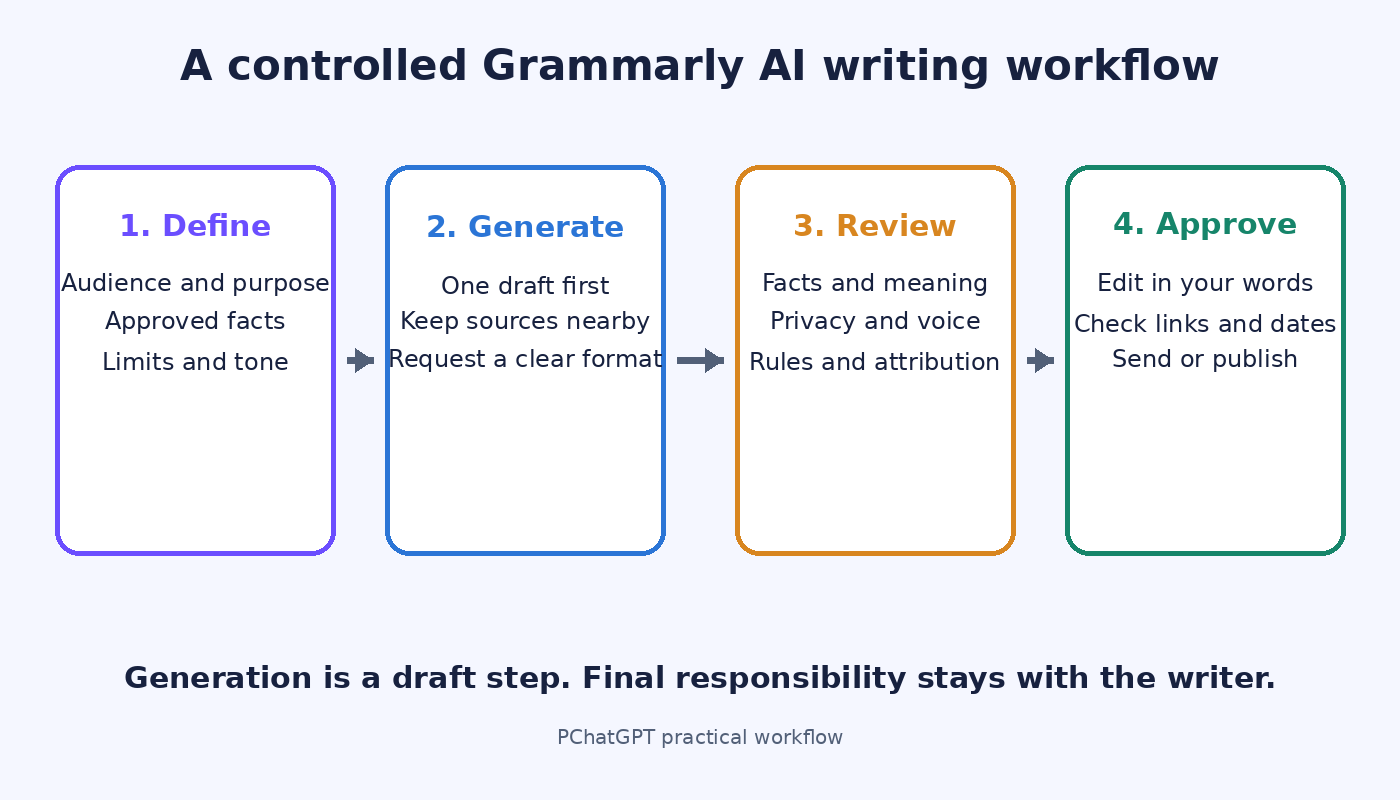
This guide explains a practical Grammarly AI writing workflow: decide whether the task suits generation, give the tool enough context, inspect the result, and then edit it as your own work. The aim is not to hand over authorship. It is to use fast assistance where it helps while keeping factual judgment, accountability, and final wording with a person.
Source note: This article is based on current Grammarly product and support documentation. It does not claim hands-on testing, and the workflow and review checklists below are editorial recommendations rather than official Grammarly methods.
What Grammarly’s AI writing assistant can do
Grammarly separates its familiar writing suggestions from optional generative AI. The standard suggestions deal with matters such as spelling, grammar, clarity, conciseness, and tone. Grammarly says those suggestions are meant to improve the writing without changing its substance. Generative AI is different because it can produce new content from a prompt and can meaningfully change what the text says.
According to Grammarly’s current generative AI assistance guide, the on-demand tools can compose, rewrite, ideate, and reply. A writer can select text, open the relevant pencil, lightbulb, or sidebar control, and ask for a change. The same guide says a writer can also begin with a prompt and ask AI Chat or the generative writing feature for an outline or ideas.
The available interface depends on the Grammarly product being used. Grammarly’s support page currently lists on-demand generative assistance in its Chrome and Edge browser extension, the classic Grammarly Editor, and Grammarly for Windows and Mac. It also describes Go and AI agents in Chrome, Edge, and Grammarly’s newer docs surface. Mobile generative AI is documented separately for Android and iOS. Rather than expecting every button to look the same, check the support instructions for the product in front of you.
The newer Grammarly docs guide describes a document editor with several agents. AI Chat can help generate ideas, rewrite text, or refine a message. The Grammarly agent reviews writing, while other documented agents handle narrower jobs such as paraphrasing, reader reactions, citation finding, AI detection, and plagiarism checking. These are separate tools with different purposes. A generated draft does not become verified merely because another agent reviewed its phrasing.
Choose generation only when the task fits
Generation is most useful when a blank page is the main obstacle and the cost of a rough first attempt is low. An internal meeting follow-up, a list of possible headings, or three ways to open a routine email can be good candidates. In each case, the writer already knows the facts and can quickly judge whether the output is suitable.
Rewriting is often a better fit than asking for a full draft. If you have a long paragraph that contains the right information but feels cramped, select it and request a shorter version. If an email sounds colder than intended, ask for a warmer tone, then compare the revision with the original. The source text gives the tool firmer boundaries and gives you something concrete to check.
Brainstorming can also save time when you treat the output as a menu, not a decision. Ask for possible objections a reader may raise, alternative section orders, or questions the draft has not answered. You can reject weak ideas without the awkwardness of untangling them from a polished final document.
Human-first writing is the better choice when the wording itself carries responsibility. A personal apology, a performance review, a public statement during a dispute, or advice with legal, medical, financial, or safety consequences should not begin as text you are tempted to accept without close scrutiny. AI may still help you inspect clarity later, but the facts, judgment, and commitments should come from the responsible person.
Confidentiality matters too. Before putting private customer details, unpublished business information, student work, or sensitive personal material into any AI feature, follow your organization’s policy and the product terms that apply to your account. Removing names does not always remove identifying context. When in doubt, use a neutral placeholder or do the work without generative assistance.
Write a brief that makes review easier
A useful prompt does not need to be clever. It needs to tell Grammarly what the text is for and what it must not get wrong. Begin with the audience and task. Add the facts the response may use, the desired length, and the action you want the reader to take. If any statement must remain unchanged, say so directly.
For example, a vague request such as “write a project update” leaves most decisions open. A stronger brief could say: “Draft a 140 word update for the design team. Use only the four status notes below. Explain that testing moved to Friday, ask owners to report blockers by 3 p.m. Thursday, and do not claim that the release date is confirmed.” The second version creates a small fact set and a visible review standard.
Keep source material separate from instructions. Label notes as facts, quotations, or open questions. If a quotation must be exact, do not ask the assistant to reconstruct it from memory. Paste the approved wording, preserve the source, and compare the final copy character by character if accuracy matters.
Also tell the tool what kind of change you want. “Improve this” can lead to broad revisions. “Cut this to 90 words while preserving the dates, names, and decision” is easier to assess. For tone, name the relationship rather than stacking adjectives. “Write to a colleague I know well, with a direct but courteous request” gives more useful context than “make it professional, warm, engaging, authentic, and polished.”
Use a draft, inspect it, then make one controlled revision
Generate one version first. Read it before requesting another. Multiple instant rewrites can create the illusion of progress while hiding which version changed a fact or softened an important condition. Mark the exact problem you see, then make a narrow request such as “keep the first paragraph and shorten only the explanation of the delay.”
Compare the revision with your brief rather than choosing the version that sounds smoothest. Did it use only the supplied information? Did it preserve uncertainty? Did it keep the requested action and deadline? A fluent sentence can still be wrong, vague, or more confident than the evidence allows.
If the output needs several rounds of factual repair, stop prompting and edit it yourself. At that point, generation is no longer saving effort. The same is true when the voice keeps drifting into sales language or generic filler. A quick manual rewrite is often faster than trying to describe every unwanted habit.
This approach also helps when you use more than one AI tool. A guide to choosing AI tools for everyday work should begin with the task and the evidence, not the novelty of the tool. Grammarly may be convenient inside a writing surface, while another assistant may suit research or structured analysis. Convenience does not remove the need to check the result.
What human review must cover
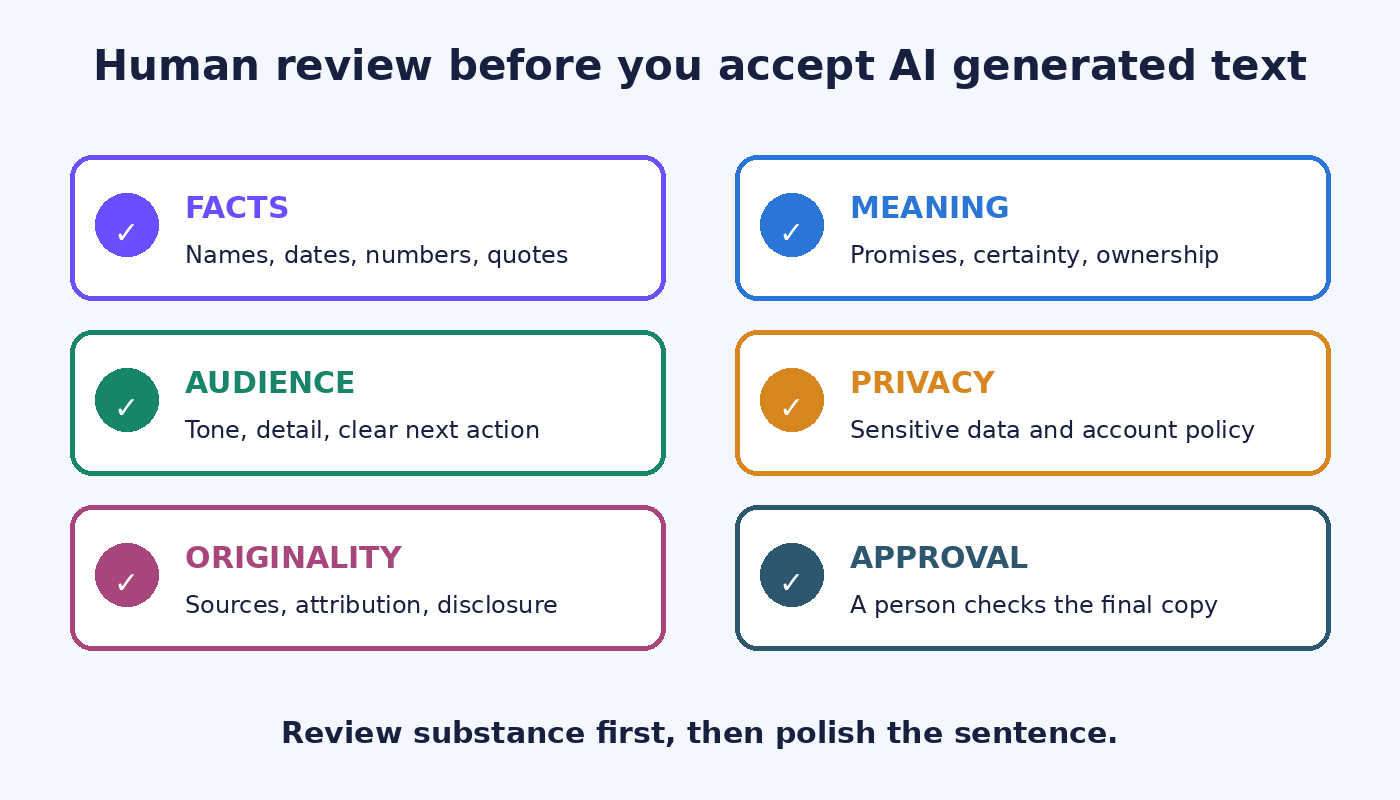
Start with factual claims. Check every name, date, number, quotation, link, product capability, and statement about what another person said or agreed to. Verify against the original source, not against another generated summary. If the draft adds a detail that was not in your notes, remove it or find a reliable source before keeping it.
Next, inspect meaning. A rewrite may keep the topic while changing the commitment. “We plan to deliver Friday” is not the same as “We will deliver Friday.” “The customer raised a concern” is not the same as “The customer rejected the proposal.” Pay special attention to certainty, permission, ownership, and deadlines.
Then read for audience and voice. Does the message sound like something you would actually send? Is the level of detail right for this reader? Delete canned praise, inflated claims, and introductions that delay the point. Grammarly documents personalization and context-aware help, but a writer still knows the relationship and consequences better than a generated draft does.
Finally, check originality and disclosure requirements. Workplace, publisher, and school rules differ. Follow the rules that govern your document. Grammarly itself says AI detection should be treated as one data point rather than conclusive proof and recommends combining automatic detection with manual review. Its support article on AI controls and detection also explains that optional generative AI can be turned off in account feature settings.
A practical email workflow
Suppose you need to tell a client that a review will arrive one day later than planned. First, write down the approved facts: the original date, the new expected date, the reason you are allowed to share, and any action needed from the client. Decide whether the new date is firm or estimated.
Second, ask for a short draft using only those facts. State the relationship and tone. A useful request might be: “Draft a concise update to an existing client. Acknowledge the one day delay, give the approved reason below, describe Friday as the expected delivery date rather than a guarantee, and invite urgent questions. Do not add compensation, excuses, or new commitments.”
Third, inspect the output against your notes. Look for an invented cause, an apology that accepts responsibility beyond what was approved, or a promise that changes an estimate into a guarantee. Correct those issues yourself. You can then use ordinary writing suggestions for grammar and clarity without asking generation to reconsider the whole message.
Fourth, read the email aloud. This catches phrases that are grammatically fine but unlike your normal voice. Confirm the recipient, attachments, dates, and links immediately before sending. That last pass sounds basic because it is basic. It also catches mistakes no style suggestion can understand.
A practical long-form workflow
For an article, report, or proposal, begin with the argument and evidence rather than a request for a finished document. Write the purpose in one sentence. Gather sources. Make a rough list of sections and decide what each section must establish. Generative AI can suggest alternate orders or point out missing reader questions, but you should choose the structure.
Draft section by section from your notes. If Grammarly generates a paragraph, attach it to the source note it is supposed to represent. This makes fact checking possible later. Do not let a polished transition blur the boundary between documented evidence and your interpretation.
After the full draft exists, run a separate editing pass. Look for repeated ideas, unsupported statements, abrupt jumps, and sections that do not serve the purpose. Only then spend time on sentence polish. If the document includes AI assistance that must be disclosed or attributed, handle that requirement before publication.
Students and researchers should be especially careful about assignment rules, quotations, citations, and original analysis. The site’s guide to using AI for writing without misrepresenting authorship offers a broader framework for keeping the research and judgment visible. The same principle applies here: assistance may support a process, but it should not conceal who did the thinking.
When Grammarly’s AI is useful and when to stop
- Use it to get past a blank page when you already know the facts and can judge the output.
- Use it to produce alternative wording for a passage you wrote, especially when the requested change is narrow.
- Use it to brainstorm questions, headings, or possible objections that you will select and develop yourself.
- Pause when the text introduces claims that are hard to verify or repeatedly changes the intended meaning.
- Do not rely on it as the final authority for consequential advice, sensitive communication, policy interpretation, or factual research.
- Do not paste material that your organization, client, school, or source agreement forbids you to share.
The useful dividing line is reviewability. If you can compare the output with a small, reliable set of facts and fix it quickly, generative assistance may save time. If you cannot tell whether the answer is right, generation has moved ahead of your evidence. Stop, research the issue, or ask the responsible person.
Frequently asked questions
Can Grammarly generate a complete first draft?
Grammarly documents generative features for composing text, developing ideas, drafting outlines, and refining existing writing. A complete first draft is possible for some tasks, but it still needs human review for facts, meaning, voice, privacy, and any disclosure rules that apply.
Is Grammarly’s generative AI the same as its grammar checker?
No. Grammarly describes its standard AI suggestions as help with spelling, grammar, clarity, conciseness, and tone without changing the substance. Its optional generative AI can create new content and meaningfully change the writing, so it requires a more substantial review.
Should I accept a rewrite if it sounds better?
Sound is only one test. Compare the rewrite with the source notes and the purpose of the document. Check whether it changed a claim, promise, deadline, quotation, or degree of certainty. Accept it only after the meaning is right.
Can I turn off Grammarly’s generative AI?
Grammarly’s current support documentation says users can turn off optional generative AI in the Feature customization area of account settings. Team access may also depend on administrator settings. The ordinary Grammarly product still relies on AI for writing suggestions, which the company distinguishes from optional generative features.
Keep the final decision with the writer
Grammarly’s move into content generation can shorten routine drafting and revision work. Its strongest use is not autonomous authorship. It is a controlled step inside a writing process that begins with a clear brief and ends with a person checking the substance.
Use generation for options, rough wording, and low-risk starts. Keep research, sensitive judgment, promises, and approval in human hands. When a draft is difficult to verify, the right response is not a more elaborate prompt. It is to return to the sources and write what you can support.