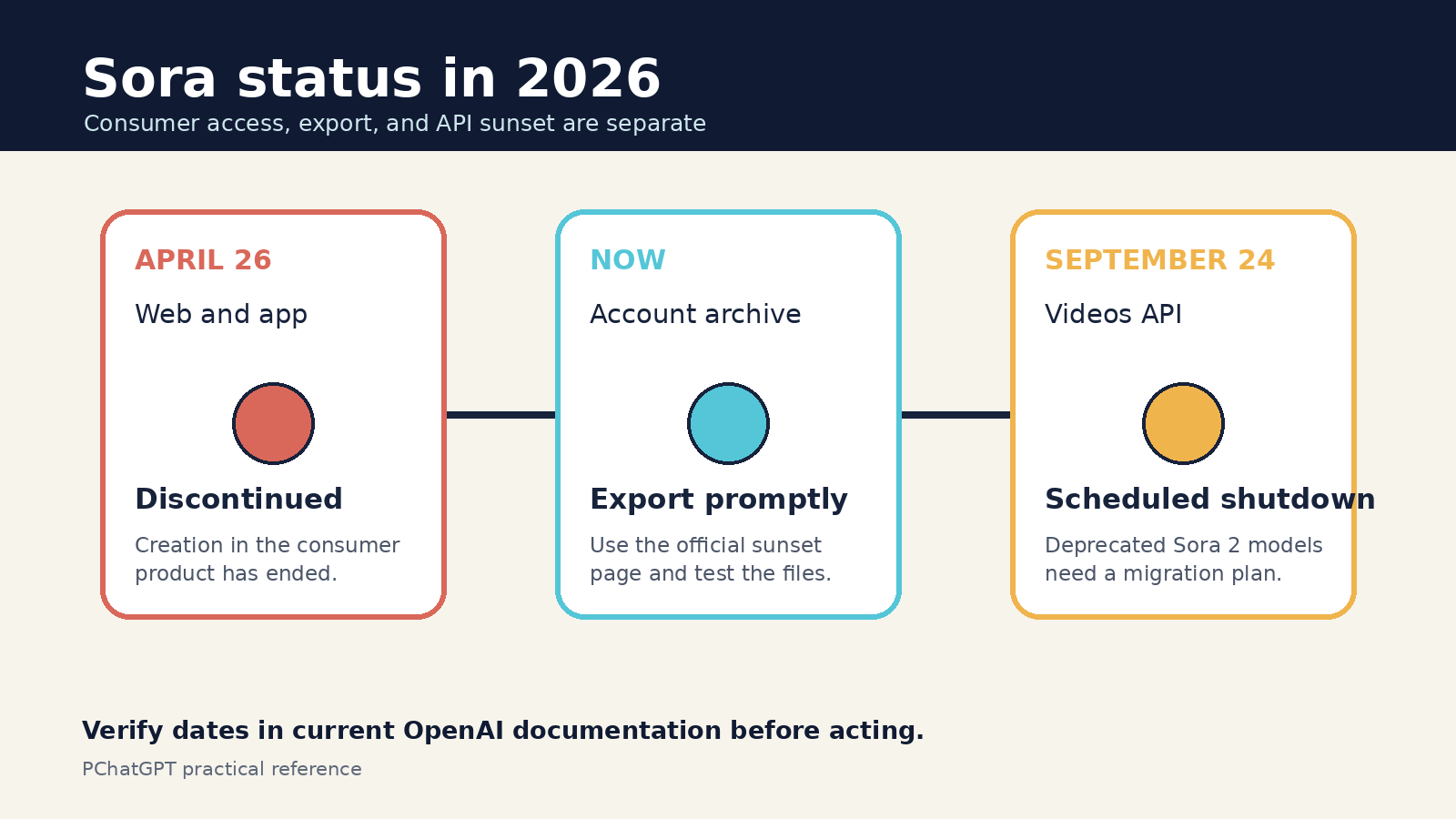
The Sora web and app experiences are no longer available. OpenAI discontinued them on April 26, 2026. The Sora 2 models and Videos API remain documented for existing API users, but they are deprecated and scheduled to shut down on September 24, 2026. This OpenAI Sora guide explains what still works, what has ended, how to preserve past work, and how to close an API project without confusing old launch features with current availability.
The distinction matters because many older Sora tutorials still describe a consumer editor, social feed, storyboards, characters, and subscription access as if those products were open today. They are not. This article uses current OpenAI documentation for availability and cutoff dates, then treats the former creative controls as historical context. It does not claim hands-on access to a discontinued product.
OpenAI Sora availability in August 2026
There are now three separate Sora situations to understand. First, the consumer Sora website and app have already been discontinued. Second, OpenAI provides a sunset page where former users can request an export of the content they created. Third, the Sora 2 models and Videos API are still described in OpenAI’s developer documentation for the remaining migration window, but the API and listed Sora 2 model versions are deprecated.
- Consumer creation: the Sora web and app experiences ended on April 26, 2026.
- Account export: OpenAI directs users to sora.chatgpt.com/sunset, where they can select Export and wait for an email when the archive is ready.
- Developer access: the Videos API and the named Sora 2 models are deprecated and scheduled to shut down on September 24, 2026.
- Old credits: OpenAI says purchased ChatGPT or Sora credits can still be used for Codex. Refund questions follow OpenAI’s regular subscription refund process.
If you have no previous Sora content and no existing Videos API integration, this is not a normal getting-started guide. Do not subscribe to a ChatGPT plan expecting the discontinued Sora app to appear. Do not design a new production dependency around an API with a published shutdown date. The useful actions now are export, inventory, migration, and careful disclosure of any clips you already made.
Export Sora work before the remaining window closes
OpenAI recommends exporting Sora content as soon as possible. Go to the official sunset address, sign in to the account that held the work, and click Export. OpenAI says it will email you when the export is ready. The help article also says that data associated with Sora will be permanently deleted after discontinuation and after any final export window has passed, if OpenAI can offer such a window.
Treat the downloaded archive as a source package, not as a finished media library. Copy it to storage you control, keep an untouched copy, and create a separate working copy for organization. A practical folder can contain the exported video, its prompt, the date, the intended audience, rights notes for uploaded material, and a short review record. Use plain filenames that remain understandable outside Sora, such as project-shot-purpose-version, rather than relying on an app-specific identifier.
Open a sample of the exported files before assuming the archive is complete. Check that the files play, that audio is present when expected, and that the resolution suits the intended use. Compare the archive with your own publishing history or project notes. If a clip matters to a client or campaign, save the final approved version and the original export separately. This protects the evidence trail when an editor later crops, compresses, captions, or color-corrects the video.
What the former Sora workflow actually included
The old consumer experiences changed over time, which is one reason old instructions conflict. The December 2024 Sora release described Sora Turbo as a standalone product for eligible ChatGPT users. That interface accepted text, image, and video inputs. It offered aspect-ratio choices, generations up to 20 seconds, and output up to 1080p. Users could extend, remix, or blend assets, while a storyboard placed inputs at selected moments in a clip.
Sora 2 arrived later with synchronized dialogue and sound effects, better instruction following, and a social app built around creation, remixing, feeds, and a likeness feature called characters. OpenAI described character controls that let a person decide who could use their likeness and revoke access. These details explain videos and project records made during Sora’s active period. They do not mean that the app, characters, feed, or consumer storyboard can be opened now.
The original post claimed that public Sora created 60-second, cinema-quality output. OpenAI’s first-party launch material does not support that wording. The 2024 launch specified videos up to 20 seconds in the editor. Later versions could assemble or extend material in other ways, but a joined sequence is not the same as one 60-second generation. “Cinema quality” is also a promotional judgment, not a measurable product limit. The corrected description uses documented durations and resolutions instead.
The remaining Sora 2 API workflow
For developers who already depend on Sora, OpenAI’s current video generation documentation is the operating reference during the sunset period. It lists the Videos API, sora-2, sora-2-pro, and dated model snapshots as deprecated. The same page gives September 24, 2026 as the shutdown date. Build a retirement plan around that date rather than around an assumption that a replacement will preserve the same endpoints or output behavior.
The API workflow is asynchronous. A request starts a render job and returns a video object with an initial state such as queued or in progress. An integration then polls for status or uses webhooks, handles failure states, and downloads the completed result. OpenAI’s guide warns that download URLs are valid for no more than one hour after generation, so a production system should copy completed assets into controlled storage promptly instead of treating a temporary URL as a permanent media address.
OpenAI documents sora-2 for faster iteration and sora-2-pro for more polished, higher-resolution work. The available settings depend on the model. The guide says both support 16-second and 20-second generations, while Sora 2 Pro supports 1080p exports in 1920 by 1080 or 1080 by 1920. Longer, higher-resolution jobs can take more time. Choose the smallest format that meets the real delivery requirement, especially while validating a shot.
The API also documents image-guided generation, extensions, edits, batch jobs, listing videos, downloading results, and deletion. Some capabilities have eligibility constraints. For example, editing an uploaded video is described as available only to eligible customers. Do not present every documented endpoint as universal account access. Confirm model access, quotas, pricing, accepted inputs, and current restrictions in your own API project before running a final batch.
A practical shot workflow for existing API users
Start with one short shot, not a finished advertisement. Write down the subject, setting, action, camera behavior, lighting, visual style, and sound. OpenAI’s prompting guide recommends specificity, but each element should serve the shot. A prompt that asks for several locations, multiple character actions, a camera transition, dialogue, and a visual transformation in a few seconds gives the model too many competing events.
A workable planning note might read: “Eight-second wide shot of a paper model train crossing a desk at sunrise. Slow camera track from left to right. Warm window light, shallow depth of field, quiet wheel clicks, no music.” This is an editorial example, not an official Sora command and not a promise of a particular result. It sets one action, one camera move, and an audio boundary that a reviewer can judge.
- Define the delivery frame first. Pick landscape or portrait from the destination, not from habit.
- Generate a short, inexpensive draft to test composition and motion.
- Review object continuity, hands and faces, text, reflections, shadows, audio timing, and camera direction frame by frame.
- Change one variable in the next attempt. A focused edit makes it easier to see whether the revision solved the problem.
- Render the required resolution only after the shot structure works.
- Download the completed asset immediately and record the video ID, model, settings, prompt, review status, and storage path.
- Set a final migration deadline well before September 24 so retries, approvals, and archive checks do not depend on the last day of service.
For prompt preparation in ChatGPT, use a separate planning conversation that contains no confidential client assets. Our ChatGPT Custom Instructions guide explains which preferences belong in account-level instructions and which details should remain in a task prompt. If you need continuity across a longer creative brief, the ChatGPT Memory and Controls guide explains how saved context differs from information supplied for one task.
Controls and limits to verify before each render
A sound production checklist separates creative controls from service limits. Creative controls describe what you ask the model to do: prompt, reference image, model, aspect ratio, duration, camera, motion, and audio. Service limits describe what the account and endpoint permit: available models, accepted sizes, job concurrency, rate limits, spend limits, asset eligibility, moderation, retention, and the shutdown schedule.
Do not copy plan limits from an old Sora app article into an API budget. Consumer subscription allowances and API billing are different surfaces. Likewise, do not infer that a control once present in the consumer editor has the same name or behavior in the Videos API. Read the current parameter reference and deprecation notice, then make a small validation request before committing a large queue.
Generated video still needs human review. OpenAI’s launch notes acknowledged that Sora could make mistakes, including unrealistic physics and failures on complex actions. Sora 2 was described as more controllable and more physically accurate than earlier systems, not flawless. A clip can look convincing on first playback while an object changes shape, a reflection moves incorrectly, or speech and lips drift apart. Slow playback and frame checks catch problems that a thumbnail cannot.
Safe publishing practices for archived or API-generated clips
Before publishing, confirm that you have permission to use every uploaded image, video, voice, logo, and person’s likeness. A model accepting an input does not settle copyright, privacy, publicity, contract, or brand-approval questions. Keep written consent with the project when a real person can be recognized. Do not use generated footage to create a false record of an event or to make a real person appear to say or do something without permission.
OpenAI’s sharing and publication policy calls for manual review, attribution to the person or company publishing the work, and a clear indication that the content is AI-generated. Follow the current usage policies as well. Policies can change, so check the live versions at publication time rather than relying on a screenshot saved months earlier.
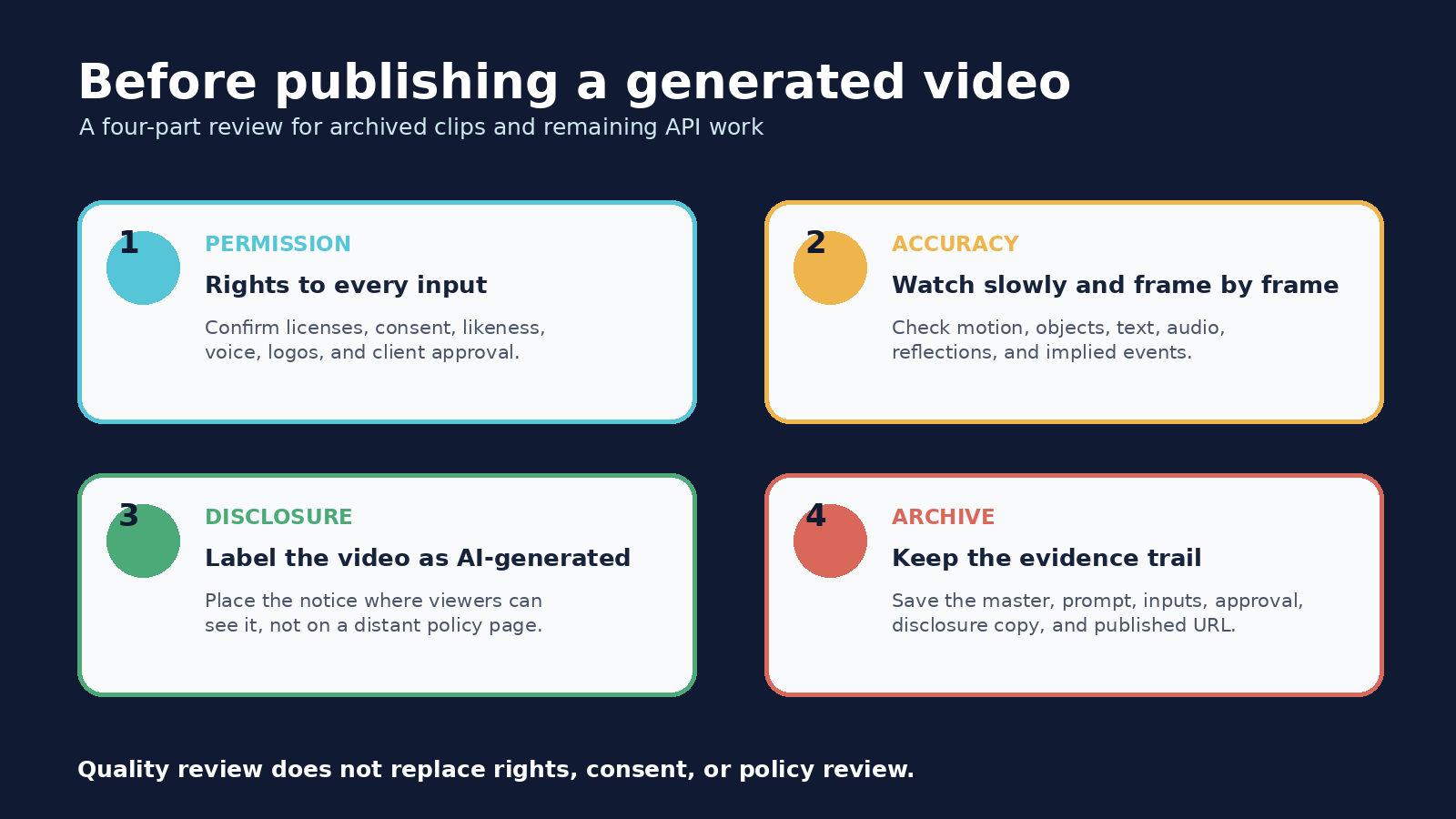
Make the disclosure visible where viewers encounter the clip. Do not hide it in a distant legal page. Keep any available provenance metadata intact during editing and export when your toolchain supports it, but do not assume metadata will survive every social platform or screen recording. A plain-language label remains useful. If the clip illustrates a fictional event, say so. If the project combines generated footage with recorded footage, describe that mix accurately.
Finally, save what a later reviewer would need: the exported master, published version, prompt or shot brief, input-rights record, disclosure copy, approval, and public URL. That record helps answer a correction request and prevents the team from guessing which asset was approved. It also makes migration easier because the creative intent is stored independently of the Sora interface.
A migration checklist before the API shutdown
- Inventory every system, script, scheduled job, and product feature that calls the Videos API.
- List the Sora model name, endpoint, input type, output size, duration, typical volume, latency tolerance, and storage destination for each use.
- Download required completed assets and verify that local copies open correctly.
- Stop exposing temporary download links as permanent customer URLs.
- Choose a replacement only after testing the same representative shots, safety requirements, and delivery formats.
- Update user interfaces, documentation, cost assumptions, monitoring, and failure messages.
- Remove API keys and obsolete jobs after the migration, while retaining the project records your organization must keep.
A replacement test should compare more than visual appeal. Check whether the service accepts your permitted inputs, handles audio, provides the required aspect ratio, exposes a stable asynchronous workflow, supports deletion, documents retention, and gives your team enough review time. Record failures as well as successes. A migration that looks good in a demo can still fail if asset retrieval, moderation, or storage behaves differently in production.
Sources and scope
Current availability and export instructions come from OpenAI’s Sora discontinuation notice. The API status, models, workflow, and shutdown date come from the current OpenAI video generation guide. Historical consumer controls and limits come from OpenAI’s December 2024 Sora launch. Sora 2 capabilities and the former app design come from OpenAI’s Sora 2 announcement. Safety and publishing advice is bounded by OpenAI’s current policies. This guide does not assume undocumented access or claim that a future replacement will match Sora.
Frequently asked questions
Can I still use the Sora app or website?
No. OpenAI says the Sora web and app experiences were discontinued on April 26, 2026. Former users should use the official sunset page to request an export rather than follow old creation tutorials.
Is the Sora 2 API still available?
OpenAI still documents the Videos API for the sunset period, but marks it and the listed Sora 2 models as deprecated. They are scheduled to shut down on September 24, 2026. Existing developers should migrate now and confirm actual project access in their API accounts.
How do I export videos from my old Sora account?
Visit sora.chatgpt.com/sunset, sign in, and select Export. OpenAI says it will send an email when the archive is ready. Download it promptly, test representative files, and keep an untouched backup.
What should I disclose when publishing a Sora video?
Manually review the clip, publish it under your name or company, and clearly state that it is AI-generated. Confirm rights and consent for inputs and likenesses, follow the current OpenAI policies, and avoid presenting synthetic footage as evidence of a real event.