“Multimodal GPT” sounds as if one model accepts every kind of media through one universal box. That is not how OpenAI’s products are organized. In ChatGPT, you can add a photo, upload a document, speak in Voice, and, on some mobile Voice experiences, share video or a screen. In the API, image analysis, image generation, transcription, speech output, and live audio use documented models and endpoints. The useful skill is knowing which surface handles the input you have.
This guide explains the original GPT-5 multimodal claim in current terms. GPT-5 improved visual reasoning when OpenAI introduced it in August 2025, but the original GPT-5 models have since been retired from ChatGPT. OpenAI’s current model release notes list newer GPT-5 family options, while the API model page now calls GPT-5 a previous model and recommends the latest model family. The practical workflows below still apply: choose the product surface first, give the model readable evidence, and verify the answer against the source material.
What GPT multimodal capability means
A multimodal system works with more than one form of information. For ordinary users, that may mean combining a written question with a photograph or discussing an image during a spoken conversation. For a developer, it may mean sending text and image inputs to a vision-capable model, calling a speech-to-text model for audio, or opening a Realtime session with an audio-capable model.
OpenAI’s GPT-5 launch article reported stronger performance across visual, video-based, spatial, and scientific reasoning evaluations. It gave examples such as interpreting a chart, summarizing a photo of a presentation, and answering questions about a diagram. That is evidence about model evaluation and visual reasoning. It does not mean every ChatGPT upload box accepts raw video files, nor does it mean the API model named gpt-5 produces speech by itself.
There are three layers to keep separate:
- The model capability describes what a model can process or produce.
- The product surface describes what ChatGPT or an API endpoint lets you submit.
- Your plan, workspace settings, region, app version, and usage limits can change which controls appear.
This distinction prevents a common mistake: reading a benchmark result, then assuming the same input is accepted in every product. Check the current model page or Help Center article for the surface you are using.
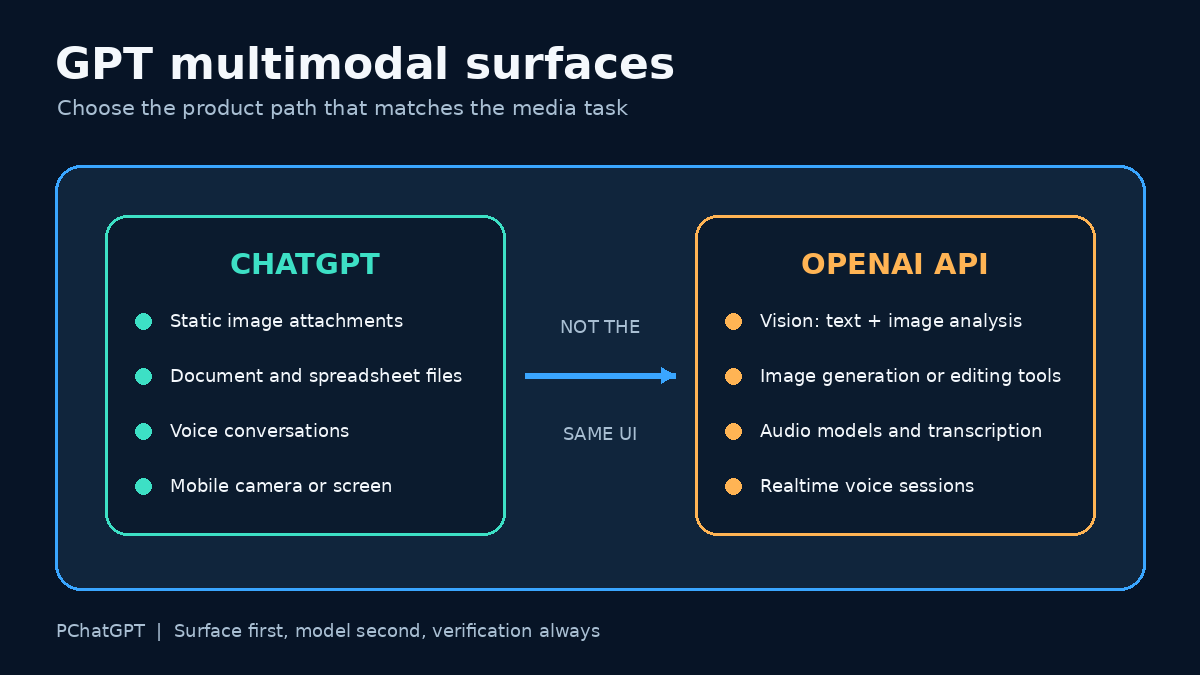
ChatGPT: images, files, and Voice are different controls
Static image input in a normal chat
In a regular ChatGPT conversation, use the plus button to add photos and files. You can also drag an image into the text area or paste one from the clipboard. OpenAI’s current ChatGPT Image Inputs FAQ says image inputs can be used to ask about objects, analyze documents shown in an image, or continue a discussion with more images in later turns.
The same Help Center page draws a firm boundary: standard image input supports static images, not video. It lists PNG, JPEG, and non-animated GIF files, with a 20 MB limit per image. Availability details can change, so the control visible in your own account is the final check.
A good image request identifies the evidence and the desired output. Instead of “analyze this,” try: “Read the labels in this chart, list the two largest changes, and quote the axis titles before you interpret the trend.” That prompt gives the model a sequence it can follow and gives you details to verify.
Documents and spreadsheets
A file upload is not identical to a photo upload. OpenAI’s File Uploads FAQ describes document tasks such as comparing files, summarizing a paper, extracting references, and analyzing a spreadsheet. It also warns that visual retrieval inside PDFs depends on the plan. ChatGPT Enterprise supports visual retrieval for PDFs, while other plans and document types may use text-based retrieval that discards embedded images.
That detail matters when a PDF contains diagrams. If ChatGPT discusses the text but misses a figure, export the relevant page as a clear image and attach it separately. Tell the model which page, table, or chart matters. Do not assume it saw every visual element simply because the PDF uploaded successfully.
Voice, live video, and screen sharing
ChatGPT Voice is its own product experience. The current ChatGPT Voice guide describes Live, Advanced, and Standard options. Live supports spoken conversation and can work with text and images when those features are available for the account. At launch, Live does not support video or screen sharing. Eligible subscribers can still use video or screen sharing in Advanced on the iOS and Android apps.
This is why “Can GPT see video?” needs a more precise answer. OpenAI evaluated GPT-5 on video-based reasoning, but a normal ChatGPT image upload accepts static images only. Mobile screen or camera sharing may be available inside an eligible Advanced Voice session. Those are different claims about different surfaces.
For a broader walkthrough of the current consumer product, see the site’s ChatGPT cheat sheet for chat, files, Voice, and memory. If your main interest is spoken interaction, the ChatGPT Voice and GPT-Live guide covers the Voice interface in more depth.
The API: assemble the media path you need
The API is not a mirror of the ChatGPT interface. Developers choose a model, endpoint, input format, and output format. OpenAI’s current GPT-5 model page describes GPT-5 as a previous API model and points developers to the latest GPT-5 family. If you maintain an existing GPT-5 integration, check its model page before changing production code. A newer ChatGPT model name does not automatically change your API request.
Image analysis
The OpenAI Images and Vision guide documents image analysis through the Responses API and Chat Completions. An image can be supplied by URL or as a Base64 data URL, and multiple images can appear in one request. Images count toward token usage. The guide also distinguishes analysis from generation: vision-capable language models can interpret image input, while GPT Image models generate or edit images.
For reliable image analysis, prepare the input before you tune the prompt:
- Crop away irrelevant borders while keeping legends, labels, and units.
- Use a readable resolution and correct rotation.
- State whether the model should transcribe, compare, classify, or explain.
- Ask it to identify unreadable regions instead of guessing.
- Check names, counts, measurements, and small text yourself.
OpenAI’s documentation lists known vision limits. Models can struggle with rotated text, precise spatial localization, some graph styles, panoramic images, object counts, and unclear non-Latin text. A confident sentence is not proof that a tiny label was read correctly.
Audio input and output
Audio uses a separate documented path. OpenAI’s Audio and Speech guide separates speech to text, text to speech, speech to speech, and speech translation. Request-based audio APIs fit bounded files and generated speech. Realtime sessions fit live, low-latency conversations. The guide names current audio-capable models for those tasks rather than presenting ordinary GPT-5 as a universal audio endpoint.
A production audio workflow should decide whether it needs a transcript or a live conversation. For meeting notes, request-based transcription is easier to store, review, and correct. For a voice agent that must respond while a person is speaking, use a Realtime architecture and handle partial events, interruptions, network conditions, and session state.
Video input
Do not infer a public raw-video endpoint from a video benchmark. If the current model and endpoint documentation does not list video input for your chosen request, convert the task into supported evidence. A common editorial method is to sample representative frames, retain timestamps, pair them with a transcript, and ask the model to analyze only those supplied frames. This is a workflow design, not an OpenAI guarantee that sampled frames fully represent a video.
For motion-sensitive work, choose frames around the event rather than one thumbnail. Include the timestamp in each filename or prompt label. Then compare the model’s account with the original clip. Fast actions, off-screen audio, transitions, and events between samples can otherwise disappear.
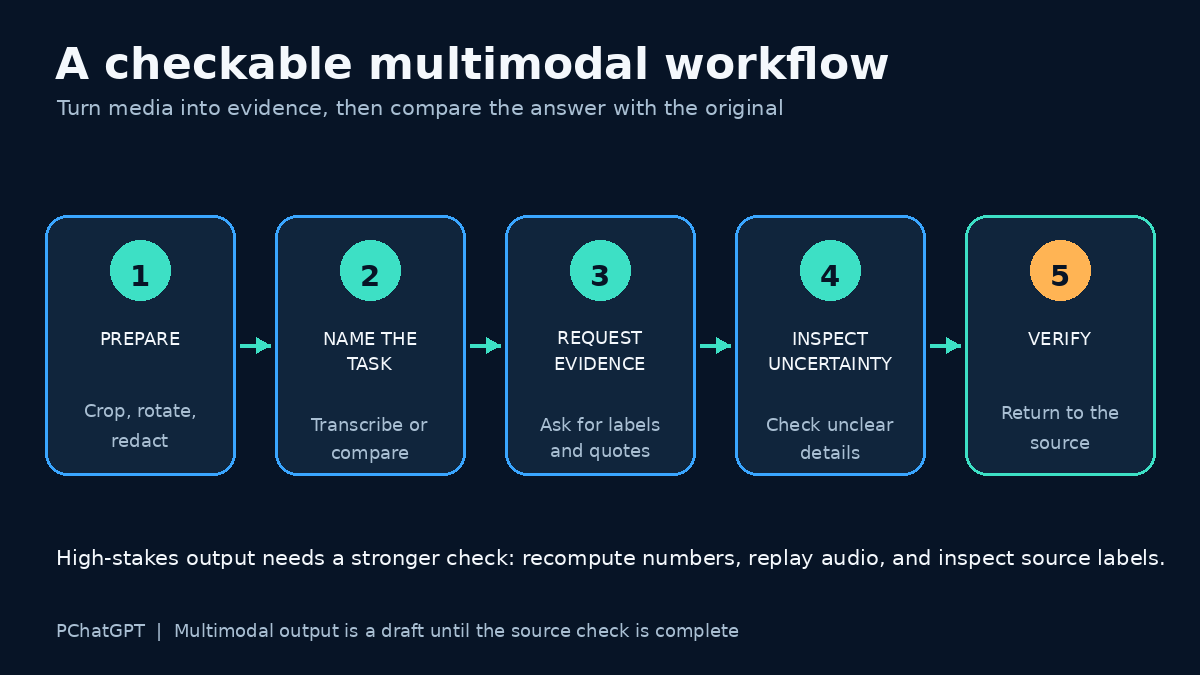
A practical workflow for mixed media
Suppose you have a photographed dashboard, a PDF report, and a short spoken explanation. Sending everything at once makes errors harder to diagnose. Process each source according to what it contains.
- Upload the dashboard image and ask for a literal transcription of headings, axes, dates, and values. Correct any reading errors first.
- Upload the report and ask for the passages that define the metrics. If its charts matter and your plan does not use visual PDF retrieval, attach those pages as images.
- Transcribe the recording through the appropriate Voice or audio path. Review names, figures, and technical terms in the transcript.
- Provide the corrected extracts in one final request. Ask for a comparison table that cites which input supports each conclusion.
- Open the original sources and verify every consequential number before using the result.
This staged approach is slower than one vague upload, but it shows where a mistake entered. It also lets you replace one bad transcription without repeating the whole task.
Prompt patterns that produce checkable answers
Use prompts that make evidence visible. These are editorial examples, not official OpenAI commands.
For a chart
“First transcribe the chart title, both axes, legend labels, and visible values. Mark any unreadable item as uncertain. Then describe the trend in five sentences. Do not estimate a value that is not labeled.”
For a screenshot of an error
“Copy the exact error message from the screenshot. Separate what the image shows from your diagnosis. Give two possible causes and one verification step for each. Do not claim a fix succeeded.”
For several product photos
“Treat each image as a separate item named A, B, and C. List visible differences only. Include color, ports, labels, and obvious damage. If an angle hides a feature, write not visible.”
For a voice transcript plus notes
“Compare the transcript with my notes. Make a list of agreements, contradictions, and missing decisions. Quote the relevant sentence for each contradiction. Flag names or numbers that may be transcription errors.”
Accuracy, privacy, and review
Multimodal inputs often contain more private information than a typed question. A screenshot may reveal account names, browser tabs, notifications, customer records, or location clues. Crop or redact unrelated details before uploading. For documents, remove hidden comments or pages that the task does not require. Follow your employer’s rules for confidential material and check OpenAI’s current data controls for the product and plan you use.
Accuracy checks should match the risk. A rough description of a vacation photo needs less scrutiny than a number copied from a financial chart. OpenAI’s image documentation warns about counting, spatial precision, and small or rotated text. The GPT-5 launch also says that language models can still make mistakes. For medical images, the ChatGPT image FAQ specifically says the feature is not suitable for specialized images such as CT scans and should not be used for medical advice.
Ask the model to expose uncertainty, but do not rely on self-reported confidence alone. Compare the answer with the original. For numbers, recompute totals. For quotations, search the document. For a diagram, inspect the arrows and labels. For audio, replay the segment around a doubtful name or amount.
How to choose the right surface
- Use a normal ChatGPT image attachment for a static photo, screenshot, chart, or diagram.
- Use ChatGPT file upload for document, presentation, or spreadsheet tasks, while checking whether embedded visuals are available to the plan.
- Use ChatGPT Voice for spoken conversation. Check whether Live, Advanced, text, image, video, or screen sharing appears in your current account.
- Use an API vision path when your application needs repeatable image analysis with structured requests.
- Use audio-specific or Realtime API models for transcription, generated speech, or a live voice agent.
- For unsupported video workflows, do not pretend a benchmark is an upload feature. Use a documented surface or build a reviewed frame-and-transcript process.
The original GPT-5 announcement was important because it documented better reasoning over visual and video-based evaluation tasks. The current lesson is more practical: “multimodal” does not erase product boundaries. Check the live documentation, select the right input path, and keep a human review step wherever a wrong reading would matter.
Frequently asked questions
Can I upload a video file to a normal ChatGPT conversation?
OpenAI’s ChatGPT Image Inputs FAQ says standard image input handles static images, not videos. Eligible subscribers may have live camera or screen sharing through Advanced Voice on supported mobile apps, which is a different feature from uploading a video file.
Does the GPT-5 API model accept audio directly?
OpenAI documents audio through audio-capable models, request-based audio APIs, and Realtime sessions. Do not assume a text-and-image GPT-5 request accepts or returns audio. Check the current model page and audio guide for the endpoint you plan to use.
Why did ChatGPT miss a chart inside my PDF?
Visual retrieval for PDFs depends on the plan. OpenAI says ChatGPT Enterprise supports visual retrieval for PDFs, while other plans and document files may use text-based retrieval that discards embedded images. Attach the chart page as a separate image when you need visual analysis.
How can I reduce errors in image analysis?
Use a clear, correctly rotated crop; preserve labels and units; name the exact task; ask for a transcription before interpretation; and verify small text, counts, measurements, and spatial claims against the original image.