A well-organized ChatGPT Project is less about collecting every available document and more about giving each conversation a trustworthy, understandable source set. When the source area holds the current brief, approved data, and a few clearly named references, ChatGPT has a better chance of finding the right context. When it holds stale drafts, unexplained exports, and duplicate files, even a polished answer can rest on the wrong version.
This guide explains how to organize files and sources in ChatGPT Projects for real research and writing work. It follows OpenAI’s current documentation rather than assuming that every account has the same limits or controls. The goal is a practical system you can inspect: define the project boundary, prepare readable files, label versions, separate instructions from evidence, ask source-aware questions, and verify important claims yourself.
What counts as a source in a ChatGPT Project
OpenAI describes Projects as workspaces that keep chats, files, and project instructions together for a long-running effort. Its current Projects in ChatGPT guide documents several ways to provide source material. You can upload common research materials such as PDFs, documents, spreadsheets, and images, paste text, add certain supported app links in a private project, and save a useful ChatGPT response back to the project as a source.
These source types are not interchangeable. An uploaded report is a reference artifact. A linked Google Drive file or folder and a Slack channel can provide access to material that lives in a supported app, subject to connection and permission requirements. A saved response is a ChatGPT-generated working note, not independent evidence. Project instructions define how ChatGPT should respond inside that project, and OpenAI says they override global custom instructions there. Keeping those roles separate makes mistakes easier to spot.
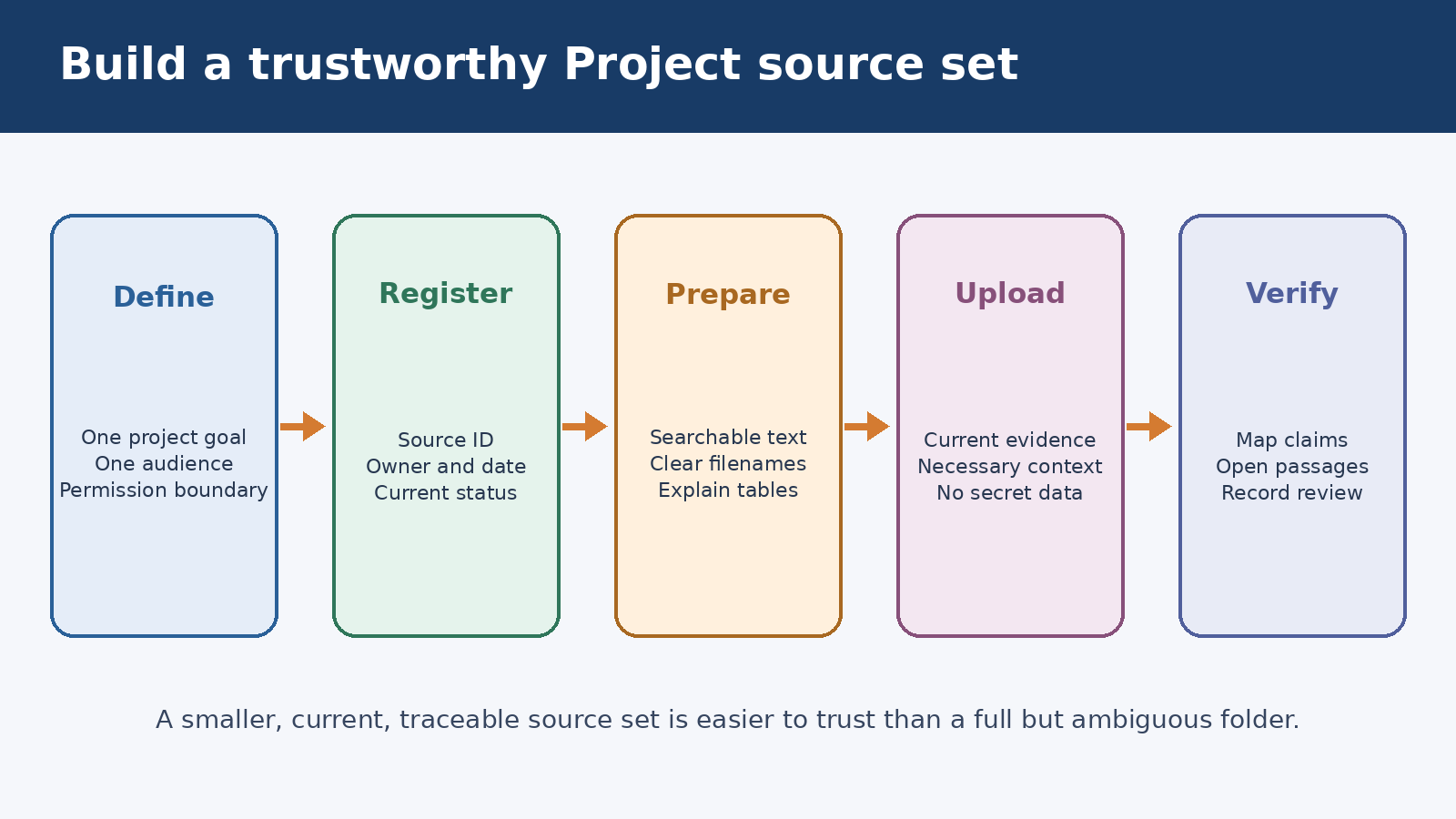
Start with a one-sentence boundary: “This project contains the evidence and working discussions for the 2026 customer retention study.” That sentence tells you what belongs. A company handbook, an unrelated sales deck, and last year’s exploratory notes may all be useful elsewhere, but they should not enter this project unless the current task truly depends on them.
Build a small source register before uploading
Before you add files, create a simple source register in a spreadsheet or text document. Give every item an identifier, a descriptive title, an owner or publisher, a publication or revision date, a status, and a short note about its purpose. For example, R01 could be the approved research protocol, D03 the raw survey export, and A07 an external article used only for background. The register is for people first. It helps you see duplicates and missing provenance before ChatGPT sees the material.
A useful status vocabulary is small: current, background, superseded, and unverified. Only current and necessary background items should normally be uploaded. Keep superseded material in your own archive rather than beside the governing version. If you must compare versions, label that intent explicitly in both filenames and prompts. “Policy_2025_superseded.pdf” and “Policy_2026_current.pdf” are much safer than “policy-final.pdf” and “policy-final-2.pdf.”
Use filenames that remain meaningful when separated from their folders. A practical pattern is source ID, date, organization, topic, status. For example, “R04_2026-07-12_Acme_Retention-Survey_Current.csv” communicates more than “survey-new.csv.” Avoid claims like “approved” unless someone with authority actually approved the file. A filename is a navigation aid, not proof of authenticity.
The source register should also say how each item may be used. A raw interview transcript might support theme coding but not public quotation. A vendor page may describe the vendor’s own product but not validate comparative performance. A saved ChatGPT summary may help orient a new chat but should point back to the underlying documents for factual claims. This small note prevents sources from silently gaining more authority than they deserve.
Prepare files for reliable retrieval
Readable source files beat visually impressive ones. Give documents clear headings, selectable text, page numbers, and meaningful table labels. Remove decorative pages that add no evidence. If a scan has no searchable text, run accurate OCR and compare critical passages with the original. If a spreadsheet has several tabs, add a data dictionary that explains the columns, units, missing values, date range, and any formulas or exclusions.
Complex page layouts deserve special care. OpenAI’s File Uploads FAQ says that, outside the documented Enterprise visual retrieval support for PDFs, document retrieval is text based and embedded images are discarded. A chart that carries the central finding may therefore need a companion text description or a clean data table. Do not assume that uploading a slide deck means every diagram will be interpreted.
Split material according to how people will ask about it, not according to arbitrary page counts. A single report with stable headings is usually easier to cite than twenty fragments. Conversely, a 500-page binder containing unrelated policies may be easier to control as separate topic files. Preserve enough context for a quoted section to make sense. Every split file should retain its title, issuing organization, date, and relation to the parent document.
Do not treat published limits as an organization strategy. File capacity and upload controls vary by plan and can change. The Projects help page and File Uploads FAQ are the right places to check what currently applies to your account. A cap tells you what the product accepts, not what creates a coherent evidence base. Ten carefully chosen files can be more useful than a full source area with no version discipline.
Keep instructions separate from evidence
Put durable behavior in Project settings, not in a reference PDF. Useful project instructions identify the audience, output style, evidence hierarchy, citation expectations, and failure behavior. They can tell ChatGPT to distinguish fact from inference, prefer current governing sources over background material, name conflicts, and say when the available sources do not answer a question.
A compact instruction block might read: “Use the project sources before general knowledge for claims about this study. Cite the source ID and section or page when available. Treat items marked background as context, not governing evidence. If two current sources conflict, quote both positions and ask which controls. Do not fill a missing value with an estimate unless the prompt requests an estimate and the answer labels it.” This is concrete enough to review after a poor answer.
Instructions cannot make a source true or force perfect retrieval. They also should not contain passwords, private keys, or unnecessary personal data. Keep the authoritative content in the source files, and use instructions to describe how that content should be handled. For a broader explanation of project context and memory, see the site’s complete ChatGPT Projects guide.
Use a source lifecycle, not a one-time upload
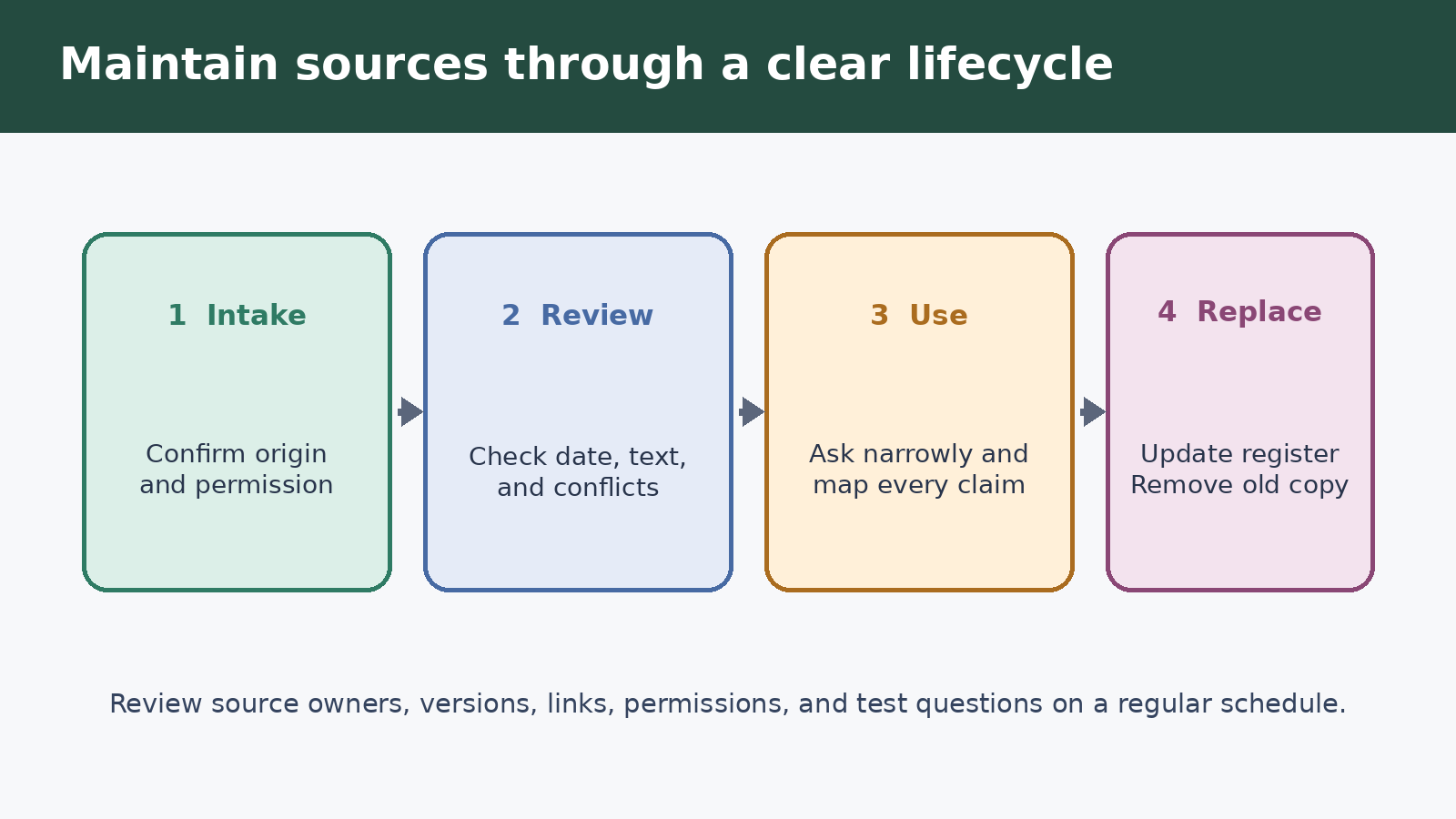
Every project source should move through a simple lifecycle: intake, review, active use, replacement, and removal. At intake, confirm where it came from and whether you are allowed to upload it. During review, check readability, date, completeness, and conflicts. Active sources belong in the project. When a new edition arrives, update the register, remove or clearly isolate the old copy, and tell active chats that the governing source changed.
OpenAI’s Projects guide says an added file can be previewed, downloaded, or deleted from the project sources list. It also explains that duplicate filenames trigger a choice to upload anyway or skip. Uploading anyway may be right for a deliberate comparison, but it is not version control. If two files share a name, identify which one governs before asking for an answer.
Saved ChatGPT responses need their own review rule. A strong synthesis can be worth saving as a decision note, glossary, or research map. Before saving it, remove unsupported claims, add links or source IDs, state the review date, and label the item as a working synthesis. Otherwise the project can create a circular trail in which a later answer cites a saved summary that was generated from an earlier answer rather than from original evidence.
A repeatable workflow for research questions
First, open a dedicated chat for source audit. Ask for a list of the available source titles, dates, apparent purposes, and obvious conflicts. Compare that inventory with your human-maintained register. This does not prove that every file was fully understood, but it quickly exposes poor names, unreadable material, and missing items.
Second, frame a narrow question and define the evidence rule. Instead of “What do customers want?” ask: “Using only R04 and R06, identify the three most frequent retention themes, show the count for each, quote one representative passage, and state the coding uncertainty.” A narrow scope helps you verify the answer and reduces the chance that background material will be blended into the conclusion without notice.
Third, request a source map before a polished narrative. Ask ChatGPT to place each proposed claim beside the source ID, location, and a short supporting passage. Reject claims that have no identifiable support. Then ask for the final draft based on the reviewed map. This two-stage method is slower than one prompt, but it catches unsupported transitions before they become persuasive prose.
Fourth, open the underlying files and check the important claims yourself. Confirm that quotations are exact, numbers use the right denominator, dates refer to the right event, and qualifying language was not dropped. For spreadsheet work, recalculate a sample. For policy or legal material, have an authorized person review the interpretation. ChatGPT can accelerate analysis, but the project’s source list is not a substitute for human accountability.
Finally, record the outcome. Save a reviewed decision note only when it adds durable value, and include the date and source IDs. Keep exploratory tangents in separate chats. The result is a project where another person can understand how a conclusion was reached rather than encountering an unexplained pile of files and conversations.
Connected sources, sharing, and permissions
OpenAI currently documents adding Google Drive file or folder links and Slack channel links as project sources in a private project. The account may prompt you to connect the app and approve access. The same documentation notes that the Google Drive app does not support sync when added within a project, although it can still search and access relevant files. Check the current interface and help page rather than assuming a link is continuously synchronized.
A connected source does not erase the source owner’s permission model. Access can change, links can break, and a renamed folder can alter what a human expects to be included. Record the connected location and access owner in the register. For a critical deliverable, note the retrieval date and preserve an approved snapshot outside ChatGPT according to your organization’s records policy.
Sharing changes the audience for every source. In a shared project, members can see chats and files, and OpenAI says members can view and download project files. Edit access can also permit members to update instructions and upload or remove files. Review the member list and permissions before adding confidential material. If one person should not see a document, that document does not belong in a project shared with that person.
Project memory is another context control, not a filing system. OpenAI explains that project-only memory can reference conversations inside the project but not conversations outside it, while default memory behavior depends on plan and settings. Shared projects use project-only memory. If context boundaries matter, check the current memory mode and account or workspace requirements. The site’s ChatGPT memory and controls guide provides related background.
Privacy, retention, and deletion checks
Upload only material you are authorized to process. Remove secrets, unnecessary personal information, client data outside the agreed scope, and copyrighted content you cannot lawfully use. Review any organizational policy that applies to external AI services. A tidy source list can still be unsafe if its contents should never have left the original system.
The File Uploads FAQ says files uploaded to ChatGPT are tied to the retention period of the corresponding chat, and it points readers to the relevant retention documentation for details and exceptions. The Projects guide says deleting a project permanently deletes its files, chats, and instructions and cannot be undone. In a shared project, deletion also removes access for collaborators. Keep required records in the approved system of record rather than treating a ChatGPT Project as your only archive.
Consumer users should also review OpenAI’s Data Controls FAQ. It explains the “Improve the model for everyone” setting and says turning it off keeps conversations in history while preventing them from being used to improve ChatGPT. Business offerings have different documented data treatment and additional controls. Confirm the service, account type, workspace policy, and connected apps that apply to your specific project.
A monthly maintenance checklist
- Compare the project source list with the human source register.
- Remove or archive superseded files outside the project.
- Confirm that current files still open and contain searchable text.
- Review connected links, owners, permissions, and access changes.
- Check project instructions for obsolete source names or priorities.
- Review saved responses and remove unverified or circular summaries.
- Inspect members and change edit access to chat access when editing is unnecessary.
- Re-run a small set of known questions and verify their supporting passages.
- Record the review date and the person responsible for the next review.
This checklist is deliberately ordinary. Reliable project work comes from small maintenance decisions, not from an elaborate naming scheme that nobody follows. If the source register takes hours to update, simplify it. If users cannot tell which file controls, reduce the active source set. If a conclusion cannot be traced to evidence, do not rescue it with confident wording.
Frequently asked questions
Should I upload every research file to one ChatGPT Project?
No. Upload the smallest set that supports the defined work. Keep unrelated, superseded, restricted, and duplicate material in an appropriate external archive. Split the work into separate projects when the audience, permission boundary, or research question is materially different.
Can ChatGPT reliably read charts and images inside uploaded PDFs?
Do not assume so. OpenAI says most plans use text-based retrieval for document files and discard embedded images, while Enterprise has documented visual retrieval support for PDFs. Provide text descriptions or underlying tables for essential visuals, and verify critical interpretations against the original.
What is the safest way to replace an old source?
Confirm the new version and its owner, update the source register, remove the superseded file from the active project, and tell ongoing chats which source now governs. Keep any required historical copy in your approved archive, not beside the current file without a clear label.
Are saved ChatGPT responses trustworthy project sources?
They can be useful working sources, but they are not independent evidence. Review the response, attach its underlying source IDs, label it as a synthesis, and add a date. For important claims, return to the original document or dataset rather than citing the generated summary alone.
Official sources and review note
This article was reviewed against OpenAI’s current Projects in ChatGPT guide, File Uploads FAQ, and Data Controls FAQ on August 15, 2026. Product labels, availability, file capacity, connected app behavior, and workspace controls can change. Check the linked official pages and the controls visible in your account before relying on a specific option or limit.